English | 简体中文

ZeroClave Privacy Firewall
Detect sensitive content before it reaches a model. Review the redacted text and choose how to send it.



Quick start ·
Plugin page ·
Development guide ·
Community
## Protect sensitive information before sending
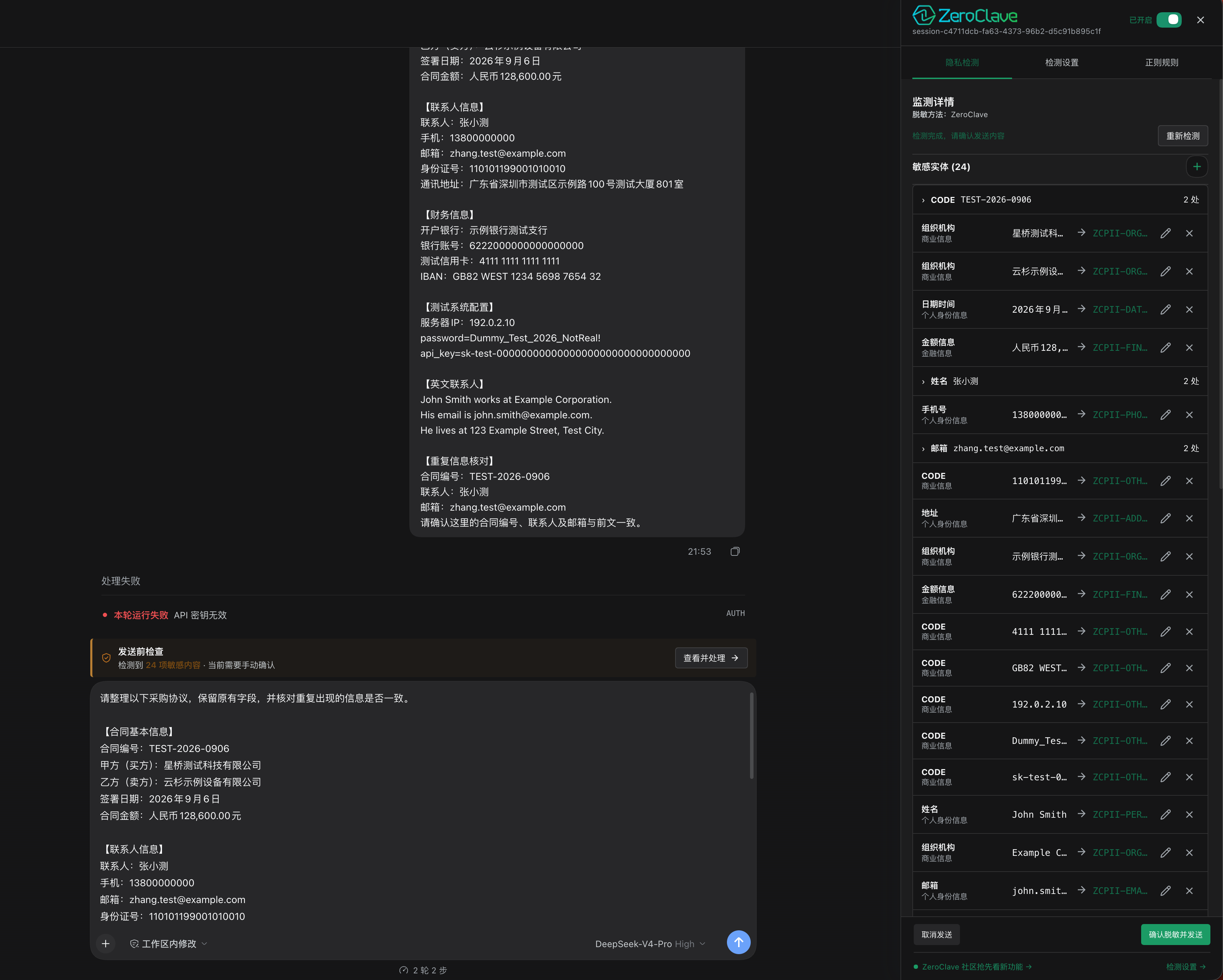
Contracts, customer records, and configuration snippets can contain email addresses, account numbers, and secrets. ZeroClave checks message text in the DeepSeek Harness send flow so you can review and adjust the redaction before sending.
- **Review before sending:** Inspect highlighted source text, detected entities, and redacted output in one side panel.
- **You control each change:** Edit replacement values, add missed entities, or keep and restore original text. Repeated values can be handled together.
- **Choose a send policy:** Confirm each review manually or automatically send redacted text after a successful scan.
- **Recover from failures:** Incomplete or failed detection blocks sending and offers a retry or an explicit switch to local regex detection.
- **Restore placeholders locally:** If a model reply contains replacement tokens, the current browser can restore them using its locally stored mapping.
Works with the **DeepSeek Harness web app and desktop app's embedded web interface**. This is an alpha release, compatible with DSH `0.1.3-alpha.1` and `0.2.0-rc.2`.
## Quick start
### 1. Get a package
Download a release from [GitHub Releases](https://github.com/ZeroClave/zeroclave-dsh-privacy/releases). For a development build, select a successful run in [Actions](https://github.com/ZeroClave/zeroclave-dsh-privacy/actions/workflows/ci.yml) and download its **Artifacts**.
| Use case | Package |
| --- | --- |
| Install in your DSH desktop or web host | `.tgz` |
| Submit to the DeepSeek Stream plugin marketplace | `.zip` |
### 2. Install in DSH
Open **Plugins → Add Plugin**. Paste the `.tgz` file's **absolute path** into **Package name or address**, select **Install**, then choose **Enable now**.
You do not need to upload a local package to GitHub first. To upgrade an existing installation, uninstall the old version before installing the new one. When using a remote web host, the path must refer to a file on the **host machine**.
> This repository includes the minimal compiled `lib/` runtime, so a GitHub source install can activate the plugin directly. For a reproducible desktop install, prefer the versioned `.tgz`; the `.zip` is intended for DeepSeek Stream marketplace uploads.
### 3. Turn on privacy detection
Open the ZeroClave side panel, enable detection, and choose a detection method under **Detection Settings**. For a first run, **Local Regex + Manual Confirmation** requires no model download.
## Daily use
1. **Write a message:** Paste or edit text in the Harness composer.
2. **Review and adjust:** Select **View details**, or press Send to open the same review panel. Check the highlighted text and redacted output, then edit entities as needed.
3. **Confirm sending:** Save any edits and select **Confirm Redact and Send**. Cancel to return to the draft.
Manual choices are retained when the same draft is rescanned. If the text changes, it is scanned again so earlier choices are not applied to different content. Duplicate submissions are blocked while a send is in progress. If sending fails, the draft and review choices are kept for a retry; Harness manages draft and attachment restoration.
Prefer fewer steps? Enable automatic redaction
Under **Detection Settings → Send Policy**, select **Automatic Redaction**. After a successful scan, the redacted text is sent without opening the review panel each time. Failed or incomplete detection still blocks sending.
## Choose a detection method
| Method | Best suited for | Where text is detected |
| --- | --- | --- |
| **Local Regex** | Structured fields, account numbers, email addresses, phone numbers, contract IDs, and secrets | In the browser; message text is not uploaded for detection |
| **Browser BERT** | Sensitive entities in English natural-language text | In the browser; downloads a model on first use |
| **ZeroClave API** | Content that benefits from gateway-enhanced recognition | Forwarded by the DSH Host to the ZeroClave Gateway |
BERT is primarily designed for English; Local Regex is recommended for Chinese contracts. If BERT is unavailable or not loaded, choose a method explicitly. ZeroClave failures or incomplete results are not silently treated as safe.
## How your data is handled
**Only message text is scanned.** Images, files, audio, tool arguments, and attachment metadata are outside the detection scope. Detection can produce false positives or miss sensitive content; review the result before sending.
- **Local detection:** Regex and Browser BERT do not upload message text to a detection service.
- **ZeroClave API:** The DSH Host and Gateway can see the original text during detection. This is not an end-to-end encrypted browser-to-TEE channel.
- **Keep original text:** Any value you exempt from protection is sent to the model as-is; the interface clearly indicates this choice.
- **Restoration mapping stays in the browser:** Preview tokens are kept in memory. After confirmation, the mapping is stored in the browser's IndexedDB. Changing browsers, devices, or site addresses, or clearing browser data, can make restoration unavailable.
- **Coverage:** Protection applies to the standard message-send flow. Direct Host API calls, automation scripts, and send paths outside the composer are not fully covered.
About shared anonymous usage statistics
The current release configuration enables usage statistics by default when the service is available. You can turn off **Share anonymous usage statistics** under **Detection Settings** at any time. The browser's Global Privacy Control (GPC) signal forces this setting off.
Statistics cover whether detection ran, whether a protected request was sent successfully, and which detection method was used. Events do not include input text, detected content, rules, or conversation content. The receiving service may still process connection information such as IP addresses.
## Contribute
Report false positives, missed detections, or interaction issues through [Issues](https://github.com/ZeroClave/zeroclave-dsh-privacy/issues). Include DSH and plugin versions plus a reproducible synthetic example; do not submit real personal information or secrets.
[Development guide](https://github.com/ZeroClave/zeroclave-dsh-privacy/blob/main/docs/DEVELOPMENT.md) · [Pull requests](https://github.com/ZeroClave/zeroclave-dsh-privacy/pulls) · [DeepSeek Stream](https://deepseek.stream/plugins/zeroclave-dsh-privacy)
Join the ZeroClave community
Community and WeChat group →
---
[Apache-2.0](https://github.com/ZeroClave/zeroclave-dsh-privacy/blob/main/LICENSE) · Refer to the model card for the built-in BERT model's license and usage restrictions.