Agentlas
बस goal दीजिए। टीम यह खुद hire करता है।
एक desktop AI agent जो आपके project के हर हिस्से के लिए specialist hire करता है,
आपके असली apps में काम करता है, और हफ़्तों तक चलता रहता है। फ़ोन से उसे चलाइए।
Grok Bot, Muse और dots का open-source alternative. Research के लिए Agentlas Science, Claude Science का alternative है।
xAI, Meta, OpenAI या Anthropic से कोई संबंध नहीं। Product names उनके owners के हैं।

macOS · Windows · Linux · Android · iOS जल्द आ रहा है
12,000+ desktop downloads · डाउनलोड मुफ़्त, आपके अपने AI plan या key पर चलता है · Apache-2.0
वेबसाइट · Agent Hub · Discord · Developers ↓
English · 한국어 · 中文 · 日本語
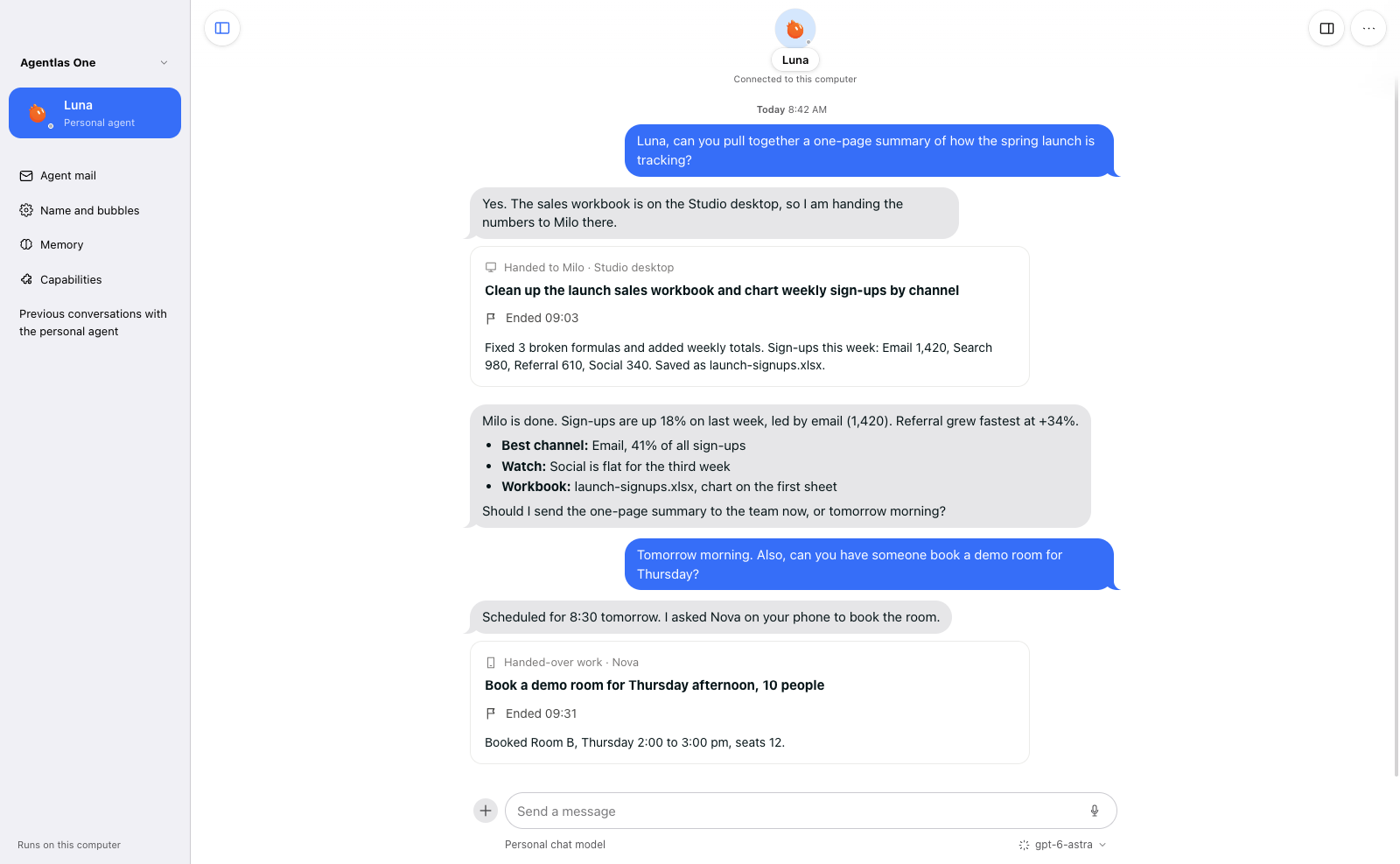
## लोग इसे क्या-क्या सौंपते हैं
| आप लिखते हैं | यह आपके apps में करता है |
| --- | --- |
| "Q3 की sales sheet साफ़ करो और उसका chart बनाओ।" | 3 टूटे cells ठीक करता है, totals जोड़ता है, और spreadsheet में ही chart बना देता है। |
| "इसे शुक्रवार के लिए 5 slides के deck में बदलो।" | Summary, regions, risks और next steps के साथ `Q3-review.pptx` के रूप में सेव करता है। |
| "इसे #sales में भेजो और Dana को बताओ।" | Slack में पोस्ट कर देता है। |
| "Product को cut out करो और cover को brighten करो।" | Photo editor में background हटाता है और image edit करता है। |
| "Beta product page को conversion के हिसाब से दोबारा बनाओ।" | Market researcher, UX designer, frontend engineer और reviewer hire करता है, फिर page ship करता है। |
| "Beta ship करो और 1,000 users तक पहुँचो।" | Goal tree खोलता है और हफ़्तों तक उस पर काम करता है। |
## हर हिस्से के लिए सही specialist hire करता है
Agentlas काम के हर हिस्से के लिए एक job opening लिखता है और उसे आपके computer के agents, आपके private cloud और मुफ़्त public Hub से भरता है। आपका AI सबसे सही fit चुनता है और वजह भी लिखता है।
## हफ़्तों चलने वाले goals
"Beta ship करो और 1,000 users तक पहुँचो" strategies और sub-goals में बँट जाता है, और हर एक के साथ एक संख्या जुड़ी होती है। Newsletter की open rate कम आए तो तरीक़ा बदल जाता है, goal वही रहता है। Laptop बंद कर दीजिए; कल यह पिछले checkpoint से आगे बढ़ता है।
## फ़ोन से चलाइए
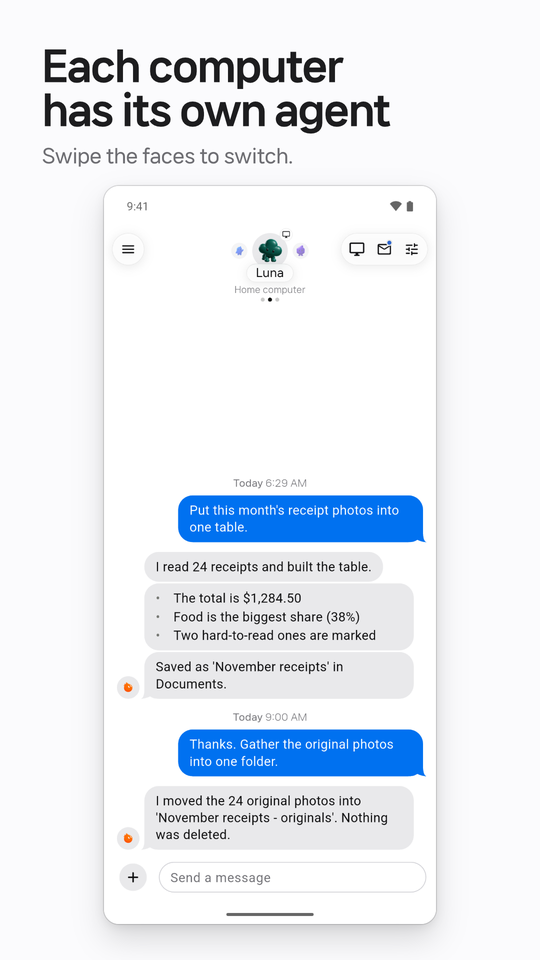
बस में बैठे हुए लिखिए "इस हफ़्ते के sign-ups, channel के हिसाब से, table में"। Analyst agent इसे घर के आपके computer पर चलाता है और table chat में आ जाती है। जब फ़ैसला आपका हो, तो एक card पूछता है: "Summary अभी भेजूँ या कल सुबह?" बस एक tap। [Android app पाइए →](https://play.google.com/store/apps/details?id=com.agentai.agentlas)
## जिस AI के पैसे आप पहले से देते हैं, वही इस्तेमाल कीजिए
Claude Code, Codex, Antigravity, Grok, Kimi, Cursor या GitHub Copilot CLI से sign in कीजिए, API key जोड़िए, या Ollama, LM Studio या MLX पर मुफ़्त local model चलाइए। जब एक plan का quota ख़त्म हो जाता है, chats अगले plan पर चली जाती हैं।
## कोई VM नहीं। आपके मौजूदा computer पर काम करता है
Grok Bot, Muse और dots हर agent को cloud में अलग computer देते हैं, और कुछ agent apps आपके computer पर virtual machine (VM) चलाते हैं। तब agent default रूप से एक दूसरे computer पर काम करता है, आपकी files, logins और apps से दूर; और local VM चलते समय RAM, disk और battery भी लेता है। Agentlas कोई VM नहीं चलाता: agents उन्हीं apps में काम करते हैं जो आप पहले से इस्तेमाल करते हैं। Isolation की जगह आपको control मिलता है: वह खुद कितना करे, यह आप तय करते हैं, हर step log होता है, और आप फ़ोन से उसे रोक सकते हैं।
## आपके computer पर क्या रहता है
- आपकी files, agents और memory आपकी अपनी machine पर रहती हैं।
- वह अपने आप कितना कर सकता है, यह आप तय करते हैं। हर step log होता है, और आप उसे फ़ोन से रोक सकते हैं।
- Phone app आपके desktop को requests भेजता है और results दिखाता है; काम आपके computer पर होता है।
- Engine Apache-2.0 के तहत open source है।
## अपना specialist बनाइए
एक वाक्य में बताइए और Agentlas एक installable agent बना देता है। उसे private रखिए, या [Agent Hub](https://agentlas.cloud/hub) पर publish कीजिए, जहाँ agents publish करना और इस्तेमाल करना मुफ़्त है और किसी भी चीज़ की ranking पैसे से तय नहीं होती।
Agentlas डाउनलोड करें ·
Android app ·
Discord से जुड़िए
⭐ Star कीजिए ताकि अगला व्यक्ति इसे ढूँढ सके · क्या टूटा, हमें बताइए
Claude Code, Codex, Cursor या Antigravity में engine इस्तेमाल करें
या अपने coding agent को इस repository का पता दें और उससे Agentlas install करने को कहें।
इसे उस LLM में paste करें जिसे आप अभी इस्तेमाल कर रहे हैं, जैसे Claude Code,
Codex, Antigravity या Cursor:
```text
request: Install Agentlas OS standalone from https://github.com/agentlas-ai/Agentlas-OS.
inspect: First fetch and read https://raw.githubusercontent.com/agentlas-ai/Agentlas-OS/main/scripts/install-all-runtimes.sh and compare its actual behavior with this requested scope.
scope: Use the isolated default runtime under ~/.agentlas/os-runtime and its dedicated ~/.agentlas/os-bin/agentlas-os launcher. Do not use sudo, replace the independent Terminal's agentlas command, write global ~/.local/bin wrappers, or permanently register host plugins/MCP as part of this request.
defaults: Keep optional features OFF. Do not enable the global router or change host instruction files.
run: If the script matches this scope, run curl -fsSL https://raw.githubusercontent.com/agentlas-ai/Agentlas-OS/main/scripts/install-all-runtimes.sh | bash. Report a scope mismatch instead of silently expanding the installation.
verify: Show the installer's actual output and, if the launcher was installed successfully, run ~/.agentlas/os-bin/agentlas-os features status.
report: State runtime installation and host connection separately. Preserve partial, unavailable, and unverified results. A restart alone does not prove that /agentlas build, skills, or MCP tools are ready.
host-status: Runtime installation and host activation are separate. For the chosen installed host use ~/.agentlas/os-bin/agentlas-os host status claude or host status codex. Start a requested new host session with the same launcher and host session claude or host session codex; native arguments follow --. Preserve partial/conflict/unavailable states.
updates: Automatic updates default OFF. After a runtime update, inspect host status again. outdated or codex_skill_alias_outdated is not readiness; do not silently replace/delete the owned alias or fall back to a legacy runtime. Codex One/Memory hooks are not applied and Windows host-session integration is unverified. Running host session codex again lets the launcher move its own verified alias to the current generation.
```
यह प्रक्रिया standalone runtime इंस्टॉल करती है। इससे वर्तमान LLM होस्ट का कनेक्शन या कमांड सक्रिय होना सिद्ध नहीं होता। shell से मैन्युअल इंस्टॉल के लिए नीचे दिए तरीके देखें।
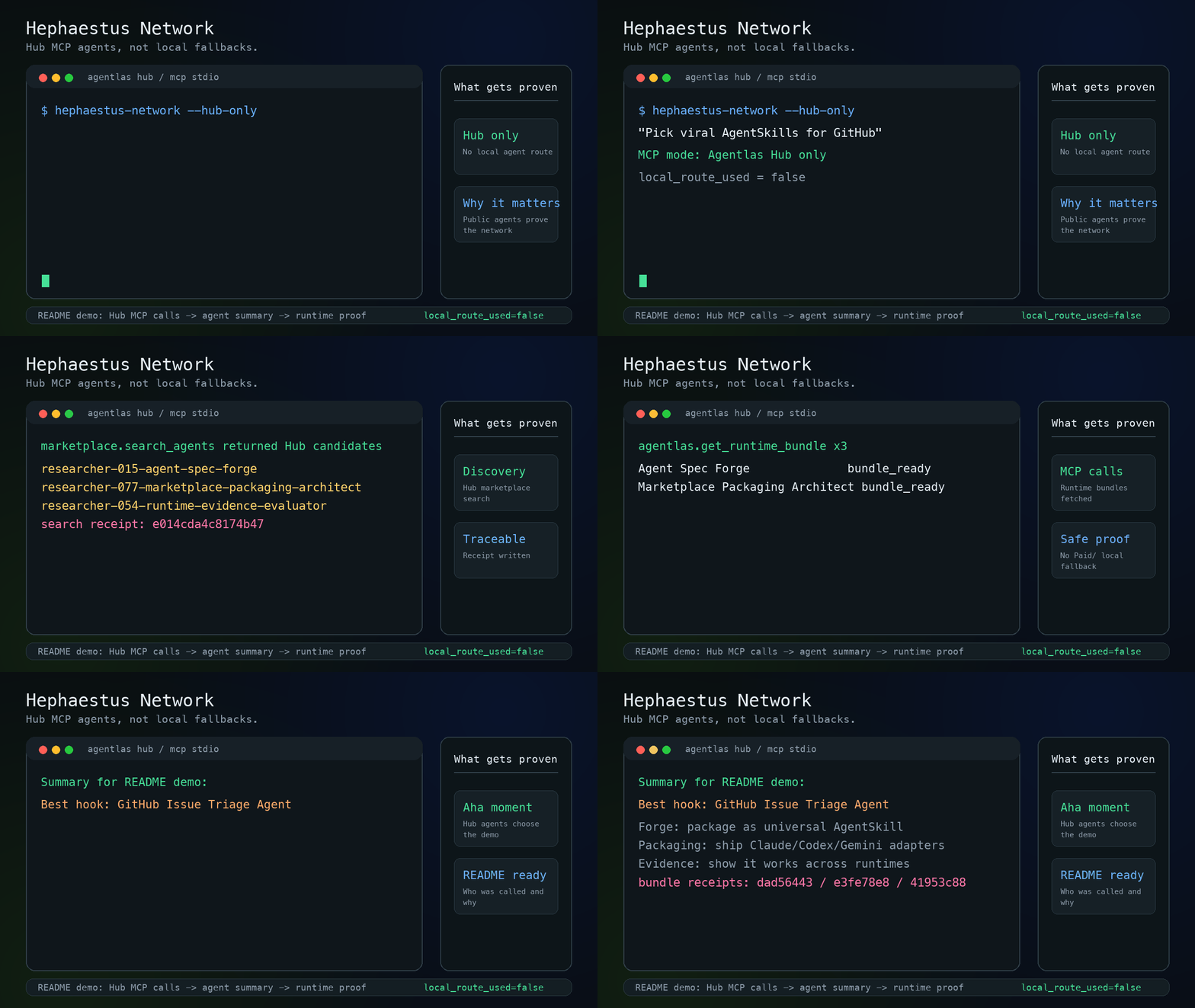
Hub से लाए गए specialist agents एक temporary task force में जुड़ते हैं और MCP के जरिए live route होते हैं, हर task के लिए अलग agent setup की जरूरत नहीं।
Agent OS का युग
·
Paste करके install करें
·
सभी Install Methods
·
कमांड सरफेस
·
v1.1.0 में नया
·
सबसिस्टम
·
एंटरप्राइज ऑपरेशंस
·
सिस्टम पैकेजिंग
·
Docs रजिस्ट्री
Installation और host sessions
### Manual LLM Adapter Install
यह कमांड स्वतंत्र रनटाइम प्रीव्यू तैयार करती है।
इंस्टॉलर isolated runtime और owned session plugins तैयार करता है। उपयोग से पहले host status देखें। स्थायी registration और Desktop updater integration पूरे नहीं हैं।
```bash
xcode-select --install # Command line tools (skip if already installed)
git --version # Confirm git is available
curl -fsSL https://raw.githubusercontent.com/agentlas-ai/Agentlas-OS/main/scripts/install-all-runtimes.sh | bash
```
### Standalone host session जोड़ें
इंस्टॉल होने के बाद समर्पित launcher प्रयोग करें। पहले चुने हुए host की स्थिति देखें; session शुरू करना अलग कार्रवाई है। ये कमांड `~/.agentlas/os-runtime` के isolated runtime और `~/.agentlas/os-host-plugins` के owned plugins का उपयोग करते हैं, स्थायी marketplace registration या project में engine files की copy का नहीं।
जिस host का उपयोग करना है उसकी स्थिति देखें:
```bash
~/.agentlas/os-bin/agentlas-os host status claude
~/.agentlas/os-bin/agentlas-os host status codex
```
उस host में नया session चाहिए तभी चलाएँ:
```bash
~/.agentlas/os-bin/agentlas-os host session claude
~/.agentlas/os-bin/agentlas-os host session codex
```
Native host को arguments देने हों तभी `-- ` जोड़ें। वास्तविक status और launch result पढ़ें। `partial`, `session_activation_not_observed` या unavailable component पूर्ण connection का प्रमाण नहीं हैं। Runtime installation, plugin preparation और model session execution अलग परिणाम हैं।
Session में दिखा qualified skill name चुनें, जैसे `agentlas-os-core:hephaestus-network`। पुराने bare names साथ रह सकते हैं; `/hep-*`, `/agentlas` या बिना namespace वाला `$hephaestus-*` इसी runtime को चुनता है, ऐसा न मानें। नीचे command reference केवल capabilities बताता है; session में वास्तव में उपलब्ध command और tool ही प्रयोग करें।
Codex core tools और skills अलग session में लोड हो सकते हैं, लेकिन One और Memory hooks अभी लागू नहीं होते। ON preference hooks चलने का प्रमाण नहीं है; `unappliedHookComponents` और `codex_optional_hook_session_loader_unverified` रिपोर्ट में बनाए रखें। Windows host-session integration अप्रमाणित है। स्थायी registration या पूर्ण native integration की गारंटी नहीं है। Windows पर link बनाने की अनुमति न हो तो status partial रह सकता है। Native inventory या version command की सफलता model turn या hook execution का प्रमाण नहीं है। Standalone और Desktop feature preferences के लिए साझा `~/.agentlas/engine-features.json` उपयोग करते हैं। स्पष्ट OFF, Desktop के default ON को भी बंद करता है। स्पष्ट preference या compatibility environment override न होने पर standalone default OFF है और Desktop अपने feature defaults उपयोग करता है। Standalone One on/off, `~/.agentlas/os-one` में अलग state है।
Update के बाद फिर `host status` देखें। Owned Codex skill alias पुराने generation को इंगित कर सकता है; `outdated` या `codex_skill_alias_outdated` का अर्थ नया session तैयार नहीं है। Alias चुपचाप बदलें/हटाएँ नहीं और legacy runtime पर fallback न करें। सही स्थिति बताकर उपलब्ध स्पष्ट repair procedure अपनाएँ। Automatic updates default OFF हैं; runtime update host activation का प्रमाण नहीं है।
कमांड सरफेस, सभी commands
Native Agentlas environments के अंदर Hephaestus commandless चलता है। External LLM tools जान-बूझकर छोटा रखा गया visible command set उपयोग करते हैं। ये commands agents बनाने और उन्हीं से काम staff करने के लिए हैं:
| सिस्टम सबसिस्टम | Shell Command | उदाहरण |
| :--- | :--- | :--- |
| **Process Builder** | `/agentlas build` | `/agentlas build create a customer support agent for Shopify refunds` |
| **Workforce Federation (Local + Cloud + Hub)** | `/agentlas network` | `/agentlas network split this launch plan into research, copy, QA, and release agents` |
| **केवल registered Local agents** | `/agentlas local` | `/agentlas local use only agents registered on this machine` |
| **केवल owned Cloud agents** | `/agentlas cloud` | `/agentlas cloud use my saved finance analyst agent to review this report` |
| **केवल public Hub agents** | `/agentlas hub` | `/agentlas hub find public specialists for accessibility QA` |
| **Directory Search** | `/agentlas search` | `/agentlas search find agents for a market report workflow` |
| **Inter-Process Call (IPC)** | `/agentlas call` | `/agentlas call market-researcher, report-writer {draft a market report}` |
| **Package Exporter** | `/agentlas upload` | `/agentlas upload ./agents/customer-support-hq` |
हर कमांड अपने मूल नाम `/hep-*` से भी काम करती है। `/agentlas network` और
`/hep-network` एक ही कमांड हैं। कोई नाम हटाया नहीं गया है, इसलिए मौजूदा
स्क्रिप्ट, नोट्स और आपकी आदत सब वैसे ही चलते रहेंगे।
और गहराई में, build factory और routing scheduler
### Meta-Agent Factory, Process निर्माण
चार builders का उपयोग करने वाली एक unified compilation factory। हर generated package अपना global command (`.agentlas/global-commands.json`) register करता है और verification scripts के साथ ship होता है, user को कभी अनुमान नहीं लगाना पड़ता कि compiled package कैसे चलाना है:
| Compilation Mode | Routing Target | Output Artifact |
| :--- | :--- | :--- |
| **Single-Agent** | `10-single-agent-builder` | Localized skills, memory contracts और runtime adapters के साथ standalone worker। |
| **Multi-Agent Team** | `20-multi-agent-team-builder` | PM Orchestrator, Memory Curator, Policy Gate, QA और validation scripts वाली hierarchical team। |
| **Workspace Packager** | `30-agentlas-packager` | runtime import, CLI execution या GitHub distribution के लिए तैयार compiled bundle। |
| **Session Agent Builder** | `40-session-agent-builder` | मौजूदा बातचीत (headless runs में explicit JSON/JSONL export) को owner-reviewed agent में बदलता है; default single agent है, team तभी जब आप चुनें। |
*Briefing Interview Gate:* Builders प्रक्रिया की शुरुआत **briefing interview gate** से करते हैं: lens-driven प्रश्न पूछना, ambiguity threshold का मूल्यांकन करना, primary sources खोजना, और work brief output करना।
### Network 2.0, Scheduler
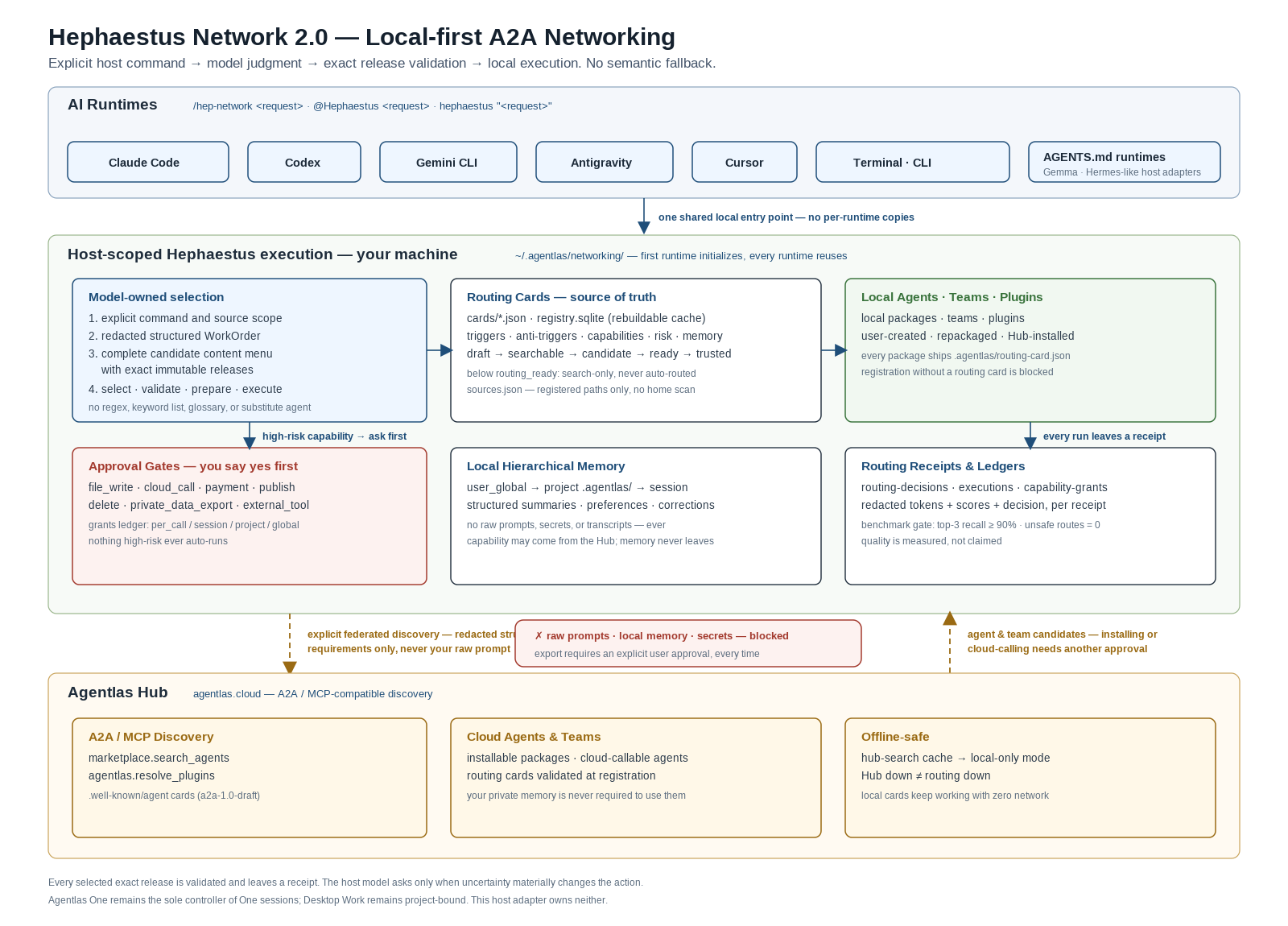
चित्र 2. A2A scheduling: LLM runtimes, local-first orchestrator, routing cards, local memory और Agentlas Hub A2A/MCP fallback।
* **Typed Job Analysis:** Active host LLM request को roles, skills, tools, artifacts, authority, cardinality और handoffs वाले redacted `WorkOrder` में बदलता है। Core substring lists से staffing intent का अनुमान नहीं लगाता।
* **Exact Source Federation:** `local`, `cloud` और `hub` exact single scopes हैं; `network` उनका sealed union है। हर source bounded content-only menu लौटाता है, और failure पर Core चुपचाप किसी दूसरे scope तक नहीं फैलता।
* **Host-Owned Task Force:** Host LLM qualification evidence पढ़कर exact `Selection` लिखता है। Core deterministic winner या hidden Router Agent re-ranking नहीं करता; वह केवल governance, privacy, identity, cardinality और graph integrity validate करता है।
* **Pinned Execution:** Validation के बाद Core original source session से केवल selected immutable releases लाता है, release/package/content digests जाँचता है, फिर planner, worker, synthesis और verifier को अलग invocations में चलाता है।
* **Evidence-Scored Evaluation:** Retrieval coverage, host selection, immutable preparation, real child invocations और final verification अलग claims के रूप में score होते हैं। Benchmark या usage history host staffing decision की जगह नहीं लेते।
यह क्या बनाता है, process packaging
Hephaestus agents को एक standard directory layout में package करता है, जिसे कोई भी workspace runtime parse, install, verify और run कर सकता है। नीचे का layout वही है जो `package-contract.json` माँगता है और `hephaestus contract verify` जाँचता है:
```text
├── AGENTS.md # Package entry: name, purpose, canonical command, roles
├── agent.md # Primary instructions: role, steps, output contract
├── agentlas.json # Manifest: permissions, memory policy, read allow/deny lists
├── agents//agent.md # Team only: one folder per worker
├── A2A/agent-card.a2a.json # A2A Agent Card projected from the two cards below
├── .agentlas/
│ ├── agent-card.json # Identity: name, slug, summary, capabilities, entrypoints
│ ├── routing-card.json # Triggers and anti-triggers (ko + en), risk, memory behavior
│ ├── build-profile.json # Fail-closed build readiness profile
│ ├── memory-map.json # Memory ownership map
│ ├── global-commands.json # Per-runtime slash command adapters
│ ├── mcp-policy.json # What the machine must provide, and what happens without it
│ ├── skill-registry.json # Skill inventory (may be empty)
│ ├── memory-tickets.jsonl # Candidate memory events before curator promotion
│ ├── capability-eval-plan.json # Positive/negative eval prompts with pass criteria
│ ├── routing-benchmarks.jsonl # At least 10 route/reject cases, ko + en
│ ├── work-brief.json # Interview-derived goal, constraints, decisions
│ ├── company-blueprint.json # Team only: orchestrator, nodes, edges
│ ├── sitemap.json # Team only: what each task produces and consumes
│ └── brief.json # agentlas.brief/1 resume, compiled at upload
├── contracts/ # intake.schema.json, output.schema.json, output.example.json
├── docs/ # Builder interview, research sources, tool selection,
│ # domain synthesis, prompt performance contract
├── tools/requirements.yaml # Projected from mcp-policy.json + agentlas.json
├── permissions/policy.yaml # Projected shell/network/file/payment whitelist
├── hooks/ # memory-upgrade.yaml, on_stop.yaml, declared, host-enforced
├── evals/README.md # Points at the eval plan and routing benchmarks
└── .claude/skills//SKILL.md # Skills, when the package carries any
```
`docs/`, eval plan और work brief सिर्फ user-confirmed minimal private build में छोड़े जा सकते हैं। `provenance.json`, `knowledge/`, `schemas/`, `sandbox/` और `examples/` optional हैं।
सार्वजनिक सुरक्षा सीमा
इस repository में Agentlas billing/account logic, production cloud credentials, customer databases, raw private transcripts, native keychain managers या private deployment scripts **शामिल नहीं** हैं।
Hephaestus द्वारा compile किए गए public output packages में local absolute paths, API keys, service-account keys, `.env` secrets, raw transcripts, customer logs या private developer notes शामिल नहीं होने चाहिए।
## License
Apache-2.0 · Made by [Appbridge](https://agentlas.cloud)