Agentlas
只管定目标,团队它自己招。
一款桌面 AI 智能体,为项目的每个环节招来专门的专家,
直接在你日常用的应用里干活,连续数周不停手。用手机就能指挥。
Grok Bot、Muse、dots 的开源替代品。做科研,Agentlas Science 是 Claude Science 的替代品。
与 xAI、Meta、OpenAI、Anthropic 无任何关联。产品名称归各自所有者所有。

macOS · Windows · Linux · Android · iOS 即将推出
桌面端下载量 12,000+ · 免费下载,使用你自己的 AI 套餐或 API Key · Apache-2.0
官网 · Agent Hub · Discord · 开发者 ↓
English · 한국어 · 日本語 · हिन्दी
## 大家都在交给它的活
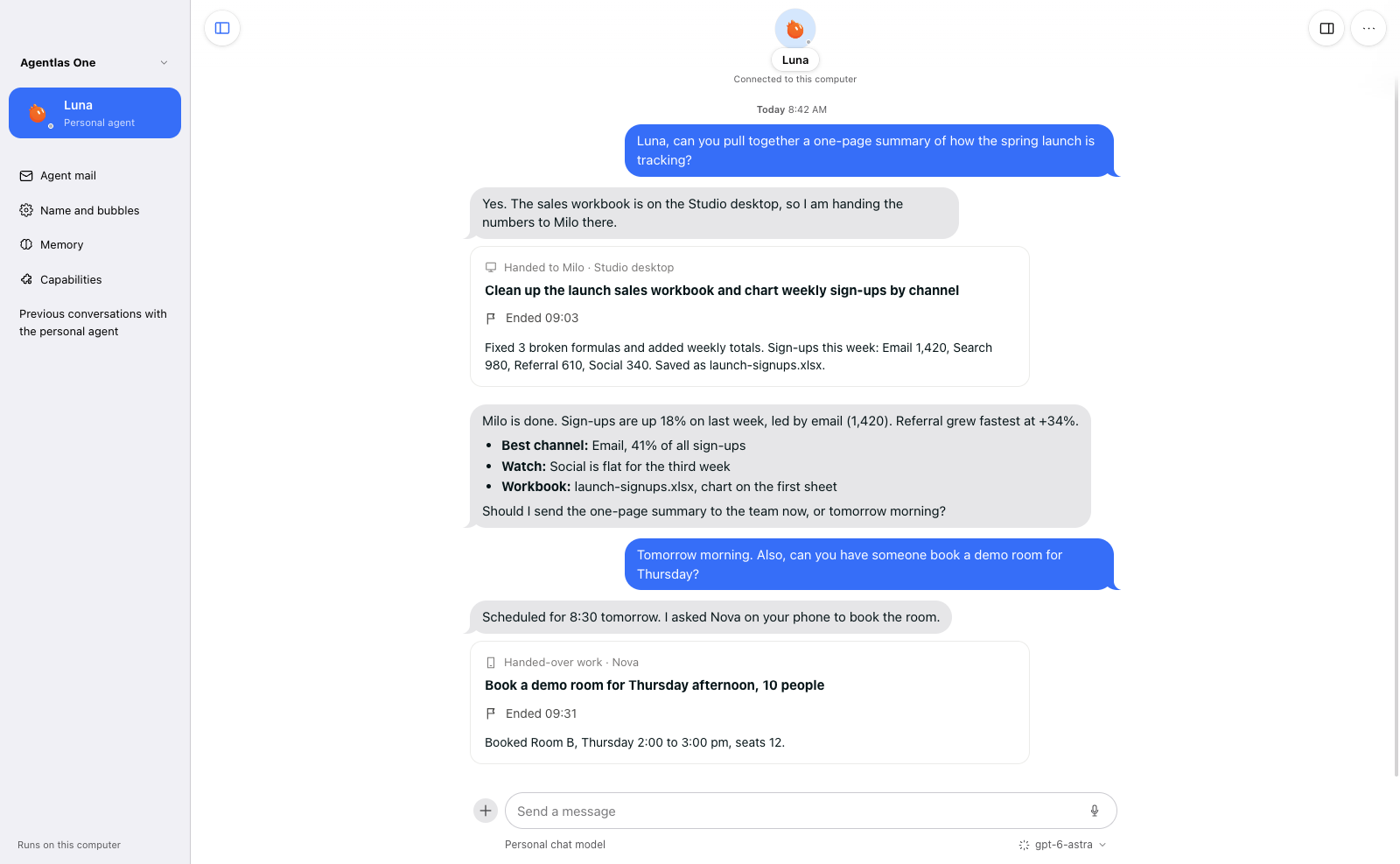
| 你输入 | 它在你的应用里这样做 |
| --- | --- |
| “把第三季度销售表整理一下,再做成图表。” | 修好 3 个出错的单元格,补上合计,在表格里直接生成图表。 |
| “做成周五用的 5 页演示文稿。” | 包含摘要、各地区情况、风险和下一步,保存为 `Q3-review.pptx`。 |
| “发到 #sales,再告诉小周。” | 在 Slack 里发出去。 |
| “把产品抠出来,封面调亮一点。” | 在修图软件里去掉背景并调整图片。 |
| “围绕转化率重做 Beta 产品页。” | 招来市场调研员、UX 设计师、前端工程师和评审,把页面做完上线。 |
| “发布 Beta 版,拿下 1,000 个用户。” | 建立目标树,连续数周持续推进。 |
## 每个环节都招最合适的专家
Agentlas 会为工作的每个部分写一份岗位需求,再从你电脑上的智能体、私有云和免费的公开 Hub 里找人补位。最合适的人选由你的 AI 来挑,并写明理由。
## 一连跑几周的目标
“发布 Beta 版,拿下 1,000 个用户”会被拆成策略和子目标,每一项都带数字。邮件的打开率偏低时,它会换方法,目标不变。合上电脑也没关系,明天从上一个检查点接着干。
## 用手机指挥
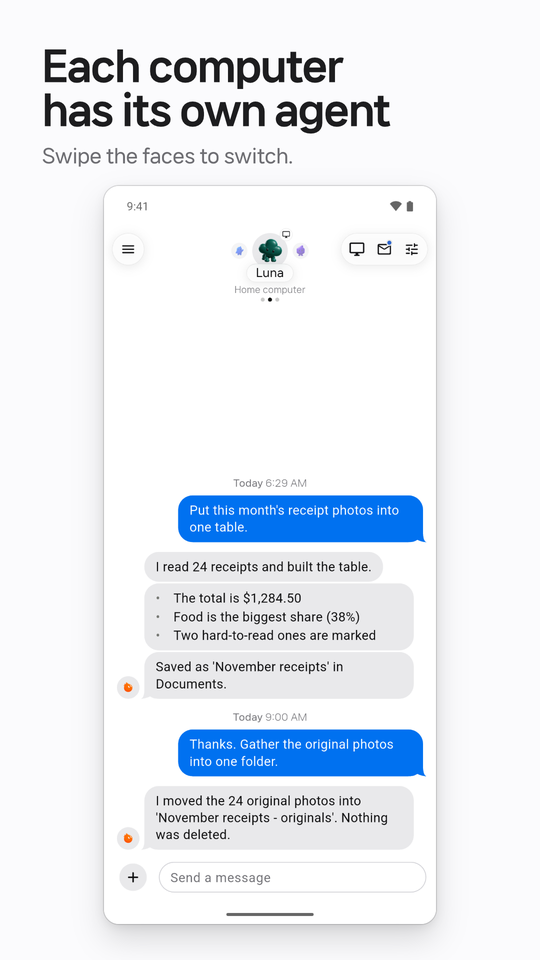
在公交上输入“本周各渠道注册数,做成表格”。分析师智能体在你家里的电脑上运行,表格直接出现在聊天里。需要你拍板时,会弹出一张卡片:“摘要现在发,还是明早发?”点一下就行。[获取 Android 应用 →](https://play.google.com/store/apps/details?id=com.agentai.agentlas)
## 直接用你已经付费的 AI
用 Claude Code、Codex、Antigravity、Grok、Kimi、Cursor 或 GitHub Copilot CLI 登录,或者填入 API Key,也可以用 Ollama、LM Studio、MLX 跑免费的本地模型。一个套餐的额度用完后,对话会自动切到下一个。
## 不用虚拟机,就在你现有的电脑上干活
Grok Bot、Muse 和 dots 给每个智能体分配一台云端电脑,也有一些智能体应用会在你的电脑上启动虚拟机(VM)。默认情况下,智能体就在另一台电脑上干活,离你的文件、登录状态和应用都很远;本地虚拟机运行时还会占用内存、磁盘和电量。Agentlas 不用虚拟机:智能体直接在你常用的应用里干活。它给你的不是隔离,而是控制权:能自主做多少由你决定,每一步都有记录,还能用手机随时叫停。
## 留在你电脑上的东西
- 你的文件、智能体和记忆都存放在你自己的设备上。
- 它能自主做多少,由你来定。每一步都有记录,随时可以用手机叫停。
- 手机应用只负责把请求发给桌面端并显示结果,真正的工作在你的电脑上完成。
- 引擎以 Apache-2.0 协议开源。
## 打造你自己的专家
用一句话描述,Agentlas 就会生成一个可安装的智能体。可以自己私用,也可以发布到 [Agent Hub](https://agentlas.cloud/hub)。在 Hub 上发布和使用智能体都是免费的,也没有任何付费排名。
下载 Agentlas ·
Android 应用 ·
加入 Discord
⭐ 点个 Star,让更多人找到它 · 反馈问题
在 Claude Code、Codex、Cursor、Antigravity 中使用引擎
也可以把这个仓库地址交给你的编程智能体,让它帮你安装 Agentlas。
把下面内容粘贴到你正在使用的 LLM,例如 Claude Code、Codex、Antigravity 或 Cursor:
```text
request: Install Agentlas OS standalone from https://github.com/agentlas-ai/Agentlas-OS.
inspect: First fetch and read https://raw.githubusercontent.com/agentlas-ai/Agentlas-OS/main/scripts/install-all-runtimes.sh and compare its actual behavior with this requested scope.
scope: Use the isolated default runtime under ~/.agentlas/os-runtime and its dedicated ~/.agentlas/os-bin/agentlas-os launcher. Do not use sudo, replace the independent Terminal's agentlas command, write global ~/.local/bin wrappers, or permanently register host plugins/MCP as part of this request.
defaults: Keep optional features OFF. Do not enable the global router or change host instruction files.
run: If the script matches this scope, run curl -fsSL https://raw.githubusercontent.com/agentlas-ai/Agentlas-OS/main/scripts/install-all-runtimes.sh | bash. Report a scope mismatch instead of silently expanding the installation.
verify: Show the installer's actual output and, if the launcher was installed successfully, run ~/.agentlas/os-bin/agentlas-os features status.
report: State runtime installation and host connection separately. Preserve partial, unavailable, and unverified results. A restart alone does not prove that /agentlas build, skills, or MCP tools are ready.
host-status: Runtime installation and host activation are separate. For the chosen installed host use ~/.agentlas/os-bin/agentlas-os host status claude or host status codex. Start a requested new host session with the same launcher and host session claude or host session codex; native arguments follow --. Preserve partial/conflict/unavailable states.
updates: Automatic updates default OFF. After a runtime update, inspect host status again. outdated or codex_skill_alias_outdated is not readiness; do not silently replace/delete the owned alias or fall back to a legacy runtime. Codex One/Memory hooks are not applied and Windows host-session integration is unverified. Running host session codex again lets the launcher move its own verified alias to the current generation.
```
此步骤安装独立运行时,并不表示当前 LLM 主机已连接或命令已启用。通过 shell 手动安装的方法见下文。
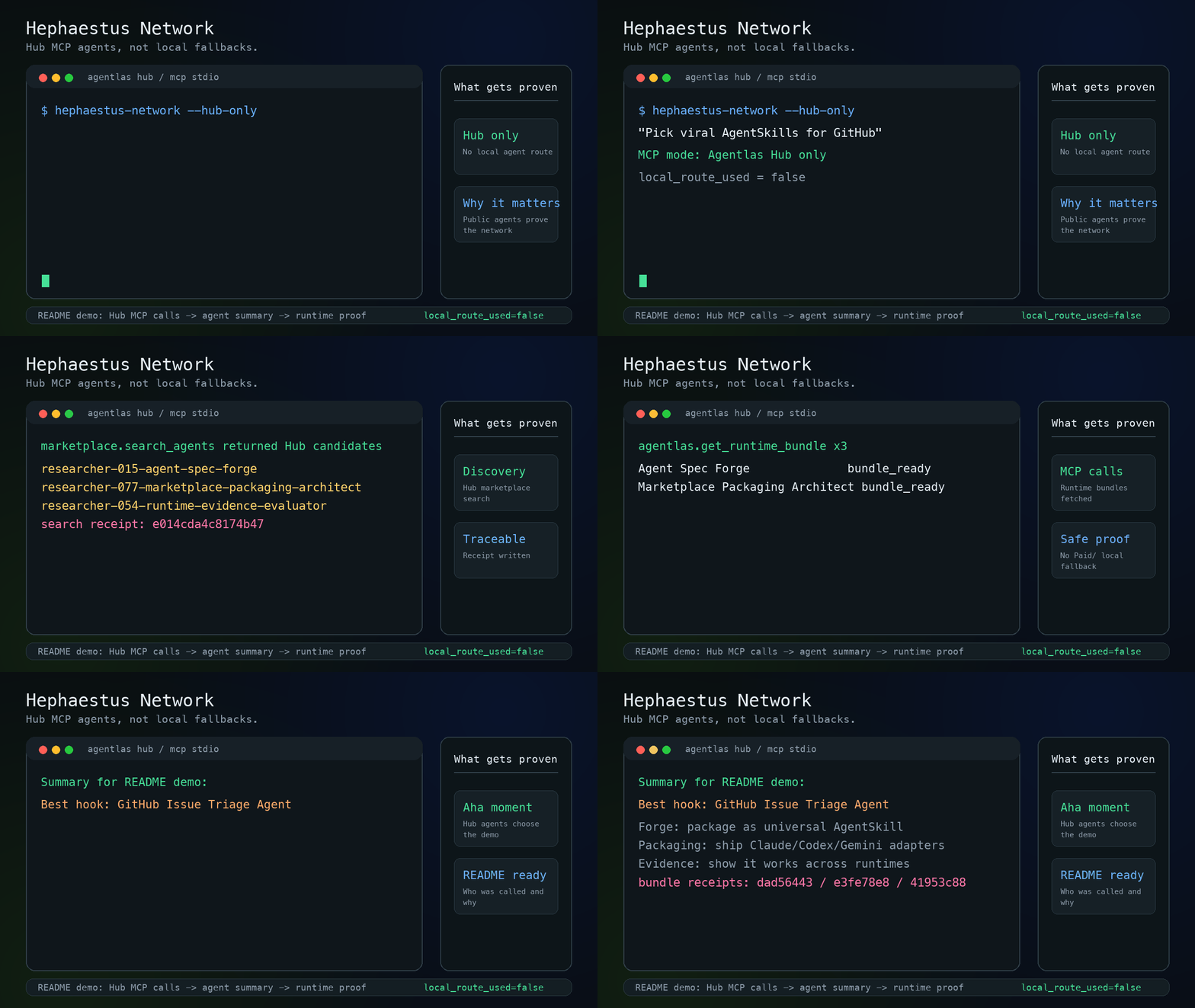
从 Hub 调取的专家智能体被组装成临时任务组,通过 MCP 实时路由, , 无需为每个任务单独配置智能体。
Agent OS 时代
·
粘贴即安装
·
全部安装方式
·
命令界面
·
v1.1.0 新特性
·
子系统
·
企业运营
·
系统打包
·
文档索引
安装与主机会话
### 手动安装 LLM Adapter
此命令准备独立运行时预览版。
安装器准备独立运行时命名空间。主机适配器和 Desktop 更新器集成尚不可用。
```bash
xcode-select --install # Command line tools (skip if already installed)
git --version # Confirm git is available
curl -fsSL https://raw.githubusercontent.com/agentlas-ai/Agentlas-OS/main/scripts/install-all-runtimes.sh | bash
```
### 连接独立主机会话
安装后使用专用 launcher。先检查所选主机状态,再单独启动会话。这些命令使用 `~/.agentlas/os-runtime` 中的独立运行时和 `~/.agentlas/os-host-plugins` 中的自有插件,不需要永久 marketplace 注册或把引擎文件复制到项目。
检查准备使用的主机:
```bash
~/.agentlas/os-bin/agentlas-os host status claude
~/.agentlas/os-bin/agentlas-os host status codex
```
需要该主机的新会话时执行:
```bash
~/.agentlas/os-bin/agentlas-os host session claude
~/.agentlas/os-bin/agentlas-os host session codex
```
仅在需要向原生主机传递参数时附加 `-- `。读取实际状态与启动结果。`partial`、`session_activation_not_observed` 或不可用组件不表示已完全连接。运行时安装、插件准备、模型会话运行是不同结果。
选择会话中实际显示的限定名称,例如 `agentlas-os-core:hephaestus-network`。旧的无命名空间名称可能同时存在;不要假定 `/hep-*`、`/agentlas` 或未限定的 `$hephaestus-*` 指向此运行时。下方命令表仅供功能参考,只使用会话实际公开的命令和工具。
Codex core 工具与技能可在独立会话中加载,但 One、Memory 钩子尚未应用。设置为 ON 不证明钩子已运行;保留 `unappliedHookComponents` 和 `codex_optional_hook_session_loader_unverified` 状态。Windows 主机会话集成尚未验证,不保证永久注册或完整原生集成。 Windows 缺少创建链接的权限时可能保持 partial。原生清单或版本命令成功不证明模型轮次或钩子已经执行。 standalone 与 Desktop 共用 `~/.agentlas/engine-features.json` 功能设置。明确的 OFF 也会关闭 Desktop 默认 ON 的功能。没有明确设置或兼容环境覆盖时,standalone 默认 OFF,Desktop 使用自己的功能默认值。独立 One 的 on/off 是 `~/.agentlas/os-one` 中的单独状态。
更新后再次运行 `host status`。自有 Codex 技能 alias 可能仍指向旧版本;`outdated` 或 `codex_skill_alias_outdated` 表示新会话尚未准备好。不要静默替换、删除 alias,也不要退回 legacy 运行时;报告准确状态并遵循已提供的明确修复步骤。自动更新默认 OFF,运行时更新不证明主机已激活。
命令界面, 全部命令
在原生 Agentlas 环境中,Hephaestus 无需任何命令即可运行。外部 LLM tools 使用一组刻意精简的可见命令。这些命令用来构建智能体,并用它们编组工作:
| 系统子系统 | Shell 命令 | 示例 |
| :--- | :--- | :--- |
| **进程构建器** | `/agentlas build` | `/agentlas build create a customer support agent for Shopify refunds` |
| **Workforce 联合(Local + Cloud + Hub)** | `/agentlas network` | `/agentlas network split this launch plan into research, copy, QA, and release agents` |
| **仅已注册的 Local 智能体** | `/agentlas local` | `/agentlas local use only agents registered on this machine` |
| **仅本人 Cloud 智能体** | `/agentlas cloud` | `/agentlas cloud use my saved finance analyst agent to review this report` |
| **仅公开 Hub 智能体** | `/agentlas hub` | `/agentlas hub find public specialists for accessibility QA` |
| **目录搜索** | `/agentlas search` | `/agentlas search find agents for a market report workflow` |
| **进程间调用(IPC)** | `/agentlas call` | `/agentlas call market-researcher, report-writer {draft a market report}` |
| **包导出器** | `/agentlas upload` | `/agentlas upload ./agents/customer-support-hq` |
每条命令仍可使用原名 `/hep-*`。`/agentlas network` 与 `/hep-network` 是同一条
命令。旧名称并未移除,因此现有脚本、笔记和使用习惯都不受影响。
更深一层, 构建工厂与路由调度
### Meta-Agent Factory, 进程创建
由四种构建器组成的统一编译工厂。每个生成的包都会注册其全局命令(`.agentlas/global-commands.json`)并附带验证脚本, , 用户永远不需要去猜编译后的包该怎么运行:
| 编译模式 | 路由目标 | 输出产物 |
| :--- | :--- | :--- |
| **单智能体** | `10-single-agent-builder` | 独立工作者,带本地化技能、记忆契约与运行时适配器。 |
| **多智能体团队** | `20-multi-agent-team-builder` | 层级化团队,包含 PM Orchestrator、Memory Curator、Policy Gate、QA 与校验脚本。 |
| **工作区打包器** | `30-agentlas-packager` | 编译好的捆绑包,可直接用于 runtime 导入、CLI 执行或 GitHub 分发。 |
| **会话智能体构建器** | `40-session-agent-builder` | 把当前对话(无头运行时则为明确的 JSON/JSONL 导出)变成经所有者审查的智能体;默认是单智能体,只有你选择团队时才生成团队。 |
*简报访谈门:* 构建器通过**简报访谈门**启动流程:进行透镜驱动的提问、评估歧义阈值、检索一手来源,并输出 Work Brief。
### Network 2.0, 调度器
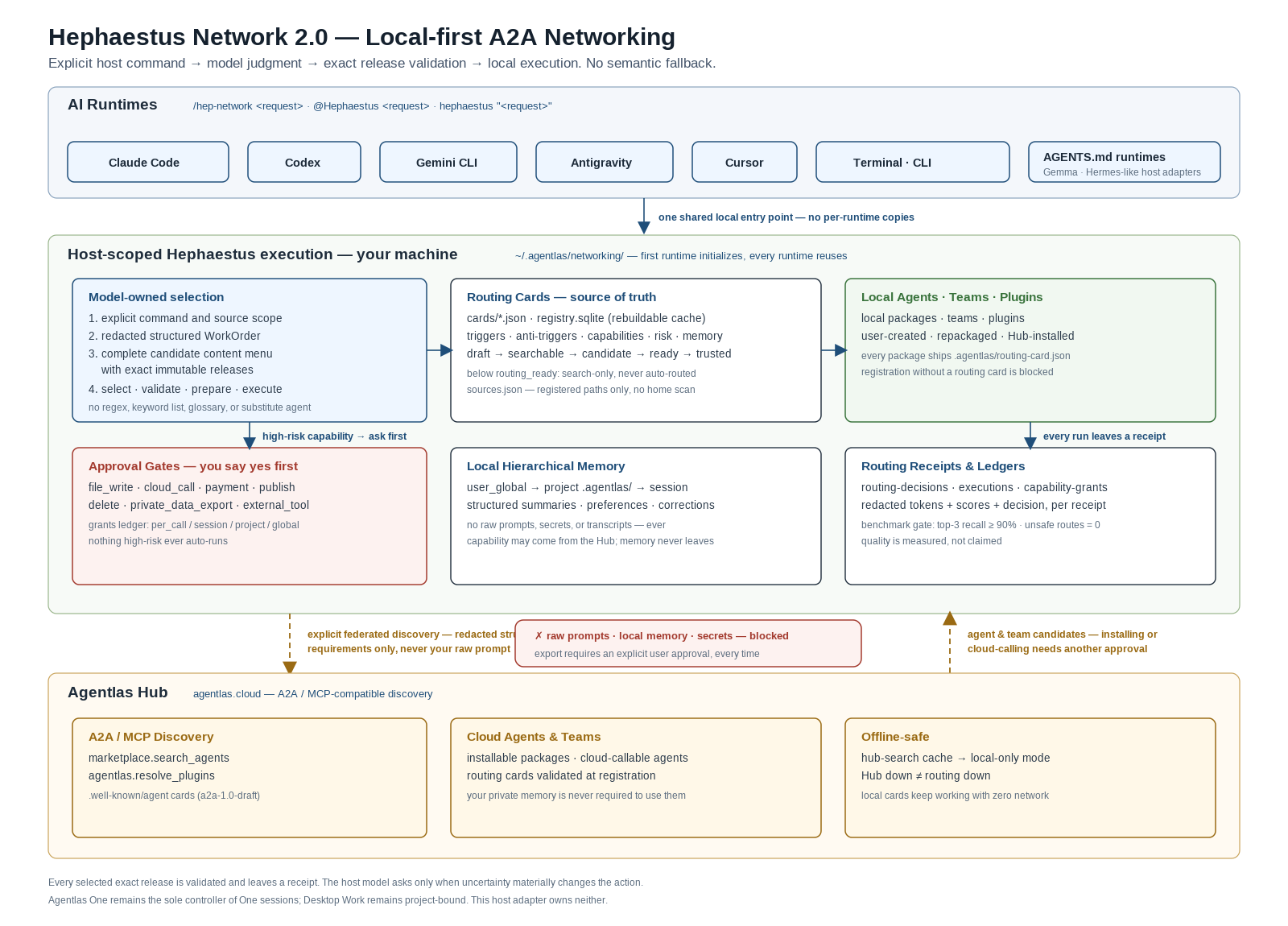
图 2. A2A 调度:LLM 运行时、本地优先编排器、路由卡、本地记忆,以及 Agentlas Hub 的 A2A/MCP 兜底。
* **类型化岗位分析:** 当前宿主 LLM 将请求整理为脱敏的 `WorkOrder`,明确角色、技能、工具、产物、权限、人数与交接关系。Core 不通过子字符串列表猜测人员需求。
* **精确来源联合:** `local`、`cloud`、`hub` 都是精确的单一范围,`network` 是三者封存后的并集。每个来源只返回有上限的 content-only 菜单;来源失败时 Core 不会悄悄扩展到其他范围。
* **由宿主组建特遣队:** 宿主 LLM 阅读资格证据并编写精确的 `Selection`。Core 不选择确定性赢家,也不进行隐藏的 Router Agent 重排序;它只验证治理、隐私、身份、人数与图结构完整性。
* **固定身份执行:** 验证后,Core 仅从原始来源会话获取已选的不可变发布,核对发布、包与内容摘要,再分别调用规划、执行、综合和验证角色。
* **基于证据的评估:** 检索覆盖、宿主选择、不可变准备、真实子调用与最终验证分别计分。基准结果或使用历史不会取代宿主的人力配置判断。
构建产物, 进程打包
Hephaestus 将智能体打包为标准目录布局,任何工作区运行时都能解析、安装、验证并运行。下面的布局就是 `package-contract.json` 所要求、`hephaestus contract verify` 所检查的内容:
```text
├── AGENTS.md # Package entry: name, purpose, canonical command, roles
├── agent.md # Primary instructions: role, steps, output contract
├── agentlas.json # Manifest: permissions, memory policy, read allow/deny lists
├── agents//agent.md # Team only: one folder per worker
├── A2A/agent-card.a2a.json # A2A Agent Card projected from the two cards below
├── .agentlas/
│ ├── agent-card.json # Identity: name, slug, summary, capabilities, entrypoints
│ ├── routing-card.json # Triggers and anti-triggers (ko + en), risk, memory behavior
│ ├── build-profile.json # Fail-closed build readiness profile
│ ├── memory-map.json # Memory ownership map
│ ├── global-commands.json # Per-runtime slash command adapters
│ ├── mcp-policy.json # What the machine must provide, and what happens without it
│ ├── skill-registry.json # Skill inventory (may be empty)
│ ├── memory-tickets.jsonl # Candidate memory events before curator promotion
│ ├── capability-eval-plan.json # Positive/negative eval prompts with pass criteria
│ ├── routing-benchmarks.jsonl # At least 10 route/reject cases, ko + en
│ ├── work-brief.json # Interview-derived goal, constraints, decisions
│ ├── company-blueprint.json # Team only: orchestrator, nodes, edges
│ ├── sitemap.json # Team only: what each task produces and consumes
│ └── brief.json # agentlas.brief/1 resume, compiled at upload
├── contracts/ # intake.schema.json, output.schema.json, output.example.json
├── docs/ # Builder interview, research sources, tool selection,
│ # domain synthesis, prompt performance contract
├── tools/requirements.yaml # Projected from mcp-policy.json + agentlas.json
├── permissions/policy.yaml # Projected shell/network/file/payment whitelist
├── hooks/ # memory-upgrade.yaml, on_stop.yaml, declared, host-enforced
├── evals/README.md # Points at the eval plan and routing benchmarks
└── .claude/skills//SKILL.md # Skills, when the package carries any
```
`docs/`、评估计划和工作简报只有在用户确认的最小私有构建中才可以省略。`provenance.json`、`knowledge/`、`schemas/`、`sandbox/` 和 `examples/` 是可选的。
公共安全边界
本仓库**不**包含 Agentlas 计费/账户逻辑、生产云凭据、客户数据库、原始私有会话记录、原生钥匙串管理器或私有部署脚本。
由 Hephaestus 编译的公开输出包必须排除本地绝对路径、API 密钥、服务账号密钥、`.env` 机密、原始会话记录、客户日志与私人开发者笔记。
## License
Apache-2.0 · Made by [Appbridge](https://agentlas.cloud)