EdgeChat

Your own chat space, without starting by maintaining a server.

Open-source, self-hosted team chat running on Cloudflare

Real-time group chats and DMs · Two-way Telegram bridging · Voice and files · Server-side encryption for messages and attachments

license stars forks last commit Cloudflare Workers

中文 · English · 日本語 · Live Demo · Documentation · Telegram Community

**EdgeChat is an open-source team chat system running on Cloudflare.** Use it to build an independent chat space for your team, project, or small community: keep discussions in groups, private matters in direct messages, and share voice messages and files whenever you need. You do not need to maintain a permanently running server. The application and data resources are deployed in your own Cloudflare account, with GitHub Actions handling automatic deployment and updates. If your members already use Telegram, you can connect the groups on both sides and let everyone keep using the chat entry point they are familiar with. [Interface Preview](#interface-preview) · [Live Demo](#live-demo) · [Telegram Bridging](#telegram-two-way-bridging) · [Features](#features) · [Privacy and Encryption](#privacy-and-encryption) · [Deployment](#deployment) · [Local Development](#local-development) ## Cross-instance group binding Starting with `2.8.0`, administrators can open **Cross-instance group binding** in the admin sidebar to connect a public, private, or general group to one group on another independent EdgeChat site. A ten-minute one-time invitation is claimed by the second administrator, then the initiator verifies the peer origin and group and confirms activation. Direct messages cannot be bound. Only new locally authored text, sender names, and source-instance labels are synchronized. History, attachments, reply references, edits, and deletions are not replicated. Pausing cancels backlog; resuming accepts only the new generation. Unlink stops new deliveries, but in-flight requests may finish and delivered copies remain. The admin page exposes backlog and failure/discard status. The normal Actions deployment applies the additive migration before releasing the Worker with its `INSTANCE_BRIDGE` Durable Object. No new manual secret is required; **retain every existing encryption key**. See the [setup guide](https://echat.azora.top/en/guide/instance-bridge). Both Telegram and instance-bridge outbound paths reject externally sourced messages to prevent cross-bridge propagation. ## Interface Preview
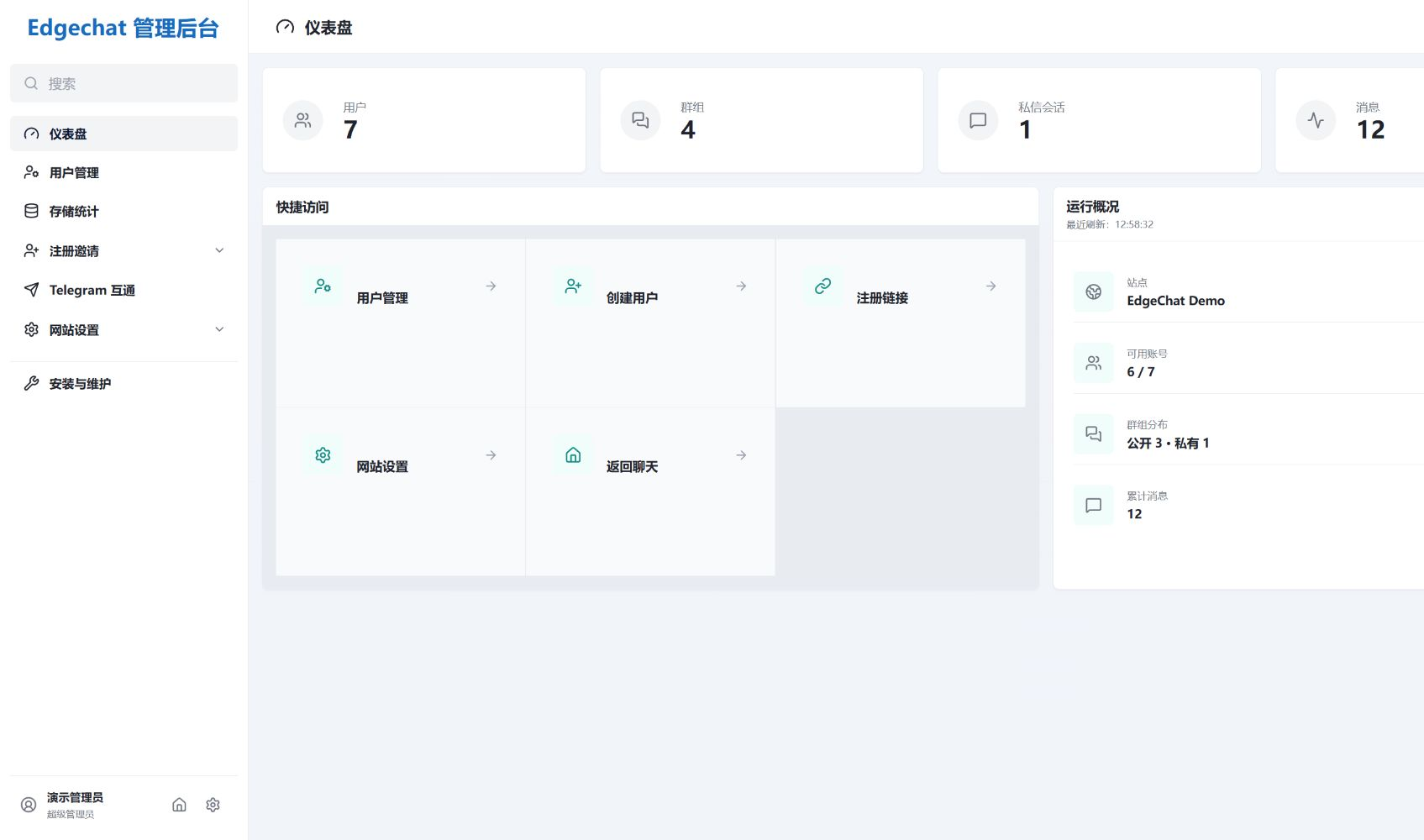
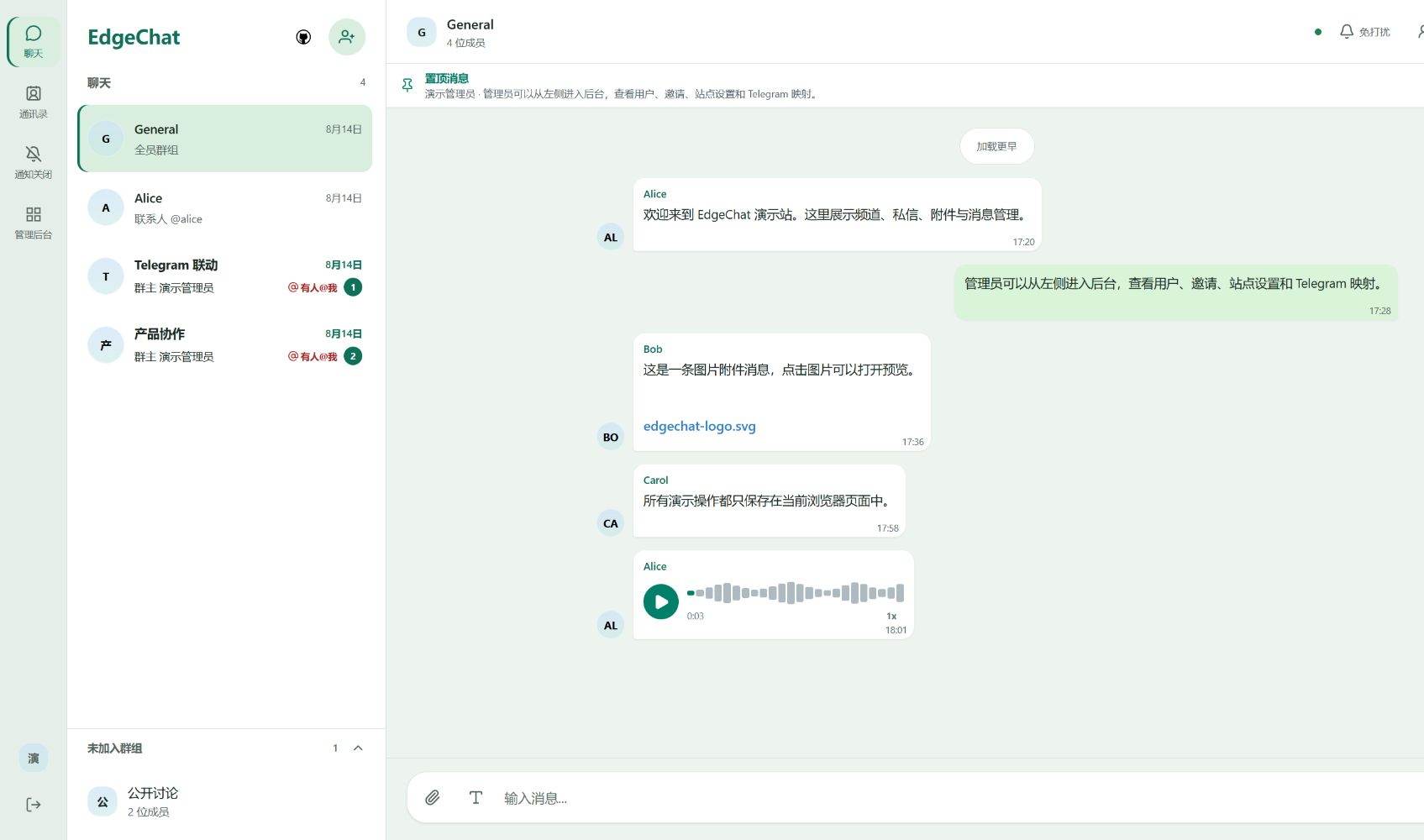
Chat Interface Admin Console
EdgeChat chat interface preview EdgeChat admin console preview
## Live Demo **[Open the EdgeChat live demo →](https://edgechat-demo.wcjxxgaq.workers.dev)** Take a look at the interface before deciding whether to deploy. The demo site reuses the production project's Vue pages, routes, state management, and real-time messaging logic. However, its API, WebSocket, file uploads, and Telegram relay are simulated in browser memory; it is not a multi-user chat room connected to a real backend. Refresh the page or click “Reset Demo Data” in the upper-right corner to restore the initial state. Demo actions do not access the production Worker or write to D1, KV, or R2. ## Why EdgeChat EdgeChat is for people who **want their own chat space without having to maintain a server, database, and complete runtime environment over the long term.** | What you care about | How EdgeChat handles it | |---|---| | Deployment and maintenance | Built on Cloudflare Workers, with no permanently running server to maintain; supports automatic deployment through GitHub Actions | | Members and administration | Provides independent accounts, public and private groups, direct messages, and an admin console | | Existing Telegram groups | Uses two-way Bot bridging so members on both sides can keep using the entry point they prefer | | Customization and extension | The source is open, so you can adapt the interface and features to your needs | The project itself is free and open source. Cloud service costs depend on your Cloudflare plan, resource configuration, and actual usage. ## Telegram Two-Way Bridging **You do not have to move everyone into the same application.** Administrators can view both public and private EdgeChat groups in the admin console and bind any group to a Telegram group. A Telegram Bot relays messages in both directions: messages sent on the web can be synchronized to Telegram, and messages in the Telegram group return to EdgeChat. One-to-one direct messages are never bridged. This suits teams and communities that already have Telegram groups but also need an independent web chat entry point.
EdgeChat and Telegram two-way message bridging demo
Two chat entry points, one conversation.
## Features ### 💬 Chat and Conversations - Public groups, private groups, and one-to-one direct messages. - Real-time messages, paginated message history, voice messages, and file sharing. - Message replies, quote navigation, @ mentions, and reply reminders. - Block and unblock direct-message contacts; while blocked, neither party can continue sending DMs. - Optional scheduled hard deletion of expired messages. ### 🎨 Everyday Experience - Liquid Glass-style interface adapted for desktop and mobile. - Voice recording, waveform progress, and variable-speed playback. - In-app message notifications in the web interface; browser system notifications are available in the background with user permission. - File uploads, avatar management, and basic accessibility support. ### 🛠 Instance Administration - Dashboard, user management, registration invitations, and site settings. - Supports permanent bans and temporary bans configured in days, hours, or minutes; temporary bans lift automatically when they expire, without an additional scheduled task. - Compare directly with the source repository in the browser to check whether the current deployment has updates. ### 🔌 Connections and Extensions - Administrator-configured two-way Telegram bridging for public and private groups, including voice message synchronization. - Members can connect the configured Telegram bot in Settings to receive direct-message and group-mention alerts while the site is closed. Each alert type can be disabled independently; alerts do not include message bodies. - WebMCP site tools: in compatible client environments, provides login, conversation queries, message reading, sending, and related capabilities. ## Privacy and Encryption EdgeChat uses AES-256-GCM server-side encryption at rest for **newly written message bodies and newly uploaded attachments**. Historical plaintext data remains unchanged; reads support both new and old data, and deployment or background jobs do not perform a bulk encryption backfill. The admin console does not provide an entry point for viewing group or direct-message bodies, but administrators can still view aggregate statistics such as message counts. > [!NOTE] > **This is server-side encryption, not end-to-end encryption.** > The Worker decrypts content after checking session permissions. The Cloudflare runtime and the party holding the keys must still be trusted. The absence of a message-viewing entry point in the admin console does not mean that the deployer is technically unable to access the content. > > When Telegram bridging is enabled, relayed messages also enter the corresponding Telegram conversation.
Key Management and Rotation
GitHub Actions manages the server-side encryption Worker Secrets. On the first deployment, if the target Worker has no encryption Secret, the workflow automatically generates a random 32-byte AES key, injects it as an independently versioned Secret, and records the current active key ID. Subsequent ordinary deployments only check that these Secrets exist; they do not regenerate, overwrite, or rotate them. An existing `EDGECHAT_ENCRYPTION_KEYRING` JSON keyring in production is preserved exactly and remains supported. To specify a key manually, create a GitHub Repository Secret named `EDGECHAT_ENCRYPTION_KEYRING`: ```json {"activeKeyId":"v1","keys":{"v1":"BASE64_ENCODED_32_BYTE_KEY"}} ``` The first deployment adopts this value directly. To enable automatic incremental rotation for an existing Worker, manually run `Deploy Worker` and check `rotate_encryption_key`. The workflow adds only one versioned key Secret and switches the active key ID to the new version; all old Secrets and the old JSON keyring remain unchanged. New messages use the new key, while old ciphertext continues to be decrypted with the key ID in its own envelope. `apply_encryption_keyring` is a fallback manual override entry point. When using it, the Repository Secret must contain the complete JSON keyring. `keys` must retain every old key ID still referenced by historical ciphertext, then add the new key and update `activeKeyId`. **Deleting an old key makes the corresponding historical ciphertext permanently unreadable.** `apply_encryption_keyring` and `rotate_encryption_key` cannot be enabled in the same run.
## Technology Stack | Area | Technology | |---|---| | Frontend | Vue 3, Vue Router, Vite | | Backend | Cloudflare Workers, Hono | | Real-time communication | Durable Objects, WebSocket Hibernation | | Database | Cloudflare D1 | | Session storage | Cloudflare KV | | File storage | Cloudflare R2 | | Build and deployment | Wrangler, GitHub Actions | See [TECHNICAL.md](TECHNICAL.md) for more implementation details. ## Deployment ### Automatic Deployment with GitHub Actions Using the GitHub Actions workflow included in the repository is recommended for deployment and subsequent updates. After completing the Cloudflare authorization and repository configuration described in the documentation, you can manually run `Deploy Worker`, or trigger deployment by pushing code to the `master` or `main` branch. The workflow file is `.github/workflows/deploy-worker.yml`. **[Quick Start](https://echat.azora.top/guide/getting-started.html) · [GitHub Actions Deployment Guide](https://echat.azora.top/guide/actions-deploy.html)** ### Manual Deployment and Docker See the [deployment documentation](https://echat.azora.top/guide/getting-started.html) for local manual deployment resource preparation, configuration, and notes. See [DOCKER.md](DOCKER.md) for Docker-related information. ### Android Client
Client, installation, and build instructions
The `capacitor/` client bundles the Vue Web UI in its APK and uses a small amount of Kotlin to integrate with the system file picker, notifications, microphone permissions, notification conversation navigation, and external links. Its package name is `com.aozorae.edgechat.web`. On first login, enter your own EdgeChat HTTPS service address; it is not tied to a fixed deployment. - Package: download `edgechat-*.apk` from [GitHub Releases](https://github.com/aozorae/Edgechat/releases) and verify `SHA256SUMS.txt`. - First use: enter your EdgeChat HTTPS service address, account, and password. - Local build: prepare JDK 21 and Android SDK 36, then run `npm run build:capacitor`. - Debug APK: `capacitor/android/app/build/outputs/apk/debug/app-debug.apk`. - CI: `.github/workflows/capacitor-android-ci.yml` uploads `edgechat-capacitor-debug`. - Release: push an `android-v*` tag or manually run `Android Release`, using the four `ANDROID_KEYSTORE_*` Secrets to build a signed APK/AAB. - Service switching: you can change the address after signing out; switching instances automatically clears the old instance token. Room offline database, WorkManager Outbox, and FCM are not currently included; when the app stops receiving messages, background instant notifications are not guaranteed. The native `android/` Kotlin + Jetpack Compose client is temporarily deprecated and is no longer the default distribution. Its source, API v1 contract, and separate CI are temporarily retained. See the [Android client documentation](https://echat.azora.top/guide/android.html) for complete details.
## Local Development ```bash # Get the source git clone https://github.com/aozorae/Edgechat.git cd Edgechat # Install dependencies npm install # Start the frontend-only demo without deploying cloud resources first npm run dev:demo ``` Before connecting to a real backend for development or deployment, prepare the required Cloudflare resources and configuration according to the documentation. ```bash # Frontend development npm run dev:frontend # Local build npm run build # Manual local deployment npm run deploy ```
Demo site build, deployment, and CI environment variables
```bash # Build the demo site separately npm run build:demo # Deploy the standalone demo Worker npm run deploy:demo ``` The demo site uses `wrangler.demo.toml` and `.github/workflows/deploy-demo.yml`; the Worker is named `edgechat-demo`. GitHub Actions supports manual triggers only and reads `DEMO_CLOUDFLARE_ACCOUNT_ID` and `DEMO_CLOUDFLARE_API_TOKEN`; it does not change the existing production deployment workflow. When deploying in a non-interactive environment, set `CLOUDFLARE_API_TOKEN` in advance. The background update check automatically records the current GitHub repository, branch, and commit at build time. For accurate results, manual deployments should be built inside a Git repository from a clean commit that has already been pushed; the source repository must remain public so the browser can call the GitHub Compare API directly. This process does not create a scheduled task. PowerShell example: ```powershell $env:CLOUDFLARE_API_TOKEN = "your-token" npm run deploy ```
## Project Structure
View the main directories ```text Edgechat/ ├─ assets/previews/ # Interface previews ├─ frontend/ # Vue frontend and in-browser demo ├─ worker/ │ ├─ schema.sql # Database schema │ ├─ migrations/ # Database migrations │ └─ src/ # APIs, authentication, and Durable Objects ├─ capacitor/ # Web UI-based Android client ├─ android/ # Temporarily retained native Android client ├─ .github/workflows/ # Automated deployment and CI ├─ wrangler.toml ├─ wrangler.demo.toml ├─ package.json ├─ README.md ├─ README.en.md ├─ README.ja.md └─ LICENSE ```
## Community and Contributions For questions, feature discussions, or to share how you use the project, open an [Issue](https://github.com/aozorae/Edgechat/issues) or join the [Telegram Community](https://t.me/EdgeChatlounge). Code, documentation, translations, and issue reports all help improve the project. Pull Requests are welcome. Thanks to everyone who has helped EdgeChat: [![Contributors](https://contrib.rocks/image?repo=aozorae/Edgechat)](https://github.com/aozorae/Edgechat/graphs/contributors) Special thanks to [@fix221](https://github.com/fix221) for submitting [PR #31](https://github.com/aozorae/Edgechat/pull/31), which added PWA support. ## Star History Star History Chart ## License This project is licensed under **GNU GPL v3.0 or later**. See [LICENSE](LICENSE). ## Acknowledgements Thanks to [linux do](https://linux.do) for helping promote the project. ## Disclaimer EdgeChat is a self-hosted open-source project. The maintainers provide the software itself only; they do not operate, control, or manage any instance deployed by users. Deployers and users are responsible for their deployment methods, usage, and the content and data generated within their instances. The project maintainers assume no responsibility for the use or misuse of any independently deployed instance.