🧠 DSH Expert Mode
One agent preset that turns DSH into a "1 Coordinator + 11 Experts" multi-agent team




中文 · English
---
## ✨ What it does
Install this preset and DSH automatically becomes a "Chief Coordinator" mode:
| Scenario | Behavior |
|----------|----------|
| Receives task | Identifies domain → delegates to the best expert |
| Complex tasks | Dispatches multiple experts in parallel |
| Simple tasks | Coordinator handles directly — no forced delegation |
| Task complete | Experts stay online for follow-up modifications |
No custom prompts to write. No multi-config to maintain. **Just install and use.**
---
## 🖼️ Demo
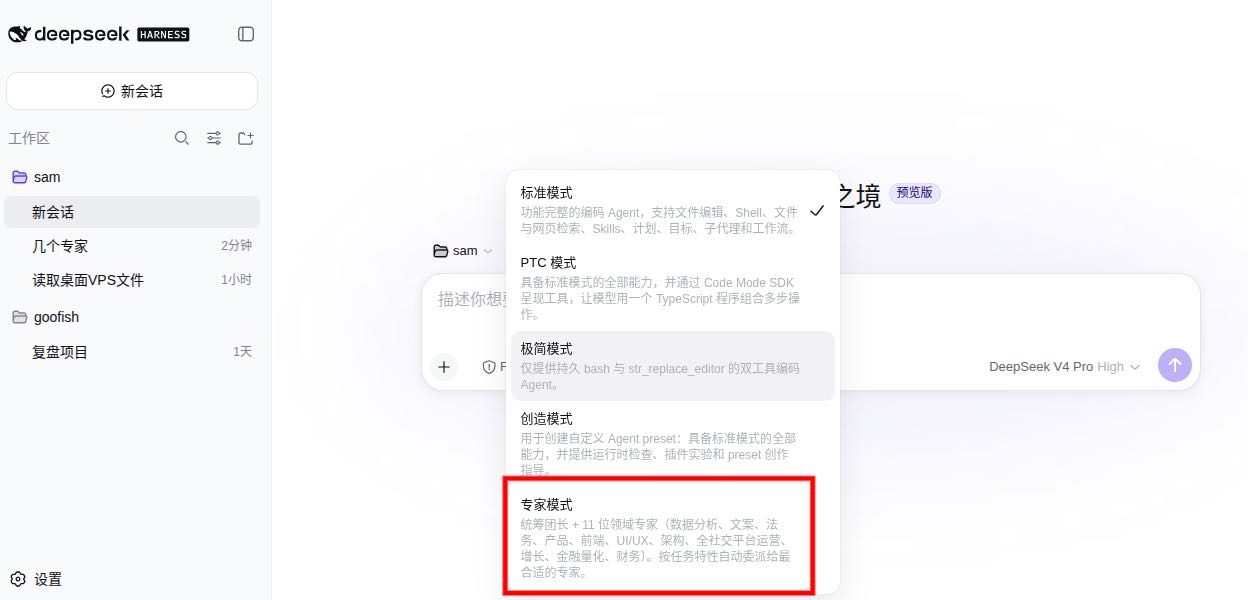
Select the "Expert Mode" preset in DSH workspace to use
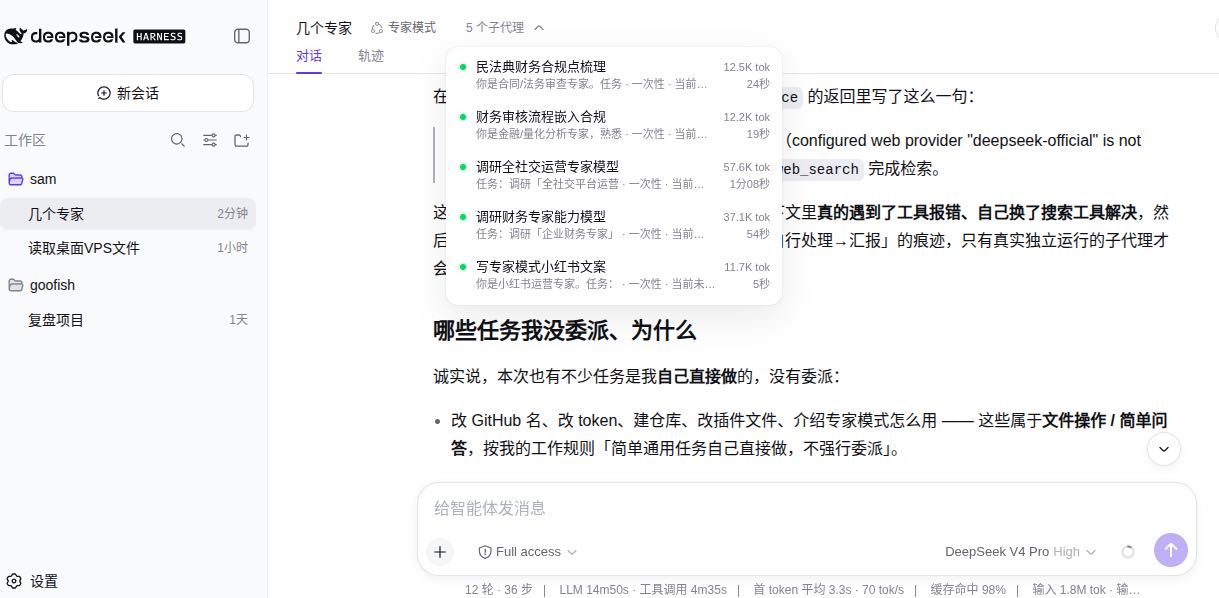
5 expert subagents working in parallel, with real-time token usage and timing
---
## 🧩 11 Experts
| Expert | Tool | Domain |
|--------|------|--------|
| 📊 Data Analyst | `expert_data_analyst` | Data cleaning, statistics, visualization |
| ✍️ Copywriter | `expert_copywriter` | Marketing copy, content creation, rewriting |
| ⚖️ Legal Review | `expert_legal_review` | Contract review, legal risk assessment |
| 📋 Product Manager | `expert_product_manager` | Requirements analysis, PRD writing, competitor research |
| 🖥️ Frontend Dev | `expert_frontend_dev` | Web frontend implementation, component development |
| 🎨 UI/UX Design | `expert_uiux_design` | Interface design, interaction patterns, design systems |
| 🏗️ Architect | `expert_architect` | System design, tech selection, architecture review |
| 📱 Social Media | `expert_social_media` | Multi-platform content distribution, account management |
| 🚀 Growth Hacker | `expert_growth` | Growth strategy, conversion funnels, A/B testing |
| 💹 Quant Finance | `expert_quant_finance` | Quantitative models, financial analysis, risk control |
| 💰 Finance | `expert_finance` | Financial analysis, report interpretation, budget planning |
---
## 🔧 Core Mechanisms
### 🚀 Quick Path
The Coordinator **answers directly** without delegating for:
- Single file read/write/edit
- Simple Q&A (no domain expertise needed)
- Casual chat / greetings
- User says "do it yourself" or "no delegation needed"
- Task completable with a single command
### ⚡ Fault Recovery
- Expert call timeout/failure → **auto-retry once**
- 2 consecutive failures → inform user, suggest alternative
- Expert output clearly off-topic → **recall and re-guide**
### 📋 Progressive Disclosure
The Coordinator holds a complete expert methodology index and **injects on-demand** — not dumping all expert personas into context at startup.
| Metric | Before | After | Improvement |
|--------|--------|-------|-------------|
| Expert persona tokens | 3850 chars | 533 chars | **-86%** |
| Total prompt tokens | ~2205 | ~1582 | **-28%** |
### 🎯 Anchored Non-degradation
Solves the "trajectory flip" problem caused by system prompt mutations:
| Anchor | Purpose |
|--------|---------|
| **Style Lock** | Maintain default reasoning style regardless of context changes |
| **Evidence Priority** | Every conclusion backed by data/logic |
| **Step-by-step** | Complex tasks decomposed into single steps |
| **Consistency Check** | Verify reasoning style matches previous turn |
| **Anti-drift** | Proactively save state before context window fills |
### 🏗️ Five Anchor Constraints
The Coordinator self-checks five anchor points every turn:
| Anchor | Purpose |
|--------|---------|
| **Review** | One-sentence recap of current subtask |
| **Convergence** | Confirm this step advanced the goal |
| **Anti-drift** | 2 turns with no progress → force strategy switch |
| **Collaboration Check** | Before delegation, verify routing is correct |
| **Resource Awareness** | Monitor token usage; auto-simplify if >70% |
### 🎯 Near-distance Guidance
During delegation, the Coordinator fills in the structured guidance template:
```
┌─ Near-distance Guidance ─┐
Identity: You are [expert role]
Task: {specific task description}
Input: {input data}
Output format: [extracted from methodology index]
Completion criteria: {clear delivery standard}
└──────────────────────────┘
```
Subagents start with clear "who I am, what to do, how to deliver."
### 🔗 Expert Communication Protocol
When cross-expert collaboration is needed:
```
[FROM:expert_data_analyst → TO:expert_frontend_dev]
Task: Design frontend data display based on analysis
Data: {Expert A's conclusion summary}
```
### 🔍 Cross Review
High-risk tasks (architecture selection, contract review, financial analysis) trigger multi-expert independent review. The Coordinator synthesizes conclusions.
### 💾 Experience Pool
After completing important tasks, experts extract lessons to `.expert-mode/experts/{name}/lessons.md`, automatically injected for similar future tasks.
### 🧠 Expert Persistence
Experts stay online after task completion. The Coordinator can wake them up for follow-up modifications with full context preserved.
---
## 📦 Installation
### Method 1: dsh plugin add (recommended)
```bash
dsh plugin --profile web add github:Asher-2000/dsh-expert-mode
```
### Method 2: git clone
```bash
mkdir -p ~/.dsh/.agent-presets
git clone https://github.com/Asher-2000/dsh-expert-mode.git ~/.dsh/.agent-presets/expert-mode
```
**Want English?** The repo includes an `expert-mode-en/` preset:
```bash
cp -r ~/.dsh/.agent-presets/expert-mode/expert-mode-en ~/.dsh/.agent-presets/expert-mode-en
```
### Method 3: Manual download
Download from [Releases](https://github.com/Asher-2000/dsh-expert-mode/releases) and place `preset.yml` + `agent.cordis.yml` into `~/.dsh/.agent-presets/expert-mode/`.
---
## 🚀 Usage
After installation, select the Expert Mode preset when creating a new session in DSH Web GUI.
---
## ❓ FAQ
**Q: Does Expert Mode consume extra model quota?**
A: Delegating to expert subagents triggers subagent model calls (DSH subagent mechanism), same as the official subagent feature. Simple tasks are handled directly by the Coordinator with no extra calls.
**Q: Can I add my own experts?**
A: Yes. Copy any expert entry in `agent.cordis.yml`, modify the tool name and persona.
**Q: How does it relate to the official standard preset?**
A: Built on top of the official standard preset combination, preserving the full toolset and only adding the expert delegation layer.
---
## 📁 File Structure
```
.
├── preset.yml # Preset metadata (name + description)
├── agent.cordis.yml # Coordinator persona + methodology index + expert tools
├── expert-mode-en/ # English preset
│ ├── preset.yml
│ └── agent.cordis.yml
├── .expert-mode/ # Expert experience pool
│ └── experts/ # Each expert's lessons.md
├── assets/ # Screenshots
├── README.md # English
├── README.zh.md # 中文
└── LICENSE
```
---
## 📝 Changelog
| Version | Changes |
|---------|---------|
| **v0.6.0** | Quick Path + Fault Recovery + bilingual parity |
| **v0.5.0** | Progressive disclosure + anchored non-degradation (tokens -28%) |
| **v0.4.0** | Five anchors + near-distance guidance + cross review + experience pool |
| **v0.3.0** | Expert persistence + communication protocol |
| **v0.2.0** | Basic multi-expert delegation |
---
## 🏆 Community
- 📢 Featured in **Awesome DSH Plugin**: https://github.com/awesome-dsh-plugin/awesome-dsh-plugin
- 🏷️ GitHub `dsh-plugin` topic: https://github.com/topics/dsh-plugin
---
## 🏷️ Tags
`dsh` `deepseek-harness` `agent-preset` `expert-mode` `multi-agent` `subagent` `ai-agent` `dsh-plugin`
---
## 📄 License
MIT License — see [LICENSE](LICENSE).