 Chatbox
(Community Edition)
Chatbox
(Community Edition)
Chatbox
(Community Edition)
Chatbox
(Community Edition)
Your Ultimate AI Copilot on the Desktop.
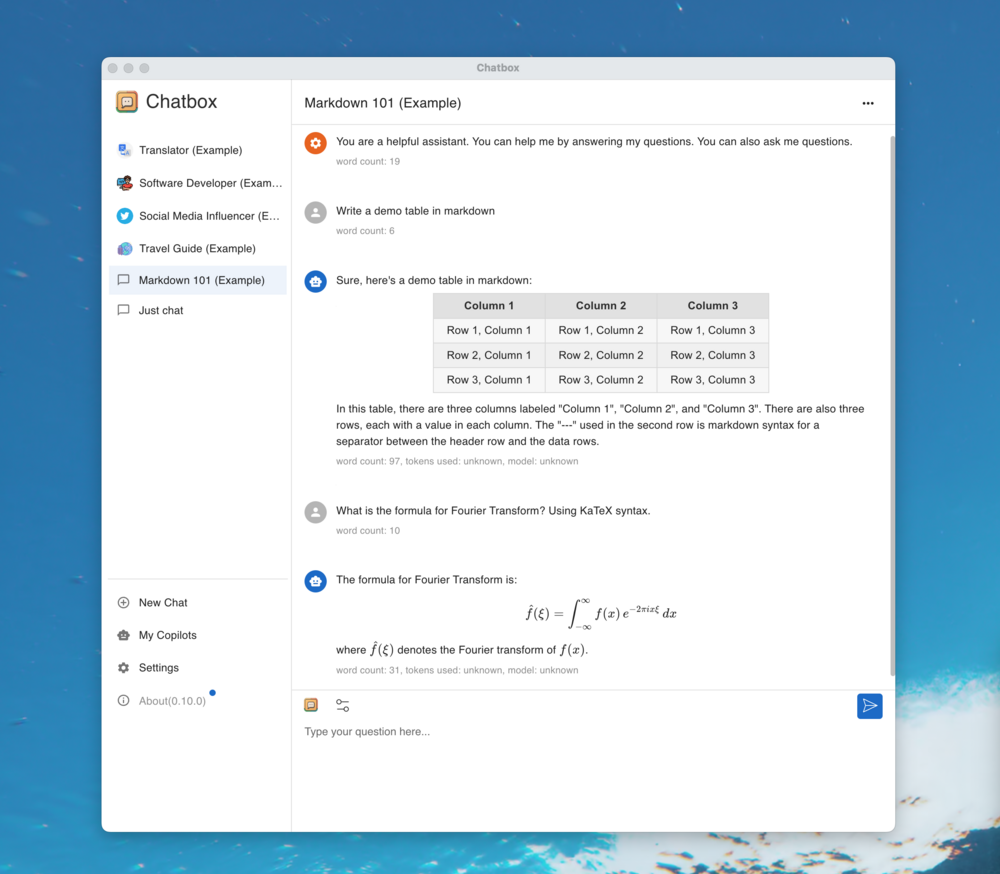
Chatbox is a desktop client for ChatGPT, Claude and other LLMs, available on Windows, Mac, Linux





| Windows | MacOS | Linux | |

Setup.exe |

Intel |
Apple Silicon |

AppImage |


 .APK
For more information: [chatboxai.app](https://chatboxai.app/)
## Quick Start
### For End Users
1. Download the appropriate installer for your platform from the [releases page](https://github.com/chatboxai/chatbox/releases)
2. Install and launch Chatbox
3. Configure your AI provider (OpenAI, Claude, etc.) in settings
4. Start chatting!
### System Requirements
| Platform | Minimum Version | Architecture |
|----------|----------------|--------------|
| Windows | Windows 10 | x64 |
| macOS | macOS 11 (Big Sur) | Intel/Apple Silicon |
| Linux | Ubuntu 20.04+ / AppImage supported distros | x64 |
## Features
### 🤖 AI Model Support
- **Support for Multiple LLM Providers**
:gear: Seamlessly integrate with a variety of cutting-edge language models:
- OpenAI (ChatGPT)
- Azure OpenAI
- Claude
- Google Gemini Pro
- Ollama (enable access to local models like llama2, Mistral, Mixtral, codellama, vicuna, yi, and solar)
- ChatGLM-6B
- **Image Generation with Dall-E-3**
:art: Create the images of your imagination with Dall-E-3.
- **Enhanced Prompting**
:speech_balloon: Advanced prompting features to refine and focus your queries for better responses.
### 🖥️ User Experience
- **Local Data Storage**
:floppy_disk: Your data remains on your device, ensuring it never gets lost and maintains your privacy.
- **No-Deployment Installation Packages**
:package: Get started quickly with downloadable installation packages. No complex setup necessary!
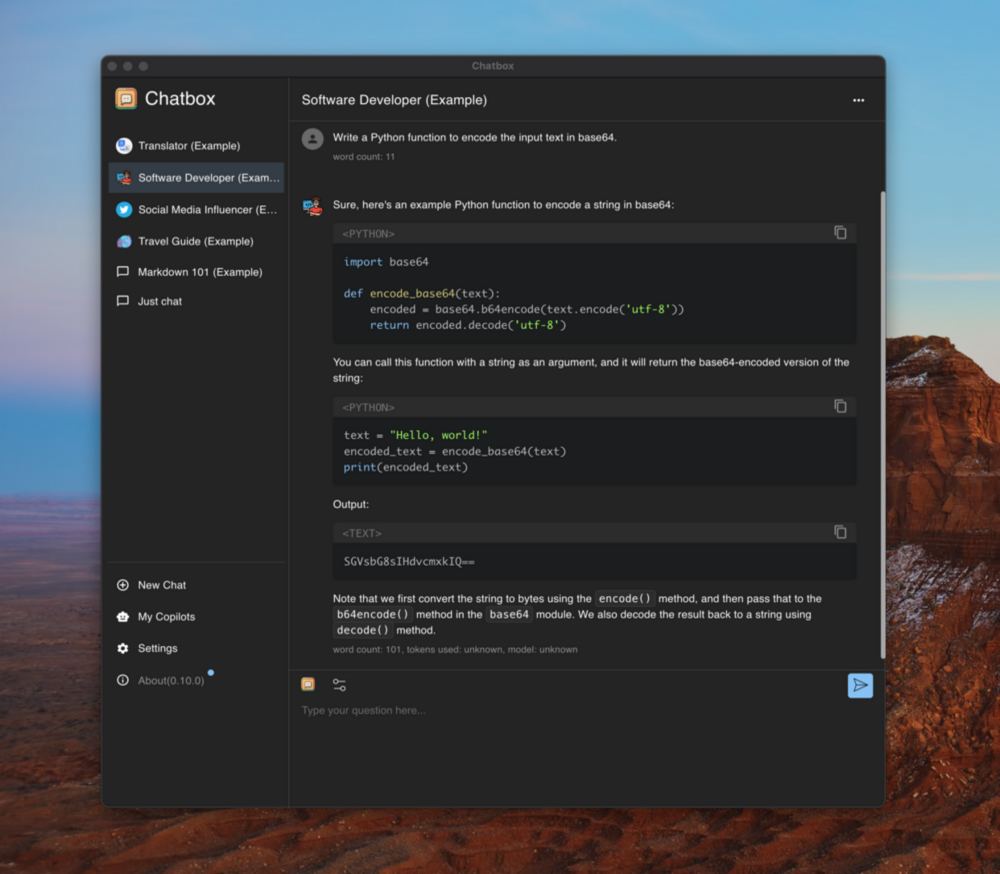
- **Ergonomic UI & Dark Theme**
:new_moon: A user-friendly interface with a night mode option for reduced eye strain during extended use.
- **Keyboard Shortcuts**
:keyboard: Stay productive with shortcuts that speed up your workflow.
- **Streaming Reply**
:arrow_forward: Provide rapid responses to your interactions with immediate, progressive replies.
### 📄 Content & Formatting
- **Markdown, Latex & Code Highlighting**
:scroll: Generate messages with the full power of Markdown and Latex formatting, coupled with syntax highlighting for various programming languages, enhancing readability and presentation.
- **Prompt Library & Message Quoting**
:books: Save and organize prompts for reuse, and quote messages for context in discussions.
### 👥 Collaboration & Sharing
- **Team Collaboration**
:busts_in_silhouette: Collaborate with ease and share OpenAI API resources among your team. [Learn More](./team-sharing/README.md)
### 🌐 Platform Availability
- **Cross-Platform Desktop**
:computer: Chatbox is ready for Windows, Mac, and Linux users.
- **Web Version**
:globe_with_meridians: Use the web application on any device with a browser, anywhere.
- **Mobile Apps**
:phone: Native iOS and Android applications for on-the-go access.
### 🌍 Localization
- **Multilingual Support**
:earth_americas: Catering to a global audience by offering support in multiple languages:
- English
- 简体中文 (Simplified Chinese)
- 繁體中文 (Traditional Chinese)
- 日本語 (Japanese)
- 한국어 (Korean)
- Français (French)
- Deutsch (German)
- Русский (Russian)
- Español (Spanish)
### ✨ More Features
- **And More...**
:sparkles: Constantly enhancing the experience with new features!
## FAQ
- [Frequently Asked Questions](./doc/FAQ.md)
## How to Contribute
We welcome contributions from the community! Here's how you can help make Chatbox better:
### 🐛 Reporting Issues
- Use [GitHub Issues](https://github.com/chatboxai/chatbox/issues) to report bugs or request features
- Before creating a new issue, please search existing issues to avoid duplicates
- Provide detailed information including steps to reproduce, expected behavior, and screenshots if applicable
### 🔧 Pull Requests
1. Fork the repository and create your branch from `main`
2. Make your changes and ensure the code follows our coding standards
3. Test your changes thoroughly
4. Update documentation if needed
5. Submit a pull request with a clear description of the changes
### 🌍 Translations
Help make Chatbox accessible to more people by contributing translations:
- Translation files are located in the `src/locales` directory
- Follow the existing translation format
- Submit a PR with your translation improvements
### 📖 Documentation
- Improve README, API documentation, or user guides
- Fix typos or clarify unclear instructions
- Add examples and tutorials
### 🌟 Other Ways to Contribute
- Star the repository to show your support
- Share Chatbox with others
- Answer questions in [GitHub Discussions](https://github.com/chatboxai/chatbox/discussions)
- Provide feedback and suggestions
**Thank you for contributing! 🙏**
## Development
### Prerequisites
Before you begin, ensure you have the following installed:
- **Node.js** (v20.x – v22.x) - [Download here](https://nodejs.org/)
- **pnpm** (v10.x or later) - Install via `corepack enable && corepack prepare pnpm@latest --activate`
- **Git** - [Download here](https://git-scm.com/)
### Quick Setup
1. **Clone the repository**
```bash
git clone https://github.com/chatboxai/chatbox.git
cd chatbox
```
2. **Install dependencies**
```bash
pnpm install
```
3. **Start development server**
```bash
pnpm run dev
```
The application will start in development mode with hot-reload enabled.
### Build Commands
| Command | Description |
|---------|-------------|
| `pnpm run dev` | Start development server with hot-reload |
| `pnpm run package` | Build and package for current platform |
| `pnpm run package:all` | Build and package for all platforms |
| `pnpm run build` | Build for production without packaging |
| `pnpm run lint` | Run Biome to check code quality |
| `pnpm run test` | Run Vitest test suite |
### Project Structure
```
chatbox/
├── src/
│ ├── main/ # Electron main process
│ ├── renderer/ # React renderer (UI)
│ ├── preload/ # Electron preload scripts
│ └── shared/ # Shared utilities
├── doc/ # Documentation and assets
├── resources/ # App resources and icons
├── team-sharing/ # Team collaboration features
└── package.json # Project configuration
```
### Development Tips
- Use `pnpm run lint` before committing to ensure code quality
- Follow the existing code style and patterns
- Test your changes on both light and dark themes
- Ensure cross-platform compatibility when making UI changes
### Troubleshooting
**Issue**: `pnpm install` fails
- **Solution**: Ensure you're using pnpm (not npm or yarn) and Node.js version is within the required range. Run `corepack enable` if pnpm is not found.
**Issue**: Build fails on Windows
- **Solution**: Run `pnpm config set script-shell "C:\\Program Files\\git\\bin\\bash.exe"` if using Git Bash
**Issue**: Changes not reflecting in development
- **Solution**: Stop the dev server, delete `node_modules/.vite`, and restart
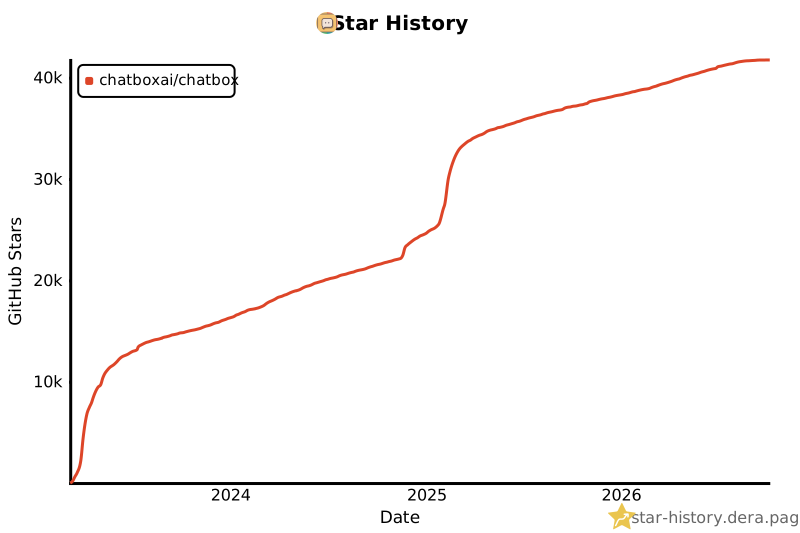
## Star History
[](https://star-history.dera.page/#chatboxai/chatbox&Date)
## Contact
[Email](mailto:hi@chatboxai.com)
## License
[LICENSE](./LICENSE)
.APK
For more information: [chatboxai.app](https://chatboxai.app/)
## Quick Start
### For End Users
1. Download the appropriate installer for your platform from the [releases page](https://github.com/chatboxai/chatbox/releases)
2. Install and launch Chatbox
3. Configure your AI provider (OpenAI, Claude, etc.) in settings
4. Start chatting!
### System Requirements
| Platform | Minimum Version | Architecture |
|----------|----------------|--------------|
| Windows | Windows 10 | x64 |
| macOS | macOS 11 (Big Sur) | Intel/Apple Silicon |
| Linux | Ubuntu 20.04+ / AppImage supported distros | x64 |
## Features
### 🤖 AI Model Support
- **Support for Multiple LLM Providers**
:gear: Seamlessly integrate with a variety of cutting-edge language models:
- OpenAI (ChatGPT)
- Azure OpenAI
- Claude
- Google Gemini Pro
- Ollama (enable access to local models like llama2, Mistral, Mixtral, codellama, vicuna, yi, and solar)
- ChatGLM-6B
- **Image Generation with Dall-E-3**
:art: Create the images of your imagination with Dall-E-3.
- **Enhanced Prompting**
:speech_balloon: Advanced prompting features to refine and focus your queries for better responses.
### 🖥️ User Experience
- **Local Data Storage**
:floppy_disk: Your data remains on your device, ensuring it never gets lost and maintains your privacy.
- **No-Deployment Installation Packages**
:package: Get started quickly with downloadable installation packages. No complex setup necessary!
- **Ergonomic UI & Dark Theme**
:new_moon: A user-friendly interface with a night mode option for reduced eye strain during extended use.
- **Keyboard Shortcuts**
:keyboard: Stay productive with shortcuts that speed up your workflow.
- **Streaming Reply**
:arrow_forward: Provide rapid responses to your interactions with immediate, progressive replies.
### 📄 Content & Formatting
- **Markdown, Latex & Code Highlighting**
:scroll: Generate messages with the full power of Markdown and Latex formatting, coupled with syntax highlighting for various programming languages, enhancing readability and presentation.
- **Prompt Library & Message Quoting**
:books: Save and organize prompts for reuse, and quote messages for context in discussions.
### 👥 Collaboration & Sharing
- **Team Collaboration**
:busts_in_silhouette: Collaborate with ease and share OpenAI API resources among your team. [Learn More](./team-sharing/README.md)
### 🌐 Platform Availability
- **Cross-Platform Desktop**
:computer: Chatbox is ready for Windows, Mac, and Linux users.
- **Web Version**
:globe_with_meridians: Use the web application on any device with a browser, anywhere.
- **Mobile Apps**
:phone: Native iOS and Android applications for on-the-go access.
### 🌍 Localization
- **Multilingual Support**
:earth_americas: Catering to a global audience by offering support in multiple languages:
- English
- 简体中文 (Simplified Chinese)
- 繁體中文 (Traditional Chinese)
- 日本語 (Japanese)
- 한국어 (Korean)
- Français (French)
- Deutsch (German)
- Русский (Russian)
- Español (Spanish)
### ✨ More Features
- **And More...**
:sparkles: Constantly enhancing the experience with new features!
## FAQ
- [Frequently Asked Questions](./doc/FAQ.md)
## How to Contribute
We welcome contributions from the community! Here's how you can help make Chatbox better:
### 🐛 Reporting Issues
- Use [GitHub Issues](https://github.com/chatboxai/chatbox/issues) to report bugs or request features
- Before creating a new issue, please search existing issues to avoid duplicates
- Provide detailed information including steps to reproduce, expected behavior, and screenshots if applicable
### 🔧 Pull Requests
1. Fork the repository and create your branch from `main`
2. Make your changes and ensure the code follows our coding standards
3. Test your changes thoroughly
4. Update documentation if needed
5. Submit a pull request with a clear description of the changes
### 🌍 Translations
Help make Chatbox accessible to more people by contributing translations:
- Translation files are located in the `src/locales` directory
- Follow the existing translation format
- Submit a PR with your translation improvements
### 📖 Documentation
- Improve README, API documentation, or user guides
- Fix typos or clarify unclear instructions
- Add examples and tutorials
### 🌟 Other Ways to Contribute
- Star the repository to show your support
- Share Chatbox with others
- Answer questions in [GitHub Discussions](https://github.com/chatboxai/chatbox/discussions)
- Provide feedback and suggestions
**Thank you for contributing! 🙏**
## Development
### Prerequisites
Before you begin, ensure you have the following installed:
- **Node.js** (v20.x – v22.x) - [Download here](https://nodejs.org/)
- **pnpm** (v10.x or later) - Install via `corepack enable && corepack prepare pnpm@latest --activate`
- **Git** - [Download here](https://git-scm.com/)
### Quick Setup
1. **Clone the repository**
```bash
git clone https://github.com/chatboxai/chatbox.git
cd chatbox
```
2. **Install dependencies**
```bash
pnpm install
```
3. **Start development server**
```bash
pnpm run dev
```
The application will start in development mode with hot-reload enabled.
### Build Commands
| Command | Description |
|---------|-------------|
| `pnpm run dev` | Start development server with hot-reload |
| `pnpm run package` | Build and package for current platform |
| `pnpm run package:all` | Build and package for all platforms |
| `pnpm run build` | Build for production without packaging |
| `pnpm run lint` | Run Biome to check code quality |
| `pnpm run test` | Run Vitest test suite |
### Project Structure
```
chatbox/
├── src/
│ ├── main/ # Electron main process
│ ├── renderer/ # React renderer (UI)
│ ├── preload/ # Electron preload scripts
│ └── shared/ # Shared utilities
├── doc/ # Documentation and assets
├── resources/ # App resources and icons
├── team-sharing/ # Team collaboration features
└── package.json # Project configuration
```
### Development Tips
- Use `pnpm run lint` before committing to ensure code quality
- Follow the existing code style and patterns
- Test your changes on both light and dark themes
- Ensure cross-platform compatibility when making UI changes
### Troubleshooting
**Issue**: `pnpm install` fails
- **Solution**: Ensure you're using pnpm (not npm or yarn) and Node.js version is within the required range. Run `corepack enable` if pnpm is not found.
**Issue**: Build fails on Windows
- **Solution**: Run `pnpm config set script-shell "C:\\Program Files\\git\\bin\\bash.exe"` if using Git Bash
**Issue**: Changes not reflecting in development
- **Solution**: Stop the dev server, delete `node_modules/.vite`, and restart
## Star History
[](https://star-history.dera.page/#chatboxai/chatbox&Date)
## Contact
[Email](mailto:hi@chatboxai.com)
## License
[LICENSE](./LICENSE)