ContextAtlas
Stable, reusable, and observable code context infrastructure for AI agents
Hybrid Retrieval · Project Memory · MCP Server · Retrieval Observability


简体中文 ·
Docs ·
First Use ·
Deployment ·
CLI ·
MCP
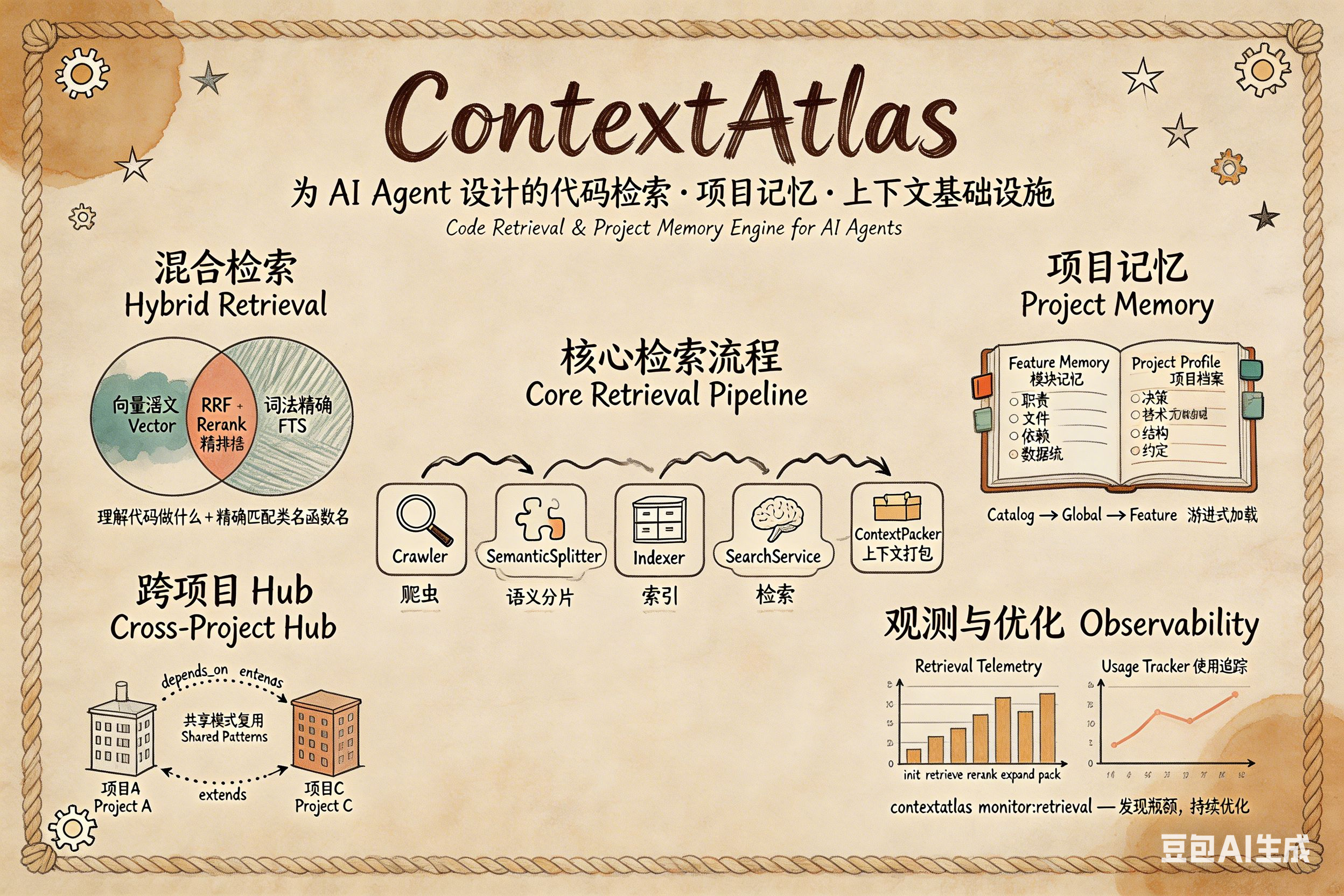
**ContextAtlas** is an open-source context infrastructure for AI coding agents — providing hybrid code retrieval, project memory, and retrieval observability as a CLI, MCP server, or embeddable library. It combines tree-sitter semantic chunking, LanceDB vector search, SQLite FTS5 full-text search, and token-aware context packing to deliver structured, high-quality code context to tools like Claude Code, Codex, and custom agent workflows.
## Updates
- `2026-04-15`: added git hook auto-maintenance with `--quick` health check (260x speedup), stale index cleanup CLI, and three-layer hook protection (debounce + quick mode + daily throttle).
- `2026-04-14`: extracted 11 Memory MCP tools' business logic to application layer, completing three-layer architecture separation (CLI / MCP adapter → application → domain), and fixed all 31 TypeScript compilation errors.
- `2026-04-10`: `codebase-retrieval` now includes the lightweight direct graph summary by default, with MCP metadata, tests, and changelog docs updated in sync.
- `2026-04-09`: added churn / cost-aware index planning, moved long-term memory into dedicated tables + FTS5, and finished default-path hardening, threshold configuration, ops alert threshold alignment, and doc sync.
- `2026-04-08`: added the embedding gateway, local caching and multi-upstream routing, plus Hugging Face integration and MCP context lifecycle tools.
- `2026-04-07`: improved the indexing pipeline with lighter planning, snapshot copy reduction, queue observability, fallback hardening, and repeatable benchmarks.
- `2026-04-06`: tightened the default user path, memory governance, and operational visibility to make first use, feedback loops, and health checks clearer.
## Contents
- [Why ContextAtlas](#why-contextatlas)
- [Where it fits](#where-it-fits)
- [Core Capabilities](#core-capabilities)
- [Tech Stack](#tech-stack)
- [Installation](#installation)
- [Configuration](#configuration)
- [Quick Start](#quick-start)
- [Integration Modes](#integration-modes)
- [Architecture Overview](#architecture-overview)
- [Documentation](#documentation-map)
- [Friendly Links](#friendly-links)
- [License](#license)
ContextAtlas is not just a code search tool. It addresses a more practical engineering problem:
- can an agent find the right code faster in a large repository?
- can repository understanding be persisted instead of rediscovered every session?
- can retrieval, indexing, and memory quality be observed and improved over time?
If you are building Claude Code workflows, MCP clients, or custom agent systems, ContextAtlas provides a **context infrastructure layer**: retrieval, memory, context packing, and observability.
## Why ContextAtlas
In real projects, agent failures are often not caused by a weak model. They come from weak context systems:
- the relevant code is not found
- the returned code is too fragmented and lacks surrounding context
- the same module has to be re-understood again and again
- indexes become stale, retrieval quality degrades, and token budgets get exhausted without clear signals
ContextAtlas turns this into a composable set of capabilities:
- **Find**: hybrid retrieval narrows down the relevant implementation
- **Expand**: graph expansion and token packing turn hits into usable local context
- **Store**: project memory, long-term memory, and a cross-project hub preserve knowledge
- **Observe**: health checks, telemetry, usage analysis, and alerts make the system diagnosable
## Where it fits
- As a repository retrieval backend for coding agents
- As an MCP server for external clients that need code retrieval and memory tools
- As a local CLI / skill backend for scripts, CI, and workflow automation
- As a cross-project knowledge layer for reusable module knowledge and decision history
## Core capabilities
| Capability | Description |
|------|------|
| **Hybrid Retrieval** | Vector recall + FTS lexical recall + RRF fusion + rerank |
| **Context Expansion** | Local context expansion based on neighbors, breadcrumbs, and imports |
| **Token-aware Packing** | Keeps the highest-value context inside a limited token budget |
| **Project Memory** | Feature Memory, Decision Record, and Project Profile |
| **Long-term Memory** | Rules, preferences, and external references that cannot be derived reliably from code |
| **Cross-project Hub** | Reuse module memories, dependency chains, and relations across repositories |
| **Async Indexing** | SQLite queue + daemon consumer + atomic snapshot switch |
| **Observability** | Retrieval monitor, usage report, index health, memory health, and alert evaluation |
ContextAtlas decides **what context to provide**, not **how the task should be executed**. It does not handle agent reasoning, workflow orchestration, or business API actions.
## Tech stack
- **TypeScript / Node.js 20+**
- **Tree-sitter** for semantic chunking
- **SQLite + FTS5** for metadata, retrieval, queues, and memory hub storage
- **LanceDB** for vector storage
- **Model Context Protocol SDK** for MCP integration
## Installation
```bash
npm install -g @codefromkarl/context-atlas
```
Product identity mapping:
- Repository: `ContextAtlas`
- npm package: `@codefromkarl/context-atlas`
- CLI command: `contextatlas`
Available commands:
- `contextatlas`
- `cw` (short alias)
The docs use `contextatlas` as the primary command name. `cw` remains as a compatibility alias.
## Configuration
Initialize the config directory and example environment file first:
```bash
contextatlas init
# Choose your integration mode:
contextatlas setup:local --mode cli-skill # Terminal + skill integration
# OR
contextatlas setup:local --mode mcp # MCP client integration
```
Default config file location:
```bash
~/.contextatlas/.env
```
Minimum required configuration:
```bash
EMBEDDINGS_API_KEY=
EMBEDDINGS_BASE_URL=
EMBEDDINGS_MODEL=
RERANK_API_KEY=
RERANK_BASE_URL=
RERANK_MODEL=
```
Index update planning also supports these optional knobs:
```bash
INDEX_UPDATE_CHURN_THRESHOLD=0.35
INDEX_UPDATE_COST_RATIO_THRESHOLD=0.65
INDEX_UPDATE_MIN_FILES=8
INDEX_UPDATE_MIN_CHANGED_FILES=5
```
- `INDEX_UPDATE_CHURN_THRESHOLD`: when the changed-file ratio crosses this value, `index:plan` / `index:update` will favor `full`
- `INDEX_UPDATE_COST_RATIO_THRESHOLD`: triggers `full` when the estimated incremental cost is close to a full rebuild
- `INDEX_UPDATE_MIN_FILES` / `INDEX_UPDATE_MIN_CHANGED_FILES`: require both repo size and change size to clear a minimum bar before escalation is allowed
> `init` writes an editable example `.env`, including default SiliconFlow endpoints and recommended model settings.
> `setup:local --mode ` writes only the configuration files for the selected mode. See [First use guide](./docs/guides/first-use.md) for mode selection guidance.
> After setup, run `contextatlas health:full` to verify index, memory, graph, contract, and MCP process health.
## Quick start
If you are onboarding for the first time, start with the [First use guide](./docs/guides/first-use.md).
### 1) Confirm the default entry flow
```bash
contextatlas start /path/to/repo
```
### 2) Initialize and fill in API settings
```bash
contextatlas init
# edit ~/.contextatlas/.env
```
### 3) Index a repository
```bash
contextatlas index /path/to/repo
```
### 4) Run local retrieval
```bash
contextatlas search \
--repo-path /path/to/repo \
--information-request "How is the authentication flow implemented?"
```
### 5) Start the daemon (recommended)
```bash
contextatlas daemon start
```
### 6) Expose it as an MCP server
```bash
contextatlas mcp
```
> If you want MCP client integration, run `contextatlas setup:local --mode mcp` first.
## Integration modes
### 1. As a local CLI / skill backend
Set up with `contextatlas setup:local --mode cli-skill`.
Useful for:
- custom agent skills
- shell workflows and CI scripts
- local debugging and retrieval analysis
Example:
```bash
# retrieval
contextatlas search --repo-path /path/to/repo --information-request "Where is the payment retry policy implemented?"
# project memory
contextatlas memory:find "search"
contextatlas decision:list
# health
contextatlas health:full
```
### 2. As an MCP server
Set up with `contextatlas setup:local --mode mcp`.
Use `contextatlas setup:local --mode mcp --toolset retrieval-only` when the client should only see read-only retrieval, graph, contract, and memory-reader tools.
Useful for:
- desktop clients that support MCP
- agent systems that need standard tool-based access to ContextAtlas capabilities
Claude Desktop configuration example:
```json
{
"mcpServers": {
"contextatlas": {
"command": "contextatlas",
"args": ["mcp"]
}
}
}
```
ContextAtlas MCP tools cover:
- code retrieval
- project memory
- long-term memory
- cross-project hub operations
- auto-recording and memory suggestion flows
## Architecture overview
```text
Indexing: Crawler / Scanner → Chunking → Indexing → Vector / SQLite Storage
Retrieval: Vector + FTS Recall → RRF → Rerank → Graph Expansion → Context Packing
Memory: Project Memory / Long-term Memory / Hub → CLI / MCP Tools
```
ContextAtlas focuses on **what context to provide**, not how the task should be executed. For a fuller architecture explanation, see [repository positioning](./docs/architecture/repository-positioning.md) and [engineering positioning](./docs/architecture/harness-engineering.md).
## Documentation map
| Document | Purpose |
|------|------|
| [2026-04-15 update summary](./docs/changelog/2026-04-15.md) | Quick health check, stale index cleanup, and git hook auto-maintenance |
| [Docs index](./docs/README.md) | Unified entry for stable docs, plans, changelog, and archived delivery material |
| [2026-04-10 update summary](./docs/changelog/2026-04-10.md) | Default-on graph context for codebase retrieval plus MCP/docs sync |
| [First use guide](./docs/guides/first-use.md) | Fast onboarding path for the default `contextatlas` loop |
| [2026-04-06 update summary](./docs/changelog/2026-04-06.md) | Summary of the new main path, memory governance, operations, release gate, and team metrics |
| [2026-04-07 update summary](./docs/changelog/2026-04-07.md) | Summary of the seven indexing phases covering lightweight planning, snapshot copy reduction, health repair, observability, fallback hardening, storage trimming, and benchmarks |
| [2026-04-09 update summary](./docs/changelog/2026-04-09.md) | Summary of index planning thresholds, long-term memory table split, and delivery sync |
| [Deployment guide](./docs/guides/deployment.md) | Installation, deployment patterns, MCP integration, operations |
| [CLI reference](./docs/reference/cli.md) | CLI commands, categories, and examples |
| [MCP reference](./docs/reference/mcp.md) | MCP tools, parameters, and calling patterns |
| [Project memory guide](./docs/project/project-memory.md) | Feature Memory, Decision Record, and Catalog routing |
| [Latest delivery bundle](./docs/archive/deliveries/2026-04-09-index-and-memory/delivery-bundle.md) | Bundled handoff package for the latest verified delivery |
| [Repository positioning](./docs/architecture/repository-positioning.md) | Repository role, design thinking, and system boundaries |
| [Engineering positioning](./docs/architecture/harness-engineering.md) | Where ContextAtlas fits in harness engineering |
| [Product roadmap](./docs/product/roadmap.md) | Future versions and product direction |
## Contributing
Ways to improve ContextAtlas:
- open issues for bugs or documentation gaps
- submit PRs for retrieval, memory, monitoring, or documentation improvements
- contribute real-world usage patterns, deployment notes, and benchmark data
- improve README, CLI docs, and MCP examples
Before submitting code, it helps to:
1. run `pnpm build` and make sure the repo still builds
2. keep command examples, README, and docs aligned with the implementation
3. update functionality, documentation, and operational notes together when possible
## Development
```bash
pnpm build
pnpm build:release
pnpm dev
node dist/index.js
```
## Friendly links
https://linux.do/
## License
MIT