오픈 소스 AI Observability, Evaluation, Optimization 플랫폼
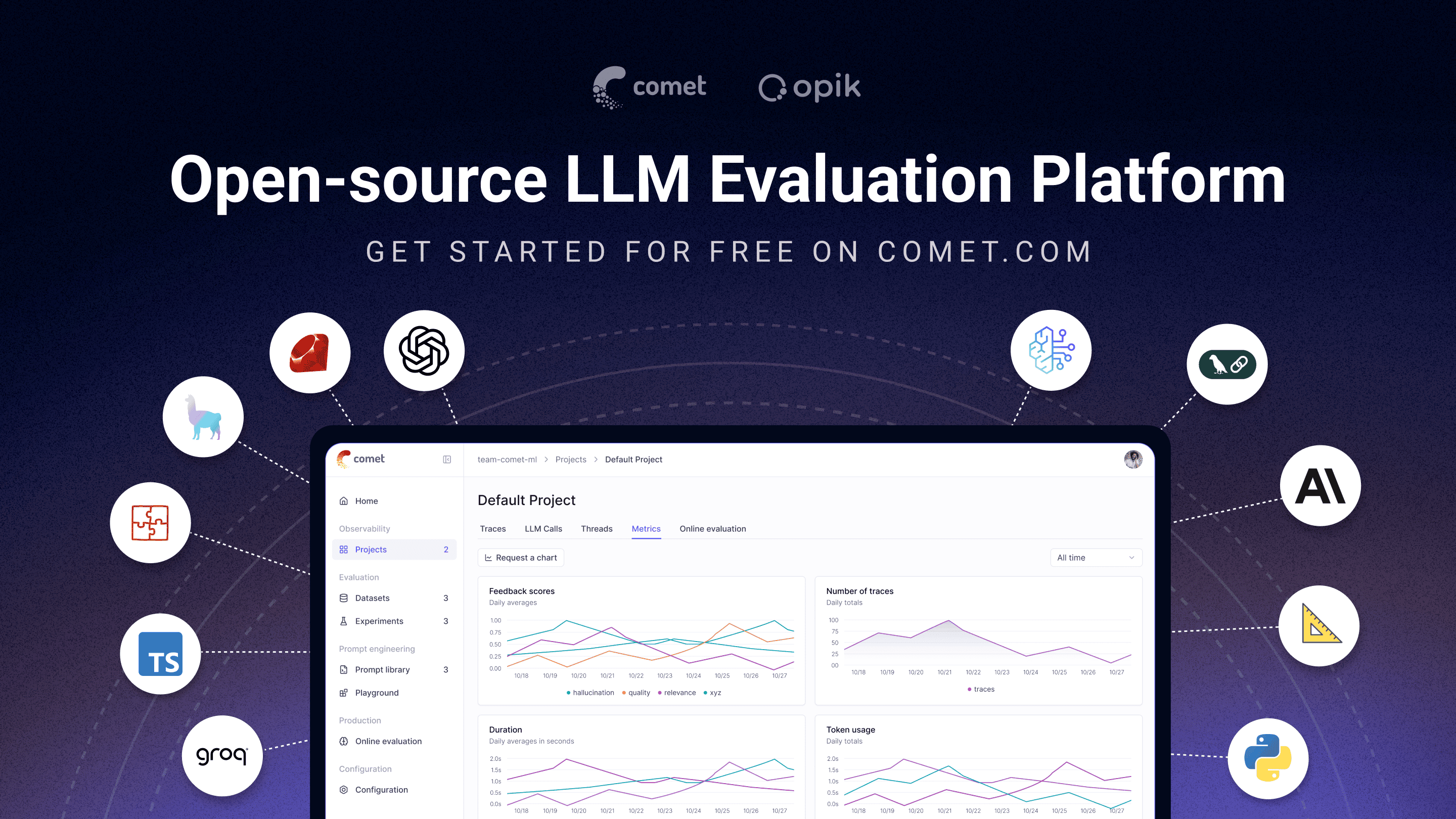
Opik은 프로토타입부터 프로덕션까지, 더 나은 생성형 AI 애플리케이션을 구축하고 테스트하고 최적화할 수 있도록 도와줍니다. RAG 챗봇, 코드 어시스턴트, 복잡한 에이전트 시스템까지—Opik의 tracing, evaluation, 자동 prompt 및 tool 최적화 기능으로 AI 개발의 불확실성을 줄여보세요.
[](https://www.comet.com/signup?from=llm&utm_source=opik&utm_medium=github&utm_content=readme_banner&utm_campaign=opik)
## 🚀 Opik이란?
Opik([Comet](https://www.comet.com?from=llm&utm_source=opik&utm_medium=github&utm_content=what_is_opik_link&utm_campaign=opik) 제공)은 LLM 애플리케이션의 전체 라이프사이클을 간소화하기 위해 설계된 오픈 소스 플랫폼입니다. 개발자가 모델과 에이전트 시스템을 평가, 테스트, 모니터링, 최적화할 수 있도록 지원합니다. 주요 기능은 다음과 같습니다:
- **Comprehensive Observability**: LLM 호출의 상세 tracing, 대화 로깅, 에이전트 활동 추적
- **Advanced Evaluation**: 강력한 prompt 평가, LLM-as-a-judge, 실험 관리
- **Production-Ready**: 확장 가능한 모니터링 대시보드 및 온라인 evaluation rule 제공
- **Opik Agent Optimizer**: prompt와 에이전트를 개선하기 위한 전용 SDK 및 optimizer 세트
- **Opik Guardrails**: 안전하고 책임감 있는 AI 개발을 위한 기능
주요 기능:
- **개발 & Tracing:**
- 개발 및 프로덕션 환경에서 상세한 context와 함께 모든 LLM 호출과 trace를 추적 ([Quickstart](https://www.comet.com/docs/opik/quickstart/?from=llm&utm_source=opik&utm_medium=github&utm_content=quickstart_link&utm_campaign=opik))
- 광범위한 서드파티 통합으로 손쉬운 observability 제공: **Google ADK**, **Autogen**, **Flowise AI** 등 다양한 프레임워크를 네이티브로 지원 ([Integrations](https://www.comet.com/docs/opik/integrations/overview/?from=llm&utm_source=opik&utm_medium=github&utm_content=integrations_link&utm_campaign=opik))
- [Python SDK](https://www.comet.com/docs/opik/tracing/annotate_traces/#annotating-traces-and-spans-using-the-sdk?from=llm&utm_source=opik&utm_medium=github&utm_content=sdk_link&utm_campaign=opik) 또는 [UI](https://www.comet.com/docs/opik/tracing/annotate_traces/#annotating-traces-through-the-ui?from=llm&utm_source=opik&utm_medium=github&utm_content=ui_link&utm_campaign=opik)를 통해 trace와 span에 피드백 점수 주석 추가
- [Prompt Playground](https://www.comet.com/docs/opik/prompt_engineering/playground)에서 prompt와 모델 실험
- **Evaluation & Testing**:
- [Datasets](https://www.comet.com/docs/opik/evaluation/manage_datasets/?from=llm&utm_source=opik&utm_medium=github&utm_content=datasets_link&utm_campaign=opik) 및 [Experiments](https://www.comet.com/docs/opik/evaluation/evaluate_your_llm/?from=llm&utm_source=opik&utm_medium=github&utm_content=eval_link&utm_campaign=opik)를 통해 LLM 애플리케이션 평가 자동화
- [Hallucination Detection](https://www.comet.com/docs/opik/evaluation/metrics/hallucination/?from=llm&utm_source=opik&utm_medium=github&utm_content=hallucination_link&utm_campaign=opik), [Moderation](https://www.comet.com/docs/opik/evaluation/metrics/moderation/?from=llm&utm_source=opik&utm_medium=github&utm_content=moderation_link&utm_campaign=opik), RAG 평가([Answer Relevance](https://www.comet.com/docs/opik/evaluation/metrics/answer_relevance/?from=llm&utm_source=opik&utm_medium=github&utm_content=alex_link&utm_campaign=opik), [Context Precision](https://www.comet.com/docs/opik/evaluation/metrics/context_precision/?from=llm&utm_source=opik&utm_medium=github&utm_content=context_link&utm_campaign=opik)) 등 강력한 LLM-as-a-judge metric 활용
- [PyTest 통합](https://www.comet.com/docs/opik/testing/pytest_integration/?from=llm&utm_source=opik&utm_medium=github&utm_content=pytest_link&utm_campaign=opik)으로 CI/CD 파이프라인에 evaluation 통합
- **프로덕션 모니터링 & 최적화**:
- 대용량 프로덕션 trace 로깅: Opik은 하루 4천만 건 이상의 trace 처리가 가능하도록 설계됨
- [Opik Dashboard](https://www.comet.com/docs/opik/production/production_monitoring/?from=llm&utm_source=opik&utm_medium=github&utm_content=dashboard_link&utm_campaign=opik)에서 피드백 점수, trace 수, 토큰 사용량을 시간별로 모니터링
- [Online Evaluation Rules](https://www.comet.com/docs/opik/production/rules/?from=llm&utm_source=opik&utm_medium=github&utm_content=dashboard_link&utm_campaign=opik)와 LLM-as-a-Judge metric으로 프로덕션 이슈 탐지
- **Opik Agent Optimizer** 및 **Opik Guardrails**로 LLM 애플리케이션을 지속적으로 개선하고 보호
> [!TIP]
> 원하시는 기능이 아직 Opik에 없다면 [Feature request](https://github.com/comet-ml/opik/issues/new/choose)를 등록해주세요! 🚀
## 🛠️ Opik 서버 설치
몇 분 안에 Opik 서버를 실행할 수 있습니다. 상황에 맞는 옵션을 선택하세요:
### 옵션 1: Comet.com Cloud (가장 간편 & 권장)
별도 설정 없이 즉시 Opik 사용 가능. 빠른 시작과 유지보수 부담 없이 사용하기에 최적입니다.
👉 [무료 Comet 계정 생성](https://www.comet.com/signup?from=llm&utm_source=opik&utm_medium=github&utm_content=install_create_link&utm_campaign=opik)
### 옵션 2: Self-Host로 완전한 제어
자체 환경에 Opik을 배포하세요. 로컬 환경에서는 Docker, 확장 가능한 배포에는 Kubernetes를 사용할 수 있습니다.
#### Docker Compose로 Self-Hosting (로컬 개발 & 테스트)
로컬 Opik 인스턴스를 실행하는 가장 간단한 방법입니다. 새로운 `./opik.sh` 설치 스크립트를 사용하세요:
On Linux or Mac Environment:
```bash
# Opik 리포지토리 클론
git clone https://github.com/comet-ml/opik.git
# 리포지토리로 이동
cd opik
# Opik 플랫폼 실행
./opik.sh
```
On Windows Environment:
```powershell
# Opik 리포지토리 클론
git clone https://github.com/comet-ml/opik.git
# 리포지토리로 이동
cd opik
# Opik 플랫폼 실행
powershell -ExecutionPolicy ByPass -c ".\\opik.ps1"
```
**개발용 Service Profile**
Opik 설치 스크립트는 다양한 개발 시나리오를 위한 service profile을 지원합니다:
```bash
# 전체 Opik suite 시작 (기본 동작)
./opik.sh
# 인프라 서비스만 시작 (데이터베이스, 캐시 등)
./opik.sh --infra
# 인프라 + 백엔드 서비스 시작
./opik.sh --backend
# 모든 profile에서 guardrails 활성화
./opik.sh --guardrails # 전체 Opik suite + Guardrails
./opik.sh --backend --guardrails # 인프라 + 백엔드 + Guardrails
```
문제 해결을 위해 `--help` 또는 `--info` 옵션을 사용하세요. Dockerfile은 보안 강화를 위해 컨테이너가 non-root 사용자로 실행되도록 합니다. 모든 서비스가 실행되면 브라우저에서 [localhost:5173](http://localhost:5173)에 접속하세요! 자세한 내용은 [Local Deployment Guide](https://www.comet.com/docs/opik/self-host/local_deployment?from=llm&utm_source=opik&utm_medium=github&utm_content=self_host_link&utm_campaign=opik)를 참조하세요.
#### Kubernetes & Helm으로 Self-Hosting (확장 가능한 배포)
프로덕션 또는 대규모 self-hosted 배포를 위해 Helm chart를 사용하여 Kubernetes 클러스터에 Opik을 설치할 수 있습니다. 배지를 클릭하면 전체 [Kubernetes Installation Guide using Helm](https://www.comet.com/docs/opik/self-host/kubernetes/#kubernetes-installation?from=llm&utm_source=opik&utm_medium=github&utm_content=kubernetes_link&utm_campaign=opik)을 확인할 수 있습니다.
[](https://www.comet.com/docs/opik/self-host/kubernetes/#kubernetes-installation?from=llm&utm_source=opik&utm_medium=github&utm_content=kubernetes_link&utm_campaign=opik)
> [!IMPORTANT]
> **버전 1.7.0 변경 사항**: 중요 업데이트 및 breaking change는 [changelog](https://github.com/comet-ml/opik/blob/main/CHANGELOG.md)를 확인하세요.
## 💻 Opik 클라이언트 SDK
Opik은 Opik 서버와 상호작용할 수 있는 클라이언트 라이브러리 suite와 REST API를 제공합니다. Python, TypeScript, Ruby(OpenTelemetry 사용) SDK를 지원하여 워크플로우에 손쉽게 통합할 수 있습니다. 상세한 API 및 SDK 레퍼런스는 [Opik Client Reference Documentation](https://www.comet.com/docs/opik/reference/overview?from=llm&utm_source=opik&utm_medium=github&utm_content=reference_link&utm_campaign=opik)을 확인하세요.
### Python SDK Quick Start
Python SDK를 시작하려면 먼저 패키지를 설치하세요:
```bash
# pip로 설치
pip install opik
# 또는 uv로 설치
uv pip install opik
```
`opik configure` 명령어를 실행하면 Opik 서버 주소(self-hosted 인스턴스용) 또는 API 키와 workspace(Comet.com용)를 입력하라는 메시지가 표시됩니다:
```bash
opik configure
```
> [!TIP]
> Python 코드에서 `opik.configure(use_local=True)`를 호출하여 로컬 self-hosted 설치를 위한 SDK 설정을 할 수도 있고, Comet.com을 위해 API 키와 workspace 정보를 직접 제공할 수도 있습니다. 더 많은 설정 옵션은 [Python SDK documentation](https://www.comet.com/docs/opik/python-sdk-reference/?from=llm&utm_source=opik&utm_medium=github&utm_content=python_sdk_docs_link&utm_campaign=opik)을 참조하세요.
이제 [Python SDK](https://www.comet.com/docs/opik/python-sdk-reference/?from=llm&utm_source=opik&utm_medium=github&utm_content=sdk_link2&utm_campaign=opik)로 trace 로깅을 시작할 준비가 되었습니다.
### 📝 통합을 통한 Trace 로깅
trace를 로깅하는 가장 쉬운 방법은 직접 통합(integration)을 사용하는 것입니다. Opik은 **Google ADK**, **Autogen**, **AG2**, **Flowise AI** 등 최신 추가 항목을 포함한 다양한 프레임워크를 지원합니다:
| 통합 | 설명 | 문서 |
| ------------------------- | ----------------------------------------------------- | --------------------------------------------------------------------------------------------------------------------------------------------------------------------- |
| **ADK** | Google Agent Development Kit(ADK) 트레이스 | [문서](https://www.comet.com/docs/opik/integrations/adk?utm_source=opik&utm_medium=github&utm_content=google_adk_link&utm_campaign=opik) |
| **AG2** | AG2 LLM 호출 트레이스 | [문서](https://www.comet.com/docs/opik/integrations/ag2?utm_source=opik&utm_medium=github&utm_content=ag2_link&utm_campaign=opik) |
| **aisuite** | aisuite LLM 호출 트레이스 | [문서](https://www.comet.com/docs/opik/integrations/aisuite?utm_source=opik&utm_medium=github&utm_content=aisuite_link&utm_campaign=opik) |
| **Agno** | Agno 에이전트 오케스트레이션 프레임워크 호출 트레이스 | [문서](https://www.comet.com/docs/opik/integrations/agno?utm_source=opik&utm_medium=github&utm_content=agno_link&utm_campaign=opik) |
| **Anthropic** | Anthropic LLM 호출 트레이스 | [문서](https://www.comet.com/docs/opik/integrations/anthropic?utm_source=opik&utm_medium=github&utm_content=anthropic_link&utm_campaign=opik) |
| **Autogen** | Autogen 에이전시 워크플로우 트레이스 | [문서](https://www.comet.com/docs/opik/integrations/autogen?utm_source=opik&utm_medium=github&utm_content=autogen_link&utm_campaign=opik) |
| **Bedrock** | Amazon Bedrock LLM 호출 트레이스 | [문서](https://www.comet.com/docs/opik/integrations/bedrock?utm_source=opik&utm_medium=github&utm_content=bedrock_link&utm_campaign=opik) |
| **BeeAI (Python)** | BeeAI Python 에이전트 프레임워크 호출 트레이스 | [문서](https://www.comet.com/docs/opik/integrations/beeai?utm_source=opik&utm_medium=github&utm_content=beeai_link&utm_campaign=opik) |
| **BeeAI (TypeScript)** | BeeAI TypeScript 에이전트 프레임워크 호출 트레이스 | [문서](https://www.comet.com/docs/opik/integrations/beeai-typescript?utm_source=opik&utm_medium=github&utm_content=beeai_typescript_link&utm_campaign=opik) |
| **BytePlus** | BytePlus LLM 호출 트레이스 | [문서](https://www.comet.com/docs/opik/integrations/byteplus?utm_source=opik&utm_medium=github&utm_content=byteplus_link&utm_campaign=opik) |
| **CrewAI** | CrewAI 호출 트레이스 | [문서](https://www.comet.com/docs/opik/integrations/crewai?utm_source=opik&utm_medium=github&utm_content=crewai_link&utm_campaign=opik) |
| **Cloudflare Workers AI** | Cloudflare Workers AI 호출 트레이스 | [문서](https://www.comet.com/docs/opik/integrations/cloudflare-workers-ai?utm_source=opik&utm_medium=github&utm_content=cloudflare_workers_ai_link&utm_campaign=opik) |
| **Cursor** | Cursor 대화 트레이스 | [문서](https://www.comet.com/docs/opik/integrations/cursor?utm_source=opik&utm_medium=github&utm_content=cursor_link&utm_campaign=opik) |
| **Cohere** | Cohere LLM 호출 트레이스 | [문서](https://www.comet.com/docs/opik/integrations/cohere?utm_source=opik&utm_medium=github&utm_content=cohere_link&utm_campaign=opik) |
| **DeepSeek** | DeepSeek LLM 호출 트레이스 | [문서](https://www.comet.com/docs/opik/integrations/deepseek?utm_source=opik&utm_medium=github&utm_content=deepseek_link&utm_campaign=opik) |
| **Dify** | Dify 에이전시 실행 트레이스 | [문서](https://www.comet.com/docs/opik/integrations/dify?utm_source=opik&utm_medium=github&utm_content=dify_link&utm_campaign=opik) |
| **DSPy** | DSPy 실행 트레이스 | [문서](https://www.comet.com/docs/opik/integrations/dspy?utm_source=opik&utm_medium=github&utm_content=dspy_link&utm_campaign=opik) |
| **Fireworks AI** | Fireworks AI LLM 호출 트레이스 | [문서](https://www.comet.com/docs/opik/integrations/fireworks-ai?utm_source=opik&utm_medium=github&utm_content=fireworks_ai_link&utm_campaign=opik) |
| **Flowise AI** | Flowise AI 비주얼 LLM 앱 트레이스 | [문서](https://www.comet.com/docs/opik/integrations/flowise?utm_source=opik&utm_medium=github&utm_content=flowise_link&utm_campaign=opik) |
| **Gemini (Python)** | Google Gemini LLM 호출 트레이스 | [문서](https://www.comet.com/docs/opik/integrations/gemini?utm_source=opik&utm_medium=github&utm_content=gemini_link&utm_campaign=opik) |
| **Gemini (TypeScript)** | Google Gemini TypeScript SDK 호출 트레이스 | [문서](https://www.comet.com/docs/opik/integrations/gemini-typescript?utm_source=opik&utm_medium=github&utm_content=gemini_typescript_link&utm_campaign=opik) |
| **Groq** | Groq LLM 호출 트레이스 | [문서](https://www.comet.com/docs/opik/integrations/groq?utm_source=opik&utm_medium=github&utm_content=groq_link&utm_campaign=opik) |
| **Guardrails** | Guardrails AI 검증 트레이스 | [문서](https://www.comet.com/docs/opik/integrations/guardrails-ai?utm_source=opik&utm_medium=github&utm_content=guardrails_link&utm_campaign=opik) |
| **Haystack** | Haystack 호출 트레이스 | [문서](https://www.comet.com/docs/opik/integrations/haystack?utm_source=opik&utm_medium=github&utm_content=haystack_link&utm_campaign=opik) |
| **Harbor** | Harbor 벤치마크 평가 트라이얼 트레이스 | [문서](https://www.comet.com/docs/opik/integrations/harbor?utm_source=opik&utm_medium=github&utm_content=harbor_link&utm_campaign=opik) |
| **Instructor** | Instructor LLM 호출 트레이스 | [문서](https://www.comet.com/docs/opik/integrations/instructor?utm_source=opik&utm_medium=github&utm_content=instructor_link&utm_campaign=opik) |
| **LangChain (Python)** | LangChain LLM 호출 트레이스 | [문서](https://www.comet.com/docs/opik/integrations/langchain?utm_source=opik&utm_medium=github&utm_content=langchain_link&utm_campaign=opik) |
| **LangChain (JS/TS)** | LangChain JavaScript/TypeScript 호출 트레이스 | [문서](https://www.comet.com/docs/opik/integrations/langchainjs?utm_source=opik&utm_medium=github&utm_content=langchainjs_link&utm_campaign=opik) |
| **LangGraph** | LangGraph 실행 트레이스 | [문서](https://www.comet.com/docs/opik/integrations/langgraph?utm_source=opik&utm_medium=github&utm_content=langgraph_link&utm_campaign=opik) |
| **Langflow** | Langflow 비주얼 AI 빌더 트레이스 | [문서](https://www.comet.com/docs/opik/integrations/langflow?utm_source=opik&utm_medium=github&utm_content=langflow_link&utm_campaign=opik) |
| **LiteLLM** | LiteLLM 모델 호출 트레이스 | [문서](https://www.comet.com/docs/opik/integrations/litellm?utm_source=opik&utm_medium=github&utm_content=litellm_link&utm_campaign=opik) |
| **LiveKit Agents** | LiveKit Agents AI 에이전트 프레임워크 호출 트레이스 | [문서](https://www.comet.com/docs/opik/integrations/livekit?utm_source=opik&utm_medium=github&utm_content=livekit_link&utm_campaign=opik) |
| **Mastra** | Mastra AI 워크플로우 프레임워크 호출 트레이스 | [문서](https://www.comet.com/docs/opik/integrations/mastra?utm_source=opik&utm_medium=github&utm_content=mastra_link&utm_campaign=opik) |
| **Microsoft Agent Framework (Python)** | Microsoft Agent Framework 호출 트레이스 | [문서](https://www.comet.com/docs/opik/integrations/microsoft-agent-framework?utm_source=opik&utm_medium=github&utm_content=agent_framework_link&utm_campaign=opik) |
| **Microsoft Agent Framework (.NET)** | Microsoft Agent Framework .NET 호출 트레이스 | [문서](https://www.comet.com/docs/opik/integrations/microsoft-agent-framework-dotnet?utm_source=opik&utm_medium=github&utm_content=agent_framework_dotnet_link&utm_campaign=opik) |
| **Mistral AI** | Mistral AI LLM 호출 트레이스 | [문서](https://www.comet.com/docs/opik/integrations/mistral?utm_source=opik&utm_medium=github&utm_content=mistral_link&utm_campaign=opik) |
| **n8n** | n8n 워크플로우 실행 트레이스 | [문서](https://www.comet.com/docs/opik/integrations/n8n?utm_source=opik&utm_medium=github&utm_content=n8n_link&utm_campaign=opik) |
| **LlamaIndex** | LlamaIndex LLM 호출 트레이스 | [문서](https://www.comet.com/docs/opik/integrations/llama_index?utm_source=opik&utm_medium=github&utm_content=llama_index_link&utm_campaign=opik) |
| **Ollama** | Ollama LLM 호출 트레이스 | [문서](https://www.comet.com/docs/opik/integrations/ollama?utm_source=opik&utm_medium=github&utm_content=ollama_link&utm_campaign=opik) |
| **OpenAI (Python)** | OpenAI LLM 호출 트레이스 | [문서](https://www.comet.com/docs/opik/integrations/openai?utm_source=opik&utm_medium=github&utm_content=openai_link&utm_campaign=opik) |
| **OpenAI (JS/TS)** | OpenAI JavaScript/TypeScript 호출 트레이스 | [문서](https://www.comet.com/docs/opik/integrations/openai-typescript?utm_source=opik&utm_medium=github&utm_content=openai_typescript_link&utm_campaign=opik) |
| **OpenAI Agents** | OpenAI Agents SDK 호출 트레이스 | [문서](https://www.comet.com/docs/opik/integrations/openai_agents?utm_source=opik&utm_medium=github&utm_content=openai_agents_link&utm_campaign=opik) |
| **Novita AI** | Novita AI LLM 호출 트레이스 | [문서](https://www.comet.com/docs/opik/integrations/novita-ai?utm_source=opik&utm_medium=github&utm_content=novita_ai_link&utm_campaign=opik) |
| **OpenRouter** | OpenRouter LLM 호출 트레이스 | [문서](https://www.comet.com/docs/opik/integrations/openrouter?utm_source=opik&utm_medium=github&utm_content=openrouter_link&utm_campaign=opik) |
| **OpenTelemetry** | OpenTelemetry 지원 호출 트레이스 | [문서](https://www.comet.com/docs/opik/tracing/opentelemetry/overview?utm_source=opik&utm_medium=github&utm_content=opentelemetry_link&utm_campaign=opik) |
| **OpenWebUI** | OpenWebUI 대화 트레이스 | [문서](https://www.comet.com/docs/opik/integrations/openwebui?utm_source=opik&utm_medium=github&utm_content=openwebui_link&utm_campaign=opik) |
| **Pipecat** | Pipecat 실시간 음성 에이전트 호출 트레이스 | [문서](https://www.comet.com/docs/opik/integrations/pipecat?utm_source=opik&utm_medium=github&utm_content=pipecat_link&utm_campaign=opik) |
| **Predibase** | Predibase LLM 호출 트레이스 | [문서](https://www.comet.com/docs/opik/integrations/predibase?utm_source=opik&utm_medium=github&utm_content=predibase_link&utm_campaign=opik) |
| **Pydantic AI** | PydanticAI 에이전트 호출 트레이스 | [문서](https://www.comet.com/docs/opik/integrations/pydantic-ai?utm_source=opik&utm_medium=github&utm_content=pydantic_ai_link&utm_campaign=opik) |
| **Ragas** | Ragas 평가 트레이스 | [문서](https://www.comet.com/docs/opik/integrations/ragas?utm_source=opik&utm_medium=github&utm_content=ragas_link&utm_campaign=opik) |
| **Smolagents** | Smolagents 에이전트 호출 트레이스 | [문서](https://www.comet.com/docs/opik/integrations/smolagents?utm_source=opik&utm_medium=github&utm_content=smolagents_link&utm_campaign=opik) |
| **Semantic Kernel** | Microsoft Semantic Kernel 호출 트레이스 | [문서](https://www.comet.com/docs/opik/integrations/semantic-kernel?utm_source=opik&utm_medium=github&utm_content=semantic_kernel_link&utm_campaign=opik) |
| **Spring AI** | Spring AI 프레임워크 호출 트레이스 | [문서](https://www.comet.com/docs/opik/integrations/spring-ai?utm_source=opik&utm_medium=github&utm_content=spring_ai_link&utm_campaign=opik) |
| **Strands Agents** | Strands Agents 호출 트레이스 | [문서](https://www.comet.com/docs/opik/integrations/strands-agents?utm_source=opik&utm_medium=github&utm_content=strands_agents_link&utm_campaign=opik) |
| **Together AI** | Together AI LLM 호출 트레이스 | [문서](https://www.comet.com/docs/opik/integrations/together-ai?utm_source=opik&utm_medium=github&utm_content=together_ai_link&utm_campaign=opik) |
| **Vercel AI SDK** | Vercel AI SDK 호출 트레이스 | [문서](https://www.comet.com/docs/opik/integrations/vercel-ai-sdk?utm_source=opik&utm_medium=github&utm_content=vercel_ai_sdk_link&utm_campaign=opik) |
| **VoltAgent** | VoltAgent 에이전트 프레임워크 호출 트레이스 | [문서](https://www.comet.com/docs/opik/integrations/voltagent?utm_source=opik&utm_medium=github&utm_content=voltagent_link&utm_campaign=opik) |
| **watsonx** | IBM watsonx LLM 호출 트레이스 | [문서](https://www.comet.com/docs/opik/integrations/watsonx?utm_source=opik&utm_medium=github&utm_content=watsonx_link&utm_campaign=opik) |
| **xAI Grok** | xAI Grok LLM 호출 트레이스 | [문서](https://www.comet.com/docs/opik/integrations/xai-grok?utm_source=opik&utm_medium=github&utm_content=xai_grok_link&utm_campaign=opik) |
> [!TIP]
> 사용 중인 프레임워크가 위 목록에 없다면 [issue를 열거나](https://github.com/comet-ml/opik/issues) 통합 기능을 포함한 PR을 제출해주세요.
위 프레임워크들을 사용하지 않는 경우에도 `track` 함수 데코레이터를 사용하여 [trace를 로깅](https://www.comet.com/docs/opik/tracing/log_traces/?from=llm&utm_source=opik&utm_medium=github&utm_content=traces_link&utm_campaign=opik)할 수 있습니다:
```python
import opik
opik.configure(use_local=True) # 로컬 실행
@opik.track
def my_llm_function(user_question: str) -> str:
# LLM 코드 작성
return "안녕하세요"
```
> [!TIP]
> track 데코레이터는 통합 기능들과 함께 사용할 수 있으며, 중첩된 함수 호출도 추적할 수 있습니다.
### 🧑⚖️ LLM as a Judge Metrics
Python Opik SDK에는 LLM 애플리케이션 평가를 도와주는 다양한 LLM as a judge metric이 포함되어 있습니다. 자세한 내용은 [metrics documentation](https://www.comet.com/docs/opik/evaluation/metrics/overview/?from=llm&utm_source=opik&utm_medium=github&utm_content=metrics_2_link&utm_campaign=opik)을 참조하세요.
사용하려면 해당 metric을 import하고 `score` 함수를 사용하면 됩니다:
```python
from opik.evaluation.metrics import Hallucination
metric = Hallucination()
score = metric.score(
input="프랑스의 수도는 어디인가요?",
output="파리",
context=["프랑스는 유럽의 국가입니다."]
)
print(score)
```
Opik은 다양한 사전 구축 heuristic metric과 직접 metric을 만들 수 있는 기능도 제공합니다. 자세한 내용은 [metrics documentation](https://www.comet.com/docs/opik/evaluation/metrics/overview?from=llm&utm_source=opik&utm_medium=github&utm_content=metrics_3_link&utm_campaign=opik)을 참조하세요.
### 🔍 LLM 애플리케이션 평가하기
Opik을 사용하면 개발 중에 [Datasets](https://www.comet.com/docs/opik/evaluation/manage_datasets/?from=llm&utm_source=opik&utm_medium=github&utm_content=datasets_2_link&utm_campaign=opik)와 [Experiments](https://www.comet.com/docs/opik/evaluation/evaluate_your_llm/?from=llm&utm_source=opik&utm_medium=github&utm_content=experiments_link&utm_campaign=opik)를 통해 LLM 애플리케이션을 평가할 수 있습니다. Opik Dashboard는 향상된 실험 차트와 대용량 trace 처리 기능을 제공합니다. [PyTest integration](https://www.comet.com/docs/opik/testing/pytest_integration/?from=llm&utm_source=opik&utm_medium=github&utm_content=pytest_2_link&utm_campaign=opik)을 사용하여 CI/CD 파이프라인의 일부로 evaluation을 실행할 수도 있습니다.
## ⭐ GitHub에서 Star를 눌러주세요
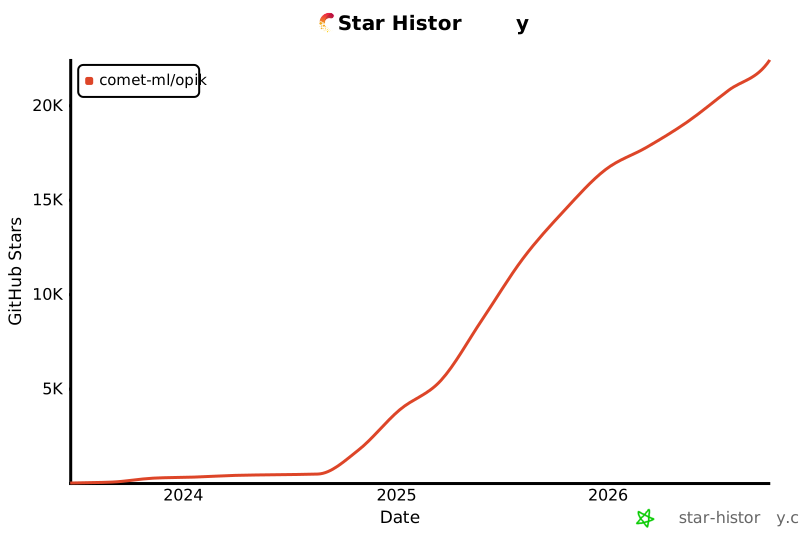
Opik이 유용하셨다면 Star를 눌러주세요! 여러분의 지원은 커뮤니티를 성장시키고 제품을 지속적으로 개선하는 데 큰 도움이 됩니다.
[](https://github.com/comet-ml/opik)
## 🤝 기여하기
Opik에 기여하는 방법은 다양합니다:
- [Bug report](https://github.com/comet-ml/opik/issues) 및 [feature request](https://github.com/comet-ml/opik/issues) 제출
- 문서 검토 및 개선을 위한 [Pull Request](https://github.com/comet-ml/opik/pulls) 제출
- Opik에 대해 발표하거나 글을 작성하고 [알려주기](https://chat.comet.com)
- 인기 있는 [feature request](https://github.com/comet-ml/opik/issues?q=is%3Aissue+is%3Aopen+label%3A%22enhancement%22)에 투표하여 지원 표시
Opik에 기여하는 방법에 대해 더 알아보려면 [contributing guidelines](CONTRIBUTING.md)를 참조하세요.