> Crafted in China. Like the teams behind DeepSeek and Black Myth: Wukong, we hope to bring more beauty to the world.





简体中文 |
English |
日本語 |
Español |
Português |
Русский

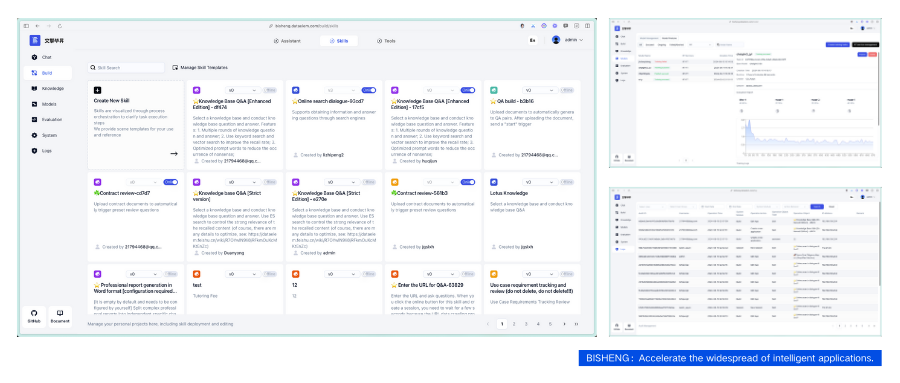
BISHENG is an **open-source, all-in-one enterprise Agent platform** focused on office productivity and putting enterprise AI applications to work. It is used by leading organizations across industries and Fortune 500 companies.
### Major update: BISHENG Desktop is here
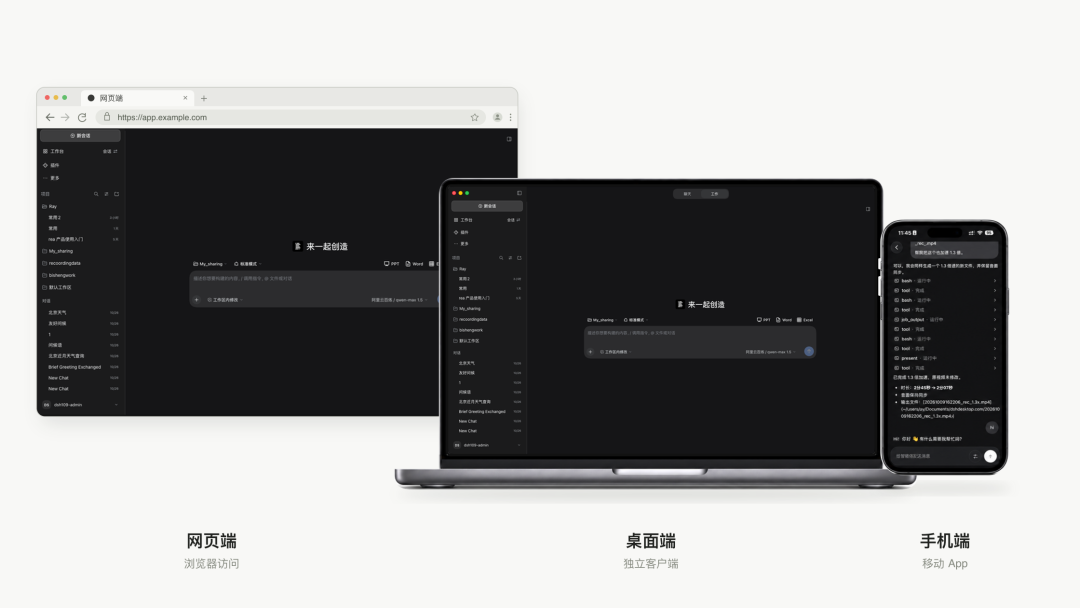
BISHENG Desktop is built on DeepSeek Harness (DSH) and works with the BISHENG platform to provide a complete, open-source enterprise Agent platform solution that can be privately deployed and kept fully under your control.
Simply put, think of it as an open-source alternative to WorkBuddy / Doubao Work, allowing enterprises to truly own and control their AI capabilities.
[Download BISHENG Desktop](https://dshdesktop.com/zh/enterprise/) · [BISHENG Desktop User Guide](https://dataelem.feishu.cn/wiki/BWSMwdc2Ciwif4kfe5HcyGHgn3b#share-QZrMdHGRdokzWixRl6vc30w1n8P)
To customize the client (for example, to replace the logo), you can modify the [open-source client code](https://github.com/dataelement/bisheng-desktop).
> The BISHENG team open-sourced a desktop client for DSH ([dshdesktop.com](https://dshdesktop.com/)) on the very night DSH was released. BISHENG Desktop is built on DSHDesktop. To date, DSHDesktop has received over 900,000 downloads and 17.4K GitHub stars ⭐️. Individual users can use DSHDesktop.
>
> [DSHDesktop website](https://dshdesktop.com/zh/)
## Features
1. **🖥️ BISHENG Desktop: connect local work with your enterprise cloud**
- **Two ways to work: Chat and Work**: Chat supports knowledge Q&A and multi-step cloud tasks. Work organizes materials in authorized local directories, generates editable Word, Excel and PowerPoint files, and keeps refining them based on your feedback.
- **Enterprise resources authorized by identity**: Use your enterprise account to access approved models, API/MCP tools, skills and knowledge spaces, or open published apps in the Application Center. Knowledge retrieval returns only the spaces and file content that the employee has permission to access.
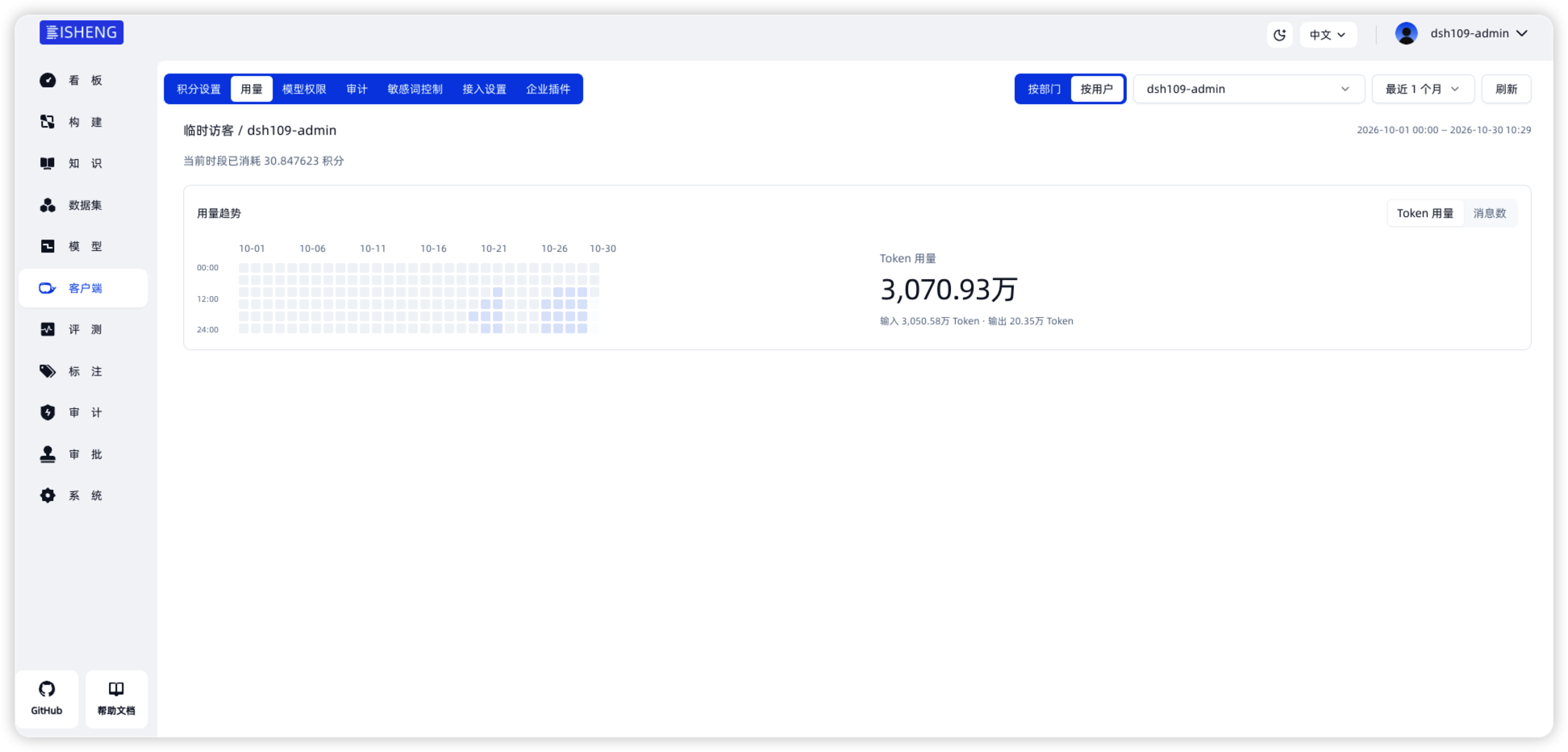
- **Central model and credit management**: Administrators manage model access, monthly credits and call records. Enterprise model calls in Chat and Work share the current user's credit ledger; users can check their balance and usage.
- **Central distribution of enterprise extensions**: Administrators import plugins and workbenches centrally. Employees receive them according to enterprise configuration and authorization.
2. **🛠️ Hosted Apps: publish apps your team builds to your colleagues**
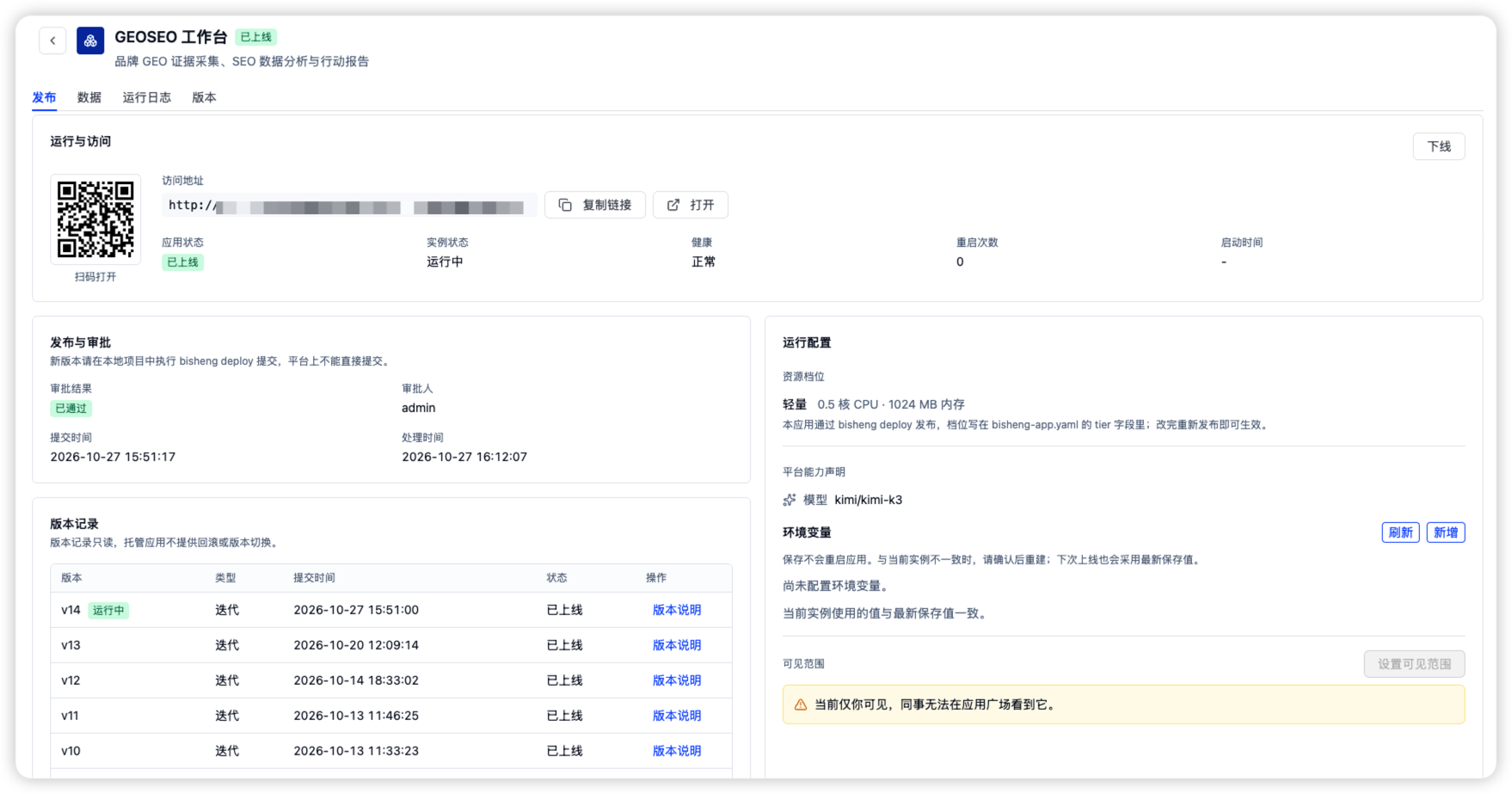
- **Turn business needs into apps**: Build dedicated pages for registration forms, project registers or department dashboards. After an app goes online, employees with access click "Enter App" in the Application Center and use it in a new tab, without signing in again.
- **Develop locally, then submit to the platform**: Developers install the bisheng command-line tool, sign in with a service account key, and develop and debug the app locally, optionally with help from a Coding Agent. In the app manifest, the developer declares the runtime, resource tier, and the platform models and knowledge bases the app uses, then submits the app to the platform. The platform runs preflight checks, secret scanning and the build.
- **Go online after approval**: Approvers open the Approval Center, review the app's source file tree, preview the app, and then approve or reject it.
- **Central management by the app owner**: In Build → Apps, the app owner checks the resource tier, sets the visibility scope, enters third-party secrets, views and edits app data online, and takes the app online, offline or deletes it.
- **Reuse platform capabilities**: The platform injects the current visitor's identity into the app, so the app does not need its own sign-in. The app can call platform models and search knowledge bases with the visitor's permissions.
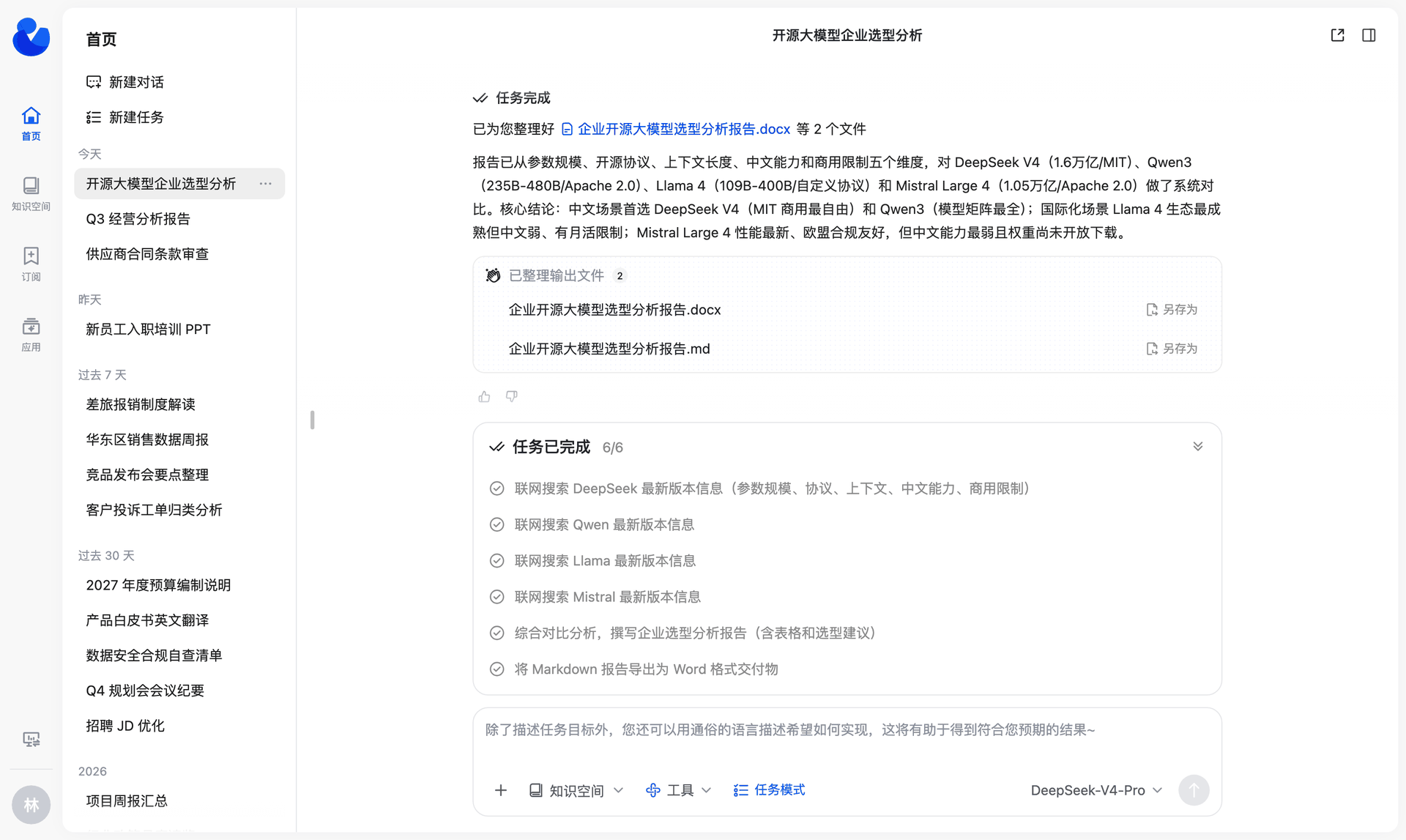
3. **🚀 Task Mode: a general-purpose agent for complex, multi-step work**
You give it a goal and, if needed, attach files, knowledge bases, tools and skills. The agent breaks the goal into tasks, runs them step by step, and delivers an HTML, Markdown, PPT, Excel or Word file.
- 🧠 **Task planning + parallel sub-agents**: The main agent builds a task checklist, tracks progress, and gives independent research tasks to sub-agents that run in parallel.
- 🙋 **Human in the loop**: When the agent needs information that only you have, the task pauses until you answer.
- 🧰 **Plug-and-play skills**: Four built-in skill packs (Word, Excel, PPT and HTML report) work out of the box. You can also import your team's own skills from a local file or from GitHub.
- 📎 **Traceable conclusions**: Reports carry citation markers. Click a marker to open the source and go to the cited passage.
4. **📚 Knowledge Space: an enterprise knowledge base for teams**
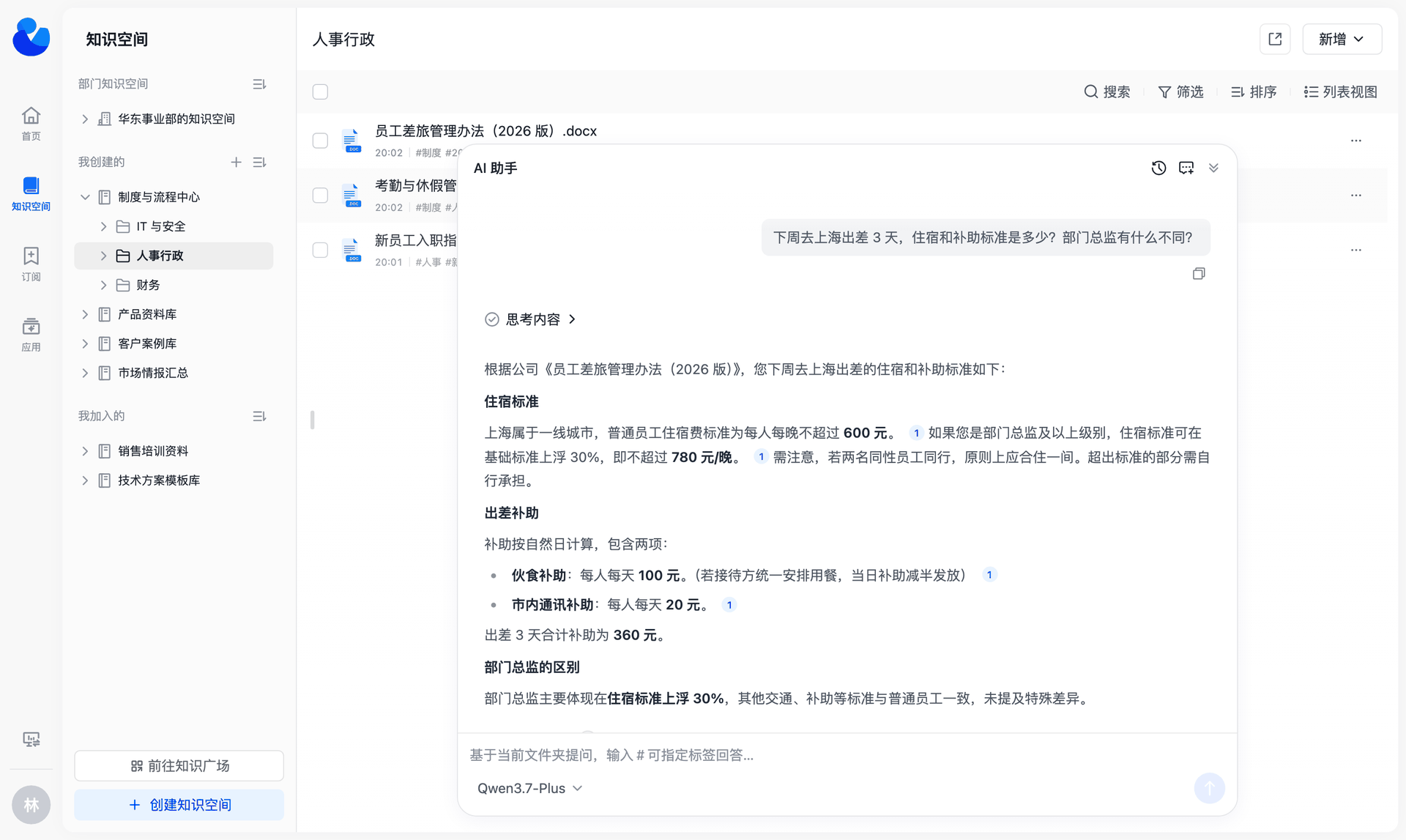
- 🗂️ **Organized content**: Multi-level folders, tags, card and list views, and search by keyword and tag together.
- 👥 **Built by the team**: Invite members with a permission template (Owner / Manager / Editor / Viewer), or publish the space to the Knowledge Square so that others can join. A super admin can create a Department Space for a department in one step.
- 🔐 **Permissions down to a single file**: Spaces, folders and files use the same set of permission templates. You can grant access to a person, a department (including its sub-departments) or a user group in one step. Folders and files inherit permissions from their parent by default, and you can also set them separately.
- 💬 **AI Q&A**: Ask questions about one document or about the whole space. Answers show their sources; click a source to open the original text at the cited location.
5. **📡 Channels: external news delivered every day, and saved as knowledge in one click**
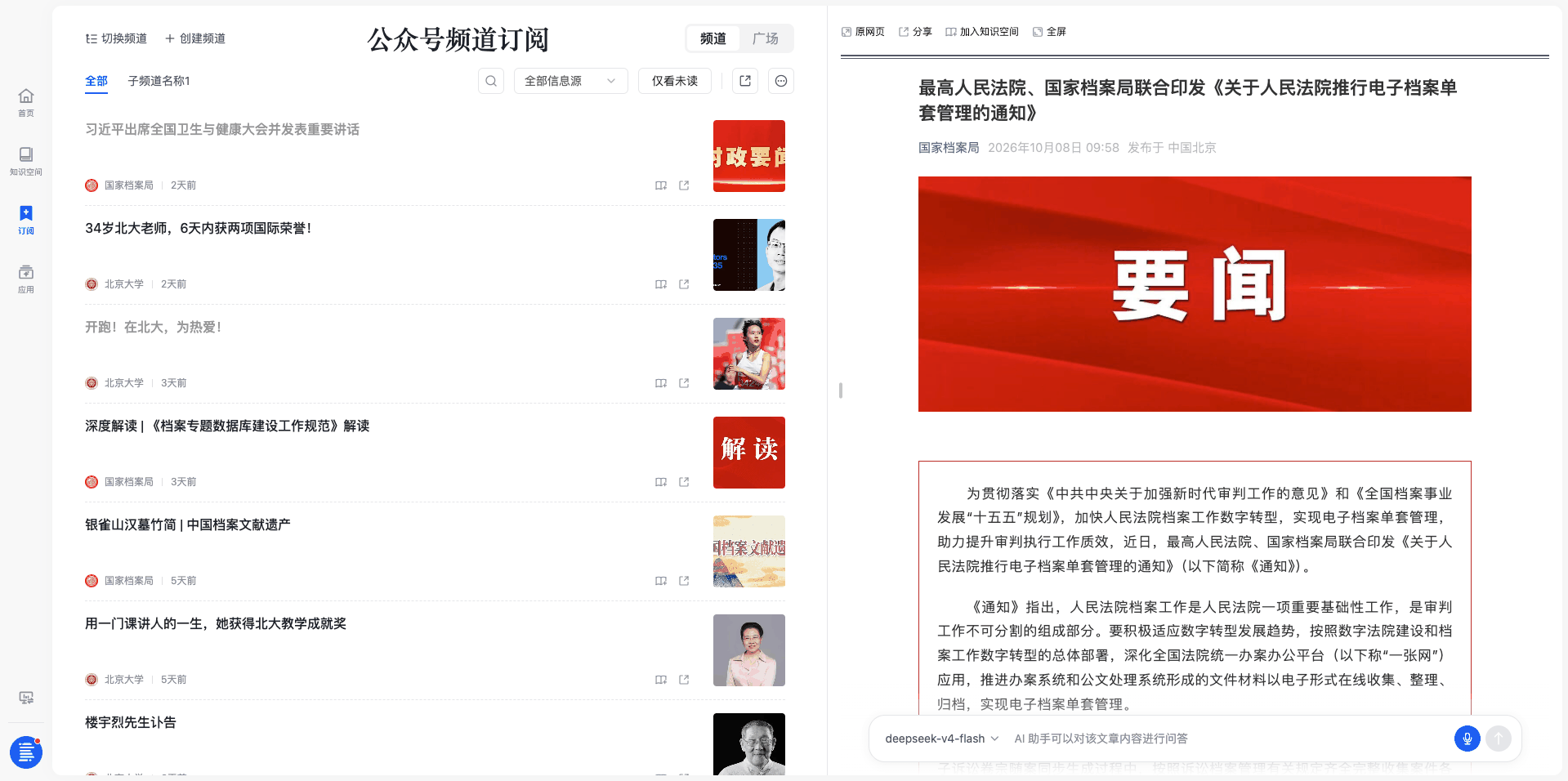
- 📰 **Topic channels**: Combine WeChat official accounts and websites into topic channels that update every day. A channel can have sub-channels.
- 🎯 **Precise filtering**: Custom rules filter titles and body text, so only relevant articles stay.
6. **🧩 Unique [BISHENG Workflow](https://dataelem.feishu.cn/wiki/R7HZwH5ZGiJUDrkHZXicA9pInif)**
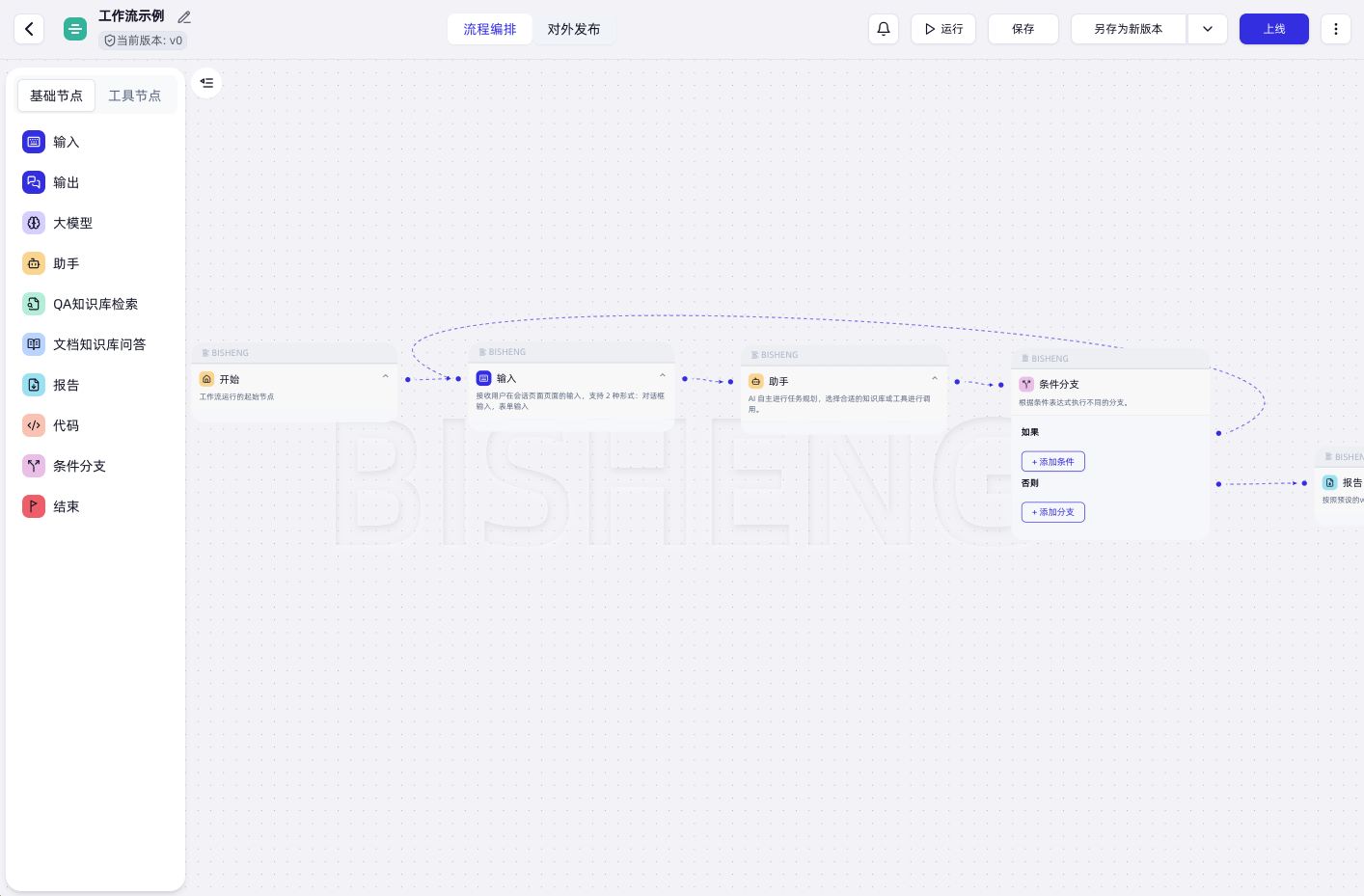
- **Independent and complete orchestration framework**: There is no split between chatflow and workflow. Multi-turn conversation and automated processing can be in the same flow.
- **Human in the loop**: A running flow can stop and wait for a person to give input, confirm, or make changes.
- **Loops, parallel branches and batch runs in any combination**: Draw a circle to make a loop (most similar products do not support loops), place nodes side by side to run them in parallel, and select multiple items to run a batch. This fits complex scenarios such as document review and fixed-layout report generation.
7. **🏢 Enterprise-grade features: the controls that enterprise AI needs**
- **Central desktop client management**: Administrators centrally configure the models, skills, API/MCP tools and knowledge spaces available in BISHENG Desktop, distribute plugins and workbenches through the enterprise plugin marketplace, and manage model access, monthly credits and call records.
- **Department and user management**: Maintain the organization structure, users and quotas.
- **Separate feature and resource permissions**: RBAC roles control feature menus and actions. ReBAC controls access to knowledge spaces, folders and individual files, with grants to individuals, departments (including sub-departments) or user groups. Folders and files inherit parent permissions by default and can also be configured independently.
- **Approvals**: Joining a knowledge space, subscribing to a channel, requesting menu permissions and other actions can require approval. You can customize approval flows and nodes.
- **Audit**: Records conversation content and system operation logs, searchable by user, time and module.
- **Dashboards** (commercial edition): Preset dashboards for user activity, application usage, token usage, knowledge base usage and more.
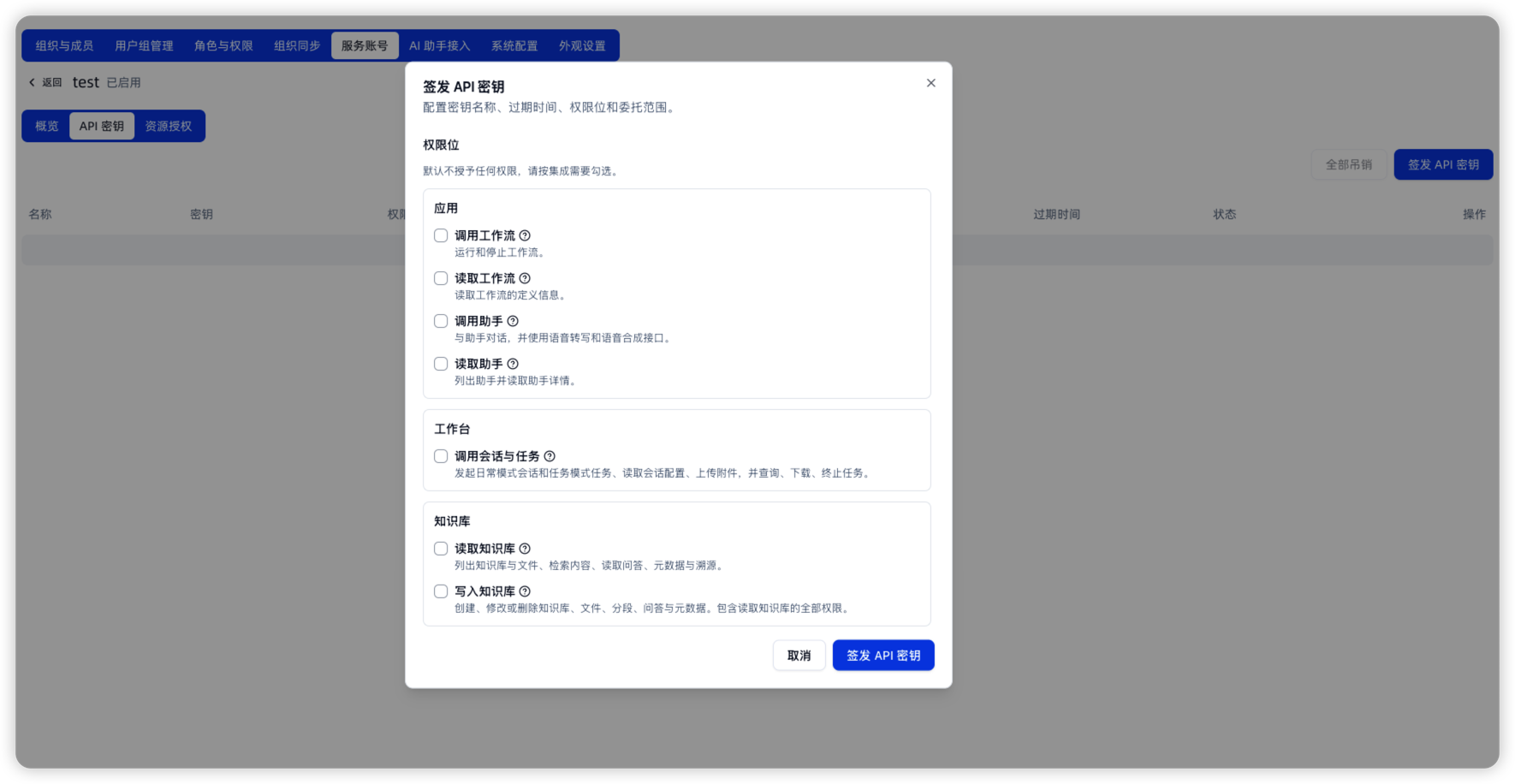
- **API key permission boundaries**: Administrators issue keys for service accounts, set expiration and interface permissions, and grant access to specific applications, knowledge bases and other resources. Interface permissions determine which actions are allowed; resource grants determine where those actions apply. Possessing a key does not grant access to the entire platform.
- **Xinchuang (domestic IT stack) support**: Supports both MySQL and Dameng DM8.
- Also: SSO/LDAP, high-availability deployment, content security review, traffic control, monitoring and statistics, and vulnerability scanning and fixes.
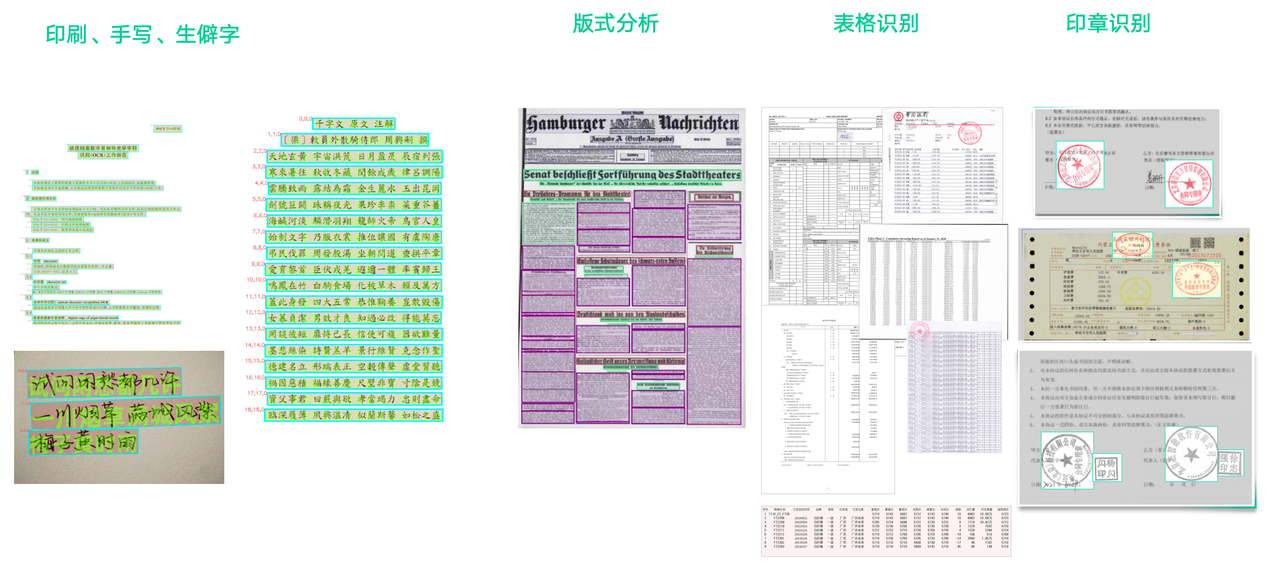
8. **🔍 High-precision document parsing**: Our document parsing models are trained on a large amount of high-quality data collected over 5 years, and you can deploy them privately for free. They include high-precision models for printed text, handwriting and rare characters, table recognition, layout analysis, and seals.
## Quick start
Before installing BISHENG, ensure the following requirements are met:
- CPU >= 8 cores
- RAM >= 32 GB
- Docker installed and running
- Docker Compose (V2 recommended)
- Bash
The default deployment includes MySQL, Redis, MinIO, OpenFGA, ES, and Milvus, among other components. OnlyOffice is optional and is not started by the base deployment.
Download BISHENG using either of the following methods:
```bash
git clone https://github.com/dataelement/bisheng.git
cd bisheng
```
If Git is unavailable, download and extract the ZIP archive:
```bash
wget https://github.com/dataelement/bisheng/archive/refs/heads/main.zip
unzip main.zip
cd bisheng-main
```
Run the installer from the repository root:
```bash
bash docker/install.sh
```
On the first run, the installer creates `docker/.env` from `docker/.env.example`, validates the configuration, logs in to the image registry, pulls images, and starts the services. An existing `.env` is preserved. Run the installer before using `docker compose up`; the Compose configuration requires `.env`. Deployment uses prebuilt images and does not compile the downloaded source code.
Check service status and startup logs:
```bash
cd docker
docker compose ps
docker compose logs -f backend backend_worker
```
Once the services are ready, open `http://SERVER_IP:3001` in your browser and register a user. By default, the first registered user becomes the system admin. Configure your models afterward.
To enable all features (BISHENG Desktop, Hosted Apps, fine-tuning, and more), see the documentation: [Self-hosting](https://dataelem.feishu.cn/wiki/BSCcwKd4Yiot3IkOEC8cxGW7nPc)
## Acknowledgement
This repo benefits from [langchain](https://github.com/langchain-ai/langchain), [unstructured](https://github.com/Unstructured-IO/unstructured) and [LLaMA-Factory](https://github.com/hiyouga/LLaMA-Factory). Thanks for their wonderful works.
Thank you to our contributors:
 ## Community & contact
Welcome to join our discussion group
 ## Selected customers
BISHENG serves leading enterprises across industries. Here are some of our customers.




## Enterprise inquiries
Contact us to discuss BISHENG enterprise deployment, desktop client integration, product demonstrations or business partnerships.
[Contact the BISHENG team through the Feishu form](https://dataelem.feishu.cn/share/base/form/shrcnVow7GQwwKYEBCD41Bu5qoh)