OpenTalking
Open-source real-time digital-human pipeline: LLM, TTS, WebRTC, character voices, and pluggable model backends
中文 ·
Documentation ·
GitHub





Demos ·
Deployment ·
Quickstart ·
Models ·
Roadmap ·
Docs & Community
---
## Overview
OpenTalking is an open-source orchestration framework for real-time digital-human conversations. It covers the core path of a **digital-human conversational product**: frontend interaction, session state, LLM replies, STT, TTS and voice selection, interruption control, subtitle events, WebRTC audio/video playback, and calls into local or remote model services.
OpenTalking is designed as a practical digital-human production stack. The WebUI, avatar and voice asset libraries, knowledge bases, memory, multi-session state, LLM / STT / TTS providers, WebRTC playback, and model backends are organized in one project. You can start with the lightweight Mock mode, connect local QuickTalk / Wav2Lip, or use OmniRT for FlashTalk, FasterLivePortrait, and other higher-quality or more complex model workflows.
- **Fast trial**: `mock / driverless mode`, useful for validating the API, TTS, and WebRTC path before downloading video model weights.
- **Real-time conversation**: connect `QuickTalk`, `Wav2Lip`, `FlashTalk`, and other models for interactive digital-human dialogue.
- **Video creation and cloning**: reuse FasterLivePortrait runtime for audio/text-driven video creation and camera/uploaded-video-driven video clone workflows.
- **Private deployment**: supports local STT/TTS, OpenAI-compatible LLMs, knowledge bases, memory, OmniRT remote inference, Docker, and distributed deployment.
More documentation:
- Documentation site:
- Chinese docs:
## WebUI And Demos
OpenTalking provides a Web service interface for managing the digital-human conversation pipeline. You can select or create avatars, configure voices, LLM, TTS, STT, and digital-human driver models, inspect model connection status, and validate real-time conversation, subtitles, and audio/video playback on the same page.
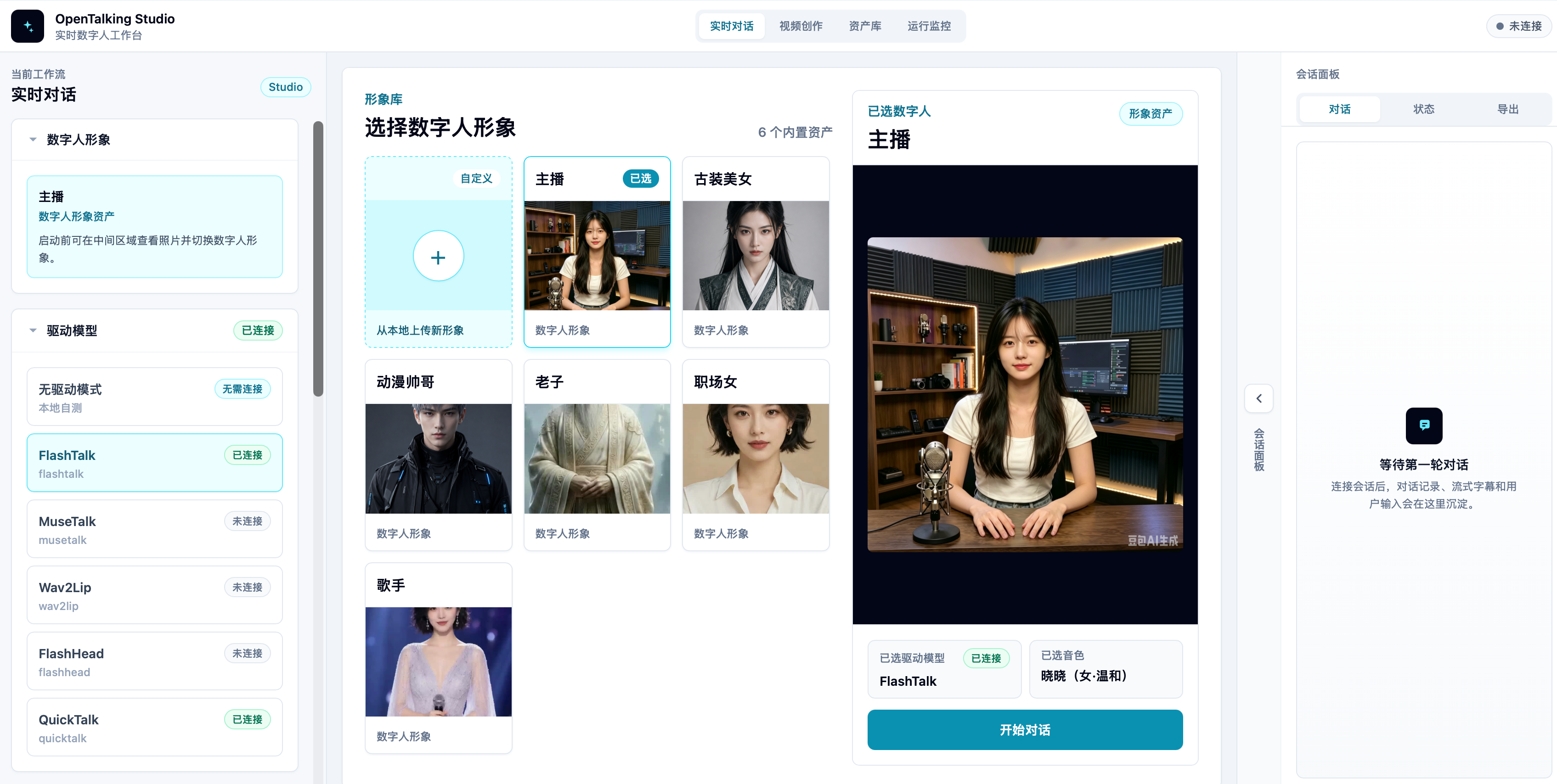
### Demo Videos
These demos cover three common frontend workflows: real-time conversation, video creation, and video clone.
| Featured Product Scenarios |
Healthcare guidance
|
Live commerce
|
Huangshan tourism guide
|
| A. Real-time Conversation |
E-commerce livestream
|
Companion character
|
News anchor
|
| B. Video Creation |
Audio driven
|
Text driven
|
Cloned voice driven
|
| C. Video Clone |
Realtime camera imitation
|
Uploaded video imitation
|
## Choose A Deployment Path
OpenTalking's **orchestration layer** (API / Worker / frontend) and **digital-human synthesis backend** (`mock`, `local`, `direct_ws`, or [OmniRT](https://github.com/datascale-ai/omnirt)) can be deployed independently. If you are new to the project, start with Mock mode to validate the full path, then switch to a real rendering model based on your GPU, model, and private-deployment requirements.
| Path | Recommended model / backend | Device reference | Best for | Details |
| --- | --- | --- | --- | --- |
| Fast trial | `mock` | CPU / no GPU | Validate API, LLM, TTS, WebRTC, and browser playback without downloading model weights | [Quickstart](https://datascale-ai.github.io/opentalking/latest/en/quick-start/) |
| Entry validation | `quicktalk` / `wav2lip` | RTX 3050 Laptop, RTX 3060, RTX 4060 | Run real video rendering for demos and deployment validation; lower the resolution on low-memory devices | [QuickTalk](https://datascale-ai.github.io/opentalking/latest/en/avatar_models/deployment/quicktalk-local/) / [Wav2Lip](https://datascale-ai.github.io/opentalking/latest/en/avatar_models/deployment/wav2lip-local/) |
| Consumer-GPU single machine | `quicktalk` / `wav2lip` / `musetalk` | RTX 3090, RTX 4090 | Closer to real-time local demos, private validation, and lightweight pre-production evaluation | [Model and backend selection](https://datascale-ai.github.io/opentalking/latest/en/model-support/selection/) |
| Fully local private path | `sensevoice` + `local_cosyvoice` + `quicktalk` | RTX 3090 / 4090 or similar GPU | Run STT, TTS, and video driving locally; OpenTalking uses the main `.venv`, while CosyVoice runs in a dedicated sidecar venv | [Local STT/TTS + QuickTalk](https://datascale-ai.github.io/opentalking/latest/en/recipes/local-quicktalk-audio/) |
| High-quality remote inference | `flashtalk` / `flashhead` / `fasterliveportrait` + OmniRT | Multi-GPU, Ascend 910B2, remote GPU service | Multi-card, GPU/NPU, production isolation, higher visual quality, or video clone workflows | [FlashTalk](https://datascale-ai.github.io/opentalking/latest/en/avatar_models/flashtalk/) / [FasterLivePortrait](https://datascale-ai.github.io/opentalking/latest/en/avatar_models/fasterliveportrait/) |
| Docker / production deployment | API, Web, Worker, external model services | Single GPU, remote GPU, distributed cluster | Service deployment, remote GPU, distributed runtime, and production validation | [Deployment](https://datascale-ai.github.io/opentalking/latest/en/deployment/) |
## Quickstart
Choose one of the two quickstart paths first:
| Path | Use when | What you need | What it validates |
| --- | --- | --- | --- |
| Compshare image | You want to try OpenTalking before setting up dependencies or downloading model weights. | A Compshare instance created from the published image, with port `5173` open. | WebUI, LLM replies, streaming TTS, subtitle events, WebRTC delivery, and the prebuilt image workflow. |
| Self deployment | You want to run the repo on your own machine or server, customize config, or continue into local/remote model deployment. | Python, Node.js, FFmpeg, `.env` provider config; real models also need GPU/runtime/model weights. | Mock first-run path, then local QuickTalk or remote OmniRT model paths. |
### 1. Compshare Image
If you want to try the OpenTalking + OmniRT + QuickTalk real-time digital-human path before setting up everything manually, use the community image we published on Compshare:
- Image URL: [image link](https://www.compshare.cn/images/TdDwmKZUZebI?referral_code=Hid5KUhcqlZEptmMEwKy2F)
- Exposed port: `5173` (WebUI; API traffic is proxied internally)
- Guide: [Compshare image quick experience](https://datascale-ai.github.io/opentalking/latest/en/quick-start/)
The image includes OpenTalking, OmniRT, the QuickTalk runtime environment, and model files. After deploying an instance, open port `5173` and visit the instance URL provided by the platform. If you need to restart services manually, follow the commands in the guide.
### 2. Self Deployment
Use this path when you want to run OpenTalking from source. Start with Mock mode if you do not want to download video model weights yet: Mock mode uses the built-in static frame, while LLM replies, streaming TTS, subtitle events, and WebRTC delivery still run through the full product path.
```bash
git clone https://github.com/datascale-ai/opentalking.git
cd opentalking
uv sync --extra dev --python 3.11
source .venv/bin/activate
cp .env.example .env
```
Edit `.env` and configure at least an LLM. The default TTS can use the keyless `edge` voice. LLM, STT, and TTS are independent providers; see [Configuration](https://datascale-ai.github.io/opentalking/latest/en/reference/configuration/) and [LLM / STT](https://datascale-ai.github.io/opentalking/latest/en/speech_models/llm-stt/).
```bash
bash scripts/start_unified.sh --mock
```
The default frontend URL is `http://localhost:5173`. To specify ports:
```bash
bash scripts/start_unified.sh --mock --api-port 8210 --web-port 5280
```
Stop services:
```bash
bash scripts/quickstart/stop_all.sh
```
#### Real Model Entrypoints
After Mock mode works, choose a real model path based on your machine. Weight downloads, directory layout, mirrors, checks, and troubleshooting are maintained in the docs; the README keeps only the startup entrypoints:
```bash
# Local QuickTalk: consumer-GPU single-machine path
export OPENTALKING_TORCH_DEVICE=cuda:0
export OPENTALKING_QUICKTALK_ASSET_ROOT="$PWD/models/quicktalk"
export OPENTALKING_QUICKTALK_WORKER_CACHE=1
bash scripts/start_unified.sh --backend local --model quicktalk --api-port 8210 --web-port 5280
# Remote OmniRT / FlashTalk: high-quality or multi-card path
bash scripts/start_unified.sh \
--backend omnirt \
--model flashtalk \
--api-port 8210 \
--web-port 5280 \
--omnirt http://:9000
```
More entrypoints:
- [QuickTalk local deployment](https://datascale-ai.github.io/opentalking/latest/en/avatar_models/deployment/quicktalk-local/)
- [Wav2Lip local deployment](https://datascale-ai.github.io/opentalking/latest/en/avatar_models/deployment/wav2lip-local/)
- [FasterLivePortrait / JoyVASA](https://datascale-ai.github.io/opentalking/latest/en/avatar_models/fasterliveportrait/)
- [Video clone guide](https://datascale-ai.github.io/opentalking/latest/en/usage/webui/video-clone/)
- [WebUI guide](https://datascale-ai.github.io/opentalking/latest/en/usage/webui/basic/)
- [Docker Compose and production deployment](https://datascale-ai.github.io/opentalking/latest/en/deployment/)
## Supported Models
| Model | Input | Recommended backend | Resource guidance |
| --- | --- | --- | --- |
| `mock` | Reference image / static frame | `mock` | No GPU required |
| `quicktalk` | Template video + audio | `local` | CUDA GPU, RTX 3090 / 4090 recommended |
| `wav2lip` | Reference image / frames + audio | `local` / `omnirt` | `>= 8 GB` GPU / NPU memory |
| `musetalk` | Full frames + audio | `omnirt` / `local` | `>= 12 GB` GPU memory |
| `soulx-flashtalk-14b` | Portrait + audio | `omnirt` | Multi-GPU / NPU |
| `soulx-flashhead-1.3b` | Portrait + audio | `omnirt` | Multi-GPU / NPU |
| `fasterliveportrait` | Portrait / driving video / audio | `omnirt` | Single-GPU real-time portrait paste-back, video creation, video clone |
### Consumer-GPU Reference
| Model | Hardware | Input | Output | VRAM | Throughput |
| --- | --- | --- | --- | --- | --- |
| `quicktalk` | RTX 3090 | Template video + audio | 720x900 / 25fps | About 3.8 GiB | About 35 fps |
For weight downloads, Docker, troubleshooting, and model configuration, see [Model deployment](https://datascale-ai.github.io/opentalking/latest/en/model-deployment/).
### Cloud Model API: Atlas Cloud
> **[Atlas Cloud](https://www.atlascloud.ai/?utm_source=github&utm_medium=link&utm_campaign=opentalking)** is an all-modal AI inference platform. One API gives you access to video generation, image generation, and LLMs, so you do not need to integrate multiple vendors separately. A single integration can route to 300+ curated all-modal models.
OpenTalking uses an OpenAI-compatible interface for LLMs. Point `OPENTALKING_LLM_BASE_URL` to `https://api.atlascloud.ai/v1` to use Atlas-hosted DeepSeek / Qwen models. See [LLM and STT](https://datascale-ai.github.io/opentalking/latest/en/speech_models/llm-stt/). For budget-friendly API options, see Atlas Cloud's [coding plan](https://www.atlascloud.ai/console/coding-plan).
## Progress And Roadmap
- [ ] **More natural real-time conversations**
Improve interruption handling, low-latency response, audio/video sync, long-session recovery, and runtime visibility.
- [ ] **Consumer-GPU multi-model path**
Improve asset checks, prewarm, cache reuse, low-memory parameters, and more RTX 3090 / 4090 / WSL2 benchmarks for QuickTalk / Wav2Lip / MuseTalk local paths, while filling in more FasterLivePortrait video creation and video clone measurements.
- [ ] **One-command Windows / WSL2 deployment**
Continue lowering the barrier for model downloads, runtime installation, environment checks, and diagnostics based on the current Windows docs and test records.
- [ ] **High-quality private deployment**
Improve external OmniRT inference services, multi-model endpoints, capacity scheduling, health checks, production monitoring, and GPU / NPU deployment guidance.
- [ ] **More cloud voice and multimodal providers**
Extend pluggable STT / TTS / LLM providers, unified frontend selection, and provider-level health checks on top of the current OpenAI-compatible, DashScope, and Xiaomi MiMo profiles.
- [ ] **Agent, memory, and platform capabilities**
Productize the asset library, knowledge bases, memory, multi-session scheduling, tool calling, and OpenClaw / external Agent integrations, then fill in observability, safety, licensed voices, and synthetic-content labeling.
### Recent Progress
- **2026-06-25: WeChat memory import and persona workflow**
Added WeChat memory persona import, documentation, and the related persona workflow. The frontend no longer treats persona selection and driving-model selection as mutually exclusive, so users can combine imported memory/persona context with the selected avatar driver.
- **2026-06-23: Local CosyVoice TRT sidecar deployment**
Added the local CosyVoice sidecar deployment path with TensorRT / FP16 acceleration notes, runtime tuning, dedicated environment isolation, startup checks, and measured deployment guidance for pairing local TTS with QuickTalk.
- **2026-06-22: Runtime configuration, memory refresh, and immersive scenes**
Added the runtime API configuration page, improved mem0 provider release during runtime refresh, and expanded the scene asset pipeline: scene asset APIs, asset-library integration, immersive conversation mode, scene/avatar anchoring, transparent background handling, and realtime media preservation across view switches.
- **2026-06-18/19: Quickstart split, LightRAG runtime config, and scenario guides**
Split the quickstart into Compshare image and self-deployment paths, added LightRAG runtime configuration and quickstart updates, fixed dependency notes for mem0 / Hugging Face download tooling, and added the Huangshan digital-human guide.
- **2026-06-12: QuickTalk local asset fixes and Apple Silicon support**
Organized QuickTalk local weights, HuBERT, InsightFace paths, missing-asset checks, cache preparation, and health checks. Added Apple Silicon deployment docs for validating `quicktalk-cpu` with MPS / CPU on macOS arm64.
- **2026-06-12: IndexTTS, QuickTalk, and FlashTalk video creation improvements**
Added local IndexTTS and OmniRT IndexTTS providers, system voices, voice preview, and voice labels. Improved the QuickTalk / IndexTTS video creation path, and added FlashTalk reference-video generation with a default reference driver.
- **2026-06-02/10: Persona Package, knowledge retrieval, and character memory**
Added Persona Package API / CLI / WebUI entrypoints for reusable role settings, knowledge materials, and prompts. Added LightRAG knowledge retrieval, session-level knowledge selection, a character memory panel, and BM25 / mem0 / SQLite memory providers.
- **2026-06-05: Asset library and knowledge-base workflow**
Extended the WebUI asset library to connect avatar assets, knowledge materials, session selection, and Agent context building. Added audio/video exports so demos, reviews, and reusable materials can stay in the same workspace.
- **2026-06-05/06: OpenAI-compatible audio providers and MuseTalk deployment updates**
Added OpenAI-compatible STT / TTS adapters, Xiaomi MiMo STT / TTS / voice clone profiles, frontend provider selection, and voice lists. Reworked `.env.example` into separate LLM / STT / TTS profile templates. Also improved MuseTalk local / OmniRT deployment docs, asset preparation scripts, and quickstart scripts.
- **2026-06-04: FasterLivePortrait video creation and video clone**
Added the FasterLivePortrait video creation parameter panel, video clone page, custom source-asset upload, camera / uploaded-video driving input, and docs screenshots, reusing the OmniRT + FasterLivePortrait runtime path.
- **2026-06-03: Web recording exports, asset library, and video workflows**
Added Web recording exports, export storage, video creation entrypoints, and the asset library workspace, connecting real-time conversation, material management, and video generation.
- **2026-06-12/13: Homepage analytics, GitHub traffic, and deployment docs**
Added the English homepage, deployment-route presentation, site analytics, GitHub traffic statistics, chart style updates, and statistics-interval fixes. Added the WSL2 network-mode selection guide for Windows deployment and continued updating README demo videos and docs-site links.
- **Earlier foundation: real-time conversation path and backend decoupling**
Built the Web console, LLM conversation, TTS, subtitle events, WebRTC audio/video playback, Avatar prewarm and cache, unified audio2video runner, and pluggable `mock` / `local` / `direct_ws` / `omnirt` model backends.
## Documentation And Community
- [Quickstart](https://datascale-ai.github.io/opentalking/latest/en/quick-start/)
- [Models](https://datascale-ai.github.io/opentalking/latest/en/model-deployment/) (weight downloads, mirrors, startup, validation)
- [Architecture](https://datascale-ai.github.io/opentalking/latest/en/developer-guide/architecture/)
- [Configuration](https://datascale-ai.github.io/opentalking/latest/en/reference/configuration/)
- [Deployment](https://datascale-ai.github.io/opentalking/latest/en/deployment/) (Docker Compose, distributed deployment)
- [Model adapter](https://datascale-ai.github.io/opentalking/latest/en/developer-guide/model-adapter/)
- [Contributing](CONTRIBUTING.md) (dev environment, CLI tools, ruff / mypy / pytest)
Join the QQ or WeChat community to discuss real-time digital humans, FlashTalk, OmniRT, model deployment, and product scenarios.
| QQ |
WeChat
微信 |
 |
 |
AI Digital Human Community · QQ Group ID: 1103327938 · WeChat
## Acknowledgements
OpenTalking references and benefits from excellent projects in the real-time digital-human ecosystem:
- Thanks to the [LINUX DO](https://linux.do/) community for their support and discussions.
- [SoulX-FlashTalk](https://github.com/Soul-AILab/SoulX-FlashTalk) and [SoulX-FlashTalk-14B](https://huggingface.co/Soul-AILab/SoulX-FlashTalk-14B)
- [LiveTalking](https://github.com/lipku/LiveTalking)
- [OmniRT](https://github.com/datascale-ai/omnirt)
- [Edge TTS](https://github.com/rany2/edge-tts)
- [aiortc](https://github.com/aiortc/aiortc)
- [Wan Video](https://github.com/Wan-Video)
## License
[Apache License 2.0](LICENSE)