ArchGraph · architecture-graph driven Agentic Engineering

A knowledge-graph framework with an ontology you define — for your coding agent.

Your coding agent forgets everything between sessions, and the "why" behind your system lives nowhere. ArchGraph fixes that: it keeps one architecture graph — a picture of your project's parts and how they relate — as the agent's durable memory and your product's design, read and written over a single MCP (Model Context Protocol) server.

The graph's vocabulary — its ontology, the set of types and relationships it may hold — is yours to define. The built-in default is ArchiMate 3.2 + ARGO extensions (ArchiMate is a standard enterprise-architecture modeling language; ARGO is the toolchain and agent-workflow layer behind argo-deploy and argo init); a repository can plug in its own. One install, one interface to learn, and a graph that stays clean because writes are deduplicated.

$ npm install -g archgraph-argo
$ argo-deploy
# inside your project, ask your coding agent to run (not a shell command):
argo init   # the initializeWorkspace MCP call

What is this?

One graph for the agent's memory and the product's design.

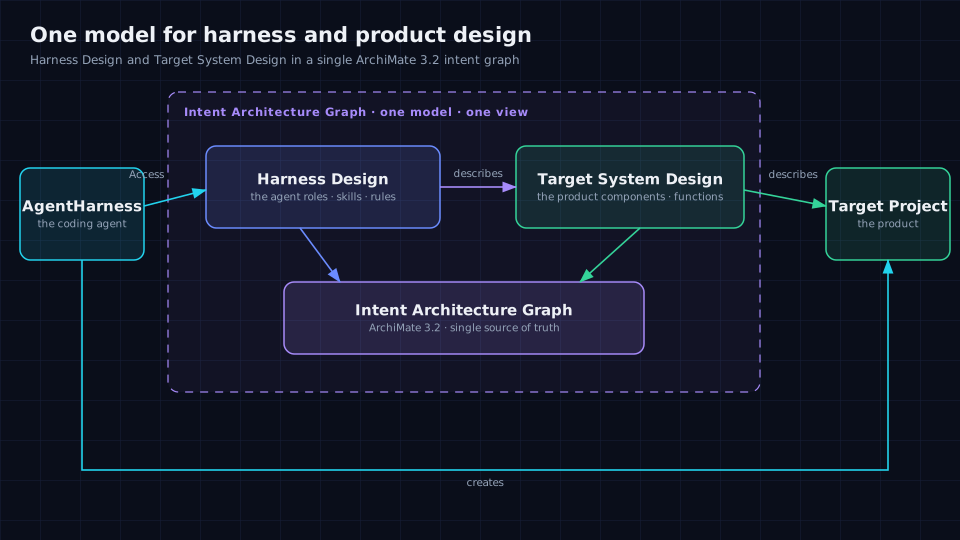
Running coding agents on a real codebase hurts in two ways: every session starts cold, and the "why" behind the system lives nowhere. ArchGraph makes one architecture graph the single source of truth — a durable, tiered memory the agent reads semantically and writes with reuse-by-default (a duplicate needs an explicit override), plus a model you can reason over. It is one MCP interface to install and learn.

ArchGraph core model — one model for the agent's memory and the product's design

Read the getting-started guide →

Why ArchGraph

The comparison lives on one page.

The usual fixes for agent context — loose files, a plain vector store, a wiki/ADR folder, a general graph or ontology tool — each work until they don't. The real differentiator isn't "custom vs. locked": Protégé/OWL, Neo4j, TerminusDB, and Archi/EA all let you extend a model. It is a first-class, validated, runtime-resolved schema bundle behind one MCP interface, with typed dedup and commit traceability built in.

See the full comparison — including what ArchGraph itself costs you →

Bring your own ontology

Not locked to one modeling language.

ArchGraph separates the core from the ontology. A repository drops a schema bundle under .argo/schema/ — element and relationship types, endpoint rules, an actor contract — and validation, MCP guidance, and the .qea projection follow it. A bundle can extends: "default" — inheriting the built-in ArchiMate 3.2 + ARGO extensions — and add its own types, with no framework change.

This repository is its own proof

Its active schema uses extends: "default" — inheriting the built-in ArchiMate 3.2 + ARGO extensions — and layers a UML 2 state-machine profile on top, resolved at runtime from .argo/schema/ rather than hardcoded in the framework.

Worked case: define an ontology, then build the graph →

Capabilities

What the framework gives you.

Tiered long-term memory · pluggable ontology · semantic + structural retrieval · deduplicated writes · acceptance-test-first traceability · Enterprise Architect (.qea) interop · federated sovereign graph sharing · one MCP interface across six harnesses. Each has a short page.

GitHub CopilotCursorOpenCodeDeepSeek HarnessOpenClawCodex

View all capabilities →

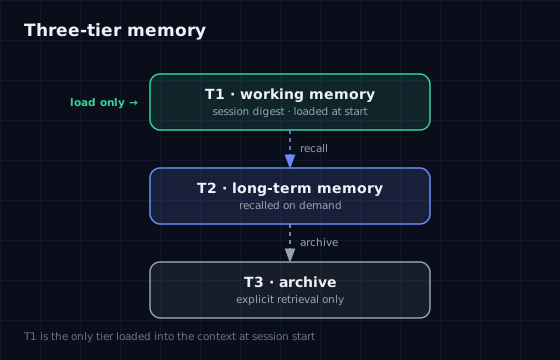
Three-tier agent memory
Three-tier memory — only a compact working memory is loaded at session start; long-term memory is recalled on demand.
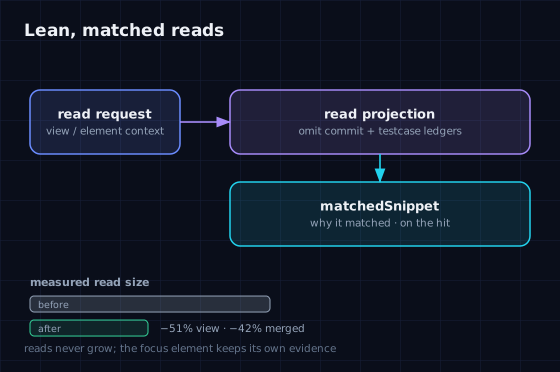
Lean, matched reads
Lean, matched reads — bookkeeping is omitted by default and semantic hits carry a matchedSnippet.
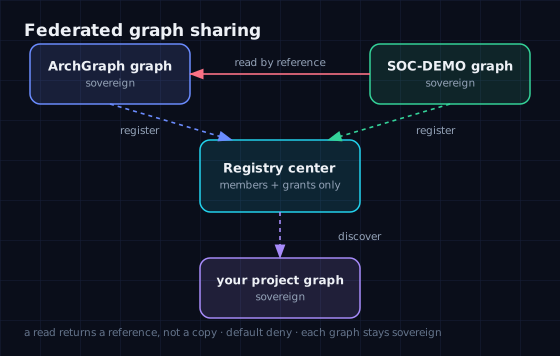
Federated graph sharing
Federated graph sharing — read another project's opened content by reference. Denied by default; nothing copied or merged.

Install & deploy

Two commands, and you're ready.

Requires Node.js ≥ 18. One argo-deploy registers the MCP server and installs the skills and rules into GitHub Copilot, Cursor, OpenCode, DeepSeek Harness, OpenClaw, and Codex (agents where the host supports them), then walks you through ~/.argo/.env.

npm install -g archgraph-argo
argo-deploy

For context reads and writes, deduplication, and Enterprise Architect interop, Node.js is all you need — no database. The structural Cypher (Neo4j's graph query language) projection and all semantic Graph RAG additionally need a Neo4j instance and an OpenAI-compatible embedding endpoint; until those are configured, argo init's structural sync and semantic lifecycle report failed (the graph itself is still created).

After deploying, restart your editor / host so it reloads the new MCP server.

Prerequisites and configuration →

Build your own graph

Your own graph, two routes.

Pick one route. Everything runs through your coding agent and the ARGO MCP server; the only commands you run yourself are the install. The fully-illustrated walkthrough is docs/case-team-graph.html (Chinese).

Route A — default ontology (fastest)

No schema work: use the built-in ArchiMate 3.2 + ARGO extensions.

  1. Install (once). Run npm install -g archgraph-argo then argo-deploy (requires Node.js ≥ 18), and restart your editor / host.
  2. Initialize. Ask your coding agent to run argo init (the initializeWorkspace MCP call) — it creates and validates design/KG/SystemArchitecture.json, which already holds the project's root view named SystemArchitecture.
  3. Add elements and relationships. Ask your coding agent to call applySystemArchitectureMutation and attach each item to the project's existing root view — have it resolve that view's real view_id first; do not pre-create a view (a second SystemArchitecture view would collide, and a different id would then fail). No schema work.
  4. Verify. Ask your coding agent to call validateSystemArchitecture, then queryNeo4jGraph with {"schema": true}.

Route B — your own ontology

  1. Install (once). As in Route A.
  2. Author your schema. Put your modeling language under .argo/schema/. A standalone bundle — a full SystemArchitecture.schema.json, editing its two $defs enum arrays, archimateElementType and archimateRelationshipType — must also declare actorElementType in schema-bundle.config.json, set to one of your element types (or to null if your schema genuinely has no actor concept), or loading fails closed (bundleValidation.status: "failed") and validation/writes are blocked. A bundle that only extends: "default" needs just the config; schema-bundle.rules.json stays optional.
  3. Author the graph yourself. With a custom schema, argo init does not create the graph (the packaged default would not match) and fails closed with NO_DEFAULT_GRAPH. Before any MCP write, create design/KG/SystemArchitecture.json by hand with your own types and root view, then ask your coding agent to run argo init to validate it.
  4. Add into YOUR root view. Ask your coding agent to call applySystemArchitectureMutation, attaching each element and relationship to the root view you authored.
  5. Verify. Same as Route A.

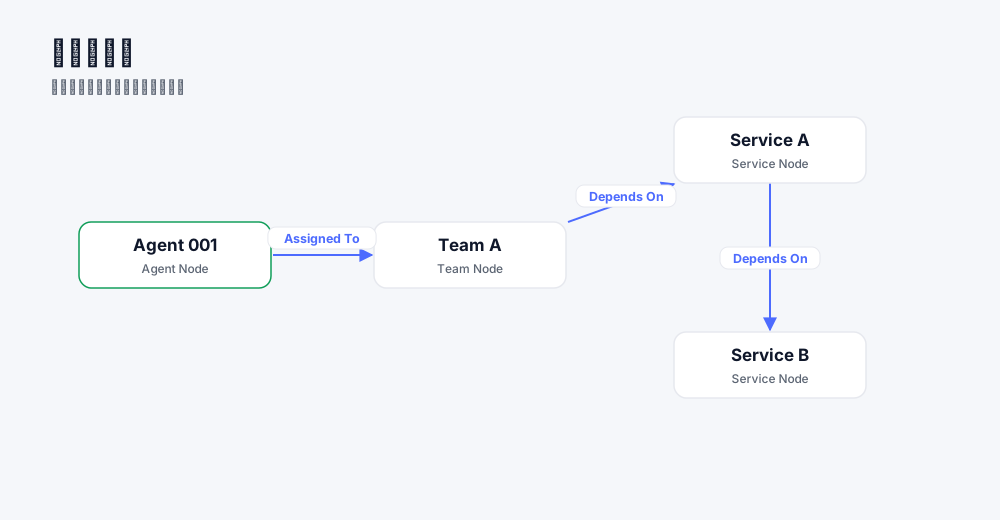
The result looks like this — the Team Graph example (4 elements, 3 relationships, one root view):

Team Graph example — Agent 001 assigned to Team A, Team A depends on Service A, Service A depends on Service B

See the full worked example (Chinese) →

How to use

Initialize once, then let the agent work.

Step 0 — initialize the workspace. In a fresh project, ask your coding agent to run argo init (the initializeWorkspace MCP call). It creates a starter design/KG/SystemArchitecture.json when missing and verifies the architecture; its first JSON → Neo4j sync and semantic-lifecycle steps report failed until Neo4j + an embedding endpoint are configured — the graph and its context reads/writes still work without them.

Then open your project and start a coding agent. It will:

The intent architecture graph — modelled by default in ArchiMate 3.2 + ARGO extensions — is the single source of truth.

Community

Built in the open.

ArchGraph runs on open co-building. The community shares and reuses architecture subgraphs across projects. Sharing is federated: each project keeps its graph sovereign, and other members read opened content by reference. The center is a registry–broker that holds federation metadata, never content — register, discover, authorize, read.

Community site  ·  graph-wiki graph assets