DSH Pocket
English | 中文


> Put **DeepSeek Harness in your pocket**: the plugin exposes exactly one port (3081), uses **Gitee or GitHub OAuth sign-in** (pick one during setup) instead of an access PIN, and **you bring your own tunnel** — your phone sees the same screen as your computer, live.
⭐ A Star would make the author's day · Here, take one
## What is this
**You want to use DeepSeek Harness on your computer, even when you're not at the computer.**
- On your way home, the agent is running a task on your computer — pull out your phone and see where it is, what it produced.
- Out and about, you want the agent on your computer to look something up or write a snippet — no remote desktop, no SSH.
- The computer is at home or in the office, you're elsewhere, and you want to **drive your DeepSeek Harness from your phone** — send tasks, watch the output, tap approvals.
That's what DSH Pocket does: **expose one port, sign in once with Gitee or GitHub, and your phone shows and controls the DeepSeek Harness UI in real time.**
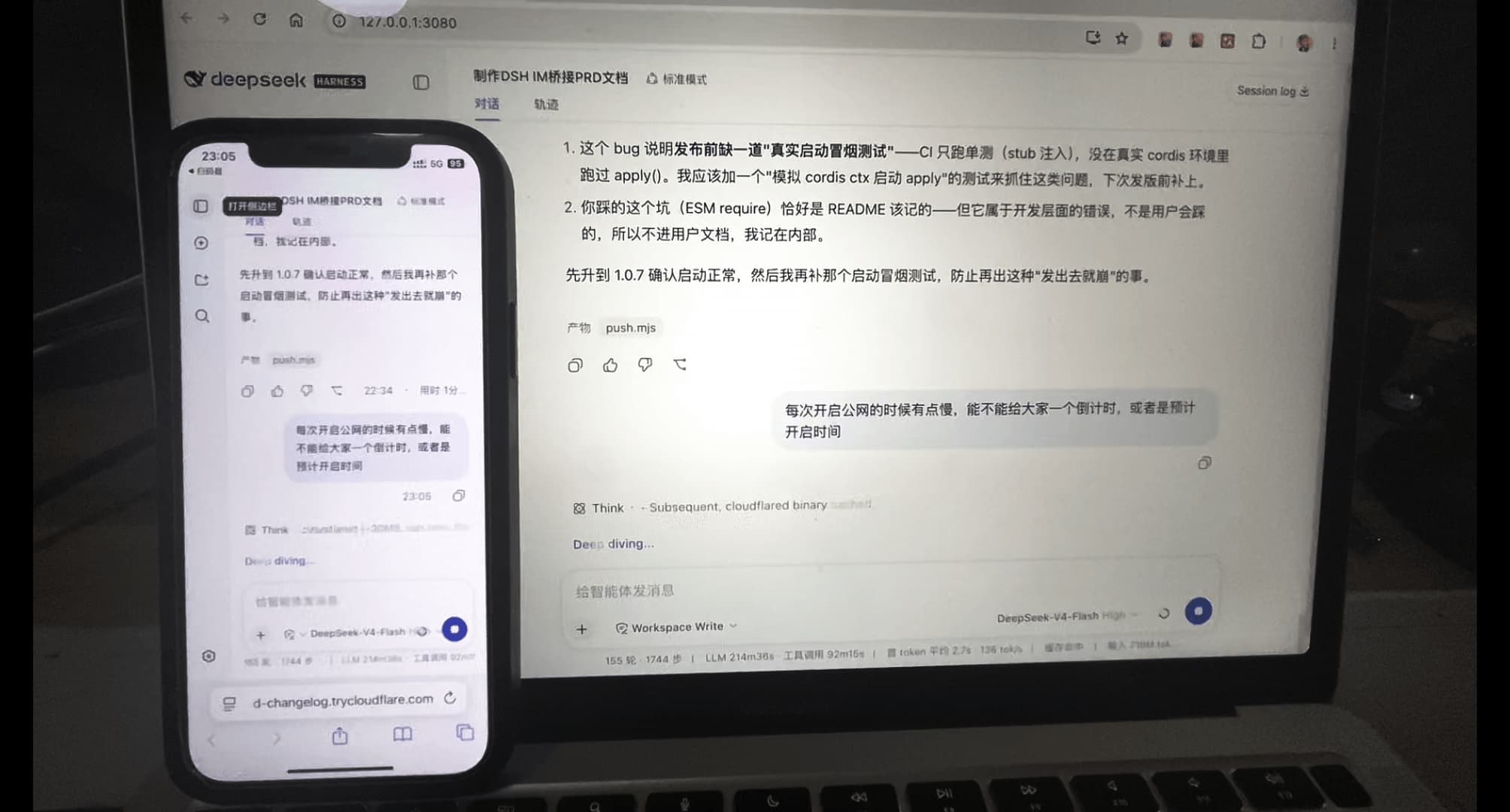
What it looks like — the phone shows the exact same UI as your computer, live:
## ✨ Features
| Feature | Description |
| ------------------------ | ----------------------------------------------------------------------------------------------------------------------------------------------------------------------------------------------------------- |
| 🚪 Single port | Only **3081** is exposed (the proxy). It rewrites inbound Host/Origin to loopback and forwards to your local dsh web — **no dsh config changes**, and no 0.0.0.0 binding (which dsh forbids) |
| 🔐 Gitee / GitHub sign-in | **Replaces the access PIN entirely**: pick **one** provider during setup (Gitee in mainland China, GitHub abroad) and bind that account (provider + uid); afterwards any device signs in with the **same account** through an allowlisted origin. Switching means re-selecting and re-binding |
| 🔗 Multi callback URLs | Both Gitee and GitHub accept multiple callback URLs (GitHub: up to 10): local `http://127.0.0.1:3081/...`, your tunnel domain `https://your-domain/...`, optionally a LAN IP — **whichever origin you visit is the callback used** |
| 🏠 Loopback is free | `127.0.0.1` / `localhost` needs no sign-in (being on the machine is already proof), and the setup page is **loopback-only** |
| 🧱 Fail closed | With no credentials or no bound account, **every non-loopback request is refused** — no "installed and exposed" window |
| 🌐 Bring your own tunnel | The plugin manages **no tunnel at all**: point a **fixed domain** at `http://127.0.0.1:3081` with frp, Tailscale Funnel, your own nginx reverse proxy, any port-forwarding service (fixed domain required, see below) |
| 📱 QR per origin | The settings tab renders a QR code for every allowlisted origin; scan it and tap "Sign in with Gitee" / "Sign in with GitHub" (whichever provider is configured) |
| 🧘 Session persistence | Signing in sets an HttpOnly session cookie (30 days) — **no repeated prompts**; sessions are bound to the dsh web process (**restart/update ⇒ sign in again**) |
| 🚪 Sign out everywhere | One click rotates the process-level session key, instantly invalidating every signed-in device |
| ⚡ Real-time sync | Streaming rides a fully transparent WebSocket — **output on the computer scrolls on the phone**; built-in heartbeat keeps NAT/idle drops from silently killing the link (auto-reconnect) |
| 🗜️ Compression | Large JSON responses are gzip/brotli'd (17MB session → ~1MB; brotli q6: fast and small) |
| 🧩 No extra service | One npm package (Remote access + the Mobile Web UI component); no server or relay of your own (sign-in uses your own Gitee / GitHub account) |
| 📱 Phone UI | The phone shows the same official UI as the computer (one `dsh web`, live-mirrored) and automatically gets the narrow-screen treatment: drawer sidebar, two-level settings navigation, touch composer, Plan review cards |
### 🧩 Two components, switched independently
The package ships two components, and installing/updating stays a single command. Each has its own switch on the **Sidebar → Plugins → dsh-pocket** card:
| Component | Owns | Switched off |
| --- | --- | --- |
| `dsh-pocket` (Remote access) | Single-port proxy, Gitee/GitHub OAuth, origin QR codes, update/restart | The proxy stops listening (3081 closes) and there is no "Phone access" tab; the phone can still reach the official UI directly (LAN / tunnel to your local dsh web) |
| `dsh-pocket-mobile` (Mobile Web UI) | Active below 1024px: drawer sidebar, panel exit button, two-level settings navigation, touch composer, Plan / approval cards | The phone gets the plain desktop layout (56px icon rail with no way to expand it, settings columns squeezed) |
> **The mobile component ships its own client bundle**: the subpackage `dsh-pocket-mobile` (source in `mobile/`, installed together with the package) declares `dsh.client`, and `client/build.mjs` compiles its browser half into `mobile/client/client.js` — so that row has a **Configure** page where the backdrop, composer optimisation and stepped settings navigation can be turned off.
>
> The switch writes the row's `disabled` override into the profile's `cordis.patch.yml` (the native DSH mechanism): the **host half starts/stops immediately**, while a client bundle enters or leaves the graph on the next page load — refresh once after switching.
Settings only keeps Remote access ("Phone access": proxy / OAuth / QR / update / restart); there is **no** mobile-UI tab — the mobile tweaks live on the **Plugins → dsh-pocket** card.
## 🚀 Getting started
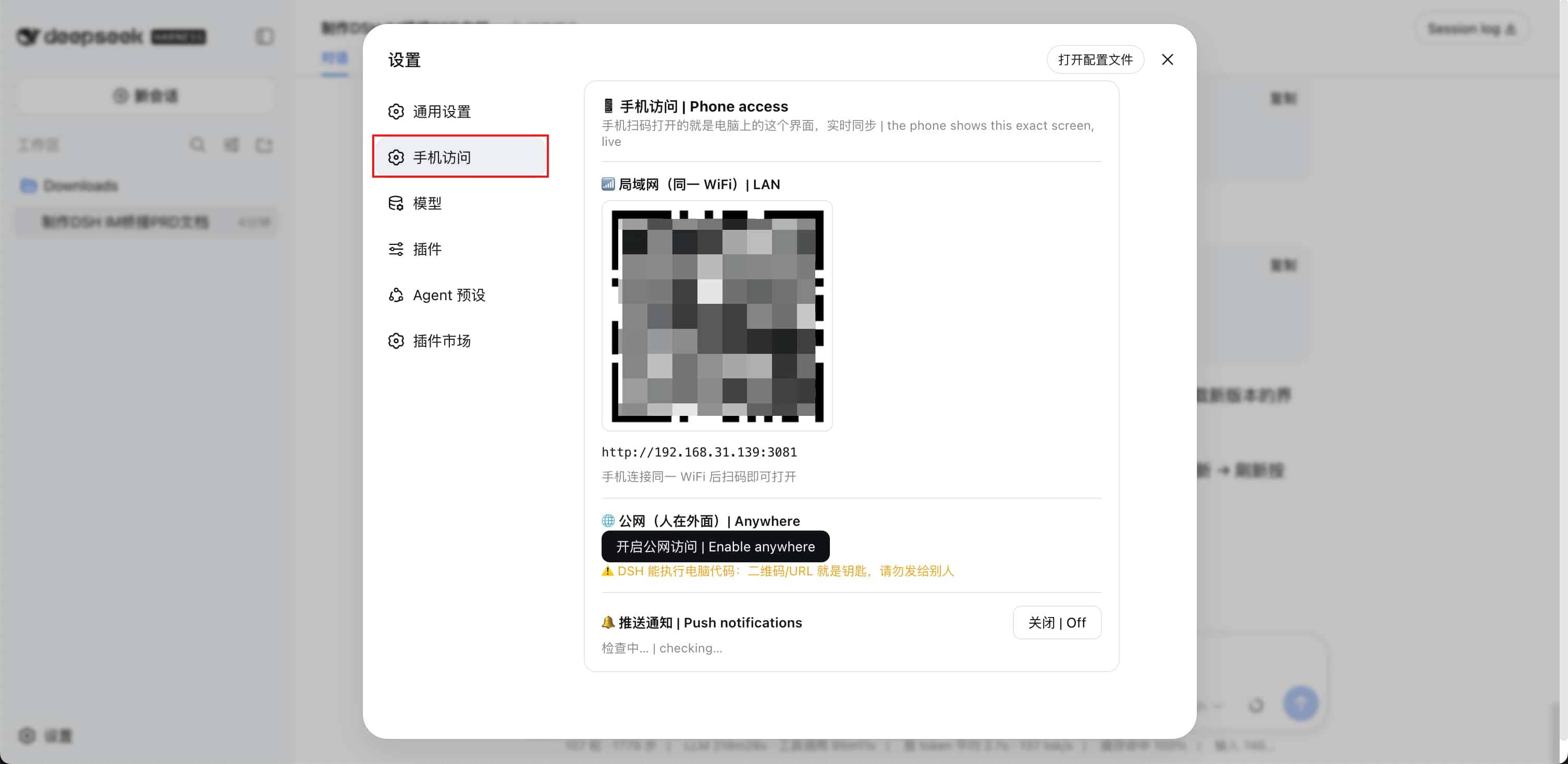
**Where is it**: after installing and restarting `dsh web`, open **Settings** — the **"Phone access"** entry appears in the left sidebar (same level as "General" and "Models"):
**Prerequisite**: [DeepSeek Harness](https://github.com/deepseek-ai/deepseek-harness) on the computer. If your terminal says `dsh: command not found`, install it first:
```sh
npm install -g @deepseek-ai/dsh # global; verify with: dsh --version
# Prefer not to install globally? Prefix every command with npx: npx @deepseek-ai/dsh
```
**Option 1: one-line install (npm registry)**
```sh
dsh plugin --profile web add @ds-hu/dsh-pocket -w --registry=https://registry.npmjs.org/
# This fails once with ERR_PNPM_IGNORED_BUILDS: the mobile subpackage is linked by the root
# package's postinstall, and pnpm 11 blocks dependency scripts by default. Click
# "Allow these scripts and retry" on the plugin panel, then re-run the command (one time only).
# Restart dsh web after it installs
npx @deepseek-ai/dsh web
```
**Option 2: install from the DSH WebUI Plugins page**
1. Open `dsh web` → **Settings → Plugins**;
2. Click **"Add plugin"** and pick the **"Official npm registry"** source (`https://registry.npmjs.org/`);
3. Enter the package name `@ds-hu/dsh-pocket` and click **"Install"**;
4. If you see `ERR_PNPM_IGNORED_BUILDS` / blocked build scripts, click **"Allow these scripts and retry"** (one time only);
5. When it finishes, **restart dsh web** as prompted.
> ℹ️ The package name is **`@ds-hu/dsh-pocket`**: the unscoped `dsh-pocket` on npm is the **original** project (PIN-based, not this one) — don't install the wrong one.
> ⚠️ **Already on the GitHub build or an older version?** A `github:` spec pins the commit, so restarting is not enough: uninstall the old plugin from the Plugins page, then install `@ds-hu/dsh-pocket` with either option above.
> 🔄 Updates: for an npm install, re-run `dsh plugin --profile web add @ds-hu/dsh-pocket@latest -w` and restart (the Plugins page does not auto-update npm installs yet). The in-UI "one-click update" only covers GitHub installs (re-runs `add` to re-pin the latest commit) and local clone symlinks (`git pull --ff-only`, development setup — see [LOCAL-DEV.md](./LOCAL-DEV.md)).
### Step 1: one-time setup (on this machine, ~2 minutes)
**① Pick one provider and create an OAuth app**:
| Provider | Where | Scope |
| -------------------------- | -------------------------------------------------------- | ------------------------- |
| **Gitee** (best in China) | | tick `user_info` |
| **GitHub** (best abroad) | | default `read:user` is enough, no review needed |
Both accept **multiple** callback URLs (GitHub: up to 10) — add one per access route (**must match exactly**, scheme and port included):
| Purpose | Callback URL |
| -------------------- | --------------------------------------------------------- |
| Local setup | `http://127.0.0.1:3081/pocket-oauth/callback` |
| Your tunnel domain | `https://your-fixed-domain/pocket-oauth/callback` |
| LAN direct (optional)| `http://your-lan-ip:3081/pocket-oauth/callback` |
Copy the resulting **Client ID** and **Client Secret**.
> 💡 A GitHub OAuth app with a single callback URL has "wildcard matching" enabled by default (it also matches subdomains/paths). Registering every URL character-for-character is the safer choice; this plugin is protected either way by its single-use `state` plus the callback allowlist.
**② Open the setup page in a browser on this machine**: `http://127.0.0.1:3081/pocket-setup` (the settings tab shows this URL with a copy button). **Pick Gitee or GitHub**, fill in the Client ID / Secret and the **access origins (one per line — the callback allowlist)**, then click "Save & bind account".
**③ Finish binding**: you are redirected to the provider you picked to authorize → back on the local page it shows "Bound successfully". That account is now bound to this machine.
### Step 2: bring your own tunnel (for remote access)
Forward a **fixed domain** to `http://127.0.0.1:3081` with whatever you like (frp, Tailscale Funnel, your own nginx reverse proxy, any port-forwarding service). Key points:
- **The domain must be fixed**: both providers match callback URLs exactly, so a changing domain breaks the callback (this is also why the plugin no longer ships a random-domain tunnel)
- **Keep the original domain as the Host header** (the default for mainstream tunnels): rewriting Host to `127.0.0.1` makes public traffic look local and skips sign-in
- The tunnel URL must be **identical** to one allowlisted origin (`https://` and `http://` count as different)
### Step 3: use it from the phone
Open `https://your-fixed-domain` on the phone → tap "**Sign in with Gitee**" (or "**Sign in with GitHub**" if that's the configured provider — the button follows the provider) → authorize with the **same** account → you're in. The UI matches your computer and stays in sync.
> **Another device**: just repeat step 3 (same account), no re-setup needed.
> **Changing the tunnel domain**: update both the OAuth app callback URL and the settings allowlist, then re-save the setup page (re-binding is required).
> **Switching provider (Gitee ⇄ GitHub)**: reopen the setup page on this machine, pick the other provider and bind again — a different provider is a different identity.
> **Revoke everything**: use "Sign out everywhere" in the settings tab.
## ⚠️ Security (read this)
- **dsh can execute code on your computer.** Authentication is your **Gitee or GitHub account**: only the account **bound during setup (provider *and* uid must both match)** gets in — any other account (even one with its own OAuth app) is rejected, and identical uids across the two providers cannot sneak through
- **Loopback is unauthenticated**: reaching it locally already means you're on the machine; that's why the **setup page is loopback-only** (remote access gets 403)
- **Fail closed**: with no client credentials, or credentials without a bound account, **every non-loopback request is refused** (an actionable page for browsers, 503 for APIs)
- **Never rewrite Host in your tunnel**: if a reverse proxy rewrites Host to `127.0.0.1`, public traffic is treated as local and skips sign-in — the one deployment detail to watch
- **The client secret never leaves this machine**: it lives in `$DSH_HOME/dsh-pocket/oauth.json` (mode 0600); the settings tab and RPC **never echo it** (only whether it is configured)
- **Gitee / GitHub is only the identity provider**: it never sees your machine's data; the access token is discarded right after fetching your uid — **nothing is persisted**
- **There is no PIN any more**: non-browser clients (curl, etc.) can therefore no longer use port 3081 — the inherent trade-off of the OAuth model
- **If your provider is unreachable**: remote sign-in is impossible (loopback is unaffected). Gitee needs `gitee.com`; GitHub needs **both** `github.com` and `api.github.com` (Gitee is the safer pick on mainland-China networks)
- **Allowlisted origins are your attack surface**: don't share your tunnel domain with untrusted people; any allowlisted origin can start a sign-in (only the bound account passes)
- **Local admin actions verify their origin (CSRF protection)**: saving credentials, starting a bind and signing out all check `Sec-Fetch-Site`/`Origin` and require a process-random nonce — other web pages cannot forge these local actions from the victim's browser; the session cookie carries `Secure` on `https` origins (omitted on `http`, where browsers would drop it)
## 🩹 FAQ
| Symptom | Cause & fix |
| ---------------------------------------------------- | -------------------------------------------------------------------------------------------------------------------------------------------------------------------------------- |
| `dsh: command not found` / DSH undefined | Install the CLI: `npm install -g @deepseek-ai/dsh`, or prefix with `npx @deepseek-ai/dsh` |
| `ERR_PNPM_ADDING_TO_ROOT` | pnpm 9 workspace-root restriction: append `-w` (`--workspace-root`) to install/update commands |
| Installed/updated but nothing changed | You **must restart `dsh web`**; the running process still holds the old code |
| `listen EADDRINUSE ... :3081` | An old process owns the port: macOS/Linux `lsof -ti :3081 \| xargs kill -9`; Windows `netstat -ano \| findstr :3081` then `taskkill /PID /F` |
| Changing the port | Plugin mode: set `"proxyPort": 3082` in `$DSH_HOME/dsh-pocket/settings.json` and restart `dsh web`. CLI mode: `dsh-pocket --port 3082` (also update the OAuth app callback URL and the allowlist) |
| Sign-in says "authorization failed / redirect_uri mismatch" | The OAuth app callback URL and the origin you are visiting are **not character-identical** (scheme, domain, port, path must all match) |
| "This account is not bound to this machine" | You signed in with a different account, or switched provider (Gitee ⇄ GitHub). Re-bind via `/pocket-setup` on the machine, or "Unbind account" first |
| Picked GitHub, sign-in keeps failing | GitHub requires outbound access to **both** `github.com` and `api.github.com`; switch to Gitee from an unstable network (re-select it in `/pocket-setup` and bind again) |
| GitHub tokens only last 8 hours — will I get logged out? | No. The plugin exchanges the code, fetches the user **once** and discards the token — it never stores or reuses it, so short-lived tokens / refresh tokens are irrelevant |
| The phone keeps bouncing back to the sign-in page | The browser dropped the session cookie (Safari drops cookies for `http://` + bare IP; there is a dedicated hint page). Use a Chromium browser, or an `https://` tunnel domain |
| Sign in again after every reboot | Sessions are bound to the dsh web process (a per-process random key) — **by design**: a restart invalidates all sessions |
| The tunnel domain changed | Update the OAuth app callback URL **and** the settings allowlist, then re-save the setup page (re-binding required) |
| After "Restart dsh web" the page says it runs in background | The new process is detached on purpose; stop it with `lsof -ti :3080 \| xargs kill -9` (macOS/Linux) or `netstat -ano \| findstr :3080` + `taskkill /PID /F` (Windows) |
| Stuck on 0.x | `^0.x` can't jump to 1.x: for an npm install run `dsh plugin --profile web add @ds-hu/dsh-pocket@latest -w` and restart `dsh web` |
## 💻 DSH Desktop
- Live screen mirroring works in DSH Desktop; **updates/restarts are managed by the desktop app** (those two actions are disabled inside the plugin)
- ⚠️ Desktop **advanced mode** does not support phone access yet (it disables the web layout, leaving the phone without a layout service → blank screen). Switch back to **compatibility** and restart; in advanced mode the phone shows an explicit notice overlay
## 🗂 Architecture (one package, two client bundles)
> Both `dsh.bundle` and `dsh.client` are **package-level** declarations. The Mobile Web UI is delivered as an **in-package subpackage** (`mobile/` = `dsh-pocket-mobile`) which declares `dsh.client` itself and ships its own browser half, so the panel card carries two independently switchable components and the mobile one has a **Configure** page. Delivery mechanism: `mobile/` is published with the root package via its `files` list, and **after installation** the root package's `postinstall` (`scripts/link-mobile-package.mjs`) creates `node_modules/dsh-pocket-mobile -> /mobile` inside the installed package — DSH resolves that row by looking for the package name under the package's own `node_modules`, so the link has to exist there.
>
> ⚠️ On install (npm and GitHub sources alike) pnpm 11 blocks that `postinstall` first: the command fails once with `ERR_PNPM_IGNORED_BUILDS` — click **Allow these scripts and retry** on the plugin panel, then run the same `add` again (one time only). `dependencies`/`bundledDependencies` cannot replace it: pnpm resolves `file:./mobile` against the *profile* directory and fails the whole install, and any `node_modules/**` committed to the repo is dropped when the artifact is unpacked.
| File | Purpose |
| -------------------- | ------------------------------------------------------------------------------------------------------------------------------------------------------------------------------ |
| `lib/index.js` | **Remote access** entry (row `dsh-pocket`): starts the proxy, registers RPC, owns the OAuth session key (rotation = sign out everywhere) plus bind/unbind/factory reset, desktop env adaptation |
| `lib/oauth.mjs` | OAuth core: provider table (Gitee / GitHub endpoints, scope, user-fetch style), config store (`oauth.json`, 0600, includes the provider), state store (single-use + TTL, carries the provider), callback-origin allowlist checks, authorize/token/user calls, session cookie derivation |
| `lib/service.mjs` | Service: proxy lifecycle (auto port fallback), status snapshot (OAuth view + a QR per allowlisted origin + LAN IP candidates) |
| `lib/proxy.mjs` | Header-rewriting reverse proxy: Host/Origin → loopback, transparent HTTP + WebSocket, polyfill injection, gzip/brotli, and the **auth gate** (loopback free / OAuth session otherwise, fail closed) plus `/pocket-oauth/*` and `/pocket-setup` routes |
| `lib/rpc-route.js` | RPC transport (used by `lib/web-rpc.js`): webserver mount / `rpc.handle` fallback / trust fence / 4xx-5xx branches (branch-for-branch with dsh-client-connection's `/api`); a future mobile host half can reuse it via `dsh-pocket/lib/rpc-route.js` |
| `lib/settings.mjs` | Settings persistence: proxy port → `$DSH_HOME/dsh-pocket/settings.json` (a legacy `mobileRightbarEnabled` orphan key is no longer read or written; a factory reset clears it) |
| `lib/clipboard.mjs` | Clipboard write (inlined into the client bundle at build time): `navigator.clipboard` with an `execCommand` fallback |
| `lib/web-rpc.js` | Remote access loopback RPC (channel `/dsh-pocket`): `status` / `oauth.rotateSession` / `oauth.unbind` / `version` / `update` / `restart` / `pocket.reset` |
| `client/` | The **Remote access** client artifact (`dsh.client` → `client/client.js`): `index.jsx` only wires the "Phone access" settings tab and the `isLoopback` fallback; `api.js` holds its contract and helpers |
| `mobile/` | The **Mobile Web UI** subpackage `dsh-pocket-mobile`: `index.js` is a do-nothing host entry (all UI lives in the browser half), `locale/` supplies the panel row title/description, `package.json` declares the package identity and `dsh.client` |
| `mobile/client/styles.js` | The **single source** of the mobile stylesheets (CSS as JS string exports): `shellCss` frame/drawer geometry and the global-panel exit button, `settingsCss`, `composerCss`, `planCss`, `touchCss`. Deliberately not `.css` imports — the native `node --test` runner cannot import CSS |
| `mobile/client/responsive-shell.js` | Viewport breakpoint (1024, matching the `ui-layout` sidebar auto-collapse point), style injection and prefs projection, drawer backdrop and idempotent open/close (reads the framework's `[data-sidebar-collapsed]` before deciding whether to call `toggleSidebar`), and auto-close that only recognises *navigation*: a session row being activated, or the main column's identity actually changing — expanding a Workspace or opening a `⋯` menu never closes the drawer |
| `mobile/client/settings-adapter.js` | Settings dialog two-level navigation adapter: directory ↔ detail state, injected "back to settings" bar, gated by the stepped-navigation switch |
| `mobile/client/index.jsx` | Plugin entry: registers the hamburger into `conversation.header.leading`, registers the global-panel exit button into `shell.overlay` (when a panel takes over the main column the conversation — and with it the hamburger — is not rendered at all, so this is the only way back on a phone), installs the two adapters above, registers the **Configure** page |
| `scripts/link-mobile-package.mjs` | The root package's `postinstall`: creates `node_modules/dsh-pocket-mobile -> /mobile` inside the installed package (the subpackage's only delivery mechanism). A link it cannot create is reported as a warning, never a failure — the row is `required: false` and must not break the whole plugin install |
| `bin/dsh-pocket.mjs` | CLI: runs the same proxy and OAuth config standalone (`--port` / `--host`) |
## 🛠 Development
```sh
npm install
npm run build:client # rebuild both client bundles (client/client.js, mobile/client/client.js)
npm test # proxy / OAuth / compression / handshake / service / RPC / settings / mobile UI / packaging
```
> Editing `client/**` or `mobile/client/**` (or the `lib/*.mjs` files they import) requires a rebuild: both bundles are committed and `npm test` byte-compares a fresh build against them, so tests can never validate a stale artifact.
> In sandboxed environments `node --test` is refused (it spawns one child per test file with piped stdio): run files directly instead, e.g. `node test/xxx.test.js`. Bundling has the same constraint (the esbuild JS API spawns a child) — use the esbuild CLI and then wrap the output.
**Want to try local changes without publishing?** Point the plugin at a symlink of this repo and restart dsh web — see [LOCAL-DEV.md](./LOCAL-DEV.md) (including how to switch back to the npm release).
## 🤝 Credits
- This project is a rework of [shaobeichen/dsh-pocket](https://github.com/shaobeichen/dsh-pocket) by 程序员少北晨: the access PIN is replaced with **Gitee / GitHub OAuth sign-in** (pick one during setup) and the built-in tunnel was removed (bring your own)
- The old narrow-screen mobile adaptation was ported from [mexiaosqwq/dsh-web-mobile](https://github.com/mexiaosqwq/dsh-web-mobile) (MIT); that implementation broke with an official Web UI update and was removed entirely (sources and notice file deleted). The current Mobile Web UI is a rewrite built on DSH's existing slot contract: the hamburger registers into `conversation.header.leading`, the drawer geometry targets `AppFrame`'s real column class names, and nothing depends on DOM structure upstream has since changed
- Sign-in is built on [Gitee OAuth 2.0](https://gitee.com/api/v5/oauth_doc) and [GitHub OAuth apps](https://docs.github.com/apps/oauth-apps/building-oauth-apps/authorizing-oauth-apps)
## 📄 License
[GPL-2.0](LICENSE) — free software: use, modify and redistribute freely, but **modified versions must stay GPL-licensed** with the copyright notice preserved; commercial use included.
> Note: this repo once ported the dsh-web-mobile (MIT, GPL-compatible) mobile adaptation under `mobile/`; that directory was emptied when the official Web UI changed, and its notice file was deleted together with the original code. The current Mobile Web UI is a rewrite built on DSH's existing slot contract; if third-party mobile code is ever brought in again, bring its license and notice along with it.
---
**Questions?** Bugs, ideas, requests — please open an issue on [GitHub Issues](https://github.com/cup113/dsh-pocket-oauth/issues) 🙏