
Back | Next | Contents
Image Recognition
# Classifying Images with ImageNet
There are multiple types of deep learning networks available, including recognition, detection/localization, and semantic segmentation. The first deep learning capability we're highlighting in this tutorial is **image recognition** using classifcation networks that have been trained to identify scenes and objects.
The [`imageNet`](../c/imageNet.h) object accepts an input image and outputs the probability for each class. Having been trained on the ImageNet ILSVRC dataset of **[1000 objects](../data/networks/ilsvrc12_synset_words.txt)**, the GoogleNet and ResNet-18 models were automatically downloaded during the build step. See [below](#downloading-other-classification-models) for other classification models that can be downloaded and used as well.
As examples of using [`imageNet`](../c/imageNet.h) we provide versions of a command-line interface for C++ and Python:
- [`imagenet-console.cpp`](../examples/imagenet-console/imagenet-console.cpp) (C++)
- [`imagenet-console.py`](../python/examples/imagenet-console.py) (Python)
Later in the tutorial, we'll also cover versions of a live camera recognition program for C++ and Python:
- [`imagenet-camera.cpp`](../examples/imagenet-camera/imagenet-camera.cpp) (C++)
- [`imagenet-camera.py`](../python/examples/imagenet-camera.py) (Python)
### Using the Console Program on Jetson
First, let's try using the `imagenet-console` program to test imageNet recognition on some example images. It loads an image, uses TensorRT and the `imageNet` class to perform the inference, then overlays the classification result and saves the output image. The repo comes with some sample images for you to use.
After [building](building-repo-2.md) the repo, make sure your terminal is located in the `aarch64/bin` directory:
``` bash
$ cd jetson-inference/build/aarch64/bin
```
Next, let's classify an example image with the `imagenet-console` program, using either the [C++](../examples/imagenet-console/imagenet-console.cpp) or [Python](../python/examples/imagenet-console.py) variants.
`imagenet-console` accepts 3 command-line arguments:
- the path to an input image (`jpg, png, tga, bmp`)
- optional path to output image (`jpg, png, tga, bmp`)
- optional `--network` flag which changes the classification model being used (the default network is GoogleNet).
Note that there are additional command line parameters available for loading customized models. Launch the application with the `--help` flag to recieve more info about using them, or see the [`Code Examples`](../README.md#code-examples) readme.
Here are a couple examples of running the program in C++ or Python:
#### C++
``` bash
$ ./imagenet-console --network=googlenet orange_0.jpg output_0.jpg # --network flag is optional
```
#### Python
``` bash
$ ./imagenet-console.py --network=googlenet orange_0.jpg output_0.jpg # --network flag is optional
```
> **note**: the first time you run the program, TensorRT may take up to a few minutes to optimize the network.
> this optimized network file is cached to disk after the first run, so future runs will load faster.
 #### C++
``` bash
$ ./imagenet-console granny_smith_1.jpg output_1.jpg
```
#### Python
``` bash
$ ./imagenet-console.py granny_smith_1.jpg output_1.jpg
```
#### C++
``` bash
$ ./imagenet-console granny_smith_1.jpg output_1.jpg
```
#### Python
``` bash
$ ./imagenet-console.py granny_smith_1.jpg output_1.jpg
```
 ### Downloading Other Classification Models
By default, the repo is set to download the GoogleNet and ResNet-18 networks during the build step.
There are other pre-trained models that you can use as well, should you choose to [download](building-repo-2.md#downloading-models) them:
| Network | CLI argument | NetworkType enum |
| --------------|----------------|------------------|
| AlexNet | `alexnet` | `ALEXNET` |
| GoogleNet | `googlenet` | `GOOGLENET` |
| GoogleNet-12 | `googlenet-12` | `GOOGLENET_12` |
| ResNet-18 | `resnet-18` | `RESNET_18` |
| ResNet-50 | `resnet-50` | `RESNET_50` |
| ResNet-101 | `resnet-101` | `RESNET_101` |
| ResNet-152 | `resnet-152` | `RESNET_152` |
| VGG-16 | `vgg-16` | `VGG-16` |
| VGG-19 | `vgg-19` | `VGG-19` |
| Inception-v4 | `inception-v4` | `INCEPTION_V4` |
> **note**: to download additional networks, run the [Model Downloader](building-repo-2.md#downloading-models) tool
### Downloading Other Classification Models
By default, the repo is set to download the GoogleNet and ResNet-18 networks during the build step.
There are other pre-trained models that you can use as well, should you choose to [download](building-repo-2.md#downloading-models) them:
| Network | CLI argument | NetworkType enum |
| --------------|----------------|------------------|
| AlexNet | `alexnet` | `ALEXNET` |
| GoogleNet | `googlenet` | `GOOGLENET` |
| GoogleNet-12 | `googlenet-12` | `GOOGLENET_12` |
| ResNet-18 | `resnet-18` | `RESNET_18` |
| ResNet-50 | `resnet-50` | `RESNET_50` |
| ResNet-101 | `resnet-101` | `RESNET_101` |
| ResNet-152 | `resnet-152` | `RESNET_152` |
| VGG-16 | `vgg-16` | `VGG-16` |
| VGG-19 | `vgg-19` | `VGG-19` |
| Inception-v4 | `inception-v4` | `INCEPTION_V4` |
> **note**: to download additional networks, run the [Model Downloader](building-repo-2.md#downloading-models) tool
> `$ cd jetson-inference/tools`
> `$ ./download-models.sh`
Generally the more complex networks can have greater classification accuracy, with increased runtime.
### Using Different Classification Models
You can specify which model to load by setting the `--network` flag on the command line to one of the corresponding CLI arguments from the table above. By default, GoogleNet is loaded if the optional `--network` flag isn't specified.
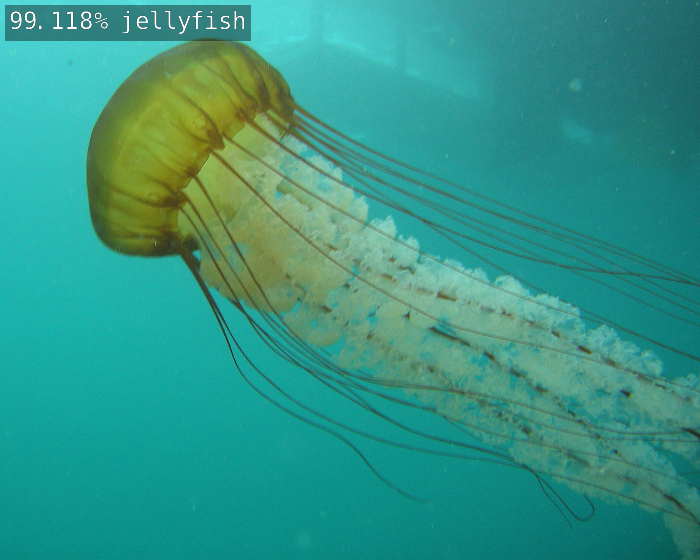
Below are some examples of using the ResNet-18 model:
``` bash
# C++
$ ./imagenet-console --network=resnet-18 jellyfish.jpg output_jellyfish.jpg
# Python
$ ./imagenet-console.py --network=resnet-18 jellyfish.jpg output_jellyfish.jpg
```
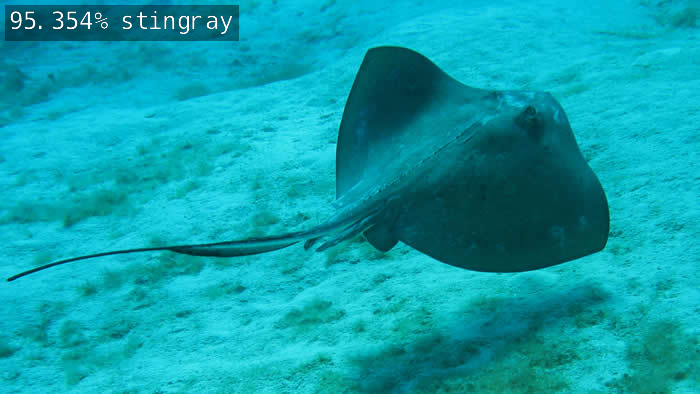
 ``` bash
# C++
$ ./imagenet-console --network=resnet-18 stingray.jpg output_stingray.jpg
# Python
$ ./imagenet-console.py --network=resnet-18 stingray.jpg output_stingray.jpg
```
``` bash
# C++
$ ./imagenet-console --network=resnet-18 stingray.jpg output_stingray.jpg
# Python
$ ./imagenet-console.py --network=resnet-18 stingray.jpg output_stingray.jpg
```
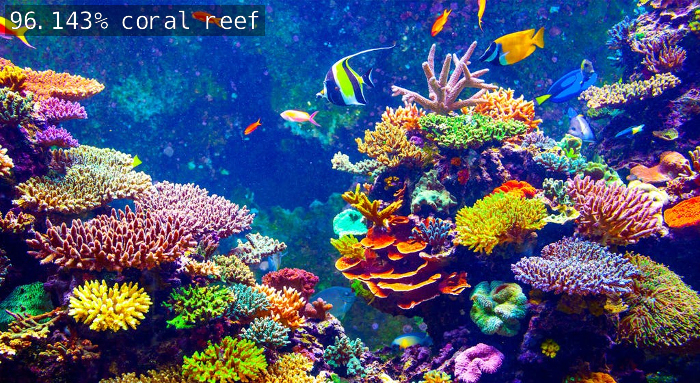
 ``` bash
# C++
$ ./imagenet-console.py --network=resnet-18 coral.jpg output_coral.jpg
# Python
$ ./imagenet-console.py --network=resnet-18 coral.jpg output_coral.jpg
```
``` bash
# C++
$ ./imagenet-console.py --network=resnet-18 coral.jpg output_coral.jpg
# Python
$ ./imagenet-console.py --network=resnet-18 coral.jpg output_coral.jpg
```
 Feel free to experiment with using the different models and see how their accuracies and performance differ.
Next, we'll go through the steps to code your own image recognition program from scratch.
##
Feel free to experiment with using the different models and see how their accuracies and performance differ.
Next, we'll go through the steps to code your own image recognition program from scratch.
##
Next | Coding Your Own Image Recognition Program
Back | Building the Repo from Source
© 2016-2019 NVIDIA | Table of Contents