中文 | English
> A plugin for DeepSeek Harness (DSH) that enables mobile and remote access via phone browser or WeChat. ## ✨ Features | Feature | Description | |---------|-------------| | 🌐 **Public Access** | Cloudflare Quick Tunnel — no public IP or registration needed; auto-downloads `cloudflared` | | 📡 **LAN Direct** | HTTP + HTTPS direct connection (HTTPS with auto-generated self-signed cert, zero config) | | 🔒 **Secure Auth** | Random token per start; HttpOnly Cookie; LAN can be token-free | | ⚡ **Performance** | Reverse proxy with automatic gzip compression for faster large session loads | | 📱 **Sidebar Icon** | Phone shortcut button persists in the bottom-left corner | | 🤖 **WeChat Bot** | iLink protocol direct connection to WeChat; AI chat, session control, model switching | | 💬 **QQ Bot** | NapCat OneBot 11 reverse WebSocket (work in progress) | ## 🚀 Quick Start **3 steps:** ```bash # 1. Install plugin (run in DSH profile directory) cd $DSH_HOME/profiles/web pnpm add github:godchen520/dsh-web-remote # 2. Register bundle (edit package.json) # Add "dsh-web-remote" to the "dsh.profile.bundles" array # 3. Restart DSH dsh web ``` A 📱 icon appears in the bottom-left corner → click to open the remote panel. ## 📸 Screenshots **Sidebar button** (bottom-left corner): 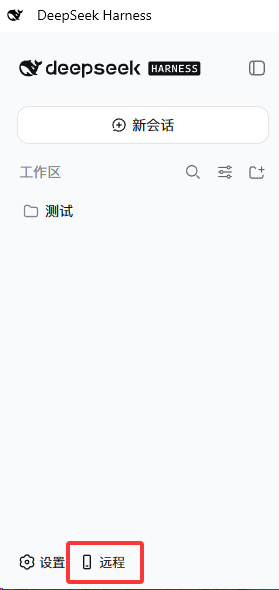 **Remote Panel** (Public / LAN switch, copy link, QR code, start/stop): 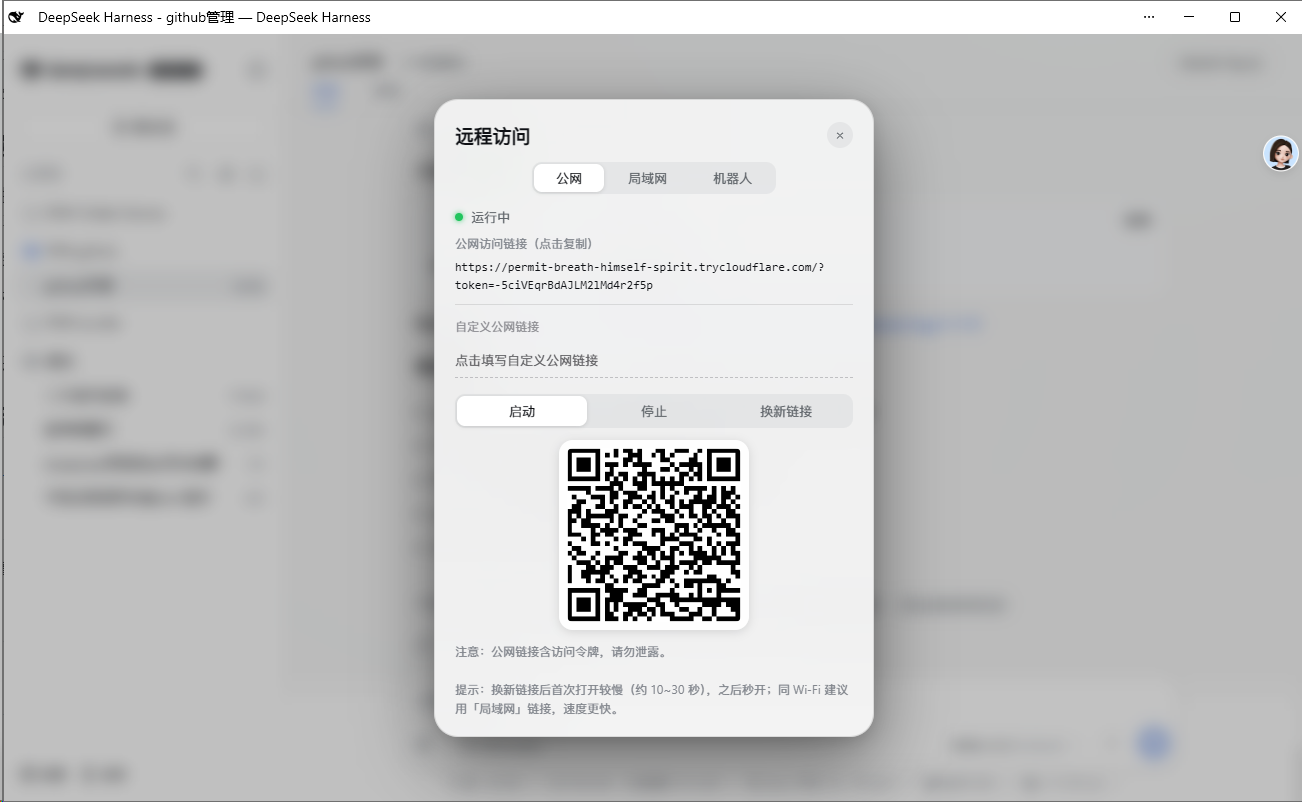 ## 📋 Installation ### Option 1: GitHub Install (Recommended) ```bash cd $DSH_HOME/profiles/web pnpm add github:godchen520/dsh-web-remote ``` Add `"dsh-web-remote"` to `dsh.profile.bundles` in `package.json`, then restart DSH. > Use `--config.minimumReleaseAge=0` if pnpm 11 blocks new packages. ### Option 2: Manual Patch Place the package in profile's `node_modules`, then add to `cordis.patch.yml`: ```yaml - insert: - id: web-remote name: 'dsh-web-remote' ``` > Bundle install requires restart; cordis.patch.yml supports HMR hot-reload. ## ⚙️ Configuration All optional. Override in `cordis.patch.yml`: | Option | Default | Description | |--------|---------|-------------| | `targetPort` | `3080` | DSH's own port | | `httpPortStart` | `3081` | LAN HTTP start port (auto-skips occupied) | | `httpsPortStart` | `3082` | LAN HTTPS start port | | `qqPortStart` | `3001` | QQ OneBot bridge start port | | `cloudflaredPath` | `''` | Specify cloudflared path; empty = auto-detect / auto-download | | `pfxPath` | `''` | PFX certificate; empty = auto-generate self-signed | | `pfxPass` | `''` | PFX password | | `toolsDir` | `''` | Tool & cert cache directory; empty = `$DSH_HOME/tools` | | `autoStart` | `true` | Auto-start on plugin load | | `lanOpen` | `true` | LAN token-free mode (private network bypass) | ## 📱 Usage 1. After start, a 📱 icon appears in the bottom-left corner 2. Click the icon → panel shows status and links 3. Open the link in your phone browser **Public:** `https://xxx.trycloudflare.com/?token=...` **LAN:** `https://192.168.x.x:3082` (same Wi-Fi; token-free by default) ## 🤖 WeChat Bot Control DSH directly from WeChat: **Remote Control Commands:** - `/link` — Get public link (auto-starts if stopped) - `/stop` — Stop remote service **Session Management:** - `/sessions` — List all sessions - `/select N` — Select session N - `/session` — Show selected session name - `/history` — Show session's recent output **Model Switching:** - `/model` — Show current model - `/switch-model` — List and switch models - `/effort N` — Set reasoning effort **Chat:** - Send content directly → auto-sends to selected session with result - Shows prompt to select a session when none is selected ## ❓ FAQ **Q: Public link shows "not secure"?** A: Expected for self-signed HTTPS certs. Choose "Continue anyway" in your phone browser. Edge may need "Enhanced Security" turned off. **Q: Link changes after DSH restart?** A: Public tunnel generates a new address each restart — this is normal. WeChat-bound tokens auto-restore. **Q: cloudflared download fails?** A: First start needs internet to download cloudflared (~10MB). Afterwards it's cached. You can also manually place it in `toolsDir`. **Q: WeChat disconnects after scanning?** A: After DSH restart, WeChat auto-reconnects (token is persisted). If still disconnected, re-send `/link` to rebind. ## 📝 Changelog See [CHANGELOG.md](CHANGELOG.md) for version history. ## 🤝 Contributing See [CONTRIBUTING.md](.github/CONTRIBUTING.md) for development and submission guidelines. ## 📄 License [MIT](LICENSE)