
# Realtime-Venus
**A full-duplex interaction system with asynchronous delegation**
Venus Team(Ant Group) and Tsinghua University
English | 简体中文





[Overview](#overview) · [Quick start](#quick-start) · [Results](#results) · [Code map](#code-map) · [Citation](#citation)
## Overview
**See, listen, and respond in real time—with background tasks running alongside the conversation.** Realtime-Venus combines full-duplex conversational models with an asynchronous execution framework. You can ask the assistant to work on a task and continue talking while it runs. The result returns to the same conversation for spoken delivery.
The project brings together three components:
| Component | Role |
| --- | --- |
| **Realtime-Venus-Omni · 9B** | A conversational model for streaming audio and video, proactive interaction, and native speech generation. |
| **Realtime-Venus-Audio · 9B** | A separately trained model for spoken interaction, audio understanding, and native speech generation. |
| **Realtime-Venus-Harness** | A shared runtime that captures delegated requests, executes background work, and returns results to the originating conversation. |
### What Realtime-Venus enables
- **Continuous audiovisual interaction.** Omni observes streaming camera and microphone input and can initiate a response when the evolving scene calls for it.
- **Full-duplex conversation.** The models process incoming speech while speaking, learning to distinguish acknowledgments and background speech from interruptions that call for a revised response.
- **Asynchronous delegation.** A model can hand a natural-language task to Harness for reasoning or tool execution while live interaction continues.
- **Results in the same conversation.** Harness prepares a reply; the conversational model handles its timing and native speech output. Work tracking separates task completion from spoken delivery.
The [paper](https://arxiv.org/pdf/2609.13814) describes the model family, dual-loop runtime, training data, and evaluation. **This source release includes the Omni model integration, the reusable Harness package, and a browser demo using a Codex task backend.** The demo's microphone-only mode also uses Omni.
## Quick start
### 1. Install dependencies
Standalone inference requires Python 3.10, CUDA, and FFmpeg. Run the following commands from the source repository root. First install the download helper's dependencies:
```bash
python -m pip install 'huggingface_hub>=0.34' 'PyYAML>=6.0'
```
The unified downloader reads the root `config.yaml` in the single Hugging Face repository [`inclusionAI/Realtime-Venus`](https://huggingface.co/inclusionAI/Realtime-Venus) to locate the model directories. Choose one download:
| Models | Command |
| --- | --- |
| Omni only | `python download_models.py --model omni --local-dir .` |
| Audio only | `python download_models.py --model audio --local-dir .` |
| Both models | `python download_models.py --model all --local-dir .` |
Omitting `--model` defaults to `all`. The downloader saves the root `config.yaml` and each selected model's complete directory under `--local-dir`, displays the standard Hugging Face Hub progress bars, and reuses cached files on later runs.
The same downloader is available from Python. It returns the selected local model directories as `Path` objects:
```python
from download_models import download_models
paths = download_models(model="omni", local_dir=".")
model_dir = paths["omni"]
```
The ModelScope mirror is an optional alternative, downloaded directly with its own CLI:
```bash
python -m pip install modelscope
modelscope download --model inclusionAI/Realtime-Venus --local_dir . \
--include "Realtime-Venus-Omni/*" "Realtime-Venus-Audio/*"
```
Then install the dependencies for your selected model:
```bash
# Realtime-Venus-Omni
python -m pip install -r Realtime-Venus-Omni/requirements.txt
# Realtime-Venus-Audio
python -m pip install -r requirements.txt
```
For the browser demo, run the installer on Linux. It creates an isolated Python 3.11/3.12 environment and installs the model, web service, and Harness dependencies:
```bash
bash install.sh
```
Then choose standalone inference or the online experience below.
### 2. Frontend Usage
Use the local checkpoints downloaded above. With `--local-dir .`, they are in `./Realtime-Venus-Omni/` and `./Realtime-Venus-Audio/` for the models you selected. Replace the `/path/to/` placeholders below with those directories, or with your chosen download location.
#### Realtime-Venus-Omni
**Offline video chat.** Generate text and speech responses based on the input video. The two examples demonstrate basic video chat and chat with long-video memory.
```bash
export REALTIME_VENUS_MODEL_PATH=/path/to/Realtime-Venus-Omni
python frontend/Realtime-Venus-Omni/offline_chat.py
# With long-video Memory
python frontend/Realtime-Venus-Omni/offline_memory_chat.py
```
**Full-duplex video interaction.** Stream the visual and audio content of a recorded video into the model as it generates text and speech responses. The three examples demonstrate text questions, spoken questions, and long-video memory.
```bash
python frontend/Realtime-Venus-Omni/duplex_chat.py
python frontend/Realtime-Venus-Omni/duplex_speech_in_chat.py
python frontend/Realtime-Venus-Omni/duplex_memory_chat.py
```
Duplex examples save subtitled videos. See the [Omni guide](frontend/Realtime-Venus-Omni/README.md) for inputs and output paths.
#### Realtime-Venus-Audio
**Offline audio understanding.** Provide a complete audio clip for the model to understand and respond to in text.
```bash
python frontend/Realtime-Venus-Audio/audio_offline_chat.py \
--model-path /path/to/Realtime-Venus-Audio \
--audio frontend/Realtime-Venus-Audio/case/case_offline.wav
```
**Full-duplex audio interaction.** Stream recorded audio into the model and generate speech responses while it continues listening. Save the output as a 24 kHz WAV file.
```bash
python frontend/Realtime-Venus-Audio/audio_duplex_chat.py \
--model-path /path/to/Realtime-Venus-Audio \
--audio frontend/Realtime-Venus-Audio/case/case_duplex.wav \
--output output/duplex_response.wav
```
Both scripts accept `--system-prompt` and `--prompt`; see the [Audio guide](frontend/Realtime-Venus-Audio/README.md) for decoding options.
### 3. Talk to Realtime-Venus
The online Duplex demo requires **at least one NVIDIA A100 GPU**. Configure the frontend model in root [`config.json`](config.json), and configure task execution in [`harness/config.json`](harness/config.json). The Demo file references the Harness file through `harness.config`.
Follow the [Demo configuration guide](demos/README.md#two-configuration-files) and [Harness configuration guide](harness/README.md#configuration-file), then start:
```bash
bash start.sh --config config.json
```
Choose `model.type: "audio"` for microphone and audio upload, or `"video"` (also accepts `"omni"`) for camera with microphone and video upload. Set `model.path` to the corresponding downloaded checkpoint. Complete Codex login if prompted; default ports are **8031** for the model and **8032** for the web service.
On your local computer, keep this tunnel open, replacing `user@server` with your SSH login:
```bash
ssh -N -L 8032:127.0.0.1:8032 user@server
```
Open [http://localhost:8032](http://localhost:8032), complete Settings and start a conversation. See the [Demo guide](demos/README.md) for service management.
### 4. Android Demo (Beta)
Download the Android demo: [Realtime-Venus-0918.apk — Beta](https://github.com/inclusionAI/Realtime-Venus/releases/download/android-beta-0918/Realtime-Venus-0918.apk). This is a **Beta** release for research and demonstration. See the [release page](https://github.com/inclusionAI/Realtime-Venus/releases/tag/android-beta-0918) for package details.
## Results
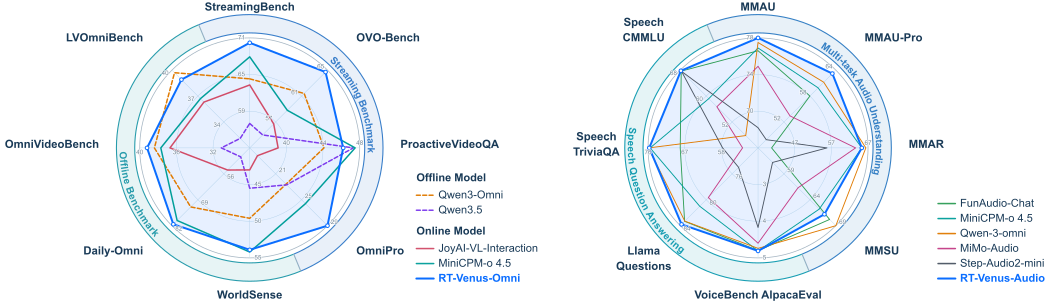
Figure 1. Video and audio understanding results from the paper.
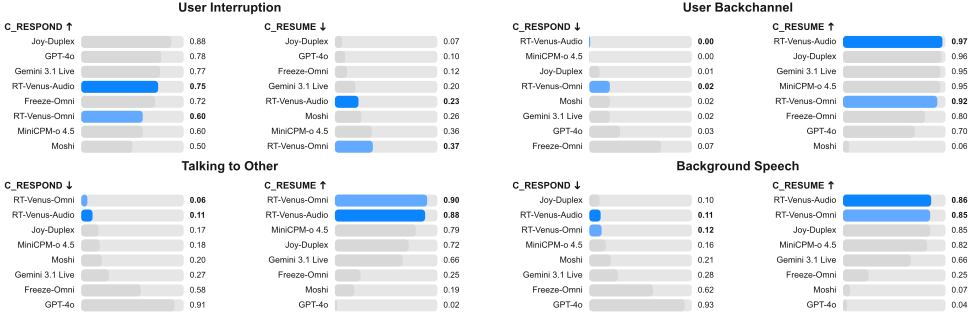
Figure 2. Full-duplex interaction results from the paper.
## Code map
```text
Realtime-Venus/
├── harness/ # Context, routing, agents, work state, and delivery
│ ├── README.md
│ └── requirements.txt # Harness media dependencies
├── frontend/
│ ├── Realtime-Venus-Omni/ # Audiovisual inference examples
│ └── Realtime-Venus-Audio/ # Audio inference examples and input samples
├── demos/
│ ├── model/ # Checkpoint adapter and model HTTP API
│ ├── server/ # Web sessions, media, settings, and artifacts
│ ├── static/ # Browser UI, capture, playback, and logos
│ ├── launcher/ # Configuration and process supervision
│ ├── settings.py # Saved task and model preferences
│ ├── install.py # Isolated environment installation
│ └── requirements.txt # Model and application dependencies
├── assets/ # Paper figures, report, and Demo screenshot
├── download_models.py # Download Omni, Audio, or both using the HF manifest
├── pyproject.toml # Standalone Harness package
├── requirements.txt # Shared dependency entry for inference examples
├── config.json # Frontend model, web service and Harness config path
└── install.sh / start.sh # Install, start, inspect, and stop the Demo
```
## Citation
```bibtex
@article{zhao2026realtime,
title={{Realtime-Venus}: A full-duplex interaction system with asynchronous delegation},
author={{Venus Team(Ant Group), Tsinghua University}},
journal={arXiv preprint arXiv:2609.13814},
year={2026}
}
```
## License
The source code in this repository is licensed under the [Apache License 2.0](LICENSE), except for components with separate license notices. Third-party fonts and paper figures retain their respective licenses; see the license files in [`demos/static/fonts/`](demos/static/fonts/) and [`assets/README.md`](assets/README.md).
---
© 2026 Realtime-Venus Authors.
Realtime-Venus is a research project by Venus Team, in collaboration with Tsinghua University.
The content on this page is for research and demonstration purposes only.