# dsh-aivn
English ·
简体中文
AIVN's stage engine, inside DSH.
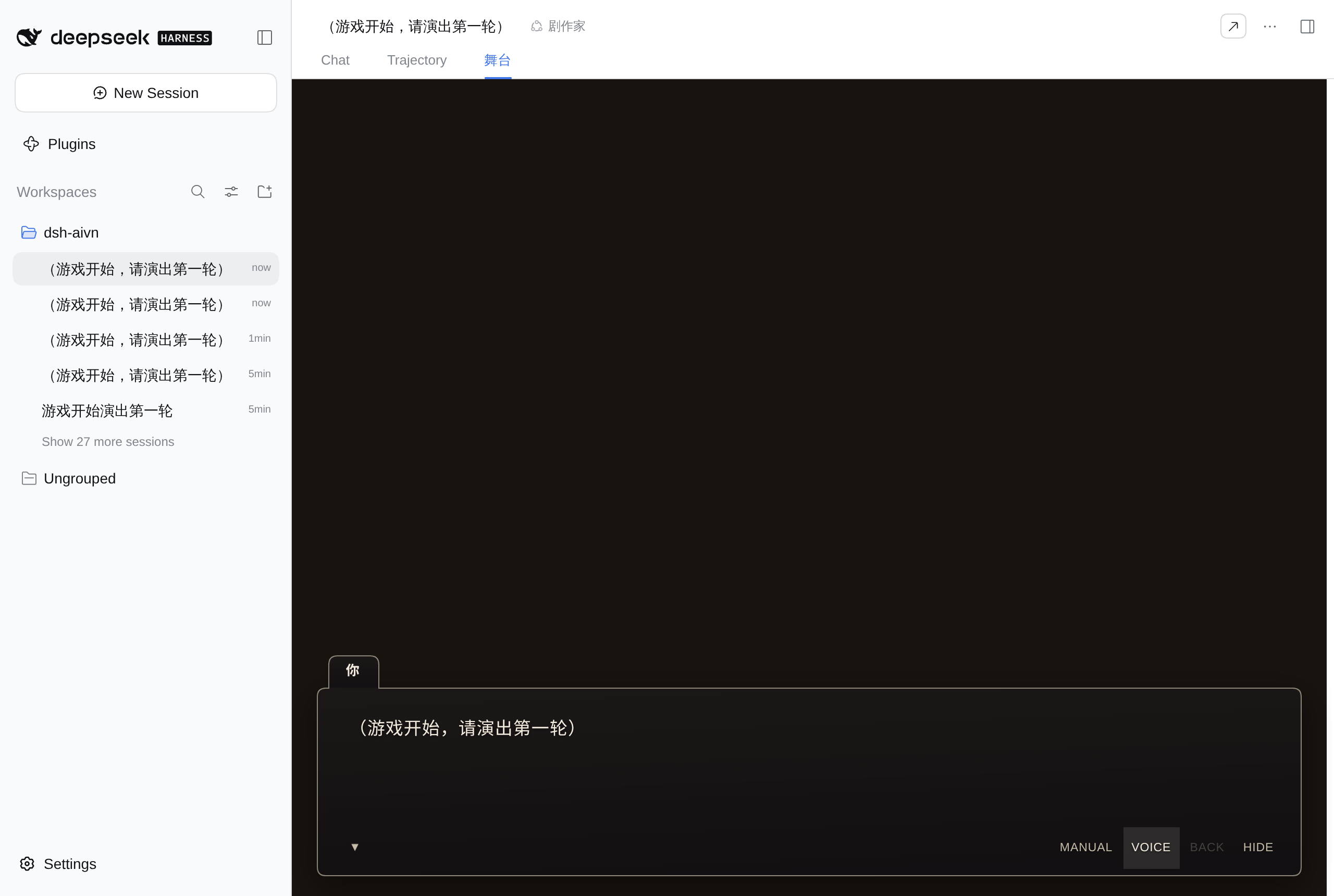
**One workspace is one play**: open a session in it, pick the **playwright (the script-writing agent role)** preset, and the conversation page gains a **Stage** tab where the Stage DSL the playwright writes is performed live — backgrounds, sprites, dialogue bar, stop-point options, all of it. The player clicks an option; that line goes back to the playwright, and it writes on.
## Install
The package is a DSH bundle (`package.json` declares `dsh.bundle.patch`):
```bash
dsh plugin --profile web add dsh-aivn
```
Installing straight from GitHub works too — `lib/` is a **tracked build artifact**, so no build
script runs and pnpm's `allowBuilds` check never comes up:
```bash
dsh plugin --profile web add github:john-walks-slow/dsh-aivn
```
- **By hand**: add a line to your profile's `cordis.patch.yml`:
```yaml
- insert:
- id: dsh-aivn
name: dsh-aivn
config: {}
```
- **The client half** (the AIVN tab) mounts on the `conversation.view` slot and needs
`dsh-web-app`. It is declared under `dsh.client{platform:"web"}` in `package.json` and
does not go through the Loader.
Six things are configurable — **voice**, **web search**, **image generation**, **music**, **shell**,
and **per-preset tool disabling**; leave the first five
all out and everything still runs (those capabilities are simply absent):
```yaml
- id: aivn
name: dsh-aivn
config:
ttsKeys: [""] # several keys rotate, spreading the free quota (comma-separated in the UI)
ttsBaseUrl: https://api.fish.audio # default; usually you don't need to set it
ttsModel: s2.1-pro-free # default
ttsConcurrency: 2 # cap on concurrent synthesis
searchKeys: [""] # with keys both presets also get web_search
searchBaseUrl: https://api.exa.ai # default
shell: false # true = give both presets bash
imageFormat: gemini # gemini | openai | modelslab (wire protocol, not a product)
imageBaseUrl: http://127.0.0.1:38000 # local flow2api; point it at the official API or your gateway
imageModel: gemini-3.0-pro-image
imageSize: 1K # 1K / 2K / 4K (uppercase K), or literal pixels 1536x1024
imageApiKey: "" # empty = no auth header (local gateways often don't check)
imageTimeoutMs: 180000
musicBaseUrl: http://127.0.0.1:38000
musicModel: flow-music-lyria-3.5
musicApiKey: ""
musicTimeoutMs: 240000
playwriterDisabledTools: "" # per-preset tool disable (comma-separated); empty = identical presets
stagehandDisabledTools: ""
```
**The config surface is 19 flat fields** (DSH's settings UI widgets only address top-level fields, so
a nested shape cannot be found):
| Option | Default | What it enables | Env fallback |
|---|---|---|---|
| `ttsKeys` | empty | Voice toggle on the stage, plus `list_voices` for both presets (the voice catalog shares the synthesis key pool) | `DSH_AIVN_TTS_KEYS` |
| `ttsBaseUrl` / `ttsModel` / `ttsConcurrency` | Fish official / `s2.1-pro-free` / `2` | — | — |
| `searchKeys` | empty | `web_search` for both presets (one call returns results and page text together) | `DSH_AIVN_EXA_KEYS` |
| `searchBaseUrl` | `https://api.exa.ai` | Change it for a proxy / mirror | — |
| `shell` | `false` | Both presets' `tool-bash` row actually mounts (off by default, same as AIVN's `defaultOff`); only affects new sessions | — |
| `imageFormat` / `imageBaseUrl` / `imageModel` | — | **baseUrl and model must both be set** for `generate_image` / `generate_asset` (present in both presets); `cut` / `import_asset` do not need it. `format` is the wire protocol, not a product name | — |
| `imageSize` | `1K` | Tier `1K`/`2K`/`4K` (uppercase K) or literal pixels `1536x1024`; gemini accepts tiers only, openai/modelslab accept both (modelslab caps at 1024) | — |
| `imageApiKey` / `imageTimeoutMs` | empty / `180000` | Leave the key empty for gateways that don't check it (no auth header is sent); raise the timeout if generation is slow | — |
| `musicBaseUrl` / `musicModel` | — | Both must be set for `generate_bgm` (Gemini shape only, no `format`) | — |
| `musicApiKey` / `musicTimeoutMs` | empty / `240000` | Same as above; one track measured at ~84 s | — |
| `playwriterDisabledTools` / `stagehandDisabledTools` | empty | Disable tools per preset (comma-separated tool names from the "Agent tools" list). Empty by default = the two presets are tool-for-tool identical | — |
| Cutout tuning | see "Asset generation" | `DSH_AIVN_CUTOUT_TOLERANCE` / `_KEY_SMOOTH` / `_EDGE_BAND` / `_SPILL` / `_SOLID_RESIDUAL`, five environment variables | same names |
Keys in neither place = that capability is off: the tool is **not registered** and the prompt never
mentions it. The two presets, the `/new-play` command and the `/aivn` routes are fixed and not
configurable. **Changing config requires a dsh restart**: the capability set is resolved at load time
(the preset rows and the tool list are both built from it).
> During development `@aivn/core` and `@aivn/stage` are `file:` dependencies (pointing at the stage-ai repo). Release builds switch to version numbers.
## Usage
1. Start a new session and pick **playwright** on the seat chip (the one that preps material is
the **stage-hand assistant**). The preset is fixed **when the session starts** and cannot be
changed midway — start a new session to change it.
2. The session's working directory root needs a `play.json`. Without one, the stage says outright
"this session's working directory has no play.json, so it isn't a play yet" — stand one up
first, see below.
3. Say something to start. Everything after that happens on stage — **that first message carries the
play's opening instruction (`opening`) to the playwright with it**, so you don't have to recite the
opening line yourself; anything ("let's go") works.
The AIVN tab is the third tab in the session header (Chat / Trajectory / AIVN), and it **only
appears while the session's preset is the playwright**.
### Starting a new play
No `play.json` in the workspace means "this isn't a play yet" — **writing one is what starts a
play**; there is no generator. The fields and the layout live in both presets' prompts (the
《剧目文件》 chapter, one shared text), and the model writes them with the ordinary file tools.
- **Human**: type `/new-play 雨中的旧校舍` in the input box. Without a play name, the working
directory name is used — this writes `play.json` and the skeleton for you, with no LLM round trip.
- **Agent**: write them per that chapter. The stage-hand assistant stands a play up while preparing it.
`/new-play` **only writes files that don't exist**: if `play.json` is already there, it errors out
(this is already a play — start a new one in an empty directory); if `memory/always/premise.md` and
the character cards are already written, they are skipped and listed as "kept" in the receipt. The
skeleton it leaves behind is the first few rows of the directory table below — fill in whatever is
missing as you go. To check what you wrote, have the stage-hand assistant call `validate_play`.
## Anatomy of a play
The working directory root is the play root:
```
play.json play config (the only required file)
memory/always/premise.md world premise
memory/always/craft.md prose style and taboos (prose — only sayable in words)
memory/always/state/scene.md current scene (the playwright writes it)
memory/always/state/threads.md open threads (the playwright writes it)
memory/always/state/state.json affinity and flags (same: affinity is an integer 0–100, keyed by character id)
characters/.md character card
assets/backgrounds/… backgrounds
assets/cg/… CGs
assets/sprites//… sprites: one directory per subject
assets/sfx/… assets/bgm/… sound effects and music
assets/manifest.json asset description table: asset id → one-line visual
endings.json endings ledger (engine-maintained, accumulates across playthroughs; do not edit)
```
### play.json
Only two fields are required:
```json
{ "id": "my-play", "title": "我的剧目" }
```
The remaining fields (all optional):
| Field | Purpose |
| --- | --- |
| `opening` | Body of the opening user message. It goes to the playwright together with the player's first message in the session; the **Start** button on an empty stage sends it too. Defaults to `(游戏开始,请演出第一轮)` |
| `characters` | `[{ id, name }]`. **Only used to put names on the dialogue bar**: sprite binding lives in the character card's frontmatter |
| `craft` | Writing parameters, see below |
| `initialState` / `initialScene` | The play's starting state and starting scene |
| `newGamePlus` | New-game-plus switch (default `false`). When on, a session newly opened in the same workspace (a new playthrough) gets the previously reached endings injected into the prompt — see "Endings and new game plus" |
| `scriptLanguage` | Script language (ISO 639-1). Defaults to following whatever language the player speaks |
| `voiceLanguage` / `defaultVoiceId` / `cover` | Voice and cover: they belong to the AIVN app; this plugin doesn't read them yet |
| `image` | `{"model": "…", "size": "2K"}`: **this play's own image model and size tier**, overriding the deployment settings (each field overrides only itself; leave it out to follow the deployment). One play may want 2K sprites for cutout while another is fine with 1K CGs |
| `agents` | Agent runtime settings: they belong to the AIVN app; this plugin doesn't read them yet |
### Endings and new game plus
When the story reaches its true end, the playwright writes an ending tag as the **last line** of that beat
(it **replaces** that beat's ``):
```xml
```
Reaching an ending puts the stage into a **terminal state**: no buttons, no continuing — to play again you
branch before the ending with DSH's native "branch in new conversation", or start a new session. After the
ending the engine opens **one extra turn** and asks the playwright for a closing prose passage
(`…`), which streams into the ending card.
The engine records endings automatically in `endings.json` at the workspace root: accumulated across
playthroughs, deduplicated by `id`, with `reachedIn` recording which playthrough reached it. The engine owns
this ledger — **do not edit it**.
When `play.json` turns on `newGamePlus`, a **newly opened session** in the same workspace (a new playthrough)
has the previously reached endings injected into the playwright's prompt so it can weave in new-game-plus
elements (characters half-remembering, different routes/choices). The engine only makes the ledger visible —
it **forces no unlocks**; how to use it is entirely up to the playwright. At the start of a new playthrough
the engine resets the three state files under `memory/always/state/` (it leaves `premise.md`, `craft.md`, the
memory index and character cards untouched).
### characters/<id>.md
A character card is a Markdown file with optional frontmatter:
```markdown
---
name: 林
sprite: lin
voice: 短句,少用形容词
---
十七岁,话少,习惯先看窗外再看人。
```
- `name` — the name on the dialogue bar.
- `sprite` — which sprite directory to bind to (`assets/sprites//`). Omit it and the
character's own id is used. Sprites are **their own thing**: a `characters/` entry can have no
sprite, and a `sprites/` entry can have no card.
- `body` — the persona body.
### assets/manifest.json
The playwright sees ids, not pictures, and relies on these descriptions:
```json
{
"veranda": { "description": "黄昏时分的走廊,木地板反着暖光" },
"lin/normal": { "description": "林,常服,平静的神色" }
}
```
**The key is the asset id, not a path** — no directory prefix, no extension. Writing
`backgrounds/veranda.png` won't error; it just never matches, and the playwright will think that
asset has no description. Three key shapes:
| Asset | Key |
| --- | --- |
| Background / CG / SFX / music | File name without the extension (`veranda`) |
| Sprite (whole subject) | Sprite directory name (`lin`) |
| Sprite (single variant) | `/` (`lin/normal`) |
Besides `description`, a value can carry `tags`, `title`, `framing`, `stature`, and `anchor`
(sprite placement); music can also carry `mood`, `scene`, `durationSec`, `loop`, and `volume`.
Backgrounds, CGs, SFX, and music are collected by extension whitelist
(png/jpg/jpeg/webp/mp3/ogg/wav/m4a); sprites are grouped by directory under
`sprites//`, and the first file in each directory is the fallback when the requested
variant isn't found.
### craft: writing parameters
The `craft` section of `play.json`; none of the fields has to be written (unwritten = engine
default):
| Field | Values | Default |
| --- | --- | --- |
| `beatLength` | `short` / `medium` / `long` | `medium` |
| `stopOptions` | `two` / `three` / `four` / `free` | `three` |
| `assets.background` | `library-first` / `library` / `generate` | `library-first` |
| `assets.cg` | `library` / `generate` / `off` | `generate` |
| `assets.sprite` | `generate` / `off` | `generate` |
| `assets.audio` | `library` / `off` | `library` |
`free` = always stop at the free-text input, with no option panel.
**The four asset-source categories are intent directives to the playwright**: the engine renders
them into the playwright's "Writing parameters" section — e.g. `cg: off` tells it not to write
``, `background: generate` tells it to produce its own art. Two caveats:
- **There is no cross-play asset library** (the app-level `library/` is permanently out of scope):
the "use the library" branch of `library` / `library-first` is unreachable and degrades to
"use what this play already has / generate".
- **The generate branches also depend on an image backend being configured**: without one they are
rewritten to "use existing assets or narrate", so the playwright is never told to call a tool that
does not exist.
Rules that can only be stated in words — prose style, taboos, how characters address each other —
go in `memory/always/craft.md`, not in `play.json`.
**Edit this section in place with `edit`** (touch only the `craft` key; not one byte of the rest of
the file). There is no `set_craft` tool — writing a file is writing a file. The engine **silently
ignores** values it doesn't recognise, so have the stage-hand assistant call `validate_play` after
editing: it reports the ones that will be dropped.
## The two presets
| id | Name | What it does |
| --- | --- | --- |
| `aivn-playwriter` | playwright | The one that writes Stage DSL live; its output is piped into the stage |
| `aivn-stagehand` | stage-hand assistant | Preps material: premise, character cards, creative guidelines, voice picking, image generation and committing, BGM, research |
Both presets have the **same entries**: instruction-file discovery (`AGENTS.md`) + persona
(that prompt file) + file tools + file search + the skill library (bundled `skills/`, see below)
+ a `tool-bash` row that stays off unless you set `shell: true`. **The tool surface is identical
too** (see "Agent tools"); the only differences are persona, injected context, and the stage
pipeline. **Neither preset lists a `dsh-aivn` entry** — the host already loads the plugin, and
another entry would install the routes and event subscriptions twice.
Only sessions on the playwright preset enter the stage pipeline. Nothing the stage-hand assistant
says goes on stage.
### Skill library (both presets)
The plugin ships three how-to references inside the package (`skills/`), mounted into both presets:
| Skill | What it covers |
| --- | --- |
| `aivn-play-setup` | The four-step setup for a new play or a settings change, and what each file holds (premise / craft.md / the craft block / character cards / memory cards / asset sheet), the `craft` values, and prep order |
| `aivn-visual-craft` | Where the art-style anchor goes, how to pin a character's looks (head-to-body ratio / face / outfit), variant layout and naming, how to write an art order, and ready-to-paste image prompts |
| `aivn-audio` | Where to find free BGM / SFX, which licences allow commercial use, source picks for six BGM moods and common SFX categories, redistribution and AI-training red lines |
Only names and one-line descriptions go into the system prompt; the model loads the full text when
one looks relevant — all three are long and should not be read every beat. `includeDefaultRoots: false`
is deliberate: the dozens of host-ops skills installed on the machine have no business crowding
these presets' catalog.
## Context injection
The playwright's system prompt is assembled from two parts with **per-beat play context**
injected in between — the playwright doesn't need to `ls` + `read` its way around to know the
play's setting, who's in it, what assets exist, and where it currently stands.
The headers the engine injects are Chinese (`# 剧本语言`, `# 剧目设定`, `# 角色表`, …): the
playwright reads and writes Chinese, and the section names are part of its prompt, not of this
document. The names below are translations of those headers.
| Section | Content | Source |
| --- | --- | --- |
| Static prefix | Identity, how to work, where the play is | the `prefix` of `persona` |
| "Script language" | Which language the prose is written in | `scriptLanguage` in `play.json` |
| "Play setting" | World premise | `memory/always/premise.md` |
| "Cast" | Each card's body + voice + sprite variants; subjects with sprites but no card get their own section | `characters/*.md` |
| "Asset list" | ids + descriptions for backgrounds / music / SFX / CGs; cue rules appended when there is music or SFX | `assets/` + `assets/manifest.json` |
| "Writing parameters" | How long each beat is, how many options, asset sources, plus the creative-guidelines prose | `craft` in `play.json` + `memory/always/craft.md` |
| "Memory index" | One line per setting card (category / title / path / summary) | `memory/index/**` |
| Static suffix | Script format, how to write memory cards, introducing new characters, the performance contract | the trailing block the plugin registers |
| [State] | Scene, affinity, flags, active threads (a user-role snapshot that changes every beat) | `memory/always/state/*` |
These sections **mount only for playwright sessions** (registered on the Agent scope), so the
stage-hand assistant never sees the performance contract. Snapshots are cached with a
second-scale TTL: several steps in one turn read the same copy, and a new beat re-reads
naturally. Change a file and there is nothing else to do — it takes effect on the next beat.
**The stage-hand assistant gets its own injection** (also registered on its own scope):
| Section | Content | Source |
| --- | --- | --- |
| "Script language" | Which language the on-stage material is written in (the conversation stays Chinese) | `scriptLanguage` in `play.json` |
| "Current state" | Play file listing (path + size, three levels deep) + the readiness report | the workspace + `readiness` |
It has no use for the performance contract (it does not write the script) or for the cast laid out
card by card — what it needs is "what is on disk right now, what is still missing", and it sees a
file it just wrote on the next beat.
## Agent tools
Tools are installed and removed with the preset. **Both presets mount the same set** (the only
difference you can opt into is the per-preset disable config below). **No tool exists for anything
the file tools already do** — `play.json`, its `craft` section and `memory/always/state/` are written
with the file tools, and the prompts say what shape they take (see "Starting a new play" above).
"What assets does this play have" is the same story: the playwright gets the asset list and cast
table injected into its A-section every beat (id + description), and the stage-hand assistant reads
the file listing in "Current state" and `assets/manifest.json` when it wants descriptions.
**The playwright's stop point is not a tool**: it is a tag on the last line of the script itself —
`` (option panel), `` (free-text input), ``
(this beat simply ends). The turn therefore ends on an assistant message, which is what DSH's
"branch in a new conversation" and the stage rebuild (it replays assistant text only) both require.
**The story's true ending uses `` instead** (also a last-line tag, replacing that beat's `` —
see "Endings and new game plus").
**Both presets mount the same set of AIVN tools** (the catalogue lives in `src/tool-catalog.ts`); the
"gate" column marks tools registered only when the matching backend / key is configured.
To disable tools per preset, use the plugin config `playwriterDisabledTools` / `stagehandDisabledTools`
(comma-separated tool names; empty by default = the two presets are identical).
| Tool | Gate | What it does |
| --- | --- | --- |
| `validate_play` | — | Play self-check: whether `play.json` can be read (with the reason when a field is missing or the JSON is broken), whether `craft` holds values the engine does not recognise, whether the state files are sound, story premise, character card count, sprites, backgrounds, asset count, and whether the generation ledger holds entries pointing at missing files. Call it right after writing play files. **No hard gate** — you can start with anything missing |
| `set_stage_style` | — | Writes the play-root `theme.json` (stage skin: dialog bar, choice cards, backdrop, radius, font, accent) and pushes the full skin to every open stage on the same play. Three states: omitted = keep, a value = set, `null` = reset; call with no args = read current |
| `generate_image` | image backend | **Pure generation**: a description → one **candidate image** (the receipt gives the file path and a preview); it binds no play target, does no cutout and no registration. Aspect via `aspectRatio` (default 16:9); `references` may hold subject ids / play-relative paths / http(s) URLs. To make it an asset, follow up with `cut` / `import_asset` (or just use `generate_asset`) |
| `cut` | — | **Cutout**: a flat-key-colour image → a transparent PNG (writes the output only, **never touches the source**). `source` is a play-relative path; with no `output` it lands in the candidate area. Five knobs below (`tolerance` / `spill` / `edgeBand` / `keySmooth` / `solidResidual`). Run it before registering a sprite; if the edges are dirty, re-run it **on the same source** with different knobs. **Independent of the image backend** |
| `import_asset` | — | **Registers** an image as a play asset: writes `assets/`, updates the asset sheet (presentation + description), records the ledger — **no cutout**. `source` is a play-relative path or an http(s) URL; placement is **always explicit** — `kind` (background / cg / sprite) is required, and for a sprite `spriteId` / `variant` / `framing` / `stature` / `title`. A sprite must be an **already-cut transparent PNG** (run `cut` first for external art); `original` keeps the pre-cutout source for re-cutting. **Independent of the image backend** |
| `generate_asset` | image backend | **One-shot**: generate + (sprite) cutout + register in a single call, returning the final asset path. Same placement args as `import_asset` (`kind` + `name` / `spriteId` / `variant` / `framing` / `stature`). **Only this path** gets the automatic key-colour background, identity lock and variant-leaning-on-neutral; if the asset already exists it is skipped |
| `generate_bgm` | music backend | Generates one BGM track into `assets/bgm/`; it **waits** (~84 s). `name` is the id your script references as `` |
| `list_voices` | `tts.keys` | Searches the Fish voice catalog: builds a window from language / tags / title keywords, filters `gender` locally, sorts by likes and shows the top 25. The id you pick goes into the card's `voice` |
| `web_search` | `search.keys` | Web search: one call returns results and page text together. For facts **outside** the play — the setting, cast and plot all live in the workspace files |
`list_voices` / `web_search` / `generate_image` / `generate_asset` / `generate_bgm` are **not registered**
when their keys / backends are absent, and the prompt never mentions them.
**`validate_play` / `set_stage_style` / `cut` / `import_asset` are not gated**: they only read/write play
files and run the cutout, never the image backend — so without image generation you can still bring in
art from other tools, `cut` it and `import_asset` it. The file tools (`read` / `write` / `edit` /
`glob` / `grep` / `read_image`) come from the preset rows and are present in both presets.
## Asset generation
"**Where the pixels come from**" and "**how pixels become a play asset**" are two steps, and the tools
are split as well:
- **One-shot (`generate_asset`)**: generate + (sprite) cutout + register in one go — the path for
"I just want a usable image".
- **The atomic trio (`generate_image` / `cut` / `import_asset`)**: one job each, freely composable —
for producing candidates for the user to pick, for art from elsewhere (downloads / another model),
or for re-cutting on its own.
| | one-shot (`generate_asset`) | atomic (`generate_image` → `cut` → `import_asset`) |
| --- | --- | --- |
| Source | the configured image backend | a `generate_image` candidate / play-relative path / http(s) URL |
| Play awareness | automatic key-colour background, identity lock, variant leaning on neutral, cutout | none: write the sprite's flat background into the prompt yourself and call `cut` separately |
| Placement | explicit args (kind / subject / variant / framing / stature) | explicit `import_asset` args |
| Commit | in one go | step by step: `cut` then `import_asset` |
Generation **waits synchronously** (70–140 s per image). "Generate a few candidates and let the user
pick" = call `generate_image` several times and paste the previews; the chosen one is then placed
(backgrounds / CGs straight into `import_asset`, sprites through `cut` first). **Unpicked candidates
leave no trace in the asset sheet.**
### Layout and ledger
```
play/
├── assets/ ← play content, goes into git
│ ├── generated.json ← generation ledger: the prompt each image was made from (append-only per key)
│ └── manifest.json ← asset descriptions and sprite presentation (framing / stature / title)
└── media-cache/ ← intermediates, never in git, safe to delete wholesale
├── drafts//{image.*, source.*, draft.json}
├── sprite-sources// ← pre-cutout originals (`import_asset`'s `original` and auto-neutral land here; re-cutting reads them)
└── tts/ ← speech cache (content-addressed)
```
Drafts live 7 days and are swept by the next generation. Add at least `media-cache/` to
`.gitignore` (keep `assets/` tracked — that is play content).
### How candidates reach the user
No new HTTP route: **the receipt and the reply embed a Markdown image whose path is absolute inside
the workspace** (``). DSH's chat
renders it as an inline preview (click for the full image), and since drafts and assets both live in
the session workspace (= the play root) this works for committed assets just as well. The tool
receipt hands over that line and the persona tells the model to paste it — "generate three
candidates and let the user pick" only works if the user can actually see them.
### Sprites: framing, stature, cutout
- **`framing`** decides the generated aspect ratio and the on-stage placement: `full` 9:16 /
`half` 3:4 / `square` 1:1. Use `full` or `half` for people, `square` for non-human subjects
(cats, props) — "full body" / "half body" are human-shaped words. Keep one tier per subject: the
declaration lives under the `` key of `assets/manifest.json` (the level shared by the
whole subject); when one variant differs, write a second `/` entry. The
subject-level framing **follows the `neutral` take** — it is the reference every variant is
derived from, and one closeup must not drag the whole subject's placement around.
- **`stature`** (`small` / `normal` / `large` / `huge`) is only about how big the subject stands on
stage, independent of framing: a mech is "full framing + huge", a cat is "square framing + small".
- **Cutout**: a sprite must be a transparent PNG. Through `generate_asset` the engine cuts it
automatically (flat key colour, global key, per-pixel edge coverage solve — `src/media/cutout.ts`);
on the atomic path, call `cut` after `generate_image` produces a candidate. When the edges are
dirty, **do not regenerate** — a new generation is a different picture: re-run `cut` with different
knobs **on the same source** (the source lives under `media-cache/sprite-sources//`, or
keep one via `import_asset`'s `original`). Its five knobs map to five environment variables:
| Env var | Default | Effect |
| --- | --- | --- |
| `DSH_AIVN_CUTOUT_TOLERANCE` | `48` | Chroma-key tolerance. **Higher = cuts harder**, and eats hair strands too |
| `DSH_AIVN_CUTOUT_SPILL` | `20` | Despill: removes residual key colour at the edges without losing a single strand. Reach for this first |
| `DSH_AIVN_CUTOUT_EDGE_BAND` | `4` | Solve band width; widen when a hard white ring shows up |
| `DSH_AIVN_CUTOUT_KEY_SMOOTH` | `0.8` | Key denoise; raise when JPEG ringing bites notches into the silhouette |
| `DSH_AIVN_CUTOUT_SOLID_RESIDUAL` | `48` | Solid-colour test. **Lower** it when outlines get eaten |
### How the three image formats differ
| `format` | Endpoint | Reference images | Size |
| --- | --- | --- | --- |
| `gemini` | `/v1beta/models/{model}:generateContent` | ✅ several (`inlineData`; official API, flow2api and cpa all speak it) | tiers only: `1K`/`2K`/`4K` |
| `openai` | `/v1/images/generations` | ❌ the endpoint has no reference-image input; passing one errors out | literal `WxH` (tiers are computed by the plugin, clamped to the official caps) |
| `modelslab` | `/images/text2img` and `/img2img` | ✅ one (uploaded via `base64_to_url` first) | single side capped at 1024; tiers land on "long side to the cap" |
**Reference images are the only reliable way to keep a character consistent**: a non-`neutral`
sprite automatically gets that subject's committed `neutral` as its reference (prompt wording
cannot lock a face). So the order per subject is: generate the neutral, commit one, then derive the
other variants. And no format but `gemini` can reach 2K — cutout jaggies are only softened by
resolution, so use `gemini` for high-quality sprites.
`references` accepts three forms: a **subject id** (uses that subject's committed `neutral`), a
**play-relative path**, or an **http(s) URL** (downloaded into memory, never to disk: private,
loopback and cloud-metadata addresses are refused, every redirect hop is re-checked, 20 MB cap).
When a background or CG references several subjects the engine writes "which one is which, in this
exact order" into the prompt — the images themselves have no names, and without the roster a
multi-character CG quietly draws the wrong person: no error, a good-looking picture, just the
wrong face.
Two more automatic behaviours on the playwright path:
- **Existing same-named assets are skipped**: the receipt says "already there" and gives the tag to
reference it, so nothing is overwritten and no quota is burned;
- **a missing `neutral` is generated on the way** when a variant is requested (once per concurrent
batch, and it is reported in the receipt). But if the subject **already has other variants** and
only lacks the `neutral`, it errors out and asks you to look first — the new face and the existing
variants would not be the same person, and that is a silent face swap mid-play.
**Per-play model and size** live in `play.json`'s `image` section (`{"model": "…", "size": "2K"}`);
leave them out to follow the deployment settings. The override applies to both roles.
## Slash command
| Command | What it does |
| --- | --- |
| `/new-play [play name]` | Stands the current working directory up as a play (writes `play.json` and the skeleton files), with no LLM round trip |
The command is visible to every session (DSH commands are not preset-scoped), and it lands in the
working directory of whichever session you type it in. It **only creates, never overwrites**: an
existing `play.json` is an error, and any other skeleton file that already exists is skipped and
listed in the receipt.
## Host HTTP surface
The browser half talks to just these endpoints, all scoped by session:
| Route | Description |
| --- | --- |
| `GET /aivn/health` | `{ ok: true, plugin: "dsh-aivn" }` |
| `GET /aivn/play?session=` | This session's play: `{ dir, config, voice }`; `{ dir: null, voice: false }` if it isn't a play. `voice` says whether the host has TTS configured, and the client uses it to decide whether to show the voice toggle |
| `GET /aivn/assets?session=` | `{ index, manifest }`; 404 if it isn't a play |
| `GET /aivn/asset?session=&path=` | One asset inside the play. `path` is **relative to the play root** (e.g. `assets/backgrounds/x.png`); 400 if it escapes |
| `GET /aivn/audio?session=&file=` | Synthesized audio for one line. The file name is `sha1(model + voice id + text)` and content-addressed, so it can be cached for a long time |
| `GET /aivn/stream?session=` | SSE, `event: frame`, with the data being one `StageFrame` JSON. On connect it replays frames already performed, then a keepalive every 15 seconds |
| `POST /aivn/input { session, text, silent? }` | One player input, delivered to the playwright. `silent: true` means it doesn't count as something the player said (the stage's **Continue** takes this path); it is still inserted as a user message. **Returns 409 once the session has ended** (a terminal state accepts no continuing; the way out is a branch or a new session) |
| `POST /aivn/voice { session, enabled?, paused? }` | The master voice switch and client backpressure. `enabled: false` stops the server from synthesizing sentence by sentence (saves quota); `paused` is temporary backpressure when the playback layer falls behind |
`StageFrame` comes in three kinds:
```ts
{ seq, kind: 'ir', event: StageEvent } // IR parsed out of the DSL
{ seq, kind: 'beat', state: 'start' | 'end' } // playwright picks up / puts down the pen
{ seq, kind: 'voice', lineSeq, phrase, state: 'started' | 'ready', url? } // voice
```
**Voice follows the playback head**: a line's audio takes 2–5 seconds to come back (measured on
Fish's free model), while the stage advances by hand — linger on a line long enough and you hear
it; click past it too fast and that line's audio is dropped (this is the engine's design: no
retroactive audio for a line already turned, so it doesn't overlap the next one). The playback
layer's "replay this line" is the remedy for that.
Synthesized audio lands in the play's own `media-cache/tts/`: the file name is
`sha1(model + voice id + text)`, content-addressed, so reconnects, rewinds, and replays all land
on the same file and never call the upstream a second time. This cache **only grows** (swapping
the model or changing one character makes a new file), and you can delete the whole directory at
any time — the next performance synthesizes it again.
A `voice` frame's `lineSeq` is **the seq of that line's `say_start` frame** (not the seq of this
frame) — that's how the audio attaches back to the line. `started` lights up the speaker (still
synthesizing); `ready` carries a playable URL. Lines and audio come out in parallel: text hits the
screen first, the voice joins when it's ready, and if it doesn't, the performance finishes in
silence (a failed synthesis logs one warning line and doesn't block the performance).
**Player input is not written into this stream by the route**: `/aivn/input` only delivers, and
there is exactly one place it lands — the host listens on `agent/inbox/inserted`, so DSH's native
input box and the stage's option cards take the same path: never two writes, never a dropped one.
What the engine injects itself (the internal nudge to close out a beat, the empty `silent` advance)
also takes this path and is fished out by `message.id`, so it never turns into a player line.
`/aivn/*` is a prefix route the plugin registers itself, **outside DSH's browser trust fence**
(that fence only covers `/api`): `POST /aivn/input` accepts same-origin requests only (a mismatched
`Origin` and `Host` gets a 403) and requires `content-type: application/json`, so a cross-site page
can't submit an input on the player's behalf.
## Permissions and compatibility
- **Network**: outbound traffic has exactly four sources — Fish Audio (`api.fish.audio` or your
`baseUrl`, shared by catalog lookups and synthesis) when a TTS key is configured, Exa
(`api.exa.ai` or your `baseUrl`) when `search.keys` is configured, your image backend when
`image` is configured, and your music backend when `music` is configured (the latter two go
exactly where your `baseUrl` points; no vendor address is preconfigured). With none of them, not
a single request is sent. Everything else is local.
- **Files**: reads and writes stay inside the session's working directory (that is, the play's
directory). Tools and `/new-play` only create play files in the directory you point them at;
voice cache, image drafts and pre-cutout originals are written under `/media-cache/` (all
intermediates, deletable as a whole at any time). Paths outside the working directory are never
touched.
- **Shell**: with `shell: false` (the default) the stage-hand assistant's `tool-bash` row stays off
and it has no command line; setting it to `true` mounts it — from then on what it can run is no
longer bounded by the file tools' path rules, so weigh that yourself.
- **HTTP**: registers `/aivn/*` on DSH's web server (play read/write, assets, the SSE event
stream, audio). All four write endpoints pass four gates: same-origin +
`content-type: application/json` + a byte cap + JSON; `/aivn/audio` accepts only a bare file name
inside the directory (`basename` check plus an `.mp3` whitelist) and no path at all.
- **Secrets**: TTS and Exa keys are read only from config or environment variables, never into
logs, URLs, or git; error text carries at most the first 200 characters returned by the upstream.
- **Compatibility**: the host half targets `dsh` `0.1.7-rc.2`, the client half targets
`0.1.1-rc.2`. The AIVN tab needs `dsh-web-app` (it mounts on the `conversation.view` slot).
## Development
**Prerequisites**: `@aivn/core` and `@aivn/stage` are `file:` dependencies for now, pointing at
the `main` checkout of the sibling repo `stage-ai` (both packages live under its `packages/`):
```
~/projects/
├── dsh-aivn/ ← this repo
└── stage-ai/
├── packages/core/ (@aivn/core)
└── packages/stage/ (@aivn/stage)
```
Those two packages are **build-time only**: esbuild bundles them into `lib/`, and nothing depends
on them at runtime. So **people installing the plugin don't need them** (`npm i` installs only
`dependencies`); you need them only to rebuild from source.
```bash
npm install # the two sibling directories above must be in place
npm run build # lib/index.js (host half) + lib/client.js (browser half)
npm run typecheck
```
`lib/` is a **tracked build artifact**: DSH loads it directly, so after changing `src/` you must
rebuild before committing. `npm publish` runs `prepublishOnly` (rebuild + typecheck), so what goes
out matches the source.
Forgetting the rebuild is silent — everything is fine locally and only the person who installs it
sees the breakage. There is a self-check for that, wired into a `pre-commit` hook as well (it
re-bundles in memory with the same options and byte-compares against the committed `lib/`, writing
nothing):
```bash
node build.mjs --check # run it by hand
git config core.hooksPath .githooks # once per clone; then it runs on every commit
```
The host half (`lib/index.js`) does not depend on the sibling repo, so it is judged strictly. The
browser half (`lib/client.js`) bundles `@aivn/stage`, so it is judged strictly only while that
sibling checkout is clean; otherwise it warns — a difference there usually means someone is editing
that package right now.
### Release a new version
```bash
npm run release # rebuild + typecheck + bump patch + pack
node ~/.agents/skills/npm-publish/scripts/publish-webauthn.cjs /tmp/dsh-aivn-.tgz # fingerprint publish
git push --follow-tags # the version commit and tag to GitHub
```
Version semantics: patch for fixes, minor for features, major for breaking changes.
### e2e
```bash
dsh-e2e start --wait-ready # start a minimal instance (dsh-base + dsh-web-app + this worktree)
npm run e2e:stage # run the "stage" suite
dsh-e2e stop
```
The instance home is `/.dsh-e2e-home` and is not tracked by git. Two local prerequisites
(both live in that home, not in the repo):
- **A working LLM provider is required**: the home's `settings.yaml` is imported and renamed on
first start, so later cold starts have no provider. Copy your own profile's provider entry
(`llm-*`) into `.dsh-e2e-home/profiles/web/cordis.patch.yml` and export whatever API key
environment variable it uses — otherwise the GUI is blocked by "Add an API key to get started"
and sessions can't send anything.
- **Pick a default model your machine can actually reach**: the list may contain region-restricted
entries (the ones that fail with `User location is not supported`). The e2e suites don't care
which one you use, only that it works.
Suites:
- `stage` (`npm run e2e:stage`) — drops a temporary play fixture at the workspace root → starts a
session on the playwright preset → sends one line → asserts that the AIVN tab mounts, the
director bar does not render, lines type onto the screen, the stop point appears, clicking an
option delivers the original text to the playwright and lands as a receipt line on the timeline,
and the playwright finishes writing a second beat.
- `injection` (`dsh-e2e run e2e/verify-injection.mjs`) — the playwright's context injection: reads
the session log to assert that all six A-section blocks plus [State] made it into the system
prompt, that their content comes from the fixture files rather than "go read it yourself", and
checks the tool surface (both presets mount the same set of AIVN tools; the asset list is
not a tool at all — it is injected).
- `stagehand` (`npm run e2e:stagehand`) — the stage-hand assistant: asserts the persona chapters,
the "Current state" injection (file listing + readiness), that all three bundled skills appear in
the skill catalog, and that the tool surface matches the playwright's (both presets mount the same
set). The e2e instance has **no image or music backend**, so this also asserts those tools are
**absent** from the tool list and that the persona never mentions them (an unconfigured backend
must never be advertised).
- `voice` (`dsh-e2e run e2e/verify-voice.mjs`) — hits Fish Audio for real: asserts that voice
frames arrive, the audio can be fetched and is a real MP3, **the browser decodes it to PCM and a
source actually starts** (hooks are installed on `AudioContext` / `decodeAudioData` /
`AudioBufferSourceNode.start` inside the page rather than guessing from frames), and that the
master voice switch really reaches the host. Export `DSH_AIVN_TTS_KEYS` before running it.
Screenshots land in `e2e-artifacts/` (not tracked by git).