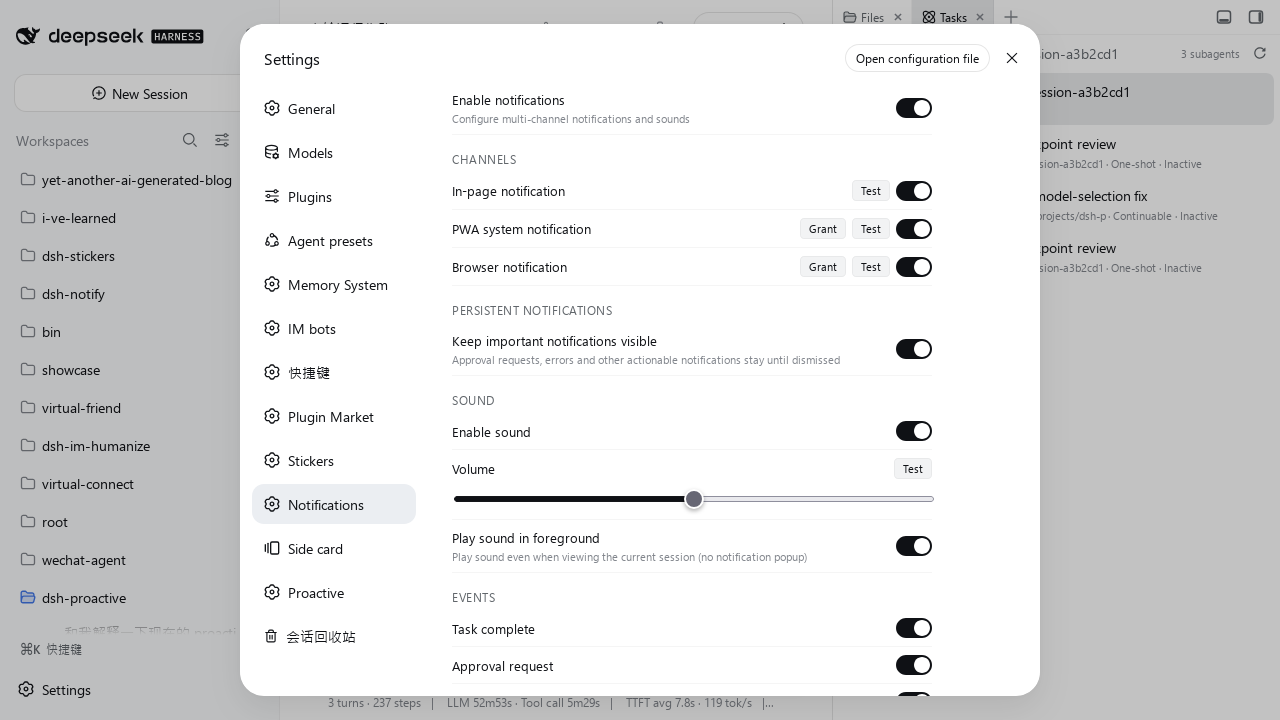
> Multi-channel notification plugin for [DeepSeek Harness (DSH)](https://github.com/deepseek-ai/deepseek-harness) — in-page toasts, PWA system notifications, and browser notifications with synthesized sounds.
[](https://www.npmjs.com/package/dsh-hybrid-notify)
[](https://opensource.org/licenses/MIT)
---
## Features
- **Three notification channels**, auto-selected by window visibility:
- **In-page toast** — when the window is focused and visible
- **PWA system notification** — when the window is in the background and the PWA channel is available
- **Browser notification** — fallback when the window is in the background and no Service Worker is registered
- **Synthesized sounds** — Web Audio API tones for each notification severity (chime for success, gentle pulse for warning, etc.), no audio files
- **Granular event toggles** — control each event type independently:
- Task complete
- Subagent complete
- Approval request
- User question
- Plan review request
- Agent error
- Background job complete
- **Per-channel toggles** — enable/disable in-page, PWA, or browser notifications
- **Session ignore rules** — silence whole sessions by title regex (default: DSH-IM `Telegram ·` sessions)
- **Sound settings** — master toggle, volume slider, foreground playback toggle, test button
- **Persistent notifications** — important events (approval requests, errors) stay visible until dismissed
- **Cleared once read** — a session's system notifications are retracted when its dot is cleared, or when you return to the window showing that session
- **HMR-safe** — survives hot-reload during development
- **Autoplay policy compliant** — unlocks audio context on first user interaction
## Installation
### From npm (recommended)
```bash
dsh plugin --profile web add dsh-hybrid-notify
```
### From GitHub
```bash
dsh plugin --profile web add github:john-walks-slow/dsh-hybrid-notify
# First add may be blocked by pnpm: add the package name printed by pnpm to
# allowBuilds in ~/.dsh/profiles/web/pnpm-workspace.yaml, then retry
```
### From source
```bash
git clone https://github.com/john-walks-slow/dsh-hybrid-notify.git
cd dsh-hybrid-notify
npm install
node build.mjs
```
This builds and deploys to `~/.dsh/profiles/web/node_modules/dsh-hybrid-notify/`.
## Configuration
Open **Settings → Notifications** in the DSH Web UI. All settings are persisted to `localStorage` (key `dsh.notify.config`) and take effect immediately.
### Events
| Event | Default | Description |
|-------|---------|-------------|
| Task complete | ON | A session's turn finishes (running → idle) |
| Subagent complete | OFF | A subagent session completes |
| Approval request | ON | An agent requests approval |
| User question | ON | An agent asks you a question |
| Plan review request | ON | Plan mode requires your review |
| Agent error | ON | An agent encounters an error |
| Background job complete | OFF | A background bash job finishes |
Notifications are suppressed for the session you are currently viewing in the foreground.
### Cleared once read
A system notification is retracted together with the UI state it mirrors (on by default; switch it off in Settings → Notifications → *Clear when read*):
- **The dot clears** — the session's sidebar status dot goes away: a completion dot is acknowledged (the session enters the main view, or starts running again), or a pending approval / question dot is resolved.
- **The window comes back** — the window returns to the foreground while the main view already shows that session.
In-page toasts are unaffected — they are right in front of you and either expire or close on click.
### Ignored sessions
The **Ignored sessions** box takes **one regular expression per line**; a session whose title matches gets no notification and no sound.
| Default rule | Effect |
|--------------|--------|
| `^Telegram ·` | Ignore DSH-IM Telegram sessions |
- Patterns are JavaScript `RegExp` sources, case-sensitive. Lines that fail to compile are skipped and reported under the box.
- **Clearing the box ignores nothing**; the *Reset to default* button restores the shipped rule.
- Add one line per channel to silence the rest of dsh-im: `^WeChat ·`, `^Feishu ·`, `^DingTalk ·`, `^WeCom ·`, `^QQ ·`, `^Slack ·`, `^Discord ·`, `^WhatsApp ·`.
### Sounds
The plugin synthesizes distinct tones for each notification level with the Web Audio API (oscillators + envelope shaping, no audio files):
| Level | Sound |
|-------|-------|
| Success | Warm major chord ascending (C5 → E5 → G5) |
| Error | Descending minor interval (E5 → A4) |
| Warning | Two gentle pulses at 440 Hz |
| Info | Soft two-tone chime (G4 → B4) |
## Permissions & Compatibility
- **Notification permission**: the PWA and browser notification channels require browser notification permission. The plugin auto-requests it on the first background event (only when the permission state is still "default"), and each channel has a **Grant** button in Settings. The in-page toast channel needs no permission.
- **PWA / Service Worker**: the PWA channel registers a Service Worker served by the plugin's host half at `/plugins/dsh-hybrid-notify/sw.js` (scope `/plugins/dsh-hybrid-notify/`). Environments without Service Worker support degrade automatically to the browser notification channel, then to in-page toasts.
- **Sounds**: synthesized in real time with the Web Audio API — no audio files to download. Subject to browser autoplay policy: the audio context is unlocked on your first click/keypress, so no sound plays before the first interaction. Configurable volume and an optional "play in foreground" toggle.
- **No network access**: the plugin makes no external requests and reports nothing anywhere. Notification content comes entirely from the local DSH session-list snapshot, the Service Worker script is served by the local DSH host, and all settings stay in `localStorage`.
- **Compatibility**: requires a modern browser with the Notification API and Web Audio API (Service Worker optional, for the PWA channel). Some mobile browsers throw on `new Notification()` — those silently fall back to in-page toasts. Node.js ≥ 18 for building from source.
- **Pure client-side**: runtime `dependencies` are empty; `@deepseek-ai/cordis` and `react` are provided by the DSH host runtime (declared as `peerDependencies`).
## Architecture
```
┌──────────────┐ ┌──────────────┐ ┌──────────────┐
│ In-page │ │ PWA │ │ Browser │
│ Toast │ │ Notification │ │ Notification │
│ (foreground)│ │ (background)│ │ (fallback) │
└──────┬───────┘ └──────┬───────┘ └──────┬───────┘
│ │ │
└───────────────────┬───────────────────┘
│
┌──────▼──────┐
│ Engine │
│ (singleton)│
└──────┬──────┘
│
┌──────▼──────┐
│ DSH Session│
│ List │
│ Snapshot │
└─────────────┘
```
The engine subscribes to the DSH session list snapshot, detects state transitions (running → idle, pending interactions), and dispatches notifications through the appropriate channel based on window visibility.
## Development
### Prerequisites
- Node.js 18+
- A DSH profile (any)
### Setup
```bash
git clone https://github.com/john-walks-slow/dsh-hybrid-notify.git
cd dsh-hybrid-notify
npm install
```
### Build
```bash
node build.mjs
```
Builds the client bundle and the host entry, then deploys to the `web` profile's `node_modules`.
### Typecheck
```bash
npm run typecheck
```
### Project structure
```
src/
├── index.ts # Host half: SW route registration
├── client.ts # Client plugin entry point
├── notification-engine.ts # Core orchestrator & diffing
├── notify-config.ts # Persisted configuration store
├── sound-manager.ts # Web Audio API sound synthesis
├── toast-store.ts # In-page toast state management
├── visibility-detector.ts # Page visibility & focus detection
├── types.ts # Shared type definitions
├── locales.ts # zh/en locale dictionaries
├── dts-shim.d.ts # Ambient type declarations
├── channels/
│ ├── inpage-toast.ts # In-page toast channel
│ ├── pwa-notification.ts # PWA notification channel
│ └── web-notification.ts # Browser notification channel
└── components/
├── NotifySettings.tsx # Settings UI (React)
├── Toast.tsx # Toast component
└── ToastContainer.tsx # Toast container for shell.overlay
```
## License
MIT
## See also
- [awesome-dsh-plugin](https://github.com/awesome-dsh-plugin/awesome-dsh-plugin) — curated list of DSH plugins
- [dsh-notify-web](https://www.npmjs.com/package/dsh-notify-web) — basic notification plugin (single channel, no sound)
## Community
- Thanks to the [LINUX DO](https://linux.do/) community for providing the discussion environment.