





Analyze images and videos with DSH's native vision models and inspect the results in a Web UI right panel.
A plugin for [DeepSeek Harness](https://github.com/deepseek-ai/deepseek-harness). ## Features - **Native image understanding** — uploaded images stay on DSH's native attachment and model path; the plugin does not configure or call a separate vision model. - **Copyable image history** — the right panel records the current DSH model's final answer beside each image thumbnail, with expandable history and one-click copy. - **Plugin-owned video upload** — accepts MP4, M4V, MOV, AVI, MPG/MPEG, MKV, and WebM only when extension, signature, and FFprobe agree. - **Scene-aware video analysis** — normalizes to H.264/yuv420p MP4, extracts keyframes with PySceneDetect, and sends ordered timestamped images to the current DSH vision model. - **Right-side panel** — switch between image/video views, play normalized videos directly, and stage a selected video in the chat draft. - **Advanced video settings** — tune upload size, storage quota, duration, output size, FPS, CRF, and keyframe count from the plugin settings card. ## How it works
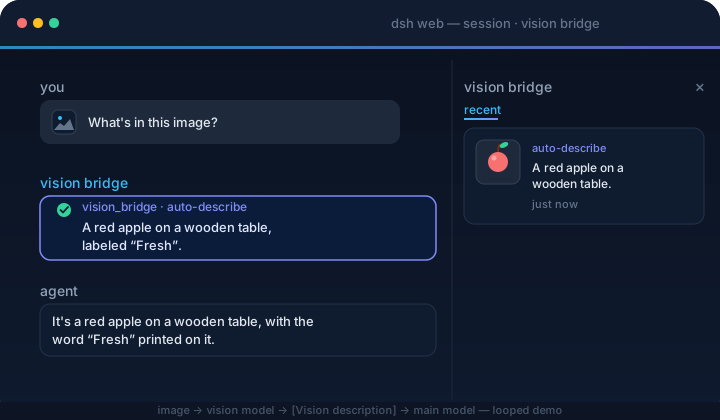
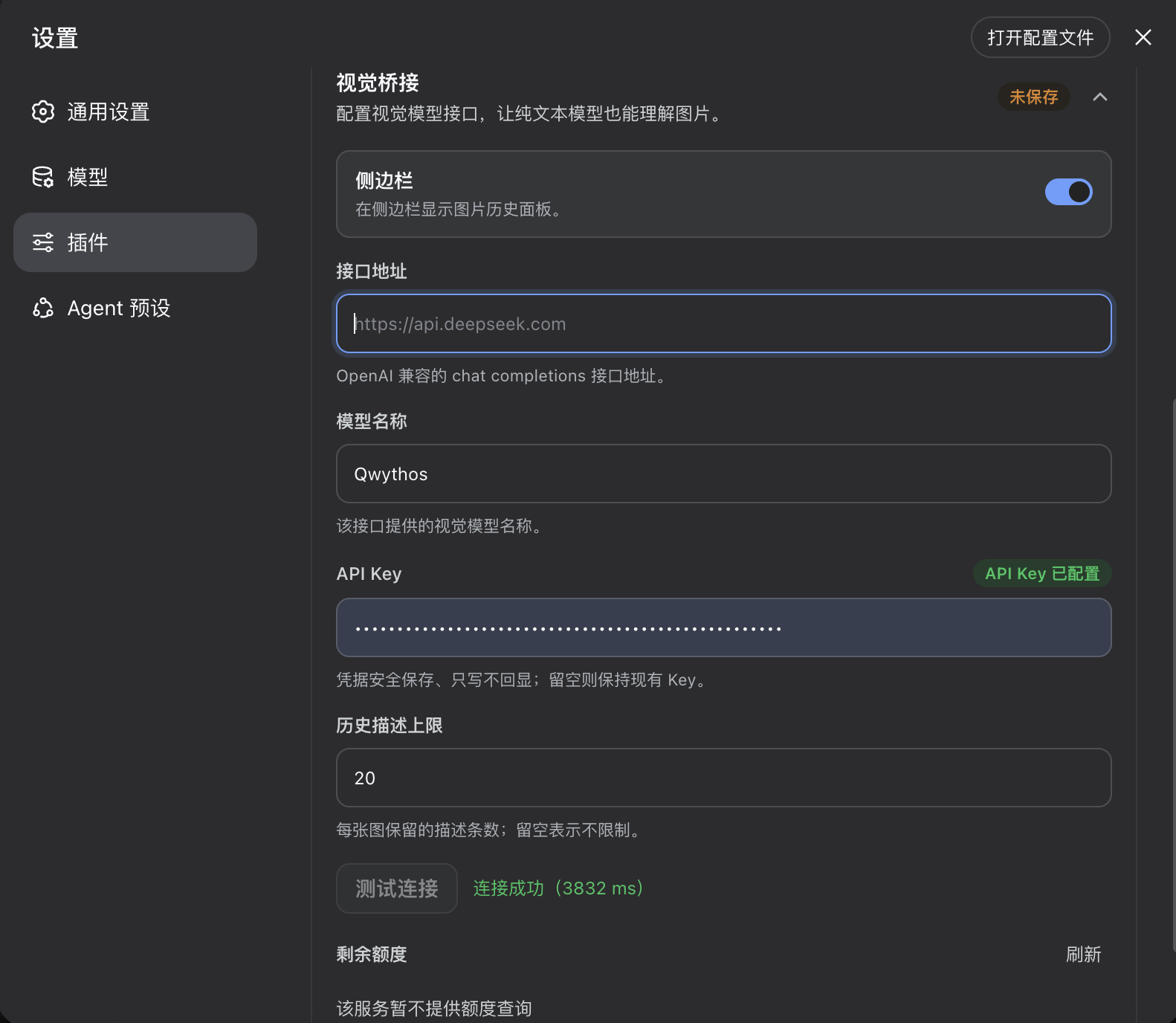 2. Select an image-capable model in DSH; there is no separate vision-model configuration in this plugin.
3. Send an image. The current model answers natively, and the image panel records the thumbnail and final answer for copying.
4. Upload a video from **Upload video** beside the composer. Once processing finishes, select **Videos** in the right panel to play it; **Ask in chat** stages a draft and never submits automatically.
### Vision model
Image and keyframe understanding use the image-capable model currently selected in DSH. Model providers, endpoints, and credentials are managed by DSH rather than this plugin.
## Uninstall
```sh
dsh plugin --profile web remove dsh-visual-plugin
```
Restart `dsh web`. The command forwards to `pnpm remove` inside the profile, and the bundle layer list reconciles to drop the plugin automatically.
## Project layout
```
src/
index.ts native image history, video_describe tool, settings, and HTTP routes
config.ts advanced video-processing settings and runtime policy
video/ upload, container probing, transcoding, scene detection, keyframes, and HTTP Range playback
client/ image/video panel, upload controls, advanced settings, locales, and CSS
cordis.patch.yml bundle patch layer
```
## Build
```sh
npm run bootstrap && npm run typecheck && npm run build # needs a local harness checkout
```
Prebuilt `lib/` is committed, so consumers never build.
## CI/CD
`ci.yml` verifies artifacts and the pack contents on every push/PR. `release.yml` (tag `v*`) checks the version, packs, creates a GitHub Release, and publishes to npm.
## Resources
- [DeepSeek Harness](https://github.com/deepseek-ai/deepseek-harness) — the plugin host this project extends.
- [PySceneDetect](https://www.scenedetect.com/) — scene detection used to select video keyframes.
- [awesome-dsh-plugin](https://github.com/awesome-dsh-plugin/awesome-dsh-plugin) — the curated DSH plugin list where this plugin is registered.
## Friendly Links
- [LINUX DO](https://linux.do)
## Thanks
- [HsiangNianian](https://github.com/HsiangNianian/) — for their help and insights during development.
- [tingfeng347](https://github.com/tingfeng347) — for the build-stability and local-harness-setup fixes.
- [dsh-auto-continue](https://github.com/HsiangNianian/dsh-auto-continue) — a DSH Web UI plugin that auto-resumes interrupted requests with 「继续」 (error classification, adaptive backoff, browser notifications); a handy companion.
## License
[MIT](LICENSE)
2. Select an image-capable model in DSH; there is no separate vision-model configuration in this plugin.
3. Send an image. The current model answers natively, and the image panel records the thumbnail and final answer for copying.
4. Upload a video from **Upload video** beside the composer. Once processing finishes, select **Videos** in the right panel to play it; **Ask in chat** stages a draft and never submits automatically.
### Vision model
Image and keyframe understanding use the image-capable model currently selected in DSH. Model providers, endpoints, and credentials are managed by DSH rather than this plugin.
## Uninstall
```sh
dsh plugin --profile web remove dsh-visual-plugin
```
Restart `dsh web`. The command forwards to `pnpm remove` inside the profile, and the bundle layer list reconciles to drop the plugin automatically.
## Project layout
```
src/
index.ts native image history, video_describe tool, settings, and HTTP routes
config.ts advanced video-processing settings and runtime policy
video/ upload, container probing, transcoding, scene detection, keyframes, and HTTP Range playback
client/ image/video panel, upload controls, advanced settings, locales, and CSS
cordis.patch.yml bundle patch layer
```
## Build
```sh
npm run bootstrap && npm run typecheck && npm run build # needs a local harness checkout
```
Prebuilt `lib/` is committed, so consumers never build.
## CI/CD
`ci.yml` verifies artifacts and the pack contents on every push/PR. `release.yml` (tag `v*`) checks the version, packs, creates a GitHub Release, and publishes to npm.
## Resources
- [DeepSeek Harness](https://github.com/deepseek-ai/deepseek-harness) — the plugin host this project extends.
- [PySceneDetect](https://www.scenedetect.com/) — scene detection used to select video keyframes.
- [awesome-dsh-plugin](https://github.com/awesome-dsh-plugin/awesome-dsh-plugin) — the curated DSH plugin list where this plugin is registered.
## Friendly Links
- [LINUX DO](https://linux.do)
## Thanks
- [HsiangNianian](https://github.com/HsiangNianian/) — for their help and insights during development.
- [tingfeng347](https://github.com/tingfeng347) — for the build-stability and local-harness-setup fixes.
- [dsh-auto-continue](https://github.com/HsiangNianian/dsh-auto-continue) — a DSH Web UI plugin that auto-resumes interrupted requests with 「继续」 (error classification, adaptive backoff, browser notifications); a handy companion.
## License
[MIT](LICENSE)