
Vanish
A modern, open-source uninstaller for Windows.
Uninstall anything cleanly — silent uninstall, leftover scanning, safe cleanup — and every deletion is reversible.
English | 简体中文
## Why Vanish
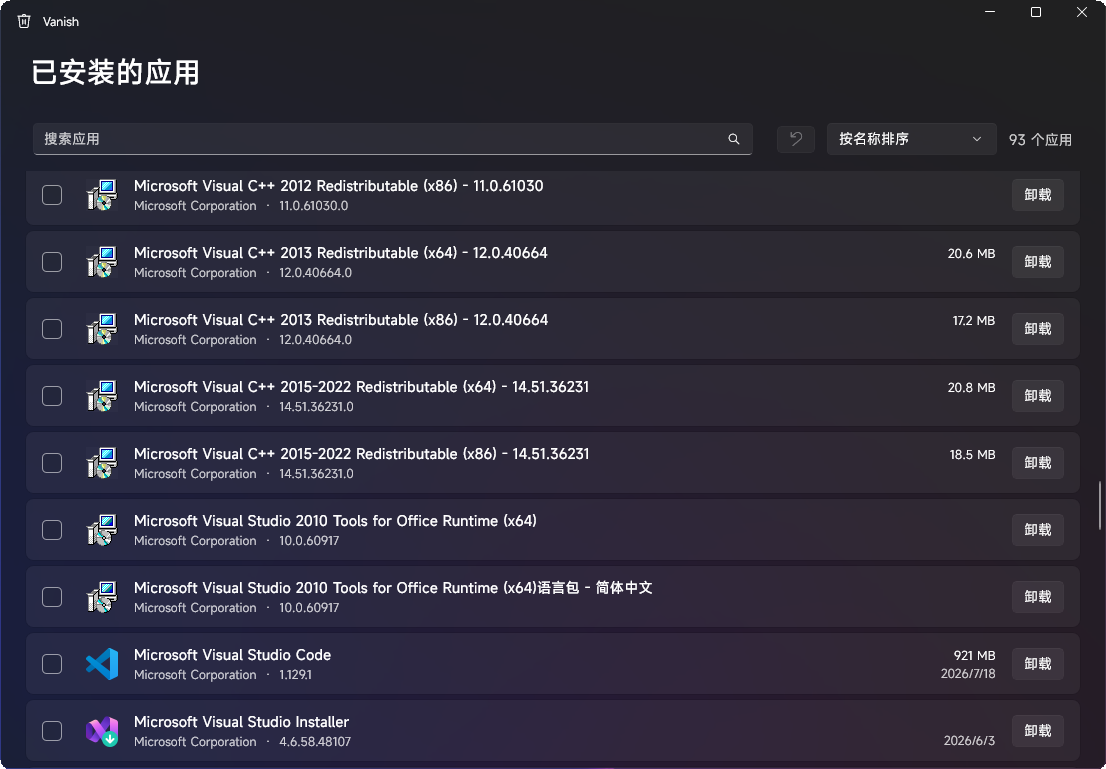
- **Actually modern** — a native WinUI 3 interface with Fluent design, light/dark theme, and full localization
- **Reversible by design** — files go to the Recycle Bin, registry keys are backed up to `.reg` before removal, and *Undo last cleanup* brings them back in one click
- **Smart, not noisy** — silent switches derived automatically per installer type; leftovers ranked by confidence so you never guess what's safe to remove
- **Zero footprint** — no ads, no bundled offers, no background services, no telemetry
## Features
- **Complete app inventory** — classic desktop programs (64-bit, 32-bit, per-user) and MSIX/Store apps, with search and sorting by name, size, or install date
- **Silent uninstall** — automatically detects MSI, Inno Setup, NSIS, and Squirrel installers and derives the correct silent switches; falls back to the interactive uninstaller when unknown
- **Batch queue** — check multiple apps and uninstall them sequentially; a failure never blocks the rest of the queue
- **Leftover scan** — fingerprints each app *before* uninstalling (executable metadata + install paths), then finds leftover files, folders, registry keys, Run entries and Start Menu shortcuts; every finding is tagged with a confidence level (High / Medium / Low) and only High is pre-selected
- **Undo** — one click restores the registry entries removed by the last cleanup from automatic `.reg` backups
## Safety by design
Deleting the wrong thing is the one mistake an uninstaller must never make. Vanish is built around that:
- Files are **always moved to the Recycle Bin**, never permanently deleted
- Registry keys are **exported to `.reg` backups before removal**, restorable via *Undo last cleanup*
- A **hard blocklist of system paths** (Windows, System32, Common Files, Microsoft app data, …) is enforced twice: during scanning and again inside the deletion engine
- **Nothing is ever deleted without your explicit confirmation** — there is no "auto clean"
- Every deletion is recorded in an **audit log** (`%LocalAppData%\Vanish\Logs`)
## Download
Get the latest version from [Releases](../../releases):
- **`Vanish-setup-*.exe`** — recommended. Installer with Start Menu shortcut and clean uninstall
- **`Vanish-*-win-x64.zip`** — portable. Unzip and run `Vanish.exe`, no installation
Both are self-contained — no .NET runtime or any other prerequisite required. Requires Windows 10 2004 (build 19041) or later, x64.
## Build from source
```
git clone https://github.com/ky3-git/Vanish.git
cd Vanish
dotnet build Vanish.slnx -c Release
dotnet test Vanish.slnx -c Release
```
Requires the .NET 10 SDK. The app is unpackaged WinUI 3 (Windows App SDK, self-contained), so `F5` in Visual Studio or `dotnet run` inside `src/Vanish.App` just works.
## Architecture
```
src/Vanish.Core enumeration, uninstaller detection, leftover scanning,
deletion engine — pure logic, no UI dependency, unit tested
src/Vanish.App WinUI 3 front end (MVVM, CommunityToolkit.Mvvm)
tests/ unit tests for matching, planning and safety guards
```
## Languages
English and 简体中文, following your Windows display language. Translations live in `src/Vanish.App/Strings` — PRs for new languages are very welcome.
## Roadmap
- Install monitoring (before/after snapshots)
- Portable app detection (apps without registry entries)
- Force removal of broken uninstall entries
- Services and scheduled-task cleanup
- winget distribution
## License
[MIT](LICENSE)