이미지와 영상을 내 컴퓨터에서 만들고, 가지 치고, 다듬으세요.
GPT, Grok, Gemini, NovelAI, ComfyUI를 한 곳에서 쓰는 로컬 스튜디오입니다.
브라우저, Mac 앱, CLI에서 쓰거나 코딩 에이전트에게 맡길 수 있습니다.


```bash
npm install -g ima2-gen
ima2 serve
```


|
### 만들기
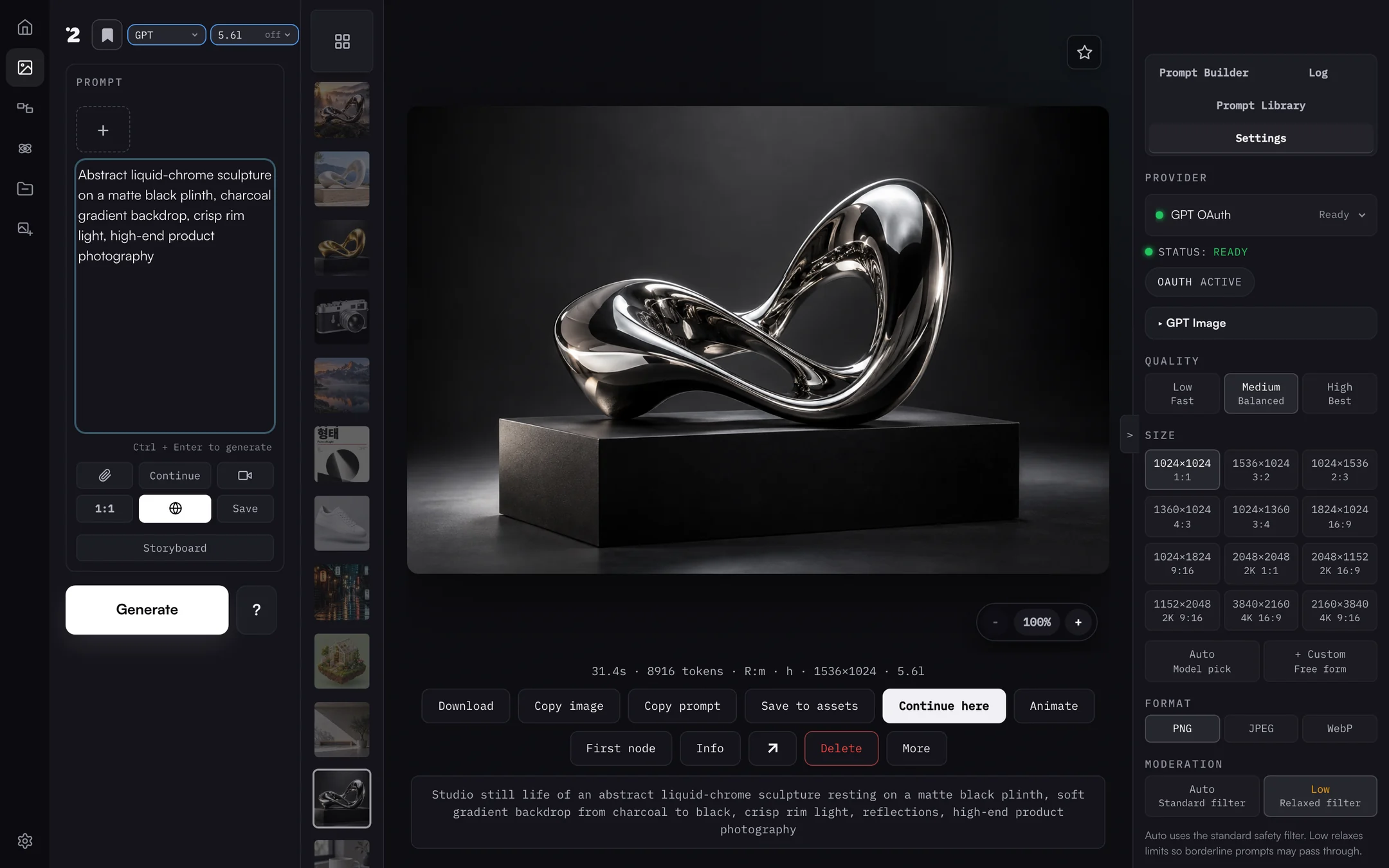
프롬프트를 쓰고 레퍼런스를 붙인 뒤 레인과 모델을 고르면 됩니다. 결과마다 프롬프트, 걸린 시간, 설정이 남아서 그대로 복사하거나 이어서 만들거나 영상으로 움직일 수 있습니다.
|
|
|
### 노드 그래프로 가지 치기
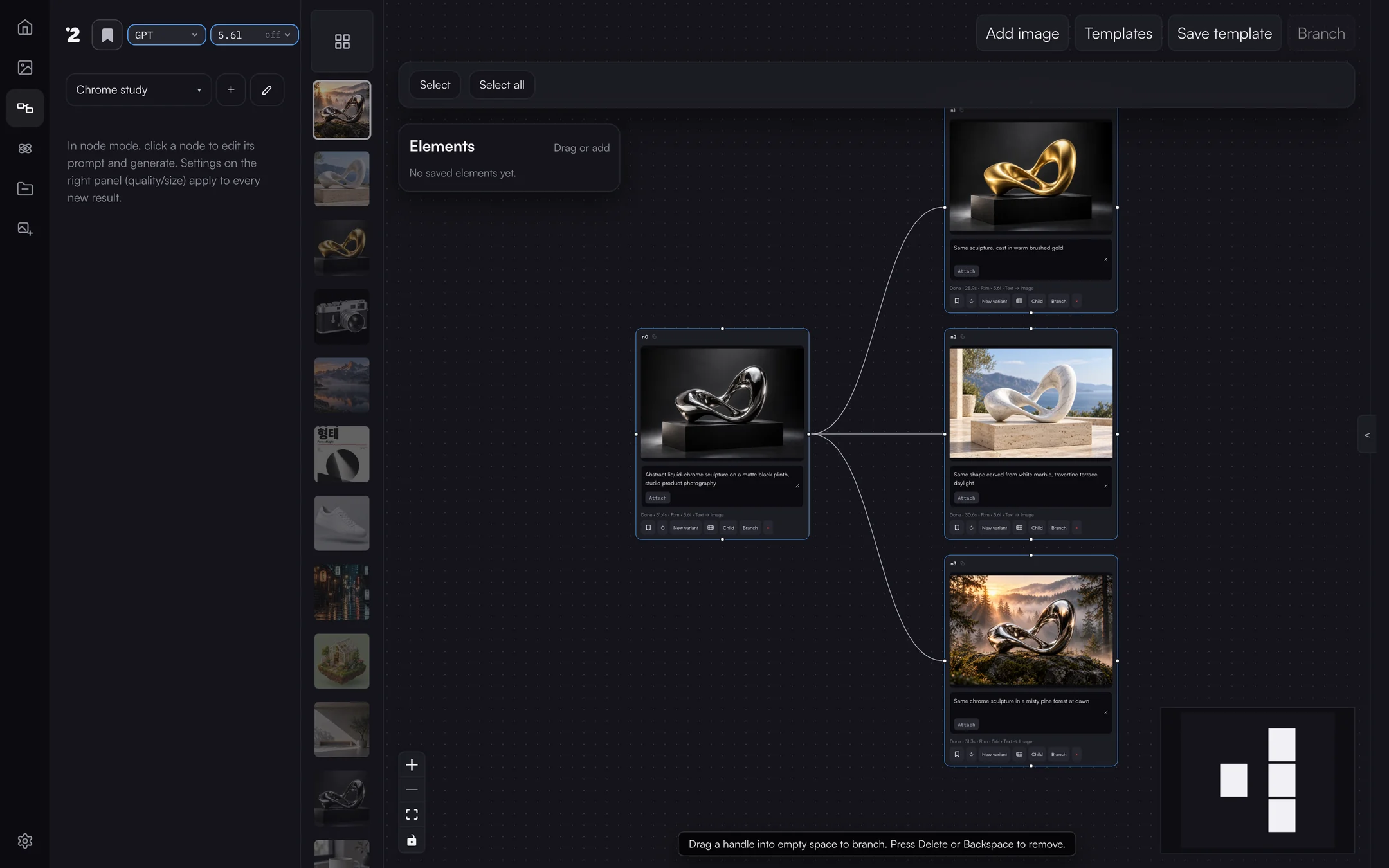
마음에 드는 이미지 하나를 두고 여러 방향으로 동시에 밀어 보세요. 가지마다 부모를 기억하니 원본이 덮어써지지 않습니다.
|
|
|
### 캔버스 모드로 다듬기
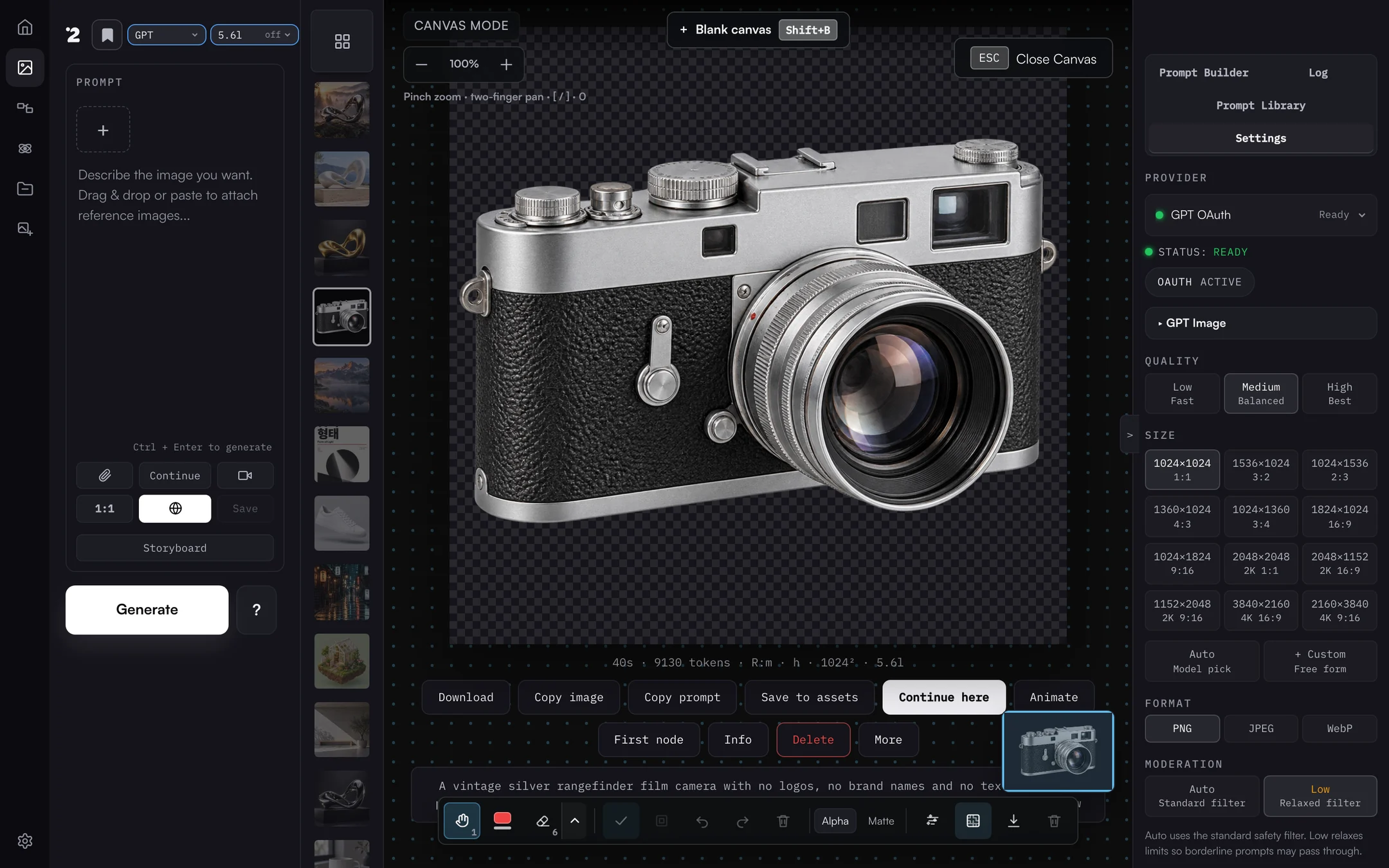
주석, 지우개, 배경 제거를 하고 진짜 알파 채널로 내보냅니다. GPT 투명화 버튼은 서버가 실제 투명도를 확인한 뒤에만 투명하다고 알려 줍니다.
|
|
|
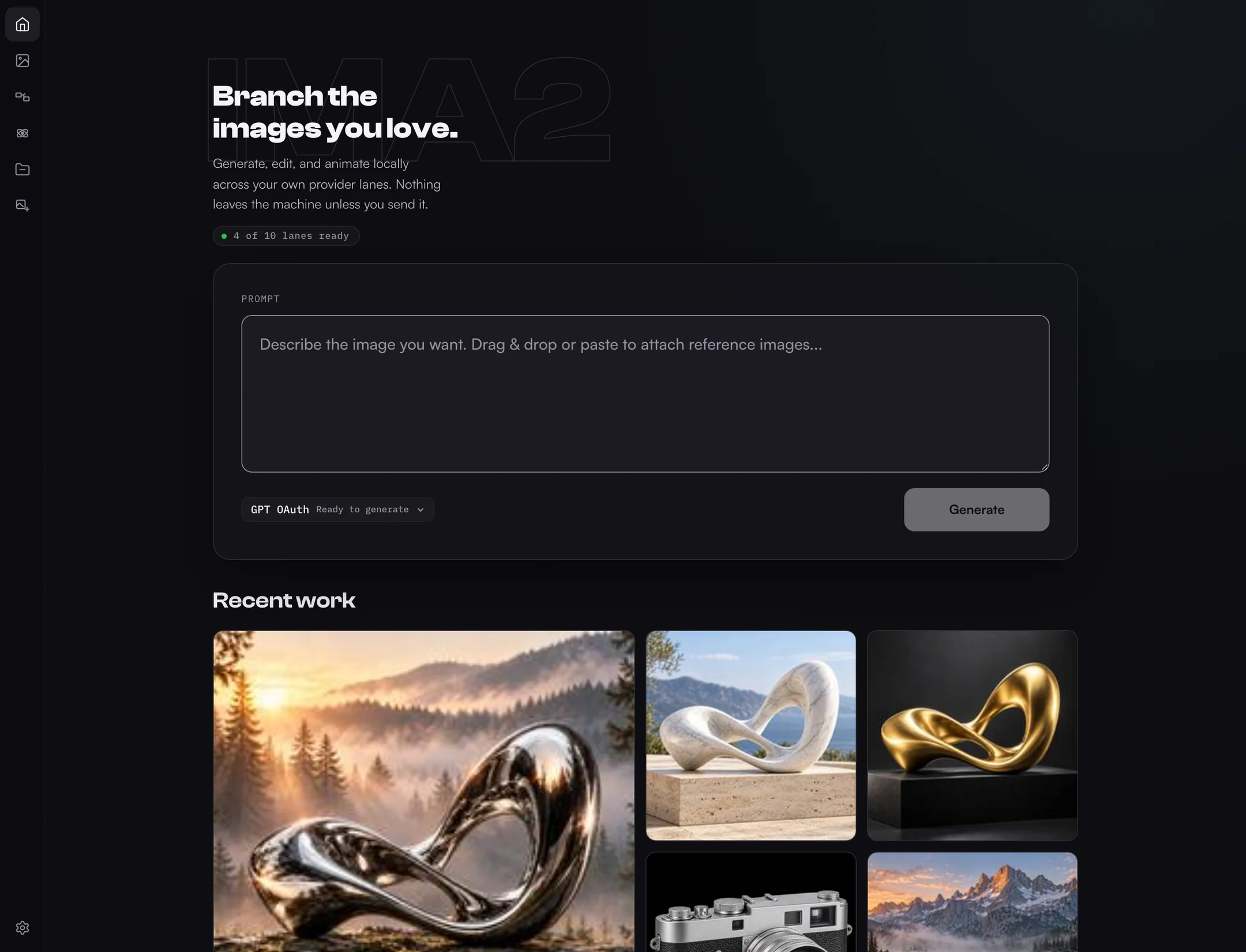
### 홈에서 시작
준비된 레인을 확인하고, 프롬프트를 바로 입력하고, 최근 작업을 폴더를 뒤지지 않고 이어 갑니다.
|
|
English · 한국어 · 日本語 · 简体中文 · 正體中文 · 웹사이트 · 문서 →
`ima2-gen`은 사람과 코딩 에이전트가 여러 프로바이더에서 재현 가능한 이미지·영상 워크플로를 돌리는 로컬 우선 비주얼 생성 런타임이자 스튜디오입니다. 내 컴퓨터에서 작은 서버를 띄우고, 모든 결과물을 `~/.ima2/generated`에 보관하며, 연결한 프로바이더와만 통신합니다. 지원하는 곳은 OpenAI OAuth/API, Grok OAuth/API, Antigravity CLI, Gemini API, AtlasCloud, MiniMax, NovelAI, 등록된 ComfyUI 워크플로이고, Runway와 Higgsfield는 별도 MCP 연동입니다. 프롬프트와 레퍼런스는 작업마다 고른 프로바이더에게만 전달됩니다.
## 빠른 시작
### Mac 앱 (Apple Silicon)
데스크톱 앱은 같은 로컬 서버와 스튜디오를 Mac 창과 메뉴 막대 아이콘으로 실행합니다. Developer ID로 서명되고 Apple 공증을 받았으며, 런타임을 자체 포함해서 Node.js를 따로 설치하지 않아도 됩니다.
1. 최신 [ima2 Desktop 릴리스](https://github.com/lidge-ai/ima2-gen/releases?q=desktop&expanded=true)에서 `ima2--mac-arm64.dmg`를 받습니다.
2. DMG를 열고 **ima2**를 **응용 프로그램** 폴더로 끌어다 놓습니다.
3. ima2를 실행하고 환영 화면에서 프로바이더를 고릅니다.
체크섬, 업데이트, 설정은 [Mac 앱 가이드](https://lidge-ai.github.io/ima2-gen/ko/docs/desktop)에 있습니다. Intel Mac, Windows, Linux에서는 npm이나 한 줄 설치를 쓰세요.
### npm
```bash
npm install -g ima2-gen
ima2 setup
ima2 serve
```
그다음 `http://localhost:3333`을 여세요. `3333` 포트가 이미 쓰이고 있으면 다음 빈 포트로 뜨고 실제 주소를 `~/.ima2/server.json`에 적어 두므로, `ima2 open`은 항상 올바른 주소를 엽니다.
### CLI로 첫 이미지 만들기
이미지와 영상 기본값을 한 번 정해 두고 생성합니다.
```bash
ima2 models
ima2 defaults set image oauth/gpt-6-luna
ima2 defaults set video grok/grok-imagine-video-1.5
ima2 gen "a clean product photo of a red guitar pedal"
ima2 video "a cat playing piano" --duration 5 --resolution 720p
```
`ima2 gen`과 생성 모드 `ima2 video`는 CLI 대상이 정해지기 전까지 `NO_DEFAULT_MODEL`로 멈춥니다. 호출에 `--model /`이나 `--provider `을 직접 주면 예외입니다. 업그레이드 뒤에 프로바이더나 과금 레인이 몰래 바뀌는 일은 없습니다.
### 한 줄 설치 (npm 없이)
각 스크립트는 패키지에서 정한 Node.js 최소 버전을 확인하고, 필요하면 Node LTS를 설치한 뒤 ima2-gen을 한 번 설치하고, 오프라인 설치 검사를 거쳐 `ima2 serve`를 실행합니다. 관계없는 프로세스를 끄거나 전역 잠금을 지우지 않습니다.
**macOS**
```bash
curl -fsSL https://lidge-ai.github.io/ima2-gen/install-mac.sh | bash
```
**Windows (PowerShell)**
```powershell
irm https://lidge-ai.github.io/ima2-gen/install-windows.ps1 | iex
```
**Linux / WSL**
```bash
curl -fsSL https://lidge-ai.github.io/ima2-gen/install-linux.sh | bash
```
Docker
```bash
docker build -t ima2-gen .
docker run -d -p 3333:3333 -e IMA2_LAN_TOKEN=change-me -v ima2-data:/data ima2-gen
```
compose 사용법, 필요한 환경 변수, 제약은 [DOCKER 문서](DOCKER.md)에 있습니다.
설정, 업데이트, npx
`ima2 setup`에서 인증 방식 네 가지 중 하나를 고릅니다.
1. **GPT OAuth** — ChatGPT 계정으로 로그인 (이미지)
2. **Grok OAuth** — xAI/Grok 계정으로 로그인 (이미지와 영상)
3. **Both** — GPT OAuth와 Grok OAuth 둘 다
4. **Web setup** — 웹 UI에서 전부 설정
영상 생성에는 Grok OAuth(2번이나 3번)가 필요합니다. GPT OAuth를 이미 쓰고 있다면 `ima2 grok login`으로 영상을 추가하세요. 기본값은 수동 붙여넣기 방식입니다.
업데이트하려면 Ctrl+C로 서버를 멈추고(다른 터미널에서는 `ima2 stop`) 다음을 실행합니다.
```bash
npm install -g ima2-gen@latest
```
Ctrl+C는 데이터베이스를 닫고, 자식 프로세스를 멈추고, 파일 잠금을 풀면서 깔끔하게 종료합니다. 설치가 실패하면 npm 권한 메시지를 확인하거나 해당 `ima2` 프로세스를 직접 멈추세요. 설치 프로그램이 프로세스를 대신 정리하지는 않습니다.
npx로 쓰려면 [npx 빠른 시작](NPX_QUICKSTART.md)을 보세요.
## 할 수 있는 일
- **만들기**: 생성, 편집, 현재 이미지 재사용, 레퍼런스 붙여넣기, 히스토리에서 이어 가기. 멀티모드를 켜면 프롬프트 하나로 후보 여러 장을 한꺼번에 띄우고 칸마다 채워지는 모습을 볼 수 있습니다. 모든 컨트롤, 멀티모드 레시피, Direct 모드, reasoning effort는 [Prompt Studio 사용 설명서](PROMPT_STUDIO.ko.md)에 정리돼 있습니다. 레퍼런스는 이미지에 최대 5장, 영상에 최대 14장까지 붙일 수 있고, 큰 이미지는 업로드 전에 압축됩니다.
- **노드 그래프**: 좋은 이미지를 여러 방향으로 가지 칩니다. 루트 노드는 로컬 레퍼런스를 받고, 자식 노드는 부모 이미지를 원본으로 씁니다. 끝난 작업은 요청 ID로 노드에 다시 연결되므로 새로고침이나 그래프 버전 충돌이 나도 결과가 돌아옵니다.
- **캔버스 모드**: 확대, 이동, 호버 강조가 있는 주석, 지우개, 그룹, 실행 취소, 스티키 메모, 배경 정리, 알파 유지 또는 매트 색상 내보내기를 지원합니다. 자체 포함 캔버스 문서는 **SVG (embedded raster)**, 실제 벡터 경로는 **Trace to SVG (vector)**를 고르세요. **GPT transparency** 버튼은 OAuth i2i 레인으로 배경을 지우고, 디코딩한 바이트 기준으로 `alphaVerified`를 알려 줍니다. 저장한 캔버스 버전은 갤러리와 히스토리 줄에는 나오지 않지만, 캔버스 모드에서 다시 열거나 다음 레퍼런스로 붙일 수 있습니다.
- **영상**: Grok 영상 모델로 텍스트→영상, 이미지→영상, 레퍼런스→영상을 만들고 진행률과 First/Mid/Last 프레임 복사 버튼을 제공합니다. **Storyboard mode**는 연속 프레임에서 인물과 장면을 일관되게 유지합니다. 진행 상황은 SSE로 planning → submitted → 진행률 → done 순서로 표시됩니다. 스토리보드에서는 이미지 키프레임을 영상 제작용으로 구성하고, 영상 클립이 인물·환경 고정 규칙을 이어받습니다.
- **래스터→벡터**: `ima2 vectorize`, AssetGen/Assets, 캔버스 내보내기에서 평면 래스터 그림을 실제 SVG 경로로 바꿉니다.
- **NovelAI 이중 프롬프트**: NovelAI를 고르면 만들기, 홈, 모바일 작성 시트에 **Positive prompt**와 **Undesired content**가 나란히 나옵니다. 작성 영역이 719px보다 좁으면 두 칸이 위아래로 쌓입니다.
- **프롬프트 라이브러리**: 로컬 프롬프트 팩, GitHub 폴더, 엄선한 GPT-image 힌트를 가져오고 로컬에서 검색합니다.
- **Prompt Builder**: 텍스트 백엔드로 의도를 다듬습니다. Settings > Providers에서 Auto로 두거나 백엔드와 모델을 고정할 수 있고, **via <backend>** 배지가 실제로 답한 백엔드를 보여 줍니다. GPT 백엔드를 고르면 기본 모델은 `gpt-6-luna`입니다.
- **로컬 갤러리**: 모든 이미지와 영상이 내 컴퓨터에 남고, 세션별 히스토리와 생성 시간, reasoning effort가 메타데이터에 기록됩니다. 기본으로 현재 세션만 보여 주고 All Images 토글로 전체 기록을 열 수 있으며, 고른 기본 범위는 세션이 바뀌어도 유지됩니다.
- **라이트·다크 테마**: AA 대비를 지키는 토큰 기반 팔레트이고, 라이트·다크·시스템을 깜빡임 없이 전환합니다.
- **모바일 셸**과 **작업 관찰**: 작은 화면용 앱 바, 작성 시트, 간단한 설정 토글, 안전한 로그와 요청 ID가 붙은 진행 중·최근 작업 목록.
Card News는 개발용 실험 기능이라 배포된 런타임에서는 숨겨져 있습니다.
### 에이전트 스킬
ima2-gen에는 코딩 에이전트가 불러 쓰는 Markdown 스킬 세 개가 들어 있습니다. 이미지·영상 생성, 프런트엔드 에셋, 디자인 방향 잡기를 단계별로 안내합니다.
| 스킬 | 명령 | 다루는 내용 |
|------|------|------|
| **Core** | `ima2 skill` | CLI 레퍼런스, 프롬프트 작성법, 프로바이더 라우팅, 한국어 텍스트, 영상 워크플로 |
| **Frontend** | `ima2 skill front` | 에셋 파이프라인(병렬 생성, 후보 선택, 프로바이더 라우팅), 웹용 모션·영상, 반응형, 접근성, anti-slop, 참고 파일 30개 이상 |
| **UI/UX Design** | `ima2 skill uiux` | 이미지 중심 디자인 방향 탐색, UX 상태, design-ism, 제품 성격, DESIGN.md 워크플로, 참고 파일 21개 |
```bash
ima2 skill ls # 스킬 목록
ima2 skill front path # 파일 경로 출력 (에이전트용)
ima2 skill front --json # JSON 래퍼 (에이전트용)
ima2 skill front refs # 참고 모듈 목록
ima2 skill front ref motion # 참고 모듈 하나 불러오기
ima2 skill install --dir # 에이전트 스킬 폴더에 설치
ima2 skill install --tmp # 임시 폴더에 설치 (대안)
```
## 프로바이더와 모델
| 레인 | 인증 | 이미지 | 영상 | 메모 |
|---|---|:-:|:-:|---|
| `oauth` | ChatGPT 로그인, ima2가 ChatGPT를 직접 호출 | ✓ | | 기본 레인. GPT-6가 기획하고 `gpt-image-2`가 그림, `gpt-6-luna` |
| `api` | `OPENAI_API_KEY` | ✓ | | Responses API `image_generation` 도구, 마스크·멀티모드·노드 |
| `grok` | xAI OAuth (`ima2 grok login`) | ✓ | ✓ | Images API 호출 전에 웹 검색과 플래너 단계 |
| `grok-api` | `XAI_API_KEY` | ✓ | ✓ | xAI Images API 직접 호출 |
| `gemini-api` | `GEMINI_API_KEY` 또는 Vertex 서비스 계정 | ✓ | | `nano-banana-2`, `nano-banana-pro`, 512px~4K |
| `agy` | Antigravity CLI | ✓ | | `agy -p`로 Gemini `nano-banana-2` / `nano-banana-pro` |
| `nai` | NovelAI API 토큰 | ✓ | | NAI Diffusion 모델 네 가지, 텍스트→이미지 |
| `comfy` | 로컬 ComfyUI | ✓ | ✓ | 등록한 이미지·영상 워크플로 |
| `atlascloud` | AtlasCloud API 키 | ✓ | | `openai/gpt-image-2` 생성과 편집 |
| `minimax` | MiniMax API 키 | ✓ | | `image-01`, `image-01-live` |
| `runway`, `higgsfield` | MCP 연결 | ✓ | ✓ | 별도 MCP 연동 |
GPT OAuth 레인은 GPT-6 모델 세 개를 씁니다. 기본값은 **`gpt-6-luna`**이고, `gpt-6-sol`과 가장 오래 추론하는 대신 가장 느린 `gpt-6-astra`를 고를 수 있습니다. 고른 모델이 이미지를 기획하고 `gpt-image-2`가 그립니다. `gpt-5.6-luna` 같은 예전 OAuth 모델 ID는 저장된 설정과 스크립트에서 그대로 동작하고, 대응하는 GPT-6 모델로 바뀝니다. API 키 레인은 자체 목록을 유지합니다: `gpt-5.6-luna`(기본), `gpt-6-astra`, `gpt-5.6-terra`, `gpt-5.6-sol`, `gpt-5.5`, `gpt-5.4`, `gpt-5.4-mini`. 앱에서 품질(`low`, `medium`, `high`)과 모더레이션(`auto`, `low`)도 고를 수 있습니다.
프로바이더 상세 (English)
- `provider: "oauth"` signs in with your ChatGPT session and calls ChatGPT's Codex backend from the ima2 server process, with no separate proxy. A GPT-6 model plans the prompt and `gpt-image-2` renders it; Direct mode skips the planner. Transparent backgrounds and image edits run on the same lane.
- `provider: "api"` calls the OpenAI Responses API with the hosted `image_generation` tool.
- `provider: "grok"` calls `https://api.x.ai` directly with the xAI OAuth session stored in `~/.progrok/auth.json`, running mandatory xAI Web Search plus a planner pass (default: `grok-4.3`, configurable in settings or via `--planner-model`) before the xAI Images API call. `grok-4.5` and `grok-4.6` are also selectable. Log in once with `ima2 grok login` or the Settings **Switch Account** button; the session refreshes itself two minutes before expiry.
- `provider: "grok-api"` calls the xAI Images API directly with `XAI_API_KEY` (no OAuth session involved).
- `provider: "nai"` calls the NovelAI image API with a persistent API token (saved in Settings > API Keys or `NOVELAI_API_KEY`; no fixed token prefix is required). Four models: `nai-diffusion-5-full`, `nai-diffusion-5-curated`, `nai-diffusion-4-5-full`, `nai-diffusion-4-5-curated`. Responses arrive as a ZIP archive that ima2 decodes to PNG. Text-to-image only — reference images, edits, and masks are refused rather than silently dropped. Browser and CLI surfaces expose negative prompt, sampler/schedule, steps/guidance/CFG rescale, seed, presets, Auto SMEA, Decrisper, Variety+, and V5 alpha.
- `provider: "agy"` spawns the Antigravity CLI (`agy -p`) to generate images via Google Gemini's `default_api:generate_image` tool (models: `nano-banana-2` and `nano-banana-pro`). Output is fixed at 1024×1024 JPEG, max 3 reference images. No web search, quality, or size controls.
- `provider: "gemini-api"` calls the Google Generative Language API directly. Supports two models: `nano-banana-2` (Gemini 3.1 Flash Image) and `nano-banana-pro` (Gemini 3 Pro Image). Auth is via `GEMINI_API_KEY` env var, web UI key management, or a Vertex AI service account JSON (`VERTEX_SERVICE_ACCOUNT_JSON`). When both an API key and Vertex credentials are configured, Vertex takes priority. Supports variable aspect ratios (1:1 through 21:9) and four resolution tiers (512px, 1K, 2K, 4K); these controls are only honored on the direct API path — the Vertex AI endpoint ignores aspect/size because it does not accept the `response_format` field. Per-model cost differs: `nano-banana-2` (Flash): 512=$0.001, 1K=$0.003, 2K=$0.004, 4K=$0.006; `nano-banana-pro`: 1K=$0.007, 2K=$0.007, 4K=$0.013. No web search or mask controls.
- API-key generation supports classic generate, edit, mask-guided edit, multimode, and node generation.
- Grok generation supports Classic, Node, and Agent flows. If a Classic reference, Node parent image, or Agent current image is present, ima2 switches the final Grok call to xAI image edit so image-to-image context is preserved.
If no provider is specified, the app keeps the current GPT OAuth/default behavior. GPT OAuth defaults to `gpt-6-luna` and API-key generation to `gpt-5.6-luna`; the API-key path also defaults to `low` reasoning and `1024x1024` unless the request passes validated options. Grok image generation defaults to `grok-imagine-image-2.0`.
One caveat on the OAuth Grok lane: xAI documents only `/v1/me` as accepting an OAuth token, so image and video calls to `api.x.ai` with that token ride an undocumented path. It works today — progrok relied on the same path — but it carries no compatibility promise. If xAI closes it, `provider: "grok-api"` with `XAI_API_KEY` is the documented route and stays unaffected.
Grok image generation exposes a Fast/Best model picker (`grok-imagine-image` / `grok-imagine-image-quality`; new sessions start on `grok-imagine-image-2.0`) and a size picker (aspect ratio + 1k/2k resolution). The Settings page prefers the Grok Build weekly credits percentage and reset time from `GET /v1/billing?format=credits`; if that source is unavailable, it falls back to the legacy monthly billing window and `$used/$limit`. A **Switch Account** button starts a device-code OAuth flow (`POST /api/auth/switch`) for re-authenticating without leaving the app.
Grok video generation defaults to canonical `grok-imagine-video-1.5`; `grok-imagine-video` remains available for base-model-only Ref2V, V2V edit, and extension paths, and the legacy `grok-imagine-video-1.5-preview` string is accepted as an alias. Three modes are auto-detected from reference count: text-to-video (0 refs), image-to-video (1 ref), and reference-to-video (2-14 refs; up to 15s on grok-imagine-video-1.5, 10s on grok-imagine-video). 1080p is available for `grok-imagine-video-1.5` prompt-only text-to-video and single image/frame image-to-video; prompt-only 1.5 uses the internal white-canvas I2V shim before the upstream request. Video controls include duration (1-15s), resolution (480p, 720p, 1080p when supported), and aspect ratio (1:1, 16:9, 9:16, 4:3, 3:4, 3:2, 2:3, auto).
## CLI
서버 명령 (English)
| Command | Description |
|---|---|
| `ima2 serve [--dev]` | Start the local web server; `--dev` enables verbose server diagnostics |
| `ima2 stop [--force]` | Stop the running server safely — graceful admin-API stop first, then SIGTERM/SIGKILL; verifies the advertised pid against `/api/health` so a recycled pid is never killed |
| `ima2 service ` | Background service: `install`/`uninstall`/`start`/`stop`/`restart`/`status`/`logs`/`repair` — launchd on macOS, systemd user unit on Linux, auto-start on login with crash restart |
| `ima2 setup` | Reconfigure saved auth |
| `ima2 status` | Show config and OAuth status |
| `ima2 doctor` | Diagnose Node, package, config, and auth |
| `ima2 doctor image-probe [--json]` | Run sanitized image probes for no-image diagnostics |
| `ima2 open` | Open the web UI |
| `ima2 reset` | Remove saved config |
클라이언트 명령 (English)
These require a running `ima2 serve`. The CLI covers every server route. The most common ones are below — the [full CLI reference](CLI.md) lists everything (generation, history, sessions, prompt library, annotations, Card News, observability, config).
| Command | Description |
|---|---|
| `ima2 models [--kind image\|video] [--lane ] [--json]` | List live lanes, status, model IDs, and capabilities |
| `ima2 defaults set image\|video /` | Persist the fail-closed CLI target for image or video generation |
| `ima2 defaults reset image\|video` | Remove a persisted CLI generation target |
| `ima2 gen [--model /]` | Generate from the CLI; requires an explicit target or saved image default |
| `ima2 edit --prompt ` | Edit an existing image |
| `ima2 vectorize [-o output.svg]` | Trace PNG/JPEG/WebP into a real SVG locally; no server or provider required |
| `ima2 prompt build --message [--backend ] [--model ]` | Refine prompt intent through the configured or explicitly selected Prompt Builder backend; requires the local server |
| `ima2 multimode ` | Multi-image SSE generation |
| `ima2 video [--model /]` | Generate video through a Grok or MCP lane; requires an explicit target or saved video default |
| `ima2 ls [--session ] [--favorites]` | List recent history |
| `ima2 show [--metadata]` | Reveal a generated asset |
| `ima2 prompt ls -q ` | Search the prompt library |
| `ima2 inflight ls [--terminal]` | List active and recent jobs (alias of `ps`) |
| `ima2 config set ` | Write to `~/.ima2/config.json` |
| `ima2 ping` | Health-check the running server |
The server advertises its actual port at `~/.ima2/server.json`. If `3333` is busy, the backend falls back to `3334+` and CLI commands follow the advertised URL. Override discovery with `--server ` or `IMA2_SERVER=http://localhost:3333`.
```bash
ima2 models --kind image
ima2 gen "poster" --model oauth/gpt-6-luna --reasoning-effort high
ima2 gen "1girl, blue hair" --model nai/nai-diffusion-5-full --nai-negative-prompt "lowres, watermark"
ima2 vectorize logo.png -o logo.svg --json
ima2 prompt build --message "Make this prompt production-ready" --backend auto --model auto
ima2 edit input.png --prompt "make it rainy" --web-search
ima2 multimode "two cats playing" -n 2
ima2 video "a cat playing piano" --model grok/grok-imagine-video-1.5 --duration 5 --resolution 720p
ima2 video "animate this" --model grok/grok-imagine-video-1.5 --ref photo.png --aspect-ratio 16:9
ima2 inflight ls --terminal
ima2 config set imageModels.reasoningEffort high
```
Full reference: [CLI.md](CLI.md).
## 설정
설정 우선순위는 `환경 변수 > ~/.ima2/config.json > 기본값`입니다. Prompt Builder 설정은 `promptBuilder.backend`(`auto`, `oauth`, `grok`, `api`, `grok-api`)와 `promptBuilder.model`로 저장됩니다. Auto에서는 GPT OAuth, Grok, OpenAI API, Grok API 순서로 시도해 처음 준비된 레인을 씁니다. 직접 고른 백엔드는 고정되고, 쓸 수 없으면 타입이 있는 오류를 돌려줍니다.
환경 변수 (English)
| Variable | Default | Description |
|---|---:|---|
| `IMA2_PORT` / `PORT` | `3333` | Web server port |
| `IMA2_HOST` | `127.0.0.1` | Web server bind host |
| `IMA2_OAUTH_PROXY_PORT` / `OAUTH_PORT` | `10531` | Port of the external GPT OAuth endpoint used with `IMA2_NO_OAUTH_PROXY=1` |
| `IMA2_SERVER` | — | CLI target override |
| `IMA2_CONFIG_DIR` | `~/.ima2` | Config and SQLite location |
| `IMA2_ADVERTISE_FILE` | `~/.ima2/server.json` | Runtime discovery file |
| `IMA2_GENERATED_DIR` | `~/.ima2/generated` | Generated image directory |
| `IMA2_IMAGE_MODEL_DEFAULT` | `gpt-6-luna` | Server fallback image model |
| `IMA2_PROMPT_BUILDER_BACKEND` | `auto` | Prompt Builder text backend (`auto`, `oauth`, `grok`, `api`, or `grok-api`); Settings persists the same value as `promptBuilder.backend` |
| `IMA2_PROMPT_BUILDER_MODEL` | `auto` with Auto backend | Backend-scoped Builder model; Settings persists the same value as `promptBuilder.model` |
| `IMA2_REASONING_EFFORT` | `medium` | Default reasoning effort for the default (GPT OAuth) path; one of `none`, `low`, `medium`, `high`, `xhigh`, `max` |
| `IMA2_NO_OAUTH_PROXY` | — | Set `1` to send GPT OAuth calls to an OpenAI-compatible endpoint on `127.0.0.1:IMA2_OAUTH_PROXY_PORT` instead of ChatGPT directly |
| `IMA2_CODEX_CLIENT_VERSION` | latest `@openai/codex` | Codex client version sent to ChatGPT; the automatic value is never lower than `0.157.0` |
| `IMA2_LOG_LEVEL` | `info` | Normal serve defaults to `info`; dev mode defaults to `debug`; supports `debug`, `info`, `warn`, `error`, or `silent` |
| `IMA2_INFLIGHT_TERMINAL_TTL_MS` | `300000` | Recent terminal job retention for debug views |
| `OPENAI_API_KEY` | — | API key for the `provider: "api"` Responses API image path and auxiliary API-key features |
| `XAI_API_KEY` | — | API key for `provider: "grok-api"` direct xAI Images API path |
| `NOVELAI_API_KEY` | — | NovelAI persistent API token for `provider: "nai"` |
| `IMA2_NAI_IMAGE_MODEL_DEFAULT` | `nai-diffusion-5-full` | Default NovelAI image model |
| `IMA2_NAI_DEFAULT_AUTO_SMEA` | `false` | Default NovelAI Auto SMEA state |
| `IMA2_NAI_DEFAULT_DECRISPER` | `false` | Default NovelAI Decrisper (`dynamic_thresholding`) state |
| `IMA2_API_IMAGE_MODEL_DEFAULT` | `gpt-5.6-luna` | Default image model for `provider: "api"` |
| `IMA2_API_REASONING_EFFORT` | `low` | Default reasoning effort for `provider: "api"` |
| `IMA2_API_IMAGE_SIZE` | `1024x1024` | Default size for `provider: "api"` |
| `IMA2_API_ALLOW_WEB_SEARCH` | `true` | Toggle web search for `provider: "api"` |
| `IMA2_GROK_PLANNER_MODEL` | `grok-4.3` | Grok search/planner model; `grok-4.5`, `grok-4.6` and GPT planners are selectable (settings UI or `--planner-model`) |
| `IMA2_GROK_PLANNER_TIMEOUT_MS` | `900000` | Timeout for the Grok planner call |
| `IMA2_GROK_SEARCH_TIMEOUT_MS` | `300000` | Timeout for the Grok web-search brief (degrades instead of failing) |
| `IMA2_GROK_VIDEO_PLAN_TOTAL_TIMEOUT_MS` | `1500000` | Ceiling on the whole video planning phase (clamped above search + planner) |
| `IMA2_GROK_IMAGE_MODEL_DEFAULT` | `grok-imagine-image-2.0` | Default final Grok image model |
| `IMA2_GROK_VIDEO_MODEL_DEFAULT` | `grok-imagine-video-1.5` | Default Grok video model |
| `IMA2_GROK_GENERATION_TIMEOUT_MS` | `300000` | Timeout for the final Grok Images API call |
| `IMA2_OAUTH_MASKED_EDIT_ENABLED` | `false` | Opt-in feature flag for masked-edit requests on the OAuth path (#31, groundwork only) |
| `GEMINI_API_KEY` | — | API key for `provider: "gemini-api"` direct Generative Language API path |
| `VERTEX_SERVICE_ACCOUNT_JSON` | — | Google service account JSON for Vertex AI auth with `provider: "gemini-api"`; takes priority over `GEMINI_API_KEY` when both are set |
| `IMA2_AGY_BIN` | `agy` on PATH | Explicit path to the Antigravity CLI binary for `provider: "agy"` |
| `IMA2_MAX_PARALLEL` | `24` | Server-wide parallel generation cap |
`IMA2_GROK_PROXY_HOST`, `IMA2_GROK_PROXY_PORT`, `IMA2_NO_GROK_PROXY`, and `IMA2_GROK_RESTART_*` were removed in 3.16 together with the local Grok proxy; they are no longer read, and setting them is harmless.
로그 모드 (English)
`ima2 serve` keeps terminal output intentionally quiet: startup URLs, warnings, and errors stay visible, while request/node/OAuth structured logs are hidden by default.
Use `ima2 serve --dev`, `npm run dev`, or `IMA2_LOG_LEVEL=debug ima2 serve` when you need request IDs, node generation phases, OAuth stream diagnostics, or inflight state transitions. Explicit `IMA2_LOG_LEVEL` and `~/.ima2/config.json` values still override the built-in defaults.
## 문제 해결
ima2 ping이 서버에 연결하지 못해요
`ima2 serve`를 먼저 실행하고 `~/.ima2/server.json`을 확인하세요. `ima2 ping --server http://localhost:3333`으로 직접 지정할 수도 있습니다.
GPT OAuth 로그인이 안 돼요
`ima2 setup`을 다시 실행해(1번) `ima2 status`를 확인한 뒤 `ima2 serve`를 다시 시작하세요.
프록시/VPN 환경에서 fetch failed가 반복돼요
GPT OAuth 요청은 `ima2 serve` 프로세스에서 `chatgpt.com`으로 바로 나갑니다. 프록시가 필요한 네트워크라면 프록시 클라이언트의 TUN/TURN 계열 모드를 켜세요. 그게 어렵다면 서버를 시작하는 터미널에 `HTTPS_PROXY`와 `NODE_USE_ENV_PROXY=1`을 함께 설정하세요. Node.js 22.21 이상과 24 이상은 두 번째 변수가 있어야 `HTTPS_PROXY`를 읽고, 그보다 오래된 Node.js는 둘 다 무시하니 TUN 모드를 쓰세요. Windows에서는 SecretDNS 같은 DNS·패킷 분할 우회 도구를 포함해 자동 실행되는 네트워크 가로채기 도구도 확인하세요. 브라우저가 연결돼 보여도 OAuth나 이미지 응답을 깨뜨릴 수 있습니다.
API_KEY_REQUIRED로 실패해요
`provider: "api"`를 쓰려면 `OPENAI_API_KEY`를 설정하거나 API 키를 등록하세요. 기본 GPT OAuth 경로는 API 키 없이 동작합니다.
EMPTY_RESPONSE가 나오거나 이미지 데이터가 없어요
`ima2 doctor image-probe --json > ima2-image-probe.json`을 실행해 안전하게 정리된 JSON을 이슈에 첨부하세요. GPT OAuth 문제라면 `ima2 serve`가 켜진 상태에서 `ima2 gen "고양이" --model oauth/gpt-6-luna --no-web-search --json`과 `ima2 gen "고양이" --model oauth/gpt-6-luna --json` 결과도 함께 남겨 주세요. ChatGPT 쿠키, OAuth token 파일, API 키, 가공하지 않은 업스트림 응답, 프롬프트 히스토리, 생성된 base64는 공유하지 마세요. 자세한 내용은 [FAQ 지원 번들](FAQ.ko.md)에 있습니다.
큰 레퍼런스 이미지가 실패해요
큰 JPEG/PNG는 업로드 전에 자동으로 압축됩니다. 그래도 실패하면 해상도를 낮춘 JPEG나 PNG로 바꿔 다시 시도하세요. 브라우저 경로에서는 HEIC/HEIF를 지원하지 않습니다.
업데이트 뒤 예전 갤러리 이미지가 안 보여요
최근 버전은 생성 이미지를 설치 패키지 폴더에서 `~/.ima2/generated`로 옮겼습니다. `ima2 doctor`를 실행하고 [예전 이미지 복구](RECOVER_OLD_IMAGES.md)를 보세요.
GPT OAuth 레인에서 GPT-6 모델이 안 보이거나 거절돼요
GPT OAuth 레인은 ChatGPT 요금제에 열린 GPT-6 모델을 씁니다. ima2-gen을 업데이트하고 `ima2 gpt login`으로 다시 로그인한 뒤 `ima2 models --kind image`로 확인하세요. 특정 모델만 계속 실패하면 기본값인 `gpt-6-luna`로 바꿔 보세요.
앱이 다른 포트로 열렸어요
요청한 포트가 쓰이고 있으면 다음 빈 포트로 뜨고 `~/.ima2/server.json`에 기록합니다. 포트가 뜻밖에 `3457`이라면 셸이 다른 로컬 도구에서 `PORT=3457`을 물려받았을 수 있습니다. `unset PORT`를 실행하거나 `IMA2_PORT=3333 ima2 serve`로 시작하세요.
더 많은 답은 [FAQ](FAQ.ko.md)에 있습니다.
## 문서
- [개발자 문서 사이트](https://lidge-ai.github.io/ima2-gen/ko/docs) — 개요, 빠른 시작, 아키텍처, 모드, 프로바이더, CLI, 설정, 서버 API
- [CLI 레퍼런스](CLI.md) · [API 레퍼런스](API.md) · [Prompt Studio 사용 설명서](PROMPT_STUDIO.ko.md) · [FAQ](FAQ.ko.md) · [예전 이미지 복구](RECOVER_OLD_IMAGES.md)
## 개발
```bash
git clone https://github.com/lidge-ai/ima2-gen.git
cd ima2-gen
npm install
npm run dev
npm run typecheck
npm test
npm run build
```
`npm run dev`는 UI를 빌드하고 TypeScript 서버를 `--watch`와 상세 진단 로그로 실행합니다. `npm run typecheck`, `npm run build:server`, `npm run build:cli`로 TypeScript 빌드 경로를 확인합니다. 노드 모드와 캔버스 모드는 기본 패키지 UI에 포함돼 있습니다.
웹 UI는 모든 진행 상황을 `GET /api/events` Server-Sent Events 연결 하나로 받습니다. 멀티모드, 노드, 영상 요청은 비동기 POST(`202 { requestId }`)로 보내고 공용 이벤트 버스로 묶어 전달하므로, 동시 작업이 브라우저의 연결 6개 제한에 걸리지 않습니다. `async: true`를 보내지 않는 CLI 클라이언트는 요청별 SSE 스트림을 그대로 받습니다.
### 요구 사항
| Contract | Value |
|---|---|
| Node engine | `>=22` |
| npm toolchain | `npm@11.18.0` |
| Release Node | `24.17.0` |
| CLI entry | `bin/ima2.js` |
| OpenAI SDK | `^7.4.0` |
| Express | `^5.1.0` |
설치 프로그램은 패키지 메타데이터에서 Node.js 최소 버전을 읽고, 서버를 시작하기 전에 오프라인 설치 검사를 수행합니다.
데스크톱 앱 빌드 (Electron, English)
`desktop/` wraps the same local server and UI in a menubar/tray app for macOS, Windows, and Linux. It supervises `server.js` as a child process (attaching to an already-running server on the configured port instead of starting a second one) and adds a native settings window: port, open at login, start hidden, menubar-only (macOS), keep-server-on-close, log level, config directory.
```bash
cd desktop
npm install
npm run prepare:app # builds server + CLI + UI at the repo root
npm start # run unpackaged
npm run dist:mac # dmg + zip (Apple Silicon / arm64)
npm run dist:win # nsis + zip
npm run dist:linux # AppImage + deb
```
Only the macOS app is distributed today, for Apple Silicon. `.github/workflows/desktop.yml` runs in three ways: a push to `dev` builds an unsigned macOS validation build, a manual dispatch builds signed and notarized installers without publishing anything, and a `desktop-v*` tag push builds, verifies, and publishes the desktop release. Trusted macOS builds require `MAC_CSC_LINK`, `MAC_CSC_KEY_PASSWORD`, `APPLE_ID`, `APPLE_APP_SPECIFIC_PASSWORD`, and `APPLE_TEAM_ID`; missing or invalid authentication fails the build instead of producing an unsigned success.
For a signed macOS verification build without publishing, run:
```bash
gh workflow run desktop.yml --ref -f platform=mac
```
The workflow verifies Developer ID, team, architecture (arm64), hardened runtime, secure timestamp, nested signatures, Gatekeeper and stapled notarization tickets. It checks the apps recovered from the final ZIP and DMG against the original signed content, then exports `ima2-macos-signature-proof` reports and installer SHA-256 hashes. Failed verification blocks installer upload. Only a `desktop-v*` tag push creates and publishes a release.
Signing credential imports run on disposable GitHub-hosted macOS. The builder cleans successfully imported keychains; if import/setup fails before its cleanup registration, runner destruction is the final cleanup boundary. Local recovery should reuse an existing login-keychain identity in the same unlocked session, rather than importing credential packages into a persistent machine. This does not require changing automatic locking or key access rules.
Windows Authenticode remains separate and uses `WIN_CSC_LINK` / `WIN_CSC_KEY_PASSWORD`; Windows builds without them are unsigned.
## 기여자
- [@lidge-jun](https://github.com/lidge-jun) — maintainer
- [@ree9622](https://github.com/ree9622) — moderation controls, Windows fixes, structured logging
- [@Charley-Peng](https://github.com/Charley-Peng) — API cache fix (#74)
- [@philiptaron](https://github.com/philiptaron) — Nix flake (#81)
- [@aorying](https://github.com/aorying) — upstream validation error surfacing (informed TS migration direction)
- [@PARKJONGMlN](https://github.com/PARKJONGMlN) — batch comparison matrix design (#80)
## 라이선스
MIT