在自己的電腦上生成、分支並精修影像與影片。
一個本機工作室,把 GPT、Grok、Gemini、NovelAI 和 ComfyUI 放在一起。
可以在瀏覽器、Mac 應用程式、CLI 中使用,也可以交給你的程式設計代理。


```bash
npm install -g ima2-gen
ima2 serve
```


|
### 創作
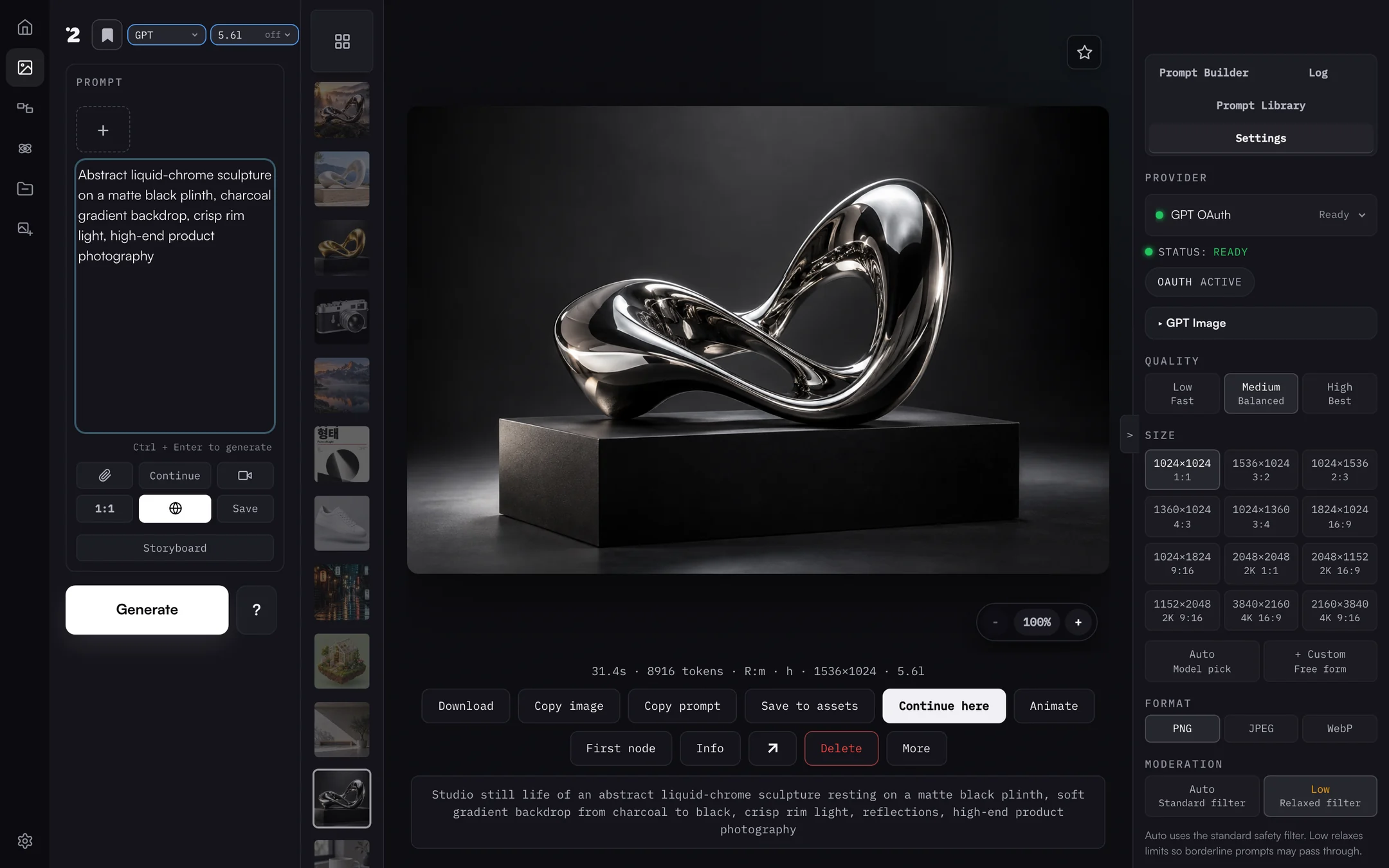
寫下提示詞、附上參考圖,選擇通道和模型就好。每個結果都會保留提示詞、耗時和設定,可以直接複製、接著創作,或做成影片。
|
|
|
### 在節點圖中分支
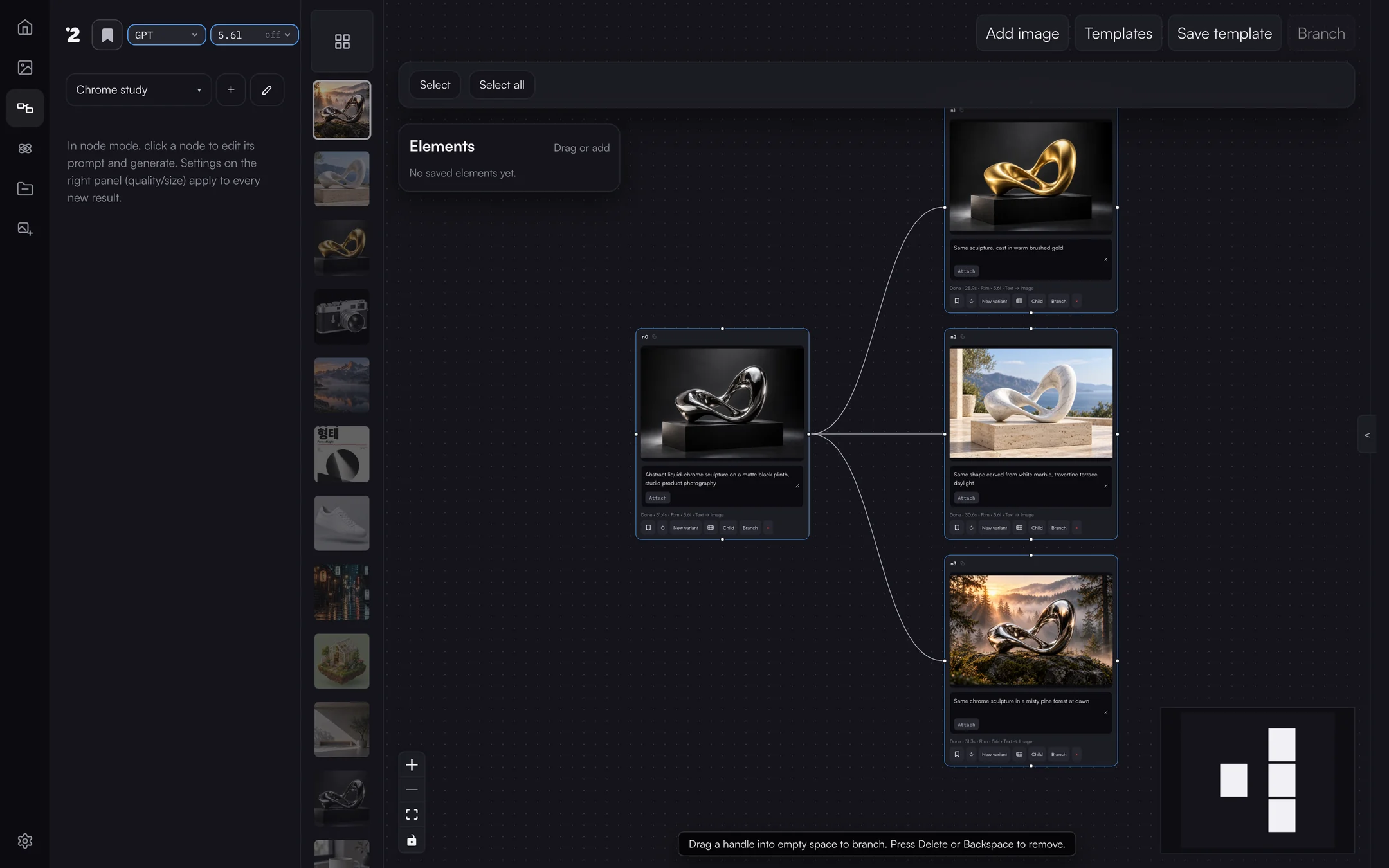
保留一張滿意的圖,同時往多個方向推進。每個分支都記得自己的父節點,原圖不會被覆蓋。
|
|
|
### 在 Canvas Mode 中精修
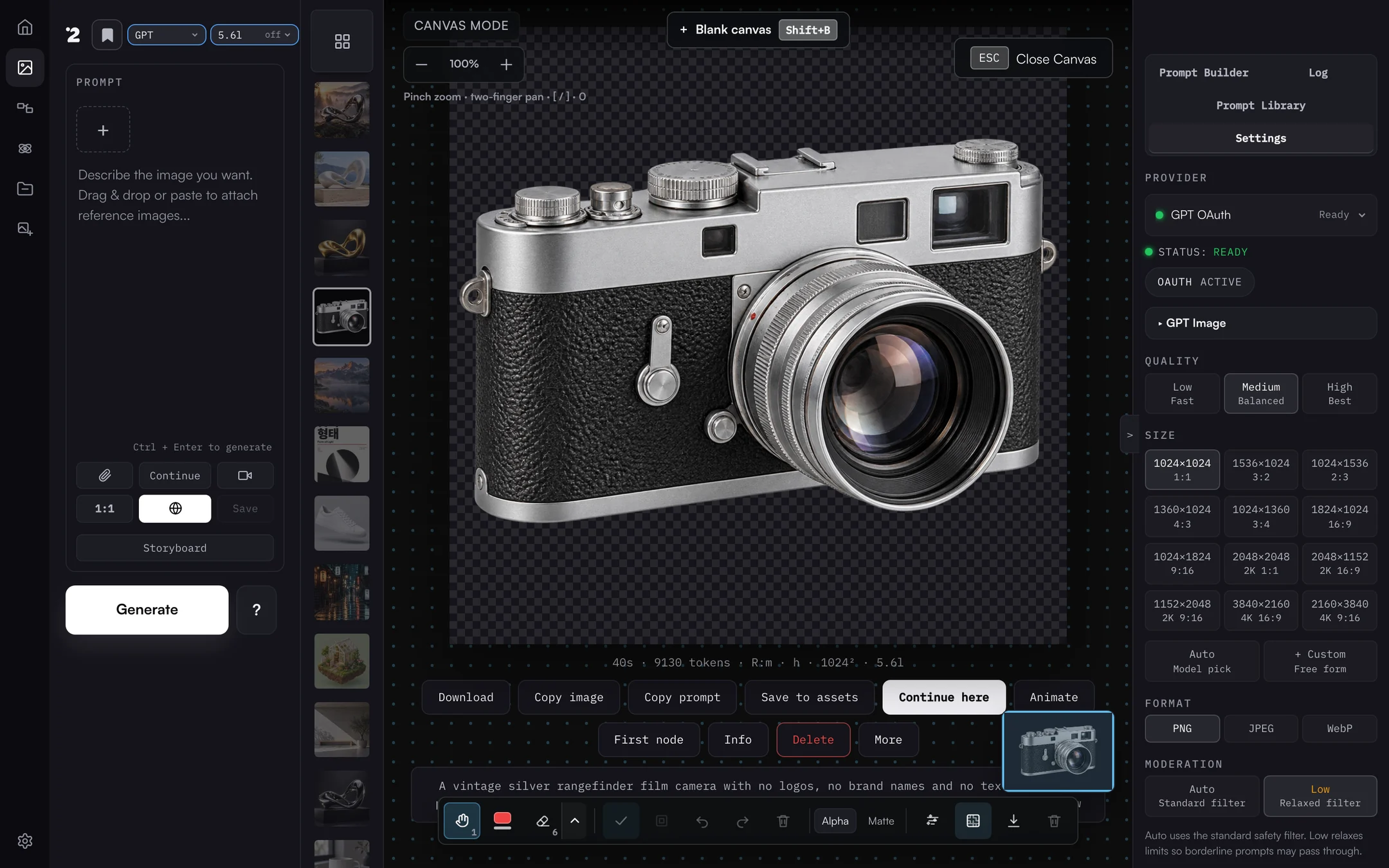
標註、擦除、去背,並以真正的 Alpha 通道匯出。一鍵 GPT 透明化會先由伺服器確認實際透明度,再告訴你結果。
|
|
|
### 從首頁開始
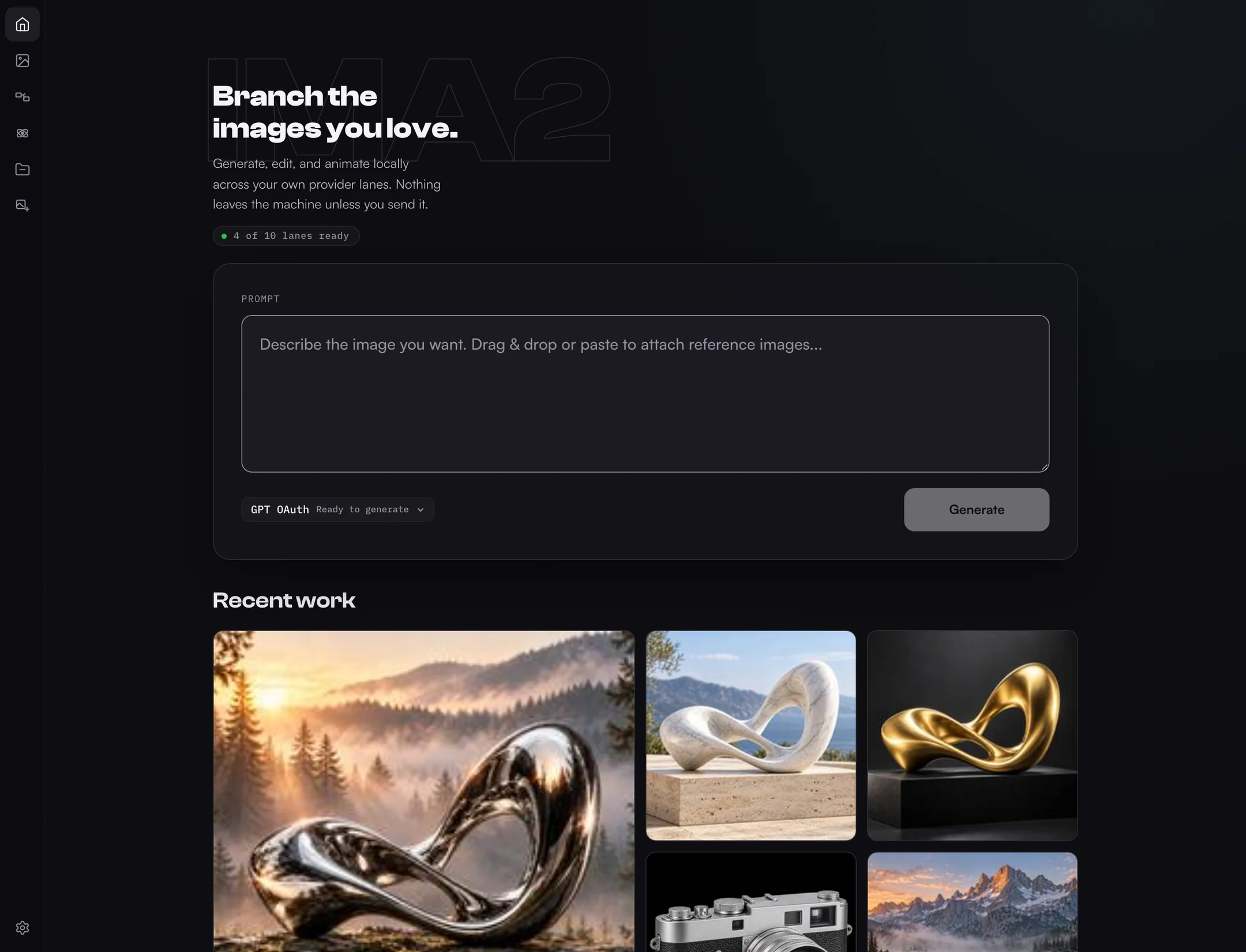
查看哪些通道已就緒,直接輸入提示詞,不必翻資料夾就能接續最近的作品。
|
|
English · 한국어 · 日本語 · 简体中文 · 正體中文 · 網站 · 文件 →
`ima2-gen` 是本機優先的視覺生成執行環境與工作室,讓人和程式設計代理在多個供應商之間執行可重現的影像與影片工作流程。它在你的電腦上執行一個小型伺服器,把所有作品存放在 `~/.ima2/generated`,只和你連線的供應商通訊:OpenAI OAuth/API、Grok OAuth/API、Antigravity CLI、Gemini API、AtlasCloud、MiniMax、NovelAI,以及已註冊的 ComfyUI 工作流程。Runway 與 Higgsfield 是獨立的 MCP 整合。提示詞與參考圖只會送往你為每個工作選擇的供應商。
## 快速開始
### Mac 應用程式(Apple Silicon)
桌面應用程式以 Mac 視窗和選單列圖示執行同一個本機伺服器與工作室。它以 Developer ID 簽署並通過 Apple 公證,內建執行環境,不需要另外安裝 Node.js。
1. 從最新的 [ima2 Desktop 版本](https://github.com/lidge-ai/ima2-gen/releases?q=desktop&expanded=true) 下載 `ima2--mac-arm64.dmg`。
2. 打開 DMG,把 **ima2** 拖進 **應用程式** 資料夾。
3. 啟動 ima2,在歡迎畫面選擇一個供應商。
檢查碼、更新與設定請見 [Mac 應用程式指南](https://lidge-ai.github.io/ima2-gen/docs/desktop)。在 Intel Mac、Windows 或 Linux 上,請使用 npm 或一行安裝。
### npm
```bash
npm install -g ima2-gen
ima2 setup
ima2 serve
```
接著打開 `http://localhost:3333`。如果 `3333` 已被佔用,`ima2-gen` 會改用下一個可用連接埠,並把實際網址寫入 `~/.ima2/server.json`,`ima2 open` 一定會開啟正確的網址。
### 用 CLI 生成第一張圖
先設定一次影像與影片的預設目標,再開始生成:
```bash
ima2 models
ima2 defaults set image oauth/gpt-6-luna
ima2 defaults set video grok/grok-imagine-video-1.5
ima2 gen "a clean product photo of a red guitar pedal"
ima2 video "a cat playing piano" --duration 5 --resolution 720p
```
在設定 CLI 目標之前,`ima2 gen` 和生成模式的 `ima2 video` 會以 `NO_DEFAULT_MODEL` 停止,除非呼叫時明確傳入 `--model /` 或 `--provider `。升級絕不會悄悄切換供應商或計費通道。
### 一行安裝(不需要 npm)
每個指令碼都會檢查套件宣告的 Node.js 最低版本,必要時安裝 Node LTS,安裝一次 ima2-gen,並在啟動 `ima2 serve` 之前執行離線安裝檢查。它不會停止無關的程序,也不會清除全域鎖定。
**macOS**
```bash
curl -fsSL https://lidge-ai.github.io/ima2-gen/install-mac.sh | bash
```
**Windows (PowerShell)**
```powershell
irm https://lidge-ai.github.io/ima2-gen/install-windows.ps1 | iex
```
**Linux / WSL**
```bash
curl -fsSL https://lidge-ai.github.io/ima2-gen/install-linux.sh | bash
```
Docker
```bash
docker build -t ima2-gen .
docker run -d -p 3333:3333 -e IMA2_LAN_TOKEN=change-me -v ima2-data:/data ima2-gen
```
compose 用法、必要的環境變數與限制請見 [Docker 文件](DOCKER.zh-TW.md)。
設定、更新與 npx
`ima2 setup` 提供四種驗證方式:
1. **GPT OAuth** — 以 ChatGPT 帳號登入(影像)
2. **Grok OAuth** — 以 xAI/Grok 帳號登入(影像與影片)
3. **Both** — 同時使用 GPT OAuth 與 Grok OAuth
4. **Web setup** — 在網頁介面完成所有設定
影片生成需要 Grok OAuth(選項 2 或 3)。如果已在使用 GPT OAuth,可以執行 `ima2 grok login` 加入影片功能,預設採用手動貼上流程。
更新時,先用 Ctrl+C 停止伺服器(或在另一個終端機執行 `ima2 stop`),再執行:
```bash
npm install -g ima2-gen@latest
```
Ctrl+C 會乾淨地結束:關閉資料庫、停止子程序並釋放檔案鎖定。若安裝失敗,請查看 npm 的權限訊息,或自行停止對應的 `ima2` 程序;安裝程式不會大範圍清理程序。
想用 npx?請參考 [npx 快速開始](NPX_QUICKSTART.zh-TW.md)。
## 能做什麼
- **創作**:生成、編輯、重複使用目前的影像、貼上參考圖、從歷史紀錄接續。開啟多模式後,一個提示詞就能同時送出多個候選,看著它們一格一格完成。所有控制項、多模式配方、Direct 模式與 reasoning effort 都寫在 [Prompt Studio 手冊](PROMPT_STUDIO.zh-TW.md) 中。 參考圖在影像生成中最多 5 張、影片中最多 14 張,大型影像會在上傳前壓縮。
- **節點圖**:把一張好圖分支到多個方向。根節點使用本機參考圖,子節點以父節點影像為來源。完成的工作會依請求 ID 回填到節點,所以重新整理頁面或圖版本衝突後,結果仍能復原。
- **Canvas Mode**:縮放、平移、懸停高亮的標註、橡皮擦、群組、復原、便利貼、背景清理,以及保留 Alpha 或指定底色匯出。需要自足的畫布文件就選 **SVG (embedded raster)**,需要真正的向量路徑就選 **Trace to SVG (vector)**。**GPT transparency** 按鈕透過 OAuth i2i 通道去背,並依解碼後的位元組回報 `alphaVerified`。 儲存的畫布版本不會出現在圖庫與歷史列中,但可以在 Canvas Mode 重新開啟,或作為下一次的參考圖。
- **影片**:透過 Grok 影片模型進行文字轉影片、影像轉影片與參考轉影片,提供進度顯示與 First/Mid/Last 影格複製按鈕。**Storyboard mode** 讓連續畫面中的人物與場景保持一致。 進度透過 SSE 依 planning → submitted → 進度百分比 → done 顯示。分鏡模式下,影像關鍵影格會依影片製作來構圖,影片片段會沿用人物與環境的鎖定規則。
- **點陣轉向量**:透過 `ima2 vectorize`、AssetGen/Assets 或 Canvas 匯出,把扁平點陣圖描成真正的 SVG 路徑。
- **NovelAI 雙提示詞**:選擇 NovelAI 後,創作、首頁與行動版輸入面板會並排顯示 **Positive prompt** 與 **Undesired content**。 輸入區域窄於 719px 時兩欄會上下堆疊。
- **提示詞庫**:匯入本機提示詞包、GitHub 資料夾與精選的 GPT-image 提示,並在本機建立索引搜尋。
- **Prompt Builder**:以文字後端琢磨意圖。可在 Settings > Providers 維持 Auto,或固定後端與模型,**via <backend>** 徽章會顯示實際回應的後端。 選擇 GPT 後端時,預設模型是 `gpt-6-luna`。
- **本機圖庫**:所有影像與影片都留在本機,附有依工作階段區分的歷史紀錄、生成時間與 reasoning effort 中繼資料。 預設只顯示目前的工作階段,All Images 切換可以展開全部歷史,所選的預設範圍在工作階段之間維持不變。
- **淺色與深色主題**:以 token 為基礎、符合 AA 對比度的配色,可在淺色、深色與跟隨系統之間無閃爍切換。
- **行動版外殼**與**工作可觀測性**:小螢幕上的應用程式列、輸入面板與精簡的設定切換,以及附安全日誌和請求 ID 的進行中、最近工作清單。
Card News 是僅供開發的實驗功能,在發佈版本中預設隱藏。
### 代理技能
ima2-gen 內建三個 Markdown 技能,供程式設計代理載入,為影像與影片生成、前端素材與設計方向探索提供結構化流程。
| 技能 | 指令 | 內容 |
|------|------|------|
| **Core** | `ima2 skill` | CLI 參考、提示詞寫法、供應商路由、韓文文字、影片工作流程 |
| **Frontend** | `ima2 skill front` | 素材管線(平行生成、候選挑選、供應商路由)、網頁動態與影片、響應式、無障礙、anti-slop,30 多個參考檔案 |
| **UI/UX Design** | `ima2 skill uiux` | 以影像為起點的設計方向探索、UX 狀態、design-ism、產品個性、DESIGN.md 工作流程,21 個參考檔案 |
```bash
ima2 skill ls # 列出技能
ima2 skill front path # 輸出檔案路徑(供代理使用)
ima2 skill front --json # JSON 包裝(供代理使用)
ima2 skill front refs # 列出參考模組
ima2 skill front ref motion # 載入一個參考模組
ima2 skill install --dir # 安裝到代理的技能資料夾
ima2 skill install --tmp # 安裝到暫存資料夾(備案)
```
## 供應商與模型
| 通道 | 驗證 | 影像 | 影片 | 說明 |
|---|---|:-:|:-:|---|
| `oauth` | ChatGPT 登入,由 ima2 直接呼叫 ChatGPT | ✓ | | 預設通道;GPT-6 規劃,`gpt-image-2` 出圖,`gpt-6-luna` |
| `api` | `OPENAI_API_KEY` | ✓ | | Responses API `image_generation` 工具,支援遮罩、多模式、節點 |
| `grok` | xAI OAuth(`ima2 grok login`) | ✓ | ✓ | 呼叫 Images API 前先做網頁搜尋與規劃 |
| `grok-api` | `XAI_API_KEY` | ✓ | ✓ | 直接呼叫 xAI Images API |
| `gemini-api` | `GEMINI_API_KEY` 或 Vertex 服務帳戶 | ✓ | | `nano-banana-2`、`nano-banana-pro`,512px 到 4K |
| `agy` | Antigravity CLI | ✓ | | 透過 `agy -p` 使用 Gemini `nano-banana-2` / `nano-banana-pro` |
| `nai` | NovelAI API 權杖 | ✓ | | 四個 NAI Diffusion 模型,文字轉影像 |
| `comfy` | 本機 ComfyUI | ✓ | ✓ | 已註冊的影像與影片工作流程 |
| `atlascloud` | AtlasCloud API 金鑰 | ✓ | | `openai/gpt-image-2` 生成與編輯 |
| `minimax` | MiniMax API 金鑰 | ✓ | | `image-01`、`image-01-live` |
| `runway`、`higgsfield` | MCP 連線 | ✓ | ✓ | 獨立的 MCP 整合 |
GPT OAuth 通道使用三個 GPT-6 模型:預設 **`gpt-6-luna`**,另有 `gpt-6-sol`,以及推理時間最長、速度最慢的 `gpt-6-astra`。所選模型負責規劃畫面,`gpt-image-2` 負責出圖。`gpt-5.6-luna` 等舊的 OAuth 模型 ID 在已儲存的設定與腳本中仍可使用,會對應到相應的 GPT-6 模型。API key 通道保留自己的清單:`gpt-5.6-luna`(預設)、`gpt-6-astra`、`gpt-5.6-terra`、`gpt-5.6-sol`、`gpt-5.5`、`gpt-5.4`、`gpt-5.4-mini`。應用程式也提供品質(`low`、`medium`、`high`)與審核等級(`auto`、`low`)控制。
供應商詳情(English)
- `provider: "oauth"` signs in with your ChatGPT session and calls ChatGPT's Codex backend from the ima2 server process, with no separate proxy. A GPT-6 model plans the prompt and `gpt-image-2` renders it; Direct mode skips the planner. Transparent backgrounds and image edits run on the same lane.
- `provider: "api"` calls the OpenAI Responses API with the hosted `image_generation` tool.
- `provider: "grok"` calls `https://api.x.ai` directly with the xAI OAuth session stored in `~/.progrok/auth.json`, running mandatory xAI Web Search plus a planner pass (default: `grok-4.3`, configurable in settings or via `--planner-model`) before the xAI Images API call. `grok-4.5` and `grok-4.6` are also selectable. Log in once with `ima2 grok login` or the Settings **Switch Account** button; the session refreshes itself two minutes before expiry.
- `provider: "grok-api"` calls the xAI Images API directly with `XAI_API_KEY` (no OAuth session involved).
- `provider: "nai"` calls the NovelAI image API with a persistent API token (saved in Settings > API Keys or `NOVELAI_API_KEY`; no fixed token prefix is required). Four models: `nai-diffusion-5-full`, `nai-diffusion-5-curated`, `nai-diffusion-4-5-full`, `nai-diffusion-4-5-curated`. Responses arrive as a ZIP archive that ima2 decodes to PNG. Text-to-image only — reference images, edits, and masks are refused rather than silently dropped. Browser and CLI surfaces expose negative prompt, sampler/schedule, steps/guidance/CFG rescale, seed, presets, Auto SMEA, Decrisper, Variety+, and V5 alpha.
- `provider: "agy"` spawns the Antigravity CLI (`agy -p`) to generate images via Google Gemini's `default_api:generate_image` tool (models: `nano-banana-2` and `nano-banana-pro`). Output is fixed at 1024×1024 JPEG, max 3 reference images. No web search, quality, or size controls.
- `provider: "gemini-api"` calls the Google Generative Language API directly. Supports two models: `nano-banana-2` (Gemini 3.1 Flash Image) and `nano-banana-pro` (Gemini 3 Pro Image). Auth is via `GEMINI_API_KEY` env var, web UI key management, or a Vertex AI service account JSON (`VERTEX_SERVICE_ACCOUNT_JSON`). When both an API key and Vertex credentials are configured, Vertex takes priority. Supports variable aspect ratios (1:1 through 21:9) and four resolution tiers (512px, 1K, 2K, 4K); these controls are only honored on the direct API path — the Vertex AI endpoint ignores aspect/size because it does not accept the `response_format` field. Per-model cost differs: `nano-banana-2` (Flash): 512=$0.001, 1K=$0.003, 2K=$0.004, 4K=$0.006; `nano-banana-pro`: 1K=$0.007, 2K=$0.007, 4K=$0.013. No web search or mask controls.
- API-key generation supports classic generate, edit, mask-guided edit, multimode, and node generation.
- Grok generation supports Classic, Node, and Agent flows. If a Classic reference, Node parent image, or Agent current image is present, ima2 switches the final Grok call to xAI image edit so image-to-image context is preserved.
If no provider is specified, the app keeps the current GPT OAuth/default behavior. GPT OAuth defaults to `gpt-6-luna` and API-key generation to `gpt-5.6-luna`; the API-key path also defaults to `low` reasoning and `1024x1024` unless the request passes validated options. Grok image generation defaults to `grok-imagine-image-2.0`.
One caveat on the OAuth Grok lane: xAI documents only `/v1/me` as accepting an OAuth token, so image and video calls to `api.x.ai` with that token ride an undocumented path. It works today — progrok relied on the same path — but it carries no compatibility promise. If xAI closes it, `provider: "grok-api"` with `XAI_API_KEY` is the documented route and stays unaffected.
Grok image generation exposes a Fast/Best model picker (`grok-imagine-image` / `grok-imagine-image-quality`; new sessions start on `grok-imagine-image-2.0`) and a size picker (aspect ratio + 1k/2k resolution). The Settings page prefers the Grok Build weekly credits percentage and reset time from `GET /v1/billing?format=credits`; if that source is unavailable, it falls back to the legacy monthly billing window and `$used/$limit`. A **Switch Account** button starts a device-code OAuth flow (`POST /api/auth/switch`) for re-authenticating without leaving the app.
Grok video generation defaults to canonical `grok-imagine-video-1.5`; `grok-imagine-video` remains available for base-model-only Ref2V, V2V edit, and extension paths, and the legacy `grok-imagine-video-1.5-preview` string is accepted as an alias. Three modes are auto-detected from reference count: text-to-video (0 refs), image-to-video (1 ref), and reference-to-video (2-14 refs; up to 15s on grok-imagine-video-1.5, 10s on grok-imagine-video). 1080p is available for `grok-imagine-video-1.5` prompt-only text-to-video and single image/frame image-to-video; prompt-only 1.5 uses the internal white-canvas I2V shim before the upstream request. Video controls include duration (1-15s), resolution (480p, 720p, 1080p when supported), and aspect ratio (1:1, 16:9, 9:16, 4:3, 3:4, 3:2, 2:3, auto).
## CLI
伺服器指令(English)
| Command | Description |
|---|---|
| `ima2 serve [--dev]` | Start the local web server; `--dev` enables verbose server diagnostics |
| `ima2 stop [--force]` | Stop the running server safely — graceful admin-API stop first, then SIGTERM/SIGKILL; verifies the advertised pid against `/api/health` so a recycled pid is never killed |
| `ima2 service ` | Background service: `install`/`uninstall`/`start`/`stop`/`restart`/`status`/`logs`/`repair` — launchd on macOS, systemd user unit on Linux, auto-start on login with crash restart |
| `ima2 setup` | Reconfigure saved auth |
| `ima2 status` | Show config and OAuth status |
| `ima2 doctor` | Diagnose Node, package, config, and auth |
| `ima2 doctor image-probe [--json]` | Run sanitized image probes for no-image diagnostics |
| `ima2 open` | Open the web UI |
| `ima2 reset` | Remove saved config |
用戶端指令(English)
These require a running `ima2 serve`. The CLI covers every server route. The most common ones are below — the [full CLI reference](CLI.zh-TW.md) lists everything (generation, history, sessions, prompt library, annotations, Card News, observability, config).
| Command | Description |
|---|---|
| `ima2 models [--kind image\|video] [--lane ] [--json]` | List live lanes, status, model IDs, and capabilities |
| `ima2 defaults set image\|video /` | Persist the fail-closed CLI target for image or video generation |
| `ima2 defaults reset image\|video` | Remove a persisted CLI generation target |
| `ima2 gen [--model /]` | Generate from the CLI; requires an explicit target or saved image default |
| `ima2 edit --prompt ` | Edit an existing image |
| `ima2 vectorize [-o output.svg]` | Trace PNG/JPEG/WebP into a real SVG locally; no server or provider required |
| `ima2 prompt build --message [--backend ] [--model ]` | Refine prompt intent through the configured or explicitly selected Prompt Builder backend; requires the local server |
| `ima2 multimode ` | Multi-image SSE generation |
| `ima2 video [--model /]` | Generate video through a Grok or MCP lane; requires an explicit target or saved video default |
| `ima2 ls [--session ] [--favorites]` | List recent history |
| `ima2 show [--metadata]` | Reveal a generated asset |
| `ima2 prompt ls -q ` | Search the prompt library |
| `ima2 inflight ls [--terminal]` | List active and recent jobs (alias of `ps`) |
| `ima2 config set ` | Write to `~/.ima2/config.json` |
| `ima2 ping` | Health-check the running server |
The server advertises its actual port at `~/.ima2/server.json`. If `3333` is busy, the backend falls back to `3334+` and CLI commands follow the advertised URL. Override discovery with `--server ` or `IMA2_SERVER=http://localhost:3333`.
```bash
ima2 models --kind image
ima2 gen "poster" --model oauth/gpt-6-luna --reasoning-effort high
ima2 gen "1girl, blue hair" --model nai/nai-diffusion-5-full --nai-negative-prompt "lowres, watermark"
ima2 vectorize logo.png -o logo.svg --json
ima2 prompt build --message "Make this prompt production-ready" --backend auto --model auto
ima2 edit input.png --prompt "make it rainy" --web-search
ima2 multimode "two cats playing" -n 2
ima2 video "a cat playing piano" --model grok/grok-imagine-video-1.5 --duration 5 --resolution 720p
ima2 video "animate this" --model grok/grok-imagine-video-1.5 --ref photo.png --aspect-ratio 16:9
ima2 inflight ls --terminal
ima2 config set imageModels.reasoningEffort high
```
Full reference: [docs/CLI.md](CLI.md).
## 設定
設定的優先順序是 `環境變數 > ~/.ima2/config.json > 內建預設值`。Prompt Builder 的設定會存成 `promptBuilder.backend`(`auto`、`oauth`、`grok`、`api` 或 `grok-api`)與 `promptBuilder.model`。在 Auto 模式下,Prompt Builder 依序嘗試 GPT OAuth、Grok、OpenAI API、Grok API,並使用第一個就緒的通道;明確選擇的後端會被固定,無法使用時回傳具型別的錯誤。
環境變數(English)
| Variable | Default | Description |
|---|---:|---|
| `IMA2_PORT` / `PORT` | `3333` | Web server port |
| `IMA2_HOST` | `127.0.0.1` | Web server bind host |
| `IMA2_OAUTH_PROXY_PORT` / `OAUTH_PORT` | `10531` | Port of the external GPT OAuth endpoint used with `IMA2_NO_OAUTH_PROXY=1` |
| `IMA2_SERVER` | — | CLI target override |
| `IMA2_CONFIG_DIR` | `~/.ima2` | Config and SQLite location |
| `IMA2_ADVERTISE_FILE` | `~/.ima2/server.json` | Runtime discovery file |
| `IMA2_GENERATED_DIR` | `~/.ima2/generated` | Generated image directory |
| `IMA2_IMAGE_MODEL_DEFAULT` | `gpt-6-luna` | Server fallback image model |
| `IMA2_PROMPT_BUILDER_BACKEND` | `auto` | Prompt Builder text backend (`auto`, `oauth`, `grok`, `api`, or `grok-api`); Settings persists the same value as `promptBuilder.backend` |
| `IMA2_PROMPT_BUILDER_MODEL` | `auto` with Auto backend | Backend-scoped Builder model; Settings persists the same value as `promptBuilder.model` |
| `IMA2_REASONING_EFFORT` | `medium` | Default reasoning effort for the default (GPT OAuth) path; one of `none`, `low`, `medium`, `high`, `xhigh`, `max` |
| `IMA2_NO_OAUTH_PROXY` | — | Set `1` to send GPT OAuth calls to an OpenAI-compatible endpoint on `127.0.0.1:IMA2_OAUTH_PROXY_PORT` instead of ChatGPT directly |
| `IMA2_CODEX_CLIENT_VERSION` | latest `@openai/codex` | Codex client version sent to ChatGPT; the automatic value is never lower than `0.157.0` |
| `IMA2_LOG_LEVEL` | `info` | Normal serve defaults to `info`; dev mode defaults to `debug`; supports `debug`, `info`, `warn`, `error`, or `silent` |
| `IMA2_INFLIGHT_TERMINAL_TTL_MS` | `300000` | Recent terminal job retention for debug views |
| `OPENAI_API_KEY` | — | API key for the `provider: "api"` Responses API image path and auxiliary API-key features |
| `XAI_API_KEY` | — | API key for `provider: "grok-api"` direct xAI Images API path |
| `NOVELAI_API_KEY` | — | NovelAI persistent API token for `provider: "nai"` |
| `IMA2_NAI_IMAGE_MODEL_DEFAULT` | `nai-diffusion-5-full` | Default NovelAI image model |
| `IMA2_NAI_DEFAULT_AUTO_SMEA` | `false` | Default NovelAI Auto SMEA state |
| `IMA2_NAI_DEFAULT_DECRISPER` | `false` | Default NovelAI Decrisper (`dynamic_thresholding`) state |
| `IMA2_API_IMAGE_MODEL_DEFAULT` | `gpt-5.6-luna` | Default image model for `provider: "api"` |
| `IMA2_API_REASONING_EFFORT` | `low` | Default reasoning effort for `provider: "api"` |
| `IMA2_API_IMAGE_SIZE` | `1024x1024` | Default size for `provider: "api"` |
| `IMA2_API_ALLOW_WEB_SEARCH` | `true` | Toggle web search for `provider: "api"` |
| `IMA2_GROK_PLANNER_MODEL` | `grok-4.3` | Grok search/planner model; `grok-4.5`, `grok-4.6` and GPT planners are selectable (settings UI or `--planner-model`) |
| `IMA2_GROK_PLANNER_TIMEOUT_MS` | `900000` | Timeout for the Grok planner call |
| `IMA2_GROK_SEARCH_TIMEOUT_MS` | `300000` | Timeout for the Grok web-search brief (degrades instead of failing) |
| `IMA2_GROK_VIDEO_PLAN_TOTAL_TIMEOUT_MS` | `1500000` | Ceiling on the whole video planning phase (clamped above search + planner) |
| `IMA2_GROK_IMAGE_MODEL_DEFAULT` | `grok-imagine-image-2.0` | Default final Grok image model |
| `IMA2_GROK_VIDEO_MODEL_DEFAULT` | `grok-imagine-video-1.5` | Default Grok video model |
| `IMA2_GROK_GENERATION_TIMEOUT_MS` | `300000` | Timeout for the final Grok Images API call |
| `IMA2_OAUTH_MASKED_EDIT_ENABLED` | `false` | Opt-in feature flag for masked-edit requests on the OAuth path (#31, groundwork only) |
| `GEMINI_API_KEY` | — | API key for `provider: "gemini-api"` direct Generative Language API path |
| `VERTEX_SERVICE_ACCOUNT_JSON` | — | Google service account JSON for Vertex AI auth with `provider: "gemini-api"`; takes priority over `GEMINI_API_KEY` when both are set |
| `IMA2_AGY_BIN` | `agy` on PATH | Explicit path to the Antigravity CLI binary for `provider: "agy"` |
| `IMA2_MAX_PARALLEL` | `24` | Server-wide parallel generation cap |
`IMA2_GROK_PROXY_HOST`, `IMA2_GROK_PROXY_PORT`, `IMA2_NO_GROK_PROXY`, and `IMA2_GROK_RESTART_*` were removed in 3.16 together with the local Grok proxy; they are no longer read, and setting them is harmless.
日誌模式(English)
`ima2 serve` keeps terminal output intentionally quiet: startup URLs, warnings, and errors stay visible, while request/node/OAuth structured logs are hidden by default.
Use `ima2 serve --dev`, `npm run dev`, or `IMA2_LOG_LEVEL=debug ima2 serve` when you need request IDs, node generation phases, OAuth stream diagnostics, or inflight state transitions. Explicit `IMA2_LOG_LEVEL` and `~/.ima2/config.json` values still override the built-in defaults.
## 疑難排解
ima2 ping 顯示無法連線到伺服器
先執行 `ima2 serve`,再檢查 `~/.ima2/server.json`。也可以用 `ima2 ping --server http://localhost:3333` 直接指定網址。
GPT OAuth 無法登入
重新執行 `ima2 setup`(選項 1),確認 `ima2 status`,然後重新啟動 `ima2 serve`。
在代理/VPN 網路中反覆出現 fetch failed
GPT OAuth 請求由 `ima2 serve` 行程直接送往 `chatgpt.com`。需要代理的網路請開啟代理用戶端的 TUN/TURN 類模式。若無法這麼做,請在啟動伺服器的終端機同時設定 `HTTPS_PROXY` 與 `NODE_USE_ENV_PROXY=1`;Node.js 22.21+ 與 24+ 只有在設定第二個變數時才會讀取 `HTTPS_PROXY`;更早的 Node.js 兩者都會忽略,請改用 TUN 模式。在 Windows 上,也請檢查開機自動啟動的網路攔截工具,包括 SecretDNS 這類 DNS/封包分割繞過工具,即使瀏覽器看起來正常,它們也可能破壞 OAuth 或影像回應。
影像生成出現 API_KEY_REQUIRED
使用 `provider: "api"` 前,請設定 `OPENAI_API_KEY` 或設定 API key。預設的 GPT OAuth 路徑不需要 API 金鑰。
回傳 EMPTY_RESPONSE 或沒有影像資料
執行 `ima2 doctor image-probe --json > ima2-image-probe.json`,並把去識別化後的 JSON 附在 Issue 中。若是 GPT OAuth 問題,請在 `ima2 serve` 執行時一併記錄 `ima2 gen "고양이" --model oauth/gpt-6-luna --no-web-search --json` 與 `ima2 gen "고양이" --model oauth/gpt-6-luna --json` 的結果。請勿分享 ChatGPT Cookie、OAuth token 檔案、API 金鑰、原始上游回應、提示詞歷史或生成的 base64。
大尺寸參考圖失敗
大型 JPEG/PNG 會在上傳前自動壓縮。若仍失敗,請轉成解析度較低的 JPEG 或 PNG 再試。瀏覽器路徑不支援 HEIC/HEIF。
更新後看不到以前的圖庫影像
新版本把生成的影像從安裝套件資料夾移到了 `~/.ima2/generated`。請執行 `ima2 doctor`,並參考 [找回舊影像](RECOVER_OLD_IMAGES.zh-TW.md)。
GPT OAuth 通道找不到或拒絕 GPT-6 模型
GPT OAuth 通道使用你的 ChatGPT 方案開放的 GPT-6 模型。請更新 ima2-gen,以 `ima2 gpt login` 重新登入,再用 `ima2 models --kind image` 檢查。若只有某個模型持續失敗,請切換到預設的 `gpt-6-luna`。
應用程式在另一個連接埠開啟
如果要求的連接埠已被佔用,`ima2-gen` 會改用下一個可用連接埠,並記錄在 `~/.ima2/server.json`。若連接埠意外變成 `3457`,可能是你的 shell 從其他本機工具繼承了 `PORT=3457`。請執行 `unset PORT`,或用 `IMA2_PORT=3333 ima2 serve` 啟動。
更多解答請見 [FAQ](FAQ.zh-TW.md)。
## 文件
- [開發者文件網站](https://lidge-ai.github.io/ima2-gen/docs) — 概覽、快速開始、架構、模式、供應商、CLI、設定與伺服器 API
- [CLI 參考](CLI.zh-TW.md) · [API 參考](API.zh-TW.md) · [Prompt Studio 手冊](PROMPT_STUDIO.zh-TW.md) · [FAQ](FAQ.zh-TW.md) · [找回舊影像](RECOVER_OLD_IMAGES.zh-TW.md)
## 開發
```bash
git clone https://github.com/lidge-ai/ima2-gen.git
cd ima2-gen
npm install
npm run dev
npm run typecheck
npm test
npm run build
```
`npm run dev` 會建置 UI,並以 `--watch` 與詳細診斷日誌啟動 TypeScript 伺服器。`npm run typecheck`、`npm run build:server` 與 `npm run build:cli` 用來驗證 TypeScript 的建置路徑。 節點模式與 Canvas Mode 預設包含在封裝後的 UI 中。
網頁介面透過單一 `GET /api/events` Server-Sent Events 連線接收所有進度。多模式、節點與影片請求以非同步 POST(`202 { requestId }`)送出,並經由共用事件匯流排多工傳送,因此同時進行的工作不會撞上瀏覽器 6 條連線的上限。沒有送出 `async: true` 的 CLI 用戶端仍會收到依請求區分的 SSE 串流。
### 執行需求
| Contract | Value |
|---|---|
| Node engine | `>=22` |
| npm toolchain | `npm@11.18.0` |
| Release Node | `24.17.0` |
| CLI entry | `bin/ima2.js` |
| OpenAI SDK | `^7.4.0` |
| Express | `^5.1.0` |
安裝程式會從套件的中繼資料讀取 Node.js 最低版本,並在啟動伺服器前執行離線安裝檢查。
桌面應用程式建置(Electron,English)
`desktop/` wraps the same local server and UI in a menubar/tray app for macOS, Windows, and Linux. It supervises `server.js` as a child process (attaching to an already-running server on the configured port instead of starting a second one) and adds a native settings window: port, open at login, start hidden, menubar-only (macOS), keep-server-on-close, log level, config directory.
```bash
cd desktop
npm install
npm run prepare:app # builds server + CLI + UI at the repo root
npm start # run unpackaged
npm run dist:mac # dmg + zip (Apple Silicon / arm64)
npm run dist:win # nsis + zip
npm run dist:linux # AppImage + deb
```
Only the macOS app is distributed today, for Apple Silicon. `.github/workflows/desktop.yml` runs in three ways: a push to `dev` builds an unsigned macOS validation build, a manual dispatch builds signed and notarized installers without publishing anything, and a `desktop-v*` tag push builds, verifies, and publishes the desktop release. Trusted macOS builds require `MAC_CSC_LINK`, `MAC_CSC_KEY_PASSWORD`, `APPLE_ID`, `APPLE_APP_SPECIFIC_PASSWORD`, and `APPLE_TEAM_ID`; missing or invalid authentication fails the build instead of producing an unsigned success.
For a signed macOS verification build without publishing, run:
```bash
gh workflow run desktop.yml --ref -f platform=mac
```
The workflow verifies Developer ID, team, architecture (arm64), hardened runtime, secure timestamp, nested signatures, Gatekeeper and stapled notarization tickets. It checks the apps recovered from the final ZIP and DMG against the original signed content, then exports `ima2-macos-signature-proof` reports and installer SHA-256 hashes. Failed verification blocks installer upload. Only a `desktop-v*` tag push creates and publishes a release.
Signing credential imports run on disposable GitHub-hosted macOS. The builder cleans successfully imported keychains; if import/setup fails before its cleanup registration, runner destruction is the final cleanup boundary. Local recovery should reuse an existing login-keychain identity in the same unlocked session, rather than importing credential packages into a persistent machine. This does not require changing automatic locking or key access rules.
Windows Authenticode remains separate and uses `WIN_CSC_LINK` / `WIN_CSC_KEY_PASSWORD`; Windows builds without them are unsigned.
## 貢獻者
- [@lidge-jun](https://github.com/lidge-jun) — maintainer
- [@ree9622](https://github.com/ree9622) — moderation controls, Windows fixes, structured logging
- [@Charley-Peng](https://github.com/Charley-Peng) — API cache fix (#74)
- [@philiptaron](https://github.com/philiptaron) — Nix flake (#81)
- [@aorying](https://github.com/aorying) — upstream validation error surfacing (informed TS migration direction)
- [@PARKJONGMlN](https://github.com/PARKJONGMlN) — batch comparison matrix design (#80)
## 授權
MIT