English |
Tiếng Việt |
简体中文 |
한국어






제품 업데이트는 x.com/clisbot에서 확인할 수 있습니다.
# clisbot - 좋아하는 coding CLI를 이동 중에도 쓰는 agentic 개인 어시스턴트, 업무 어시스턴트, coding 파트너로 바꾸기
OpenClaw / Hermes Agent를 쓰고 싶지만 이런 문제가 있다면:
- API 비용이 너무 높아 결국 LLM proxy 우회 경로를 찾게 된다
- 일상 업무에는 OpenClaw / Hermes Agent를 쓰고, 실제 coding은 Claude / Codex / Gemini로 다시 돌아가야 한다
- 이동 중에도 coding과 업무를 계속하고 싶다
`clisbot`은 이 문제를 풀기 위한 해법이다.
`clisbot`은 Claude Code, Codex, Gemini CLI 같은 native frontier agent CLI를 여러 채널에서 오래 살아 있는 chat-native bot으로 바꾼다. 현재 채널은 Slack, Telegram, Zalo Bot, Zalo Personal이며 더 늘어날 예정이다. 각 agent는 자기 tmux session 안에서 실행되고, 실제 workspace를 유지하며, coding bot, 일상 업무 어시스턴트, 혹은 SOUL, IDENTITY, MEMORY를 갖춘 팀 어시스턴트처럼 동작할 수 있다.
이것은 tmux에 chat을 붙인 얇은 bridge가 아니다. `clisbot`은 Slack, Telegram, Zalo Bot, Zalo Personal 같은 chat platform을 실제 channel surface로 다루며, routing, durable conversation state, pairing, follow-up control, file send/receive, 그리고 frontier coding agent를 팀이 실제 일하는 도구와 커뮤니케이션 surface 안에 머물게 하는 능력을 제공한다.
`clisbot`은 같은 durable agent session 위에서 여러 CLI, 여러 채널, 여러 workflow shape를 지원하는 reusable agent runtime layer로 성장하는 것을 목표로 한다.
## 왜 clisbot을 만들었나
나는 Long Luong(Long)이고, 베트남 1위 교통 예약 플랫폼 Vexere의 공동창업자이자 CTO다. 우리는 교통 운영사를 위한 SaaS와 재고 배분 인프라도 함께 만든다. 회사가 300명 규모로 커지고 Engineering, Product, Design 팀이 100명 이상이 되면서, 조직 전체에 AI-native workflow를 실용적으로 도입하는 방법을 찾고 있었다.
문제는 AI가 유용한지 아닌지가 아니다. 기업 규모에서 AI를 실제로 작동시키면서도 스택이 파편화되거나, 비싸지거나, 통제 불가능해지지 않게 만드는 것이 문제다. 현실에서는 비용 통제, workflow truthfulness, team accessibility, governance, 그리고 frontier AI를 실제 업무가 일어나는 도구와 surface 안으로 가져오는 일을 동시에 해결해야 한다.
`clisbot`은 내가 선택한 접근이다. 또 하나의 고립된 AI layer를 만드는 대신, 이미 신뢰하고 쓰는 coding CLI를 durable하고 chat-native한 agent로 바꿔 Slack, Telegram, Zalo surface, 실제 팀 workflow 안에서 일하게 만든다.
`clisbot`이 당신의 workflow에 도움이 되었다면 GitHub star는 그것이 유용하다는 신호를 주고 더 많은 사람이 발견하게 돕는 간단한 방법이다.
## 빠른 시작
### AI-Assisted Setup
이미 Codex, Claude Code, Gemini CLI를 쓰고 있다면 이 repo를 그 CLI에서 열고 먼저 이 짧은 prompt를 붙여 넣는다:
```text
Help me clarify and set up clisbot from this GitHub repo: https://github.com/longbkit/clisbot
```
원하는 것이 이미 명확하다면 아래 prompt를 붙여 넣고 placeholder를 채운다:
```text
Help me clarify and set up clisbot from this GitHub repo: https://github.com/longbkit/clisbot
I want:
- target channel:
- coding CLI tool:
- usage shape:
```
AI agent용 안내: 아래 가이드를 사용해 사용자가 가능한 적은 마찰로 `clisbot`을 설치, 설정, onboarding 하도록 돕는다.
1. 꼭 필요한 최소한의 질문만 한다. 특히 target channel, coding CLI tool, usage shape를 확인한다.
2. 첫 테스트가 성공한 뒤에는 credentials persist를 기본 권장한다. 그래야 이후 restart 때 token을 다시 입력하지 않고 `clisbot start`만 쓸 수 있다.
3. `README.md`와 `docs/user-guide/README.md`를 읽고 가장 짧고 안전한 setup path를 안내한다. 환경이 허용하면 올바른 `clisbot` command를 실행하고 status/logs로 검증한다.
4. bot 생성, Slack app setup, Zalo Personal login처럼 수동 단계가 필요하면 사용자가 정확히 무엇을 해야 하는지 설명하고 기다린다.
5. 기술적 한계로 command를 실행할 수 없다면 사용자가 실행할 정확한 terminal command를 준다. 해결되지 않은 bug가 setup을 막으면 GitHub issue 생성 또는 https://docs.google.com/forms/d/e/1FAIpQLSd7L7mHOo0ea8YXFI4tGnyDIj94ESn4hbbDa5YTbcEKTVOKTA/viewform feedback 제출을 돕는다.
플랫폼 지원:
- 현재 Linux와 macOS가 지원 host environment다.
- Windows 사용자는 WSL2 안에서 `clisbot`을 실행해야 한다. native Windows는 아직 지원하지 않으며, `clisbot`은 현재 `tmux`와 Bash 기반 runtime flow에 의존한다.
### 수동 setup
대부분의 사용자는 여기서 시작하면 된다:
```bash
npm install -g clisbot
clisbot start \
--cli codex \
--bot-type personal \
--telegram-bot-token \
--persist
```
token을 아직 persist하지 않고 먼저 시험하려면 `--persist`만 제거한다. 일상 복구 명령은 `clisbot stop`, `clisbot restart`, `clisbot status`, `clisbot logs`다.
다음 단계:
- 보안을 위해 DM은 기본적으로 pairing으로 시작한다.
- `clisbot`에는 첫 사용 마찰을 줄이는 smart autopairing path도 있다. 처음 30분 안에 bot에게 DM을 보내면 보통 owner role을 바로 claim하고 별도 pairing 없이 시작할 수 있다.
최단 경로 대신 단계별 setup 문서가 필요하다면:
- Telegram: [Telegram Bot Setup](../ko/user-guide/telegram-setup.md)
- Slack: [Slack App Setup](../ko/user-guide/slack-setup.md)
- Zalo Bot: [Zalo Bot Setup](../ko/user-guide/zalo-bot-setup.md)
- Zalo Personal: [Zalo Personal](../ko/user-guide/zalo-personal.md)
- Release history: [CHANGELOG.md](../../../CHANGELOG.md), [release notes](../../../docs/releases/README.md), [update guide](../../../docs/updates/update-guide.md), [release guides](../../../docs/updates/README.md), [migration index](../../../docs/migrations/index.md)
- Slack app manifest template: [app-manifest.json](../../../templates/slack/default/app-manifest.json)
- Slack app manifest guide: [app-manifest-guide.md](../../../templates/slack/default/app-manifest-guide.md)
이후에는:
- `--bot-type personal`은 한 사람을 위한 assistant를 만든다
- `--bot-type team`은 팀, channel, group workflow를 위한 shared assistant를 만든다
- literal token input은 `--persist`를 같이 쓰지 않는 한 memory에만 남는다
- `--persist`는 token을 canonical credential file로 승격해 다음 `clisbot start`가 재사용하게 한다
- fresh bootstrap은 명시한 channel만 enable한다
- 첫 run에서 persist한 뒤에는 이후 restart에 plain `clisbot start`를 쓸 수 있다
## 페이지 인덱스
- [필요별 시작점](#start-by-need)
- [지원 채널](#supported-channels)
- [누구에게 맞는가](#who-it-is-for)
- [clisbot이 맞는 자리](#how-clisbot-fits)
- [Use Case Map](#use-case-map)
- [첫 setup FAQ](#first-setup-faq)
- [Routing And Access FAQ](#routing-and-access-faq)
- [Chat-Native Operator Experience](#chat-native-operator-experience)
- [Runtime And Workflow FAQ](#runtime-and-workflow-faq)
- [증상별 troubleshooting](#troubleshooting-by-symptom)
- [Troubleshooting playbooks](#troubleshooting-playbooks)
- [Command cheat sheet](#command-cheat-sheet)
- [Related docs](#related-docs)
## 필요별 시작점
| 필요 | 가장 좋은 첫 경로 | 맞는 이유 | 다음 문서 |
| --- | --- | --- | --- |
| 채팅 속 개인 coding assistant | Telegram DM + `codex` | setup friction이 낮고 routed coding behavior가 강하며 workspace가 durable하다. | [Telegram Bot Setup](../ko/user-guide/telegram-setup.md), [Codex CLI Guide](../../../docs/user-guide/codex-cli.md) |
| 공유 room의 팀 assistant | Slack channel 또는 Telegram group/topic + `codex` | 명시적 routes, mention default, sender policy가 shared use를 더 안전하게 만든다. | [Slack App Setup](../ko/user-guide/slack-setup.md), [Routes](../../../docs/user-guide/channels.md) |
| chat에서 Claude Code 사용 | 어떤 routed surface든 + `claude` | Claude-native commands와 skills를 chat에서 계속 쓸 수 있다. | [Claude CLI Guide](../../../docs/user-guide/claude-cli.md), [Native CLI Commands](../../../docs/user-guide/native-cli-commands.md) |
| local memory가 있는 OpenClaw-style assistant | Personal 또는 team bot + bootstrapped workspace | `AGENTS.md`, `USER.md`, `MEMORY.md`, pairing, routes, channel-native UX가 OpenClaw 습관과 잘 맞는다. | [User Guide](../../../docs/user-guide/README.md), [Authorization And Roles](../../../docs/user-guide/auth-and-roles.md) |
| Hermes-agent-style background workflow | 반복되거나 어려웠던 task를 review하도록 schedule해 skill을 만들고 개선한다. | 하나의 chat surface가 반복 난제를 reusable skills, review loops, recurring briefs로 바꿀 수 있다. | [Slash Commands](../../../docs/user-guide/slash-commands.md), [Runtime Operations](../../../docs/user-guide/runtime-operations.md) |
| Operator rescue and inspection | `clisbot status`, `logs`, `watch`, `runner inspect` | channel health, runtime pid, active runs, live runner panes를 보여 준다. | [Runtime Operations](../../../docs/user-guide/runtime-operations.md), [CLI Commands](../../../docs/user-guide/cli-commands.md) |
| Zalo automation | Zalo Bot 또는 Zalo Personal | Zalo Bot은 official-DM 중심, Zalo Personal은 local personal-account DM/group workflow를 지원하며 allowlist 전까지 조용하다. | [Zalo Bot Setup](../ko/user-guide/zalo-bot-setup.md), [Zalo Personal](../ko/user-guide/zalo-personal.md) |
## 지원 채널
현재 user-facing channel guide:
- [Slack App Setup](../ko/user-guide/slack-setup.md)
- [Telegram Bot Setup](../ko/user-guide/telegram-setup.md)
- [Zalo Bot Setup](../ko/user-guide/zalo-bot-setup.md)
- [Zalo Personal](../ko/user-guide/zalo-personal.md)
| Channel | Best fit | Supported surfaces | Routing shape | Status |
| --- | --- | --- | --- | --- |
| Slack | Team channels, private groups, workplace assistant flows. | DM, public/private channel, thread continuity. | `dm:`, `group:`, `group:*` | 안정적인 primary channel |
| Telegram | Personal bot, mobile coding, groups, topic-isolated team workflows. | DM, group, forum topic. | `dm:`, `group:`, `topic::` | 안정적인 primary channel |
| Zalo Bot | Official Zalo bot DM flows와 Vietnam-market experiments. | 현재는 DM 중심. | `dm:`, `dm:*` | Alpha; polling-first |
| Zalo Personal | Local personal-account automation. | DM과 group, user/group이 allowlist되기 전까지 기본적으로 조용함. | `dm:`, `dm:*`, `group:` | 지원되는 local channel |
간단 capability map:
| Capability | Slack | Telegram | Zalo Bot | Zalo Personal |
| --- | --- | --- | --- | --- |
| Direct messages | Yes | Yes | Yes | Yes |
| Shared rooms | Channels and groups | Groups | 현재 group model 없음 | Groups |
| Child conversation isolation | Threads | Forum topics | No | topic/thread model 없음 |
| Pairing / first access flow | Yes | Yes | Yes | Opt-in; 기본 silent |
| Route allowlists | Yes | Yes | DM allowlists | DM and group allowlists |
| Chat-native queue/loop use | Yes | Yes | Yes, DM-oriented | Yes, route-scoped |
| Message send CLI | Yes | Yes | Yes, text와 URL-backed photo path | Yes, text와 file/URL media path |
| Inbound attachments | routed attachments로 지원 | routed attachments로 지원 | Images/stickers to `.attachments/` | Images and grouped image handling |
| Best default runner | `codex` | `codex` | `codex` | `codex` |
목표 surface에 맞는 channel guide를 사용한다. Slack과 Telegram은 오늘 가장 안정적인 public user experience이고, Zalo Bot과 Zalo Personal은 target market이나 test surface가 Zalo를 필요로 할 때 적합하다. 해당 channel guide의 safety notes를 가까이 두는 것이 좋다.
## 누구에게 맞는가
| Audience | Common goal | Recommended shape | Main risk to manage |
| --- | --- | --- | --- |
| Solo builder | 실제 repo workspace를 잃지 않고 phone/chat에서 code. | `--bot-type personal`, Telegram DM, `codex`. | Native CLI auth 또는 host dependency 누락. |
| Office worker | terminal이나 별도 AI app에 갇히지 않고 business work, marketing, research, writing, planning, reporting, follow-up에 frontier agent 사용. | `--bot-type personal`, 가장 자주 쓰는 channel, `codex` 또는 선호 CLI. | 습관과 permission이 명확해지기 전에 bot에게 너무 넓은 workspace를 주는 것. |
| Team member | decisions, files, follow-ups가 이미 일어나는 work channel에 assistant를 넣기. | `--bot-type team`, shared room route, mention required, queue/loop for follow-up. | shared assistant와 private assistant 혼동; route와 sender policy는 explicit해야 한다. |
| Business, marketing, operations team | recurring reports, campaign briefs, customer/market research, document updates, reviews, reminders, cross-functional requests를 chat-native workflow로 전환. | 팀의 실제 channel에 따라 Slack, Telegram, Zalo Bot, Zalo Personal; 반복 작업에는 queues와 loops. | timezone, sender identity, target channel을 잘못 schedule하는 것. |
| Engineering lead | assistant를 team channel에 두되 모두에게 열지는 않기. | `--bot-type team`, shared route allowlist, mention required. | route admission과 sender policy 혼동. |
| AI workflow operator | 반복 review, status checks, follow-up work 실행. | `/queue`, `/loop`, `clisbot queues`, `clisbot loops` 기반 chat-native requests. | 잘못된 sender, target, timezone으로 loops/queues 생성. |
| Claude-heavy team | 기존 Claude Code command와 skill habit 유지. | `claude` runner, native command pass-through, long task는 streaming on. | Claude plan approval과 auto-mode behavior가 나타날 수 있음. |
| OpenClaw / Hermes Agent user | frontier coding CLI를 쓰면서 channel-native assistant ergonomics, memory, background work, skill evolution 유지. | Routed chat surfaces, memory files, workspace bootstrap, scheduled skill review loops. | 모든 OpenClaw/Hermes behavior가 1-1로 mapping된다고 가정하는 것. |
| Platform builder | clisbot을 local agent runtime layer로 평가. | Multiple agents, explicit routes, runtime inspection, queue/loop primitives. | channel, control, agents, runner ownership을 흐리는 것. |
## clisbot이 맞는 자리
`clisbot`은 Codex, Claude Code, Gemini CLI 같은 native CLI agent를 Slack, Telegram, Zalo에서 접근 가능한 durable bot으로 바꾼다. 각 agent는 tmux-backed runner를 통해 실제 workspace 안에서 실행되고, channel은 chat-native presentation, routing, pairing, file handling, follow-up behavior를 맡는다.
핵심 문제는 단순히 "terminal text를 chat으로 보내기"가 아니다. clisbot은 subscription-backed coding agent를 API-only assistant product 중심으로 workflow를 재구축하지 않고도 실제 communication surface에 더 안전하게 노출하는 방법을 준다.
주요 fit:
- routed coding work의 가장 안전한 default가 필요하면 Codex.
- Claude Code 자체가 우선이고 long task에서 operator supervision을 더 받아들일 수 있으면 Claude.
- Gemini auth가 깨끗하고 Gemini가 필요하면 Gemini.
- memory, workspace continuity, pairing, channel-native UX, powerful agents에 대한 routed chat access가 목표라면 대부분의 OpenClaw-style assistant workflow에 대해 더 저렴한 replacement로 clisbot 사용.
- durable queue/loop primitives와 실제 coding-agent workspace 안에서 skill creation/improvement가 필요하면 Hermes-agent-style background workflow에 clisbot 사용.
- chat-native operation을 먼저 사용: bot에게 loop 생성, route 추가, clisbot update, release changes 요약, runtime inspect를 요청한다. Slash commands와 CLI commands는 여전히 explicit control surface와 reliable fallback이다.
## Use Case Map
| Use case | Typical prompt | Useful controls | Notes |
| --- | --- | --- | --- |
| Quick coding task | "Fix the failing test and send me the diff." | `/streaming on`, `/watch every 30s`, `/stop` | 다른 CLI가 필요하지 않으면 Codex부터 시작. |
| Code review loop | "After this implementation, queue a code review against architecture and fix the issues." | Bot-created queue, `/queue`, `clisbot queues list` | Queue는 current run을 steer하지 않고 단계를 순서대로 유지. |
| Team group assistant | "@bot summarize this incident thread" | `routes add`, `routes add-allow-user`, `/mention` | Shared groups는 기본적으로 mention required 유지. |
| Recurring operations brief | "Create a weekday 09:00 loop that checks CI and summarizes risk." | Bot-created loop, `/loop status`, `/loop cancel ` | creation response의 timezone 확인. |
| Native Claude skill | "`/code-review`" | Native command pass-through | Slack이 `/...`를 intercept하면 leading space를 붙인다. |
| Personal memory assistant | "Remember this project rule and update the workspace docs." | Bootstrapped `AGENTS.md`, `USER.md`, `MEMORY.md` | private memory를 shared contexts에 넣지 않는다. |
| Mobile coding companion | "Continue the repo task from my phone." | `/attach`, `/detach`, `/watch`, `/new` | workspace는 machine에 남고 chat이 control surface다. |
| Bot self-update | "Update clisbot, follow the update guide, then summarize what changed." | Bot checks `clisbot update --help`, operator auth, `clisbot status` | 권한이 있으면 routine update path를 수행 가능. |
| Zalo local automation | "Allow this Zalo user or group to use the work bot." | `dm:*` allowUsers or exact `group:` routes | Zalo Personal은 의도적으로 allowlist된 user/group 외에는 silent 유지. |
## 첫 setup FAQ
### 어떤 CLI를 먼저 고르면 좋은가?
일반적인 routed coding experience에는 `codex`를 고른다. 현재 clisbot에서 operator stability가 가장 강한 default다.
팀이 Claude Code, Claude-native commands, Claude-specific skills에 이미 의존한다면 `claude`를 고른다. 긴 작업은 streaming을 켜서 Claude가 plan approval에서 기다리는지 볼 수 있게 한다.
Gemini가 runtime environment에서 이미 authenticated이고 Gemini가 필요하다면 `gemini`를 고른다. Gemini가 OAuth나 setup screen을 열면 먼저 Gemini auth를 직접 고친다.
관련 문서: [Codex CLI Guide](../../../docs/user-guide/codex-cli.md), [Claude CLI Guide](../../../docs/user-guide/claude-cli.md), [Gemini CLI Guide](../../../docs/user-guide/gemini-cli.md).
### Telegram과 Slack 중 어디서 시작해야 하나?
가장 단순한 personal bot path가 필요하면 Telegram을 쓴다. workflow가 team-channel first라면 Slack을 쓴다. routes가 명시되면 Telegram topics와 Slack threads 모두 isolated conversation surface로 잘 동작한다.
관련 문서: [Telegram Bot Setup](../ko/user-guide/telegram-setup.md), [Slack App Setup](../ko/user-guide/slack-setup.md).
### personal과 team bot type의 차이는?
`personal`은 한 사람에게 최적화되어 있고 보통 DM에서 시작한다. `team`은 shared room, team, group workflow에 맞춰져 있으며 route, mention behavior, sender policy가 더 중요해진다.
### 첫 run에 왜 `--cli`와 `--bot-type`이 모두 필요한가?
Fresh config에는 agent가 아직 없다. `--cli`는 `codex`, `claude`, `gemini` 같은 native runner를 고르고, `--bot-type`은 초기 bootstrap shape를 고른다. agent가 생기면 이후 start에서는 config를 재사용할 수 있다.
### clisbot은 OpenClaw replacement인가?
대부분의 OpenClaw-style workflow에는 그렇다. clisbot은 이미 비용을 내고 있는 CLI tool subscription을 재사용하므로, 별도 API-heavy stack보다 더 저렴하고 더 나은 replacement가 되는 것을 목표로 한다.
핵심 차이는 execution model이다. OpenClaw-style system은 보통 API나 별도 agent runtime을 가리킨다. clisbot은 Codex, Claude Code, Gemini CLI 같은 native agentic coding CLI를 durable tmux session 안에서 실행한다. 현재 이러한 coding agent는 여전히 coding에 가장 강한 agentic AI layer이면서, office work, research, planning, writing, operations, team follow-up에도 충분히 일반적이다.
### clisbot은 Hermes agent인가?
직접 clone은 아니지만, clisbot은 많은 Hermes-agent background use case의 실용적인 replacement다. Durable sessions, queues, loops, workspace memory, chat-native control은 background task, scheduled review, skill evolution에 잘 맞는다.
어려운 task 뒤에 skill을 만들라고 하거나, daily/weekly checkpoint에서 skill을 개선하라고 하거나, 반복되거나 고전했던 task를 review하도록 schedule해 skill을 만들고 개선할 수 있다. 운영 관점에서는 Hermes agent가 self-create/evolve skills 하는 방식과 매우 비슷하지만, clisbot은 channel, control, agent, config, auth, runner boundary를 명확히 유지한다.
## Routing And Access FAQ
### bot은 DM에서는 답하지만 group에서는 왜 답하지 않나?
DM과 shared surface는 별도 gate다. DM은 pairing이나 DM route를 통해 들어올 수 있다. Group, channel, topic은 `group:` 또는 `topic::` 같은 explicit shared route가 필요하고, mention이 요구될 수 있다.
### `group:*`는 무엇인가?
`group:*`는 한 bot 아래의 default multi-user sender policy node다. 모든 group을 admit한다는 뜻은 아니다. bot의 shared admission policy가 `allowlist`일 때도 exact shared routes가 어떤 groups, topics, channels가 admitted되는지 결정한다.
### Slack channel이나 Telegram topic에서도 deny message가 "group"이라고 하는 이유는?
deny text는 multi-user surface를 위한 공통 human-facing word로 "group"을 의도적으로 사용한다. 내부적으로 provider-specific surface는 여전히 `group`, `topic` 같은 canonical route concept로 mapping된다.
### group에서 bot mention이 필요한 이유는?
Shared surfaces는 기본적으로 안전한 쪽을 택한다. Mention-required route는 바쁜 room에서 bot이 우발적으로 활성화되는 일을 줄인다. `/mention`, `/mention channel`, `/mention all`로 mention behavior를 조절하거나, mention 없이 듣게 하려는 route에는 `routes set-require-mention`을 사용한다.
### shared surface에서 선택된 사람만 bot을 쓰게 하려면?
route를 추가하고 policy를 `allowlist`로 두거나 설정한 뒤 allowed users를 추가한다:
```bash
clisbot routes add --channel telegram group: --bot default --policy allowlist
clisbot routes add-allow-user --channel telegram group: --bot default --user
```
Surface policy는 누가 bot에 닿을 수 있는지 결정한다. Auth roles는 들어온 뒤 무엇을 할 수 있는지 결정한다.
관련 문서: [Authorization And Roles](../../../docs/user-guide/auth-and-roles.md).
## Chat-Native Operator Experience
### slash command와 CLI command를 외워야 하나?
아니다. 권장 product experience는 chat-native다. 원하는 것을 bot에게 말하면 bot이 관련 help를 inspect하고, 올바른 `clisbot` command를 실행하고, 결과를 보고한다.
좋은 prompt:
```text
Create a loop every weekday at 09:00 that checks CI and summarizes risk here.
Queue a code review after the current implementation finishes, then run tests.
Add this Telegram topic to the default bot if I am allowed to manage routes.
Update clisbot, follow the update guide, restart safely, and summarize what changed.
```
`/loop`, `/queue`, `/watch`, `/status` 같은 slash command는 여전히 중요하다. 이미 명령을 아는 사용자를 위한 precise chat control surface다. CLI는 exact하고 scriptable한 control이 필요할 때의 explicit operator surface이자 fallback이다.
### bot-native configuration은 어떻게 안전하게 유지되나?
clisbot은 bot이 자기 자신을 설정하도록 도울 수 있지만, 모든 chat message를 protected state mutation 권한으로 취급하지 않는다.
중요 guardrails:
- surface routes가 bot이 어디에서 답할 수 있는지 결정한다
- auth roles와 permissions가 sender가 routes, queues, loops, runtime operations, protected resources를 관리할 수 있는지 결정한다
- agent prompt는 configuration, update, loop, queue, route request에서 command를 지어내지 말고 `clisbot` CLI help를 쓰도록 지시한다
- sensitive action 전에는 `clisbot auth get-permissions --sender --agent --json` 같은 read-only permission check를 해야 한다
- runtime monitoring, `status`, `logs`, `watch`, `/attach`, `/stop`, `stop --hard`는 native CLI나 runner가 stuck일 때 recovery path를 준다
의도한 균형은 이것이다: chat으로 clisbot을 운영할 수 있지만 configuration changes는 여전히 explicit command surfaces, auth checks, durable state, observable recovery mechanisms를 지난다.
## Runtime And Workflow FAQ
### run이 오래 걸릴 때 무엇을 써야 하나?
현재 thread에서 live updates를 다시 받으려면 `/attach`를 쓴다. 주기적 updates에는 `/watch every 30s`를 쓴다. run은 조용히 계속되지만 final result는 post되게 하려면 `/detach`를 쓴다.
현재 run을 interrupt하고 싶을 때만 `/stop`을 쓴다.
### queue와 steer의 차이는?
`/queue `는 prompt를 현재 run 뒤에 저장하고 나중에 순서대로 실행한다. review-after-code, test-after-fix, 의도적인 multi-step work에 쓴다.
`/steer `는 active run에 prompt를 즉시 inject한다. 현재 run이 잘못된 방향으로 가고 있어 바로 수정해야 할 때 쓴다.
### 언제 loop를 만들어야 하나?
반복되거나 schedule된 work에는 loops를 쓴다. 가장 쉬운 길은 bot에게 plain language로 loop를 만들라고 요청하는 것이다:
```text
Create a loop every weekday at 09:00 that summarizes open operational risks here.
Run this review prompt 3 times, one after another, until the issues are fixed.
Check CI every 2 hours and summarize only actionable failures.
```
bot은 필요하면 live loop help를 inspect하고, clisbot control surface를 통해 loop를 만들고, resolved timezone과 cancel command를 보고해야 한다. 정확한 syntax가 필요하면 direct `/loop ...` command도 그대로 쓸 수 있다.
Loops는 durable하고 session-scoped다. bot에게 물어보거나 `/loop status`, `clisbot loops status`로 loop state를 확인한다. replacement schedule을 만들기 전에 stale loop를 cancel한다.
### queued 또는 looped prompt가 즉시 실행되지 않는 이유는?
Managed loops는 skip-if-busy이고, queues는 current logical run이 settle되기를 기다린다. 이는 active conversation을 망가뜨리거나 관련 없는 prompt를 하나의 run에 쌓는 일을 막는다.
### native CLI commands는 어떻게 동작하나?
clisbot은 `/status`, `/stop`, `/queue`, `/loop` 같은 작은 control command set을 예약한다. 다른 slash command는 underlying CLI로 그대로 forwarding된다. 그래서 Claude-native `/code-review`, Codex-native `/review` 또는 `$code-review` 같은 습관도 계속 작동할 수 있다.
관련 문서: [Native CLI Commands](../../../docs/user-guide/native-cli-commands.md).
## 증상별 troubleshooting
| Symptom | First check | Likely cause | Fix |
| --- | --- | --- | --- |
| `clisbot start`가 agents 미구성을 말함 | `clisbot start --help` | Fresh config에 agent가 없음. | `--cli`와 `--bot-type`를 모두 넣어 start. |
| Token refs가 `missing` | `clisbot status` | runtime에서 env var가 보이지 않음. | token을 다시 전달, persist, 또는 env export된 shell에서 restart. |
| Channel이 `starting`에 머묾 | `clisbot logs` | credential, network, auth, provider startup failure. | logs의 provider error를 고친 뒤 restart. |
| DM에서는 답하지만 group에서는 답하지 않음 | group/topic에서 `/whoami` | shared route 또는 mention requirement 누락. | `group:` 또는 `topic::` route 추가. |
| Message accepted지만 answer 없음 | `clisbot watch --latest --lines 100` | Runner blocked, unauthenticated, 또는 prompt 대기. | workspace의 native CLI state를 고친 뒤 restart 또는 `/new`. |
| Native CLI runner가 답하지 않음 | terminal에서 `codex`, `claude`, `gemini` 직접 실행 | underlying coding CLI가 install/auth/trust되지 않았거나 이 machine에서 실행 불가. | native CLI를 먼저 고친다; CLI가 정상 답변해야 clisbot도 작동한다. |
| Channel 또는 runtime이 stuck처럼 보임 | `clisbot status`와 `clisbot logs` | channel worker, detached runtime, tmux runner state stale. | `clisbot restart`를 먼저 시도; 부족하면 `clisbot stop --hard` 후 `clisbot start`. |
| Claude가 stuck처럼 보임 | `/streaming on`과 `/watch every 30s` | Claude plan approval 또는 auto-mode behavior. | default confirmation 대기라면 `/nudge`. |
| Gemini startup block | `clisbot logs` | Gemini OAuth 또는 setup screen. | Gemini를 직접 authenticate하거나 headless auth path 제공. |
| Codex가 missing env var 보고 | `clisbot watch --latest` | Detached runtime이 shell env를 inherit하지 않음. | env가 있는 shell에서 clisbot restart 또는 service env 설정. |
| Slack slash command가 clisbot에 안 닿음 | Slack client behavior | Slack이 leading `/...`를 intercept. | leading space, 예: ` /status`, 또는 `\status`. |
| restart 후 old behavior 남음 | `clisbot runner list` | stale tmux runner 또는 old environment. | `clisbot stop --hard` 후 start. |
| update/restart가 stuck처럼 보임 | `clisbot status` | worker가 이미 exit했거나 monitor transition 중. | status 먼저 확인; runtime down이면 `clisbot start`. |
## Troubleshooting playbooks
### Native CLI를 먼저 확인
clisbot이 message를 accept했지만 agent가 답하지 않으면, 먼저 clisbot과 underlying coding CLI를 분리해서 본다.
1. 같은 machine에서 terminal을 연다.
2. clisbot이 사용할 workspace로 이동한다. 보통 `~/.clisbot/workspaces/default`다.
3. configured CLI를 직접 start한다:
```bash
codex
claude
gemini
```
4. `hi`라고 말하고 CLI가 답하는지 확인한다.
5. CLI가 start 또는 reply하지 못하면 install, login, trust prompt, model access, local dependency issue를 먼저 고친다. clisbot은 broken native CLI를 작동하게 만들 수 없고, 이미 machine에서 동작하는 CLI를 run/route할 수 있을 뿐이다.
### Stuck channel 또는 runtime reset
native CLI가 terminal에서는 작동하지만 chat channel이 여전히 stuck이면 clisbot runtime boundary를 reset한다.
1. normal restart를 먼저 시도한다:
```bash
clisbot restart
```
2. stale tmux sessions 또는 old channel state가 남아 있으면 모든 clisbot tmux session을 hard-stop하고 fresh start한다:
```bash
clisbot stop --hard
clisbot start
```
3. restart 후 `clisbot status`를 실행하고 target channel에서 작은 test message를 보낸다.
### Bot Does Not Start
1. `clisbot status` 실행.
2. `clisbot logs` 실행.
3. token refs가 있고 channel enabled인지 확인.
4. first run이라면 `--cli`와 `--bot-type`를 모두 포함.
5. normal restart가 충분하지 않으면 `clisbot stop --hard` 후 correct environment shell에서 다시 start.
### Bot Does Not Reply In A Routed Surface
1. surface에서 `/whoami` 전송.
2. `clisbot routes list --channel `로 exact route 존재 확인.
3. sender policy가 user를 block하지 않는지 확인.
4. `requireMention`이 true이면 message가 bot을 mention하는지 확인.
5. test message 하나 뒤 `clisbot watch --latest --lines 100`로 runner pane inspect.
### Runner Looks Stuck
1. `clisbot runner list` 실행.
2. `clisbot runner inspect --latest` 실행.
3. `clisbot watch --latest --lines 100`로 live pane 확인.
4. workspace를 직접 연다. 보통 `~/.clisbot/workspaces/default`.
5. native CLI를 거기서 start하고 auth, trust, dependency prompts를 clear.
6. run이 기다리는지, 잘못됐는지, fresh conversation이 필요한지에 따라 `/nudge`, `/stop`, `/new` 사용.
### Access Control Is Confusing
1. 두 질문을 분리한다:
- route policy: 이 sender가 이 surface에 reach할 수 있는가?
- auth role: admission 후 이 sender가 무엇을 할 수 있는가?
2. `clisbot routes get --channel --bot ` 사용.
3. 다음을 사용:
```bash
clisbot auth get-permissions --sender --agent --json
```
4. `disabled`는 owner/admin보다 우선하고, `blockUsers`도 여전히 우선한다는 점을 기억한다.
### Queue Or Loop Behavior Is Surprising
1. `/status`로 current session 확인.
2. `/queue list` 또는 `clisbot queues list`로 pending queue items 확인.
3. `/loop status` 또는 `clisbot loops status`로 loops 확인.
4. creation response의 loop timezone 확인.
5. replacement schedule을 만들기 전에 stale loops cancel.
## Command Cheat Sheet
| Job | Command |
| --- | --- |
| 첫 Telegram personal bot 시작 | `clisbot start --cli codex --bot-type personal --telegram-bot-token --persist` |
| 첫 Slack team bot 시작 | `clisbot start --cli codex --bot-type team --slack-app-token --slack-bot-token --persist` |
| runtime health 확인 | `clisbot status` |
| recent logs 읽기 | `clisbot logs` |
| live runner output inspect | `clisbot watch --latest --lines 100` |
| Telegram group route 추가 | `clisbot routes add --channel telegram group: --bot default` |
| Telegram topic route 추가 | `clisbot routes add --channel telegram topic:: --bot default` |
| Slack channel route 추가 | `clisbot routes add --channel slack group: --bot default` |
| DM pairing approve | `clisbot pairing approve ` |
| runtime sessions hard reset | `clisbot stop --hard` |
| update instructions 보기 | `clisbot update --help` |
## Related Docs
- [User Guide](../../../docs/user-guide/README.md)
- [CLI Commands](../../../docs/user-guide/cli-commands.md)
- [Runtime Operations](../../../docs/user-guide/runtime-operations.md)
- [Routes](../../../docs/user-guide/channels.md)
- [Surface Access Model](../../../docs/user-guide/surface-access-model.md)
- [Bots And Credentials](../../../docs/user-guide/bots-and-credentials.md)
- [Authorization And Roles](../../../docs/user-guide/auth-and-roles.md)
- [Slash Commands](../../../docs/user-guide/slash-commands.md)
- [Agent Progress Replies](../../../docs/user-guide/agent-progress-replies.md)
- [Telegram Bot Setup](../ko/user-guide/telegram-setup.md)
- [Slack App Setup](../ko/user-guide/slack-setup.md)
- [Zalo Bot Setup](../ko/user-guide/zalo-bot-setup.md)
- [Zalo Personal](../ko/user-guide/zalo-personal.md)
## CLI Compatibility Snapshot
`clisbot`은 현재 Codex, Claude, Gemini와 잘 동작한다.
| CLI | Current Stability | Short Take |
| --- | --- | --- |
| `codex` | 현재 최고 | routed coding work의 가장 강한 default. |
| `claude` | caveat와 함께 사용 가능 | Claude는 bypass-permissions로 launch해도 자체 plan-approval/auto-mode behavior를 보일 수 있다. |
| `gemini` | 완전 호환 | Gemini는 routed chat-native workflows의 first-class runner로 지원된다. |
CLI별 operator notes:
- [Codex CLI Guide](../../../docs/user-guide/codex-cli.md)
- [Claude CLI Guide](../../../docs/user-guide/claude-cli.md)
- [Gemini CLI Guide](../../../docs/user-guide/gemini-cli.md)
## 최근 릴리스 하이라이트
- `v0.1.53`: main README와 localized user guides를 refresh하고, Zalo Bot QR onboarding과 Zalo Personal media guide를 추가하며, queue/loop/message-tool edge cases와 Slack/Telegram/Zalo channel behavior를 고치고, contacts/groups/poll 같은 민감한 channel action용 admin-only permissions를 추가한다.
- `v0.1.52`: `routes add ...`가 “해당 bot에 현재 default로 assigned된 agent 사용”을 뜻한다는 점을 명확히 하고, stale short `startupDelayMs` overrides를 정리해 upgraded installs가 새로운 60초 startup default를 inherit하게 한다.
- `v0.1.51`: standard CLI families와 shared runner fallback의 default runner startup window를 60초로 높여 느린 fresh launch가 첫 prompt 제출 전에 실패할 가능성을 줄인다.
- `v0.1.50`: 훨씬 강한 AI-native operator experience. chat으로 bot이 자기 자신을 관리하게 할 수 있고, real shared chat surfaces의 safer personal/team bots, older installs direct update, durable queue control, clearer session continuity truth, more reliable scheduled loops, stronger trust/restart behavior, stricter streaming/session isolation을 포함한다.
- `v0.1.43`: 더 durable한 runtime recovery, clearer routed follow-up controls, more truthful tmux prompt submission checks, better queued-start notifications, safer Slack thread attachment behavior.
현재 stable line이 보통 의미하는 것:
- 핵심은 AI-native control: shell로 내려가지 않고 chat에서 bot에게 queue work, schedule recurring briefs, self-update, release changes 설명, setup/routing guide를 요청.
- personal user: fragile long-run failures 감소, 더 나은 `/queue`, Telegram media handling 개선.
- shared bot owner: route safety가 더 명확하고, older installs direct upgrade가 쉬우며, 하나의 bot이 group에 있으면서 일부 사람에게만 답하는 team use case가 더 실용적.
- operator: queue visibility와 session continuity truth가 좋아지고, update 중 restart behavior가 덜 헷갈리며, 문제 시 `watch`와 `inspect` shortcut이 빨라짐.
전체 notes:
- [CHANGELOG.md](../../../CHANGELOG.md)
- [Release Notes Index](../../../docs/releases/README.md)
- [v0.1.53 Release Notes](../../../docs/releases/v0.1.53.md)
- [v0.1.52 Release Notes](../../../docs/releases/v0.1.52.md)
- [v0.1.51 Release Notes](../../../docs/releases/v0.1.51.md)
- [v0.1.50 Release Notes](../../../docs/releases/v0.1.50.md)
- [v0.1.43 Release Notes](../../../docs/releases/v0.1.43.md)
- [v0.1.39 Release Notes](../../../docs/releases/v0.1.39.md)
## Showcase
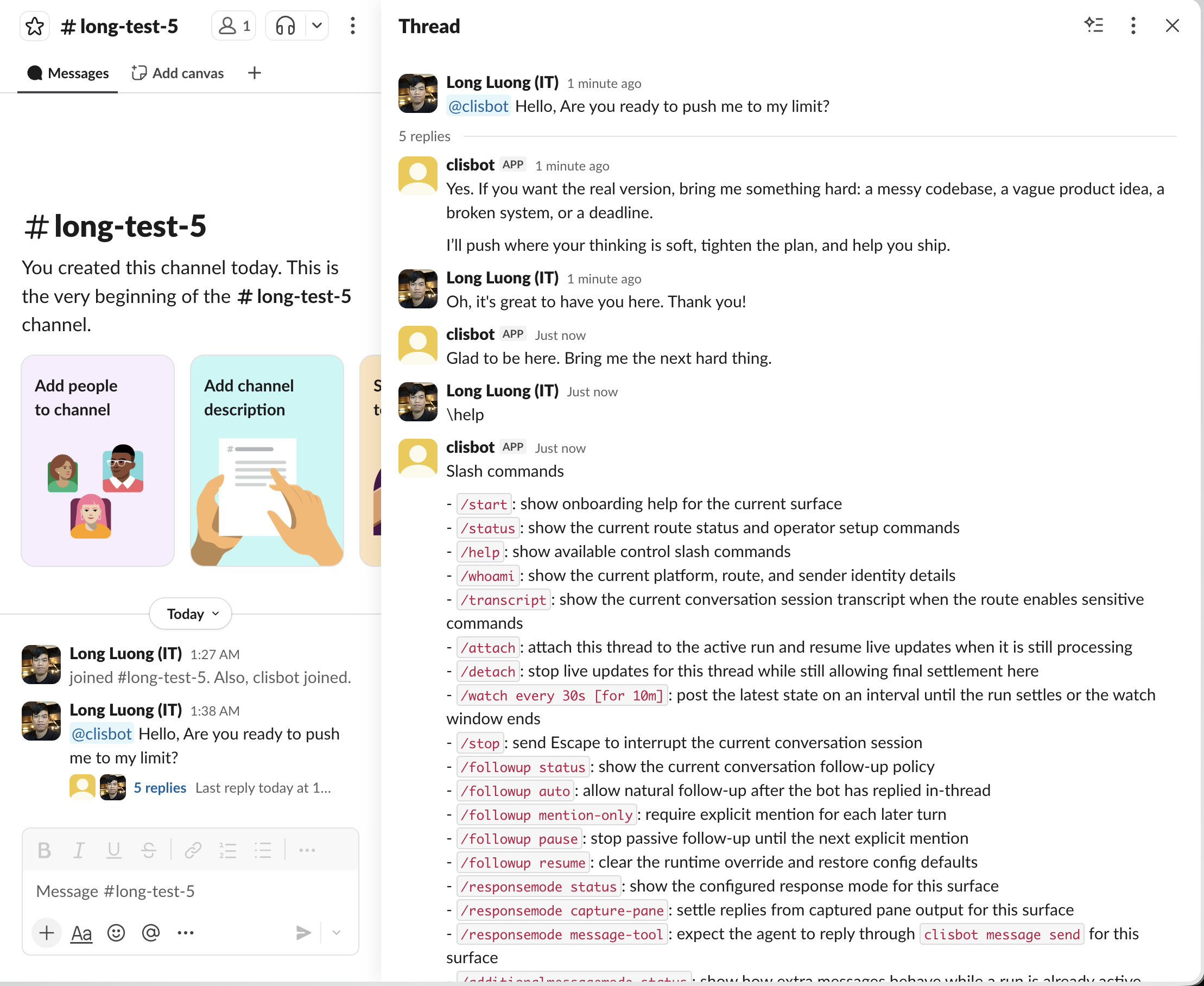
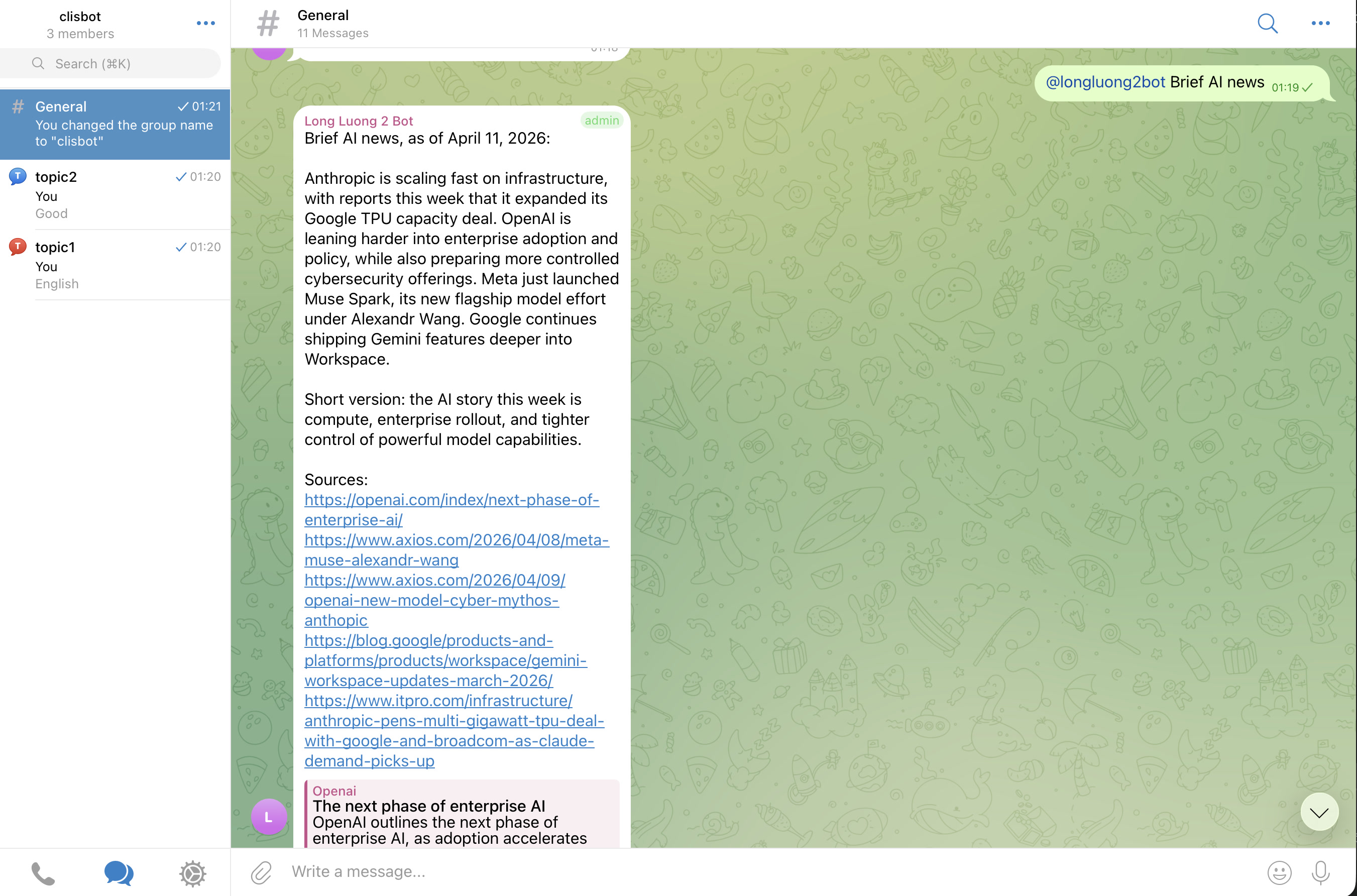
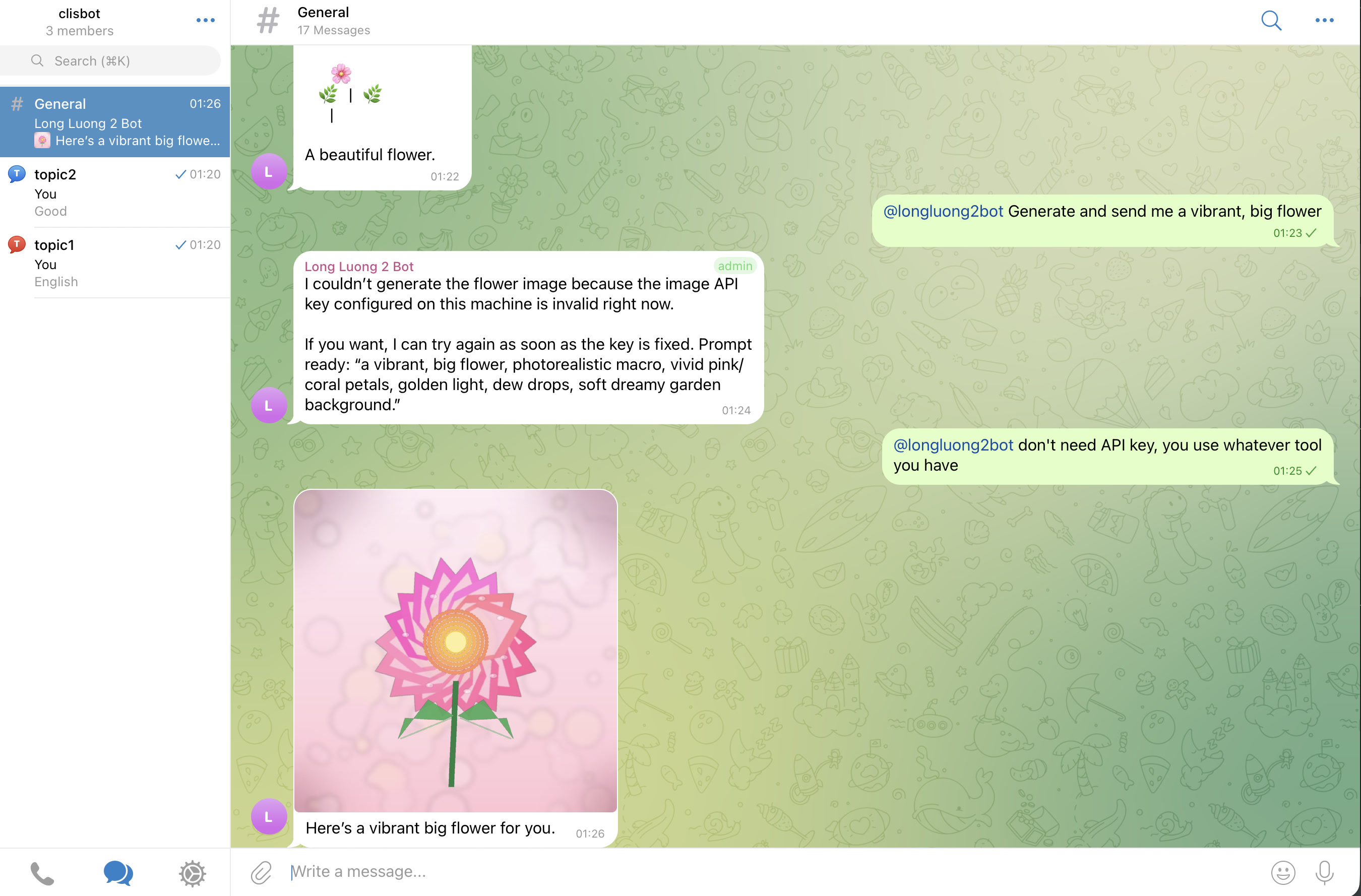
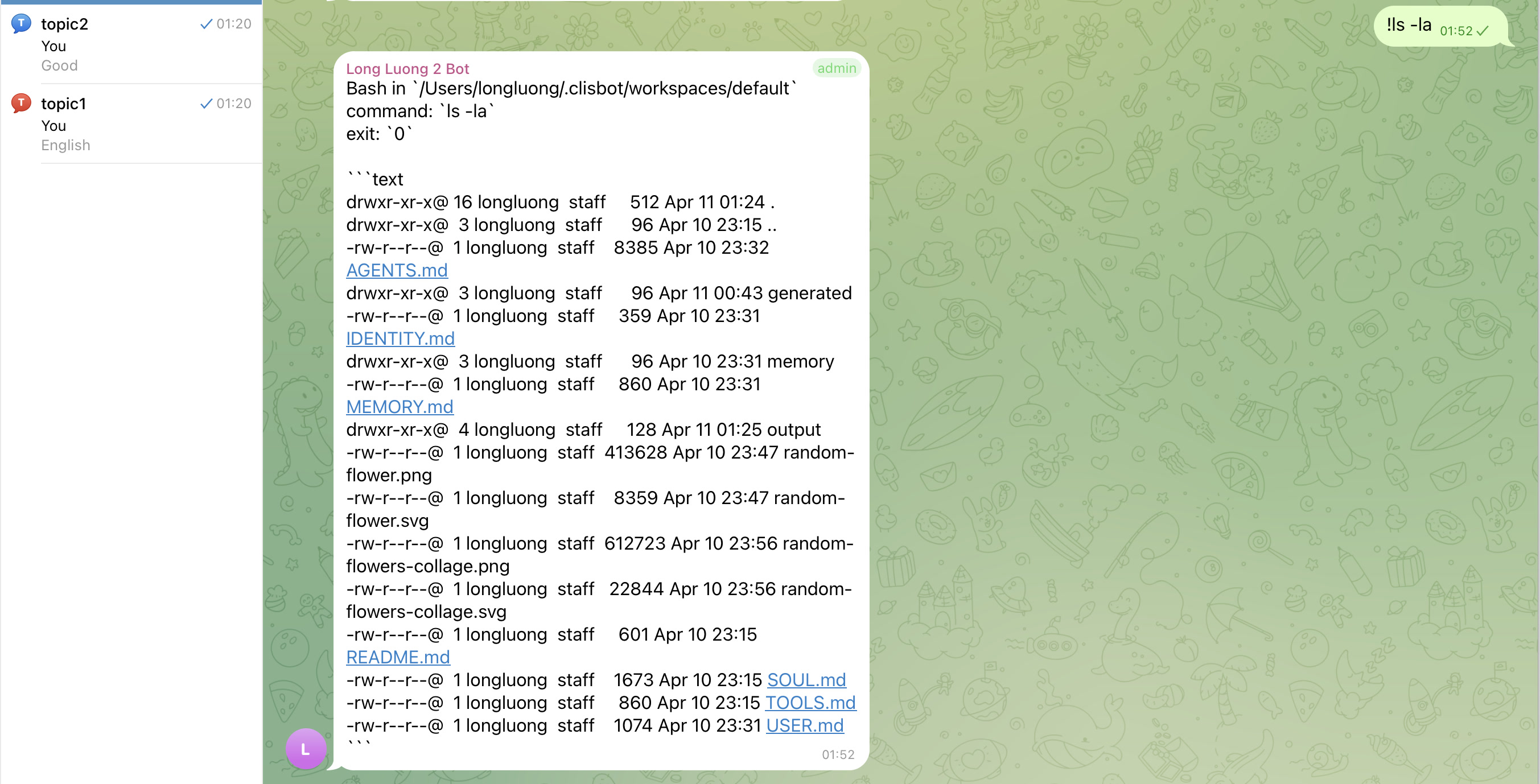
목표는 terminal transcript mirror가 아니라 진짜 chat-native agent surface다. threads, topics, follow-up behavior, file-aware workflows가 각 supported channel surface에서 native하게 느껴져야 한다.
Slack
Telegram
## 중요 주의
강력한 vendor security/safety investment가 frontier agentic CLI tools를 자동으로 안전하게 만들지는 않는다. `clisbot`은 그 tools를 chat과 workflow surfaces를 통해 더 넓게 노출하므로, 전체 system을 high-trust software로 보고 본인 책임으로 사용해야 한다.
## 감사
OpenClaw가 만든 아이디어, momentum, practical inspiration 없이는 `clisbot`도 없었을 것이다. 여기의 많은 configuration, routing, workspace concepts는 OpenClaw를 연구하며 배웠고 `clisbot`의 방향에 맞게 조정했다. OpenClaw project와 community에 존중과 감사를 보낸다.
## Docs
- [Localized Docs Hub](../README.md)
- [Vietnamese Repo README](./README.vi.md)
- [Simplified Chinese Repo README](./README.zh-CN.md)
- [Korean Repo README](./README.ko.md)
- [Overview](../../../docs/overview/README.md)
- [Architecture](../../../docs/architecture/README.md)
- [Development Guide](../../../docs/development/README.md)
- [Feature Tables](../../../docs/features/feature-tables.md)
- [Backlog](../../../docs/tasks/backlog.md)
- [User Guide](../../../docs/user-guide/README.md)
## Roadmap
현재 shipped foundation:
- Native CLI runners: Codex, Claude Code, Gemini CLI.
- Channels: Telegram, Slack, Zalo Bot, Zalo Personal.
- Workflow primitives: durable queues와 loops는 real chat-native operations work에 충분히 안정적이다.
Next focus:
- Hermes agent pattern처럼 auto-skill creation과 improvement를 표준화: 반복되거나 어려웠던 tasks가 daily/weekly review loops를 통해 reusable skills가 되게 한다.
- 다음 channel wave 추가: Discord와 WhatsApp Personal unofficial.
- durable tmux runner boundary 주변의 runtime safety, recovery, channel-native operator experience를 계속 개선.
## AI-Native Workflow
이 repo는 작은 AI-native engineering workflow 예시이기도 하다:
- Claude/Gemini compatibility files가 같은 source로 symlink될 수 있는 단순한 `AGENTS.md` style operating rules
- 반복 feedback과 pitfalls를 남기는 lessons-learned docs
- stable implementation contract로 쓰는 architecture docs
- AI agents의 feedback loop를 닫는 end-to-end validation expectations
- shortest-review-first artifacts, repeated review loops, task-readiness shaping을 위한 workflow docs: [docs/workflow/README.md](../../../docs/workflow/README.md)
## Bug Report
bug report의 preferred way는 이 GitHub repo에 issue를 만드는 것이다. [Google Form](https://docs.google.com/forms/d/e/1FAIpQLSd7L7mHOo0ea8YXFI4tGnyDIj94ESn4hbbDa5YTbcEKTVOKTA/viewform)으로도 report할 수 있다.
포함하면 좋은 정보:
- clisbot version
- 사용한 channel과 runner
- 기대한 동작
- 실제 발생한 동작
- secrets를 제거한 관련 `clisbot status` 또는 `clisbot logs` output
## Contributing
Merge requests are welcome.
real tests, screenshots, 또는 behavior recordings가 있는 MR은 더 빨리 merge된다.