UFO³  : Weaving the Digital Agent Galaxy
Cross-Device Orchestration Framework for Ubiquitous Intelligent Automation
📖 Language / 语言:
English |
中文
[](https://arxiv.org/abs/2511.11332)

[](https://opensource.org/licenses/MIT)
[](https://microsoft.github.io/UFO/)
---
## 🌟 What is UFO³ Galaxy?
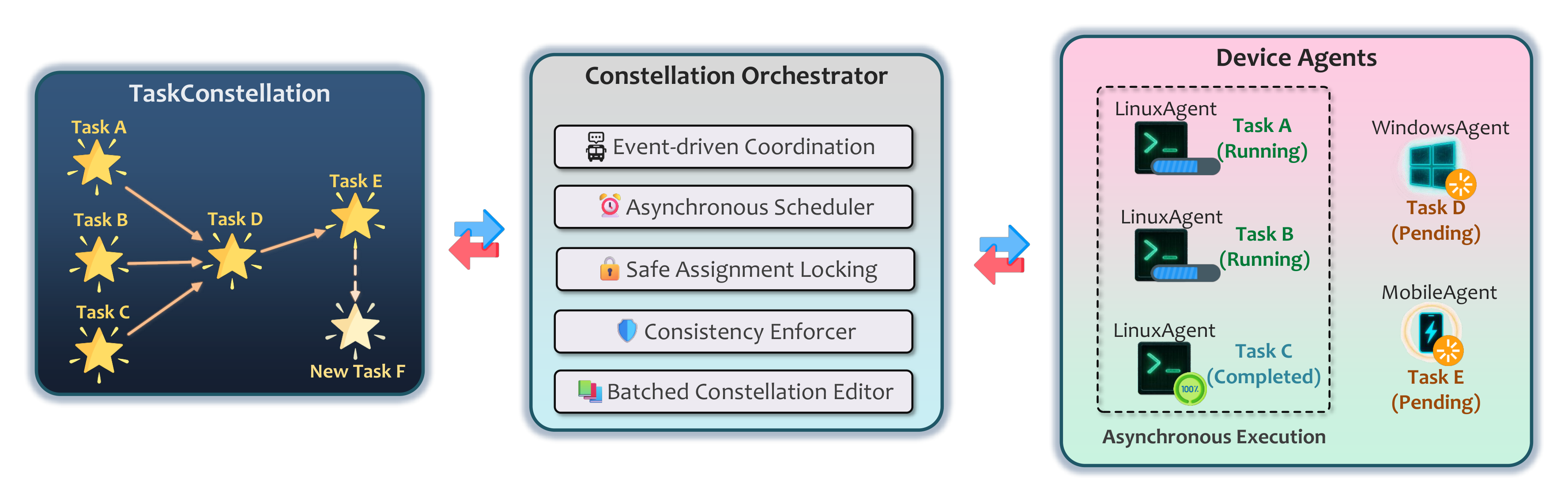
**UFO³ Galaxy** is a revolutionary **cross-device orchestration framework** that transforms isolated device agents into a unified digital ecosystem. It models complex user requests as **Task Constellations** (星座) — dynamic distributed DAGs where nodes represent executable subtasks and edges capture dependencies across heterogeneous devices.
### 🎯 The Vision
Building truly ubiquitous intelligent agents requires moving beyond single-device automation. UFO³ Galaxy addresses four fundamental challenges in cross-device agent orchestration:
|
**🔄 Asynchronous Parallelism**
Enabling concurrent task execution across multiple devices while maintaining correctness through event-driven coordination and safe concurrency control
**⚡ Dynamic Adaptation**
Real-time workflow evolution in response to intermediate results, transient failures, and runtime observations without workflow abortion
|
**🌐 Distributed Coordination**
Reliable, low-latency communication across heterogeneous devices via WebSocket-based Agent Interaction Protocol with fault tolerance
**🛡️ Safety Guarantees**
Formal invariants ensuring DAG consistency during concurrent modifications and parallel execution, verified through rigorous proofs
|
---
## ✨ Key Innovations
UFO³ Galaxy realizes cross-device orchestration through five tightly integrated design principles:
---
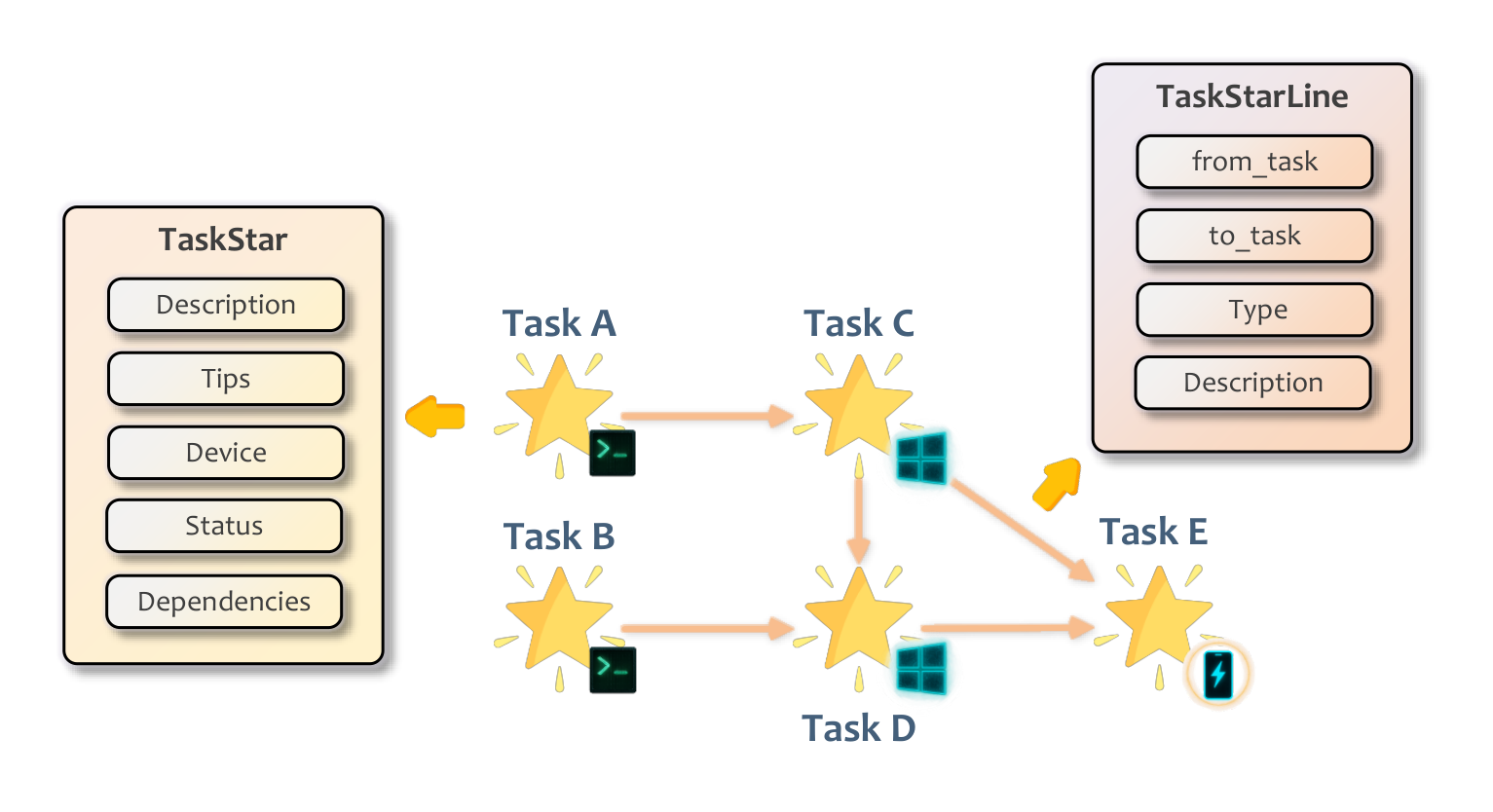
### 🌟 Declarative Decomposition into Dynamic DAG
User requests are decomposed by the **ConstellationAgent** into a structured DAG of **TaskStars** (nodes) and **TaskStarLines** (edges) encoding workflow logic, dependencies, and device assignments.
**Key Benefits:** Declarative structure for automated scheduling • Runtime introspection • Dynamic rewriting • Cross-device orchestration
---
|
### 🔄 Continuous Result-Driven Graph Evolution
The **TaskConstellation** evolves dynamically in response to execution feedback, intermediate results, and failures through controlled DAG rewrites.
**Adaptation Mechanisms:**
- 🩺 Diagnostic TaskStars for debugging
- 🛡️ Fallback creation for error recovery
- 🔗 Dependency rewiring for optimization
- ✂️ Node pruning after completion
Enables resilient adaptation instead of workflow abortion.
|
### ⚡ Heterogeneous, Asynchronous & Safe Orchestration
Tasks are matched to optimal devices via **AgentProfiles** (OS, hardware, tools) and executed asynchronously in parallel.
**Safety Guarantees:**
- 🔒 Safe assignment locking (no race conditions)
- 📅 Event-driven scheduling (DAG readiness)
- ✅ DAG consistency checks (structural integrity)
- 🔄 Batched edits (atomicity)
- 📐 Formal verification (provable correctness)
Ensures high efficiency with reliability.
|
|
### 🔌 Unified Agent Interaction Protocol (AIP)
Persistent **WebSocket-based** protocol providing unified, secure, fault-tolerant communication for the entire agent ecosystem.
**Core Capabilities:**
- 📝 Agent registry with capability profiles
- 🔐 Secure session management
- 📤 Intelligent task routing
- 💓 Health monitoring with heartbeats
- 🔌 Auto-reconnection & retry mechanisms
**Benefits:** Lightweight • Extensible • Fault-tolerant
|
### 🛠️ Template-Driven MCP-Empowered Device Agents
Lightweight **development template** for rapidly building new device agents with **Model Context Protocol (MCP)** integration.
**Development Framework:**
- 📄 Capability declaration (agent profiles)
- 🔗 Environment binding (local systems)
- 🧩 MCP server integration (plug-and-play tools)
- 🔧 Modular design (rapid development)
**MCP Integration:** Tool packages • Cross-platform standardization • Rapid prototyping
Enables platform extension (mobile, web, IoT, embedded).
|
🎯 Together, these designs enable UFO³ to decompose, schedule, execute, and adapt distributed tasks efficiently while maintaining safety and consistency across heterogeneous devices.
---
## 🎥 Demo Video
See UFO³ Galaxy in action with this comprehensive demonstration of cross-device orchestration:
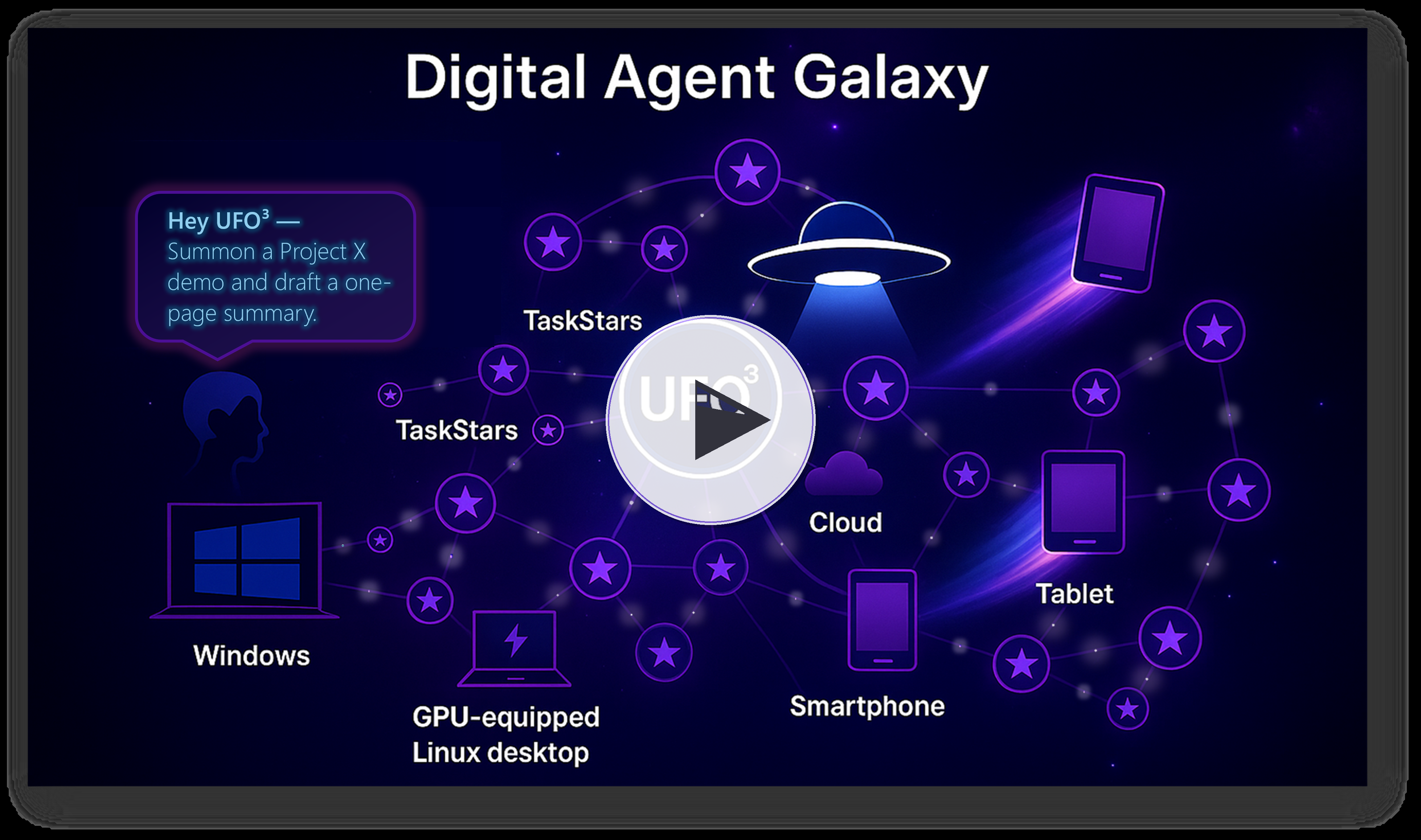
🎬 Click to watch: Multi-device workflow orchestration with UFO³ Galaxy
---
## 🏗️ Architecture Overview
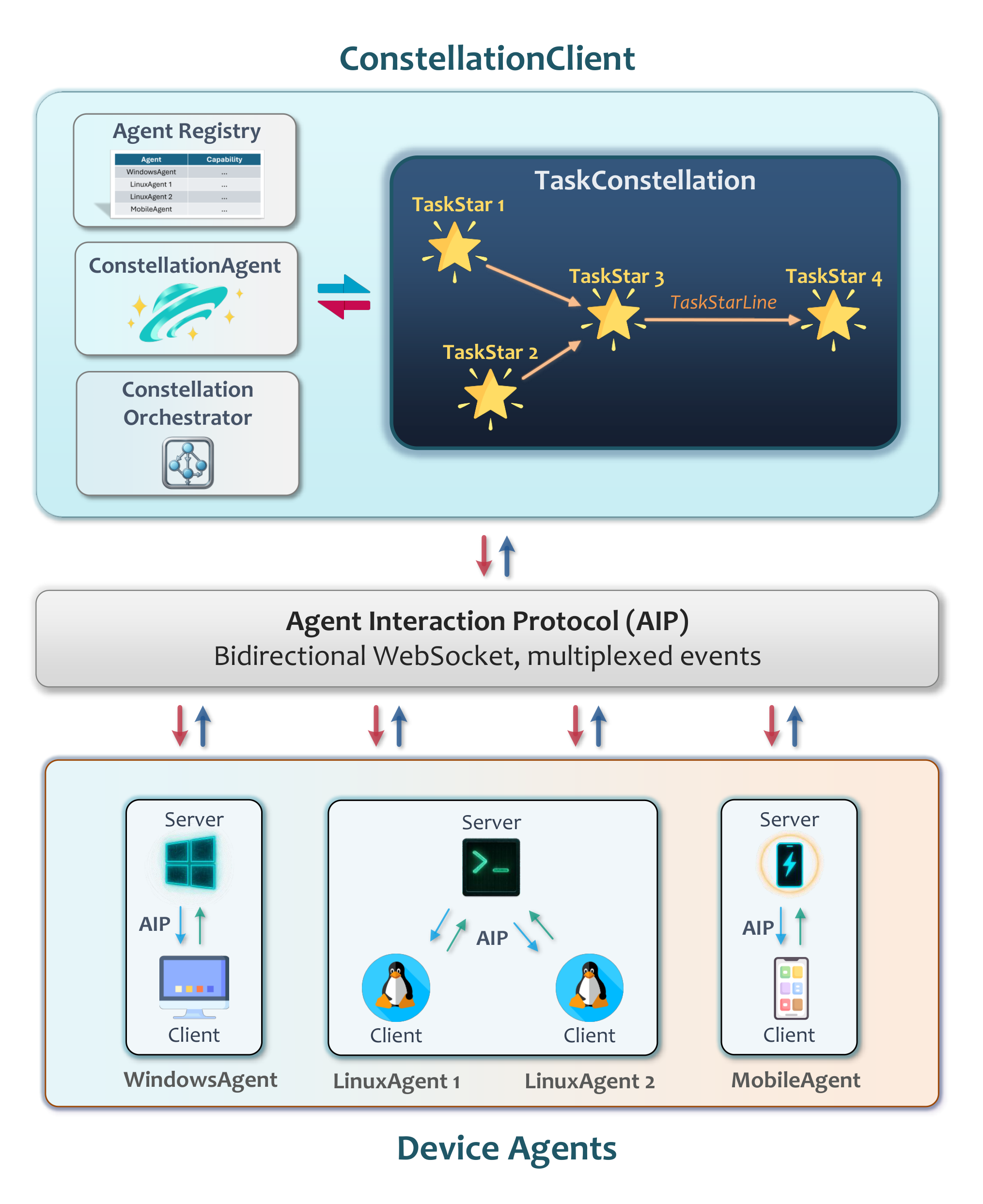
UFO³ Galaxy Layered Architecture — From natural language to distributed execution
### Hierarchical Design
|
#### 🎛️ Control Plane
| Component | Role |
|-----------|------|
| **🌐 ConstellationClient** | Global device registry with capability profiles |
| **🖥️ Device Agents** | Local orchestration with unified MCP tools |
| **🔒 Clean Separation** | Global policies & device independence |
|
#### 🔄 Execution Workflow
|
---
## 🚀 Quick Start
### 🛠️ Step 1: Installation
```powershell
# Clone repository
git clone https://github.com/microsoft/UFO.git
cd UFO
# Create environment (recommended)
conda create -n ufo3 python=3.10
conda activate ufo3
# Install dependencies
pip install -r requirements.txt
```
### ⚙️ Step 2: Configure ConstellationAgent LLM
UFO³ Galaxy uses a **ConstellationAgent** that orchestrates all device agents. Configure its LLM settings:
```powershell
# Create configuration from template
copy config\galaxy\agent.yaml.template config\galaxy\agent.yaml
notepad config\galaxy\agent.yaml
```
**Configuration File Location:**
```
config/galaxy/
├── agent.yaml.template # Template - COPY THIS
├── agent.yaml # Your config with API keys (DO NOT commit)
└── devices.yaml # Device pool configuration (Step 4)
```
**OpenAI Configuration:**
```yaml
CONSTELLATION_AGENT:
REASONING_MODEL: false
API_TYPE: "openai"
API_BASE: "https://api.openai.com/v1/chat/completions"
API_KEY: "sk-YOUR_KEY_HERE"
API_VERSION: "2025-02-01-preview"
API_MODEL: "gpt-5-chat-20251003"
# ... (prompt configurations use defaults)
```
**Azure OpenAI Configuration:**
```yaml
CONSTELLATION_AGENT:
REASONING_MODEL: false
API_TYPE: "aoai"
API_BASE: "https://YOUR_RESOURCE.openai.azure.com"
API_KEY: "YOUR_AOAI_KEY"
API_VERSION: "2024-02-15-preview"
API_MODEL: "gpt-5-chat-20251003"
API_DEPLOYMENT_ID: "YOUR_DEPLOYMENT_ID"
# ... (prompt configurations use defaults)
```
### 🖥️ Step 3: Configure Device Agents
Each device agent (Windows/Linux) needs its own LLM configuration to execute tasks.
```powershell
# Configure device agent LLMs
copy config\ufo\agents.yaml.template config\ufo\agents.yaml
notepad config\ufo\agents.yaml
```
**Configuration File Location:**
```
config/ufo/
├── agents.yaml.template # Template - COPY THIS
└── agents.yaml # Device agent LLM config (DO NOT commit)
```
**Example Configuration:**
```yaml
HOST_AGENT:
VISUAL_MODE: true
API_TYPE: "openai" # or "aoai" for Azure OpenAI
API_BASE: "https://api.openai.com/v1/chat/completions"
API_KEY: "sk-YOUR_KEY_HERE"
API_MODEL: "gpt-4o"
APP_AGENT:
VISUAL_MODE: true
API_TYPE: "openai"
API_BASE: "https://api.openai.com/v1/chat/completions"
API_KEY: "sk-YOUR_KEY_HERE"
API_MODEL: "gpt-4o"
```
> **💡 Tip:** You can use the same API key and model for both ConstellationAgent (Step 2) and device agents (Step 3).
### 🌐 Step 4: Configure Device Pool
```powershell
# Configure available devices
copy config\galaxy\devices.yaml.template config\galaxy\devices.yaml
notepad config\galaxy\devices.yaml
```
**Example Device Configuration:**
```yaml
devices:
# Windows Device (UFO²)
- device_id: "windows_device_1" # Must match --client-id
server_url: "ws://localhost:5000/ws" # Must match server WebSocket URL
os: "windows"
capabilities:
- "desktop_automation"
- "office_applications"
- "excel"
- "word"
- "outlook"
- "email"
- "web_browsing"
metadata:
os: "windows"
version: "11"
performance: "high"
installed_apps:
- "Microsoft Excel"
- "Microsoft Word"
- "Microsoft Outlook"
- "Google Chrome"
description: "Primary Windows desktop for office automation"
auto_connect: true
max_retries: 5
# Linux Device
- device_id: "linux_device_1" # Must match --client-id
server_url: "ws://localhost:5001/ws" # Must match server WebSocket URL
os: "linux"
capabilities:
- "server_management"
- "log_analysis"
- "file_operations"
- "database_operations"
metadata:
os: "linux"
performance: "medium"
logs_file_path: "/var/log/myapp/app.log"
dev_path: "/home/user/projects/"
warning_log_pattern: "WARN"
error_log_pattern: "ERROR|FATAL"
description: "Development server for backend operations"
auto_connect: true
max_retries: 5
```
> **⚠️ Critical: IDs and URLs Must Match**
> - `device_id` **must exactly match** the `--client-id` flag
> - `server_url` **must exactly match** the server WebSocket URL
> - Otherwise, Galaxy cannot control the device!
### 🖥️ Step 5: Start Device Agents
Galaxy orchestrates **device agents** that execute tasks on individual machines. You need to start the appropriate device agents based on your needs.
#### Example: Quick Windows Device Setup
**On your Windows machine:**
```powershell
# Terminal 1: Start UFO² Server
python -m ufo.server.app --port 5000
# Terminal 2: Start UFO² Client (connect to server)
python -m ufo.client.client `
--ws `
--ws-server ws://localhost:5000/ws `
--client-id windows_device_1 `
--platform windows
```
> **⚠️ Important: Platform Flag Required**
> Always include `--platform windows` for Windows devices and `--platform linux` for Linux devices!
#### Example: Quick Linux Device Setup
**On your Linux machine:**
```bash
# Terminal 1: Start Device Agent Server
python -m ufo.server.app --port 5001
# Terminal 2: Start Linux Client (connect to server)
python -m ufo.client.client \
--ws \
--ws-server ws://localhost:5001/ws \
--client-id linux_device_1 \
--platform linux
# Terminal 3: Start HTTP MCP Server (for Linux tools)
python -m ufo.client.mcp.http_servers.linux_mcp_server
```
**📖 Detailed Setup Instructions:**
- **For Windows devices (UFO²):** See [UFO² as Galaxy Device](../documents/docs/ufo2/as_galaxy_device.md)
- **For Linux devices:** See [Linux as Galaxy Device](../documents/docs/linux/as_galaxy_device.md)
### 🌌 Step 6: Launch Galaxy Client
#### 🎨 Interactive WebUI Mode (Recommended)
Launch Galaxy with an interactive web interface for real-time constellation visualization and monitoring:
```powershell
python -m galaxy --webui
```
This will start the Galaxy server with WebUI and open your browser to the interactive interface:
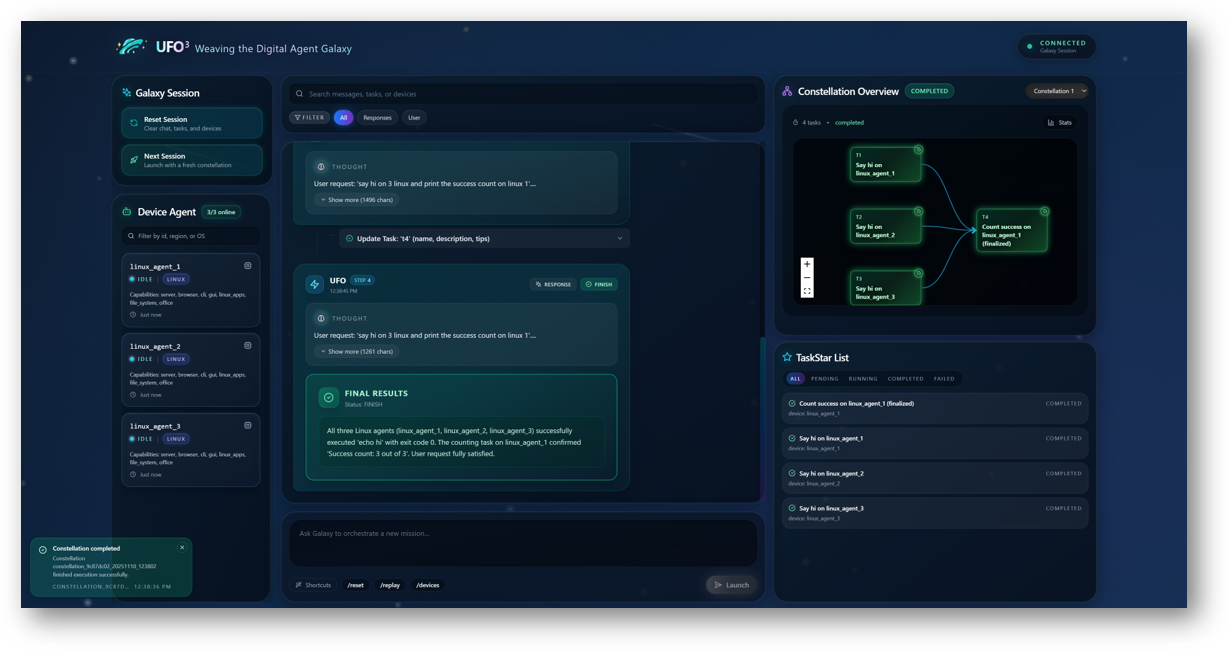
🎨 Galaxy WebUI - Interactive constellation visualization and chat interface
**WebUI Features:**
- 🗣️ **Chat Interface**: Submit requests and interact with ConstellationAgent in real-time
- 📊 **Live DAG Visualization**: Watch task constellation formation and execution
- 🎯 **Task Status Tracking**: Monitor each TaskStar's progress and completion
- 🔄 **Dynamic Updates**: See constellation evolution as tasks complete
- 📱 **Responsive Design**: Works on desktop and tablet devices
**Default URL:** `http://localhost:8000` (automatically finds next available port if 8000 is occupied)
---
#### 💬 Interactive Terminal Mode
For command-line interaction:
```powershell
python -m galaxy --interactive
```
---
#### ⚡ Direct Request Mode
Execute a single request and exit:
```powershell
python -m galaxy --request "Extract data from Excel on Windows, process with Python on Linux, and generate visualization report"
```
---
#### 🔧 Programmatic API
Embed Galaxy in your Python applications:
```python
from galaxy.galaxy_client import GalaxyClient
async def main():
# Initialize client
client = GalaxyClient(session_name="data_pipeline")
await client.initialize()
# Execute cross-device workflow
result = await client.process_request(
"Download sales data, analyze trends, generate executive summary"
)
# Access constellation details
constellation = client.session.constellation
print(f"Tasks executed: {len(constellation.tasks)}")
print(f"Devices used: {set(t.assigned_device for t in constellation.tasks)}")
await client.shutdown()
import asyncio
asyncio.run(main())
```
---
## 🎯 Use Cases
### 🖥️ Software Development & CI/CD
**Request:**
*"Clone repository on Windows, build Docker image on Linux GPU server, deploy to staging, and run test suite on CI cluster"*
**Constellation Workflow:**
```
Clone (Windows) → Build (Linux GPU) → Deploy (Linux Server) → Test (Linux CI)
```
**Benefit:** Parallel execution reduces pipeline time by 60%
---
### 📊 Data Science Workflows
**Request:**
*"Fetch dataset from cloud storage, preprocess on Linux workstation, train model on A100 node, visualize results on Windows"*
**Constellation Workflow:**
```
Fetch (Any) → Preprocess (Linux) → Train (Linux GPU) → Visualize (Windows)
```
**Benefit:** Automatic GPU detection and optimal device assignment
---
### 📝 Cross-Platform Document Processing
**Request:**
*"Extract data from Excel on Windows, process with Python on Linux, generate PDF report, and email summary"*
**Constellation Workflow:**
```
Extract (Windows) → Process (Linux) ┬→ Generate PDF (Windows)
└→ Send Email (Windows)
```
**Benefit:** Parallel report generation and email delivery
---
### 🔬 Distributed System Monitoring
**Request:**
*"Collect server logs from all Linux machines, analyze for errors, generate alerts, create consolidated report"*
**Constellation Workflow:**
```
┌→ Collect (Linux 1) ┐
├→ Collect (Linux 2) ├→ Analyze (Any) → Report (Windows)
└→ Collect (Linux 3) ┘
```
**Benefit:** Parallel log collection with automatic aggregation
---
## 🌐 System Capabilities
Building on the five design principles, UFO³ Galaxy delivers powerful capabilities for distributed automation:
|
### ⚡ Efficient Parallel Execution
- **Event-driven scheduling** monitors DAG for ready tasks
- **Non-blocking execution** with Python `asyncio`
- **Dynamic task integration** without workflow interruption
- **Result:** Up to 70% reduction in end-to-end latency compared to sequential execution
---
### 🛡️ Formal Safety Guarantees
- **Three formal invariants (I1-I3)** ensure DAG correctness
- **Safe assignment locking** prevents race conditions
- **Acyclicity validation** eliminates circular dependencies
- **State merging** preserves progress during runtime modifications
- **Formally verified** through rigorous mathematical proofs
|
### 🔄 Intelligent Adaptation
- **Dual-mode ConstellationAgent** (creation/editing) with FSM control
- **Result-driven evolution** based on execution feedback
- **LLM-powered reasoning** via ReAct architecture
- **Automatic error recovery** through diagnostic tasks and fallbacks
- **Workflow optimization** via dynamic rewiring and pruning
---
### 👁️ Comprehensive Observability
- **Real-time visualization** of constellation structure and execution
- **Event-driven updates** via publish-subscribe pattern
- **Rich execution logs** with markdown trajectories
- **Status tracking** for each TaskStar and dependency
- **Interactive WebUI** for monitoring and control
|
---
### 🔌 Extensibility & Platform Independence
UFO³ is designed as a **universal orchestration framework** that seamlessly integrates heterogeneous device agents across platforms.
**Multi-Platform Support:**
- 🪟 **Windows** — Desktop automation via UFO²
- 🐧 **Linux** — Server management, DevOps, data processing
- 📱 **Android** — Mobile device automation via MCP
- 🌐 **Web** — Browser-based agents (coming soon)
- 🍎 **macOS** — Desktop automation (coming soon)
- 🤖 **IoT/Embedded** — Edge devices and sensors (coming soon)
**Developer-Friendly:**
- 📦 **Lightweight template** for rapid agent development
- 🧩 **MCP integration** for plug-and-play tool extension
- 📖 **Comprehensive tutorials** and API documentation
- 🔌 **AIP protocol** for seamless ecosystem integration
**📖 Want to build your own device agent?** See our [Creating Custom Device Agents tutorial](../documents/docs/tutorials/creating_device_agent/overview.md) to learn how to extend UFO³ to new platforms.
---
## 📚 Documentation
| Component | Description | Link |
|-----------|-------------|------|
| **Galaxy Client** | Device coordination and ConstellationClient API | [Learn More](../documents/docs/galaxy/client/overview.md) |
| **Constellation Agent** | LLM-driven task decomposition and DAG evolution | [Learn More](../documents/docs/galaxy/constellation_agent/overview.md) |
| **Task Orchestrator** | Asynchronous execution and safety guarantees | [Learn More](../documents/docs/galaxy/constellation_orchestrator/overview.md) |
| **Task Constellation** | DAG structure and constellation editor | [Learn More](../documents/docs/galaxy/constellation/overview.md) |
| **Agent Registration** | Device registry and agent profiles | [Learn More](../documents/docs/galaxy/agent_registration/overview.md) |
| **AIP Protocol** | WebSocket messaging and communication patterns | [Learn More](../documents/docs/aip/overview.md) |
| **Configuration** | Device pools and orchestration policies | [Learn More](../documents/docs/configuration/system/galaxy_devices.md) |
| **Creating Device Agents** | Tutorial for building custom device agents | [Learn More](../documents/docs/tutorials/creating_device_agent/overview.md) |
---
## 📊 System Architecture
### Core Components
| Component | Location | Responsibility |
|-----------|----------|----------------|
| **GalaxyClient** | `galaxy/galaxy_client.py` | Session management, user interaction |
| **ConstellationClient** | `galaxy/client/constellation_client.py` | Device registry, connection lifecycle |
| **ConstellationAgent** | `galaxy/agents/constellation_agent.py` | DAG synthesis and evolution |
| **TaskConstellationOrchestrator** | `galaxy/constellation/orchestrator/` | Asynchronous execution, safety enforcement |
| **TaskConstellation** | `galaxy/constellation/task_constellation.py` | DAG data structure and validation |
| **DeviceManager** | `galaxy/client/device_manager.py` | WebSocket connections, heartbeat monitoring |
### Technology Stack
| Layer | Technologies |
|-------|-------------|
| **Language** | Python 3.10+, asyncio, dataclasses |
| **Communication** | WebSockets, JSON-RPC |
| **LLM** | OpenAI, Azure OpenAI, Gemini, Claude |
| **Tools** | Model Context Protocol (MCP) |
| **Config** | YAML, Pydantic validation |
| **Logging** | Rich console, Markdown trajectories |
---
## 🌟 From Devices to Galaxy
UFO³ represents a paradigm shift in intelligent automation:
```mermaid
%%{init: {'theme':'base', 'themeVariables': { 'primaryColor':'#E8F4F8','primaryTextColor':'#1A1A1A','primaryBorderColor':'#7CB9E8','lineColor':'#A8D5E2','secondaryColor':'#B8E6F0','tertiaryColor':'#D4F1F4','fontSize':'16px','fontFamily':'Segoe UI, Arial, sans-serif'}}}%%
graph LR
A["🎈 UFO
February 2024
GUI Agent for Windows"]
B["🖥️ UFO²
April 2025
Desktop AgentOS"]
C["🌌 UFO³ Galaxy
November 2025
Multi-Device Orchestration"]
A -->|Evolve| B
B -->|Scale| C
style A fill:#E8F4F8,stroke:#7CB9E8,stroke-width:2.5px,color:#1A1A1A,rx:15,ry:15
style B fill:#C5E8F5,stroke:#5BA8D0,stroke-width:2.5px,color:#1A1A1A,rx:15,ry:15
style C fill:#A4DBF0,stroke:#3D96BE,stroke-width:2.5px,color:#1A1A1A,rx:15,ry:15
```
Over time, multiple constellations interconnect, forming a self-organizing **Digital Agent Galaxy** where devices, agents, and capabilities weave together into adaptive, resilient, and intelligent ubiquitous computing systems.
---
## 📄 Citation
If you use UFO³ Galaxy in your research, please cite:
**UFO³ Galaxy Framework:**
```bibtex
@article{zhang2025ufo3,
title={UFO$^3$: Weaving the Digital Agent Galaxy},
author = {Zhang, Chaoyun and Li, Liqun and Huang, He and Ni, Chiming and Qiao, Bo and Qin, Si and Kang, Yu and Ma, Minghua and Lin, Qingwei and Rajmohan, Saravan and Zhang, Dongmei},
journal = {arXiv preprint arXiv:2511.11332},
year = {2025},
}
```
**UFO² Desktop AgentOS:**
```bibtex
@article{zhang2025ufo2,
title = {{UFO2: The Desktop AgentOS}},
author = {Zhang, Chaoyun and Huang, He and Ni, Chiming and Mu, Jian and Qin, Si and He, Shilin and Wang, Lu and Yang, Fangkai and Zhao, Pu and Du, Chao and Li, Liqun and Kang, Yu and Jiang, Zhao and Zheng, Suzhen and Wang, Rujia and Qian, Jiaxu and Ma, Minghua and Lou, Jian-Guang and Lin, Qingwei and Rajmohan, Saravan and Zhang, Dongmei},
journal = {arXiv preprint arXiv:2504.14603},
year = {2025}
}
```
**First UFO:**
```bibtex
@article{zhang2024ufo,
title = {{UFO: A UI-Focused Agent for Windows OS Interaction}},
author = {Zhang, Chaoyun and Li, Liqun and He, Shilin and Zhang, Xu and Qiao, Bo and Qin, Si and Ma, Minghua and Kang, Yu and Lin, Qingwei and Rajmohan, Saravan and Zhang, Dongmei and Zhang, Qi},
journal = {arXiv preprint arXiv:2402.07939},
year = {2024}
}
```
---
## 🤝 Contributing
We welcome contributions! Whether building new device agents, improving orchestration algorithms, or enhancing the protocol:
- 🐛 [Report Issues](https://github.com/microsoft/UFO/issues)
- 💡 [Request Features](https://github.com/microsoft/UFO/discussions)
- 📝 [Improve Documentation](https://github.com/microsoft/UFO/pulls)
- 🧪 [Submit Pull Requests](../../CONTRIBUTING.md)
---
## 📬 Contact & Support
- 📖 **Documentation**: [https://microsoft.github.io/UFO/](https://microsoft.github.io/UFO/)
- 💬 **Discussions**: [GitHub Discussions](https://github.com/microsoft/UFO/discussions)
- 🐛 **Issues**: [GitHub Issues](https://github.com/microsoft/UFO/issues)
- 📧 **Email**: [ufo-agent@microsoft.com](mailto:ufo-agent@microsoft.com)
---
## ⚖️ License
UFO³ Galaxy is released under the [MIT License](../../LICENSE).
See [DISCLAIMER.md](../../DISCLAIMER.md) for privacy and safety notices.
---
Transform your distributed devices into a unified digital collective.
UFO³ Galaxy — Where every device is a star, and every task is a constellation.
© Microsoft 2025 • UFO³ is an open-source research project