Robot Reel — Physical AI. In motion. On record. Three real demos: SmolVLA robot actions, an MCP Blender director, and Newton physics exported to OpenUSD.

Give Physical AI a replay button.

Recorded policy runs in simulation. Films you can inspect. 3D scenes you can edit.
Watch the behavior, step through the evidence, and take the scene with you.

CI status Latest release Code license: Apache-2.0 Live demos: recorded replays Hugging Face: interactive labs Python 3.12+ GitHub stars

◉ Explore the Stress Lab   ·   ✦ Enter the Butterfly Lab   ·   ◐ Try the before / after   ·   Download the demos ↓   ·   中文

No account or install to watch. Preview panels show independent recorded runs.

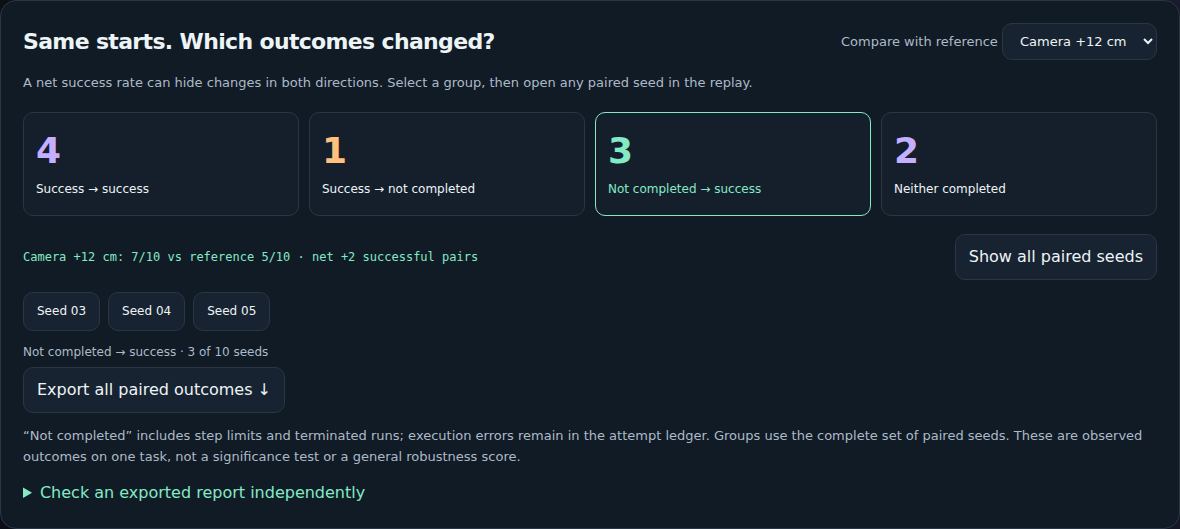
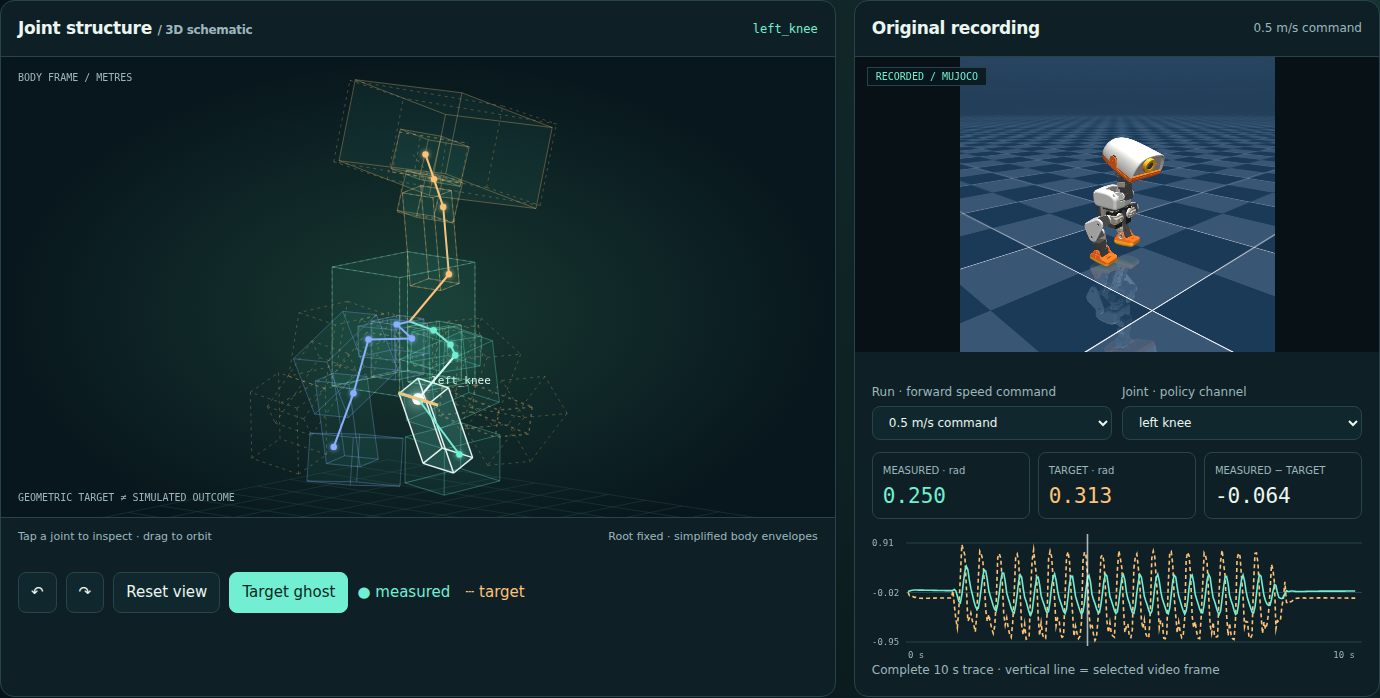
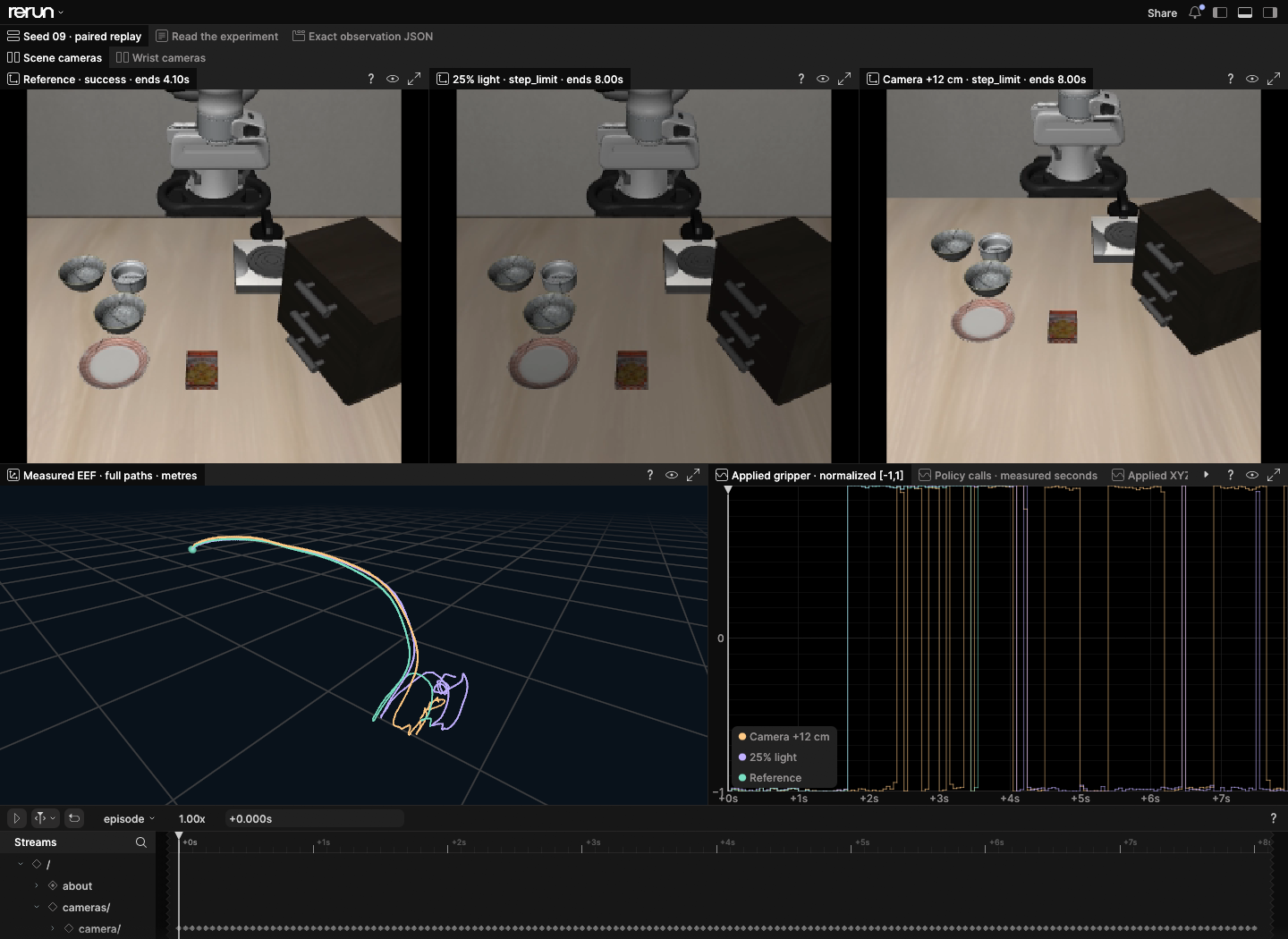
The [homepage](https://noteflowai.github.io/robot-reel/) brings the recorded preview into the first mobile screen. Play it deliberately, then **Save this view as an image** to keep the preview frame or original poster with its source, playback time and simulation scope. Product direction and acceptance milestones: [Roadmap](ROADMAP.md). ## Review an AI explanation against the run [Open the Qwen3.8 robot review](https://noteflowai.github.io/robot-reel/model-review/): compare six actual model outputs with three original SmolVLA episodes, sampled images and recorded facts. Switch between images only and images plus the outcome record. ```sh robot-reel review-claims trace.json claims.json --output review.json ``` Check outcomes, action counts and cited frame labels offline. Explanations remain unverified interpretations. [Method, complete records and tutorial](docs/model-review.md). **[First review, no clone required](docs/first-claim-review.md)** — Install the released CLI and check one original model response against its recorded robot trace. Install the released CLI and check one original model response against its recorded robot trace. ## Choose your workflow Robot Reel packages policy simulations and 3D scene edits into replayable recordings, source data and editable files. Explore an existing experiment, then use its guide to record or edit your own scene. | What you need to do | Start here | What you can deliver | | --- | --- | --- | | Replay your own LeRobot dataset episode | [`robot-reel lerobot`](docs/lerobot.md) · [SO-101 example](https://noteflowai.github.io/robot-reel/lerobot/) | An offline page with every camera, commanded vs. measured joints and fingerprinted source files | | Review a policy under changed conditions | [SmolVLA Stress Lab](https://noteflowai.github.io/robot-reel/stress/) | Paired outcomes, camera views, action traces and an offline experiment | | Close a digital-twin loop on a factory and campus | [Factory Twin Lab](https://noteflowai.github.io/robot-reel/factory-twin/) | Paired closed-loop and shadow shifts, decision evidence, Blender and OpenUSD projects | | Inspect simulation parameters and numerical error | [Genesis × Newton Solver Lab](https://noteflowai.github.io/robot-reel/solver-lab/) | Error curves, original samples and editable OpenUSD | | Edit captured assets and review the change | [Blender Scene Lab](https://noteflowai.github.io/robot-reel/scene-lab/) | Baseline and edited projects, renders and edit parameters | Each experiment documents its method, checked quantities and runtime requirements. For your own policy or simulator, start with the [recording guide](docs/recording.md) and validate exports against the original samples. ## Quick start **[Try Robot Reel on Hugging Face](https://huggingface.co/spaces/glayguo/robot-reel)**: compare 30 SmolVLA simulation trials on one task (10 initial states × 3 conditions), orbit recorded GPU cloth, and explore twelve Newton worlds and both Microduck walks. No installation or model account needed. The Space hosts the original recordings; [build and publication details](docs/huggingface.md) include their source commit and checksums. [Model & data collection](https://huggingface.co/collections/glayguo/robot-reel-physical-ai-replay-lab-6aa67e950ba650285033a4d0) · [Feedback & discussion](https://huggingface.co/spaces/glayguo/robot-reel/discussions/1). New here? [Take the three-step tour](https://noteflowai.github.io/robot-reel/#tour): compare a real paired outcome, inspect its native Rerun workspace, then verify the full experiment locally. The [demo gallery](https://noteflowai.github.io/robot-reel/#demos) filters policy runs, comparison experiments and 3D creation; previews play on request. Install the released CLI from [PyPI](https://pypi.org/project/robot-reel/0.19.1/) with Python 3.12+: ```bash python3 -m venv .venv source .venv/bin/activate python -m pip install robot-reel==0.19.1 robot-reel --help ``` To check the recordings included in a source checkout, Python 3.12+ and the standard library are enough: ```bash git clone https://github.com/noteflowai/robot-reel.git cd robot-reel # Check every trial in the paired policy experiment. python3 -m robot_reel.cli stress docs/stress # Check the recorded policy episode and its evidence. python3 -m robot_reel.cli vla docs/vla # Turn the included braking comparison into a checked storyboard. python3 -m robot_reel.cli direct docs/compare/braking \ --plan examples/contact-storyboard.json --output artifacts/director ``` [![Open in Colab](https://colab.research.google.com/assets/colab-badge.svg)](https://colab.research.google.com/github/noteflowai/robot-reel/blob/main/examples/quickstart.ipynb) Or use the [verified installation packages or non-root Docker image](docs/distribution.md). Recording new runs needs the [full runtime](docs/recording.md). The hosted replays open in a browser without a local simulation environment. ### How stable are the failure labels? The reliability taxonomy labels a step-limit failure as `step_limit_stalled` or `step_limit_in_motion` using one fixed cutoff: 1 mm of end-effector travel over the final tenth of recorded frames. `--stall-sweep` re-reads the verified recorded traces and re-labels them at up to eight other thresholds, in metres. It does not re-run any policy. ```bash python3 -m robot_reel.stress docs/stress --reliability --stall-sweep 0.0005,0.002,0.005 ``` The JSON gains a `stall_sensitivity` object with these fields: - `thresholds`: the tested values, sorted, always including the 0.001 reference. - `by_threshold`: per-kind `counts` and `stalled_trials` at each threshold. - `changed`: for each non-reference threshold, the trials whose kind differs from the reference, with `tail_travel_m`. - `stable_step_limit_trials`: step-limit trials that keep the same kind at every tested threshold. - `boundary`: each step-limit trial's `tail_travel_m`, its kind per threshold, and `depends_on_threshold`. Success and terminated trials never change kind. The published `reliability.json` and its 1 mm reference are unchanged. The sweep only describes how sensitive the labels are on these recordings. It does not validate or calibrate any threshold. An invalid list (empty, non-numeric, non-finite, zero or negative, duplicated, more than eight values, or above 1 m) exits with status 2 and a message naming the problem. ## Your LeRobot dataset. One command. Point Robot Reel at any [LeRobotDataset](https://huggingface.co/docs/lerobot/lerobot-dataset-v3) episode, on the Hugging Face Hub or on disk, and get a folder that opens offline: every camera on one clock, the language task, and each joint's command beside its measurement with a jump to the largest difference. The export pins the Hub commit and the SHA-256 of every source file; `--check-source` re-reads the dataset and compares every value. Supports v3.0 and v2.x; LeRobot itself is not required. ```bash python -m pip install 'robot-reel[lerobot]==0.19.1' robot-reel lerobot lerobot/svla_so101_pickplace --episode 0 --output artifacts/so101 robot-reel lerobot artifacts/so101 --verify --check-media --check-source ``` [![A real SO-101 LeRobot episode: two camera views on one clock above commanded versus measured joint curves.](docs/lerobot/poster.png)](https://noteflowai.github.io/robot-reel/lerobot/) **[Open the SO-101 example ↗](https://noteflowai.github.io/robot-reel/lerobot/)** · [First dataset review and handoff](docs/first-dataset-review.md) · [Guide, checks and limits](docs/lerobot.md) · Source: episode 0 of [`lerobot/svla_so101_pickplace`](https://huggingface.co/datasets/lerobot/svla_so101_pickplace) (Apache-2.0), the real SO-101 data SmolVLA was fine-tuned on. **Try it on your own episode and tell us how it went.** The [20-minute trial guide](docs/first-use-trial.md) times the install and export; the [trial report form](https://github.com/noteflowai/robot-reel/issues/new?template=first_use_trial.yml) asks what you were looking for and where you got stuck. Failed attempts help just as much. ## One shift. Close the loop. **Factory Twin Lab — factory & campus × Blender 5.2 × OpenUSD.** A simulated production line, AMR fleet, hall climate and campus energy system stream noisy, lossy telemetry to a digital twin. The twin mirrors the plant, estimates hidden spindle wear with a Kalman filter, tests 14 what-if maintenance plans on its own model, forecasts billed demand and sends commands back. Replay the same shift with the loop **closed** or with the identical twin in **shadow** mode. Time-lapse Cycles render of the procedural factory hall over the recorded closed-loop shift: station beacons, crates, AMRs and cyan twin rings change with every sample. **[Open the Factory Twin Lab ↗](https://noteflowai.github.io/robot-reel/factory-twin/)** · [Offline experiment](https://noteflowai.github.io/robot-reel/factory-twin/experiment.zip) · [Blender + OpenUSD projects](https://github.com/noteflowai/robot-reel/releases/latest/download/factory-twin-blender.zip) · [Model, loop and checks](docs/factory-twin.md) · [24 s Cycles flythrough ▶](https://noteflowai.github.io/robot-reel/factory-twin/film.mp4) Across **12 paired shifts** the closed loop had 0 spindle failures (shadow: 11) and 0 billing intervals over the demand limit (shadow: 8); good parts rose in 10 pairs and fell in 2. The whole campus is modelled procedurally in Blender, and all 676,393 animated values per mode were checked frame by frame, then read back through OpenUSD. `robot-reel factory-twin --verify` re-executes plant and twin with the standard library. The plant is illustrative, not calibrated to a real site. ## One frame. Back in the scene. **[Scene Lab](https://noteflowai.github.io/robot-reel/scene-lab/) — Microduck × captured terrain × Blender.** Step through a recorded robot on the original and edited coastal scene. Follow its trajectory and contacts, keep its source camera, or orbit the full robot. Compare the matching MuJoCo and Blender video frames, then download the animated native project or export a source-checked frame JSON. [![Microduck in a captured coastal scene, rendered with its recorded camera](docs/scene-lab/motion/baseline/poster.png)](https://noteflowai.github.io/robot-reel/scene-lab/) Both six-second runs are retained, including the falls and slides. All **362 source frames** have native transform and virtual-camera checks. Full geometry, body bounds/proxy and recorded-video modes support different rendering limits. [Reproduction and measured performance](examples/scene-motion/README.md) · [Portable Blender projects](https://github.com/noteflowai/robot-reel/releases/latest/download/scene-motion-native.zip). ## One launch. Mind the timestep. **Solver Lab — Genesis × Newton.** Six independent **L40S / CUDA** flights use the same initial state and gravity at 30, 120 and 480 integration steps per second. Compare each recorded arc with the analytic solution, inspect position and velocity errors, and follow specific-energy drift. Smaller steps reduce this pilot's maximum position error from **32.70 cm to 2.05 cm**. [![Genesis and Newton recorded flights, timestep controls and measured error curves](docs/solver-lab/poster.png)](https://noteflowai.github.io/robot-reel/solver-lab/) **[Open Solver Lab ↗](https://noteflowai.github.io/robot-reel/solver-lab/)** · [Complete offline experiment](https://noteflowai.github.io/robot-reel/solver-lab/experiment.zip) · [Scene, equations and reproduction](docs/solver-lab.md) All **366 recorded position/velocity states** remain downloadable as JSON/CSV. Genesis native trajectories were reopened and checked; the editable OpenUSD retains every sample. The installed CLI verifies and exports the lab without a GPU. Both engines produce matching values in this simple no-contact, no-drag flight; it is an integration diagnostic, not a ranking of simulators. ## Inside a learned Microduck walk. **Share a verifiable Microduck frame.** Frame links identify the trace and model revision. Download the matching experiment and frame JSON, then check them with `robot-reel microduck-review`. The installed verifier needs no source checkout or GPU. [Offline workflow](docs/offline-lab.md). **Microduck Motion Lab.** Tap a 3D joint to inspect it, drag to orbit, overlay policy targets, click a 14-joint residual heatmap, and follow the original video. Switch between **0.3 / 0.5 m/s speed commands** and inspect all **8,400 measured joint samples**. Share a frame, export JSON/CSV, or reopen a received frame JSON after checking every fact against the recording. Take both complete walks offline. Playback stays beside the schematic; four view buttons work from the keyboard. Retry a failed video without losing the selected frame or joint. [Review a frame with your agent](docs/agent-review.md): load a focused skill through Skills Anywhere, run the read-only source check, then explain the verified facts. Microduck's recorded walk beside an orbitable joint schematic and exact measured versus target curves. **[Enter the Microduck Motion Lab ↗](https://noteflowai.github.io/robot-reel/microduck-lab/)** · [Both recordings and offline viewer](https://noteflowai.github.io/robot-reel/microduck-lab/experiment.zip) · [Methods and checks](docs/microduck-lab.md) · [Interaction inspiration: mishig's Microduck Anatomy](https://huggingface.co/spaces/mishig/microduck-anatomy) All **18,000 body transforms** were checked against MuJoCo. The schematic fixes the floating root because the original recordings did not save root orientation; it does not infer foot contact. This is **simulation with PD-actuator fallback**, not hardware. Model-derived geometry and footage retain upstream noncommercial/ share-alike terms. Original implementation; no code or assets copied from the reference Space. ## Same sheet. Three ways to fall. **Cloth Lab.** Release three independent Newton cloth simulations on **NVIDIA L40S**, changing only the bending coefficient. Orbit the deforming meshes, overlay them on the same clock, and compare measured vertex motion. Every one of the **42,471 vertex samples** is retained in the source data and checked through OpenUSD and Blender. The current lab also exports **1920 × 1080 figures** with measured deformation and source fingerprints, plus full-precision sample JSON. Shared links preserve the camera angle so teammates can reopen the same view. Open a received sample JSON to check its facts and restore that view offline, or verify it independently against the source vertices with the current CLI. Three actual Newton CUDA cloth recordings with identical grids and clamps, but different bending coefficients. Each preview frame identifies its source sample and simulation time. **[Release the sheets ↗](https://noteflowai.github.io/robot-reel/cloth/)** · [Offline experiment](https://github.com/noteflowai/robot-reel/releases/latest/download/robot-reel-cloth-experiment.zip) · [Editable OpenUSD](https://github.com/noteflowai/robot-reel/releases/latest/download/robot-reel-cloth-scene.usdc) · [Method, limits & reproduction](docs/cloth.md) The coefficients are solver settings, not calibrated fabric properties. Colors identify cases; the page reports geometric diagnostics and preserves original float32 positions and velocities. No collisions or self-contact are modeled. The browser draws saved meshes with Canvas 2D; no CUDA or Newton installation is needed for playback. Robot Reel **0.7.0+** includes the cloth CLI and complete offline export in its [installation package](docs/distribution.md). Recording new runs uses the optional Newton runtime. ## Same task. Change the view. **The Stress Lab.** SmolVLA runs the same task under reference lighting, reduced light and a shifted camera. Explore **30 real closed-loop trials** across ten paired initial states. Select any outcome in the matrix, compare both policy cameras, and jump to the largest measured trajectory difference. Recorded with **NVIDIA L40S / CUDA inference**, with hardware and timing in every trace. Three real SmolVLA rollouts from the same initial state under reference lighting, reduced light and a shifted camera. Each view retains its source sample and actual outcome. **[Compare the policy runs ↗](https://noteflowai.github.io/robot-reel/stress/)** · [Complete offline lab ↓](https://github.com/noteflowai/robot-reel/releases/latest/download/robot-reel-stress-experiment.zip) · [MCAP telemetry ↓](https://noteflowai.github.io/robot-reel/stress/telemetry.mcap) · [Open it in Foxglove](docs/telemetry.md) · [Reproduce & inspect](docs/stress.md) **Share a moment for review.** Export a selected pair as JSON or readable Markdown with your own note. Reopen the JSON to restore the exact source samples, or verify its recorded facts against the full local collection. Held final observations and the complete experiment's counts stay explicit. [Review workflow and CLI](docs/stress.md#share-a-moment-for-review). **See what a net score hides.** The live lab groups every paired seed by outcome. The camera condition's net gain of two successes includes three gains and one loss. Select either group, jump to its recordings, and export the full paired report for independent verification with the 0.8.0+ installed CLI. [Compare paired outcomes](https://noteflowai.github.io/robot-reel/stress/#outcomes) · [Report method and CLI](docs/stress.md#compare-paired-outcomes). **Test the recorded pairs.** With Robot Reel 0.17.1+, `robot-reel stress stress-lab --paired-exact` reports an exact two-sided paired sign test: `dim` lost one success and gained none (2/2, p = 1.0); `camera` lost one and gained three (10/16, p = 0.625). Holm-adjusted p is 1.0 for both. The smallest attainable p values with these discordant counts are 1.0 and 0.125, so this plan cannot reach p < 0.05. This single task does not establish general robustness or causation. [Method and limits](docs/stress-exact.md). **[Inspect every failure](https://noteflowai.github.io/robot-reel/stress/#failures).** Filter the recorded classifications and jump to each final motion window, with measured end-effector travel. [![Recorded failure review: classified episodes, complete denominators and a jump to the final motion window.](docs/failure-review.png)](https://noteflowai.github.io/robot-reel/stress/#failures) **Failure analysis.** All 14 unsuccessful trials reached the action limit. Every trial remained above the 1 mm stall threshold: end-effector travel over the final tenth of each episode ranged from **44.8 mm to 138.6 mm**. These measurements establish motion at the cut-off; task progress and success with a larger action budget require separate evaluation. **Repeatability check.** One repeat of the full plan on the same L40S matched **30 / 30 outcomes, action counts, recorded robot states and actions**, and **360 / 360 rendered frames consumed by policy calls**. One of 3,195 recording-only frames differed; that frame was not used for inference. The result documents repeatability under these recorded conditions. It does not establish general determinism or, by itself, causal attribution. [Taxonomy, reproducibility and their limits](docs/stress.md#what-the-failures-were-and-whether-a-repeat-agrees). **[Browse the results on Hugging Face Datasets](https://huggingface.co/datasets/glayguo/robot-reel-paired-outcomes)**: 30 trial rows and 20 paired rows, with source hashes, units and the full method. This is the recorded pilot's tabular evidence, not a training dataset or official benchmark. All ten paired camera-condition outcomes: four both succeed, one loses success, three gain success, and two remain incomplete. Select a group to inspect its recordings. The **0.8.0 offline lab** includes these review tools. Download the ZIP and the [sample review JSON](https://github.com/noteflowai/robot-reel/releases/latest/download/robot-reel-seed-09-review.json), then follow the [quick start guide](docs/offline-lab.md). No installation is needed to replay; the matching release wheel enables independent CLI checks. One task × three native scene conditions × ten paired seeds. Fixed budget: 160 actions / 8 simulation seconds per trial. Every trial is retained; execution errors stay in the attempt ledger. Inspect applied controls, measured state, separate inference/simulation timings and per-condition confidence intervals. This is a controlled diagnostic, not an official LIBERO benchmark score. Preview plays on simulation time; shorter runs explicitly hold their final sample. ## Same seed. Different endings. **Native Rerun inspection.** Open three paired Stress Lab trials with six embedded camera videos, measured 3D end-effector paths, applied controls and policy-timing curves on one clock. The portable recording keeps the original JSON and has been read back against every source sample. Actual Rerun workspace with three policy camera views, measured 3D paths and applied-control curves from paired seed 09. **[Open the Rerun workspace ↗](https://app.rerun.io/version/0.37.2/?url=https%3A%2F%2Fnoteflowai.github.io%2Frobot-reel%2Frerun%2Fseed-09.rrd)** · [Portable recording ↓](https://noteflowai.github.io/robot-reel/rerun/seed-09.rrd) · [Rebuild & verify](docs/telemetry.md#native-rerun-workspace) Selected seed 09: reference succeeds; dim lighting and the shifted camera reach the step limit. 405 observations · 41 policy calls · 6 embedded videos. The full experiment still contains 30 trials. Desktop browser recommended; the downloaded file opens locally in Rerun 0.37.2. ## 0.05° apart. Worlds apart. **The Butterfly Lab.** Twelve isolated Newton worlds begin at nearly identical angles. Their recorded paths become a luminous 3D time sculpture. Drag to orbit, switch to a motion overlay, and find the moment a tiny release difference becomes a 6.26 m gap. Twelve measured Newton pendulum trajectories unfold into a colored time sculpture. Depth represents simulation time; adjacent releases differ by 0.05 degrees. **[Explore the Butterfly Lab ↗](https://noteflowai.github.io/robot-reel/chaos/)** · [OpenUSD scene ↓](https://noteflowai.github.io/robot-reel/chaos/scene.usdc) · [Offline experiment ↓](https://noteflowai.github.io/robot-reel/chaos/experiment.zip) · [Reproduce & inspect](docs/chaos.md) 601 samples × 12 worlds. All 14,424 body poses checked in native Blender. Adjacent release offsets are 0.05°; the sweep spans 0.55°. The largest recorded gap is world 04 versus 01 (+0.15°), at 12.5 s. Sculpture depth represents time, not physical travel. Preview plays at 3.33×; the interactive replay defaults to 1×. ## One recording. Two looks. Drag between the original MuJoCo simulation and its Blender replay. Jump to the recorded contact, step both views together, then take the editable scene into your own project. Animated divider between the original MuJoCo footage and its Blender replay, with the same recorded source frame and simulator time. **[Drag to compare ↗](https://noteflowai.github.io/robot-reel/remix/)** · [How the samples match](docs/remix.md) · [Download the Blender scene](https://noteflowai.github.io/robot-reel/blender/replay.blend) ## Choose your front-row seat
01 / Words → robot actions

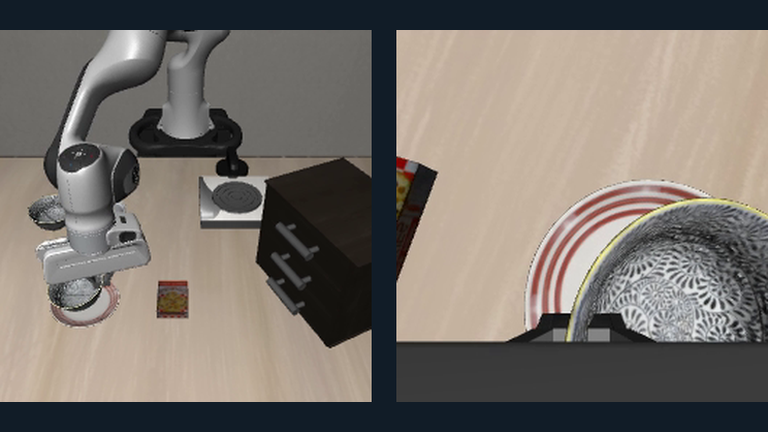
SmolVLA's scene and wrist cameras after the recorded bowl-to-plate task.

A language instruction becomes an actual SmolVLA rollout in LIBERO. Inspect both camera views, measured state and each applied control.

76 actions · one completed simulation task

Play the task ↗ · Reproduce it · Episode + evidence ↓

02 / Brief → Blender film

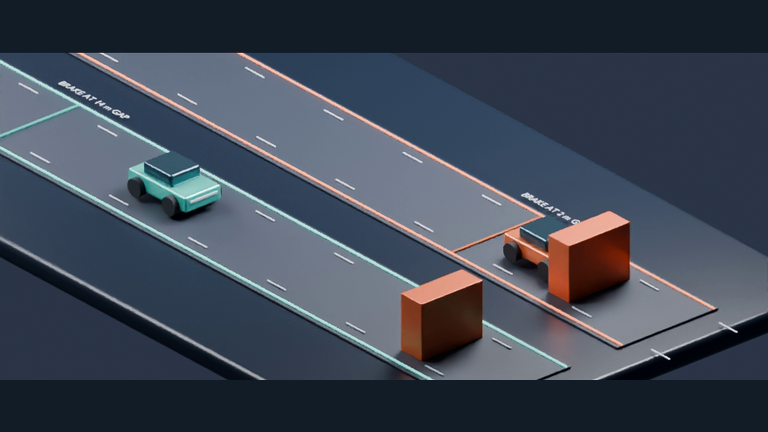
A Blender camera shows two recorded braking trials at the contact sequence.

Connect an MCP agent to plan camera cuts, captions and slow motion. Build an editable film whose frames map back to the original recording.

4 camera views · all 180 source samples retained

Explore the film ↗ · Connect an agent · Blender project ↓

03 / Physics → editable 3D

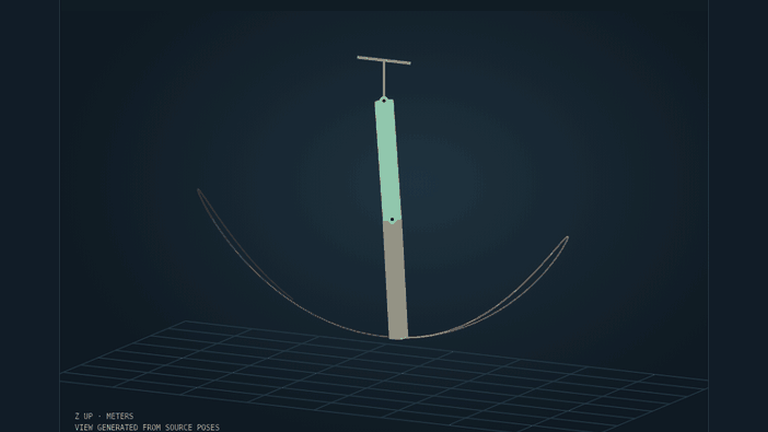
Recorded Newton double-pendulum poses and their motion trail in the browser's 3D replay.

Record Newton physics on CPU. Explore measured poses in a browser, then open the animated OpenUSD scene in Blender to light, edit and render.

181 source samples · 362 checked body transforms

Inspect the physics ↗ · Build the scene · OpenUSD ↓

04 / A tiny robot. A learned policy.

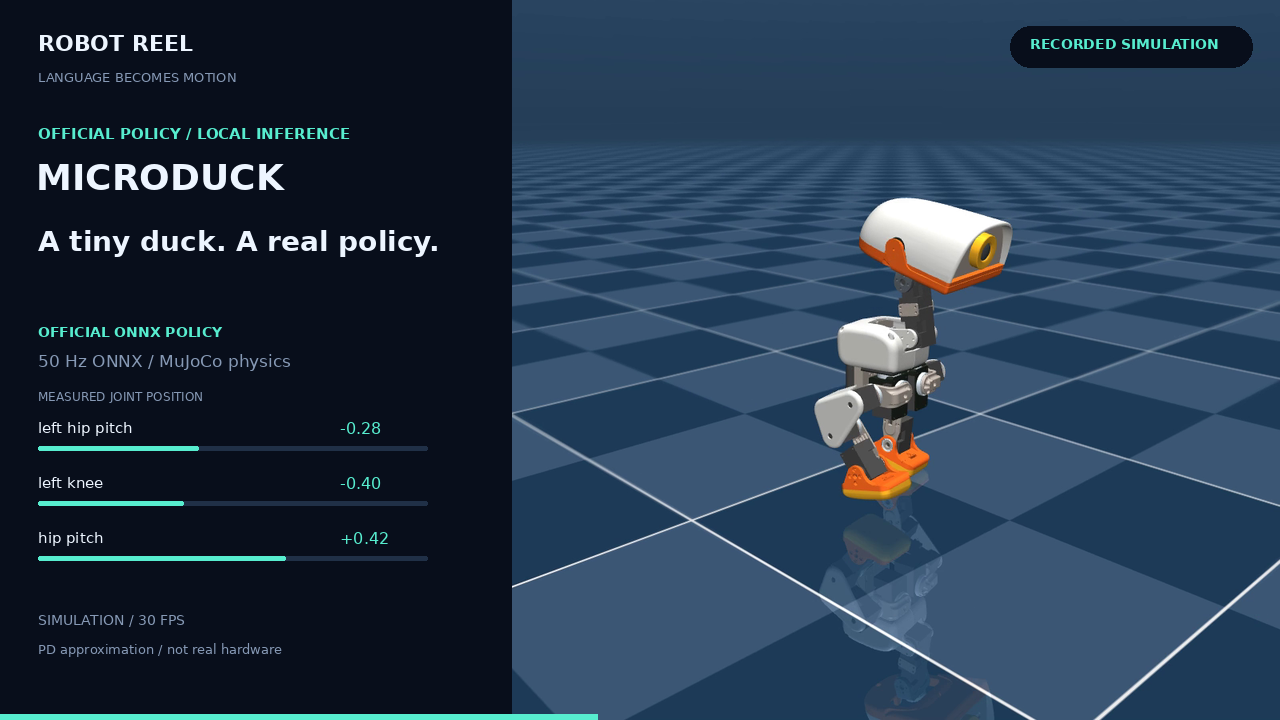
Microduck's official ONNX walking policy recorded in MuJoCo, with measured joint telemetry.

Watch Pollen Robotics' Microduck walk with its official ONNX policy. Follow joint targets, measured responses and base motion, or compare two speed commands.

50 Hz policy · 14 joint targets and responses

Meet Microduck ↗ · Compare speeds · Record your own

**More scenes:** [Early vs. late braking](https://noteflowai.github.io/robot-reel/compare/braking/) · [SO-100 arm studio](https://noteflowai.github.io/robot-reel/studio/) · [Editable braking scene](https://noteflowai.github.io/robot-reel/blender/) ## Keep the run behind the film | Watch | Inspect | Reuse | | --- | --- | --- | | Browser replays, synchronized views, shot navigation and frame links. | Applied actions, measured poses, recorded outcomes and source revisions. | Offline episodes, MP4s, JSON traces, editable Blender projects and OpenUSD scenes. | **The evidence travels with the demo.** Validators check file hashes, timestamps, frame mappings and outcome consistency. Native Blender checks cover all 420 vehicle samples in the directed film and all 362 body transforms in the Newton import. [Director check](docs/director/animation-check.json) · [Newton check](docs/newton/blender-check.json). The browser plays recorded simulations. The VLA example is one seeded rollout, with inference waiting time omitted; new director briefs use your connected agent and a new render. Microduck uses the XML PD-actuator fallback. [Scope, provenance and asset terms](THIRD_PARTY.md). ## Agent workflow experiments Robot Reel recordings also provide source data for testing agent workflows. Skills Anywhere delivers instructions; EvalArc checks the resulting programs against the original coordinates and clocks. | Experiment | Recorded result | Inspect the evidence | | --- | --- | --- | | Skill delivery: 27 Qwen3-8B attempts across three engineering profiles | No direct-delivery or MCP attempt fully resolves the task. The no-skill condition resolves 2/3 attempts in the final profile. | [Instructions, candidate files and task checks](https://noteflowai.github.io/evalarc/skill-impact/) | | Session handoff: six Qwen3-4B continuations, three per condition | All six retrieval calls succeed. All six programs remain unchanged; each condition resolves 0/3 tasks. | [Retrieved history, commands and coordinate checks](https://noteflowai.github.io/evalarc/funes-handoff/) | [Review independent-source SWE tasks](https://noteflowai.github.io/evalarc/independent-swe/index.html): a separate fixed cohort records 36 attempts on Astropy, pytest and SymPy across four workflow conditions. Direct and MCP preloads deliver identical guidance; an unrelated MCP control matches the prompt length. No attempt obtains native acceptance: 31 have assessable reports and five remain uncertain after upstream infrastructure flags. Eight attempts produce nonempty patches. [Methods and offline records](https://github.com/noteflowai/evalarc/tree/main/examples/independent-swe) keep tool failures, native labels and incomplete usage visible. [Carry the reviewed skill into a new session](https://noteflowai.github.io/evalarc/skill-handoff/): a separate six-attempt cohort reuses the predecessor's exact skill bytes through workflow MCP preloads. All six preloads succeed; the memory group retrieves six results. All six programs remain unchanged and no task passes full acceptance. The report connects original pins, delivery receipts, retrieved history and task checks. These are small studies on public tasks. Each profile and cohort retains its own results, including failures; they do not establish general skill or memory benefits. The [research guide](docs/research-pilots.md) documents the methods, source versions and related scene-editing experiments. ## Build your own scene Choose the workflow you want to build: | I want to… | Start here | | --- | --- | | Run paired VLA stress trials on GPU | [CUDA setup, fixed experiment and evidence checks](docs/stress.md) | | Inspect paired trials in Rerun | [Portable video, 3D paths and native readback](docs/telemetry.md#native-rerun-workspace) | | Run SmolVLA locally | [Isolated CPU environment + pinned models](docs/vla.md) | | Let an agent direct a film | [MCP setup + Blender build/render](docs/director.md) | | Export recorded simulations to a DCC | [Newton → OpenUSD → Blender](docs/newton.md) | | Model a factory twin in Blender | [Procedural campus → checked Blender/OpenUSD](docs/factory-twin.md) | | Explore a physics parameter sweep | [Butterfly Lab → twelve isolated worlds](docs/chaos.md) | | Record Microduck, braking or the arm | [Recording packs + runtime setup](docs/recording.md) | | Compare two captured runs | [Comparison contract + CLI](docs/comparison.md) | | Replay a LeRobot dataset episode | [Hub or local dataset → offline replay](docs/lerobot.md) | ## Make the next scene Contributions with a working replay and inspectable source data are welcome: new simulation adapters, measured policy comparisons, accessible viewers and editable 3D exports. [Contributing](CONTRIBUTING.md) · [Development and checks](docs/recording.md#development) · [Issues](https://github.com/noteflowai/robot-reel/issues). Built with [LeRobot](https://github.com/huggingface/lerobot), [MuJoCo](https://github.com/google-deepmind/mujoco), [Newton](https://github.com/newton-physics/newton), [Blender](https://www.blender.org), [OpenUSD](https://github.com/PixarAnimationStudios/OpenUSD), [Strands Robots](https://github.com/strands-labs/robots), and [Pollen Robotics](https://github.com/pollen-robotics/microduck). Recorder code: Apache-2.0. VLA images retain their upstream attribution and asset terms; Microduck media retains its noncommercial/share-alike terms. The cover's source mapping and media notice accompany the preview. Independent project; no upstream endorsement is implied.