# dsh-better-sidebar
DSH 的双工作台:原生右侧栏 + 自绘底部面板,并把 ctx.betterSidebar 服务开放给所有插件

npm version npm downloads CI GitHub stars License: MIT 支持的 DSH 版本:0.2.1-rc.1+
🌏 中文 · English
## ✨ 特色功能 | | | |---|---| | **🗂️ 文件管理**
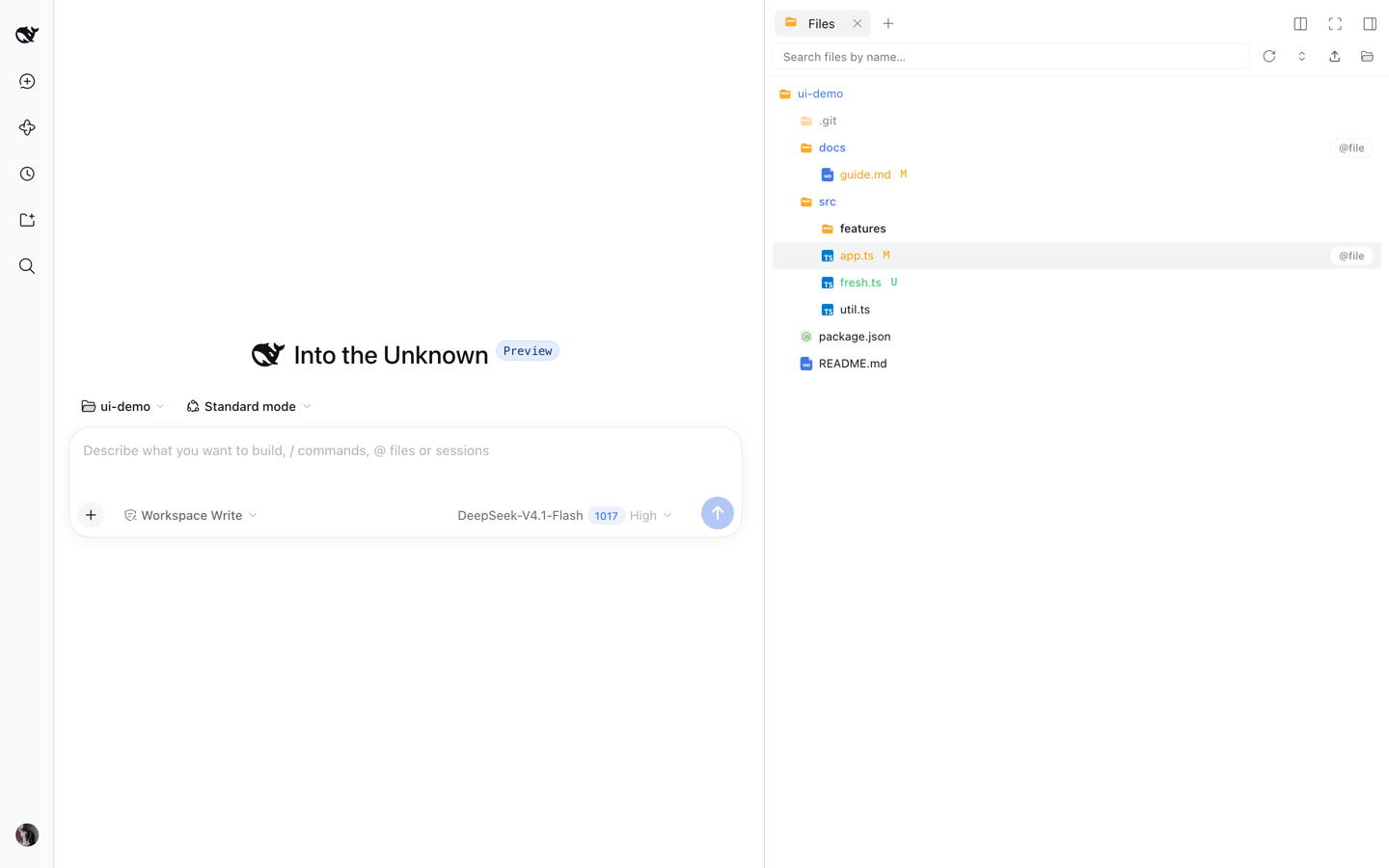
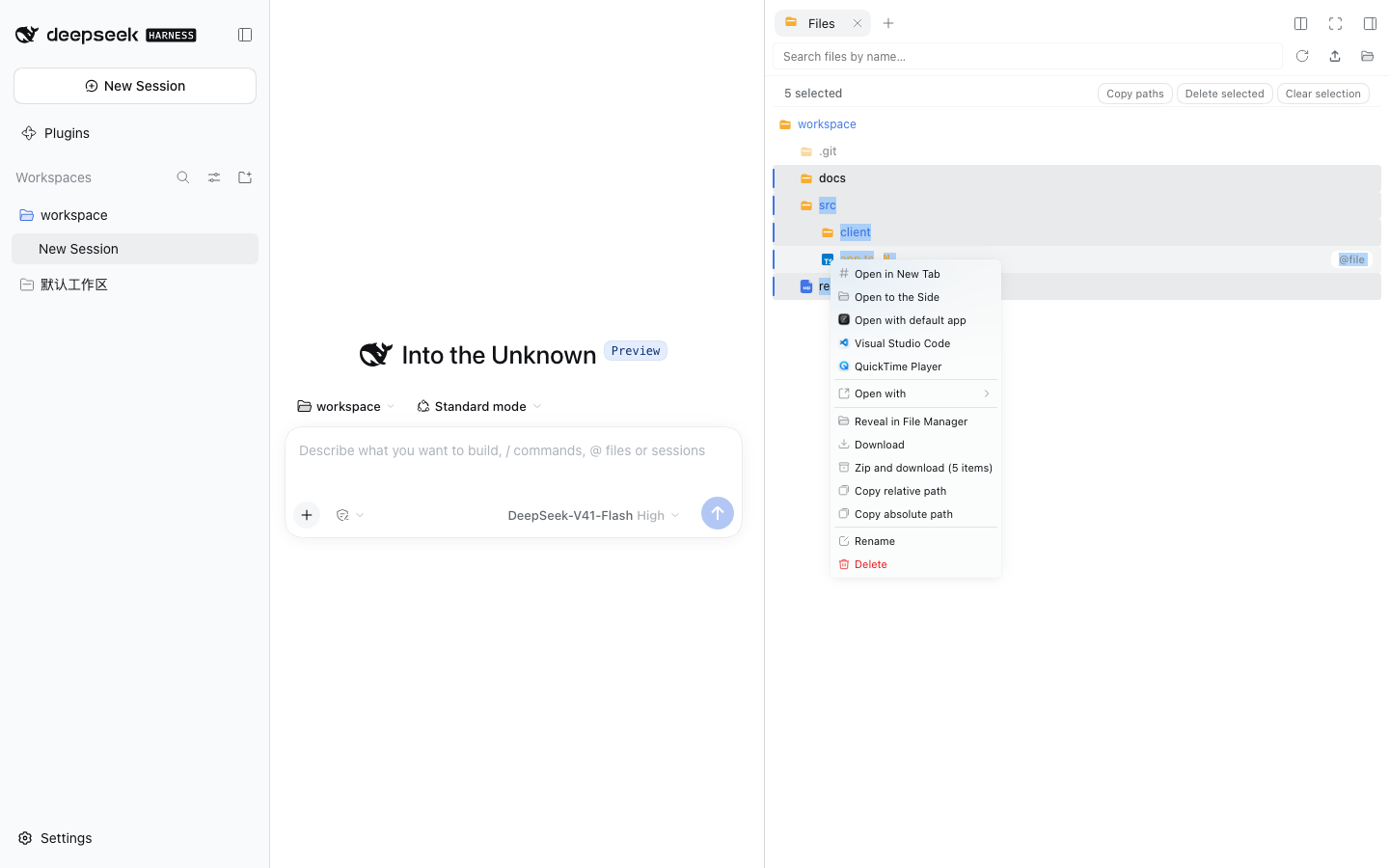
懒加载目录树、Git 变更着色、实时 watch 刷新、全局搜索、拖拽上传、多选批量操作、「打开方式」双源菜单。
文件树(Git 着色)
右键菜单:打开方式 + 打包下载 | **🌿 Git**
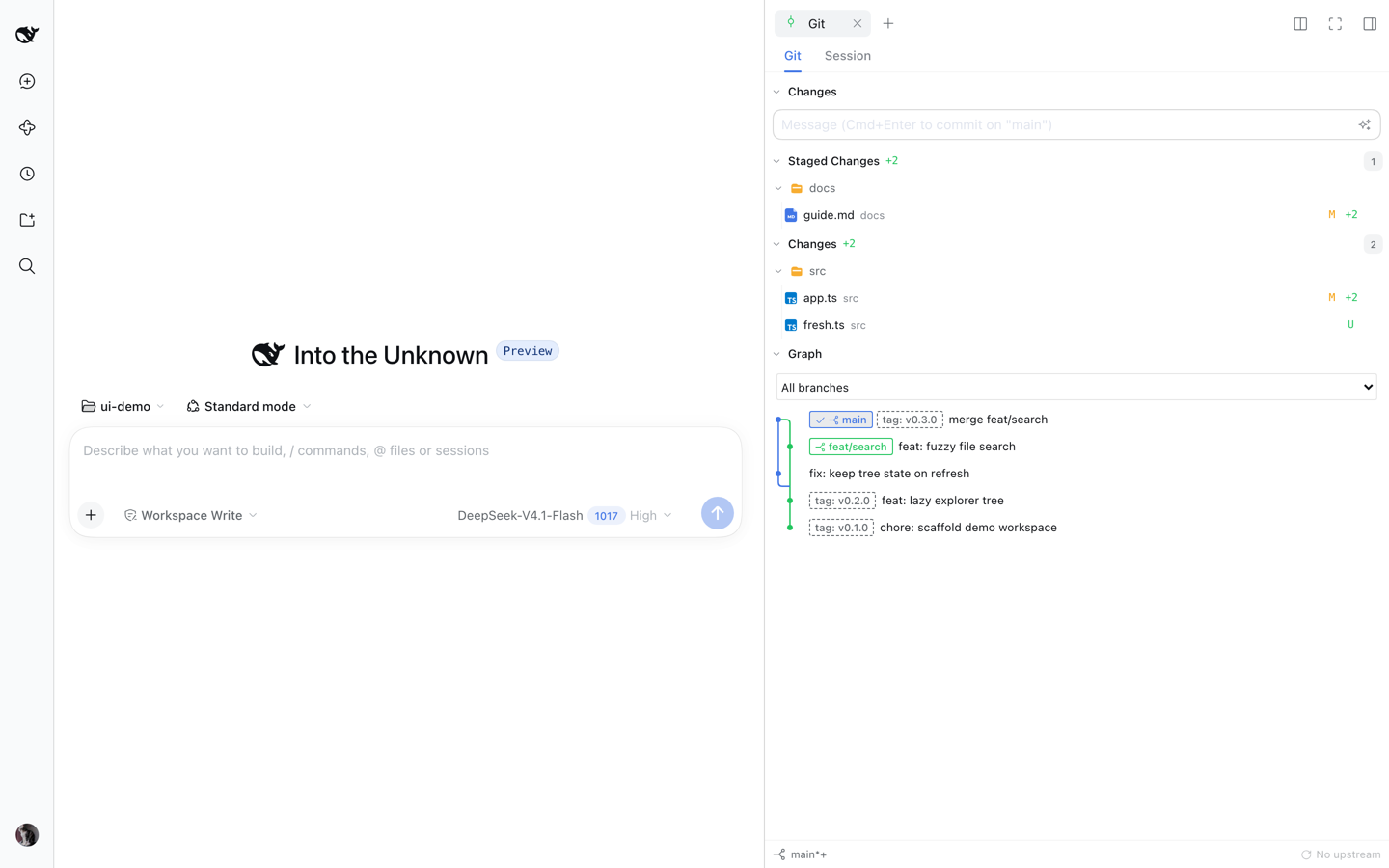
Source Control(Merge / Staged / Changes 三组、带 Generate 的消息框、分支与同步底栏)+ 本轮 AI 改动视角合一,并在同一页签内给出**只读提交图**(泳道、分支与 tag 徽章、分支筛选、提交详情)。
Git:变更与带 tag 的提交图 | | **📝 可编辑编辑器与预览**
可编辑的 CodeMirror(官方预览是只读)、Markdown + Mermaid + 浮动目录、HTML 沙箱预览、`.jsonl` 记录卡片、超大文件分页预览、传输无大小上限。
Markdown + Mermaid 预览 | **🧩 任务管理**
子代理拓扑实时预览(工作流图 / 树双模式)+ 后台任务清单:退出码、实时输出、强制终止。
任务页:子代理拓扑 | | **💬 侧边对话(beta)**
Codex 风格侧边线程:继承主会话完整上下文独立运行、实时推送、排队可见可撤回、每个线程独立选模型、一键提升为顶层会话。
侧边对话 | **🖥️ 底部工作台**
自绘底部面板与原生右侧栏同时展开:拖拽分栏、多终端页签、按会话持久化布局。
双工作台 | **还有**:📂 `sidebar_open` 工具让模型主动打开侧边栏 · ⚡ 启动只拉 ~325KB 核心、重依赖按需加载 · 🌏 多语言跟随 DSH · 📱 窄屏自动切换全宽抽屉 ### 🌿 Git Graph(只读提交图) 在 Git 面板顶部切到 **Git Graph**:本地分支、远程跟踪分支与 HEAD 的提交节点、分叉与合并连线。分支下拉框只筛选历史,**不会 checkout 或 fetch**;提交行是单行(泳道连线 + 引用徽章 + 标题),hover 看作者与短 hash,选中后在底部面板看完整提交信息与 diff。历史按页加载,分页期间 refs 变化会提示刷新;读取有上限(每页 200 条、偏移 10,000、分支 1,000),超限明确报错。图中提交支持 lightweight 与 annotated tag,提交行与详情通过中性 tag pill 标识,tag 变化会使旧分页失效。Tag 装饰按引用名保留前 5,000 条,并受 8 MiB 输出的完整行前缀限制;多余 tag 省略,不影响整张图加载。 ### 🧭 dsh-context 诊断入口(可选) 装上 `dsh-context` 插件后,三处各有一个直达该会话 **Context(上下文)** 视图的入口:任务管理页的代理节点详情卡、后台任务输出窗(按任务的**真实属主会话**寻址,而不是它被挂在哪个会话名下)、以及会话标题栏。入口**只在** dsh-context 的 `Context` 页面确实注册时才出现——没装、没启用或该页面被隐藏的部署不会显示任何控件;一次跳转进行中时,三个入口一并禁用。跳转失败只报一条可关闭的提示(浮在窗口底部),空闲时不新增任何轮询。 ## 🚀 安装 ```sh dsh plugin --profile web add dsh-better-sidebar@latest ``` 装完**硬刷新浏览器**(Cmd/Ctrl+Shift+R)即可。要求 DSH **0.2.1-rc.1+**。 > **兼容性警告:插件版本必须与宿主线匹配。** 截至 2026-10-26,DSH 的 npm `latest` 是 **0.2.1-rc.2**,上方命令安装的 v0.28.2 与之兼容。仍停留在 **0.2.0-rc.2** 的宿主必须固定 `dsh-better-sidebar@0.26.1`(并建议先升级宿主到 `0.2.1-rc.2`);DSH 0.2.1-alpha.5 用户固定 `dsh-better-sidebar@0.28.0-alpha.0`。市场安装器按插件的 `latest` 安装、不按宿主版本选版本,旧宿主会收到版本拒绝错误——请升级宿主或显式固定版本。两个包的 `latest` 标签不是同一支持线。
按 DSH 版本选插件版本 | 你的 DSH 版本 | 安装命令 | | --- | --- | | **0.2.1-rc.1+** | `dsh plugin --profile web add dsh-better-sidebar@0.28.2` | | **0.2.1-alpha.5** | `dsh plugin --profile web add dsh-better-sidebar@0.28.0-alpha.0` | | **0.2.0-rc.2** | `dsh plugin --profile web add dsh-better-sidebar@0.26.1` | | **0.2.0-rc.1** | `dsh plugin --profile web add dsh-better-sidebar@0.24.1` | | **0.1.7-rc.1 ~ 0.1.7 正式版** | `dsh plugin --profile web add dsh-better-sidebar@0.22.1` | | 0.1.7-alpha.x | 没有可装版本——先升级 DSH 到 rc.1 | | 0.1.6 及更早(含 0.1.5 线) | `dsh plugin --profile web add dsh-better-sidebar@0.19.1` | 旧版本一律写**精确版本号**(`latest` 会随新正式版前移)。命令里的 `web` 换成你自己的 profile 名即可。
其他安装方式 **让 DSH 自己装**——把这段提示词发给任意一个 DSH 会话: ```text 帮我安装 dsh-better-sidebar 插件(DSH 侧边栏工作台),步骤: 1. 先确认 DSH 为 0.2.1-rc.1 或更新版本,再执行 dsh plugin --profile web add dsh-better-sidebar@0.28.2 2. 完成后提醒我硬刷新浏览器(Cmd/Ctrl+Shift+R) 遇到报错先查 https://github.com/omdsh-dev/DSH-better-sidebar README 的常见问题表。 ``` **一键脚本**——克隆本仓库后执行 `bash scripts/install.sh 0.28.2`(macOS / Linux / Windows Git Bash;Windows 原生用 `./scripts/install.ps1 -Version 0.28.2`),自动完成安装 + bundle 注册。 **更新**:重跑一次安装命令即可,然后硬刷新浏览器。
常见问题 | 现象 | 原因与解决 | |---|---| | 报 `Ignored build scripts` | pnpm 11 拦截了某个传递依赖的构建脚本。在 profile 目录(`~/.dsh/profiles/web`)跑 `pnpm approve-builds` 按提示放行——本插件自身已无构建脚本依赖。 | | 报 `minimum release age` / 版本不足 24h | 装的版本发布不足 24 小时。等 24h 或重跑一次(pnpm 会自动补 `minimumReleaseAgeExclude`)。 | | 报「找不到 profile 目录」 | 先跑一次 `dsh web`,让它初始化 `~/.dsh/profiles/web`。 | | 页面出现**两个侧边栏** | 双挂载。删掉 `~/.dsh/profiles/web/cordis.patch.yml` 里旧的手动挂载行(`- insert: ... better-sidebar ...`);聚合包以不同 id 挂载本包时会自动退让,无需处理。 | | 升级后设置页的值去哪了 | DSH 0.1.7 起偏好写在 profile 里本插件的挂载行上(默认 entry id `better-sidebar`),插件首次启动会把旧 `settings.yaml` 里的配置一次性回迁,不会覆盖新设的值。 | | 终端无法使用 | 终端由 **DSH 自身**提供(本插件不自带 PTY),请查 DSH 侧文档;底部终端显示「宿主未提供终端能力」= 这个部署没挂终端控制器。 | | 提示 `dsh: command not found` | 先安装 DSH;或用 `npx -y --package @deepseek-ai/dsh@0.2.1-rc.1 dsh plugin --profile web add dsh-better-sidebar@0.28.2`。 |
## 🆕 最近更新 **v0.28.2 — 大会话冷读修复** - **根因修复**:detached 会话的 cwd 不再解码整份会话日志——改读存储在 header 里的工作区地址(只读第一个 zstd 帧,header-only),按会话做进程内缓存与在飞去重;`activeWorktreeRootOf` 对 detached 会话不再折持久化日志 - **为什么 0.28.1 没修好**:单飞只覆盖 `/sidebar/api`,而启动期真正并发的是 fs-watch 每个监视目录一帧、`/sidebar/file|html` 每资源一次——39 MB 级会话仍被并发整读数十次 - **行为**:会话 attach 后仍跟随 `working_directory` 与 linked worktree;attach 之前侧边栏根是原始项目目录,下一次 5 s 轮询自动切回 - **实测(40.2 MB 会话,本机)**:12 路由 + 36 个绕过入口并发 → 1 次 header 读、0 次整读、3 ms、RSS +0.3 MB;修复前 6 个入口并发即 6 次整读、峰值 +1.0 GB(外推 36 次 ≈ 6 GB) **v0.28.1 — UX 与可靠性补丁** - **OOM 修复**:12 条 `/sidebar/*` 路由共享的冷 cwd 读取按「会话 + 客户端提示」合并,切换会话的并发突发不再并行解码同一份大会话日志 - **不再静默写错文件**:页签调解覆盖后台会话,worktree 会话统一地址基准——改名/删除的已打开文件不会被下一次保存重建,聊天链接也不会静默打开另一检出的同名文件 - **宿主崩溃防护**:病态 `git status` 输出加了闩锁与进程树终止,「宿主 `RangeError` 崩溃」降为一次 SCM 刷新失败 - **Git 页**:>1000 分支的历史恢复加载;tag 现在装饰提交行与详情,tag 变化会使旧分页失效 - **编辑器**:仅 mtime 变化后保存不再死锁 `fs-conflict`;刷新后保留阅读位置;「添加到对话」落地为紧凑引用 chip,不再展平已有 chip - **Markdown 链接**:本地 destination 的 Windows 反斜杠归一,`C:\ws\_analysis\report.md` 不再报裸 ENOENT - **侧栏**:右栏展开时底部工作台入口常显;macOS 兜底入口避开红绿灯;页签 scope 按内容稳定,消除无谓的整文件重读;关闭侧聊页签时归档其会话 **v0.28.0 — 面向 DSH 0.2.1-rc.1+ 的插件正式版** - 13 条 DSH peer 下限前移到 `^0.2.1-rc.1`,沿用 alpha.0 的功能实现,不增加运行时改动 - 上游 alpha.5 → rc.1 完整树差异共 355 个文件,全部为 `package.json`,源码零变化 - DSH 0.2.0-rc.2 宿主固定插件 v0.26.1;DSH 0.2.1-alpha.5 宿主固定 v0.28.0-alpha.0 - 验证:[RC 适配记录](./docs/plans/2026-10-17-dsh-0.2.1-rc.1-adaptation.md) ## 🔌 插件生态 `ctx.betterSidebar` 向所有插件开放 `registerTab` / `registerFileViewer` 两个扩展点,内置 6 tab + 4 viewer 与第三方插件走同一套 API。GitHub topic [`dsh-better-sidebar`](https://github.com/topics/dsh-better-sidebar) 下已有 **30+ 生态插件**;完整接入文档见 **[docs/external-plugin-guide.md](./docs/external-plugin-guide.md)**。 ```ts import type {} from 'dsh-better-sidebar' // 触发 ctx.betterSidebar 类型合并 export const inject = ['betterSidebar'] export function apply(ctx: Context) { ctx.effect(() => ctx.betterSidebar.registerTab({ id: 'my-plugin:db', title: 'Database', component: ({ scope }) => , })) } ```
生态插件目录(28 个 Tab 插件 · 4 个预览插件 · 4 个增强工具) ### 📑 Tab 插件(注册侧边栏页面) | 插件 | ⭐ | 简介 | |---|---|---| | [ChenRuoT/dsh-sidebar-qa](https://github.com/ChenRuoT/dsh-sidebar-qa) | stars | 划选追问侧边页:类 Codex 侧边提问 / Claude Code `/btw` | | [fuhefei/dsh-sentinel](https://github.com/fuhefei/dsh-sentinel) | stars | 条件驱动唤醒系统:文件 / 命令 / HTTP / 进程 / Webhook 监视,到点唤醒 agent;dock + 侧栏分支 + 全局仪表盘 | | [Fisfzy/ego-browser](https://github.com/Fisfzy/ego-browser) | stars | Agent 浏览器:i18n 感知的本机浏览器 Tab(装了 better-sidebar 自动注册侧边栏页,未装回退浮动浮窗观察) | | [jiuge2467/dsh-studio](https://github.com/jiuge2467/dsh-studio) | stars | 全栈增强工作台:多源 MCP 可视化调试中枢、视觉思考引擎 | | [Iwctwbh/dsh-flowglass](https://github.com/Iwctwbh/dsh-flowglass) | stars | 流镜 Flowglass:会话流程图实时可视化(消息 / 工具组 / 子代理分支) | | [FeatherHunter/dsh-mattpocock-skills-deck](https://github.com/FeatherHunter/dsh-mattpocock-skills-deck) | stars | mattpocock/skills 游戏化任务系统:地图拨迷雾、任务栏推进 | | [GULI-lab/DSH-element-source](https://github.com/GULI-lab/DSH-element-source) | stars | 点击页面任意 UI 元素直达 Vue / React / Svelte / Angular 源码并送入会话 | | [Lzh3070/dsh-file-review-tab](https://github.com/Lzh3070/dsh-file-review-tab) | stars | 文件改动审查页:行级红绿 diff + 撤销 + chat 行深链 | | [yq04/dsh-git-remotes](https://github.com/yq04/dsh-git-remotes) | stars | Git 远程页:分支 / 上游 / ahead-behind,fetch 可 prune、ff-only pull、确认后 push | | [ztyhehe/dsh-better-sidebar-svn](https://github.com/ztyhehe/dsh-better-sidebar-svn) | stars | SVN 源码管理页:status / diff / log / commit / update / revert / 冲突解决,与内置 Git 面板对称 | | [Melody-max114/dsh-excel-panel](https://github.com/Melody-max114/dsh-excel-panel) | stars | Excel 编辑页:xlsx 预览 / 编辑、公式实时计算、合并单元格、保存回原文件 | | [v587d/dsh-anysearch-refs](https://github.com/v587d/dsh-anysearch-refs) | stars | AnySearch 搜索结果引用卡片:搜索词、来源摘要、关键词高亮 | | [Lukeknow0/dsh-markdown-link-preview](https://github.com/Lukeknow0/dsh-markdown-link-preview) | stars | Markdown 产物链接预览:点击聊天中的同源 `.md` 输出文件,直接在侧边栏阅读 | | [mlosun/dsh-docs-panel](https://github.com/mlosun/dsh-docs-panel) | stars | 全局文档面板:随身 Markdown 笔记,任何工作区随时可读 | | [tylina/dsh-tylina](https://github.com/tylina/dsh-tylina) | stars | Typst 文档编辑工具:WYSIWYG 编辑排版论文、报告、试卷、简历、图表、海报、乐谱和 PPTX 导出的 Slides | | [lnyuqian/dsh-skill-sidebar](https://github.com/lnyuqian/dsh-skill-sidebar) | stars | 技能面板:扫描本机技能目录,4-6 字功能短语 + 一键复制调用 + 置顶 | | [g-yixuan/dsh-sidenote](https://github.com/g-yixuan/dsh-sidenote) | stars | Codex 风格侧边对话 + 划选引用注释(轻量消费插件) | | [OMSociety/dsh-ssh-tunnel](https://github.com/OMSociety/dsh-ssh-tunnel) | stars | 多主机 SSH 隧道 + SSH 管理器页 | | [OMSociety/dsh-git-forge](https://github.com/OMSociety/dsh-git-forge) | stars | GitHub / Gitea 账号、项目授权与推送策略 | | [YesSanSan/dsh-conversation-outline](https://github.com/YesSanSan/dsh-conversation-outline) | stars | 对话大纲页:按轮次结构化展示、一键跳转、LLM 一句话标题 | | [Wulabalabo/dsh-sidebar-Explorer-Plus](https://github.com/Wulabalabo/dsh-sidebar-Explorer-Plus) | stars | 文件管理页:上传 / 移动 / 删除 / 重命名 / 新建文件夹(补全写操作) | | [yq04/dsh-turn-review](https://github.com/yq04/dsh-turn-review) | stars | 本轮审查:逐回合审查 agent 改动 | | [Ghz114514/dsh-refpics](https://github.com/Ghz114514/dsh-refpics) | stars | Pinterest 风格参考图搜索:瀑布流、侧栏画板、下载与 Eagle 收藏 | | [yzlin499/dsh-yzlin499-easy-plugins](https://github.com/yzlin499/dsh-yzlin499-easy-plugins) | stars | 实用小工具集(毛坯房 DSH 友好) | | [dong-victor/dsh-better-sidebar-starter](https://github.com/dong-victor/dsh-better-sidebar-starter) | stars | 运行配置页:IDEA 式 Run/Debug 配置——一键启动、历史保存、WebSocket 实时日志、多实例并行 | | [baosfeng/my-dsh-plugins](https://github.com/baosfeng/my-dsh-plugins) | stars | 个人多插件合集(`dsh-file-activity`):侧边栏文件活动页——文件读取 / 新增 / 修改历史与统计 | | [Hoemr/dsh-better-overleaf](https://github.com/Hoemr/dsh-better-overleaf) | stars | Overleaf 标签页:直连 CDP 浏览器登录、项目切换、本地 git 镜像与双向同步 | | [Andor-Z/dsh-turn-outline](https://github.com/Andor-Z/dsh-turn-outline) | stars | 轮次轨迹页:按用户轮次折叠会话,点击任意步骤跳回对话原位;零 LLM、只读 | ### 🖼️ 预览插件(注册文件预览器) | 插件 | ⭐ | 简介 | |---|---|---| | [HuanLinOTO/dsh-plugin-better-sidebar-plugin-office](https://github.com/HuanLinOTO/dsh-plugin-better-sidebar-plugin-office) | stars | Office 三件套预览(.docx / .xlsx / .pptx),独立 bundle 瘦身主体 | | [HuanLinOTO/dsh-plugin-better-sidebar-plugin-audio](https://github.com/HuanLinOTO/dsh-plugin-better-sidebar-plugin-audio) | stars | 音频预览:可缩放波形播放器 + 实时频谱,HTTP Range 流式媒体路由,任意大小可拖进度 | | [zemul/dsh-video-preview](https://github.com/zemul/dsh-video-preview) | stars | 视频内联预览:.mp4 / .webm / .mov / .mkv / .avi,HTTP Range 拖进度条 | | [dong-victor/dsh-better-sidebar-jupyter](https://github.com/dong-victor/dsh-better-sidebar-jupyter) | stars | `.ipynb` 可运行 Notebook 视图:懒启动 Python kernel、流式输出、保存回写 | ### 🧰 增强与工具 | 插件 | ⭐ | 简介 | |---|---|---| | [eg-bole/dsh-better-sidebar-icons](https://github.com/eg-bole/dsh-better-sidebar-icons) | stars | VSCode 风格文件 / 文件夹图标主题(vscode-icons 移植,纯 DOM 覆盖零侵入) | | [dong-victor/dsh-better-sidebar-terminal-plus](https://github.com/dong-victor/dsh-better-sidebar-terminal-plus) | stars | 终端增强:内嵌 Nerd Font 图标字体、修复 xterm 图标渲染、稳定终端 cwd | | [Max-Null/dsh-sidebar-preview-select](https://github.com/Max-Null/dsh-sidebar-preview-select) | stars | 预览划选增强:侧边栏预览里划选文本 → 浮动「发送到会话」 | | [Hoemr/dsh-quicklook](https://github.com/Hoemr/dsh-quicklook) | stars | QuickLook 式空格预览:活动文件标签页按 Space 全尺寸查看图片 / PDF / 文本 |



> 📣 **上架你的插件**:给仓库打上 `dsh-better-sidebar` topic 即出现在 [topic 页](https://github.com/topics/dsh-better-sidebar);再向 [`src/client/plugins-tabs.ts`](./src/client/plugins-tabs.ts) / [`plugins-viewers.ts`](./src/client/plugins-viewers.ts) 提一条 `PluginEntry` PR,即可进入设置页内置推荐目录。
⌨️ 快捷键 | 操作 | 按键 | |---|---| | 保存编辑 | `Ctrl/Cmd + S` | | 文件内查找 / 替换 | `Ctrl/Cmd + F` | | 查找下一个 / 上一个 | `Ctrl/Cmd + G` / `Shift + Ctrl/Cmd + G` | | 选中下一个相同片段 | `Ctrl/Cmd + D` | | Git 提交 | `Ctrl + Enter` | | 关闭 Tab | 鼠标中键 | | 拆分/合并分栏 | 拖 Tab 到分栏边缘 / 中间 | | 引用文件到输入框 | 悬浮行尾 `@文件` 按钮 |
🔐 安全与 ⚠️ 已知限制 - 路由受 Host 头信任围栏保护(与 `/api` 一致);`fs.write` 原子写入;git 只调 CLI、绝不设置身份 - ⚠️ **v0.23.0 起文件系统路由不做工作区包含检查**:能读写宿主用户可访问的任意路径(只受 OS 权限约束)——调用方不能再把这些路由当作被围栏保护的接口 - HTML 预览在**不透明源沙箱 iframe** 中渲染;设置页可按功能关闭沙箱(默认关闭,带警告文案) - Git 无 push/pull/fetch;文件树只对**已展开**的目录做 watch;Markdown 预览渲染的是已保存文件 - 只读预览的格式(表格 / PDF / 图片 / Office)由 DSH 内置文档预览渲染,实现随宿主版本走;浏览器视图只在 desktop profile 存在 - 未保存草稿在关闭标签页 / 删除文件 / 刷新页面前都会先确认;磁盘被外部改动后再保存会被拒绝,不会静默覆盖 - 移动端(<768px)无底部面板,其标签页并入右侧栏全宽抽屉
🛠️ 开发与构建 ```sh pnpm install # @deepseek-ai/* devDependencies 已发布,直接解析 pnpm typecheck && pnpm lint && pnpm build && pnpm test make check # 聚合校验门禁(对齐 CI) make mount # 真机挂载冒烟:build + pack → pnpm test:mount ``` **架构**:单 npm 包、host/client 双半结构——host(`src/index.ts`):`/sidebar/api/*` JSON API、媒体 / HTML 预览 / 上传路由与两条 WebSocket;client(`src/client/index.tsx`):原生右侧栏 tab + 底部工作台;状态按会话持久化 localStorage。仓库工作规范见 [`AGENTS.md`](./AGENTS.md)。 Windows / Linux / macOS 三平台适配(macOS 日常验证,其余经单元测试与 Windows CI 覆盖);无原生依赖,构建只需 Node ≥ 20 + pnpm ≥ 10。
## 💬 社区 推荐添加 QQ 群(577011007)
微信群二维码 QQ群二维码
## 🤝 参与贡献 - **代码改动走 PR**:`feat/*` / `fix/*` 分支开发 → `gh pr create`;提交前跑 `pnpm typecheck && pnpm build && pnpm test`(或 `make check`) - **收录生态插件**:给仓库打 `dsh-better-sidebar` topic + 向 [`src/client/plugins-tabs.ts`](./src/client/plugins-tabs.ts) / [`plugins-viewers.ts`](./src/client/plugins-viewers.ts) 提 PR - 仓库工作规范见 [`AGENTS.md`](./AGENTS.md) ## 👥 贡献者 贡献者 ## 🔗 友情链接 - [dsh-tianshu-tui](https://github.com/huiliyi37/dsh-tianshu-tui):DeepSeek Harness 交互式终端 UI 插件,增加 TDD 与证据门等工作流 - [dsh-TUI](https://github.com/ccch1mneyyy/dsh-TUI):Claude Code 风格全屏交互终端插件——像素鲸鱼顶栏、思考流式展开、上下文进度条 + TPS 仪表 - [dshfind 插件超市](https://dshfind.com/zh/plugins):三方插件市场——GitHub topic `dsh-plugin` 下的公开仓库清单,每日同步 - [DeepSeek Harness Desktop Tauri](https://github.com/hairyf/deepseek-harness-desktop):Tauri 桌面版——5MB 安装包、零环境配置、预置插件开箱即用 - [DeepSeek Harness Desktop](https://github.com/anywhere-labs/deepseek-harness-desktop):现代化桌面端——无需配置 Node.js 即可启动和管理本地 Harness 服务;[官网](https://www.dshdesktop.cn) ---
MIT License · Built for the DeepSeek Harness ecosystem · 在 topic dsh-better-sidebar 发现更多生态插件