
depup
Multi-language dependency updater CLI for Node.js, Python, Rust, Go, Ruby, PHP, Java, Swift and mise, with a release age filter and OSV vulnerability checks
Supported Platforms




English |
日本語
---
depup finds the manifests in a project (`package.json`, `pyproject.toml`, `Cargo.toml`, `go.mod`, `Gemfile`, `composer.json`, Gradle build files, `Package.swift`, and mise config files), looks up newer versions in each registry, and rewrites the version specifiers in place, for every language in one run.
It is conservative by default: a new version becomes a candidate only after it has been public for a week, versions without known vulnerabilities on OSV.dev are preferred, pinned versions stay as they are, and ranges keep their operators and upper bounds.
Add `--install` to let each project's package manager refresh its lock file after the update.
## Features
- **Multi-Language Support**: Node.js, Python, Rust, Go, Ruby, PHP, Java, and Swift dependencies, plus mise tool versions in `mise.toml` / `.tool-versions`, through the same workflow
- **Manifest Updates**: Directly updates version specifications in manifest files (`package.json`, `Cargo.toml`, and so on)
- **Git Submodules**: Preview or advance submodule pointers with [`--submodules`](docs/ecosystems.md#git-submodules)
- **Smart Version Handling**: Preserves version range formats (`^`, `~`, `>=`) and upper bounds, including prerelease and patch qualifiers; also preserves spaces in Cargo operator wildcards such as `= 1.*`
- **Pinned Version Detection**: Skips intentionally pinned versions by default
- **Age Filter**: Only updates to versions that have been public for at least N days or weeks (1 week by default)
- **Project Age Policies**: Inherits pnpm, Bun, and mise policies per directory and preserves stricter uv and mise native cutoffs
- **Vulnerability Check**: Looks up candidates on OSV.dev, preferring versions without known vulnerabilities. Updates that fix existing vulnerabilities may still be allowed under severity and count limits (enabled by default)
- **Package Manager Install**: `--install` runs each project's package manager after the update and passes the age filter on to pnpm, uv, and mise
- **Lockfile Age Audit**: Checks the direct and transitive versions in `Cargo.lock` and npm/pnpm lockfiles after install; if a version the run added still fails, that project's manifests and lockfiles return to their state before the run (exit code `2`)
- **Bun Catalogs**: Updates Bun `catalog` / `catalogs` definitions in `package.json`
- **Monorepo Support**: `.depup`, Cargo/pnpm/Go workspaces, Gradle multi-project builds, nested package installs, and Tauri projects
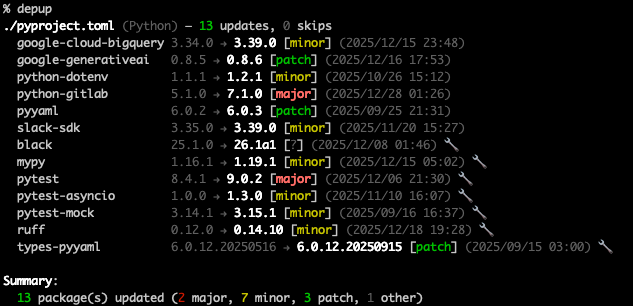
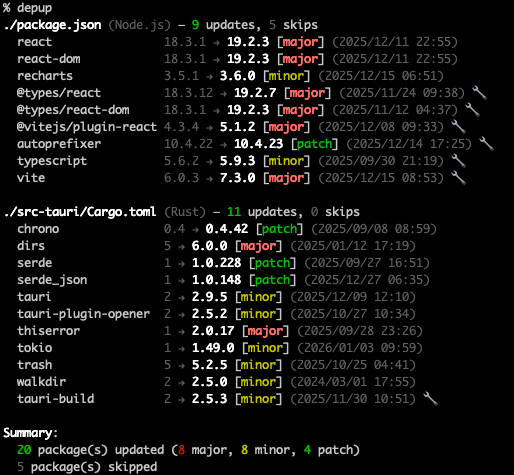
- **Multiple Output Formats**: Colored text with the release date of each new version, JSON, and diff
### Supported Languages


| Language | Manifest | Registry | Lock Files |
|----------|----------|----------|------------|
|  Node.js | package.json (including Bun catalogs) | npm | package-lock.json, pnpm-lock.yaml, yarn.lock, bun.lock, bun.lockb |
|
 Python | pyproject.toml | PyPI | uv.lock, requirements.lock, poetry.lock |
|
 Rust | Cargo.toml | crates.io | Cargo.lock |
|
 Go | go.mod (go.work members auto-detected) | Go Proxy | go.sum |
|
 Ruby | Gemfile | RubyGems | Gemfile.lock |
|
 PHP | composer.json | Packagist | composer.lock |
|
 Java | build.gradle, build.gradle.kts, gradle/*.versions.toml (settings.gradle subprojects auto-detected) | Maven Central | gradle.lockfile |
|
 Swift | Package.swift | GitHub Tags | Package.resolved |
|
 mise | mise.toml, .mise.toml, .config/mise/config.toml, .tool-versions, etc. | `mise ls-remote` | mise.lock |
## Requirements
- **mise**: At runtime, only needed to update mise tool versions (version lists come from `mise ls-remote`). Without it, depup ignores mise config files, warns once, and continues with the other languages
- **Package managers**: `--install` runs the package manager of each project (npm, pnpm, uv, Cargo, Bundler, Composer, Gradle, and so on), so it must be installed; a package manager that is not installed counts as a failed install
- **Network access**: Versions are looked up in the public registries, and the vulnerability check queries the OSV.dev API
## Installation
### Homebrew (macOS/Linux)
```bash
brew install owayo/depup/depup
```
### winget (Windows)
```powershell
winget install owayo.depup
```
### Cargo
Requires Rust 1.99 or later.
```bash
cargo install --git https://github.com/owayo/depup --locked
```
### From GitHub Releases
Download the archive for your platform from [Releases](https://github.com/owayo/depup/releases/latest), extract it, and put `depup` on your `PATH`. Each release also includes `SHA256SUMS` for checking the downloads.
| Platform | Archive |
|---|---|
| Linux (x86_64) | `depup-x86_64-unknown-linux-gnu.tar.gz` |
| Linux (ARM64) | `depup-aarch64-unknown-linux-gnu.tar.gz` |
| macOS (Intel) | `depup-x86_64-apple-darwin.tar.gz` |
| macOS (Apple Silicon) | `depup-aarch64-apple-darwin.tar.gz` |
| Windows (x86_64) | `depup-x86_64-pc-windows-msvc.zip` |
On macOS, if you downloaded the archive with a browser, remove the quarantine attribute before running it: `xattr -d com.apple.quarantine depup`.
### From Source
Requires [mise](https://mise.jdx.dev/) (the Rust toolchain is pinned in `mise.toml`).
```bash
git clone https://github.com/owayo/depup.git
cd depup
make install
```
`make install` installs to `/usr/local/bin`. Set `INSTALL_PATH` to change it (for example `make install INSTALL_PATH="$HOME/.local/bin"`).
After a winget install, open a new terminal so that the updated `PATH` takes effect. To remove a build installed from source, run `make uninstall` with the same `INSTALL_PATH`.
## Usage
```bash
depup [OPTIONS] [PATH]
```
`PATH` is the directory to process (defaults to the current directory). depup updates every supported language it finds there unless you limit it with a language flag such as `--node` or `--python`.
```bash
# Preview all updates (dry run)
depup -n
# Update Node.js dependencies only
depup --node
# Update only lodash and typescript
depup --only lodash --only typescript
# Exclude react from updates
depup --exclude react
# Only update to versions at least 2 weeks old (the default is 1 week)
depup --age 2w
# Update and show diff
depup --diff
# Update, then run the package manager install (npm install, etc.)
depup --node --install
# JSON output for CI/CD
depup --json
```
Output for a Python project and for a Tauri project:
Python (pyproject.toml)
|
Tauri (package.json + Cargo.toml)
|
### How depup Decides Updates
Unless a dependency is pinned, depup looks up its published versions, picks the newest one that passes the checks below, and rewrites the manifest in place. By default:
- An exact version such as `"1.2.3"` in `package.json` is treated as an intentional pin and is not updated unless you pass `--include-pinned`. Go modules and mise tools are exceptions ([Pinned Versions and `--include-pinned`](docs/usage.md#pinned-versions-and---include-pinned)).
- Only versions that have been public for at least one week are candidates ([Age Filter](docs/usage.md#age-filter)).
- Versions without known vulnerabilities are preferred. By default, updates that fix existing vulnerabilities may introduce new Medium/Low vulnerabilities within severity and count limits ([Vulnerability Check](docs/usage.md#vulnerability-check-osvdev)).
- Prereleases are not proposed while the current version is stable ([Candidate Ordering and Prereleases](docs/usage.md#candidate-ordering-and-prereleases)).
- Ranges keep their shape and upper bound; only the lower bound moves ([Upper and Lower Bounds of Ranges](docs/usage.md#upper-and-lower-bounds-of-ranges)).
- Major bumps are allowed unless `--max-change` caps them ([Limiting Bumps](docs/usage.md#limiting-bumps---max-change)).
### Allowing Updates with Remaining Vulnerabilities (Enabled by Default)
An update that fixes existing vulnerabilities may be allowed even if it introduces new Medium/Low vulnerabilities. Each new vulnerability requires a separate fix of the same or higher known severity.
| Vulnerabilities fixed | Newly introduced vulnerabilities | Update allowed? |
|---|---|---|
| 1 Critical or High | 1 Medium or Low | Yes, with a warning |
| 1 Medium | 1 Medium or Low | Yes, with a warning |
| 1 Low | 1 Low | Yes, with a warning |
| 1 Low | 1 Medium, High, or Critical | No |
| 1 Critical | 2 Medium | No: new vulnerabilities outnumber fixes |
Updates introducing High, Critical, or unknown-severity vulnerabilities are not allowed by this exception. Updates containing malware are also excluded. Allowing a new vulnerability of the same severity does not guarantee that real-world risk has decreased.
Counts are per package. Aliases for the same vulnerability are counted once; a vulnerability still present in another locked version does not count as fixed.
depup prefers versions without known vulnerabilities, then versions that fix some vulnerabilities without adding any, and finally versions meeting the conditions above. **The age waiting period and other update filters still apply.** The comparison requires confirmed Cargo or supported npm/pnpm lockfile versions, or a fixed Python/Ruby/PHP declaration. An unknown current version or a manifest range's lower bound alone does not qualify.
Updates allowed under these conditions report fixed vulnerabilities, new vulnerabilities, and existing vulnerabilities that remain in text and JSON. They do not receive the `✓ OSV` mark because known vulnerabilities remain. Use `--no-osv-risk-tradeoff`, or set `osv_risk_tradeoff = false` in the global configuration, to reject all candidates with known vulnerabilities. `--no-osv` disables the check entirely.
### More Documentation
- [Filtering Candidates](docs/usage.md#filtering-candidates): the age filter, project age policies, the OSV.dev check, and `--max-change`
- [Version Specifiers and Rewriting](docs/usage.md#version-specifiers-and-rewriting): which specifiers count as pinned, how ranges and formats are preserved, and which constraints are left unchanged
- [Running the Package Manager](docs/usage.md#running-the-package-manager---install): the command `--install` runs for each package manager, and how far the age filter reaches into transitive dependencies
- [When a Dependency Is Not Updated](docs/usage.md#when-a-dependency-is-not-updated): the skip reasons that `--verbose` lists
- [Command-Line Reference](docs/cli-reference.md): all options, the text / JSON / diff output, and the exit codes
- [Ecosystems and Monorepos](docs/ecosystems.md): workspaces and Tauri projects, and the exact declarations depup reads in each ecosystem
## Configuration
depup reads its defaults, monorepo directories, and release-age policies from the sources below. A command-line flag overrides depup's global defaults for that run. Explicit project age policies take precedence over `--age`; stricter uv and mise native constraints are also preserved.
| Setting | Location | Purpose |
|---|---|---|
| Global defaults | `~/.config/depup/config.toml`, created on the first run | Default `age`, `osv`, `osv_risk_tradeoff`, and `max_change`, plus verified publisher exceptions (`age_exempt`) |
| Monorepo directories | `.depup` at the project root | Additional directories to process |
| Project age policy | `minimumReleaseAge` in the pnpm or Bun settings, `minimum_release_age` in the mise settings | Minimum release age of that project |
| Native age constraints | uv's `exclude-newer` and mise's global, local, and per-tool age settings | Preserve stricter cutoffs during candidate selection and install |
Each manifest inherits age settings from its ancestors. Shared installs and Cargo workspace locks use the strictest applicable member policy, including members with no updates. See [Age Filter](docs/usage.md#age-filter) for sources, precedence, and limits.
For example, to wait two weeks instead of one and to rule out major bumps in every project:
```toml
# ~/.config/depup/config.toml
age = "2w"
max_change = "minor"
```
All keys, the `.depup` format, and how invalid values are handled: [docs/configuration.md](docs/configuration.md)
## Development
Requires [mise](https://mise.jdx.dev/). Tool versions are pinned in `mise.toml`.
```bash
make setup # Install the toolchain (mise) and dependencies
make ci # Run the same checks as CI (no changes)
```
| Command | Description |
|---|---|
| `make setup` | Install the toolchain (mise) and dependencies |
| `make build` | Build a debug binary |
| `make release` | Build a release binary |
| `make run` | Run the debug binary (arguments via ARGS="...") |
| `make test` | Run the tests |
| `make lint` | Run clippy with warnings as errors |
| `make fmt` | Format the code (rewrites files) |
| `make fmt-check` | Check the formatting (no changes) |
| `make check` | Run fmt-check and lint (no changes) |
| `make ci` | Run the same checks as CI (no changes) |
| `make install` | Install the release binary to INSTALL_PATH (default /usr/local/bin) |
| `make uninstall` | Remove the binary from INSTALL_PATH |
| `make clean` | Remove build artifacts |
Run `make` to list every target. Releases are published from GitHub Actions (**Actions → Release → Run workflow**).
The additional test targets, JSON and Cargo manifest benchmarks, what CI runs on each OS, and the release steps are described in [docs/development.md](docs/development.md). On Windows, run the `make` targets in Git Bash; the guide also lists equivalent PowerShell commands.
## License
[MIT](LICENSE)