
reSARch
Standalone CLI for sysstat sa files: detect anomalies, chart them as SVG, and produce sar / sadf reports on Linux, macOS and Windows
Supported Platforms




English |
日本語
---
Inspect `sa` files collected on Linux from your own PC, without installing `sar` or `sadf` on the machine doing the analysis.
`sar` writes its logs (`/var/log/sa/saXX`) as raw C structs, so reading them usually needs a sysstat of a compatible version on a compatible architecture. reSARch reads the supported formats directly and resolves the struct layouts for the ABI of the host that wrote the file. The design notes are in [docs/architecture.md](docs/architecture.md).
## Features
- **sar / sadf compatible output**: text, JSON, CSV and XML reports, including restart and comment records, in the format of upstream sysstat 12.8.0, or of RHEL / CentOS 7's `sar` with `--sar-profile`
- **Terminal UI**: interactive tables and graphs of every recorded activity
- **Analysis**: anomaly detection, period summaries, host comparisons, and SVG charts of what was detected
- **28 registered formats**: readers for sysstat 2.2 through 12.8, including files written by big-endian and 32-bit hosts, with [legacy limitations](docs/formats.md)
- **Verified collection**: automated collection and verification with distribution packages and official sysstat release images ([how the output is verified](docs/verification.md))
## Requirements
Supply an `sa` file collected by sysstat on Linux. reSARch analyses saved files; to collect new data, use sysstat on Linux or the bundled [collection scripts](docs/development.md#collecting-real-sa-files). The TUI requires an interactive terminal.
## Installation
### Homebrew (macOS/Linux)
```bash
brew install owayo/re-sar-ch/re-sar-ch
```
### winget (Windows)
```powershell
winget install owayo.reSARch
```
### Cargo
Requires Rust 1.98 or later.
```bash
cargo install --git https://github.com/owayo/re-sar-ch --bin resarch --locked
```
### From GitHub Releases
Download the archive for your platform from [Releases](https://github.com/owayo/re-sar-ch/releases/latest), extract it, and put `resarch` on your `PATH`. Each release also includes `SHA256SUMS` for checking the downloads.
| Platform | Archive |
|---|---|
| Linux (x86_64) | `resarch-x86_64-unknown-linux-gnu.tar.gz` |
| Linux (x86_64, musl) | `resarch-x86_64-unknown-linux-musl.tar.gz` |
| Linux (ARM64) | `resarch-aarch64-unknown-linux-gnu.tar.gz` |
| macOS (Intel) | `resarch-x86_64-apple-darwin.tar.gz` |
| macOS (Apple Silicon) | `resarch-aarch64-apple-darwin.tar.gz` |
| Windows (x86_64) | `resarch-x86_64-pc-windows-msvc.zip` |
On macOS, if you downloaded the archive with a browser, remove the quarantine attribute before running it: `xattr -d com.apple.quarantine resarch`.
### From Source
Requires [mise](https://mise.jdx.dev/) (the Rust toolchain is pinned in `mise.toml`).
```bash
git clone https://github.com/owayo/re-sar-ch.git
cd re-sar-ch
make install
```
`make install` installs to `/usr/local/bin`. Set `INSTALL_PATH` to change it (for example `make install INSTALL_PATH="$HOME/.local/bin"`).
`make install` also writes the resarch skill for Claude Code and Codex to `~/.claude/skills/resarch` and `~/.codex/skills/resarch`. `make install SKILL_TARGETS=` skips the skills, and `make install-bin` installs the binary alone. With the other methods, write the skill with `resarch skill-install` ([Use it from an AI agent](#use-it-from-an-ai-agent)).
winget registers `resarch` on `PATH`. After installation, open a new terminal so the updated `PATH` takes effect.
## Quickstart
After installation, replace `sa01` with the path to your file. Copy it from the collecting host if you are analysing it on another machine.
```bash
resarch info sa01 # Inspect the format and recorded activities
resarch -u -f sa01 # Display CPU utilisation
resarch detect sa01 # Find times and metrics to investigate
```
An **activity** is a kind of statistic, such as CPU or memory; an **item** is an individual CPU, device, or other measured resource. Use `resarch --help` or `resarch detect --help` to look up commands and options.
## Usage
### As a drop-in for `sar`
Omit the subcommand to read saved files with `sar`-compatible arguments. Output follows the sysstat 12.8.0 profile regardless of the input file's generation.
```bash
resarch -u -f sa01 # CPU utilisation
resarch -r -f sa01 # memory
resarch -n DEV,EDEV -f sa01 # network interfaces
resarch -u -P ALL -s 09:00:00 -e 18:00:00 -f sa01
resarch sar -A -f sa01 # explicit compatibility entry point
resarch sadf -j sa01 # sadf-compatible JSON
resarch sadf -g sa01 600 12 -- -u > cpu.svg # up to 12 CPU samples per boot segment
resarch --sar-profile sysstat-10.1.5-el7 -u -f sa01 # as RHEL/CentOS 7's own sar prints it
```
The quirks are reproduced deliberately: `-I` takes no number, `-P ALL` differs from `-P all`, `-h` means `--pretty --human` rather than help, and the first record matched by `-s` is consumed as the baseline rather than displayed. Supported options, output profiles and the environment variables `sar` reads are in [docs/compatibility.md](docs/compatibility.md).
### Saving an sa binary as sar text
```bash
resarch sa2sar sa13 -o sar13 # All activities, averages, restarts and comments
resarch sa2sar sa13 --utc -o sar13-utc # Use UTC timestamps
resarch sa2sar sa13 --sar-profile sysstat-10.1.5-el7 -o sar13 # what a RHEL/CentOS 7 host's sa2 writes
```
The default is equivalent to `sar -A -C -t -f sa13`, using timestamps recorded by the source host. Omit `-o` or use `-o -` for stdout. Existing destination files are never overwritten; failed conversion leaves no partial destination file.
When comparing an el7 `sa2sar` report with a host's saved `sar` text byte for byte, match its date setting. Set `S_TIME_FORMAT=ISO` if the saved banner uses `YYYY-MM-DD`; this affects the banner date, not the statistics.
### Its own commands
```bash
resarch identify sa01 sa02 # which sysstat wrote each file
resarch info sa01 # generation, ABI, activity table
resarch show sa01 --activity cpu,disk --format table
resarch show sa01 --format ndjson # for feeding an agent or a pipeline
resarch summarize sa01 sa02 sa03 --from 09:00 --to 18:00 # 09:00-18:00 local time each day
resarch compare --host app1=app1/sa01 --host app2=app2/sa01
```
The native commands display timestamps in the machine's local timezone, and read `hh:mm[:ss]` in `--from` / `--to` in the same timezone. `--timezone ` changes it (`local`, `utc`, or an IANA name such as `Asia/Tokyo`). For `summarize` and `compare`, `--from` / `--to` narrow the aggregation period itself.
Daily windows apply to every day in a file. Each entry into a window establishes a new reference sample, including repeated windows during a daylight saving time change. `summarize` and `compare` accept `--format table`, `json`, or `ndjson`. For `show` compatibility formats, omit `--timezone` / `--utc`: `sar` uses local time and `sadf-*` uses UTC for display and filtering.
### Finding what went wrong
```bash
resarch detect sa01 # where and what looks off
resarch detect sa01 --verbose # every detection's breakdown and interpretations
resarch detect sa13 --svg-dir charts # chart each detection as SVG
```
`resarch detect` tells you **when** and **what** looks off, without needing you to know what to look for. It checks fixed conditions on values whose meaning is established, deviation from the file's own median and MAD, and level changes between adjacent windows, then groups what fires into episodes. It gives no confidence percentages, says when its own yardstick is suspect, and lists every series it could not evaluate. Reports are in English or Japanese (`--lang`).
### Browsing interactively (TUI)
```bash
resarch tui sa01
resarch tui sa01 --activity cpu,disk,memory # open with a narrowed set
```
Recorded activities become tabs; pick an item and read its time series as a table with a graph above it. Press `?` for the key reference and `Esc` to quit from the main screen. `—` means the value is absent, not zero, and the graph line breaks where samples are missing. The MEMORY tab compares three estimates of memory utilisation on one graph — excluding buffers/cache, based on MemAvailable, and including buffers/cache; [docs/usage.md](docs/usage.md#reading-memory-usage) explains how to read them.
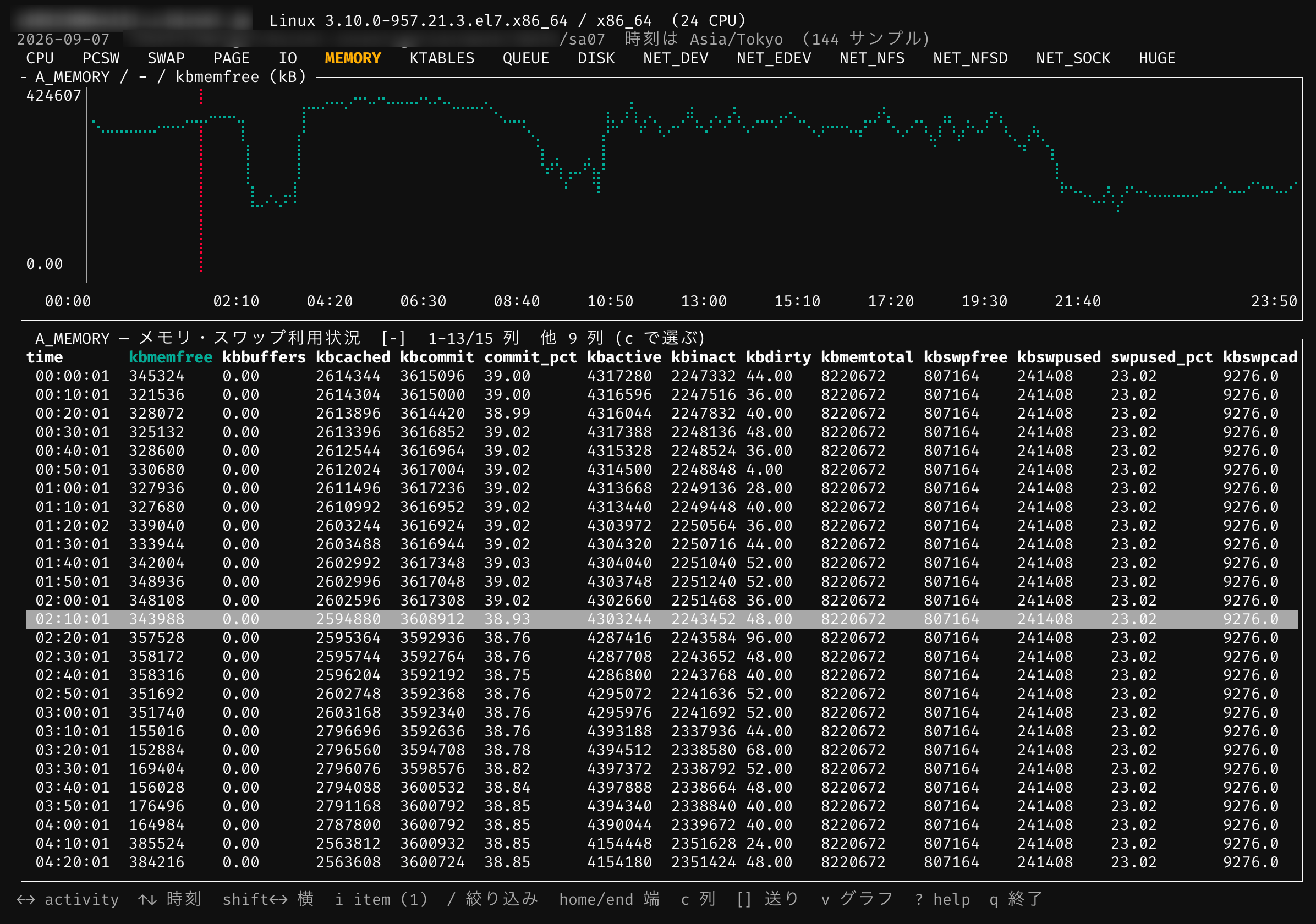
The screenshot predates two changes: the quit key is now `Esc` rather than `q`, and the MEMORY tab now opens on three utilisation lines instead of a single `kbmemfree` line.
With `tui --lenient`, a truncated input retains complete samples, shows an incomplete-input notice, and exits nonzero. Native counter rates with no positive elapsed time remain absent with `non_positive_elapsed` quality; instantaneous gauges remain available.
Item and column pickers fit the current terminal size, including while resizing. Extreme finite values use scaled plotting coordinates and axis labels in the original units. Native output marks NaN and infinity as `not_finite`; computed values are absent, while raw strings remain available.
### Commands
| Task | Command |
|---|---|
| Display `sar`-compatible reports | `resarch sar` (the subcommand may be omitted) |
| Produce `sadf`-compatible output or convert old formats | `resarch sadf` |
| Save a complete `sar` text report | `resarch sa2sar` |
| View tables, JSON, and other formats | `resarch show` |
| Browse interactively in a terminal | `resarch tui` |
| Detect anomalies | `resarch detect` |
| Explore metrics and detections in an offline HTML report | `resarch report sa01 -o report.html` |
| Summarise a period | `resarch summarize` |
| Compare hosts | `resarch compare` |
| Inspect headers and recorded activities | `resarch info` |
| Identify the producing sysstat version | `resarch identify` |
| Install an AI agent skill | `resarch skill-install` |
Append `--help` to a command to see its options (`resarch sar --help` for the `sar` entry point). Each command in detail, including the TUI keys, the `detect` report, SVG charts and old-file conversion: [docs/usage.md](docs/usage.md).
## Use it from an AI agent
`resarch` ships a skill describing its own commands, so an agent knows when to reach for it and — more importantly — how to read what comes back.
```bash
resarch skill-install claude # ~/.claude/skills/resarch/SKILL.md
resarch skill-install codex # ~/.codex/skills/resarch/SKILL.md
```
The skill text is embedded in the binary, so a release download is enough — no checkout, no network. It spends most of its length on how to read `detect` output, because that is where an agent is most likely to overclaim. It also states that **an empty value in reSARch's own formats is not a zero**, and which `--from` / `--to` means what in which subcommand.
## Supported formats
All 28 registered format magic values, from sysstat 2.2 (`0x015d`) through 12.8 (`0x2175`), have readers. They include Red Hat's vendor variant `0x1170` and files written by big-endian and 32-bit hosts. Supporting every registered format is distinct from having verified every historical release, and old formats have field and ABI limitations: [docs/formats.md](docs/formats.md).
## How the output is verified
Every expected-output file that `sysstat` keeps in its own test suite is compared line by line against what reSARch produces — 21 cases in total:
| Comparison result | Cases |
|---|---:|
| Byte-identical | 16 |
| Identical after masking | 4 |
| Mismatched | 0 |
| Not comparable | 1 |
The four masked cases mask only the `A_DISK` device-name column, which upstream resolves through the reading host's `/dev` and `/sys`. `sa` files collected with 181 official sysstat releases, five distribution packages and eleven CentOS RPM releases are also read through to the end of the file. Details and the meaning of each status: [docs/verification.md](docs/verification.md).
## Development
Requires [mise](https://mise.jdx.dev/). Tool versions are pinned in `mise.toml`.
```bash
make setup # Install the toolchain (mise) and dependencies
make ci # Run the same checks as CI (no changes)
```
| Command | Description |
|---|---|
| `make setup` | Install the toolchain (mise) and dependencies |
| `make build` | Build a debug binary |
| `make release` | Build a release binary |
| `make run` | Run the debug binary (arguments via ARGS="...") |
| `make test` | Run the tests |
| `make lint` | Run clippy with warnings as errors |
| `make fmt` | Format the code (rewrites files) |
| `make fmt-check` | Check the formatting (no changes) |
| `make check` | Run fmt-check and lint (no changes) |
| `make ci` | Run the same checks as CI (no changes) |
| `make install` | Install the release binary to INSTALL_PATH (default /usr/local/bin) |
| `make uninstall` | Remove the binary from INSTALL_PATH |
| `make clean` | Remove build artifacts |
Run `make` to list every target. Releases are published from GitHub Actions (**Actions → Release → Run workflow**).
Without mise, add `SYSTEM_TOOLS=1` to use the tools on your PATH; their versions may then differ from CI. The conformance tests against upstream sysstat data, byte-reader and writer boundary tests, comparisons with saved `sar` text, collection scripts and release procedure are in [docs/development.md](docs/development.md).
See [CHANGELOG.md](CHANGELOG.md) for release notes. Report bugs through [GitHub Issues](https://github.com/owayo/re-sar-ch/issues), including `resarch --version`, the command you ran, and the error message.
## License
[MIT](LICENSE)
Upstream `sysstat` is GPL-licensed, so none of its test data or expected output is vendored here; `make fixtures` downloads it for the conformance tests only. The data in `tests/fixtures/` is written from scratch and MIT-licensed like the rest of the project. The live snapshots in `testdata/sysstat-live/` come with their own [provenance and usage notice](testdata/sysstat-live/README.md).