
rgee is a binding package for calling Google Earth Engine API from within R. Additionally, several functions have been implemented to make simple the connection with the R spatial ecosystem. The current version of rgee has been built considering the earthengine-api 0.1.229. Note that access to Google Earth Engine is only available to registered users.
More than 250+ examples using GEE with R are available here


Quick Start User’s Guide for rgee


Created by:
EN and POR: Andres Luiz Lima Costa http://amazeone.com.br/index.php
-
SPA: Antony Barja Ingaruca https://barja8.github.io/
What is Google Earth Engine?
Google Earth Engine is a cloud-based platform that allows users to have an easy access to a petabyte-scale archive of remote sensing data and run geospatial analysis on Google’s infrastructure. Currently, Google offers support only for Python and JavaScript. rgee will fill the gap starting to provide support to R!. Below you will find the comparison between the syntax of rgee and the two Google-supported client libraries.
| JS (Code Editor) | Python | R |
|---|---|---|
library(rgee) ee_Initialize() db <- 'CGIAR/SRTM90_V4' image <- ee$Image(db) image$bandNames()$getInfo() #> [1] "elevation" |
Quite similar, isn’t it?. However, there are additional smaller changes should consider when using Google Earth Engine with R. Please check the consideration section before you start coding!
Installation
Install the rgee package from GitHub is quite simple, you just have to run in your R console as follows:
remotes::install_github("r-spatial/rgee")
rgee depends on sf. Therefore, is necessary to install its external libraries, follow the installation steps specified here. If you are using a Debian-based operating system, you probably need to install virtualenv as well. If you are using a Debian-based operating system, you probably need to install virtualenv as well.
sudo pip3 install virtualenvsetup
Prior to using rgee you will need to install a Python version higher than 3.5 in their system. rgee counts with an installation function (ee_install) which helps to setup rgee correctly:
library(rgee)

## It is necessary just once
ee_install()

# Initialize Earth Engine!
ee_Initialize()
Additionally, you might use the functions below for checking the status of rgee dependencies and delete credentials.
ee_check() # Check non-R dependencies
ee_clean_credentials() # Remove credentials of a specific user
ee_clean_pyenv() # Remove reticulate system variables
Also, consider looking at the setup section for more information on customizing your Python installation.
Package Conventions
- All
rgeefunctions have the prefix ee_. Auto-completion is your friend :). - Full access to the Earth Engine API with the prefix ee$….
- Authenticate and Initialize the Earth Engine R API with ee_Initialize. It is necessary once by session!.
-
rgeeis “pipe-friendly”, we re-exports %>%, butrgeedoes not require its use.
Quick Demo
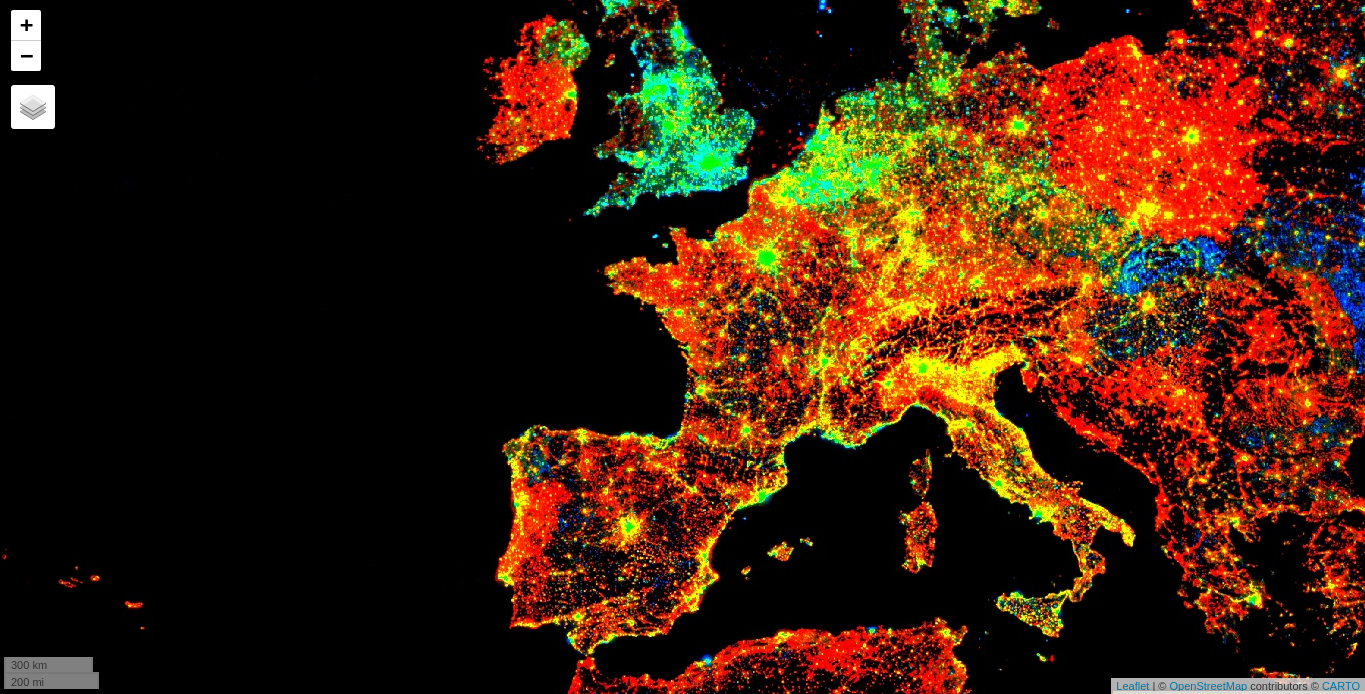
1. Compute the trend of night-time lights (JS version)
Authenticate and Initialize the Earth Engine R API.
library(rgee)
ee_Initialize()
#ee_reattach() # reattach ee as a reserve word
Adds a band containing image date as years since 1991.
createTimeBand <-function(img) {
  year <- ee$Date(img$get('system:time_start'))$get('year')$subtract(1991L)
  ee$Image(year)$byte()$addBands(img)
}
Map the time band creation helper over the night-time lights collection.
collection <- ee$
  ImageCollection('NOAA/DMSP-OLS/NIGHTTIME_LIGHTS')$
  select('stable_lights')$
  map(createTimeBand)
Compute a linear fit over the series of values at each pixel, visualizing the y-intercept in green, and positive/negative slopes as red/blue.
col_reduce <- collection$reduce(ee$Reducer$linearFit())
col_reduce <- col_reduce$addBands(
  col_reduce$select('scale'))
ee_print(col_reduce)
Create a interactive visualization!
Map$setCenter(9.08203, 47.39835, 3)
Map$addLayer(
  eeObject = col_reduce,
  visParams = list(
    bands = c("scale", "offset", "scale"),
    min = 0,
    max = c(0.18, 20, -0.18)
  ),
  name = "stable lights trend"
)
2. Extract precipitation values
Install and load tidyverse and sf R package, after that, initialize the Earth Engine R API.
library(tidyverse)
library(rgee)
library(sf)

# ee_reattach() # reattach ee as a reserve word
ee_Initialize()
Read the nc shapefile.
nc <- st_read(system.file("shape/nc.shp", package = "sf"), quiet = TRUE)
Map each image from 2001 to extract the monthly precipitation (Pr) from the Terraclimate dataset
terraclimate <- ee$ImageCollection("IDAHO_EPSCOR/TERRACLIMATE")$
  filterDate("2001-01-01", "2002-01-01")$
  map(function(x) x$reproject("EPSG:4326")$select("pr"))
Extract monthly precipitation values from the Terraclimate ImageCollection through ee_extract. ee_extract works similar to raster::extract, you just need to define: the ImageCollection object (x), the geometry (y), and a function to summarize the values (fun).
ee_nc_rain <- ee_extract(x = terraclimate, y = nc, sf = FALSE)
colnames(ee_nc_rain) <- sprintf("%02d", 1:12)
ee_nc_rain$name <- nc$NAME
Use ggplot2 to generate a beautiful static plot!
ee_nc_rain %>%
  pivot_longer(-name, names_to = "month", values_to = "pr") %>%
  ggplot(aes(x = month, y = pr, group = name, color = pr)) +
  geom_line(alpha = 0.4) +
  xlab("Month") +
  ylab("Precipitation (mm)") +
  theme_minimal()

3. Create an NDVI-animation (JS version)
Install and load sf, after that, initialize the Earth Engine R API.
library(rgee)
library(sf)
ee_Initialize()
# ee_reattach() # reattach ee as a reserve word
Define the regional bounds of animation frames and a mask to clip the NDVI data by.
mask <- system.file("shp/arequipa.shp", package = "rgee") %>%
  st_read(quiet = TRUE) %>%
  sf_as_ee()
region <- mask$geometry()$bounds()
Retrieve the MODIS Terra Vegetation Indices 16-Day Global 1km dataset as an ee.ImageCollection and select the NDVI band.
col <- ee$ImageCollection('MODIS/006/MOD13A2')$select('NDVI')
Group images by composite date
col <- col$map(function(img) {
  doy <- ee$Date(img$get('system:time_start'))$getRelative('day', 'year')
  img$set('doy', doy)
})
distinctDOY <- col$filterDate('2013-01-01', '2014-01-01')
Define a filter that identifies which images from the complete collection match the DOY from the distinct DOY collection.
filter <- ee$Filter$equals(leftField = 'doy', rightField = 'doy');
Define a join; convert the resulting FeatureCollection to an ImageCollection.
join <- ee$Join$saveAll('doy_matches')
joinCol <- ee$ImageCollection(join$apply(distinctDOY, col, filter))
Apply median reduction among matching DOY collections.
comp <- joinCol$map(function(img) {
  doyCol = ee$ImageCollection$fromImages(
    img$get('doy_matches')
  )
  doyCol$reduce(ee$Reducer$median())
})
Define RGB visualization parameters.
visParams = list(
  min = 0.0,
  max = 9000.0,
  bands = "NDVI_median",
  palette = c(
    'FFFFFF', 'CE7E45', 'DF923D', 'F1B555', 'FCD163', '99B718', '74A901',
    '66A000', '529400', '3E8601', '207401', '056201', '004C00', '023B01',
    '012E01', '011D01', '011301'
    )
)
Create RGB visualization images for use as animation frames.
Define GIF visualization parameters.
gifParams <- list(
  region = region,
  dimensions = 600,
  crs = 'EPSG:3857',
  framesPerSecond = 10
)
Render the GIF animation in the console.

How does rgee work?
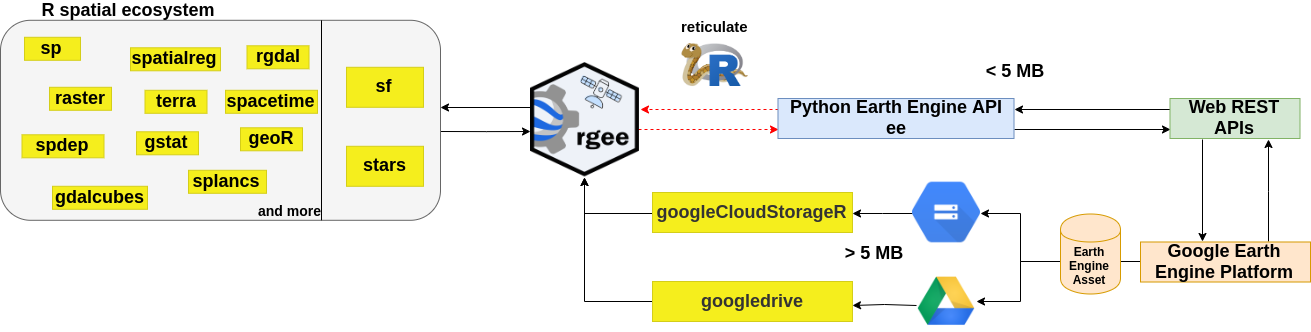
rgee is not a native Earth Engine API like the Javascript or Python client, to do this would be extremely hard, especially considering that the API is in active development. So, how is it possible to run Earth Engine using R? the answer is reticulate. reticulate is an R package designed to allow a seamless interoperability between R and Python. When an Earth Engine request is created in R, reticulate will transform this piece into Python. Once the Python code is obtained, the Earth Engine Python API transform the request to a JSON format. Finally, the request is received by the Google Earth Engine Platform thanks to a Web REST API. The response will follow the same path.
Code of Conduct
Please note that the rgee project is released with a Contributor Code of Conduct. By contributing to this project, you agree to abide by its terms.
Contributing Guide
👍 Thanks for taking the time to contribute! 🎉👍 Please review our Contributing Guide.
Credits 🙇
First off, we would like to offer an special thanks 🙌 👏 to Justin Braaten for his wise and helpful comments in the whole development of rgee. As well, we would like to mention the following third-party R/Python packages for contributing indirectly to the develop of rgee:
- gee_asset_manager - Lukasz Tracewski
- geeup - Samapriya Roy
-
geeadd - Samapriya Roy
- cartoee - Kel Markert
- geetools - Rodrigo E. Principe
- landsat-extract-gee - Loïc Dutrieux
- earthEngineGrabR - JesJehle
- sf - Edzer Pebesma
- stars - Edzer Pebesma
- gdalcubes - Marius Appel







