dsh-desktop-statusbar








简体中文 | English | 日本語 | Español | Français | Deutsch | Русский | Português
Replaces the stats line under the message input in the DSH desktop app with a configurable status bar: fields, ordering, per-model prices and currency are all configurable, with live cost estimates using DeepSeek's official peak/off-peak rates.
https://github.com/user-attachments/assets/5a4f7fd8-a445-490d-a557-1ec840c611df
## Features
- **9 optional fields plus the context ring**: context occupancy (the ring at the head of the bar), peak / off-peak check, turns & steps, cache hit rate, output speed, TTFT, run time, this turn cost, session cost, balance
- **Click a field for details**:
| Field | Content |
| --- | --- |
| Context ring (bar head) | System prompt / tool definitions / messages |
| Peak / off-peak check | Usage heat map: day / week / month / year |
| Turns & steps | Context compactions / skills injected / tool calls |
| Combined hit | This turn / highest / lowest cache hit rate |
| TPS | This turn / fastest / slowest speed |
| TTFT | This turn / fastest / slowest first-token delay |
| Run time | Wait time / model time / tool calls |
| This turn cost | Token breakdown for this turn |
| Session cost | Cumulative token breakdown for this session |
| Balance | Top-up balance / granted balance / quota left |
- **Session data drill-down**: context compactions mark the node they happened at, skills injected counts the skills injected in this session, and tool calls list every tool the session used with its call count; click the title to go back up
- **Version check and update**: DSH checks for the latest version on startup, shows a hint next to the "Status bar" nav item when one is available, and offers a one-click update button in settings
- **GitHub support**: the button opens the GitHub project page, where you can star the project.
- **Cost estimation**: priced with the official peak/off-peak rules; each call is computed from the moment it happened and the model it used
- **Price book**: your own prices, an optional peak/off-peak split, and a CNY / USD currency switch
- **Also**: automatic holiday updates, balance refreshed every minute, 8 UI languages (Simplified Chinese / English / 日本語 / Español / Français / Deutsch / Русский / Português)
## Install
In the DSH desktop app, open **Plugins → Add plugin** and install by package name:
```
dsh-desktop-statusbar
```
Where the npm registry is not reachable, the same dialog offers the China mainland mirror as the install source. A GitHub repository URL is also accepted:
```
https://github.com/raphael-y7/dsh-desktop-statusbar
```
Command line:
```powershell
dsh plugin --profile desktop add dsh-desktop-statusbar
```
### Install from npm
Both ways above install from the npm registry; the package name is `dsh-desktop-statusbar`. To check the current version on npm:
```powershell
npm view dsh-desktop-statusbar version
```
### When the built-in updater fails
The built-in one-click update button may fail on some desktop builds, either not responding or reporting an error. In that case, use the official install entry and **append `@version` to the package name** to install the exact version:
```powershell
dsh plugin --profile desktop add dsh-desktop-statusbar@3.0.5
```
The same string works in the plugin panel: type `dsh-desktop-statusbar@3.0.5` into the **Add plugin** field.
Use the current latest version (shown on the release page or in the `npm view` output above). Pinning the version also ensures **you install exactly the target build**, avoiding a stale cached package.
Also listed on [dshmarket](https://awesome-dsh-plugin.com/p/raphael-y7/dsh-desktop-statusbar/), [dshfind](https://dshfind.com/zh/plugins/raphael-y7/dsh-desktop-statusbar) and [1024Store](https://deepseek1024.com/plugins/Rapheal-Y7/dsh-desktop-statusbar).
## Usage
Open **Settings → Status bar**:
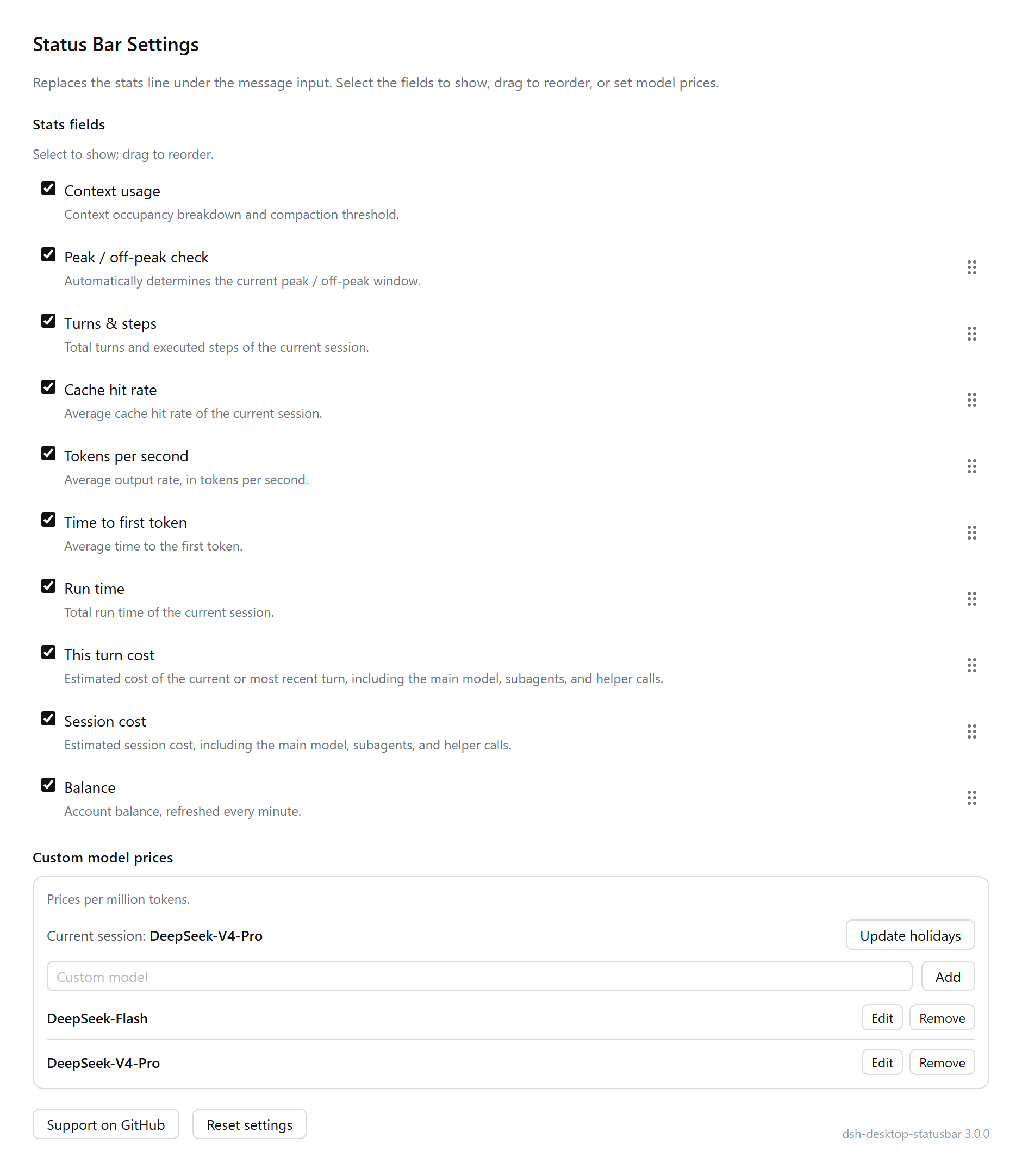
- **Context occupancy**: the ring at the head of the bar — progress shows the share of context used, the gap marks the compaction threshold, and the colour shows the run state (idle-grey / running-green / sub-agent running-blue / deeper sub-agent running-purple / error-red / pending approval-yellow)
- **Stats fields**: ticking controls visibility only, so unticking hides a field without moving it; drag the handle on the right to reorder; "Reset settings" restores the factory order
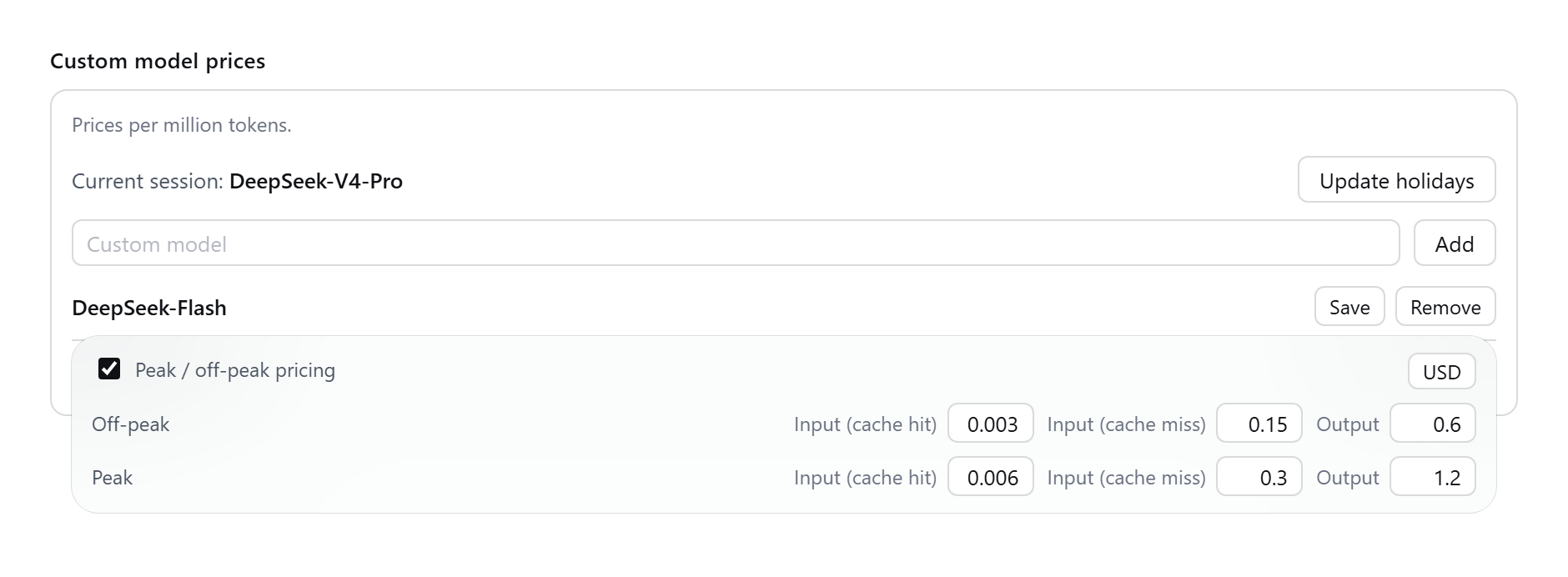
- **Custom model prices**: enter a model name and "Add" to create an entry; "Edit" opens the editor and changes are written on save; tick "peak / off-peak pricing" to split by time of day, otherwise a flat all-day price applies
- **Currency**: CNY or USD in the top-right corner of the editor. Switching replaces the two built-in models with that currency's official reference prices (edited entries are kept) and changes the symbol in the cost fields; the balance follows the currency reported by the API
- **Holidays**: automatically fetch and write next year's schedule after December 31 each year
- **Balance**: refreshed once a minute
### Billing rules
Peak hours are **09:00–12:00 and 14:00–18:00 Beijing time, Monday to Friday**, and off-peak rates are half the peak rates; Chinese public holidays and weekends are billed off-peak all day (matching the [official docs](https://api-docs.deepseek.com/quick_start/pricing), checked 2026-09).
## Relay balance query
When the status bar queries a balance, it selects the query method based on **the platform actually used by the current session**, covering two cases: automatic matching and manual configuration.
### 1. Automatic matching
When the relay is configured as an ordinary provider on the DSH **Models** page (with a baseURL and an API key), the plugin uses that key to probe the following common balance endpoints concurrently; if any parseable endpoint responds, the balance is shown with no extra configuration:
- `/v1/usage`
- `/v1/user/self`, `/api/user/self`, `/api/v1/user/self`
- `/api/usage`
- `/v1/dashboard/billing/credit_grants`
- `/v1/credits`
If the site's balance endpoint follows one of the standard forms above and can be read with `Authorization: Bearer `, the balance is shown automatically.
### 2. Manual configuration
In any of the following cases, you must add a platform entry under **Settings → Status bar → Custom model prices → Platform** and fill in the endpoint and credentials:
- the provider has no baseURL configured on the **Models** page;
- the balance endpoint or authentication scheme is not a standard form (for example, New API requires an extra user ID request header);
- the endpoint's response structure cannot be parsed automatically.
The fields are defined as follows:
| Field | Description | Example |
| --- | --- | --- |
| Request header | Name of the request header used for the user ID; token authentication always uses `authorization: Bearer` and needs no entry | `New-Api-User` |
| User ID | The user identifier for the above request header | `12345` |
| Token | New API: enter the “access token” (the system access token in personal settings); Sub2API: enter the “login token”; ordinary relay: enter the `sk-` key used for model calls | `sk-...` |
| Balance endpoint | Full URL of the balance endpoint | `https://example.com/api/user/self` |
| Balance field | Currency symbol, field path and divisor, in the form ` / ` | `$data.quota / 500000` |
| Applicable models | Models belonging to this platform | — |
| Cost multiplier | Pricing multiplier, default 1 | `1` |
#### Example 1: New API-compatible site
- Balance endpoint: `https://example.com/api/user/self`
- Balance field: `$data.quota / 500000` (this site counts 500000 quota as 1 CNY)
- Token: the access token generated in personal settings (not a model-call key)
- Request header: `New-Api-User`; User ID: the account user ID
#### Example 2: Sub2API site
Sub2API sites commonly expose the balance endpoint in one of the following two forms; choose according to the site:
- Supports OpenAI-compatible `GET /v1/usage` (authenticated with the `sk-` model key): usually matched automatically, with no manual configuration; if not matched, set the token to that `sk-` key and the balance endpoint to `https://example.com/v1/usage`.
- Only a console endpoint is available (the endpoint is under `/api/v1/*` and requires a console login session): set the balance endpoint to the site's console balance endpoint (as actually provided by the site), and **set the token to the “login token”** (the access credential obtained after console login, not a model-call key); fill in the balance field according to the endpoint's response structure.
#### Example 3: OpenAI-compatible relay with a single key
- Token: the `sk-` key used for model calls
- Usually matched automatically; if not matched, add the balance endpoint and balance field (such as `$balance` or `$data.balance`).
> Note: if the balance endpoint is left empty, the platform's balance is not queried, but it still takes part in billing by cost multiplier.
## Known limitations
- Fastest / slowest TTFT and speed come from a new host-side projection: **you must fully quit and restart DSH** before it starts collecting
- A model with no price is not billed; adding the price back-fills its earlier calls
- One-click update relies on `pnpm`: the desktop app uses the copy bundled with the host, while CLI / web usage needs `pnpm` on the system. If neither is found, the update says so explicitly **and logs every location it tried**; you can also point it at a specific command with the `DSH_DESKTOP_STATUSBAR_PNPM` environment variable
## Permissions & external access
The plugin reads session logs and local config to compute usage, balance and cost, and supports one-click self-update, so it is a **high-privilege plugin**. Below is the real permission boundary (matching the `lib/` code). Please review it before installing.
### Files
| Path | Purpose | Notes |
| --- | --- | --- |
| `/dsh-status-bar/usage-ledger.json` | Local usage ledger, back-filled from history on startup | Writes only inside the plugin's own directory |
| `/dsh-status-bar/holidays.json` | Public-holiday cache | Written during automatic holiday updates in the background |
| `/dsh-status-bar/exchange-rate.json` | Daily exchange-rate cache | Written when exchange rates are refreshed in the background |
| `/dsh-status-bar/tip-diag.log` | Diagnostic log | Records tooltip-positioning diagnostics to help troubleshoot |
| `/dsh-status-bar/relay-balance.json` | Relay balance config (no plaintext secret) | Plugin directory |
| `/sessions` | Read session logs to compute token / cost stats | Read-only |
| `/.credentials.yaml` | Reads API keys by refs only when neither the credentials service nor env vars provide one | Read-only |
| Profile `package.json` / `pnpm-lock.yaml` / `pnpm-workspace.yaml` | Backed up and written back during one-click self-update | Only when you click "one-click update" |
### Network
Requests are made only to show balance, exchange rates, public holidays or check for updates; all except the local loopback 127.0.0.1 use HTTPS, and they fail quietly on timeout without blocking the other status-bar fields.
| Domain | Purpose |
| --- | --- |
| `api.deepseek.com` | DeepSeek account balance |
| `openrouter.ai` | OpenRouter credits |
| `api.siliconflow.com` / `api.siliconflow.cn` | SiliconFlow account info |
| `api.moonshot.ai` / `api.moonshot.cn` | Moonshot balance |
| `open.bigmodel.cn` / `api.z.ai` | Zhipu quota |
| `api.b.ai` | B.AI balance |
| `api.xiaomimimo.com` | Xiaomi MiMo balance |
| `api.stepfun.com` / `api.stepfun.ai` | StepFun account balance (China / International) |
| `www.minimax.cn` | MiniMax Token Plan quota |
| `management-api.x.ai` | xAI team balance |
| `business.aliyuncs.com` | Alibaba Cloud BSS account balance |
| `open.er-api.com` | CNY exchange rate |
| `sousuo.www.gov.cn` | Automatic public-holiday updates |
| `registry.npmjs.org` | Version check (self-update) |
| `127.0.0.1` (loopback) | Host web port / local adapters |
Leaving a platform's balance URL empty means it is not queried, and does not affect billing.
### Credentials
- Uses the host credentials service `ctx.credentials` first (the authoritative source written by the models page); if unavailable it falls back to environment variables (e.g. `DEEPSEEK_API_KEY` and each adapter's refs name), then to the refs section of `/.credentials.yaml`.
- API keys are **only used to query that platform's balance**; they are never uploaded elsewhere, logged, or written to the ledger.
- The settings page shows tokens as dots with select-to-copy; `GET /dsh-desktop-statusbar/api/relay-balance-config` returns the same-origin token to the frontend. That endpoint is loopback-only (Host / Origin / remoteAddress checks) and never leaves the machine.
### Commands
- `pnpm` is invoked only when you click "one-click update": it prefers the pnpm bundled with the host (e.g. `runtime/primary-runtime/dependencies/pnpm/bin/pnpm.mjs`), falling back to the system `pnpm`; you can point it with the `DSH_DESKTOP_STATUSBAR_PNPM` environment variable.
- On failure the update restores the Profile backup and shows the reason; if pnpm is not found it reports explicitly and logs every location tried.
### Failure boundaries
- No credentials: that platform's balance shows "—"; other fields keep working.
- Network failure / timeout: only that balance or rate is affected; other stats are unaffected.
- pnpm not found: one-click update errors explicitly instead of failing silently.
- Self-update failure: the Profile's `package.json` / lockfile backup is restored.
### Known risks
- High-privilege plugin (file read/write + network + credentials + commands) — please decide whether to install after understanding the permission scope.
- When external balance services are unavailable the related numbers are missing or stale.
- One-click self-update needs write access to the Profile directory.
## Development
Every test is a standalone script meant to be run with plain node — no test framework.
```powershell
npm test # runs every verify*.js/.mjs under tests/, then checks project vs installed plugin dir
npm run sync # copies lib/ into the installed plugin dir
```
Development scripts under `tools/` ship with the package (the `files` field includes them),
so both a git clone and an npm install get them:
| Script | Purpose |
|---|---|
| `tools/test.cjs` | full test run + consistency guard |
| `tools/sync-to-plugin.cjs` | project `lib/` → installed plugin dir |
| `tools/sync-from-plugin.cjs` | installed plugin dir → project `lib/` |
| `tools/plugin-dir.cjs` | locates the plugin dir |
| `tools/shot.cjs` | regenerates the README screenshots |
They are only used while developing; the plugin never loads them at runtime.
The npm package includes `tests/` and `tools/`, so an installed copy can run `node tools/test.cjs` directly
(full test run + consistency guard).
The plugin directory is located automatically: environment variable `DSH_STATUS_BAR_PLUGIN_DIR` →
known layouts under `~/.dsh` (`local-plugins/`, each `profiles/*/node_modules/`) → derived from the
`tools/` location. No code changes needed when switching machine or user name.
## Licence
[MIT](LICENSE): free to use, modify and redistribute; keep the copyright and licence notice.