# FlareMo 🔥

Zero Servers · Zero Upkeep · 24/7 Global Edge Uptime · Absolute Data Ownership
For individuals: a quiet, focused thought capture space and second brain. For teams: a shared space to publish notes to each other, with fine-grained roles.

English • 简体中文 • 日本語 • Français • Español • 한국어 • Русский • العربية

GitHub stars License Cloudflare Workers Memos Compatible Better Auth Website

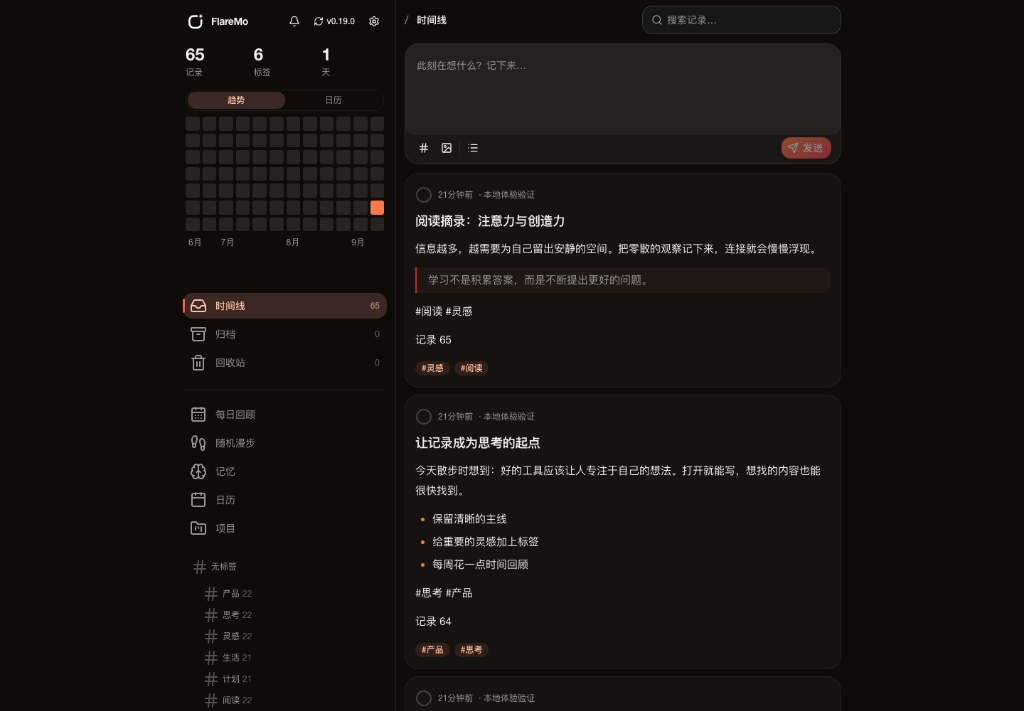
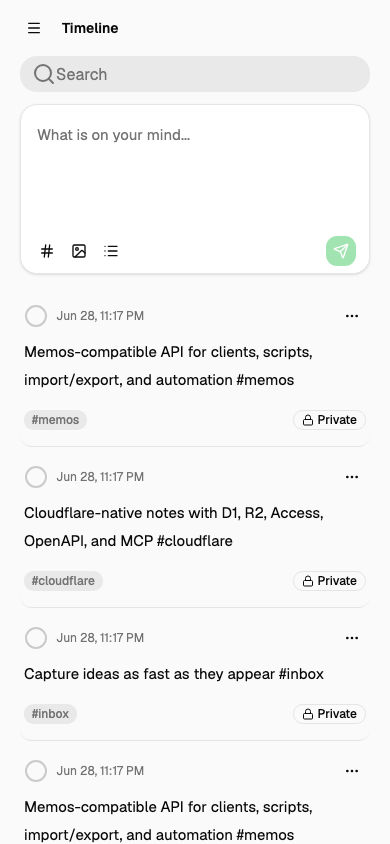
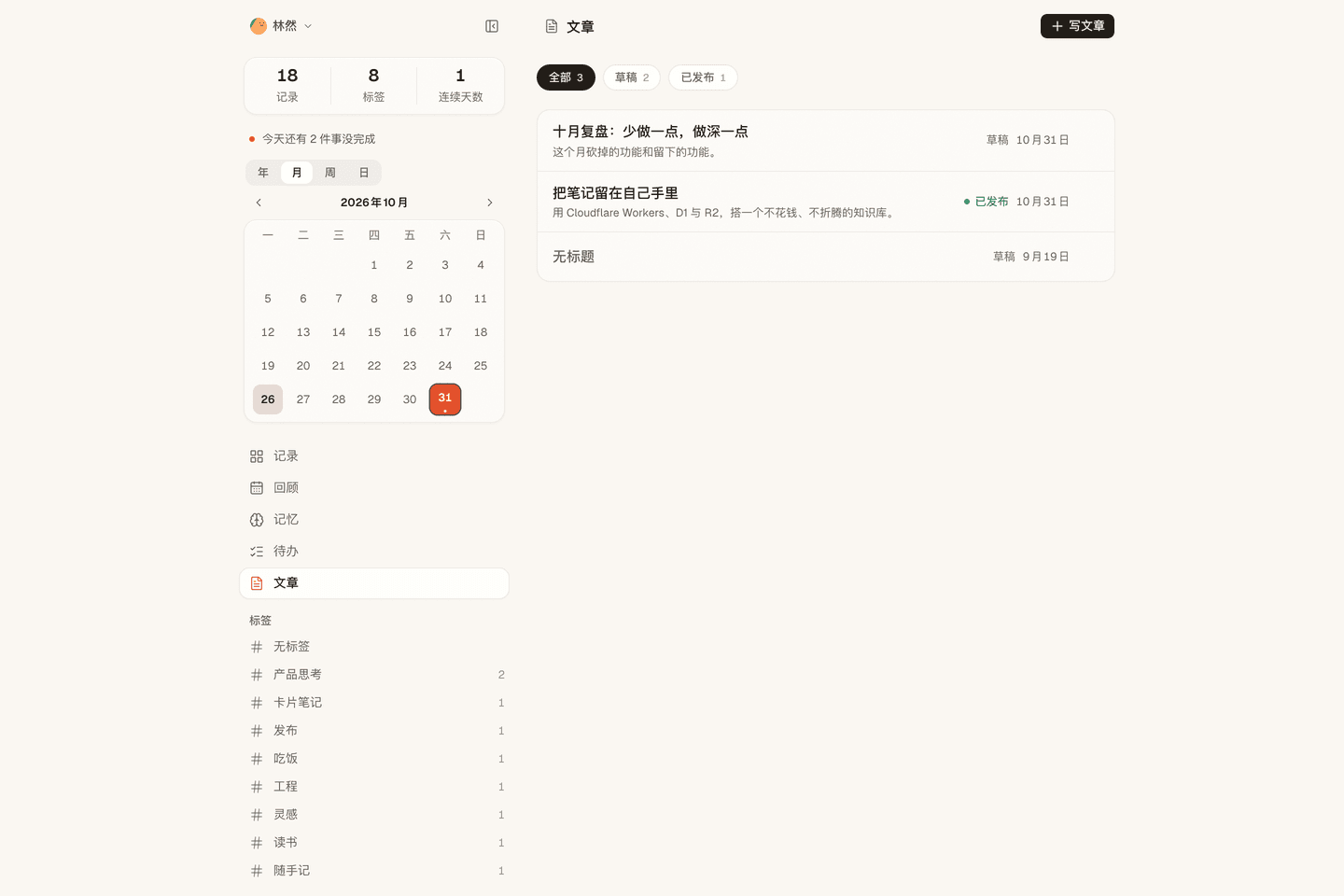
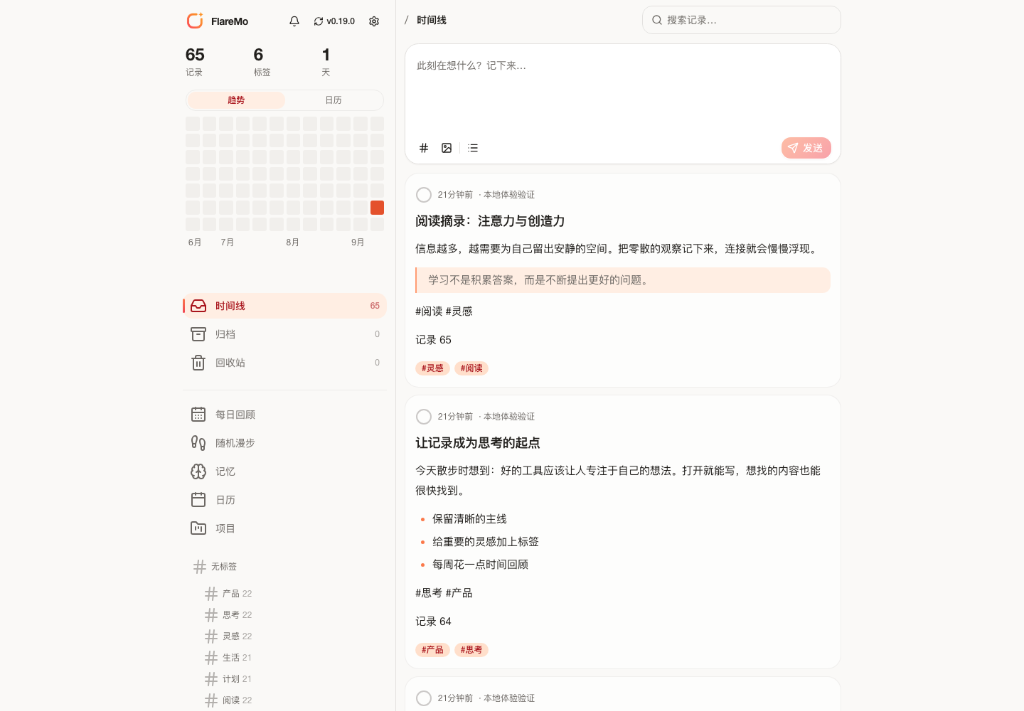
| ☀️ Desktop · Light Theme | 🌙 Desktop · Dark Theme | 📱 Mobile · Responsive | | :---: | :---: | :---: | | FlareMo Desktop Light Mode | FlareMo Desktop Dark Mode | FlareMo Mobile Mode | | ✅ To-dos, projects and review | 📄 Articles you can publish | | :---: | :---: | | To-dos, projects and review | Articles you can publish | Actual live screenshots: seamless light/dark mode switching and full-featured mobile responsiveness. Every feature shown is wired to working backend capabilities.
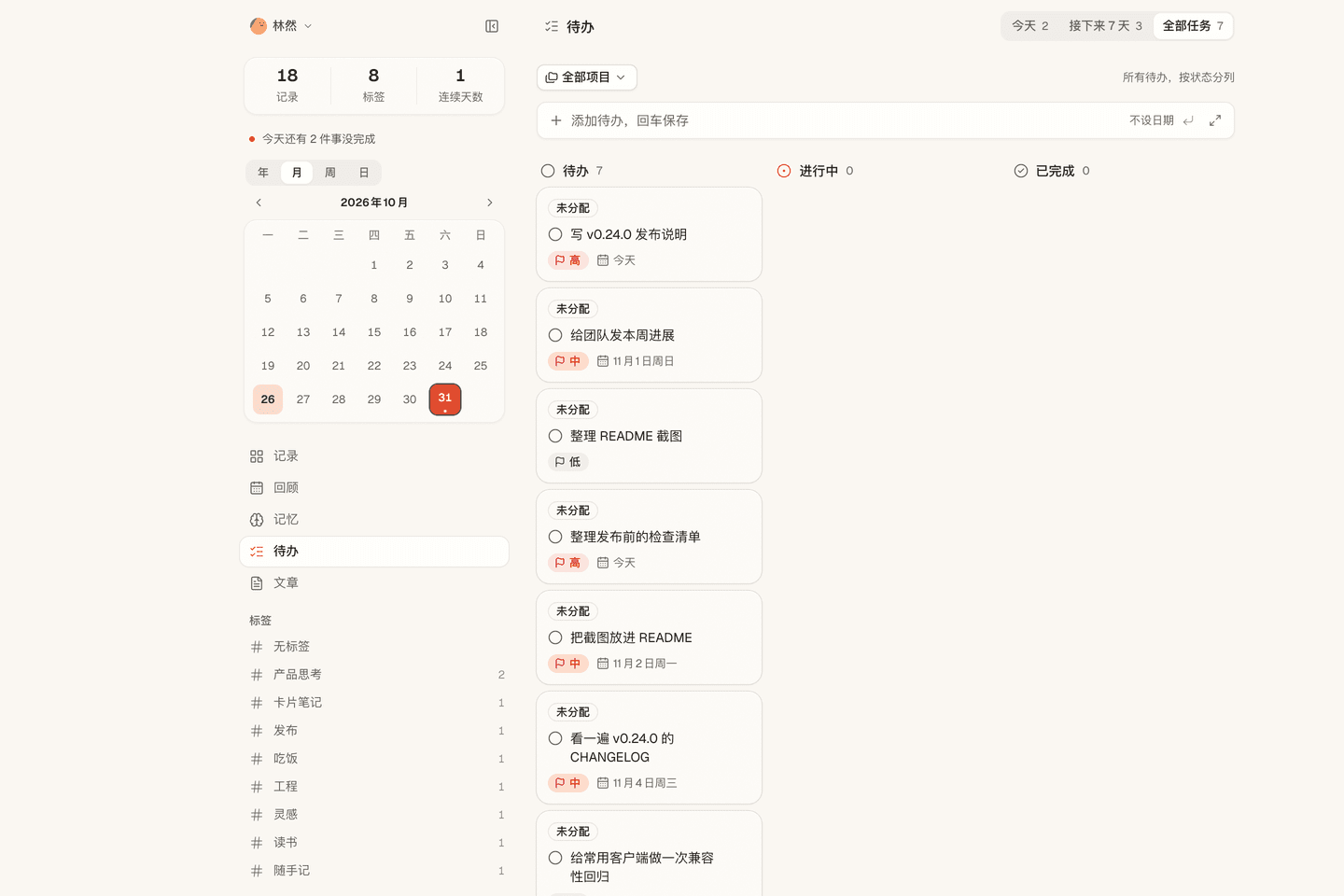
--- ## 💡 Why FlareMo? Low-friction memo capture and a distraction-free timeline have proved their value. Self-hosting a traditional note-taking setup, though, typically means paying for a VPS, configuring Docker and PostgreSQL, scripting automated backups, and dreading disk or hardware failures. FlareMo answers a simpler question: **Can you get a 24/7 online, resilient, globally accelerated knowledge base with zero server maintenance, using just a free Cloudflare account?** - **Truly Serverless**: Both code and static assets run on Cloudflare Workers edge nodes near you with millisecond latency. - **Enterprise-grade durability out of the box**: Cloudflare D1 handles notes and metadata; Cloudflare R2 stores media attachments with multi-region replication. - **AI-Native Second Brain**: Agent Memory hub ships a CLI and a cross-agent skill so AI agents (Claude, Cursor, Codex, ChatGPT, ZCode) can read and update your long-term preferences and memory scopes; MCP endpoints are also available. - **Quiet for one, powerful for many**: Default is an encrypted, private single-user sanctuary. Enable team mode to add a shared team space with roles and three-tier visibility — for sharing notes, not for running projects together. - **Minimal, not simplistic**: The interface stays quiet and every control earns its place — nothing decorative shouting for attention, nothing useful missing. --- ## ✨ Key Features ### 1. Instant Capture & Inspiring Review - **Capture in milliseconds**: Card-style timeline, tags, Markdown/GFM, and previews for image and audio attachments. - **Notes and articles**: The composer stays a quick note (tags, up to 9 images, bold, lists, to-dos); "Write full screen" opens the same note in a full-screen canvas. Articles are written from the Articles page. - **Comments under the note**: Comment on any note, in your personal space or the team space, Weibo-style. Comments live under the original note and stay out of the timeline, search, stats, tags, and review. - **Lightning-fast search**: SQLite FTS5 full-text indexing with query operators (`has:attachment`, `is:pinned`, `before:YYYY-MM-DD`, `after:YYYY-MM-DD`, `in:timeline|archive|trash`). - **Semantic "Find" (Vector Search)**: Workers AI embeddings paired with Vectorize derived vector indexes for contextual recall; re-verifies permissions against D1 and seamlessly falls back to FTS5. - **Thought activation**: Built-in **Daily Review** (on this day), **Random Walk** (wandering through tag and backlink graphs with postcard summaries), and related note recommendations. - **Revision history**: Full version diffs and one-click historical restore. ### 2. AI Long-term Memory (CLI + Skills) - **Agent Memory**: Ships `flaremo` CLI and the `flaremo-memory` skill — agents record and update cross-session long-term memory (preferences, project decisions, constraints, lessons) through a shared REST base. - **Human in the loop**: Review, verify, lock, or correct AI-recorded memories at `/memory`. - **Open ecosystem**: CLI + Skills are the recommended path; `/memory/mcp` (Streamable HTTP MCP) and `/mcp` endpoints are available for existing MCP clients. ### 3. To-dos & Projects - **Schedule a note**: Pick a day and a project for a note; each unchecked to-do in it becomes a task. Checking it off in the note or on the to-do page stays in sync both ways. - **One to-do page**: `/projects` shows **Today**, **Next 7 days**, and **All tasks** as day-grouped lists, plus your projects as kanban boards (drag between status columns, priorities, manual order). Every list has a quick-add row. - **Personal by design, reversible deletion**: Tasks belong to a single owner; deleting moves them to a recycle bin until restored or automatically purged. ### 4. Reminders & Time Horizons - **Badges where you read**: Scheduled notes show "to-dos n/m · date · project" on the card, and Daily Review opens with today's to-dos. - **Time horizons at a glance**: The explorer home view pairs a mini month calendar with overdue/today reminders, so what's due never hides behind the board. - **Due and overdue reminders**: A daily job raises "due today" and overdue notifications in the app, with optional browser Web Push. Schedules are day-level; there are no clock-time alarms. ### 5. Team Space & 3-Tier Visibility - **Sharing, not collaboration**: The team space is where members publish notes to each other and comment on them. `@username` mentions autocomplete in the team composer and notify the person mentioned; notifications open the original note at its comments. - **Role governance**: `owner`, `admin`, and `member` roles. Admins invite members via one-time activation links (members choose their own passwords; admins never handle plaintext credentials). - **3-tier visibility**: - 🔒 **Private**: Only author can view. - 👥 **Team**: Shared read-only with active team members. - 🌐 **Public**: Anonymous read-only via time-limited share links. - **Safe offboarding**: Removing a member triggers reliable background cleanup that purges private data while preserving team and public notes. - **Reader seats**: Grant a time-boxed read-only seat — guest readers, course cohorts, client delivery. Seats lapse automatically at their expiry (fail-closed at credential resolution, no cron needed). Manage them from the members page, or provision by email through `PUT /api/app/admin/team/reader` with a Personal Access Token (see `docs/team-mode.md`). ### 6. Offline First & PWA Experience - **Installable PWA**: Install to macOS, Windows, iOS, or Android home screen with native feel. - **Reliable offline sync**: Drafts save locally instantly. Offline submissions and uploads queue up and replay automatically when connectivity is restored. - **Live voice input**: The composer's microphone button streams speech-to-text (ASR) into the draft as you speak. ### 7. Secure Better Auth Application Security - **Better Auth powered**: HttpOnly, `SameSite=Lax` browser cookie sessions; revocable `memos_pat_` Personal Access Tokens for scripts, CLI, and MCP. - **Strict Origin protection**: State-changing requests enforce exact origin whitelisting. Cloudflare Access remains available as an optional outer defensive perimeter. ### 8. Memos Compatibility & Seamless Migration - **Memos `/api/v1` compatibility**: Provides core Memos API endpoints (camelCase default, legacy snake_case via header) and OpenAPI schema. - **Third-party apps ready**: Works directly with mobile clients like Moe Memos. - **Bi-directional import & export**: Full raw export bundles, one-click import with conflict strategies, plus a converter for Memos 0.31 exports ([guide](./docs/en/import-from-memos.md)). --- ### 9. Plugin System: Cards as Plugins - **Five built-in cards**: Plain, Daily, Ticket, Postcard, plus a canvas-drawn Postmark demo. - **Store and curation**: browse directories, one-click install (SHA-256 verified), enable/disable, reorder, set the default, hide — all in account settings. The official directory lives at [flaremo.app/plugins](https://flaremo.app/plugins/registry.json). - **Upload your own**: admins can install a local package — it exists only on that instance and is never sent anywhere. - **Authoring tools**: `pnpm plugin:new` scaffolds, `pnpm plugin:check` validates with the **exact rules instances enforce on install**, `pnpm plugins:build` packages. Document cards are pure JSON layouts; sandbox cards run your own HTML/CSS/JS. See the [plugin guide](./docs/en/plugins.md). - **Safe by default**: cards run in an opaque-origin sandbox with **no network access**; community and brand packs stay off until an admin enables them. ## 📊 How Generous Is Cloudflare's Free Tier? Many assume "free" means "severely limited". For text-heavy personal knowledge bases, Cloudflare's free quota is virtually inexhaustible: | Resource | Free Tier Quota | Equivalent Capacity | Practical Lifespan | | :--- | :--- | :--- | :--- | | **Cloudflare D1** | **5 GB database** | ~**2.5 Million** text memos | Writing 100 memos daily would take **68 years** to fill | | **Cloudflare R2** | **10 GB storage** | ~**5,000–10,000** photos / **80 hours** of voice | **$0 egress fees**; public sharing won't trigger bandwidth bills | | **Cloudflare Workers** | Generous free request limits | 300+ global edge locations | Millisecond latency worldwide without cold boots | --- ## 🥊 Comparison: Cloudflare Native vs Home NAS vs Traditional VPS | Dimension | Cloudflare Native (FlareMo) | Home NAS / Mini PC | Traditional VPS | | :--- | :--- | :--- | :--- | | **Data Durability** | **Enterprise multi-region replication**, zero hardware failure risk | Single drive failure or power outage can cause total data loss | Dependent on manual snapshot & backup routines | | **Maintenance** | **Zero**: No OS patching, no Docker compose, no DB maintenance | OS updates, Docker upkeep, SMART disk alerts, router configs | Kernel upgrades, security patches, watchdog daemons | | **Access Latency** | **Global edge CDN**, sub-100ms response anywhere | Requires DDNS / frp / Tailscale tunnels, constrained by home uplink | Dependent on single cloud region; high cross-border latency | | **SSL & Domains** | **Automated HTTPS** & custom domain bindings | Manual certificate issuance, reverse proxy configuration | Nginx / Caddy config & Let's Encrypt renewal maintenance | | **Financial Cost** | **$0 / month** on free tier | High upfront hardware cost + ongoing electricity | Ongoing monthly / annual server & bandwidth bills | --- ## 🚀 5-Minute Quick Deployment ### Method 1: One-click Deploy to Cloudflare [![Deploy to Cloudflare](https://deploy.workers.cloudflare.com/button)](https://deploy.workers.cloudflare.com/?url=https://github.com/realchendahuang/FlareMo) Clones the repository into your GitHub account and provisions D1, R2, Queues, and Vectorize automatically. After the initial deploy, set `FLAREMO_PUBLIC_URL` and secrets (see [docs/en/deploy.md](./docs/en/deploy.md#one-click-deploy-community-supported)). If the first attempt reports "Github API Limit Exceeded", wait a few minutes and retry. ### Method 2: GitHub Action (self-hosted fork) On your fork, run **Deploy to Cloudflare** from Actions to provision resources, publish the Worker, and sync auth secrets. Pushes do not publish. See [docs/en/github-action-deploy.md](./docs/en/github-action-deploy.md). ### Method 3: Deploy with an AI Agent (Recommended) Give the repository to an agent capable of executing terminal commands (e.g. Claude Code, Cursor Agent, Codex) along with [docs/en/agent-deploy.md](./docs/en/agent-deploy.md): > "Please deploy FlareMo to my Cloudflare account following docs/en/agent-deploy.md." --- ### Method 4: Manual 3-Step Deployment #### 1. Create Cloudflare Resources ```bash pnpm exec wrangler whoami pnpm exec wrangler d1 create flaremo pnpm exec wrangler r2 bucket create flaremo-attachments ``` Or run `pnpm provision:remote` instead: it creates the missing D1 / R2 / Queue / Vectorize resources and writes the D1 `database_id` into `wrangler.jsonc` for you. It is idempotent — existing resources are skipped. #### 2. Configure Settings & Secrets ```bash cp wrangler.jsonc.example wrangler.jsonc ``` Fill in the generated `database_id` and set `FLAREMO_PUBLIC_URL` to your production domain. Then set secrets: ```bash pnpm exec wrangler secret put BETTER_AUTH_SECRET --config ./wrangler.jsonc pnpm exec wrangler secret put FLAREMO_BOOTSTRAP_SECRET --config ./wrangler.jsonc ``` #### 3. Deploy ```bash pnpm deploy:dry-run pnpm deploy ``` (The full `pnpm verify` gate runs only when the maintainer explicitly asks for it.) Visit your production domain at `/setup` and enter the `FLAREMO_BOOTSTRAP_SECRET` to initialize your Owner account. Detailed guides: [Deployment Guide](./docs/en/deploy.md) · [GitHub Action deploy](./docs/en/github-action-deploy.md) · [Update Guide](./docs/en/update.md). --- ## 🧱 Architecture & Tech Stack ```mermaid flowchart LR Browser["FlareMo Web UI (React 19 / PWA)"] --> Worker["Cloudflare Worker"] Clients["Memos Clients / Scripts / MCP"] --> Worker Worker --> Auth["Better Auth (Session / PAT)"] Worker --> D1["Cloudflare D1 (Memos / Relations / Settings)"] Access["Cloudflare Access (Optional Outer Perimeter)"] -.-> Worker Worker --> R2["Cloudflare R2 (Attachments & Exports)"] Worker --> Assets["Workers Static Assets"] ``` - **Runtime**: Cloudflare Workers - **Frontend**: React 19, Vite, TanStack Router, Tailwind CSS 4, Radix UI - **Database**: Cloudflare D1, Drizzle ORM - **Storage**: Cloudflare R2 - **Auth**: Better Auth (HttpOnly cookie session + revocable `memos_pat_`) - **AI & Search**: Workers AI, Vectorize, SQLite FTS5 - **Plugins**: slot-based extension platform ([standard](./docs/plugin-platform-standard.md), [guide](./docs/en/plugins.md)); packages live in R2, sandboxed cards run without network access --- ## 🌟 Star History [![Star History Chart](https://api.star-history.com/svg?repos=realchendahuang/FlareMo&type=Date)](https://star-history.com/#realchendahuang/FlareMo&Date) --- ## 📄 License Open-sourced under the [GNU AGPL-3.0](./LICENSE) license. Copyright (c) 2026 realchendahuang.