The Agentic OS for any hardware
Open Reality gives your AI agent the ability to use any hardware. Vision + Action.







Website ·
Get started ·
Things you can ask ·
Self-host ·
MCP docs ·
Contributing
---
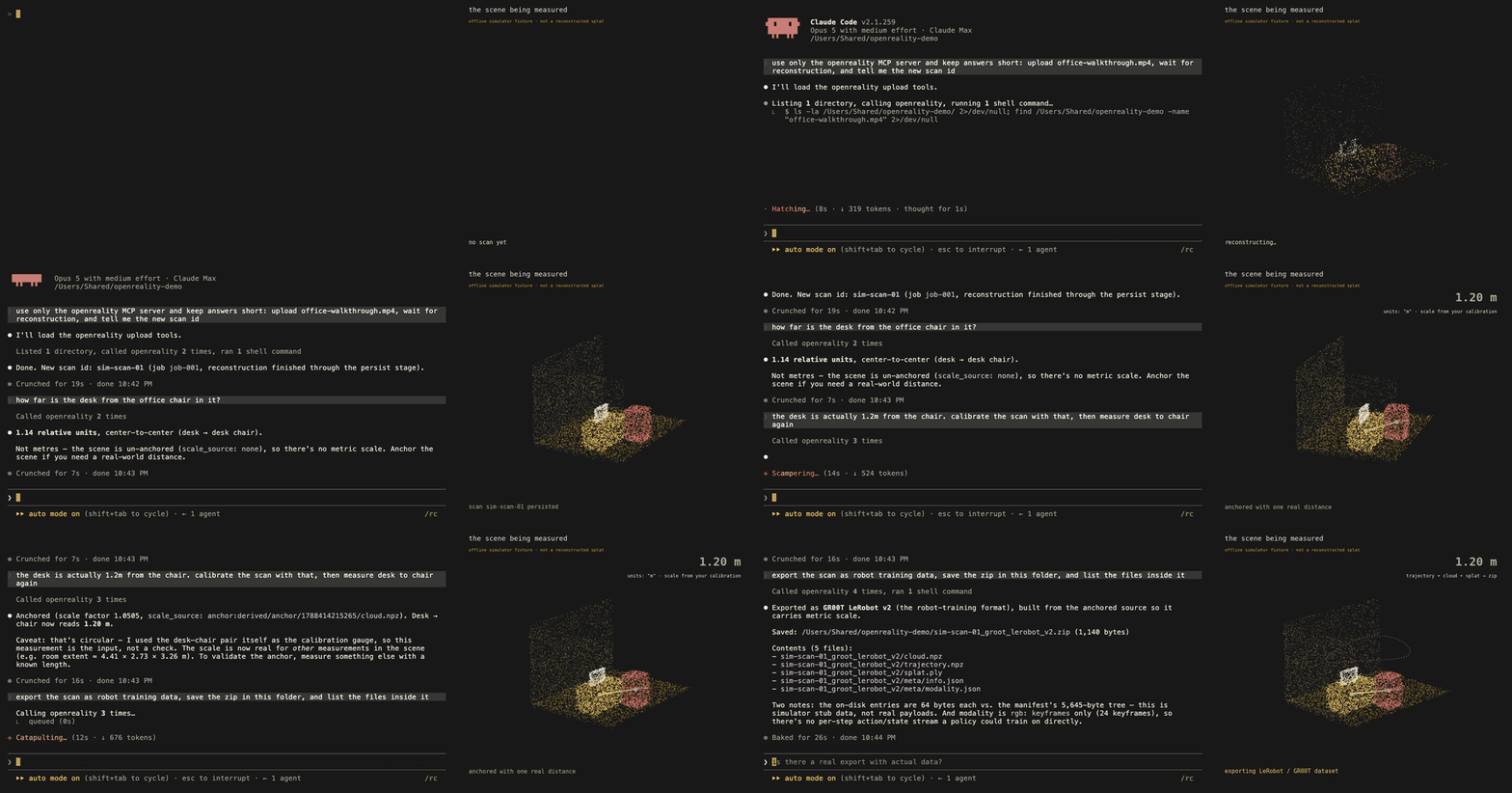
Demo v1: a real Claude Code (Opus) session against the built-in offline simulator, beside a synchronized scene panel. Video: docs/demo/demo-video-v1.mp4. Rendered from docs/demo/ with VHS.

Live reconstruction from a handheld video: the camera path and the 3D scene build up together. Scan demo and the initial technical idea: VGGT-SLAM by Dominic Maggio, Hyungtae Lim and Luca Carlone (MIT SPARK Lab). Open Reality's reconstruction core builds on their work.
## Utilities
| | |
|---|---|
| 🎥 **Video in, 3D scene out** | Upload a phone video. A few minutes later you have a persistent 3D scene. |
| 📏 **Measurement** | Distances and angles between any points. Numbers are only called metres after you calibrate with real distance; otherwise relative.|
| 🧭 **Path planning** | Plan a route through the scanned free space to an object or a point. |
| 🤖 **Robot-training exports** | Turns a scan into LeRobot / GR00T style datasets or an Isaac Sim scene (hosted service). |
| 🕵️ **Scene agents** | Server-side agents that survey, label, and answer questions about a scene. |
| 🛠️ **41 tools for your AI** | Everything is exposed through MCP. |
| 🧪 **Offline simulator** | A mock backend fakes the entire workflow with fixture data, so you can develop and demo with no account and no GPU. |
| 🏠 **Self-hostable** | The full server runs on your own GPU box or your own Modal account, no account with us needed. |
## Quickstart
Add the tools to your AI assistant:
```bash
claude mcp add openreality -- npx -y openreality-mcp serve
codex mcp add openreality -- npx -y openreality-mcp serve
```
Claude desktop / Cursor (click to expand)
Add this to `claude_desktop_config.json` (Settings → Developer → Edit Config)
or `~/.cursor/mcp.json`:
```json
{
"mcpServers": {
"openreality": {
"command": "npx",
"args": ["-y", "openreality-mcp", "serve"]
}
}
}
```
Claude Code plugin / Claude desktop one-click extension (click to expand)
Claude Code plugin (the MCP server plus the workflow skill in one step):
```
/plugin marketplace add reality-opened/openreality
/plugin install openreality@openreality
```
Claude desktop extension: download `openreality-mcp-.mcpb` from the
[latest release](https://github.com/reality-opened/openreality/releases/latest)
and double-click it, or drag it into the Claude desktop window. No terminal needed.
Then sign in once (opens your browser, stores a revocable API key on your machine):
```bash
npx -y openreality-mcp login
```
Scan a room with your phone at [open-reality.io](https://open-reality.io), or just ask
your assistant to upload a video file. Full per-client setup:
[open-reality.io/mcp](https://open-reality.io/mcp).
## Examples
Once connected, talk to your assistant like this:
> "Upload `~/Videos/kitchen.mp4` and reconstruct it."
> "What objects are in my latest scan, and how big is the room?"
> "The counter edge to the window is 2.4 m. Calibrate the scene, then measure the couch."
> "Plan a path from the door to the desk and describe it."
> "Export this scan as robot-training data and save the zip locally."
## Self Hosting
The whole workflow is self-hostable. Read
[`server/docs/self-hosting.md`](server/docs/self-hosting.md); the short version:
```bash
git clone https://github.com/reality-opened/openreality
cd openreality/server
# Path A: your own GPU box (one process, local disk)
python -m server.selfhost --data-dir ~/openreality-data
# Path B: your own Modal account (CPU web server + GPU worker)
modal deploy modal_selfhost.py
```
Self-hosted servers need no account: a single token printed at first start is
your login, and the MCP client connects with `OPENREALITY_URL` plus that token.
> [!IMPORTANT]
> **Licensing.** This repo is BSD-2-Clause, but the 3D reconstruction model a
> self-hosted server downloads (VGGT-1B and the VGGT code it runs on) is
> licensed by its owners as **CC BY-NC 4.0, non-commercial use only**. Nothing
> here redistributes it; your server fetches it from the source under their
> terms. For commercial use, use the hosted service (which runs a commercially
> licensed model) or get your own license from the model owners.
## Repo index
| Directory | What it is | Ships as |
|---|---|---|
| [`mcp/`](mcp/) | The MCP server: 41 tools, scene resources, the offline simulator, and a full test suite. Developed here directly. | npm [`openreality-mcp`](https://www.npmjs.com/package/openreality-mcp) |
| [`server/`](server/) | The backend: turns videos into persistent scenes and serves measurement, planning, agents, and exports over a plain REST API. | source (public mirror) |
| [`core/`](core/) | The 3D reconstruction library: camera tracking and dense geometry from ordinary video (the VGGT-SLAM 2.0 line), plus metric calibration, object detection, and splat export. | source (public mirror) |
`server/` and `core/` are curated mirrors of our private working repos, synced
by hand; each carries a `MIRROR.md` that says exactly what is included and how
it is synced. `mcp/` is developed in this repo directly.
## Technical details
```mermaid
flowchart LR
A["📱 phone video"] --> B["server: 3D reconstruction
(GPU job)"]
B --> C[("persistent scene:
geometry + objects + report")]
C --> D["41 MCP tools"]
D --> E["🤖 Claude / Codex / Cursor"]
E -->|"measure · navigate · export"| D
```
The MCP process always runs on your machine and holds your credentials; every
tool call is a typed REST call to a server (ours or yours). Big files are
written to your disk, never pasted into the AI's context. Server refusals and
uncertainty labels reach the AI unedited, so it cannot pretend a relative
number is metres.
The measurement rule is explained in
[Why our 3D tools refuse to say "metres" until you prove it](docs/posts/relative-units-are-not-metres.md).
## 🙏 Acknowledgements
Open Reality stands on other people's research and code. Thank you to:
- [VGGT-SLAM](https://github.com/MIT-SPARK/VGGT-SLAM) by Dominic Maggio, Hyungtae Lim and Luca Carlone (MIT SPARK Lab). The reconstruction core in `core/` is the VGGT-SLAM 2.0 line, and the scan demo above is theirs.
- [VGGT](https://github.com/facebookresearch/vggt) (Meta AI), the feed-forward 3D backbone a self-hosted server fetches under its own licence (see the note above).
- [Depth Anything V2](https://github.com/DepthAnything/Depth-Anything-V2), the metric-depth model behind our scale-drift correction between map segments.
- [gsplat](https://github.com/nerfstudio-project/gsplat) from the Nerfstudio project, the optional GPU refinement in our splat export.
- [SAM 3](https://github.com/facebookresearch/sam3) (Meta AI) for segmentation, and SAM 3D Objects and [TRELLIS](https://github.com/microsoft/TRELLIS) (Microsoft) for object completion and variants on the hosted service.
- [LeRobot](https://github.com/huggingface/lerobot) (Hugging Face), NVIDIA [GR00T](https://github.com/NVIDIA/Isaac-GR00T) and Isaac Sim, whose dataset and scene formats our robot-training exports target.
- [GTSAM](https://github.com/borglab/gtsam) for factor-graph optimization, [cordis](https://github.com/cordiverse/cordis) for the plugin runtime, and the [MCP TypeScript SDK](https://github.com/modelcontextprotocol/typescript-sdk).
## 🤝 Contributing
Issues and pull requests are welcome on any component. Changes to `mcp/` land
here directly; fixes to `server/` and `core/` are folded back into the private
working repos and re-synced out. If you self-host and something breaks, an
issue with your logs is a gift: the self-host paths are young.
## License
[BSD-2-Clause](LICENSE) for everything in this repository. Third-party models
are fetched from their owners under their own licenses (see the licensing note
above and [`server/docs/self-hosting.md`](server/docs/self-hosting.md)).
---
Built by reality-opened · open-reality.io