Fast, quiet notes that live on your computer.
A native notes app built with Rust + GPUI: real folders, Markdown that formats itself, and a whiteboard inside your notes. Free and open source.
> [!NOTE]
> Quiet.md is in **beta** and changing quickly. If you hit a bug or have an idea, please [open an issue](https://github.com/s1dashu/quiet-md/issues) — or better, send a pull request.
## Why Quiet.md
**📁 Your notes are just files.** No account, no cloud, and nothing goes over the network by default, apart from the optional update check, anonymous daily usage counts from the app and the `quiet` command line tool (only counts such as how often the app was opened; turn them off in Settings › General › Anonymous usage statistics), and font downloads you cause: the handwriting font for Chinese, Japanese and Korean the first time a whiteboard needs it, and a downloadable document font when you pick one. Every folder in the sidebar is a real folder on your disk, and every note is a file named after its title: `.md` for Markdown, `.xml` for rich documents. Sync them with iCloud, Git or anything you like. If you ever stop using Quiet.md, your files stay right where they are.
**⚡ Native, and fast.** The whole interface is drawn on the GPU by Rust and [GPUI](https://www.gpui.rs/). No Electron, no WebView. In a one-million-character note, typing takes about 5 ms a frame, and a 120 Hz display allows 8.3.
**✍️ Write and draw in one place.** Type `#`, `-`, `[]` or `>` and Markdown formats itself. When words are not enough, put a whiteboard right in the note. Rich notes are stored in the Feishu (Lark) DocxXML format, so pasting from Feishu or a web page keeps its structure.
## Features
### Write
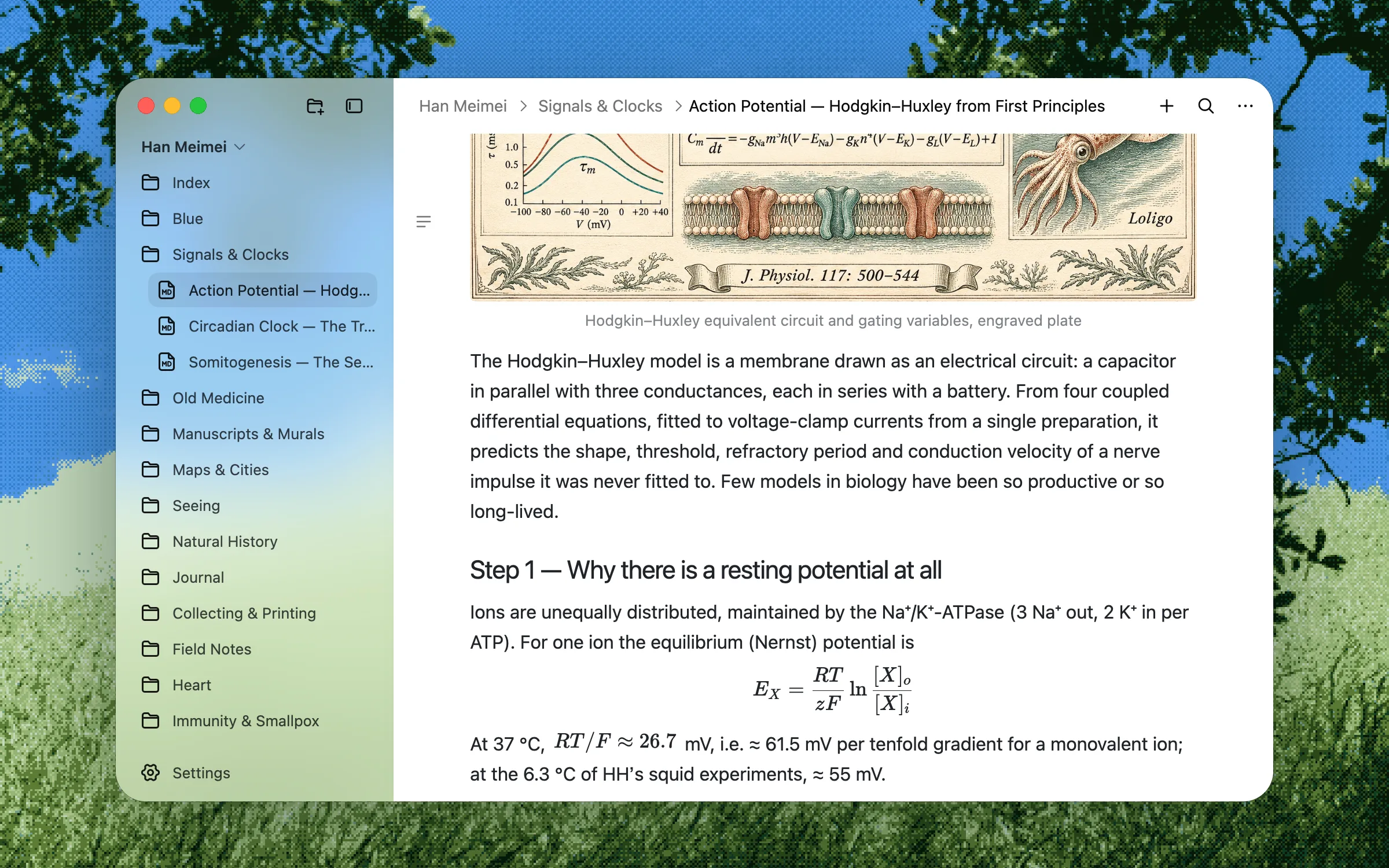
Headings, lists, to-dos, quotes, callouts, columns, tables with merged cells, code with syntax highlighting, LaTeX math, images, files and covers. Markdown shortcuts work as you type, and the `/` menu has everything else. Mention another note to link it; the other note lists its backlinks. Databases keep records with select, date, number, formula, lookup and link fields, in views you filter, sort and group; each cell of a Notes column is a real note. The … menu has Focus Mode, Typewriter Mode and Paragraph Focus, and View › Zoom In enlarges the text alone.
### Draw
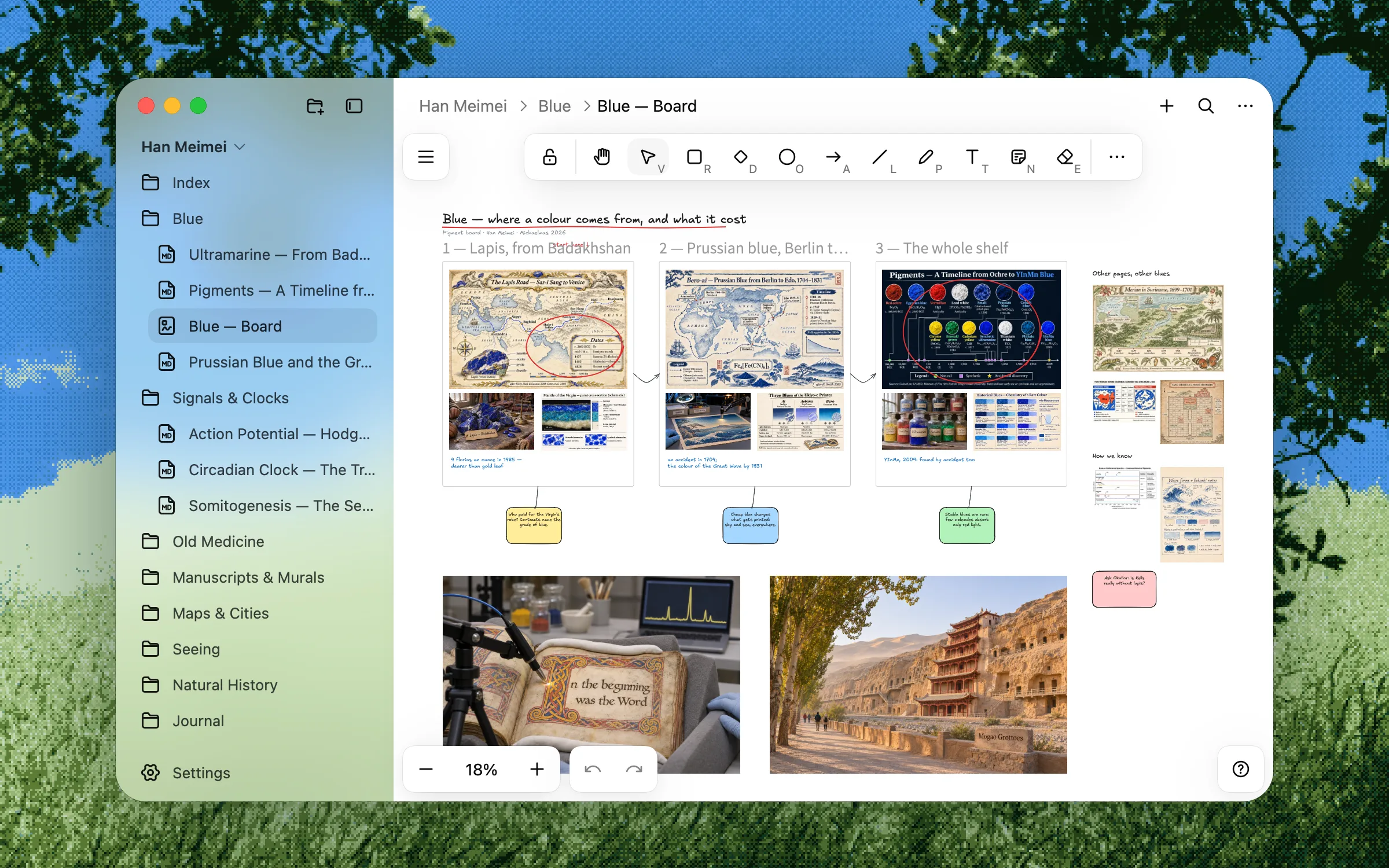
Boards are a whiteboard ported from Excalidraw: shapes, arrows that stay attached, freehand, text, sticky notes, frames and pictures. Put one inside a note, or keep it as an `.excalidraw` file that excalidraw.com opens. Zoom with a trackpad pinch; a board with 10,000 shapes stays smooth.
### Organize in real folders
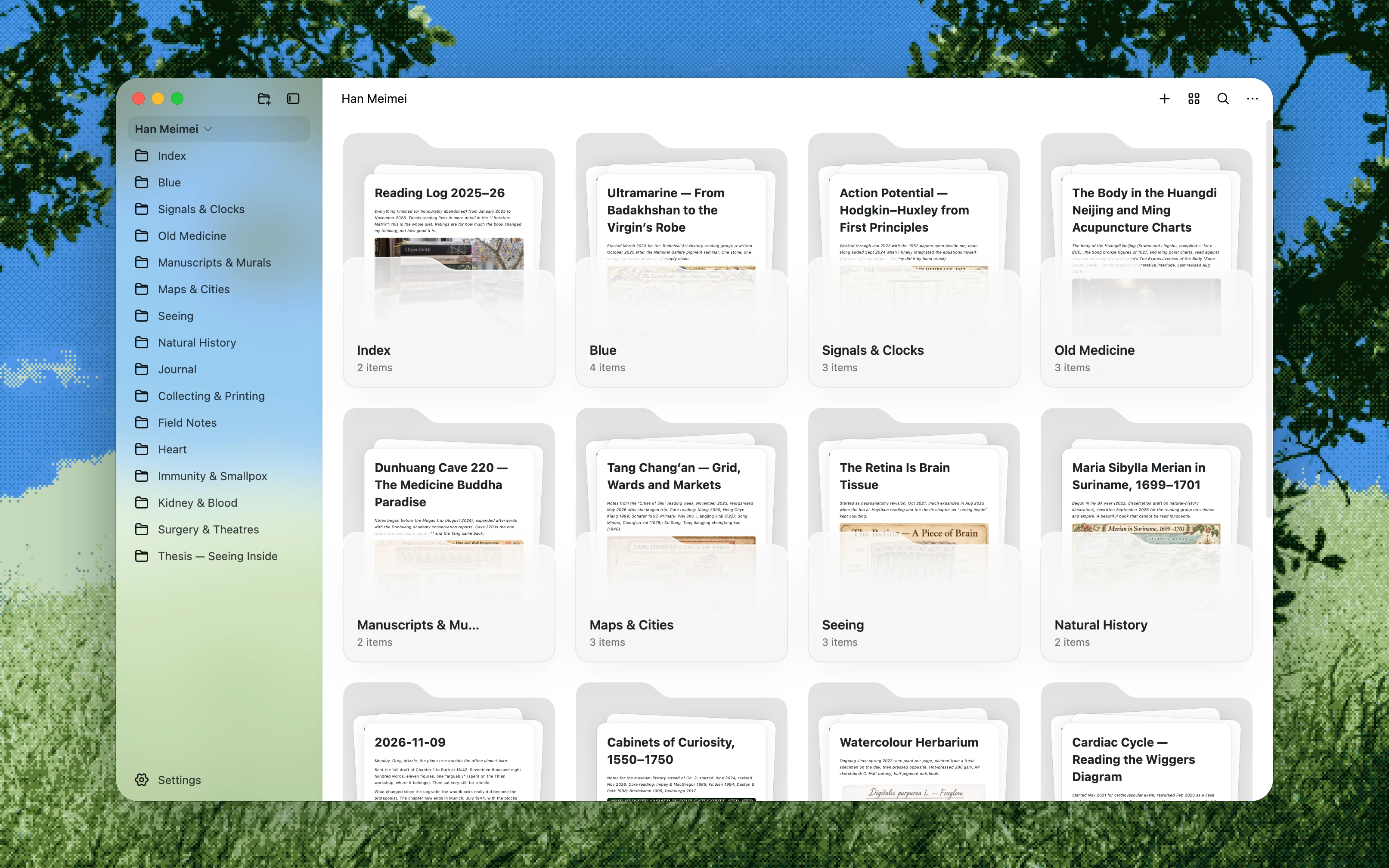
The sidebar groups your top-level folders. Open one and its page shows subfolders as stacks of their pages, and the list view sorts by any column. Add any folder on your computer with **Add Folder** and it is used where it is. Hold a note over a folder and it opens for you; folders go inside folders, pages and folders move between top-level folders, and every move can be undone. Pin notes to the top of the sidebar, search every title and line from the search icon or `⌘ J`, and find and replace within a note, with regular expressions if you like. Deleted notes wait in the Trash for as many days as you choose. A Markdown file opened on its own is edited in its own window, right where it is.
### Bring your notes
Import from Another App… (in the File menu) finds your Obsidian, Logseq, iA Writer and Typora libraries and SiYuan workspaces on this computer and copies them in, leaving the originals alone. Obsidian `[[wikilinks]]` keep working: click one to open the note it points to. Later, drag Markdown files and folders onto a folder's page or straight into a sidebar folder. Notes go out again as Markdown or PDF, or straight to the printer.
### Work with agents
The `quiet` command line tool lets an AI agent (Claude Code, Codex and others) read, search and edit the same library you write in. It finds blocks by outline, edits through the same engine as the app, rewrites links when notes move, adds rows to databases and draws on boards, and refuses to overwrite what you changed since it read. A note you have open takes in the agent's edit as it lands, every save keeps the previous text as a version, and `quiet run` takes a whole JavaScript script as one change that is written in full or not at all. Settings › Agent Connector gives your agent one line to paste and, on macOS, installs the command. The [Quiet.md agent skill](#use-with-ai-agents) teaches Claude Code, Codex and other agents to reach for `quiet` whenever you ask about your notes. `quiet` counts which of its commands run each day, under a random id and never with your notes, and sends the counts once a day; `quiet telemetry off`, `DO_NOT_TRACK=1` or turning off Settings › General › Anonymous usage statistics stops it.
`quiet` ships inside the app. On macOS, put it on your PATH with `ln -s /Applications/quiet.md.app/Contents/MacOS/quiet /usr/local/bin/quiet`; on Windows it sits beside `quiet_md.exe` in the install folder. See [docs/design/CLI.md](docs/design/CLI.md).
### And more
- **Version history**: every note keeps snapshots as it saves (20 by default, up to 30). Open one to see what changed in place, restore it in one click, or give it a name.
- **Quick notes**: on macOS, a global shortcut (`⌥ Space` by default) opens a small note window over any app.
- **Your look**: four built-in styles — Craft, Feishu, Notion and Obsidian — each with a dark look worked out from its colours, or your own CSS ([docs/THEMES.md](docs/THEMES.md)). Choose the interface and document fonts.
- **Your keys**: press `⌘ /` to see every shortcut, and rebind or clear any of them. On Windows and Linux, Ctrl stands in for ⌘ and Alt for ⌥.
- **Your language**: English, Simplified Chinese, Traditional Chinese, Japanese, Korean, Spanish, French, Arabic and Turkish. Arabic text joins its letters and runs right to left.
- **Housekeeping**: Settings › Documents finds images and files no note uses any more and moves them out once you confirm.
- **Updates**: new versions install from inside the app after their signature is verified. Automatic checks can be turned off.
## Roadmap
- [x] Rich documents: headings, lists, callouts, tables, columns, code, math, images and files
- [x] Markdown files, opened and edited in place
- [x] Boards: hand-drawn diagrams and sketches, inside notes or on their own
- [x] Open any folder in place, side by side in the sidebar
- [x] Import from Obsidian, Logseq, SiYuan, Typora, iA Writer and any Markdown folder
- [x] Writing modes: focus, typewriter and paragraph focus
- [x] Themes, dark mode and nine languages
- [x] A `quiet` CLI and skill for AI agents
- [ ] Databases (in progress)
- [ ] Mermaid diagrams (in progress)
- [ ] Mobile support: iPhone, iPad and Android (in progress)
- [ ] Sync across devices (in progress)
- [ ] Document properties
- [ ] Web clipper
## Download
| Platform | Package | Requirements |
|---|---|---|
| **macOS** (Apple Silicon) | [quiet-md-macos-arm64.dmg](https://download.quiet.md/latest/quiet-md-macos-arm64.dmg) | macOS 13 or later |
| **Windows** (x64) | [quiet-md-windows-x64-setup.exe](https://download.quiet.md/latest/quiet-md-windows-x64-setup.exe) | Windows 10 version 1809 or later |
| **Linux** (x86_64, experimental) | [quiet-md-x86_64.AppImage](https://download.quiet.md/latest/quiet-md-x86_64.AppImage) | glibc 2.35 or later (Ubuntu 22.04 and newer) |
| **macOS** (Intel) | [quiet-md-macos-x86_64.dmg](https://download.quiet.md/latest/quiet-md-macos-x86_64.dmg) | macOS 13 or later |
- **macOS**: open the `.dmg` and drag `quiet.md.app` onto the Applications shortcut beside it, then open it from Applications. The app and the disk image are signed and notarized by Apple. The `.zip` on the Releases page holds the same app; it is what in-app updates download.
- **Windows**: run the installer. By default it installs for the current user only, and uninstalling never deletes your notes. If SmartScreen appears on first launch, click **More info → Run anyway**.
- **Linux** (experimental): `chmod +x quiet-md-*.AppImage` and run it; without FUSE, add `--appimage-extract-and-run`. AppImage 0.1.10 and later support in-app updates; older Linux versions need a one-time manual install. Interactive testing so far covers Omarchy on Wayland; see the [Linux notes](CONTRIBUTING.md#linux-experimental).
You can also download from [Quiet.md](https://quiet.md/?lang=en). Every release and its SHA-256 checksums are on [GitHub Releases](https://github.com/s1dashu/quiet-md/releases).
On first launch, Quiet.md opens straight into a **Quiet Notes** folder in your Documents (or the `Quiet.md` folder an earlier version made there) with a **Getting started** guide — a ten-minute tour of the main features. Existing notes are never overwritten. Add other folders or bring notes from other apps whenever you like, from the File menu.
## Use with AI agents
> **Requires Quiet.md 0.2.0 or later.** Agent Connector and the `quiet` commands the skill relies on arrive in 0.2.0; earlier versions may not have `quiet` at all. If `quiet` isn't found, a command is unknown, or Settings has no Agent Connector, update to the latest Quiet.md from [quiet.md](https://quiet.md).
Two pieces: the `quiet` command line tool, which ships inside the Quiet.md app, and the agent skill in [`skills/quiet-md`](skills/quiet-md/SKILL.md), which teaches the agent to use it.
1. **Install the skill** with the [skills](https://github.com/vercel-labs/skills) CLI (needs Node.js):
```sh
npx skills add s1dashu/quiet-md -g -y -a claude-code # or -a codex, …; leave out -a to choose
```
2. **Put `quiet` on your PATH.** macOS: Settings › Agent Connector › Install Command (设置 › 连接 Agent › 安装命令行工具) in Quiet.md (it links `quiet` into `~/.local/bin`), or `ln -sf /Applications/quiet.md.app/Contents/MacOS/quiet ~/.local/bin/quiet`; the Homebrew cask links it for you. Windows: the installer adds it to your PATH (open a new terminal). Linux: `bin/quiet` in the `.tar.gz`, or a link named `quiet` to the AppImage.
3. **Check:** `quiet ls` lists the folders Quiet.md has open.
An agent can do all of this for you. Tell it: *Install the Quiet.md skill and CLI by following https://github.com/s1dashu/quiet-md/blob/main/docs/AGENT_INSTALL.md*. That page gives each agent (Claude Code, Codex, others) the exact commands.
## Performance
Frame processing time over 100 consecutive operations in a mixed document of **1 million characters** and 549 chapters:
| Operation | P50 | P95 |
|---|---:|---:|
| ⌨️ Typing | **5.06 ms** | 5.78 ms |
| ⌫ Backspace | **4.99 ms** | 5.55 ms |
| 🖱️ Scrolling | **2.08 ms** | 4.14 ms |
A 120 Hz display gives each frame 8.3 ms. Even at P95 on a million-character document, there is headroom left.
| | |
|---|---|
| macOS download | ~18 MB |
| Windows installer | ~14 MB |
| Runtime | No WebView, no Electron, no background services |
Apple M5 Pro / 48 GiB, macOS 26.5, release build. Methodology and scripts to reproduce: [docs/PERFORMANCE.md](docs/PERFORMANCE.md).
## Contributors
Thanks to everyone who has helped build Quiet.md. Issues and pull requests are welcome: building, testing and code conventions are in [CONTRIBUTING.md](CONTRIBUTING.md).
[](https://github.com/s1dashu/quiet-md/graphs/contributors)
## Community
WeChat users can scan the code below to join our user group. A Discord server is coming soon.
## Recent updates
- **0.2.0** (Nov 28): a simpler interface built on one design system, databases for everyone, three writing modes and a command line your AI agent can use.
- **Folders are the top level**: there is no separate Home page any more. The sidebar groups top-level folders under headings that fold, and each heading's … menu has Manage, Show in Finder and Remove from sidebar. Add Folder uses a folder where it is. My documents and Files on this computer are gone: a Markdown file opened on its own gets a window of its own, and folders you opened before become top-level folders. Drag a page or folder into another top-level folder, or use Move To; its pictures, links and version history go with it, and it can be undone. Favorites fold into Pinned.
- **One design system**: menus, buttons, dialogs, switches, tooltips and scrollbars are one set of components after shadcn/ui, with continuous (squircle) corners on macOS, a thin ring and soft shadow around popovers, one shadow scale and Nucleo icons throughout. Menus that don't fit scroll, and moving toward a submenu no longer lights the rows you cross. The header reads + · Search · … on every page (+ · View · Search · … on folders), and the breadcrumbs line up with the window buttons by the height of their capitals.
- **Databases**: make one from the New menu, the `/` menu or a CSV file. Fields include text, single and multiple select, date, number, formula, lookup and link; views filter, sort, group and colour rows by rule, with a Fit to content row height. Each cell of a Notes column is a real note in your library.
- **Writing modes**, in the document's … menu: Focus Mode (⌘.) leaves the document alone in its window; Typewriter Mode (⌘⇧T) keeps the line you are writing in the middle; Paragraph Focus (⌘⇧F) keeps the current paragraph clear and fades the rest. View › Zoom In / Out (⌘+ / ⌘−) scales the note's text alone, headings, tables, code and equations with it.
- **Command line and agents**: the new `quiet` tool lists, searches, reads and edits notes and databases from a terminal, adds and removes sidebar folders, and opens a document at a given block. Settings › Agent Connector sets up Claude Code, Codex and other agents with one command; `quiet` ships with the app and joins your PATH (Install Command on macOS, the installer on Windows).
- **Clearer dark mode**: links, text colours, highlights, reminder dates, countdowns and button labels all reach readable contrast; the sidebar is brighter, and ⌃⌘D switches between dark and light.
- **Also new**: child pages are back; pasting from Word, browsers or Feishu keeps its formatting on Windows and Linux; import SiYuan workspaces, with SiYuan, Obsidian, Typora and Markdown folders under one Import from Another App…; the Trash empties itself after 1 to 30 days; any shortcut can be cleared; Open in New Window follows the main window's size and sidebar; renaming or moving a folder shows at once while the files follow in the background; first launch opens straight into Documents › Quiet Notes and the regrouped guides, with example Markdown, board and database files; anonymous daily usage counts, which you can turn off in Settings › General.
- **Library format**: opening a library upgrades it to FORMAT 6, after which 0.1.14 and earlier can't open it. Libraries in iCloud and other synced folders are not upgraded for now.
- **0.1.14** (Nov 22): regular-expression find and replace; Obsidian `[[wikilinks]]` open their note; Turkish and right-to-left Arabic interfaces; choose interface and document fonts; clean up unused images and files; faster search and bulk delete in large libraries.
- **0.1.13** (Nov 17): boards, a whiteboard ported from Excalidraw, inside a note or as a `.excalidraw` file; version history for every note; French and Arabic interfaces; Copy as Markdown; pasted web images are saved into the library.
- **0.1.12** (Nov 14): drag files from Finder straight into sidebar folders; squircle Home cards; Open in Finder; a minimum window width that keeps room for the note.
- **0.1.11** (Nov 13): the library became real folders with files named by title, migrated automatically with a backup; a new first launch with Obsidian import; Japanese, Spanish and Korean interfaces; display math in Markdown; faster launch and less memory.
- **0.1.10** (Nov 10): pick a document type from the New menu; wide tables scroll sideways; Markdown keeps column alignment.
- **0.1.9** (Nov 8): fixes for Cmd+Q on macOS, window buttons on Windows and selections hidden by highlights.
- **0.1.8** (Nov 9): edit local Markdown files in place; nested folders with drag and undo; lower image memory; an experimental Linux AppImage.
- **0.1.7** (Nov 6): safer multi-window saving and conflict recovery; Markdown exports keep inline attachments.
- **0.1.6** (Nov 6): smoother typing and window switching, wider tables, ⌥ Space for quick notes on macOS; image paste, PDF export and printing on Windows.
- **0.1.5** (Nov 5): renamed to Quiet.md; manage several documents at once; empty the Trash in one step.
- **0.1.4** (Nov 5): in-app updates, verified by signature; dark mode for every theme.
- **0.1.3** (Nov 4): readable sidebar text when macOS is in dark mode.
- **0.1.2** (Nov 4): the standard macOS menus and shortcuts; the Dock icon reopens a window.
- **0.1.1** (Nov 3): first Windows x64 release.
Full notes for each version are on [Releases](https://github.com/s1dashu/quiet-md/releases).
## License
The code is licensed under [MIT](LICENSE). Third-party code, fonts and assets are listed in [THIRD_PARTY.md](THIRD_PARTY.md).
The following are not covered by the MIT license and should be replaced in forks:
- The Nucleo icons in `assets/icons/` (82) and `assets/editor-icons/` (24) are under a commercial Nucleo license. Do not extract or redistribute them on their own.
- The name "Quiet.md" and the app icon.
## Star History









 ## Recent updates
- **0.2.0** (Nov 28): a simpler interface built on one design system, databases for everyone, three writing modes and a command line your AI agent can use.
- **Folders are the top level**: there is no separate Home page any more. The sidebar groups top-level folders under headings that fold, and each heading's … menu has Manage, Show in Finder and Remove from sidebar. Add Folder uses a folder where it is. My documents and Files on this computer are gone: a Markdown file opened on its own gets a window of its own, and folders you opened before become top-level folders. Drag a page or folder into another top-level folder, or use Move To; its pictures, links and version history go with it, and it can be undone. Favorites fold into Pinned.
- **One design system**: menus, buttons, dialogs, switches, tooltips and scrollbars are one set of components after shadcn/ui, with continuous (squircle) corners on macOS, a thin ring and soft shadow around popovers, one shadow scale and Nucleo icons throughout. Menus that don't fit scroll, and moving toward a submenu no longer lights the rows you cross. The header reads + · Search · … on every page (+ · View · Search · … on folders), and the breadcrumbs line up with the window buttons by the height of their capitals.
- **Databases**: make one from the New menu, the `/` menu or a CSV file. Fields include text, single and multiple select, date, number, formula, lookup and link; views filter, sort, group and colour rows by rule, with a Fit to content row height. Each cell of a Notes column is a real note in your library.
- **Writing modes**, in the document's … menu: Focus Mode (⌘.) leaves the document alone in its window; Typewriter Mode (⌘⇧T) keeps the line you are writing in the middle; Paragraph Focus (⌘⇧F) keeps the current paragraph clear and fades the rest. View › Zoom In / Out (⌘+ / ⌘−) scales the note's text alone, headings, tables, code and equations with it.
- **Command line and agents**: the new `quiet` tool lists, searches, reads and edits notes and databases from a terminal, adds and removes sidebar folders, and opens a document at a given block. Settings › Agent Connector sets up Claude Code, Codex and other agents with one command; `quiet` ships with the app and joins your PATH (Install Command on macOS, the installer on Windows).
- **Clearer dark mode**: links, text colours, highlights, reminder dates, countdowns and button labels all reach readable contrast; the sidebar is brighter, and ⌃⌘D switches between dark and light.
- **Also new**: child pages are back; pasting from Word, browsers or Feishu keeps its formatting on Windows and Linux; import SiYuan workspaces, with SiYuan, Obsidian, Typora and Markdown folders under one Import from Another App…; the Trash empties itself after 1 to 30 days; any shortcut can be cleared; Open in New Window follows the main window's size and sidebar; renaming or moving a folder shows at once while the files follow in the background; first launch opens straight into Documents › Quiet Notes and the regrouped guides, with example Markdown, board and database files; anonymous daily usage counts, which you can turn off in Settings › General.
- **Library format**: opening a library upgrades it to FORMAT 6, after which 0.1.14 and earlier can't open it. Libraries in iCloud and other synced folders are not upgraded for now.
- **0.1.14** (Nov 22): regular-expression find and replace; Obsidian `[[wikilinks]]` open their note; Turkish and right-to-left Arabic interfaces; choose interface and document fonts; clean up unused images and files; faster search and bulk delete in large libraries.
- **0.1.13** (Nov 17): boards, a whiteboard ported from Excalidraw, inside a note or as a `.excalidraw` file; version history for every note; French and Arabic interfaces; Copy as Markdown; pasted web images are saved into the library.
- **0.1.12** (Nov 14): drag files from Finder straight into sidebar folders; squircle Home cards; Open in Finder; a minimum window width that keeps room for the note.
- **0.1.11** (Nov 13): the library became real folders with files named by title, migrated automatically with a backup; a new first launch with Obsidian import; Japanese, Spanish and Korean interfaces; display math in Markdown; faster launch and less memory.
- **0.1.10** (Nov 10): pick a document type from the New menu; wide tables scroll sideways; Markdown keeps column alignment.
- **0.1.9** (Nov 8): fixes for Cmd+Q on macOS, window buttons on Windows and selections hidden by highlights.
- **0.1.8** (Nov 9): edit local Markdown files in place; nested folders with drag and undo; lower image memory; an experimental Linux AppImage.
- **0.1.7** (Nov 6): safer multi-window saving and conflict recovery; Markdown exports keep inline attachments.
- **0.1.6** (Nov 6): smoother typing and window switching, wider tables, ⌥ Space for quick notes on macOS; image paste, PDF export and printing on Windows.
- **0.1.5** (Nov 5): renamed to Quiet.md; manage several documents at once; empty the Trash in one step.
- **0.1.4** (Nov 5): in-app updates, verified by signature; dark mode for every theme.
- **0.1.3** (Nov 4): readable sidebar text when macOS is in dark mode.
- **0.1.2** (Nov 4): the standard macOS menus and shortcuts; the Dock icon reopens a window.
- **0.1.1** (Nov 3): first Windows x64 release.
Full notes for each version are on [Releases](https://github.com/s1dashu/quiet-md/releases).
## License
The code is licensed under [MIT](LICENSE). Third-party code, fonts and assets are listed in [THIRD_PARTY.md](THIRD_PARTY.md).
The following are not covered by the MIT license and should be replaced in forks:
- The Nucleo icons in `assets/icons/` (82) and `assets/editor-icons/` (24) are under a commercial Nucleo license. Do not extract or redistribute them on their own.
- The name "Quiet.md" and the app icon.
## Star History