DSH Pocket
English | 中文





> Put **DeepSeek Harness in your pocket**: one package, one settings tab — scan a QR code and your phone shows exactly what's on your computer screen, live, from anywhere.
⭐ A Star would make the author's day · Here, take one
## What is this
**You want to use DeepSeek Harness on your computer, even when you're not at the computer.**
- On your way home, the agent is running a task on your computer — pull out your phone and see where it is, what it produced.
- Out and about, you want the agent on your computer to look something up or write a snippet — no remote desktop, no SSH.
- The computer is at home or in the office, you're elsewhere, and you want to **drive your DeepSeek Harness from your phone** — send tasks, watch the output, tap approvals.
That's what DSH Pocket does: **install it, scan a QR code, and your phone shows and controls the DeepSeek Harness UI in real time — from anywhere.**
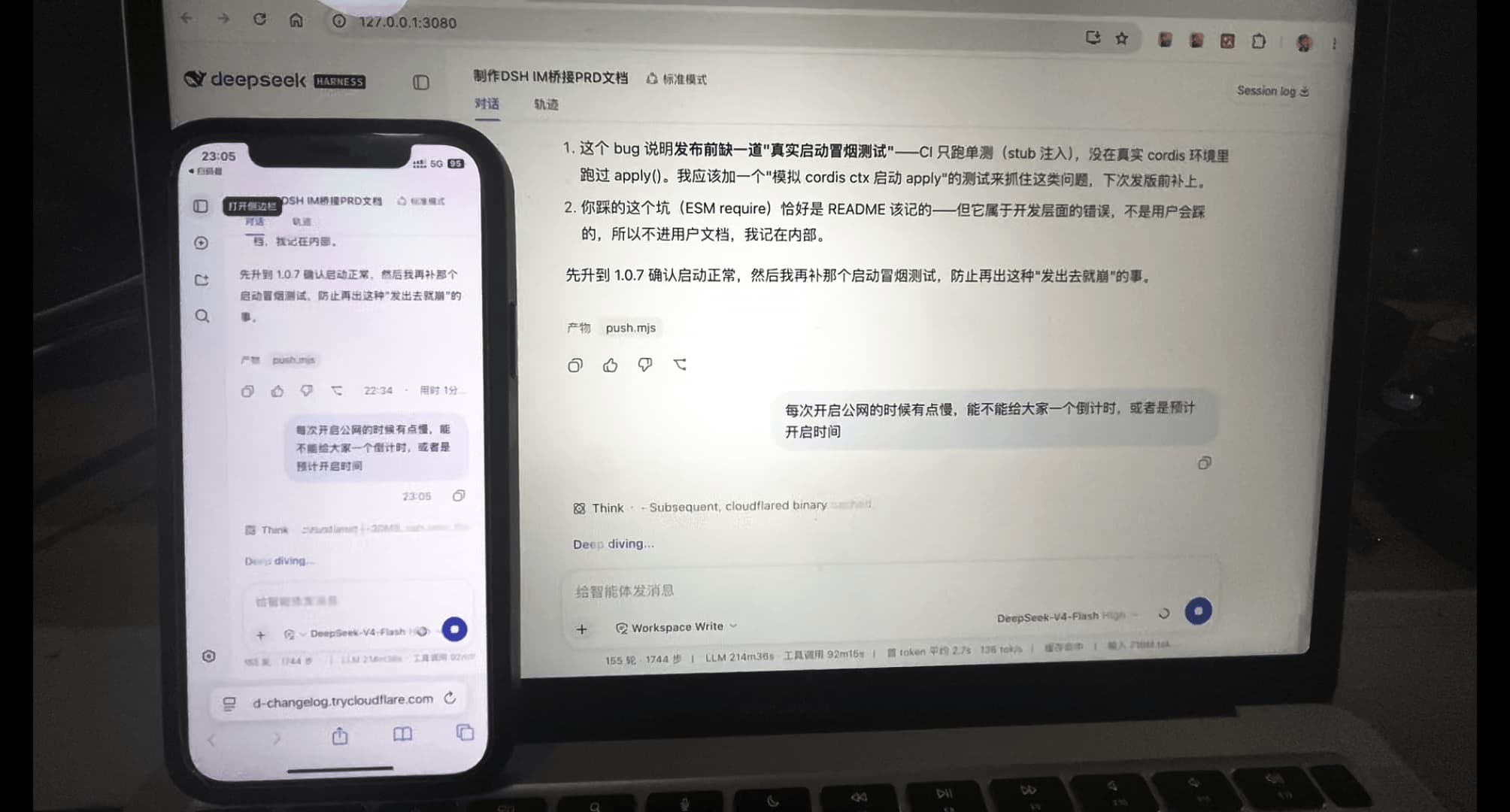
What it looks like — the phone shows the exact same UI as your computer, live:
## ✨ Features
| Feature | Description |
|---|---|
| 📶 LAN QR access | Works out of the box: Settings → Phone access — scan the LAN QR on the same Wi-Fi |
| 🌐 Public QR (from anywhere) | Click "Enable anywhere" → cloudflared tunnel → scan the public QR over 4G / any network |
| 🔐 Access PIN | Public links require an **8-digit PIN** (rotated every time the tunnel starts — old links die instantly); LAN has its own separate **8-digit PIN** (refresh it manually in Settings) |
| ⚡ Real-time sync | Streaming output passes through WebSocket untouched — what the computer renders, the phone renders live; fully interactive both ways |
| 📱 Mobile-adaptive layout | Narrow screens get a drawer layout automatically (ported from dsh-web-mobile, MIT): sidebar drawer, full-width conversation, safe-area insets, touch optimizations |
| 🗜️ Transfer compression | Large JSON responses are gzip/brotli'd on the fly (17MB session history → ~1.3MB) — faster loads, less mobile data |
| 🔁 Tunnel auto-restore | After a DSH restart the previously-running public tunnel comes back automatically |
| 🧩 Zero-dependency install | One npm package, one settings tab — no core/adapter split, no account, no server |
## 🚀 Usage
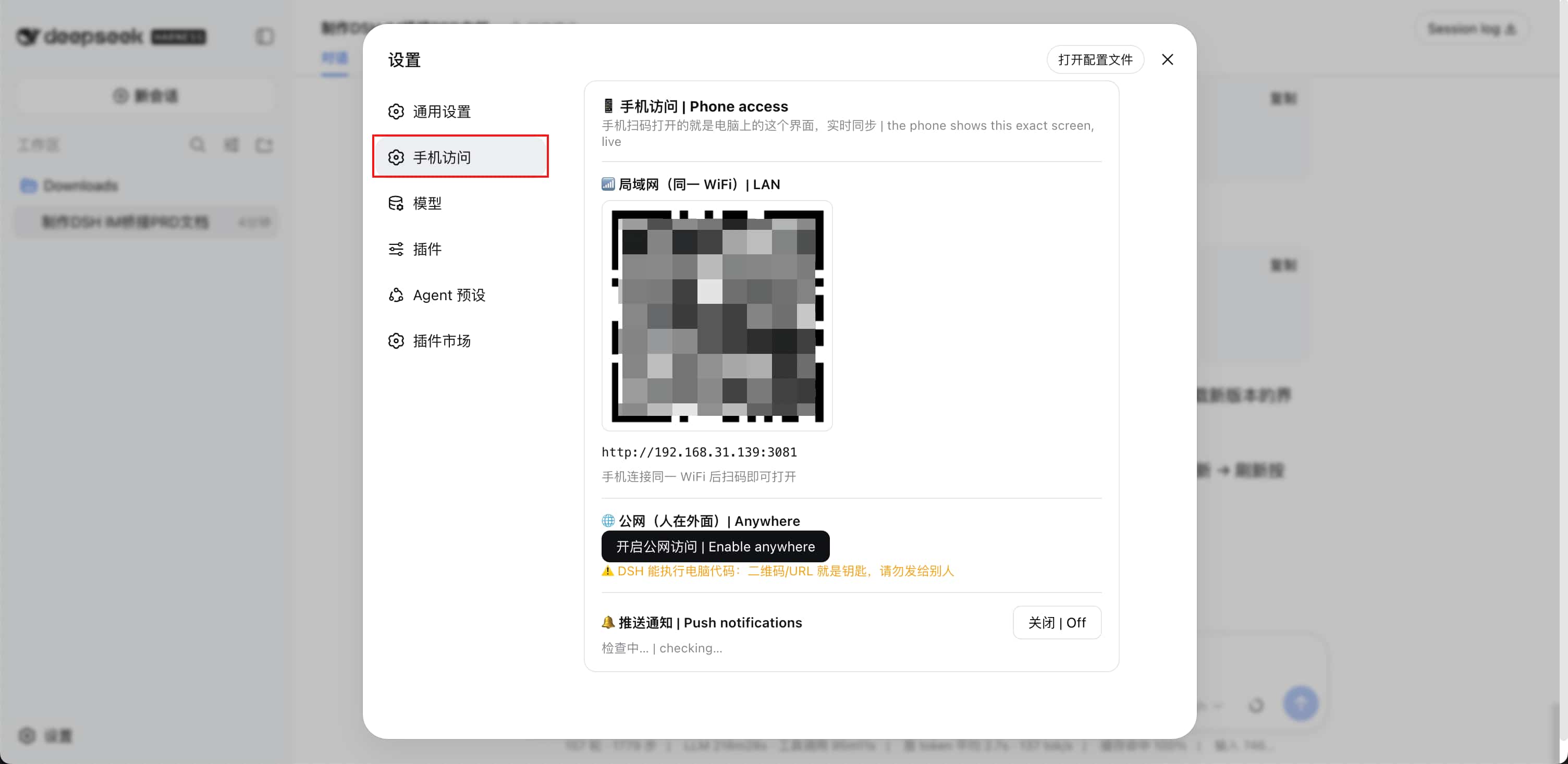
**Where the entry is**: after installing and restarting `dsh web`, open **Settings** — the left sidebar shows **"Phone access"** at the top level (same level as General / Models):
**Prerequisite**: [DeepSeek Harness](https://github.com/deepseek-ai/deepseek-harness) installed. If your terminal says `dsh: command not found`, install it first:
```sh
npm install -g @deepseek-ai/dsh # global install; verify: dsh --version
# No global install? Prefix every command with: npx @deepseek-ai/dsh
```
```sh
# 1. Install the plugin (everything in one package)
dsh plugin --profile web add dsh-pocket -w
# 2. Restart dsh web
npx @deepseek-ai/dsh web
```
### LAN (same Wi-Fi)
Settings → **Phone access** → scan the "📶 LAN" QR code → enter the **LAN PIN** (shown in the LAN block of the settings page; hit **Refresh** to get a new one) → the phone opens the exact same DSH, in real time.
### Public (from anywhere)
On the same page click "**Enable anywhere**" → wait for the tunnel (first run downloads cloudflared; macOS/Linux use the Tsinghua mirror, seconds) → scan the "🌐 Public" QR code → the phone opens the link and **enters the 8-digit PIN** (shown in the settings page's public section, **rotated on every tunnel start**) → works from outside (4G / office network).
> Upgrading: `dsh plugin --profile web update dsh-pocket --latest -w` (`--latest` is required across major versions — a `^0.x` range won't auto-jump to 1.x).
## ⚠️ Security (read first)
- **DSH can execute code on your computer.** **LAN** QR/URL plus its own **8-digit PIN** is the key — **never share the LAN QR, URL or PIN**.
- **Public** access is protected by an **8-digit PIN**: the link is random, the PIN rotates on every tunnel start, and old links die instantly — even a leaked link can't get in.
- The public URL is randomly assigned by cloudflared and **changes on every restart** (old links die automatically — a natural key rotation).
- LAN mode exposes nothing publicly; only devices on the same network can reach it.
- Built for personal use; the public PIN lives in `$DSH_HOME/dsh-pocket/token` (re-rolled on every tunnel start) and the LAN PIN in `$DSH_HOME/dsh-pocket/token-lan` (refreshed manually in Settings).
## 💻 DSH Desktop
- In the desktop app, **QR screen-mirroring works**; **update/restart are managed by the desktop app** (auto-disabled here).
- ⚠️ The desktop **advanced mode** doesn't support phone access yet (it disables the web layout; the phone gets no layout service → blank screen). Switch back to **compatibility** mode and restart; phones opening an advanced-mode page will see a clear notice overlay.
## 🩹 Troubleshooting (traps users step on)
| Symptom | Cause & fix |
|---|---|
| `dsh: command not found` / "DSH is not defined" | dsh CLI missing: `npm install -g @deepseek-ai/dsh`, or prefix commands with `npx @deepseek-ai/dsh` |
| `ERR_PNPM_ADDING_TO_ROOT` | pnpm 9 workspace-root restriction: append `-w` (`--workspace-root`) to install/update commands |
| Nothing changed after install/update | **You must restart `dsh web`**; the running process still loads the old code |
| `listen EADDRINUSE ... :3081` | A stale dsh-pocket process holds the port: macOS/Linux `lsof -ti :3081 \| xargs kill -9`; Windows `netstat -ano \| findstr :3081` (find the LISTENING PID) → `taskkill /PID /F`, then retry |
| Version stuck below 1.x | `^0.x` ranges never jump to 1.x: update with `--latest` (`dsh plugin --profile web update dsh-pocket --latest -w`) |
| Public `error 1033` | See "Public tunnel troubleshooting" below — usually a local proxy/VPN (Clash etc. TUN mode) killing the tunnel |
| After "Restart dsh web", the page says the process is running in the background | The new process from in-page self-restart is a detached background process (not attached to your terminal) — that's the standard way to apply updates in-page; stop it: macOS/Linux `lsof -ti :3080 \| xargs kill -9`; Windows `netstat -ano \| findstr :3080` → `taskkill /PID /F` (logs under `$DSH_HOME` as `dsh-pocket-restart-*.log`) |
## ⚠️ Public tunnel troubleshooting (read first)
**Symptom**: after clicking "Enable anywhere", the public URL shows `error 1033` (Tunnel error) on the phone.
**Most common cause: a local proxy/VPN (Clash, Surge, v2ray, sing-box, etc., especially in TUN mode).**
Such tools take over all traffic and often cut cloudflared's tunnel-edge connections
(`*.argotunnel.com`, Cloudflare edge IPs), so the tunnel registers but the data plane never connects.
**Fix (try in order, lightest first)**:
1. First **just turn off the proxy's TUN mode** — no need to quit the proxy; this is enough in most cases:
- Clash: turn off the "**TUN mode**" toggle in Settings (or right-click the menu-bar icon → uncheck TUN mode)
- Surge: turn off "**Enhanced mode**"; v2ray/sing-box: turn off "**virtual NIC / route takeover**"
- Then go back to the settings page and click "Enable anywhere" again
2. If that's not enough, temporarily **fully quit the proxy** (not just close the window: quit Clash from the menu-bar icon; if a
background service is installed, stop it in the service manager and confirm with `ps aux | grep clash`), then retry.
3. Add **DIRECT rules** to the proxy for the tunnel domains and Cloudflare edge (Clash example):
```yaml
- DOMAIN-SUFFIX,argotunnel.com,DIRECT
- DOMAIN-SUFFIX,trycloudflare.com,DIRECT
- IP-CIDR,198.41.192.0/24,DIRECT,no-resolve
```
4. If the network really can't reach the tunnel, use **LAN mode**: turn on the phone hotspot → connect the computer to it → scan the LAN QR. Same experience, from anywhere.
**Other causes**: corporate firewalls / campus networks blocking outbound — ask IT to allow it, or use a hotspot.
**First run: "Downloading cloudflared" fails or hangs**:
- **macOS/Linux**: the plugin first downloads from the **Tsinghua mirror** (measured ~3MB/s, done in seconds); falls back to official GitHub + acceleration mirrors if it fails.
- **Windows**: no Tsinghua mirror (Homebrew doesn't support Windows) — downloads the ~50MB exe from GitHub directly; **single-threaded, so it's slower — that's expected**, wait a few minutes, or use a proxy.
- If all sources fail, the settings page shows a hint. Alternatives (any one):
1. Install the `cloudflared` command and retry (the plugin then uses the PATH binary, no download):
- macOS: `brew install cloudflared`; Linux: `sudo apt install cloudflared` or from the official site
- Windows: `winget install cloudflared` or from the official site
- Any platform: `npm i -g cloudflared`
2. Enable a proxy (system proxy / Clash etc.) and click "Enable anywhere" again
3. Manually download the binary into `$DSH_HOME/dsh-pocket/bin/` (`$DSH_HOME` is usually `~/.dsh`, on Windows `%USERPROFILE%\.dsh`; name it `cloudflared` (add `.exe` on Windows) **or** the release asset name — both are recognized)
## 🗂 Architecture (single package)
| File | Purpose |
|---|---|
| `lib/index.js` | Plugin entry: auto-start proxy + register RPC + access-PIN management (public: 8 digits rotated per tunnel start; LAN: separate 8 digits, manually refreshable) + DSH Desktop detection |
| `lib/service.mjs` | Service: proxy lifecycle (port auto-fallback), public tunnel (auto-restore), status snapshot (with QR data URLs) |
| `lib/proxy.mjs` | Header-rewriting reverse proxy: Host/Origin → loopback, HTTP + WebSocket passthrough + polyfill injection + gzip/brotli compression + public-access PIN auth |
| `lib/tunnel.mjs` | cloudflared: multi-mirror download (Tsinghua first) / adaptive parallel / start / parse public URL (HTTP/2) |
| `lib/web-rpc.js` | Loopback RPC: `status` / `tunnel.start` / `tunnel.stop` / `version` / `update` / `restart` |
| `client/` | "Phone access" settings tab + mobile adaptation (dsh-web-mobile port) |
| `bin/dsh-pocket.mjs` | CLI: LAN/public modes, prints URL + QR |
## 🛠 Development
```sh
npm install
node client/build.mjs # rebuild after editing client/
npm test # proxy / auth / compression / tunnel / service / RPC (43 tests)
```
## 🤝 Credits
- Mobile adaptation ported from [mexiaosqwq/dsh-web-mobile](https://github.com/mexiaosqwq/dsh-web-mobile) (MIT)
- Public tunnel powered by [cloudflared](https://github.com/cloudflare/cloudflared)
## 📄 License
[GPL-2.0](LICENSE) — copyleft: free to use, modify, and redistribute, but **derivatives must stay GPL** and keep the copyright notice; commercial use included.
> Note: the mobile-adaptation portion is ported from [dsh-web-mobile](https://github.com/mexiaosqwq/dsh-web-mobile) (MIT, GPL-compatible); its copyright notice stays in `client/mobile/LICENSE.dsh-web-mobile`.
---
**Questions? Feedback welcome**: bugs, ideas, or feature requests — open an issue at [GitHub Issues](https://github.com/shaobeichen/dsh-pocket/issues) 🙏