---
## Install
```bash
opencode plugin add @slkiser/opencode-quota
```
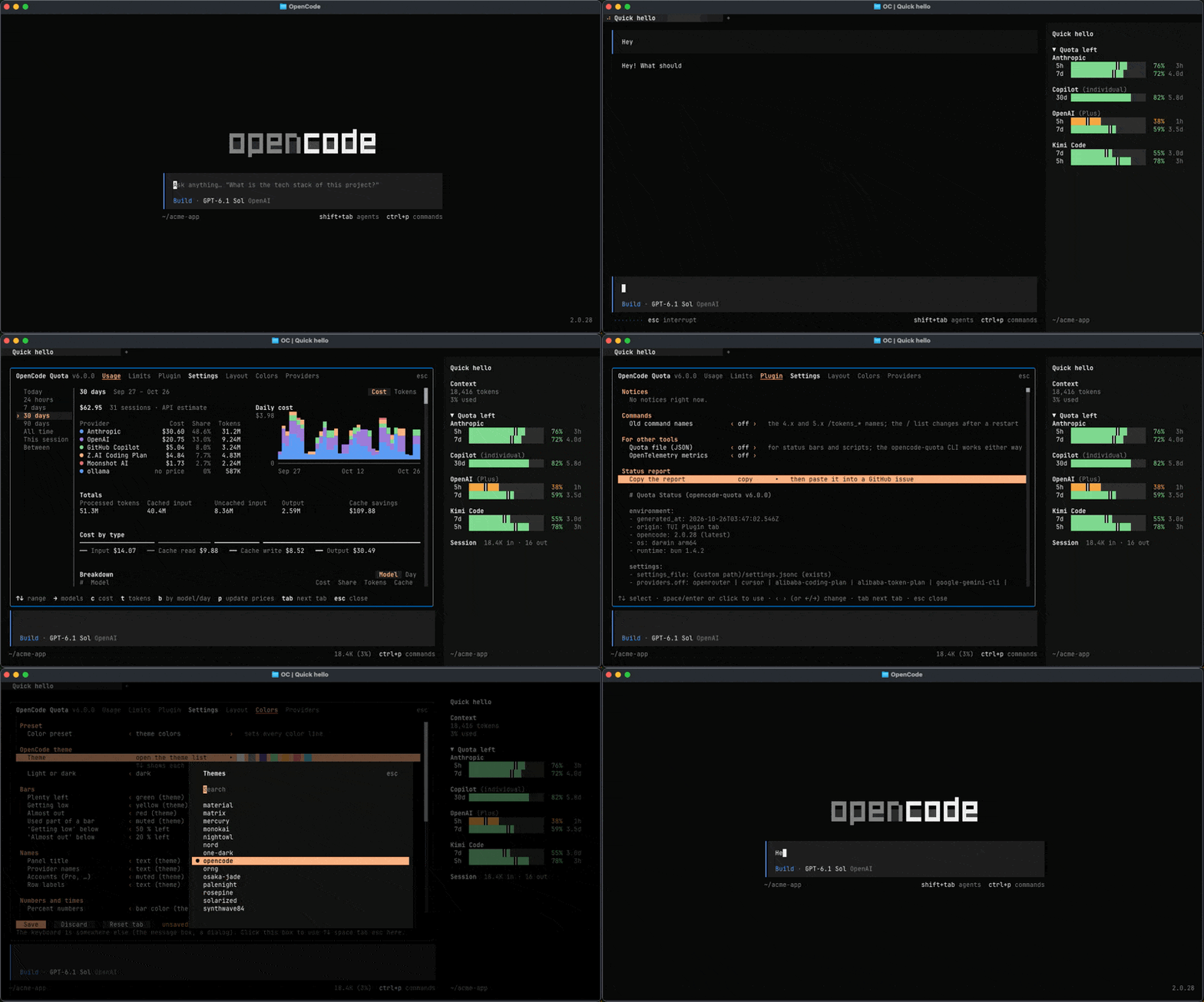
Restart OpenCode and type `/quota`. A window opens with your limits. Click a tab (Usage, Limits, Plugin, or a Settings tab) or press `tab` to move between them; click or press `esc` to close it.
> [!IMPORTANT]
> You need OpenCode `2.0.26+`; the terminal commands also need Node.js `22.13+` or `23.4+`. Still on OpenCode 1? Run `npx @slkiser/opencode-quota@4 init` instead.
Edit opencode.json yourself
Add the plugin to `opencode.jsonc` or `opencode.json`, and keep your other plugins. In `~/.config/opencode` it works in every project; in a project's folder, only there. This one entry loads both the server and the TUI:
```jsonc
{
"$schema": "https://opencode.ai/config.json",
"plugin": ["@slkiser/opencode-quota"],
}
```
## What you get
- **Built for OpenCode 2:** settings apply live, in every open OpenCode.
- **Terminal:** `npx @slkiser/opencode-quota@latest show` works even with OpenCode closed.
- **Web and Desktop:** `/quota`, `/quota_usage` and `/quota_status` post their report in the chat as your message. The AI never answers it, and the plugin filters it out of every AI request. After you uninstall the plugin, old reports in past chats are no longer filtered. Web's font may not line up the columns.
- **Scripts and status bars:** JSON, an export file, and metrics. See [External integration](docs/readme/external-integration.md).
## Commands
| Command | What it shows |
| ---------------------- | ----------------------------------------------------------------------------------------------------------------------------- |
| `/quota` | Limits. Web and Desktop: limits next to the last 7 days of usage |
| `/quota_usage [range]` | Tokens and API cost: `today` (default), `24h`, `7d`, `30d`, `90d`, `all`, `session` (with its subagents), `between` two dates |
| `/quota_status` | Setup check: logins, providers, pricing, and notices |
| `/quota_settings` | Settings tabs (TUI only) |
For example `/quota_usage 30d` or `/quota_usage between 2026-09-01 2026-09-25`. In a terminal, with OpenCode open or closed, `npx @slkiser/opencode-quota@latest show` shows your quota and `npx @slkiser/opencode-quota@latest status` checks your setup ([how they differ](docs/readme/troubleshooting.md#terminal-commands)). Add `--help` to see all options.
## Settings
Change the sidebar, status line, toasts, colors, words and providers in `/quota_settings`. **Save** writes only what you changed to `opencode-quota/settings.jsonc` in OpenCode's config folder and keeps your comments. A file edit reaches every open TUI within a few seconds. Custom providers, the Claude CLI path and the export path are set only in the file. [Settings and defaults](docs/readme/configuration.md).
## Providers
Log in with `/connect` and the provider shows up. Switch providers on or off in `/quota_settings` → **Providers**.
| American | Plans |
| --- | --- |
| [Anthropic (Claude)](docs/readme/providers.md#anthropic-claude)\* | Personal · Business |
| [Cursor](docs/readme/providers.md#cursor)\* | Personal · Business |
| [Gemini CLI](docs/readme/providers.md#gemini-cli)\* | Business |
| GitHub Copilot | Personal · [Business](docs/readme/providers.md#github-copilot)\* |
| [Google AGY](docs/readme/providers.md#google-agy-quick-setup)\* | Personal · Business |
| Ollama Cloud | Personal |
| OpenAI | Personal · Business |
| OpenCode Go | Personal |
| OpenCode Zen | Personal · Business |
| OpenRouter | Personal · Business |
| xAI | Personal · Business |
| Chinese | Plans |
| --- | --- |
| [Alibaba Coding Plan](docs/readme/providers.md#alibaba-coding-plan)\* | Personal |
| [Alibaba Token Plan](docs/readme/providers.md#alibaba-token-plan)\* | Personal · Business |
| DeepSeek | Personal |
| Kimi Code | Personal · Business |
| Kimi Code (CN) | Personal · Business |
| MiniMax Token Plan | Personal · Business |
| MiniMax Token Plan (CN) | Personal · Business |
| [Xiaomi MiMo](docs/readme/providers.md#xiaomi-mimo)\* | Personal |
| Z.ai Coding Plan | Personal |
| Zhipu Coding Plan | Personal · Business |
\* Linked names need one more step; the rest work once you log in. [What each one reports](docs/readme/providers.md#pre-configured-providers).
OpenAI ChatGPT quota needs a Codex login ([how](docs/readme/providers.md#openai-and-xai)). Gemini CLI works only with Gemini Code Assist Standard or Enterprise (organization) accounts. Personal Google users should use Google AGY. Business plans of the Chinese providers show only your own member API key's usage, except Alibaba Token Plan, which reports one Credits row per team seat. API keys come from OpenCode or an [environment variable](docs/readme/providers.md#api-keys).
### Custom providers
Track any other provider, from its quota API or from a local estimate. Ask your agent to add a custom provider: it is saved switched off, and you switch it on in `/quota_settings` → **Providers**. [Copy-paste prompt](docs/readme/providers.md#custom-providers).
## Updating
```bash
opencode plugin update
```
Restart OpenCode. Coming from 4.x or 5.x? Your settings convert on the first start, and the old `/tokens_*` commands still work. See [Updating](docs/readme/updating.md).
## Troubleshooting
1. Run `/quota_status` in an OpenCode session, or `npx @slkiser/opencode-quota@latest status` in a terminal.
2. Provider missing? Log in to it again in OpenCode 2.
3. Using a companion plugin (Cursor, Google)? List it **before** `@slkiser/opencode-quota` in `opencode.json`.
4. `claude` or `bl` not found? See [Service environment](docs/readme/troubleshooting.md#service-environment).
5. `/quota_usage` empty? Start OpenCode once, then use a model.
More fixes: [Troubleshooting](docs/readme/troubleshooting.md).
## Reference
Guides: [Configuration](docs/readme/configuration.md) · [Providers](docs/readme/providers.md) · [Troubleshooting](docs/readme/troubleshooting.md) · [External integration](docs/readme/external-integration.md) · [Updating](docs/readme/updating.md)
Outside links: [OpenCode docs](https://opencode.ai/docs/) · [OpenCode config](https://opencode.ai/docs/config/) · [OpenCode plugins](https://opencode.ai/docs/plugins/) · [OpenCode TUI](https://opencode.ai/docs/tui/) · [models.dev pricing data](https://models.dev/) · [Node.js downloads](https://nodejs.org/en/download)
## Contributors
Thanks to everyone who has contributed to OpenCode Quota.
## License
MIT. OpenCode Quota is not built by the OpenCode team and is not affiliated with OpenCode or any provider listed above.