# spinqit_mcp_tools Installation Guide
This project is based on mcp-server to support efficient invocation of SpinQ quantum computing hardware resources by AI large models.
This project provides one-click installation scripts for `spinqit_mcp_tools` on Windows and macOS. These scripts automatically check the Python environment (Python 3.10 is recommended) and install the required `spinqit_mcp_tools` dependency package. If no suitable Python environment is found, the scripts will attempt to create one using Conda or guide users to manually install Python.
## Table of Contents
- [Prerequisites](#prerequisites)
- [Script Installation Steps](#script-installation-steps)
- [Windows](#windows)
- [macOS](#macos)
- [Output Results](#output-results)
- [Troubleshooting](#troubleshooting)
- [Manual Installation Steps](#manual-installation-steps)
- [License](#license)
## Prerequisites
Before running the installation scripts, ensure the following requirements are met:
- **Python 3.10 recommended**: Use Python 3.10 for the current `spinqit_mcp_tools` environment.
- **Conda (optional)**: If Python 3.10 is not installed, the scripts can use Anaconda to create an environment. Download it from [Anaconda](https://www.anaconda.com/download).
- **Internet connection**: Required for downloading the `spinqit_mcp_tools` package via `pip`.
- **macOS terminal permissions**: Ensure the terminal supports `bash`.
## Script Installation Steps
### Windows
1. **Download the Script**
- Download the `mcpenv-installer-win-x86_64.bat` script from the following link:
Download Windows Installation Script
2. **Run the Script**
- Double-click `mcpenv-installer-win-x86_64.bat` to execute the installation.
3. **Script Behavior**
- **If Python 3.10 is already installed**: The script will directly install the `spinqit_mcp_tools` package and output the Python environment path and the `mcp-server` execution command.
- **If Python 3.10 is not installed but Conda is available**: The script will create a Conda environment named `mcp-server-py310` using Python 3.10, install the dependencies, and output the environment path and execution command.
- **If neither Python 3.10 nor Conda is installed**: The script will prompt you to download and install Python 3.10 or Conda from [Python's official website](https://www.python.org/downloads/) or [Anaconda's official website](https://www.anaconda.com/download). After installation, rerun the script.
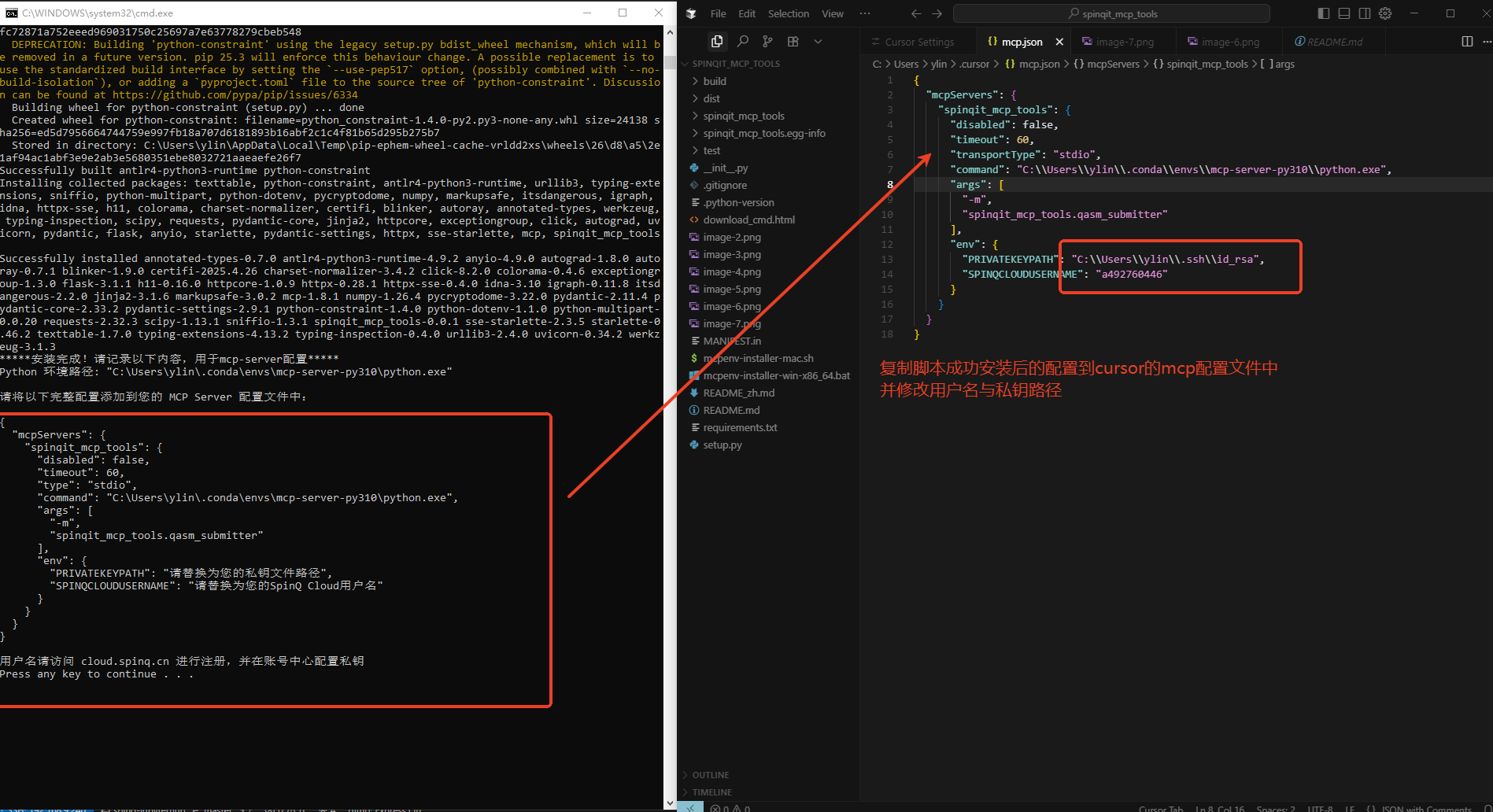
4. **Successful Installation**
- 
- Note the execution command, for example `C:\ProgramData\Anaconda3\envs\mcp-server-py310\python.exe -m spinqit_mcp_tools.qasm_submitter`.
- Register an account at [SpinQ Cloud](https://cloud.spinq.cn), configure your public key, and add `PRIVATEKEYPATH`, `SPINQCLOUDUSERNAME`, and `SPINQCLOUDHOST` to your MCP server settings. The default host is `http://cloud.spinq.cn:6060`, and other host addresses are also supported.
### macOS
1. **Download the Script**
- Download the `mcpenv-installer-mac.sh` script from the following link:
Download macOS Installation Script
2. **Run the Script**
- Execute the script with:
```bash
sudo bash ./mcpenv-installer-mac.sh
```
3. **Script Behavior**
- Similar to the Windows script, the macOS script will:
- Check for Python 3.10. If found, it will install `spinqit_mcp_tools`.
- If Python 3.10 is not found, it will check for Conda and create a `mcp-server-py310` environment.
- If neither Python 3.10 nor Conda is installed, it will prompt you to install Python 3.10 or Conda and then rerun the script.
### Output Results
After successful execution, the script will output the following information:
- **Python environment path**: The path to the Python executable, e.g.:
- Windows: `C:\path\to\conda\envs\mcp-server-py310\python.exe`
- macOS: `/path/to/conda/envs/mcp-server-py310/bin/python`
- **mcp-server execution command**: The command to run `mcp-server`, e.g.:
- Windows: `C:\path\to\conda\envs\mcp-server-py310\python.exe -m spinqit_mcp_tools.qasm_submitter`
- macOS: `/path/to/conda/envs/mcp-server-py310/bin/python -m spinqit_mcp_tools.qasm_submitter`
Save this information for configuring and running `spinqit_mcp_tools`.
### Troubleshooting
- **Python not found or version below 3.10**:
- Download and install Python 3.10 from [Python's official website](https://www.python.org/downloads/), ensuring it is added to PATH.
- Rerun the script after installation.
- **Conda not recognized**:
- Ensure Anaconda is installed and added to PATH if Python 3.10 is not present.
- **pip installation failure**:
- Check your internet connection.
- **Conda environment creation failure**:
- Verify Conda is properly installed or reinstall it from [Anaconda's official website](https://www.anaconda.com/download).
### Usage
Use the Python installation directory to run:
```bash
/pathtopython/python -m spinqit_mcp_tools.qasm_submitter
```
### Environment Testing
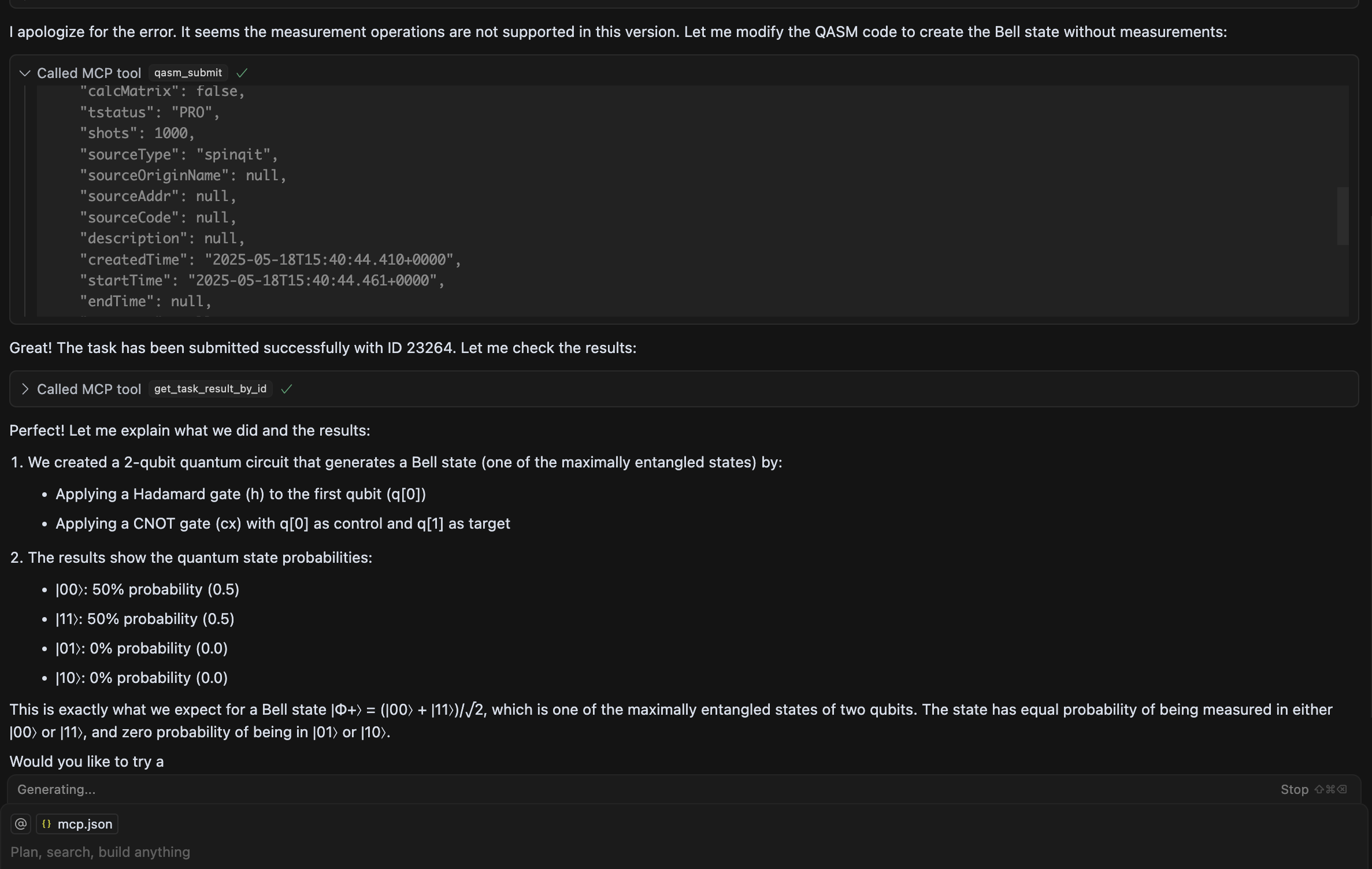
Create and submit a 2-qubit quantum circuit QASM to the cloud platform and view results.
- Cursor
- Configuration method
- Results
- Configuration settings
```json
{
"mcpServers": {
"qasm-submitter": {
"type": "stdio",
"command": "cmd",
"args": [
"/C",
"C:\\Users\\ylin\\.conda\\envs\\mcp-server-py310\\python.exe",
"-m",
"spinqit_mcp_tools.qasm_submitter"
],
"env": {
"PRIVATEKEYPATH": "",
"SPINQCLOUDUSERNAME": "",
"SPINQCLOUDHOST": "http://cloud.spinq.cn:6060"
}
}
}
}
```
- VSCode Cline Plugin
- Configuration settings:
```json
{
"mcpServers": {
"qasm-submitter": {
"disabled": false,
"timeout": 60,
"transportType": "stdio",
"command": "cmd",
"args": [
"/C",
"C:\\Users\\ylin\\.conda\\envs\\mcp-server-py310\\python.exe",
"-m",
"spinqit_mcp_tools.qasm_submitter"
],
"env": {
"PRIVATEKEYPATH": "",
"SPINQCLOUDUSERNAME": "",
"SPINQCLOUDHOST": "http://cloud.spinq.cn:6060"
}
}
}
}
```
- Configuration method

- Results

## Manual Installation Steps
- Install Python 3.10, then run:
```bash
pip install spinqit_mcp_tools
```
- Configure `python -m spinqit_mcp_tools.qasm_submitter` as the MCP client startup command.
- Set the required environment variables: `PRIVATEKEYPATH`, `SPINQCLOUDUSERNAME`, and `SPINQCLOUDHOST`.
## License
This project is licensed under the MIT License. See the [LICENSE](LICENSE) file for details.