
OpenMozi
English | 简体中文
> *Built for the hackers. A custom Agent OS heavily inspired by OpenClaw. Honestly, there's no grand vision here—I just wanted to build a hackable Agent OS from scratch to truly figure out how this stuff works under the hood.*
A personal AI agent that lives on your machine.
It uses your tools, works in your projects, and delivers real files — not just chat.



---
## What is MOZI
MOZI is a desktop AI agent (think of a personal, self-hosted Codex) that runs entirely on your machine. You point it at a project folder, give it a task, and it executes: shell commands, file edits, web research, document generation. Every deliverable it claims is verified against the filesystem before it reports done — no fake success.
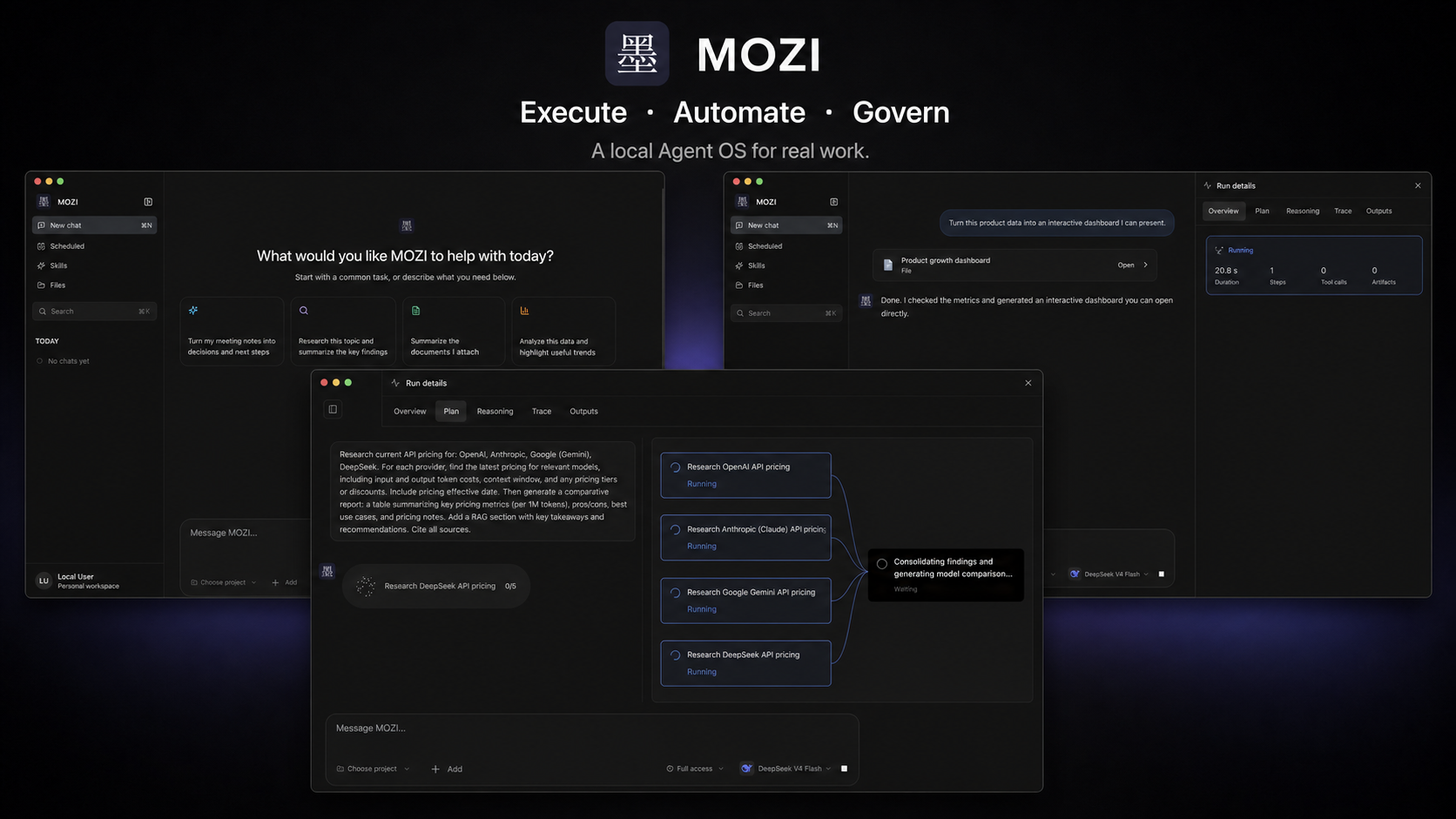
The composer is the cockpit: pick a **project** (any folder or git repo), the **git branch** to work on, the **permission level** (read-only → full access), and the **model** — then describe what you want.
## What it can do
- **Code** — reads real repos, writes and edits files, runs tests, works on the branch you pick. A built-in branch switcher does honest `git switch` (never auto-stash, never force; conflicts abort with git's own message).
- **Documents** — generates Word / PowerPoint / Excel / PDF files and previews them **inside the app**: docx via a high-fidelity embedded viewer, spreadsheets as interactive grids, slides and PDFs with full CJK text. Hook up a local [ONLYOFFICE container](docker-compose.yml) and the preview upgrades to a full editor — optional, everything degrades gracefully without it.
- **Research** — searches the web, reads pages and files, and compiles findings into structured reports you can open as artifacts.
- **Remember** — long-term memory across sessions. Tell it something once; it's there next week.
- **Automate** — scheduled and recurring tasks with a dedicated UI, plus reusable task templates.
- **Skills** — 25 built-in skills (the [Anthropic official skill catalog](https://github.com/anthropics/skills) adapted to MOZI, plus MOZI's own). Skills load on demand: the model sees a one-line catalog and pulls full instructions only when a task needs them. Drop a `SKILL.md` into your workspace to add your own.
## Get the App
The desktop app is the primary way to use MOZI. Download the latest Apple Silicon DMG and its checksum file from [GitHub Releases](https://github.com/spytensor/openmozi/releases).
> [!WARNING]
> Current macOS downloads are **not signed with an Apple Developer ID and are not notarized by Apple**. Gatekeeper may say that MOZI "is damaged," "cannot be opened," or is from an unidentified developer. Verify the DMG's SHA-256 value against the published `openmozi--SHA256SUMS.txt` before removing quarantine. The checksum confirms which GitHub artifact you downloaded; it does not replace Apple code-signing trust.
After verifying the checksum, drag `MOZI.app` into `/Applications`, then remove quarantine from that verified copy and open it:
```bash
xattr -dr com.apple.quarantine /Applications/MOZI.app
open -a /Applications/MOZI.app
```
To build it yourself instead (macOS, Apple Silicon):
```bash
git clone https://github.com/spytensor/openmozi.git
cd openmozi
./scripts/setup.sh app
# → desktop/dist/mac-arm64/MOZI.app (drag into /Applications)
```
The setup script handles the toolchain for you: it finds a compatible Node.js
(22 LTS preferred) from Homebrew, nvm, fnm, mise, volta, or asdf, and runs the
repository-pinned pnpm without `corepack enable`, without sudo, and without a
global pnpm install. If no usable Node exists it prints the exact install
command for your platform. Run `./scripts/setup.sh --check` to see what it
would use without changing anything.
On first launch, create your local account and add an LLM API key. The app manages its own backend and data — no separate server to run. See [docs/DESKTOP-APP.md](docs/DESKTOP-APP.md) for details.
**Requirements:** Node.js >= 22.12 and < 26 — Node 22 LTS recommended (`brew install node@22`, or use `.nvmrc` with nvm/fnm). Node 26+ is too new for our native dependencies, and Node 23 is rejected by dependency engine pins. You do **not** need corepack or a global pnpm: `./scripts/setup.sh` resolves the pinned pnpm on its own. Building manually instead? Use `corepack pnpm install` or `npx -y pnpm@10.29.2 install` — avoid `corepack enable`, which needs sudo on nodejs.org installs and no longer exists on Node >= 25. Optional extras: LibreOffice (slide/PDF conversion for previews), Docker (ONLYOFFICE editor-grade office viewing).
## Run as a server (optional)
MOZI also runs headless with a Web UI — same runtime, same features:
Supported server architectures are Linux x64/arm64 and macOS Apple Silicon. Intel Macs are not supported because the vector database dependency does not publish a macOS x64 binary.
```bash
pnpm mozi onboard # interactive setup: provider, API key
pnpm start # Web UI at http://localhost:9210
```
Server-mode configuration lives in `~/.mozi/mozi.json` (JSON, not YAML). Inspect or change it with `pnpm mozi config get brain` / `pnpm mozi config set brain.model `, or re-run `pnpm mozi onboard --update`.
## LLM Providers
MOZI works with any OpenAI-compatible API — 27 providers are in the catalog. Switch anytime without losing data or history.
| Provider | Setup | Notes |
|----------|-------|-------|
| **MiniMax** | `MINIMAX_API_KEY` | Default provider (MiniMax-M3) |
| **OpenAI** | `OPENAI_API_KEY` | GPT series |
| **Anthropic** | `ANTHROPIC_API_KEY` | Claude series |
| **Google Gemini** | `GEMINI_API_KEY` | Gemini Pro/Flash |
| **DeepSeek** | `DEEPSEEK_API_KEY` | DeepSeek V-series, R-series |
| **Qwen / Alibaba Cloud** | `DASHSCOPE_API_KEY` | Qwen models through Model Studio / DashScope |
| **Moonshot** | `MOONSHOT_API_KEY` | Kimi models, long context |
| **Groq** | `GROQ_API_KEY` | Ultra-fast inference |
| **Ollama** | Local install | Fully local and private |
| | | …and 18 more (xAI, Mistral, Together, OpenRouter, NVIDIA, Bedrock, …) |
Regional endpoints are supported via `_BASE_URL` overrides.
If Docker runs behind a TLS-intercepting proxy, pass the proxy's public root certificate when building:
```bash
export MOZI_EXTRA_CA_CERT_B64="$(base64 < company-root-ca.pem | tr -d '\n')"
docker compose up -d --build
```
The certificate is added to both build stages. Never place a private key in this variable.
## Architecture
```
You (Desktop app / Web UI)
--> Gateway (sessions, auth, permission levels)
--> Brain (LLM reasoning, planning, tool calls)
--> Capabilities (shell, files, search, skills, sub-agents)
```
The LLM is the decision-maker; everything else is infrastructure that executes its decisions and reports the truth back. Deep dives:
- [Architecture Diagram](docs/architecture.svg)
- [Runtime Prompt Architecture](docs/RUNTIME-PROMPT-ARCHITECTURE.md)
- [Constitution](docs/CONSTITUTION.md)
## Development
```bash
pnpm dev # backend watch mode
pnpm ui:dev # Web UI dev server (hot reload)
pnpm test # vitest suite; real-provider integration tests require credentials
pnpm desktop:dev # desktop app in dev mode
```
```
src/
core/ # Brain: LLM loop, model routing, provider failover
gateway/ # sessions, auth, permission levels
capabilities/ # shell, filesystem, search, vision
skills/ # skill registry + 25 bundled SKILL.md assets
memory/ # long-term memory, vector store
store/ # SQLite (better-sqlite3)
ui/ # React + Vite desktop/web UI
desktop/ # Electron shell + packaging
```
Tech stack: TypeScript, Node.js 22, Fastify, better-sqlite3, Vercel AI SDK, React + Vite, Electron, Vitest.
## Contributing
Read [CONTRIBUTING.md](CONTRIBUTING.md) before opening an issue or pull request. Use the structured GitHub forms, report vulnerabilities privately, and never attach credentials or private data.
1. Read `AGENTS.md`, `CLAUDE.md`, and `docs/CONSTITUTION.md` for repository rules.
2. Run relevant tests and `pnpm verify:public-export` before submitting changes.
3. Commit convention: `feat:` / `fix:` / `refactor:` / `docs:` / `test:` / `chore:`.
## Releases
GitHub Actions run deterministic policy, type, unit, integration, and E2E checks. The browser smoke runs after changes land on `main` or when triggered manually; it does not block ordinary pull requests. Releases are still built and verified locally, then uploaded to [GitHub Releases](https://github.com/spytensor/openmozi/releases) with DMG, ZIP, SHA-256 checksums, and a release manifest. See [docs/RELEASE.md](docs/RELEASE.md).
## Acknowledgments
Deepest respect to the [OpenClaw](https://github.com/openclaw/openclaw) project, which served as the primary architectural inspiration for OpenMozi.
## License
OpenMozi's own source code is licensed under the [MIT License](LICENSE).
OpenMozi also depends on third-party software under its own terms. In particular,
the optional interactive React preview includes CodeSandbox Nodebox, which uses
the Sustainable Use License and restricts commercial use and distribution. See
[THIRD_PARTY_NOTICES.md](THIRD_PARTY_NOTICES.md) and the bundled license texts
before redistributing OpenMozi or using that preview commercially.
---
MOZI — an AI that works for you, not the other way around.