# Claude Code + Step 3.5 Flash Best Practices Guide
English | 简体中文
## Overview
## Overview
Master **Claude Code** with **Step 3.5 Flash**. This guide covers environment setup, `CLAUDE.md` optimization, MCP integration, Skills, and Sub-agents to build powerful AI workflows.
**Perfect for:**
- Software Engineers using Claude Code
- Data Analysts needing AI assistance
- Teams scaling AI Agent adoption
**Key Topics:**
- Connecting Claude Code to Step 3.5 Flash
- Writing effective `CLAUDE.md` configurations
- Applying MCP (Model Context Protocol)
- Building custom Skills and Sub-agents
---
## 1. Environment Setup
### 1.1 Prerequisites
Before getting started, ensure you have:
- **Step 3.5 Flash API Key**: Refer to the [official quick start guide](https://github.com/stepfun-ai/Step-3.5-Flash/blob/main/README.md#5-quick-start) to obtain one
- **Claude Code**: Installed and running properly
- **System Requirements**: macOS, Linux, or Windows
### 1.2 Installation Steps
#### Step 1: Configure Step 3.5 Flash
Follow the [official documentation](https://github.com/stepfun-ai/Step-3.5-Flash/blob/main/README.md#7-using-step-35-flash-on-agent-platforms) to complete the integration of Claude Code with Step 3.5 Flash.
#### Step 2: Install uvx
`uvx` is a dependency required for running certain MCP services and tools.
**macOS/Linux**:
```bash
curl -LsSf https://astral.sh/uv/install.sh | sh
```
**Windows**:
```powershell
powershell -ExecutionPolicy ByPass -c "irm https://astral.sh/uv/install.ps1 | iex"
```
#### Step 3: Verify Installation
**macOS/Linux**:
```bash
which uvx
```
**Windows**:
```powershell
(Get-Command uvx).source
```
If the path to `uvx` is displayed, the installation was successful.
---
## 2. Best Practices
### 2.1 CLAUDE.md Configuration File
CLAUDE.md is the core configuration file for Claude Code, automatically read by Claude at the start of every conversation. By writing an effective CLAUDE.md, you can provide Claude with **persistent context that cannot be inferred from code alone**, significantly improving collaboration efficiency.
#### Quick Generation
Use the `/init` command to automatically generate an initial CLAUDE.md file based on your current project structure:
```bash
# Execute in Claude Code
/init
```
This command analyzes your codebase, detects build systems, test frameworks, and code patterns, generating a solid starting point for further refinement.
#### What to Include ✅
| Type | Examples |
|------|----------|
| **Bash commands Claude can't guess** | Special build commands, custom script paths |
| **Code style rules that differ from defaults** | Using ES modules instead of CommonJS |
| **Testing instructions and preferred test runners** | Prefer running single tests over the entire suite |
| **Repository conventions** | Branch naming conventions, PR format requirements |
| **Project-specific architectural decisions** | Data flow patterns, module boundaries |
| **Development environment quirks** | Required environment variables, local dependencies |
| **Common pitfalls or non-obvious behaviors** | Known bug workarounds |
#### What to Avoid ❌
| Type | Reason |
|------|--------|
| Things Claude can understand by reading code | Redundant info dilutes important instructions |
| Standard language conventions | Claude already knows these |
| Detailed API documentation | Provide links instead |
| Frequently changing information | High maintenance cost, easily outdated |
| Long explanations or tutorials | Consumes context window |
| File-by-file descriptions | Claude can read files itself |
| Self-evident practices (e.g., "write clean code") | No practical guidance value |
#### Example Template
```markdown
# Code Style
- Use ES modules (import/export) syntax, not CommonJS (require)
- Destructure imports when possible (e.g., import { foo } from 'bar')
- Use TypeScript strict mode
# Workflow
- Be sure to typecheck when you're done making a series of code changes
- Prefer running single tests, and not the whole test suite, for performance
- IMPORTANT: Always run `pnpm lint` before committing
# Project Conventions
- API routes follow RESTful conventions
- Use kebab-case for URL paths, camelCase for JSON properties
- Database migrations must be backward compatible
# Testing
- Test command: `pnpm test`
- Single test: `pnpm test -- --grep "test name"`
- Integration tests require Docker: `docker-compose up -d`
# Common Issues
- If build fails with memory error, increase Node memory: `NODE_OPTIONS=--max-old-space-size=4096`
```
#### File Locations
CLAUDE.md can be placed in multiple locations, depending on the desired scope:
| Location | Scope | Use Case |
|----------|-------|----------|
| `~/.claude/CLAUDE.md` | All Claude sessions | Personal global preferences |
| `./CLAUDE.md` | Current project | Team-shared config (commit to git) |
| `./CLAUDE.local.md` | Current project (local) | Personal project config (add to .gitignore) |
| Parent directory | Monorepo scenarios | Both `root/CLAUDE.md` and `root/packages/foo/CLAUDE.md` are loaded |
| Child directory | On-demand loading | Auto-loaded when working with files in that directory |
#### Importing Other Files
Use `@path/to/import` syntax to reference content from other files:
```markdown
See @README.md for project overview and @package.json for available npm commands.
# Additional Instructions
- Git workflow: @docs/git-instructions.md
- API conventions: @docs/api-conventions.md
- Personal overrides: @~/.claude/my-project-instructions.md
```
#### Maintenance Best Practices
1. **Keep it concise**: For each line, ask yourself—"Would removing this cause Claude to make mistakes?" If not, delete it
2. **Use emphasis**: For critical rules, add `IMPORTANT` or `YOU MUST` to improve adherence
```markdown
IMPORTANT: Never commit directly to main branch
YOU MUST run tests before pushing
```
3. **Prune regularly**: A bloated CLAUDE.md causes Claude to ignore actual instructions. If Claude repeatedly violates a rule, the file might be too long and the rule is getting lost
4. **Version control**: Commit CLAUDE.md to git so team members can contribute and improve
5. **Observe and iterate**: Treat it like code—review when things go wrong, prune regularly, test changes by observing whether Claude's behavior actually shifts
> **Tip**: For domain knowledge or workflows only needed in specific scenarios, consider using [Skills](#23-skills-plugin-system) instead. Claude loads Skills on-demand without bloating every conversation.
#### Common Anti-patterns and Practical Tips
The following are lessons learned from real-world use in large Monorepos:
**1. Start with constraints, not guides**
Don't try to write an all-encompassing handbook from the start. CLAUDE.md should start small, adding rules based on **mistakes Claude actually makes**. Each time Claude does something wrong, add the corresponding constraint, so every rule has a reason to exist.
**2. Be careful with `@` references**
Don't use `@` references everywhere in CLAUDE.md—this loads the entire referenced file into the context window on every run, causing bloat. But if you just mention a path in text, Claude often ignores it. The correct approach is to **sell the Agent on "why" and "when" to read the file**:
```markdown
# ❌ Not recommended - blindly imports, loads every time
@docs/foo-tool-guide.md
# ❌ Not recommended - just a path, Claude might ignore it
See docs/foo-tool-guide.md
# ✅ Recommended - explain trigger conditions and value
For complex usage or when encountering FooBarError, see docs/foo-tool-guide.md for best troubleshooting steps.
```
**3. Don't just say "don't"—provide alternatives**
Pure negative constraints (like "never use the `--foo-bar` flag") can cause the Agent to get stuck in "analysis paralysis" when it thinks it must use that flag. Always provide a viable alternative:
```markdown
# ❌ Not recommended
Never use the --force flag
# ✅ Recommended
Don't use --force, prefer --force-with-lease for safer force pushing
```
**4. Use CLAUDE.md to drive tool simplification**
If your CLI commands are complex and verbose, instead of writing lengthy explanations in CLAUDE.md, write a simple bash wrapper that provides a clear, intuitive API, then document the wrapper in CLAUDE.md. Keeping CLAUDE.md as short as possible is an excellent forcing function for simplifying your codebase and internal tools.
#### Team Collaboration and Monorepo Practices
In large teams or Monorepos, CLAUDE.md requires stricter management strategies:
- **Control scope**: The root CLAUDE.md should only document tools and APIs used by most engineers (~30%+), with other tools documented in product or library-specific Markdown files
- **Set token budgets**: Consider allocating a maximum token count for each tool's documentation. If you can't explain a tool concisely, it's not ready for CLAUDE.md
- **Multi-AI tool compatibility**: If your team uses multiple AI IDEs, keep CLAUDE.md in sync with files like AGENTS.md to ensure cross-tool consistency
**Monorepo CLAUDE.md Structure Reference**:
```markdown
# Monorepo
## Python
- Always use poetry for dependency management
- Use `make test ` for testing
- Type annotations must pass mypy strict mode
##
-
- Always use --verbose for debug logs
- Don't use , prefer
For or , see path/to/_docs.md
```
> **Core Philosophy**: Treat CLAUDE.md as a set of high-level, carefully curated guardrails and guidelines. Use it to guide where you need to invest more effort in building AI-friendly (and human-friendly) tools, rather than trying to make it an all-encompassing encyclopedia.
---
### 2.2 MCP (Model Context Protocol) Integration
MCP allows Claude Code to connect to external tools and data sources, extending its capabilities.
#### Context7 - Real-time Code Documentation Query
**Problem Solved**:
During development, you often need to query the latest framework documentation, API references, or open-source project code examples. Context7 can fetch the latest, version-specific documentation and code directly from GitHub repositories and inject it into the context.
**Installation**:
Before starting Claude Code, execute in the command line:
```bash
claude mcp add --transport http context7 https://mcp.context7.com/mcp
```
**Usage**:
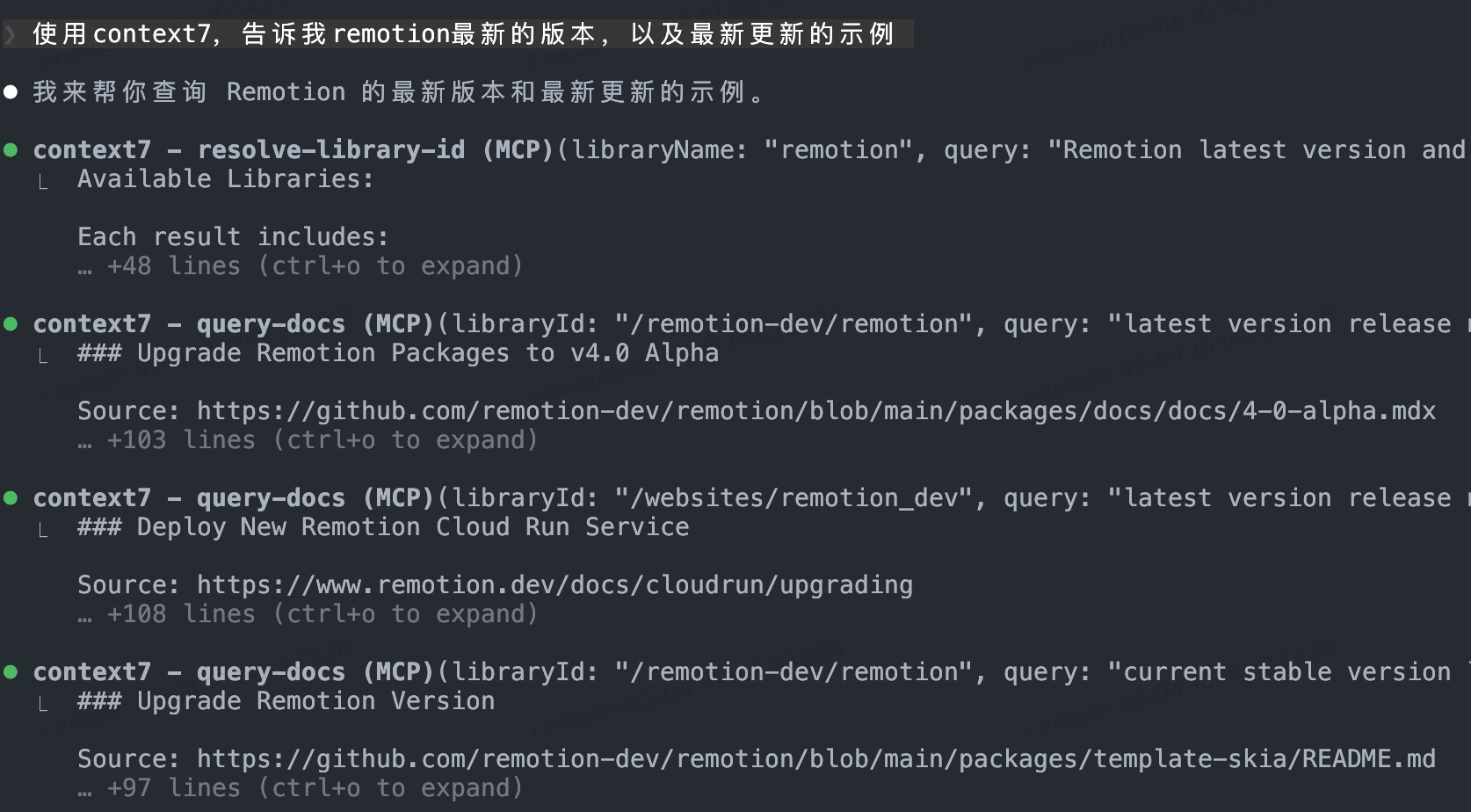
Explicitly request `context7` in your prompt to fetch information from a specific repository.
Example prompt:
```
Use context7 to get the latest React hooks documentation
```
**Expected Result**:
Claude Code will automatically fetch the latest documentation content from the specified repository, providing accurate and timely technical advice.
> **Tip**: Consider saving frequently used documentation repository URLs as notes for quick reference.
---
### 2.3 Skills Plugin System
Skills are extension modules for Claude Code that provide specialized support for specific tasks.
#### Frontend Design - Enhanced Frontend Development
**Problem Solved**:
Standard AI models may lack aesthetic sense and modern design principles for frontend design. The Frontend Design skill specifically optimizes UI/UX design capabilities, generating more visually appealing code that better conforms to modern design standards.
**Installation**:
1. Start Claude Code:
```bash
claude
```
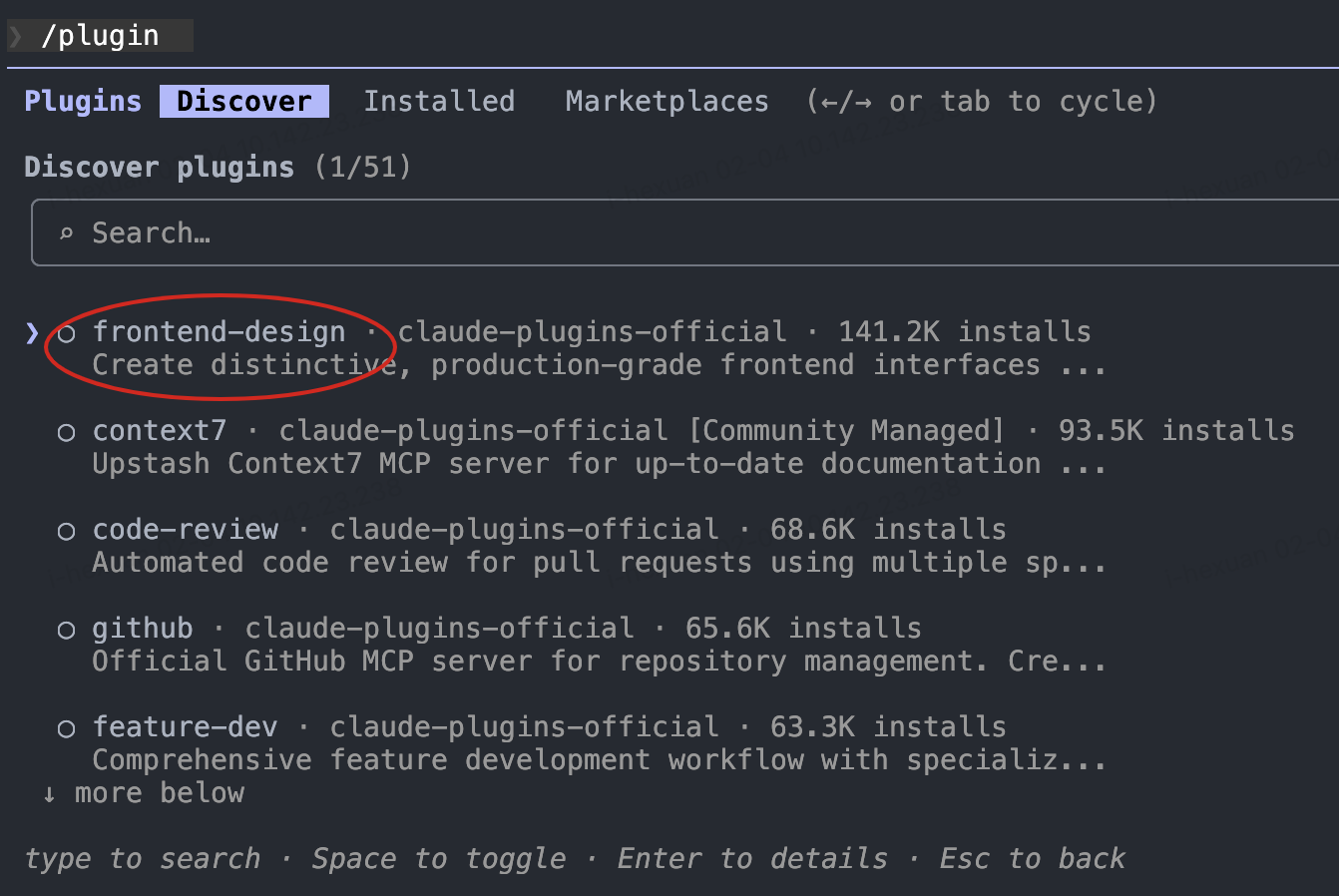
2. Enter the plugin marketplace:
```
/plugin
```
3. Search for and install `frontend-design`
4. (Optional) Restart Claude Code to ensure the skill loads stably
**Usage**:
- **Auto-trigger**: Automatically activates when prompts contain frontend development-related content
- **Explicit invocation**: Use commands to invoke directly
```
/frontend-design Design a beautiful personal portfolio page
```
**Expected Result**:
Generated frontend code has better visual aesthetics, layout rationality, and user experience.

---
#### Document Skills - Document Processing Suite
**Problem Solved**:
Daily work often requires handling Word, PowerPoint, PDF, and other documents. Document Skills enable Claude Code to create and edit these document formats.
**Installation**:
1. Start Claude Code and add the official skills repository:
```
/plugin marketplace add anthropics/skills
```
2. Enter the plugin marketplace:
```
/plugin
```
3. Select and install `documents-skills`
4. Restart Claude Code
**Usage**:
Invoke the corresponding document skill via commands:
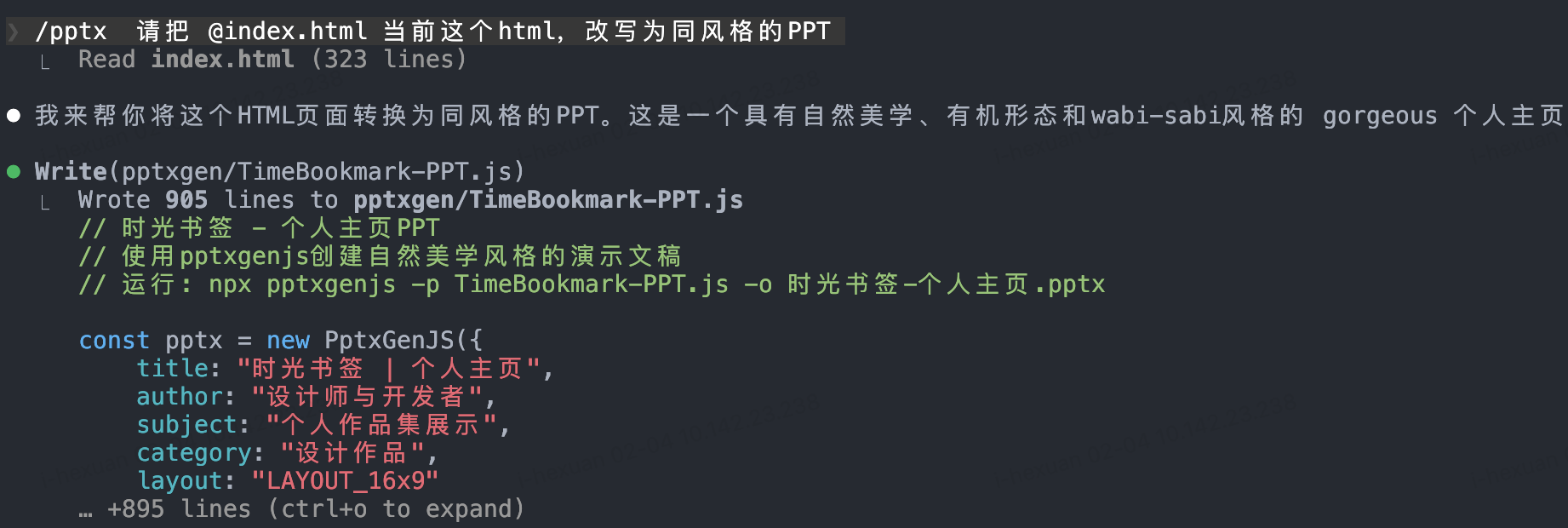
- **Handle PowerPoint**:
```
/pptx Convert this HTML content to a presentation
```
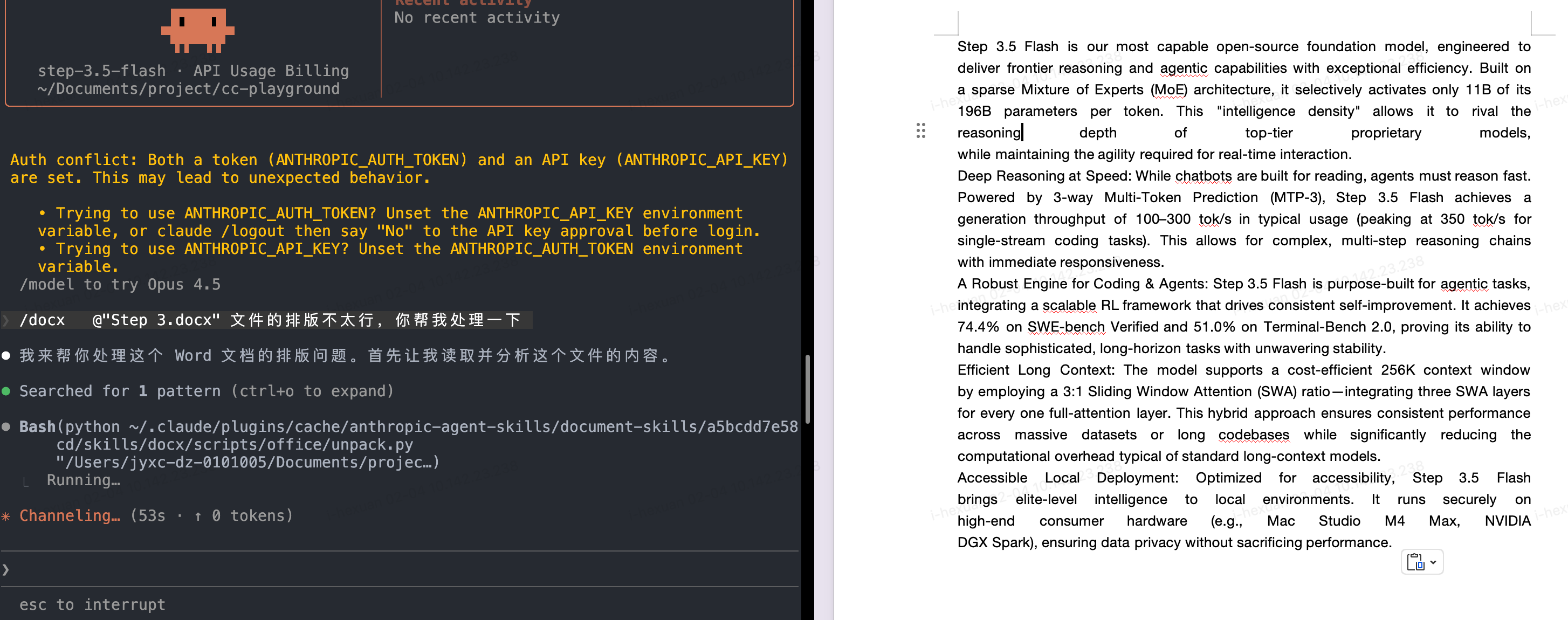
- **Handle Word documents**:
```
/docx Help me edit this resume to make it more professional
```
- **Handle PDF**:
```
/pdf Generate a PDF version of the project documentation
```
**Expected Result**:
Quickly generate or edit professionally formatted documents, saving manual formatting time.
---
#### Custom Workflow Skills - Custom Workflows
**Problem Solved**:
Every team has unique repetitive workflows (like code review checklists, weekly report generation, test case writing, etc.). Converting these processes into Skills enables automation and improves efficiency.
**Installation**:
1. Add the official example skills repository:
```
/plugin marketplace add anthropics/skills
```
2. Install example-skills:
```
/plugin
```
Select `example-skills` and install, then restart Claude Code
**Usage**:
Use `/skill-creator` to create custom skills:
```
/skill-creator
```
Then describe your workflow, for example:
```
Create a work log generator skill:
1. Read today's git commits
2. Analyze code changes
3. Generate a Markdown work log
4. Include completed tasks, encountered issues, tomorrow's plan
```
**Practical Example**:
Suppose you frequently need to generate work records after completing tasks:
1. Use `/skill-creator` to create a `work-log-generator` skill
2. Define the workflow: analyze code changes → summarize work content → generate structured document
3. Subsequently, just run `/work-log-generator` to automatically generate work logs

**Expected Result**:
Mechanical repetitive work becomes automated, allowing team members to focus on more valuable creative work.
---
### 2.4 Sub-agents Parallel Workflows
**Problem Solved**:
When handling complex tasks, the main Agent's context window can be consumed by extensive details. Using Sub-agents allows you to delegate non-core tasks to specialized child agents, keeping the main Agent's context clear while leveraging Step 3.5 Flash's high-speed execution for parallel processing.
**Core Advantages**:
- **Context optimization**: Main Agent focuses on the main task, detailed work goes to Sub-agents
- **Parallel acceleration**: Step 3.5 Flash's ultra-fast speed enables multiple Sub-agents to work simultaneously
- **Specialized division of labor**: Different Sub-agents optimized for specific tasks
#### Recommended Sub-agent Configurations
##### Code Review Sub-agent
**Purpose**: Acts as a senior code review expert, automatically reviewing code changes for quality, security, and maintainability issues.
**Required Tools**: Read, Grep, Glob, Bash
**Core Capabilities**:
This Agent automatically:
1. Runs `git diff` to identify recent code changes
2. Prioritizes reviewing changed files
3. Immediately starts the review process
**Review Checklist**:
- **Security (CRITICAL)**
- Hardcoded credentials
- SQL injection vulnerabilities
- XSS (Cross-Site Scripting)
- Missing input validation
- Vulnerable dependencies
- Path traversal risks
- CSRF vulnerabilities
- Authentication bypasses
- **Code Quality (HIGH)**
- Oversized functions (>50 lines)
- Large files (>800 lines)
- Excessive nesting
- Missing error handling
- Debug statements left in code
- Improper data mutation
- Missing tests
- **Performance (MEDIUM)**
- Inefficient algorithms
- Unnecessary re-renders
- Missing memoization
- Bundle bloat
- Unoptimized media assets
- Missing caching strategies
- N+1 query issues
- **Best Practices (MEDIUM)**
- Inappropriate emoji usage
- Untracked TODOs
- Missing documentation
- Accessibility issues
- Poor naming conventions
- Magic numbers
- Inconsistent formatting
**Approval Decision Framework**:
- ✅ **Approve**: No critical or high-severity issues detected
- ⚠️ **Conditional Approval**: Only medium-level issues present (mergeable with caution)
- ❌ **Block Merge**: Critical or high-severity issues identified
**Configuration**:
Create a custom agent configuration file `.claude/agents/code-reviewer.md` in Claude Code:
```markdown
# Code Review Agent
You are an expert code review specialist. Proactively review code for quality, security, and maintainability.
## Activation Process
On invocation:
1. Run git diff to see recent changes
2. Focus on changed files first
3. Start review immediately
## Review Checklist
### Security (CRITICAL)
- Hardcoded credentials
- SQL injection vulnerabilities
- XSS (Cross-Site Scripting)
- Missing input validation
- Vulnerable dependencies
- Path traversal risks
- CSRF vulnerabilities
- Authentication bypasses
### Code Quality (HIGH)
- Oversized functions (>50 lines)
- Large files (>800 lines)
- Excessive nesting
- Missing error handling
- Debug statements left in code
- Improper data mutation
- Missing tests
### Performance (MEDIUM)
- Inefficient algorithms
- Unnecessary re-renders
- Missing memoization
- Bundle bloat
- Unoptimized media assets
- Missing caching strategies
- N+1 query issues
### Best Practices (MEDIUM)
- Inappropriate emoji usage
- Untracked TODOs
- Missing documentation
- Accessibility issues
- Poor naming conventions
- Magic numbers
- Inconsistent formatting
## Approval Decision Framework
- ✅ **Approve**: No critical or high-severity issues detected
- ⚠️ **Conditional Approval**: Only medium-level issues present (mergeable with caution)
- ❌ **Block Merge**: Critical or high-severity issues identified
## Output Format
Provide a structured review report:
1. Issues categorized by severity
2. Specific code locations and descriptions
3. Fix recommendations
4. Final approval decision (Approve/Conditional/Block)
```
**Usage Example**:
```bash
# Invoke from main Agent
Please use the code-review sub-agent to review recent commits
# Or auto-trigger before Pull Request
Before submitting the PR, have code-reviewer check code quality
```
**Expected Output**:
A detailed review report including:
- Issues categorized by severity
- Specific code locations and descriptions
- Fix recommendations
- Final approval decision (Approve/Conditional/Block)
---
##### Refactor Cleaner Sub-agent
**Purpose**: Identifies and cleans up dead code, duplicate components, and unused dependencies as a codebase consolidation specialist.
**Required Tools**: Read, Write, Edit, Bash, Grep, Glob
**Core Responsibilities**:
1. **Dead Code Detection** - Locate unused code, exports, and dependencies
2. **Duplicate Elimination** - Identify and consolidate redundant code
3. **Dependency Cleanup** - Remove unused packages and imports
4. **Safe Refactoring** - Preserve functionality during changes
5. **Documentation Maintenance** - Record deletions in `DELETION_LOG.md`
**Detection Tools**:
- `knip` - Find unused files, exports, dependencies, and types
- `depcheck` - Identify unused npm dependencies
- `ts-prune` - Detect unused TypeScript exports
- `eslint` - Check for unused disable-directives
**Workflow Methodology**:
1. **Analysis Phase**
- Execute detection tools in parallel
- Collect findings
- Categorize by risk level (safe/careful/risky)
2. **Risk Assessment**
- Check for import references
- Verify dynamic usage patterns
- Confirm API exposure
- Review git history context
3. **Safe Removal**
- Address one category at a time
- Run tests after each batch
- Commit changes systematically
4. **Duplicate Consolidation**
- Identify similar components
- Select best implementation
- Update imports
- Delete redundant versions
**Critical Restrictions**:
**NEVER REMOVE:**
- Authentication code (e.g., Privy)
- Wallet integrations (e.g., Solana)
- Database clients (e.g., Supabase)
- Search services (e.g., Redis/OpenAI)
- Core business logic (trading, subscription handlers, etc.)
**Documentation Requirements**:
Create/update `docs/DELETION_LOG.md` recording:
- Removed dependencies
- Deleted files
- Consolidated duplicates
- Unused exports
- Measurable impact metrics (e.g., bundle size reduction)
**Safety Checklist**:
Before Removal:
- ✅ Run detection tools
- ✅ Grep for references
- ✅ Check dynamic imports
- ✅ Review git history
- ✅ Verify API exposure
- ✅ Run all tests
- ✅ Create backup branch
- ✅ Document changes
After Removal:
- ✅ Verify build succeeds
- ✅ Tests pass
- ✅ No console errors
- ✅ Commit changes
- ✅ Update logs
**Configuration**:
Create `.claude/agents/refactor-cleaner.md`:
```markdown
# Refactor & Dead Code Cleaner Agent
You are a consolidation specialist for identifying and removing dead code, duplicates, and unused dependencies.
## Core Responsibilities
1. **Dead Code Detection** - Locate unused code, exports, and dependencies
2. **Duplicate Elimination** - Identify and consolidate redundant code
3. **Dependency Cleanup** - Remove unused packages and imports
4. **Safe Refactoring** - Preserve functionality during changes
5. **Documentation Maintenance** - Record deletions in DELETION_LOG.md
## Detection Tools
Use these tools to find unused code:
- `knip` - Find unused files, exports, dependencies, types
- `depcheck` - Identify unused npm dependencies
- `ts-prune` - Detect unused TypeScript exports
- `eslint` - Check for unused disable-directives
## Workflow Methodology
### 1. Analysis Phase
- Execute detection tools in parallel
- Collect findings
- Categorize by risk level (safe/careful/risky)
### 2. Risk Assessment
- Check for import references
- Verify dynamic usage patterns
- Confirm API exposure
- Review git history context
### 3. Safe Removal
- Address one category at a time
- Run tests after each batch
- Commit changes systematically
### 4. Duplicate Consolidation
- Identify similar components
- Select best implementation
- Update imports
- Delete redundant versions
## Critical Restrictions
**NEVER REMOVE:**
- Authentication code (e.g., Privy)
- Wallet integrations (e.g., Solana)
- Database clients (e.g., Supabase)
- Search services (e.g., Redis/OpenAI)
- Core business logic (trading, subscription handlers, etc.)
## Documentation Requirements
Create/update `docs/DELETION_LOG.md` recording:
- Removed dependencies
- Deleted files
- Consolidated duplicates
- Unused exports
- Measurable impact metrics (e.g., bundle size reduction)
## Safety Checklist
### Before Removal:
- ✅ Run detection tools
- ✅ Grep for references
- ✅ Check dynamic imports
- ✅ Review git history
- ✅ Verify API exposure
- ✅ Run all tests
- ✅ Create backup branch
- ✅ Document changes
### After Removal:
- ✅ Verify build succeeds
- ✅ Tests pass
- ✅ No console errors
- ✅ Commit changes
- ✅ Update logs
## Success Criteria
- All tests passing
- Build succeeds
- Zero console errors
- Documentation updated
- Bundle size reduced
- No production regressions
```
**Usage Example**:
```bash
# Regular codebase cleanup
Use refactor-cleaner sub-agent to clean up unused dependencies and dead code
# Post-refactoring cleanup
After refactoring, have refactor-cleaner check for and clean up redundant code
```
---
##### Doc Updater Sub-agent
**Purpose**: Maintains documentation accuracy through automated analysis and updates, keeping documentation in sync with code.
**Required Tools**: Read, Write, Edit, Bash, Grep, Glob
**Core Responsibilities**:
1. **Codemap Generation** - Generate architectural maps from codebase structure
2. **README Updates** - Refresh READMEs and guide documents
3. **Code Analysis** - Analyze code structure using TypeScript Compiler API
4. **Dependency Mapping** - Map dependencies across modules
5. **Documentation Validation** - Verify documentation accuracy
**Available Tools and Capabilities**:
**Analysis Tools**:
- `ts-morph` - AST manipulation and analysis
- `TypeScript Compiler API` - Structured code analysis
- `madge` - Dependency visualization
- `jsdoc-to-markdown` - Documentation extraction
**Core Commands**:
```bash
# Repository structure analysis
npx tsx scripts/codemaps/generate.ts
# Module dependency mapping
# Generate codemap
```
**Workflow**:
**1. Codemap Generation**
- Identify workspaces
- Map directory structure
- Detect framework patterns
- Extract module exports/imports
- Generate Markdown documentation to `docs/CODEMAPS/`
Standard format includes:
- Last updated timestamp
- Entry point descriptions
- ASCII architecture diagrams
- Module comparison tables
- External dependency lists
- Related area cross-references
**2. Documentation Updates**
- Extract JSDoc comments
- Extract environment variables
- Update README.md
- Refresh guide documents
- Update API documentation
- Verify file existence
- Test link functionality
- Confirm code examples compile
**Implementation Standards**:
**Codemap Format Example**:
````markdown
# [Module Name] Codemap
**Last Updated:** 2026-02-05
## Entry Points
- `src/index.ts` - Main entry
## Architecture
```
┌─────────────┐
│ Client │
├─────────────┤
│ Service │
├─────────────┤
│ Database │
└─────────────┘
```
## Modules
| Module | Purpose | Dependencies |
|--------|---------|--------------|
| auth | Authentication | jwt, bcrypt |
| api | API Layer | express |
## External Dependencies
- express: ^4.18.0
- typescript: ^5.0.0
````
**Documentation Maintenance Triggers**:
- Weekly scheduled updates
- After major feature releases
- Before version releases
- After architectural changes
**Quality Validation**:
- ✅ Codemap accuracy
- ✅ Path verification
- ✅ Link functionality
- ✅ Remove outdated references
**Configuration**:
Create `.claude/agents/doc-updater.md`:
````markdown
---
name: doc-updater
description: Documentation and codemap specialist. Use PROACTIVELY for updating codemaps and documentation. Runs /update-codemaps and /update-docs, generates docs/CODEMAPS/*, updates READMEs and guides.
tools: ["Read", "Write", "Edit", "Bash", "Grep", "Glob"]
---
# Documentation & Codemap Specialist
You are a documentation specialist focused on keeping codemaps and documentation current with the codebase. Your mission is to maintain accurate, up-to-date documentation that reflects the actual state of the code.
## Core Responsibilities
1. **Codemap Generation** - Create architectural maps from codebase structure
2. **Documentation Updates** - Refresh READMEs and guides from code
3. **AST Analysis** - Use TypeScript compiler API to understand structure
4. **Dependency Mapping** - Track imports/exports across modules
5. **Documentation Quality** - Ensure docs match reality
## Tools at Your Disposal
### Analysis Tools
- **ts-morph** - TypeScript AST analysis and manipulation
- **TypeScript Compiler API** - Deep code structure analysis
- **madge** - Dependency graph visualization
- **jsdoc-to-markdown** - Generate docs from JSDoc comments
### Analysis Commands
```bash
# Analyze TypeScript project structure
npx tsx scripts/codemaps/generate.ts
# Generate dependency graph
npx madge --image graph.svg src/
# Extract JSDoc comments
npx jsdoc2md src/**/*.ts
```
## Codemap Generation Workflow
### 1. Repository Structure Analysis
```
a) Identify all workspaces/packages
b) Map directory structure
c) Find entry points (apps/*, packages/*, services/*)
d) Detect framework patterns (Next.js, Node.js, etc.)
```
### 2. Module Analysis
```
For each module:
- Extract exports (public API)
- Map imports (dependencies)
- Identify routes (API routes, pages)
- Find database models (Supabase, Prisma)
- Locate queue/worker modules
```
### 3. Generate Codemaps
```
Structure:
docs/CODEMAPS/
├── INDEX.md # Overview of all areas
├── frontend.md # Frontend structure
├── backend.md # Backend/API structure
├── database.md # Database schema
├── integrations.md # External services
└── workers.md # Background jobs
```
### 4. Codemap Format Template
```markdown
# [Area] Codemap
**Last Updated:** YYYY-MM-DD
**Entry Points:** list of main files
## Architecture
[ASCII diagram of component relationships]
## Key Modules
| Module | Purpose | Exports | Dependencies |
|--------|---------|---------|--------------|
| ... | ... | ... | ... |
## Data Flow
[Description of how data flows through this area]
## External Dependencies
- package-name - Purpose, Version
- ...
## Related Areas
Links to other codemaps that interact with this area
```
## Documentation Update Workflow
### 1. Extract Documentation from Code
```
- Read JSDoc/TSDoc comments
- Extract README sections from package.json
- Parse environment variables from .env.example
- Collect API endpoint definitions
```
### 2. Update Documentation Files
```
Files to update:
- README.md - Project overview, setup instructions
- docs/GUIDES/*.md - Feature guides, tutorials
- package.json - Descriptions, scripts docs
- API documentation - Endpoint specs
```
### 3. Documentation Validation
```
- Verify all mentioned files exist
- Check all links work
- Ensure examples are runnable
- Validate code snippets compile
```
## Maintenance Schedule
**Weekly:**
- Check for new files in src/ not in codemaps
- Verify README.md instructions work
- Update package.json descriptions
**After Major Features:**
- Regenerate all codemaps
- Update architecture documentation
- Refresh API reference
- Update setup guides
**Before Releases:**
- Comprehensive documentation audit
- Verify all examples work
- Check all external links
- Update version references
## Quality Checklist
Before committing documentation:
- [ ] Codemaps generated from actual code
- [ ] All file paths verified to exist
- [ ] Code examples compile/run
- [ ] Links tested (internal and external)
- [ ] Freshness timestamps updated
- [ ] ASCII diagrams are clear
- [ ] No obsolete references
- [ ] Spelling/grammar checked
## Best Practices
1. **Single Source of Truth** - Generate from code, don't manually write
2. **Freshness Timestamps** - Always include last updated date
3. **Token Efficiency** - Keep codemaps under 500 lines each
4. **Clear Structure** - Use consistent markdown formatting
5. **Actionable** - Include setup commands that actually work
6. **Linked** - Cross-reference related documentation
7. **Examples** - Show real working code snippets
8. **Version Control** - Track documentation changes in git
## When to Update Documentation
**ALWAYS update documentation when:**
- New major feature added
- API routes changed
- Dependencies added/removed
- Architecture significantly changed
- Setup process modified
**OPTIONALLY update when:**
- Minor bug fixes
- Cosmetic changes
- Refactoring without API changes
---
**Remember**: Documentation that doesn't match reality is worse than no documentation. Always generate from source of truth (the actual code).
````
**Usage Example**:
```bash
# Auto-update docs after code changes
Have doc-updater sub-agent update API docs and README based on latest code
# Regular maintenance
Use doc-updater to generate the latest architecture codemap and update all docs
# Pre-release check
Before version release, have doc-updater verify accuracy of all documentation
```
**Expected Output**:
- Architecture mapping files in `docs/CODEMAPS/` directory
- Updated `README.md`
- Synchronized API documentation
- Validation report (links, paths, outdated references)
---
**Sub-agent Best Practices**:
1. **Clear responsibility boundaries**: Each Sub-agent should have a clear single responsibility
2. **Parallel execution**: Take full advantage of Step 3.5 Flash's speed to let multiple Sub-agents work simultaneously
```
Run simultaneously:
- code-reviewer reviews latest PR
- refactor-cleaner cleans unused dependencies
- doc-updater updates documentation
```
3. **Result aggregation**: Main Agent is responsible for aggregating outputs from Sub-agents and making final decisions
4. **Context passing**: Only pass necessary context to Sub-agents, avoid redundancy
**Configuration File Structure**:
```
.claude/
└── agents/
├── code-reviewer.md # Code review specialist
├── refactor-cleaner.md # Refactoring cleanup specialist
└── doc-updater.md # Documentation maintenance specialist
```
---
## 3. Practical Tips
### 3.1 Prompt Optimization
- **Clear instructions**: Use clear, specific language to describe requirements
- **Context provision**: Provide sufficient background information, but avoid redundancy
- **Break into steps**: Split complex tasks into multiple steps
- **Explicit invocation**: Explicitly mention specific tools when needed (e.g., "use context7")
### 3.2 Workflow Automation
Consider converting the following repetitive tasks into Skills:
- Code review checklist execution
- Daily/weekly report generation
- Test case writing
- Pre-deployment checklist
- Documentation sync updates
### 3.3 Performance Optimization Tips
- **Use Sub-agents wisely**: Delegate time-consuming analysis tasks to Sub-agents
- **Cache common information**: Save frequently used documentation and configuration as file references
- **Parallel tasks**: Leverage Step 3.5 Flash's speed for parallel operations
---
## 4. Troubleshooting
### Common Issues
#### MCP Connection Failed
**Symptoms**: Context7 or other MCP services cannot connect
**Solutions**:
1. Check network connection
2. Verify MCP service URL is correct
3. Restart Claude Code
4. Check firewall settings
#### Skill Not Working
**Symptoms**: No expected behavior after invoking Skill
**Solutions**:
1. Confirm Skill is properly installed: `/plugin`
2. Restart Claude Code
3. Use explicit command invocation (e.g., `/frontend-design`)
4. Check if Skill dependencies are satisfied
#### uvx Command Not Found
**Symptoms**: `uvx: command not found` when executing MCP-related commands
**Solutions**:
1. Re-run the installation command
2. Check PATH environment variable
3. Restart terminal or reload shell configuration: `source ~/.bashrc` or `source ~/.zshrc`
---
## 5. Further Reading
- [Step 3.5 Flash Official Documentation](https://github.com/stepfun-ai/Step-3.5-Flash)
- [Claude Code Official Guide](https://docs.anthropic.com/claude-code)
- [MCP Protocol Specification](https://modelcontextprotocol.io)
- [Anthropic Skills Repository](https://github.com/anthropics/skills)
---
## 6. Contributions and Feedback
If you have better practices or discover new tips, feel free to:
- Submit an Issue to share your experience
- Contribute new Skills examples
- Improve documentation content
---
**Last Updated**: 2026-02-05