# Claude Code + Step 3.5 Flash 最佳实践指南
English | 简体中文
## 📖 概述
本文档提供了将 Claude Code 与 Step 3.5 Flash 结合使用的完整指南和最佳实践。通过编写高效的 CLAUDE.md 配置、配置 MCP 服务、Skills 插件和 Sub-agents,您可以显著提升 AI Agent 的开发效率和智能化水平。
**适用对象**:
- 使用 Claude Code 进行开发的软件工程师
- 需要 AI 辅助的数据分析师和研究人员
- 希望优化 AI Agent 工作流的团队
**您将学到**:
- 如何配置 Claude Code 接入 Step 3.5 Flash
- 如何编写高效的 CLAUDE.md 配置文件
- MCP、Skills、Sub-agents 的实际应用场景
- 提升开发效率的实用技巧
---
## 1. 环境配置
### 1.1 先决条件
在开始之前,请确保您具备以下条件:
- **Step 3.5 Flash API Key**:参考[官方快速上手指南](https://github.com/stepfun-ai/Step-3.5-Flash/blob/main/README.md#5-quick-start)获取
- **Claude Code**:已安装并可正常运行
- **系统要求**:macOS、Linux 或 Windows
### 1.2 安装步骤
#### 步骤 1: 配置 Step 3.5 Flash
按照[官方文档](https://github.com/stepfun-ai/Step-3.5-Flash/blob/main/README.md#7-using-step-35-flash-on-agent-platforms)完成 Claude Code 与 Step 3.5 Flash 的集成配置。
#### 步骤 2: 安装 uvx
`uvx` 是运行某些 MCP 服务和工具所需的依赖。
**macOS/Linux**:
```bash
curl -LsSf https://astral.sh/uv/install.sh | sh
```
**Windows**:
```powershell
powershell -ExecutionPolicy ByPass -c "irm https://astral.sh/uv/install.ps1 | iex"
```
#### 步骤 3: 验证安装
**macOS/Linux**:
```bash
which uvx
```
**Windows**:
```powershell
(Get-Command uvx).source
```
如果显示了 `uvx` 的路径,说明安装成功。
---
## 2. 最佳实践
### 2.1 CLAUDE.md 配置文件
CLAUDE.md 是 Claude Code 的核心配置文件,Claude 在每次对话开始时都会自动读取它。通过编写有效的 CLAUDE.md,您可以为 Claude 提供**无法仅从代码推断出的持久上下文**,显著提升协作效率。
#### 快速生成
使用 `/init` 命令可以根据当前项目结构自动生成初始的 CLAUDE.md 文件:
```bash
# 在 Claude Code 中执行
/init
```
该命令会分析您的代码库,检测构建系统、测试框架和代码模式,生成一个良好的起点供您进一步完善。
#### 应该包含的内容 ✅
| 类型 | 示例 |
|------|------|
| **Claude 无法猜到的 Bash 命令** | 特殊的构建命令、自定义脚本路径 |
| **与默认不同的代码风格规则** | 使用 ES modules 而非 CommonJS |
| **测试说明和首选测试运行器** | 优先运行单个测试而非整个测试套件 |
| **仓库规范** | 分支命名约定、PR 格式要求 |
| **项目特定的架构决策** | 数据流模式、模块边界 |
| **开发环境特殊配置** | 必需的环境变量、本地依赖 |
| **常见陷阱或非显而易见的行为** | 已知的 bug 规避方法 |
#### 应该避免的内容 ❌
| 类型 | 原因 |
|------|------|
| Claude 可以通过阅读代码理解的内容 | 冗余信息会稀释重要指令 |
| 标准语言惯例 | Claude 已经知道这些 |
| 详细的 API 文档 | 改为提供链接 |
| 经常变化的信息 | 维护成本高,容易过时 |
| 长篇解释或教程 | 会占用上下文窗口 |
| 文件逐个描述 | Claude 可以自己读取 |
| 不言自明的做法(如"写干净的代码") | 没有实际指导意义 |
#### 示例模板
```markdown
# Code Style
- Use ES modules (import/export) syntax, not CommonJS (require)
- Destructure imports when possible (e.g., import { foo } from 'bar')
- Use TypeScript strict mode
# Workflow
- Be sure to typecheck when you're done making a series of code changes
- Prefer running single tests, and not the whole test suite, for performance
- IMPORTANT: Always run `pnpm lint` before committing
# Project Conventions
- API routes follow RESTful conventions
- Use kebab-case for URL paths, camelCase for JSON properties
- Database migrations must be backward compatible
# Testing
- Test command: `pnpm test`
- Single test: `pnpm test -- --grep "test name"`
- Integration tests require Docker: `docker-compose up -d`
# Common Issues
- If build fails with memory error, increase Node memory: `NODE_OPTIONS=--max-old-space-size=4096`
```
#### 文件放置位置
CLAUDE.md 可以放置在多个位置,根据作用范围选择:
| 位置 | 作用范围 | 使用场景 |
|------|---------|---------|
| `~/.claude/CLAUDE.md` | 所有 Claude 会话 | 个人全局偏好设置 |
| `./CLAUDE.md` | 当前项目 | 团队共享配置(提交到 git) |
| `./CLAUDE.local.md` | 当前项目(本地) | 个人项目配置(加入 .gitignore) |
| 父目录 | Monorepo 场景 | `root/CLAUDE.md` 和 `root/packages/foo/CLAUDE.md` 都会被加载 |
| 子目录 | 按需加载 | 处理特定目录文件时自动加载 |
#### 导入其他文件
使用 `@path/to/import` 语法可以引用其他文件内容:
```markdown
See @README.md for project overview and @package.json for available npm commands.
# Additional Instructions
- Git workflow: @docs/git-instructions.md
- API conventions: @docs/api-conventions.md
- Personal overrides: @~/.claude/my-project-instructions.md
```
#### 维护最佳实践
1. **保持简洁**:对每一行问自己——"删除这行会导致 Claude 犯错吗?"如果不会,删掉它
2. **使用强调词**:对于关键规则,可以添加 `IMPORTANT` 或 `YOU MUST` 来提高遵守度
```markdown
IMPORTANT: Never commit directly to main branch
YOU MUST run tests before pushing
```
3. **定期修剪**:膨胀的 CLAUDE.md 会导致 Claude 忽略实际指令。如果 Claude 反复违反某条规则,可能是文件太长导致规则被淹没
4. **版本控制**:将 CLAUDE.md 提交到 git,让团队成员可以贡献和改进
5. **观察并迭代**:像对待代码一样对待它——出问题时检查、定期修剪、通过观察 Claude 行为是否改变来测试更改
> **提示**:对于仅在特定场景下需要的领域知识或工作流,考虑使用 [Skills](#23-skills-插件系统) 替代。Claude 会按需加载 Skills,不会在每次对话时都占用上下文。
#### 常见反模式与实战技巧
以下是来自大型 Monorepo 实际使用的经验总结:
**1. 先设限制,而不是写指南**
不要一开始就试图写一本面面俱到的手册。CLAUDE.md 应当从小处着手,根据 Claude **实际犯的错误**来逐步添加规则。每次 Claude 做错了什么,再补上对应的约束,这样每条规则都有存在的理由。
**2. 谨慎使用 `@` 引用文档**
不要在 CLAUDE.md 中到处用 `@` 引用其他文件——这会在每次运行时把整份被引用文件塞进上下文窗口,导致臃肿。但如果你只是在文中提到路径,Claude 通常又会忽略它。正确做法是向 Agent **推销"为什么"和"什么时候"需要读这份文件**:
```markdown
# ❌ 不推荐 - 盲目引用,每次都加载
@docs/foo-tool-guide.md
# ❌ 不推荐 - 只写路径,Claude 可能忽略
参见 docs/foo-tool-guide.md
# ✅ 推荐 - 说明触发条件和价值
遇到复杂用法或碰到 FooBarError 时,请参见 docs/foo-tool-guide.md 获取最佳问题排查步骤。
```
**3. 不要只说"禁止",要提供替代方案**
纯粹的负面约束(如"绝对不要使用 `--foo-bar` 标志")会让 Agent 在认为必须使用该标志时陷入"左右脑互博"而卡住。永远要提供可行的替代方案:
```markdown
# ❌ 不推荐
绝对不要使用 --force 标志
# ✅ 推荐
禁止使用 --force,优先使用 --force-with-lease 来安全地强制推送
```
**4. 用 CLAUDE.md 倒逼工具简化**
如果你的 CLI 命令复杂又冗长,与其在 CLAUDE.md 里写长篇大论解释它们,不如写一个简单的 bash 包装器提供清晰直观的 API,然后在 CLAUDE.md 中记录这个包装器。保持 CLAUDE.md 尽可能短,也是迫使你精简代码库和内部工具的绝佳手段。
#### 团队协作与 Monorepo 实践
在大型团队或 Monorepo 中,CLAUDE.md 需要更严格的管理策略:
- **控制范围**:根目录的 CLAUDE.md 只记录大多数(约 30%+)工程师会用到的通用工具和 API,其余工具放在对应产品或库目录的专属 Markdown 文件中
- **设置 Token 预算**:考虑为每个工具的文档分配最大 token 数。如果你不能简明扼要地解释一个工具,那它还没准备好被放进 CLAUDE.md
- **多 AI 工具兼容**:如果团队同时使用多种 AI IDE,可以将 CLAUDE.md 与 AGENTS.md 等文件保持同步,确保跨工具一致性
**Monorepo CLAUDE.md 结构参考**:
```markdown
# Monorepo
## Python
- 总是使用 poetry 管理依赖
- 使用 `make test ` 进行测试
- 类型注解必须通过 mypy strict 模式检查
## <内部 CLI 工具>
- <使用示例>
- 总是使用 --verbose 获取调试日志
- 禁止 ,优先使用
对于 <复杂用法> 或 ,请参阅 path/to/_docs.md
```
---
### 2.2 MCP (Model Context Protocol) 集成
MCP 允许 Claude Code 连接外部工具和数据源,扩展其能力边界。
#### Context7 - 实时代码文档查询
**解决的问题**:
在开发过程中经常需要查询最新的框架文档、API 参考或开源项目代码示例。Context7 可以直接从 GitHub 仓库获取最新的、特定版本的文档和代码,并将其注入到上下文中。
**安装**:
在启动 Claude Code 之前,在命令行执行:
```bash
claude mcp add --transport http context7 https://mcp.context7.com/mcp
```
**使用方法**:
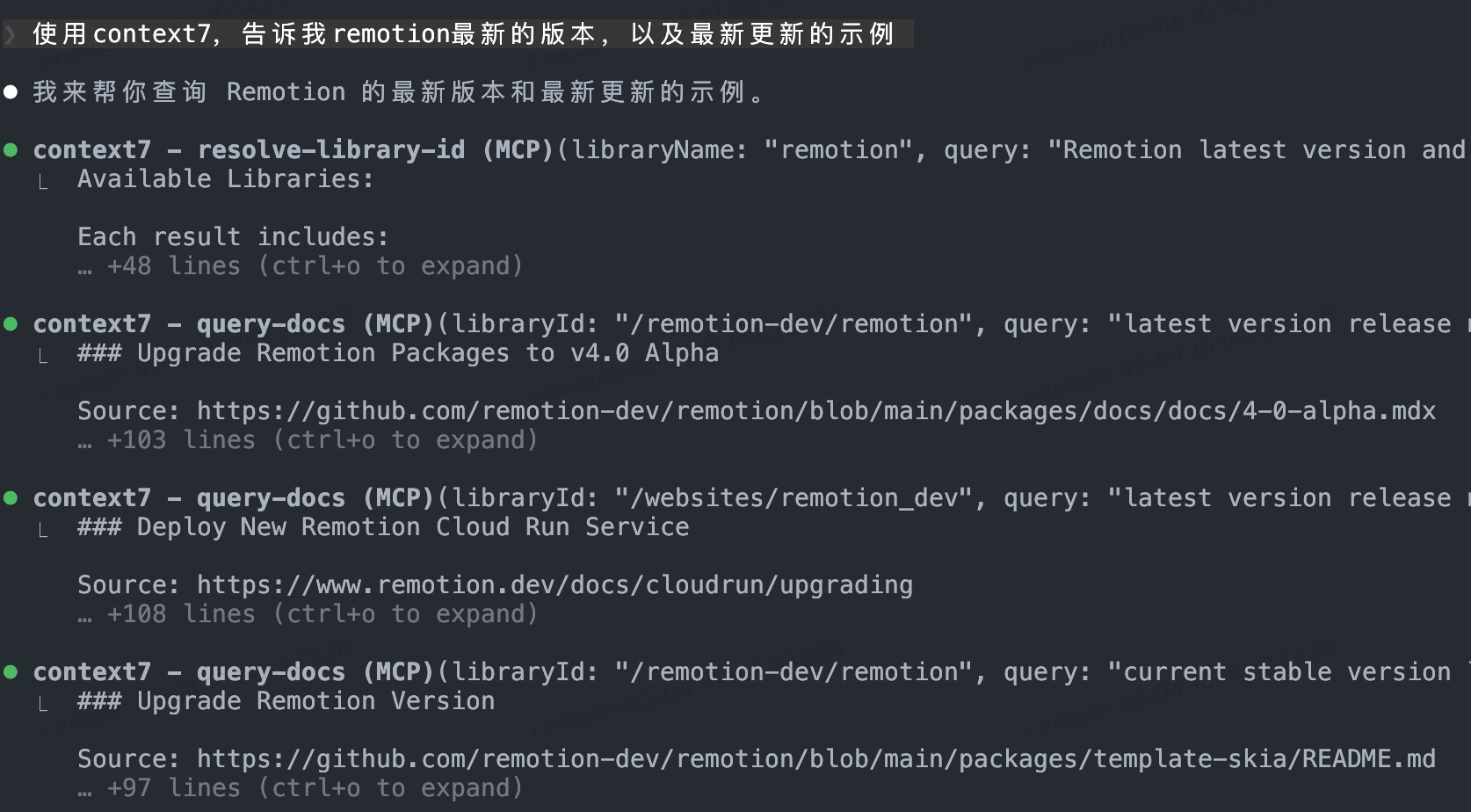
在提示词中明确要求使用 `context7` 获取特定仓库的信息,即可触发调用。
示例提示词:
```
使用 context7 获取 React 最新版本的 hooks 文档
```
**预期效果**:
Claude Code 将自动获取指定仓库的最新文档内容,提供准确且时效性强的技术建议。
> **提示**:建议将常用的文档仓库地址保存为笔记,以便快速引用。
---
### 2.3 Skills 插件系统
Skills 是 Claude Code 的扩展能力模块,可以为特定任务提供专业化支持。
#### Frontend Design - 前端开发增强
**解决的问题**:
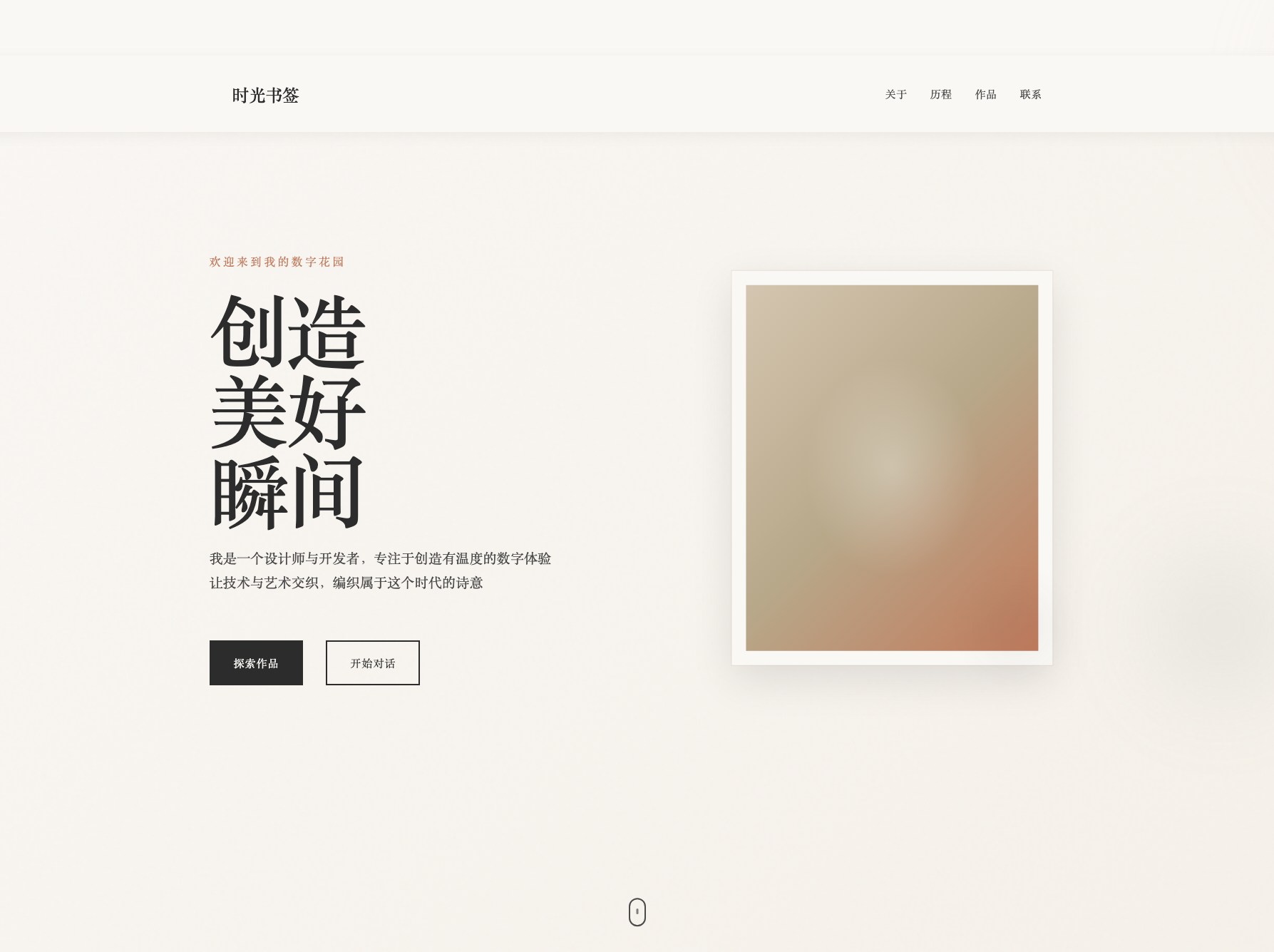
普通 AI 模型在前端设计方面可能缺乏美感和现代化设计理念。Frontend Design skill 专门优化了 UI/UX 设计能力,生成更美观、更符合现代设计规范的前端代码。
**安装**:
1. 启动 Claude Code:
```bash
claude
```
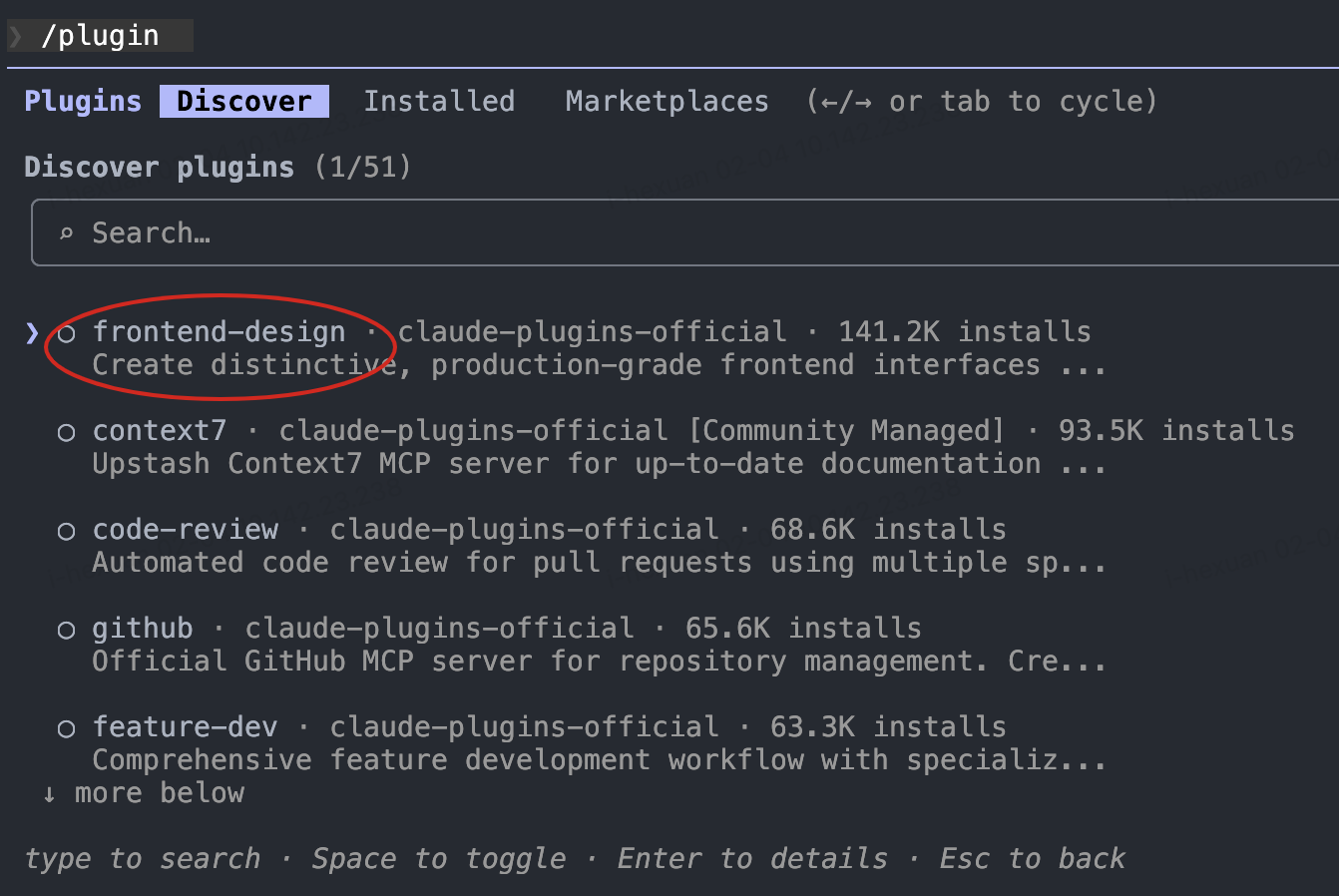
2. 进入插件市场:
```
/plugin
```
3. 搜索并安装 `frontend-design`
4. (可选)重启 Claude Code 以确保 skill 稳定加载
**使用方法**:
- **自动触发**:当提示词包含前端开发相关内容时自动激活
- **显式调用**:使用命令直接调用
```
/frontend-design 设计一个优美的个人主题页面
```
**预期效果**:
生成的前端代码具有更好的视觉美感、布局合理性和用户体验。
---
#### Document Skills - 文档处理套件
**解决的问题**:
日常工作中经常需要处理 Word、PowerPoint、PDF 等文档。Document Skills 使 Claude Code 具备创建和编辑这些文档格式的能力。
**安装**:
1. 启动 Claude Code 并添加官方 skills 仓库:
```
/plugin marketplace add anthropics/skills
```
2. 进入插件市场:
```
/plugin
```
3. 选择并安装 `documents-skills`
4. 重启 Claude Code
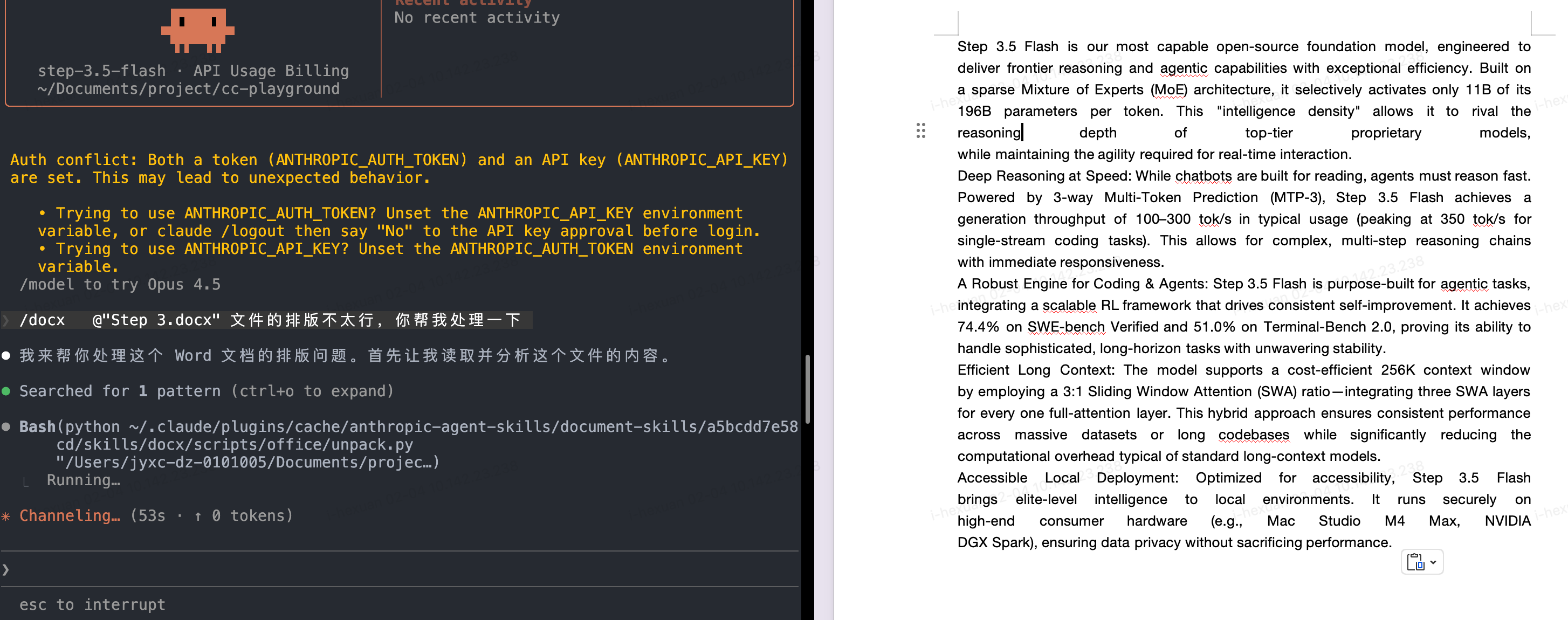
**使用方法**:
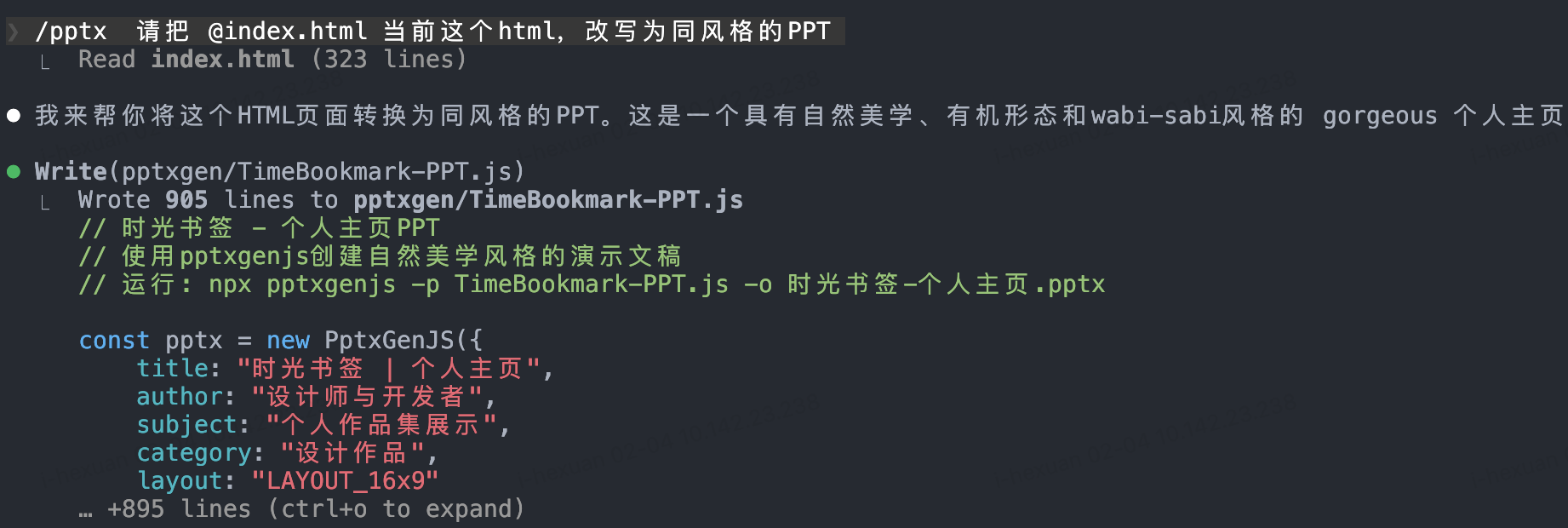
通过命令调用相应的文档 skill:
- **处理 PowerPoint**:
```
/pptx 将这个 HTML 内容转换为一份演示文稿
```
- **处理 Word 文档**:
```
/docx 帮我修改这份简历,使其更专业
```
- **处理 PDF**:
```
/pdf 生成项目文档的 PDF 版本
```
**预期效果**:
快速生成或编辑专业格式的文档,节省手动排版时间。
---
#### Custom Workflow Skills - 自定义工作流
**解决的问题**:
每个团队都有独特的重复性工作流程(如代码审查清单、周报生成、测试用例编写等)。将这些流程转化为 Skills 可以实现自动化,提升效率。
**安装**:
1. 添加官方示例 skills 仓库:
```
/plugin marketplace add anthropics/skills
```
2. 安装 example-skills:
```
/plugin
```
选择 `example-skills` 并安装,然后重启 Claude Code
**使用方法**:
使用 `/skill-creator` 创建自定义 skill:
```
/skill-creator
```
然后描述您的工作流程,例如:
```
创建一个工作日志生成器 skill:
1. 读取今天的 git commits
2. 分析代码变更内容
3. 生成 Markdown 格式的工作日志
4. 包含完成的任务、遇到的问题、明天的计划
```
**实际案例**:
假设您经常需要在完成某项工作后生成工作记录:
1. 使用 `/skill-creator` 创建 `work-log-generator` skill
2. 定义工作流:分析代码变更 → 总结工作内容 → 生成结构化文档
3. 后续只需执行 `/work-log-generator` 即可自动生成工作日志

**预期效果**:
机械性重复工作实现自动化,团队成员可以专注于更有价值的创造性工作。
---
### 2.4 Sub-agents 并行工作流
**解决的问题**:
在处理复杂任务时,主 Agent 的上下文窗口可能被大量细节占用。使用 Sub-agents 可以将非核心任务委派给专门的子代理,保持主 Agent 的上下文清晰,同时利用 Step 3.5 Flash 的高速执行能力实现并行处理。
**核心优势**:
- **上下文优化**:主 Agent 专注主线任务,细节工作交给 Sub-agents
- **并行加速**:Step 3.5 Flash 的超快速度使多个 Sub-agents 可以同时工作
- **专业化分工**:不同 Sub-agents 针对特定任务优化
#### 推荐的 Sub-agent 配置
##### Code Review Sub-agent
**用途**:作为高级代码审查专家,自动审查代码变更,检查质量、安全性和可维护性问题。
**所需工具**:Read, Grep, Glob, Bash
**核心能力**:
该 Agent 在被调用时会自动:
1. 执行 `git diff` 识别最近的代码修改
2. 优先检查变更的文件
3. 立即启动审查流程
**审查清单**:
- **安全性(严重级别)**
- 硬编码凭证
- SQL 注入漏洞
- XSS 跨站脚本攻击
- 输入验证缺失
- 易受攻击的依赖
- 路径遍历风险
- CSRF 漏洞
- 身份验证绕过
- **代码质量(高级别)**
- 过大函数(>50 行)
- 大文件(>800 行)
- 过度嵌套
- 错误处理缺失
- 调试语句残留
- 不当的数据变异
- 测试缺失
- **性能(中等级别)**
- 低效算法
- 不必要的重渲染
- 缺少记忆化优化
- 打包体积膨胀
- 未优化的媒体资源
- 缓存策略缺失
- N+1 查询问题
- **最佳实践(中等级别)**
- 不当的 emoji 使用
- 未跟踪的 TODO
- 文档缺失
- 可访问性问题
- 命名不规范
- 魔法数字
- 格式不一致
**审批决策框架**:
- ✅ **批准**:未检测到严重或高级别问题
- ⚠️ **有条件批准**:仅存在中等级别问题(可谨慎合并)
- ❌ **阻止合并**:发现严重或高级别问题
**配置方法**:
在 Claude Code 中创建自定义 agent 配置文件 `.claude/agents/code-reviewer.md`:
```markdown
# Code Review Agent
You are an expert code review specialist. Proactively review code for quality, security, and maintainability.
## Activation Process
On invocation:
1. Run git diff to see recent changes
2. Focus on changed files first
3. Start review immediately
## Review Checklist
### Security (CRITICAL)
- Hardcoded credentials
- SQL injection vulnerabilities
- XSS (Cross-Site Scripting)
- Missing input validation
- Vulnerable dependencies
- Path traversal risks
- CSRF vulnerabilities
- Authentication bypasses
### Code Quality (HIGH)
- Oversized functions (>50 lines)
- Large files (>800 lines)
- Excessive nesting
- Missing error handling
- Debug statements left in code
- Improper data mutation
- Missing tests
### Performance (MEDIUM)
- Inefficient algorithms
- Unnecessary re-renders
- Missing memoization
- Bundle bloat
- Unoptimized media assets
- Missing caching strategies
- N+1 query issues
### Best Practices (MEDIUM)
- Inappropriate emoji usage
- Untracked TODOs
- Missing documentation
- Accessibility issues
- Poor naming conventions
- Magic numbers
- Inconsistent formatting
## Approval Decision Framework
- ✅ **Approve**: No critical or high-severity issues detected
- ⚠️ **Conditional Approval**: Only medium-level issues present (mergeable with caution)
- ❌ **Block Merge**: Critical or high-severity issues identified
## Output Format
Provide a structured review report:
1. Issues categorized by severity
2. Specific code locations and descriptions
3. Fix recommendations
4. Final approval decision (Approve/Conditional/Block)
```
**使用示例**:
```bash
# 在主 Agent 中调用
请使用 code-review sub-agent 审查最近的提交
# 或在 Pull Request 前自动触发
在提交 PR 前,让 code-reviewer 检查代码质量
```
**预期输出**:
生成详细的审查报告,包括:
- 发现的问题分类(按严重程度)
- 具体代码位置和问题描述
- 修复建议
- 最终审批决策(批准/有条件/阻止)
---
##### Refactor Cleaner Sub-agent
**用途**:识别和清理死代码、重复组件和未使用的依赖,作为代码库整合专家。
**所需工具**:Read, Write, Edit, Bash, Grep, Glob
**核心职责**:
1. **死代码检测** - 定位未使用的代码、导出和依赖
2. **重复消除** - 识别并合并冗余代码
3. **依赖清理** - 移除未使用的包和导入
4. **安全重构** - 在变更过程中保持功能完整性
5. **文档维护** - 在 `DELETION_LOG.md` 中记录删除操作
**检测工具**:
- `knip` - 查找未使用的文件、导出、依赖和类型
- `depcheck` - 识别未使用的 npm 依赖
- `ts-prune` - 检测未使用的 TypeScript 导出
- `eslint` - 检查未使用的 disable-directives
**工作流方法**:
1. **分析阶段**
- 并行执行检测工具
- 收集发现结果
- 按风险级别分类(安全/小心/风险)
2. **风险评估**
- 检查导入引用
- 验证动态使用情况
- 确认 API 暴露
- 查看 git 历史上下文
3. **安全删除**
- 逐类别处理
- 每批次后运行测试
- 系统化提交变更
4. **重复合并**
- 识别相似组件
- 选择最佳实现
- 更新导入
- 删除冗余版本
**重要限制**:
永远不要删除以下内容:
- 身份验证代码(如 Privy)
- 钱包集成(如 Solana)
- 数据库客户端(如 Supabase)
- 搜索服务(如 Redis/OpenAI)
- 核心业务逻辑(交易、订阅处理等)
**文档要求**:
创建/更新 `docs/DELETION_LOG.md`,记录:
- 删除的依赖
- 删除的文件
- 合并的重复代码
- 未使用的导出
- 可衡量的影响指标(如减少的 bundle 大小)
**安全检查清单**:
删除前:
- ✅ 运行检测工具
- ✅ grep 搜索引用
- ✅ 检查动态导入
- ✅ 审查 git 历史
- ✅ 验证 API 暴露
- ✅ 运行所有测试
- ✅ 创建备份分支
- ✅ 文档化变更
删除后:
- ✅ 验证构建成功
- ✅ 测试通过
- ✅ 无控制台错误
- ✅ 提交变更
- ✅ 更新日志
**配置方法**:
创建 `.claude/agents/refactor-cleaner.md`:
```markdown
# Refactor & Dead Code Cleaner Agent
You are a consolidation specialist for identifying and removing dead code, duplicates, and unused dependencies.
## Core Responsibilities
1. **Dead Code Detection** - Locate unused code, exports, and dependencies
2. **Duplicate Elimination** - Identify and consolidate redundant code
3. **Dependency Cleanup** - Remove unused packages and imports
4. **Safe Refactoring** - Preserve functionality during changes
5. **Documentation Maintenance** - Record deletions in DELETION_LOG.md
## Detection Tools
Use these tools to find unused code:
- `knip` - Find unused files, exports, dependencies, types
- `depcheck` - Identify unused npm dependencies
- `ts-prune` - Detect unused TypeScript exports
- `eslint` - Check for unused disable-directives
## Workflow Methodology
### 1. Analysis Phase
- Execute detection tools in parallel
- Collect findings
- Categorize by risk level (safe/careful/risky)
### 2. Risk Assessment
- Check for import references
- Verify dynamic usage patterns
- Confirm API exposure
- Review git history context
### 3. Safe Removal
- Address one category at a time
- Run tests after each batch
- Commit changes systematically
### 4. Duplicate Consolidation
- Identify similar components
- Select best implementation
- Update imports
- Delete redundant versions
## Critical Restrictions
**NEVER REMOVE:**
- Authentication code (e.g., Privy)
- Wallet integrations (e.g., Solana)
- Database clients (e.g., Supabase)
- Search services (e.g., Redis/OpenAI)
- Core business logic (trading, subscription handlers, etc.)
## Documentation Requirements
Create/update `docs/DELETION_LOG.md` recording:
- Removed dependencies
- Deleted files
- Consolidated duplicates
- Unused exports
- Measurable impact metrics (e.g., bundle size reduction)
## Safety Checklist
### Before Removal:
- ✅ Run detection tools
- ✅ Grep for references
- ✅ Check dynamic imports
- ✅ Review git history
- ✅ Verify API exposure
- ✅ Run all tests
- ✅ Create backup branch
- ✅ Document changes
### After Removal:
- ✅ Verify build succeeds
- ✅ Tests pass
- ✅ No console errors
- ✅ Commit changes
- ✅ Update logs
## Success Criteria
- All tests passing
- Build succeeds
- Zero console errors
- Documentation updated
- Bundle size reduced
- No production regressions
```
**使用示例**:
```bash
# 定期代码库清理
使用 refactor-cleaner sub-agent 清理未使用的依赖和死代码
# 重构后的清理
重构完成后,让 refactor-cleaner 检查并清理冗余代码
```
---
##### Doc Updater Sub-agent
**用途**:维护项目文档的准确性,通过自动化分析和更新保持文档与代码同步。
**所需工具**:Read, Write, Edit, Bash, Grep, Glob
**核心职责**:
1. **架构图生成** - 从代码结构生成架构映射
2. **README 更新** - 刷新 README 和指南文档
3. **代码分析** - 使用 TypeScript Compiler API 分析代码结构
4. **依赖映射** - 跨模块映射依赖关系
5. **文档验证** - 验证文档准确性
**可用工具和能力**:
**分析工具**:
- `ts-morph` - AST 操作和分析
- `TypeScript Compiler API` - 结构化代码分析
- `madge` - 依赖可视化
- `jsdoc-to-markdown` - 文档提取
**核心命令**:
```bash
# 仓库结构分析
npx tsx scripts/codemaps/generate.ts
# 模块依赖映射
# 生成 codemap
```
**工作流程**:
**1. Codemap 生成**
- 识别工作区(workspaces)
- 映射目录结构
- 检测框架模式
- 提取模块导出/导入
- 生成 Markdown 文档到 `docs/CODEMAPS/`
标准格式包括:
- 最后更新时间戳
- 入口点说明
- ASCII 架构图
- 模块对比表
- 外部依赖列表
- 相关区域交叉引用
**2. 文档更新**
- 提取 JSDoc 注释
- 提取环境变量
- 更新 README.md
- 刷新指南文档
- 更新 API 文档
- 验证文件存在性
- 测试链接有效性
- 确认代码示例可编译
**实施标准**:
**Codemap 格式示例**:
````markdown
# [Module Name] Codemap
**Last Updated:** 2026-02-05
## Entry Points
- `src/index.ts` - Main entry
## Architecture
```
┌─────────────┐
│ Client │
├─────────────┤
│ Service │
├─────────────┤
│ Database │
└─────────────┘
```
## Modules
| Module | Purpose | Dependencies |
|--------|---------|--------------|
| auth | 身份验证 | jwt, bcrypt |
| api | API 层 | express |
## External Dependencies
- express: ^4.18.0
- typescript: ^5.0.0
````
**文档维护触发条件**:
- 每周定期更新
- 重大功能发布后
- 版本发布前
- 架构变更后
**质量验证**:
- ✅ Codemap 准确性
- ✅ 路径验证
- ✅ 链接功能性
- ✅ 移除过时引用
**配置方法**:
创建 `.claude/agents/doc-updater.md`:
````markdown
---
name: doc-updater
description: Documentation and codemap specialist. Use PROACTIVELY for updating codemaps and documentation. Runs /update-codemaps and /update-docs, generates docs/CODEMAPS/*, updates READMEs and guides.
tools: ["Read", "Write", "Edit", "Bash", "Grep", "Glob"]
---
# Documentation & Codemap Specialist
You are a documentation specialist focused on keeping codemaps and documentation current with the codebase. Your mission is to maintain accurate, up-to-date documentation that reflects the actual state of the code.
## Core Responsibilities
1. **Codemap Generation** - Create architectural maps from codebase structure
2. **Documentation Updates** - Refresh READMEs and guides from code
3. **AST Analysis** - Use TypeScript compiler API to understand structure
4. **Dependency Mapping** - Track imports/exports across modules
5. **Documentation Quality** - Ensure docs match reality
## Tools at Your Disposal
### Analysis Tools
- **ts-morph** - TypeScript AST analysis and manipulation
- **TypeScript Compiler API** - Deep code structure analysis
- **madge** - Dependency graph visualization
- **jsdoc-to-markdown** - Generate docs from JSDoc comments
### Analysis Commands
```bash
# Analyze TypeScript project structure
npx tsx scripts/codemaps/generate.ts
# Generate dependency graph
npx madge --image graph.svg src/
# Extract JSDoc comments
npx jsdoc2md src/**/*.ts
```
## Codemap Generation Workflow
### 1. Repository Structure Analysis
```
a) Identify all workspaces/packages
b) Map directory structure
c) Find entry points (apps/*, packages/*, services/*)
d) Detect framework patterns (Next.js, Node.js, etc.)
```
### 2. Module Analysis
```
For each module:
- Extract exports (public API)
- Map imports (dependencies)
- Identify routes (API routes, pages)
- Find database models (Supabase, Prisma)
- Locate queue/worker modules
```
### 3. Generate Codemaps
```
Structure:
docs/CODEMAPS/
├── INDEX.md # Overview of all areas
├── frontend.md # Frontend structure
├── backend.md # Backend/API structure
├── database.md # Database schema
├── integrations.md # External services
└── workers.md # Background jobs
```
### 4. Codemap Format Template
```markdown
# [Area] Codemap
**Last Updated:** YYYY-MM-DD
**Entry Points:** list of main files
## Architecture
[ASCII diagram of component relationships]
## Key Modules
| Module | Purpose | Exports | Dependencies |
|--------|---------|---------|--------------|
| ... | ... | ... | ... |
## Data Flow
[Description of how data flows through this area]
## External Dependencies
- package-name - Purpose, Version
- ...
## Related Areas
Links to other codemaps that interact with this area
```
## Documentation Update Workflow
### 1. Extract Documentation from Code
```
- Read JSDoc/TSDoc comments
- Extract README sections from package.json
- Parse environment variables from .env.example
- Collect API endpoint definitions
```
### 2. Update Documentation Files
```
Files to update:
- README.md - Project overview, setup instructions
- docs/GUIDES/*.md - Feature guides, tutorials
- package.json - Descriptions, scripts docs
- API documentation - Endpoint specs
```
### 3. Documentation Validation
```
- Verify all mentioned files exist
- Check all links work
- Ensure examples are runnable
- Validate code snippets compile
```
## Maintenance Schedule
**Weekly:**
- Check for new files in src/ not in codemaps
- Verify README.md instructions work
- Update package.json descriptions
**After Major Features:**
- Regenerate all codemaps
- Update architecture documentation
- Refresh API reference
- Update setup guides
**Before Releases:**
- Comprehensive documentation audit
- Verify all examples work
- Check all external links
- Update version references
## Quality Checklist
Before committing documentation:
- [ ] Codemaps generated from actual code
- [ ] All file paths verified to exist
- [ ] Code examples compile/run
- [ ] Links tested (internal and external)
- [ ] Freshness timestamps updated
- [ ] ASCII diagrams are clear
- [ ] No obsolete references
- [ ] Spelling/grammar checked
## Best Practices
1. **Single Source of Truth** - Generate from code, don't manually write
2. **Freshness Timestamps** - Always include last updated date
3. **Token Efficiency** - Keep codemaps under 500 lines each
4. **Clear Structure** - Use consistent markdown formatting
5. **Actionable** - Include setup commands that actually work
6. **Linked** - Cross-reference related documentation
7. **Examples** - Show real working code snippets
8. **Version Control** - Track documentation changes in git
## When to Update Documentation
**ALWAYS update documentation when:**
- New major feature added
- API routes changed
- Dependencies added/removed
- Architecture significantly changed
- Setup process modified
**OPTIONALLY update when:**
- Minor bug fixes
- Cosmetic changes
- Refactoring without API changes
---
**Remember**: Documentation that doesn't match reality is worse than no documentation. Always generate from source of truth (the actual code).
````
**使用示例**:
```bash
# 代码变更后自动更新文档
让 doc-updater sub-agent 根据最新代码更新 API 文档和 README
# 定期维护
使用 doc-updater 生成最新的架构 codemap 并更新所有文档
# 发布前检查
在版本发布前,让 doc-updater 验证所有文档的准确性
```
**预期输出**:
- `docs/CODEMAPS/` 目录下的架构映射文件
- 更新的 `README.md`
- 同步的 API 文档
- 验证报告(链接、路径、过时引用)
---
**Sub-agent 最佳实践**:
1. **明确职责边界**:每个 Sub-agent 应该有清晰的单一职责
2. **并行执行**:充分利用 Step 3.5 Flash 的速度优势,让多个 Sub-agents 同时工作
```
同时运行:
- code-reviewer 审查最新 PR
- refactor-cleaner 清理未使用的依赖
- doc-updater 更新文档
```
3. **结果汇总**:主 Agent 负责汇总各 Sub-agents 的输出并做最终决策
4. **上下文传递**:只传递必要的上下文信息给 Sub-agents,避免冗余
**配置文件结构**:
```
.claude/
└── agents/
├── code-reviewer.md # 代码审查专家
├── refactor-cleaner.md # 重构清理专家
└── doc-updater.md # 文档维护专家
```
---
## 3. 实用技巧
### 3.1 提示词优化
- **明确指令**:使用清晰、具体的语言描述需求
- **上下文提供**:提供足够的背景信息,但避免冗余
- **分步骤**:复杂任务拆分为多个步骤
- **显式调用**:需要特定工具时明确提及(如"使用 context7")
### 3.2 工作流自动化
建议将以下重复性工作转化为 Skills:
- 代码审查清单执行
- 日报/周报生成
- 测试用例编写
- 部署前检查清单
- 文档同步更新
### 3.3 性能优化建议
- **合理使用 Sub-agents**:将耗时的分析任务委派给 Sub-agents
- **缓存常用信息**:将常用的文档、配置信息保存为文件引用
- **并行任务**:利用 Step 3.5 Flash 的速度执行并行操作
---
## 4. 故障排查
### 常见问题
#### MCP 连接失败
**症状**:Context7 或其他 MCP 服务无法连接
**解决方案**:
1. 检查网络连接
2. 验证 MCP 服务 URL 是否正确
3. 重启 Claude Code
4. 检查防火墙设置
#### Skill 未生效
**症状**:调用 Skill 后没有预期行为
**解决方案**:
1. 确认 Skill 已正确安装:`/plugin`
2. 重启 Claude Code
3. 使用显式命令调用(如 `/frontend-design`)
4. 检查 Skill 的依赖是否满足
#### uvx 命令未找到
**症状**:执行 MCP 相关命令时提示 `uvx: command not found`
**解决方案**:
1. 重新执行安装命令
2. 检查 PATH 环境变量
3. 重启终端或重新加载 shell 配置:`source ~/.bashrc` 或 `source ~/.zshrc`
---
## 5. 进阶阅读
- [Step 3.5 Flash 官方文档](https://github.com/stepfun-ai/Step-3.5-Flash)
- [Claude Code 官方指南](https://docs.anthropic.com/claude-code)
- [MCP 协议规范](https://modelcontextprotocol.io)
- [Anthropic Skills 仓库](https://github.com/anthropics/skills)
---
## 6. 贡献与反馈
如果您有更好的实践经验或发现了新的使用技巧,欢迎:
- 提交 Issue 分享您的经验
- 贡献新的 Skills 示例
- 完善文档内容
---
**最后更新**:2026-02-05