``` ╔═══════════════════════════════════════════════════════════════╗ ║ ║ ║ █████╗ ██████╗ ███████╗███╗ ██╗████████╗███████╗ ║ ║ ██╔══██╗██╔════╝ ██╔════╝████╗ ██║╚══██╔══╝██╔════╝ ║ ║ ███████║██║ ███╗█████╗ ██╔██╗ ██║ ██║ ███████╗ ║ ║ ██╔══██║██║ ██║██╔══╝ ██║╚██╗██║ ██║ ╚════██║ ║ ║ ██║ ██║╚██████╔╝███████╗██║ ╚████║ ██║ ███████║ ║ ║ ╚═╝ ╚═╝ ╚═════╝ ╚══════╝╚═╝ ╚═══╝ ╚═╝ ╚══════╝ ║ ║ ██╗███╗ ██╗ █████╗ ║ ║ ██║████╗ ██║ ██╔══██╗ ║ ║ ██║██╔██╗ ██║ ███████║ ║ ║ ██║██║╚██╗██║ ██╔══██║ ║ ║ ██║██║ ╚████║ ██║ ██║ ║ ║ ╚═╝╚═╝ ╚═══╝ ╚═╝ ╚═╝ ║ ║ ██████╗ ██████╗ ██╗ ██╗ ║ ║ ██╔══██╗██╔═══██╗╚██╗██╔╝ ║ ║ ██████╔╝██║ ██║ ╚███╔╝ ║ ║ ██╔══██╗██║ ██║ ██╔██╗ ║ ║ ██████╔╝╚██████╔╝██╔╝ ██╗ ║ ║ ╚═════╝ ╚═════╝ ╚═╝ ╚═╝ ║ ║ ║ ╚═══════════════════════════════════════════════════════════════╝ ``` **A complete ecosystem for AI-assisted development**
CI Toolkit Validation Release Rust Platform License

34 Rust Crates · 94 Skills · 16 Agents · 9 AI Tools · Knowledge Graph

--- A terminal-native ecosystem for managing AI coding agents. Built around a Rust TUI that orchestrates Claude Code, Codex, Gemini, and Copilot sessions with git worktree isolation, and a portable toolkit of skills, agents, and workflows that plug into 9 different AI coding tools. ### Related repositories The portable skills, the `bootstrap.js` installer, and the catalog live in a separate, standalone repo — `ainb` consumes it as a pinned external source. | Repo | What it holds | |---|---| | **stevengonsalvez/agents-in-a-box** (this repo) | The `ainb` TUI/CLI unit manager (Rust workspace), the v2 plugin system, and the docs. | | **[stevengonsalvez/ainb-reflect-memory](https://github.com/stevengonsalvez/ainb-reflect-memory)** | `reflect` — the long-term memory engine (GraphRAG + QMD) + its Claude Code plugin, extracted from this monorepo. Engine install: `uv tool install --upgrade 'git+https://github.com/stevengonsalvez/ainb-reflect-memory.git[graph]'`. | | **[stevengonsalvez/ainb-toolkit](https://github.com/stevengonsalvez/ainb-toolkit)** | The canonical home for the 94 curated skills, 16 agents, workflows, utilities, the `external-dependencies.yaml` manifest, the `bootstrap.js` legacy installer, and the generated `catalog.yaml`. `ainb` browses + installs from it; the release CI pins a tag of it to generate the curated `catalog-index.json`. |

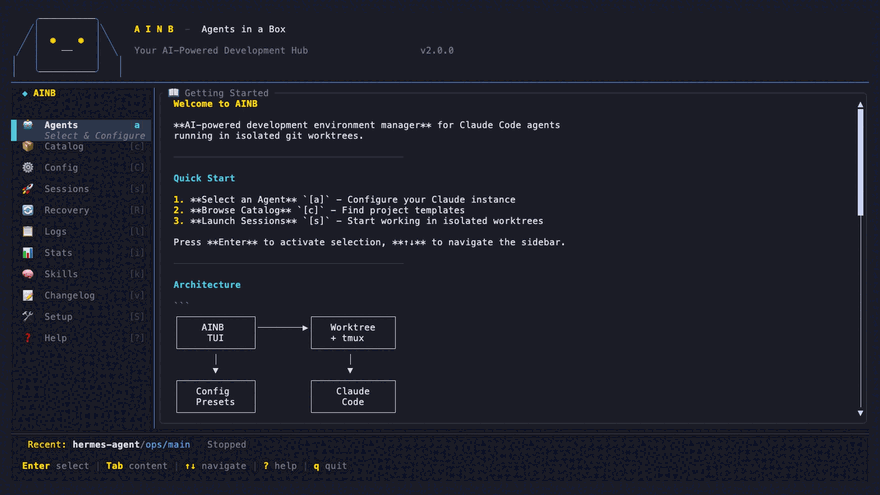
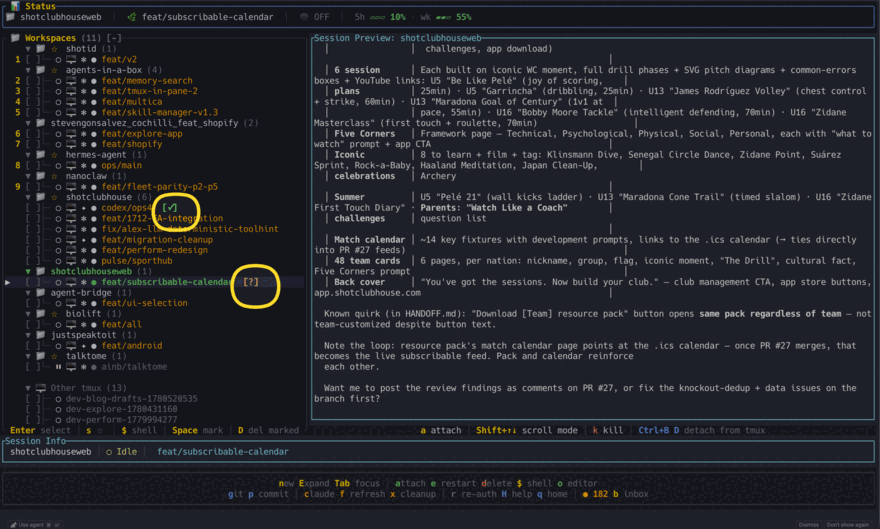
ainb home screen with sidebar navigation
Every agent on one screen. Every agent in its own worktree.

--- ## Everything it does Seventeen surfaces, one binary. Each links to its docs.
Session list with workspace tree and live preview Sessions, one worktree each
Every agent gets its own branch and working directory. Watch them all from one tree.
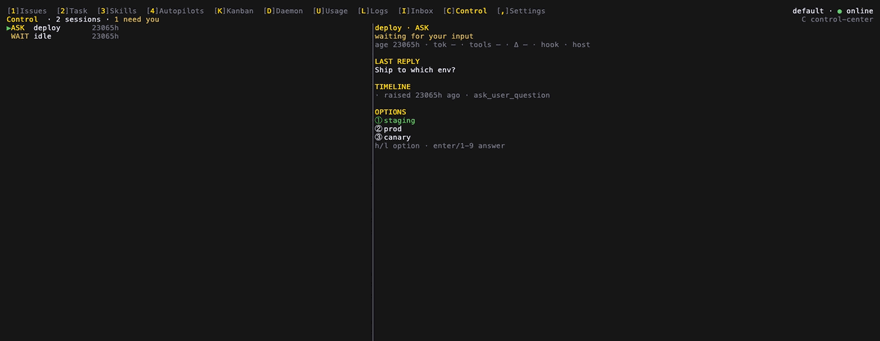
Hangar control center showing sessions and a pending question Hangar: work queues up
Boards, tasks, squads and autopilots. Agents pull work instead of waiting for you to start it.
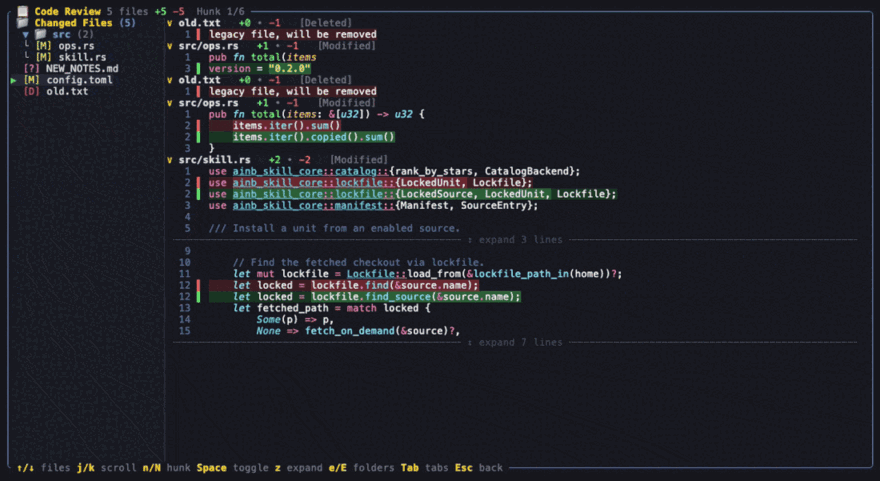
Code review diff with file tree and syntax highlighting Read the diff before you trust it
File tree, per-file blocks, word-level emphasis, hunk navigation. Or ainb diff-review, headless.
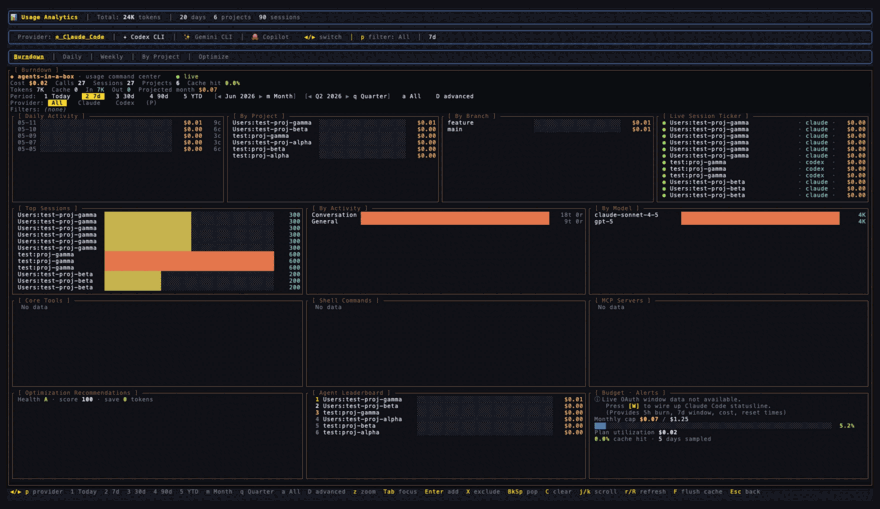
Burndown analytics dashboard Spend, before the invoice
Daily activity, per-model and per-project breakdowns, live budget tracking, optimisation hints.
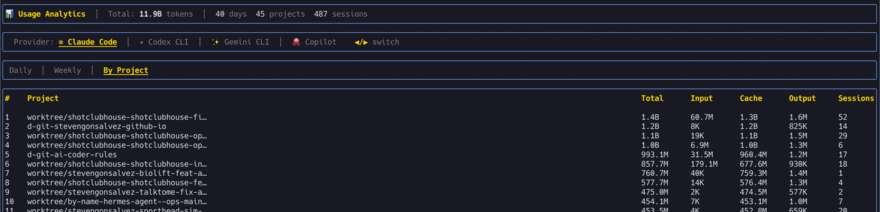
Per-project token attribution table Which repo burned the budget
Input, cache, output and session counts per project and per worktree.
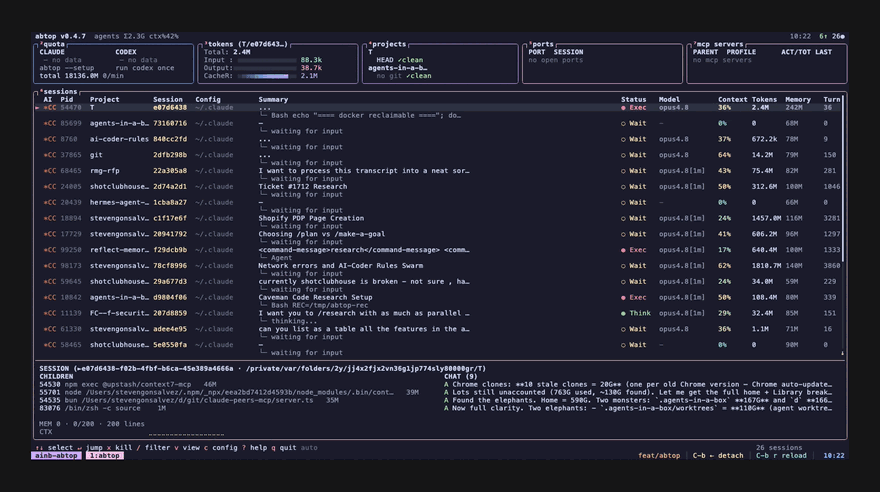
abtop live agent monitor abtop: top, for agents
Quota, tokens, projects, ports, MCP servers and every live session in one pane.
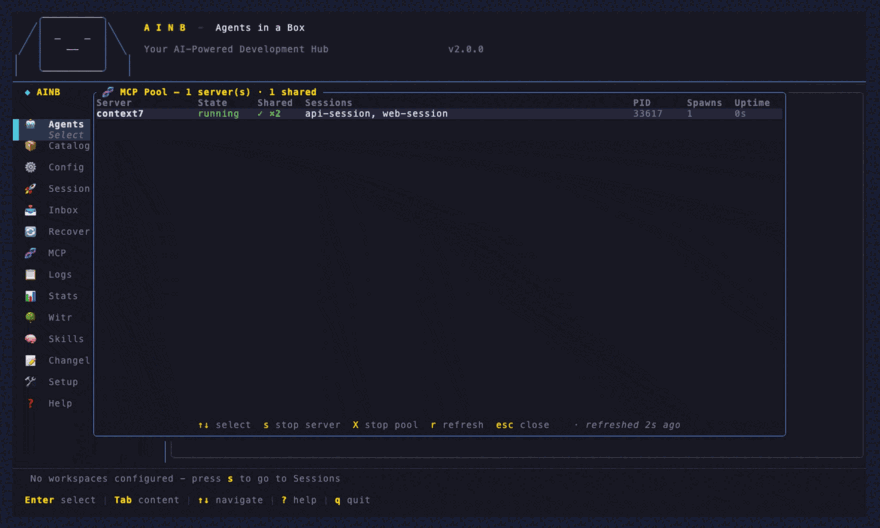
Shared MCP pool overlay One MCP pool, not one per session
A single server process shared across every session, with idle reaping.
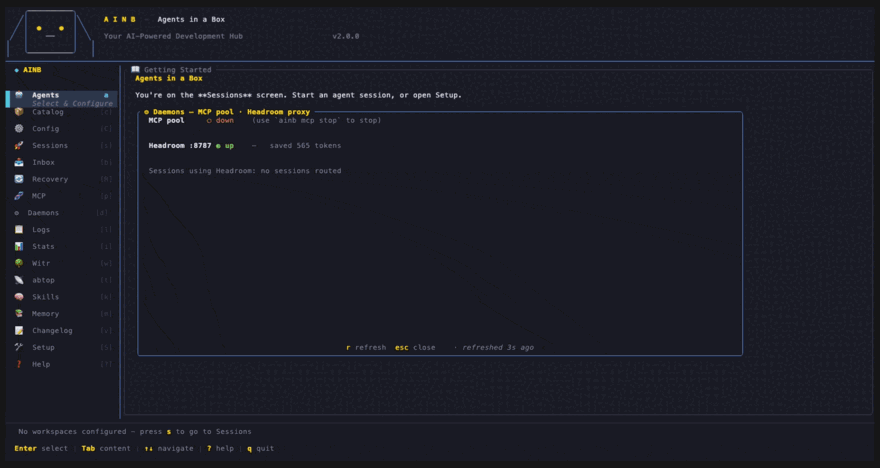
Daemons overlay showing MCP pool and headroom proxy health Daemons, and their health
Every background process ainb depends on, with restart in place when one dies.
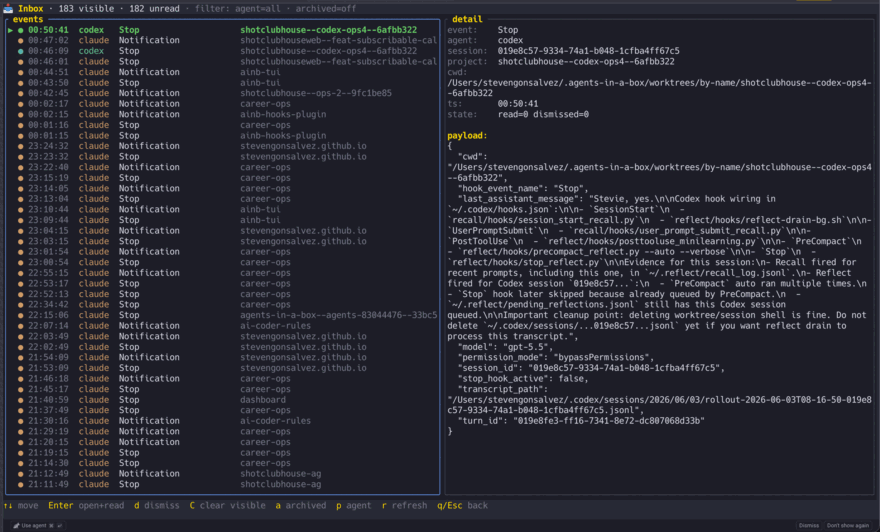
Inbox of agent notifications Every notification in one Inbox
Approvals, completions and errors from every agent, instead of scattered across panes.
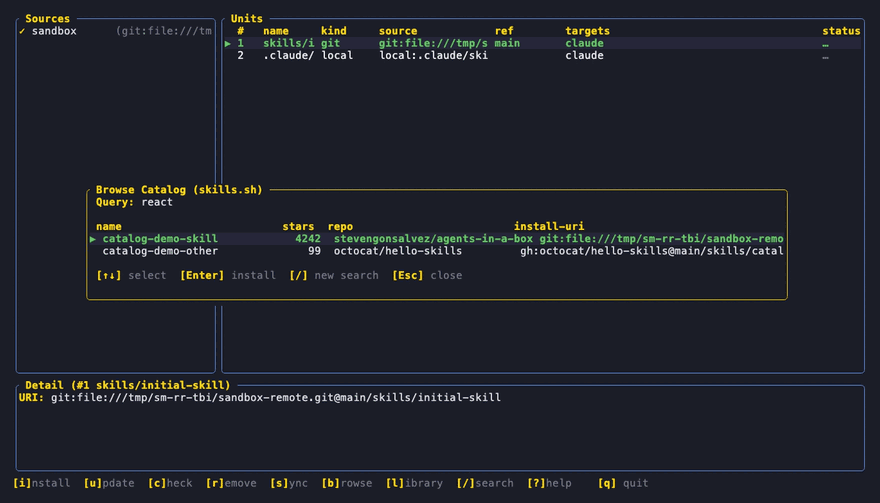
Skill manager browsing a catalog Skills, across every tool
Browse, install, sync and remove units. Write once, deploy to nine tool homes.
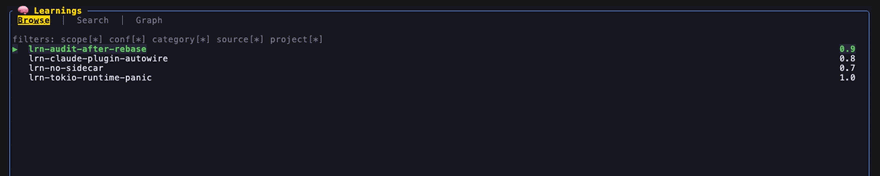
Learnings browser with search and filters Stop re-explaining the codebase
Search what past sessions learned, by entity, community or free text.
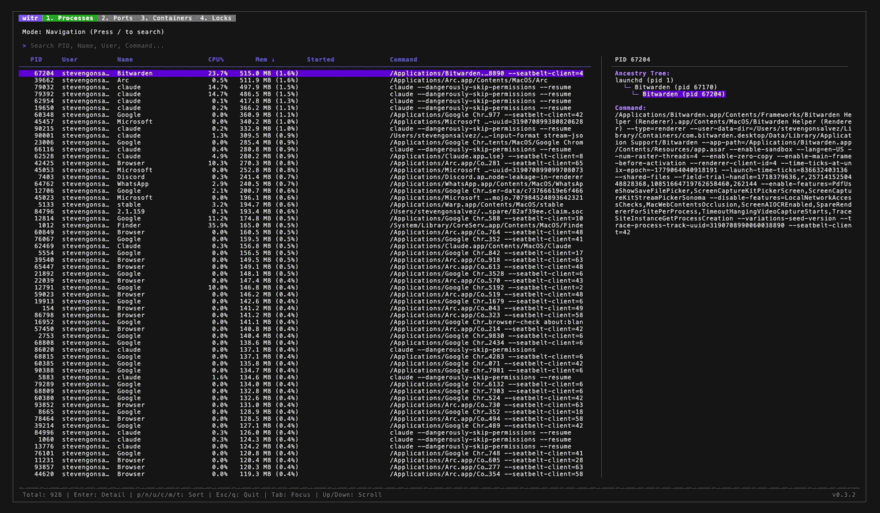
witr process browser with ancestry What did that process touch
Process causality, ancestry, ports and locks, without leaving the TUI.
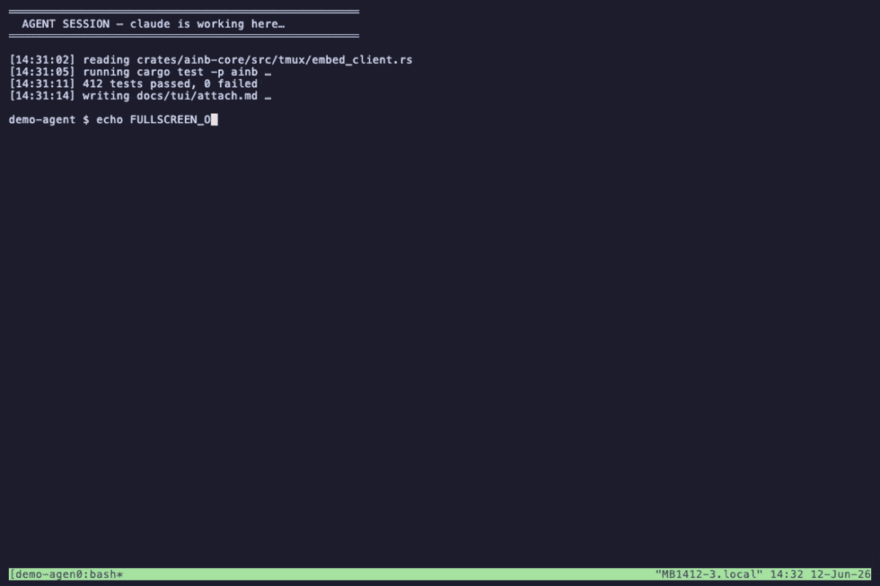
Attached agent session Attach, detach, survive a sleep
tmux-backed. Reattach full-screen or in a pane and keep typing.
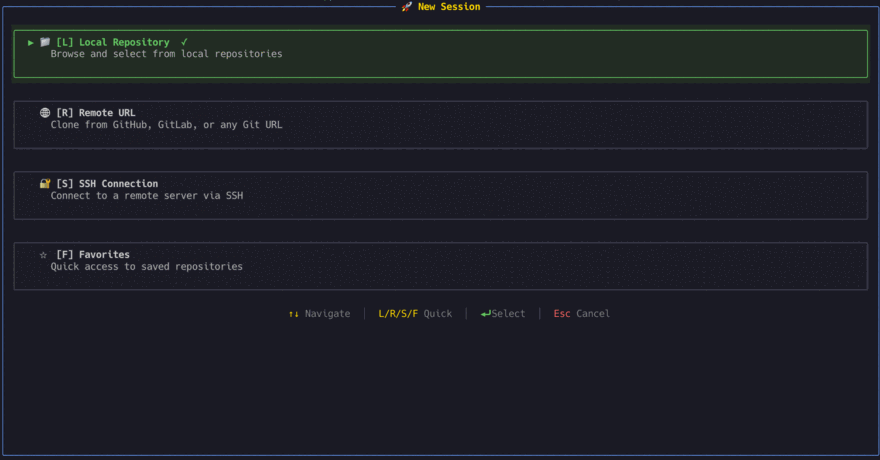
New session flow Start one any way you like
Local repo, clone from GitHub or GitLab, SSH to a remote box, or a favourite.
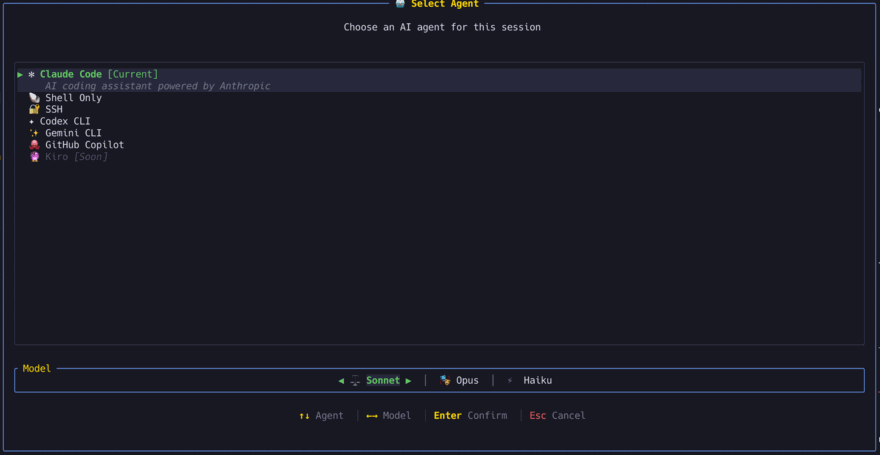
Agent and model picker Pick the agent, pick the model
Claude Code, Codex, Gemini, Copilot, a raw shell or SSH. Sonnet, Opus or Haiku per session.
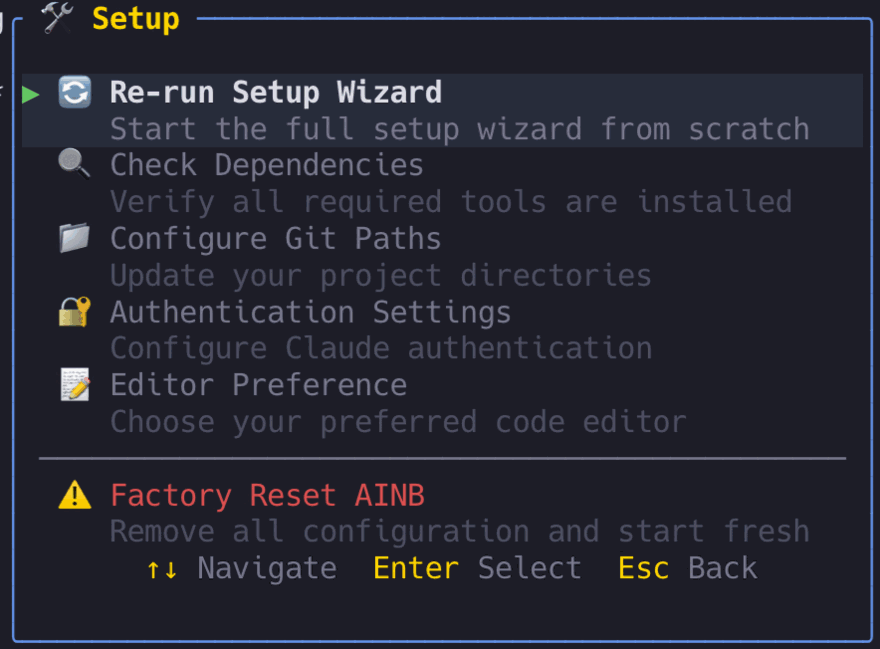
Setup wizard Guided first run
Dependency checks, auth, git paths, editor. Factory reset when you want to start over.
**Also in the box, no screenshot yet** ([#778](https://github.com/stevengonsalvez/agents-in-a-box/issues/778) tracks capturing these): | Surface | What it gives you | Docs | |---|---|---| | **Fleet panel** (`f`) | See which agents are blocked on you and answer them without attaching | [cli.md](docs/tui/cli.md) | | **ATC** | An always-on watcher that works the queue while you are away (opt-in) | [atc-plumbing.md](docs/atc-plumbing.md) | | **Recovery** | Find sessions orphaned by a crash and resume them | [cli.md](docs/tui/cli.md) | | **Fleet bridge** | Drive the fleet from Telegram, Slack or Discord | [fleet-bridge.md](docs/fleet-bridge.md) | | **`ainb web`** | A read-only browser dashboard over the fleet | [web.md](docs/tui/web.md) | | **Headroom** | Context compression so long runs stop hitting the wall | [token-optimization.mdx](docs/tui/token-optimization.mdx) | | **`ainb claudecode statusline`** | Live rate-limit and spend inside Claude Code's own status line | [cli.md](docs/tui/cli.md) | | **OTel to Grafana** | A wizard that wires Claude Code's telemetry into Grafana Alloy | [otel-grafana.md](docs/reference/otel-grafana.md) | --- ## What's Inside | Component | What it does | Scale | |-----------|-------------|-------| | **[ainb TUI](#ainb--terminal-ui)** | Rust terminal app for managing Claude Code sessions | 34 crates | | **[Toolkit](#toolkit)** | Portable skills, agents, and workflows for AI coding tools | 94 skills, 16 agents | | **[Knowledge System](#knowledge-system)** | GraphRAG + QMD learning capture and retrieval | [Architecture docs](docs/knowledge/overview.md) | --- ## Why agents-in-a-box? > ### Run a fleet. Lose nothing. > > Every agent gets its own worktree, its own tmux session, and a line item on your bill. One agent is a chat window. Five agents is an operations problem, and that is the part nothing else solves. Here is every part of it. ### Your agents stop fighting each other | The problem | Without ainb | With ainb | |---|---|---| | Two agents, one branch | Index lock races, half-committed files, work silently overwritten | One git worktree and one branch per session, cleaned up when the session is killed cleanly | | Laptop sleeps, SSH drops | Session gone, context gone, start the conversation again | tmux-backed. Reattach and keep typing where you left off | | A crash leaves sessions behind | Hunt through `tmux ls` and guess which pane was what | `ainb recover` finds the orphans and resumes them | ### You stop babysitting them | The problem | Without ainb | With ainb | |---|---|---| | Which agent needs me *right now* | Cycle through every pane in turn, repeatedly | Press `f`. The Fleet panel lists exactly who is blocked | | An agent asked a question 20 minutes ago | Scroll back through output to find it | Answer it from the Fleet panel without attaching | | Nobody is watching while you are away | You are the event loop | ATC wakes on a timer and works the queue for you | ### Work queues up without you | The problem | Without ainb | With ainb | |---|---|---| | Every task starts with you typing | You are the scheduler | Hangar boards hold tasks agents pull from | | One agent per job, in sequence | Long jobs serialise behind you | Squads fan a job out across several agents | | Recurring work | A cron job you maintain by hand | Autopilots fire on a schedule and report back | ### You see what they actually changed | The problem | Without ainb | With ainb | |---|---|---| | Approving diffs on autopilot | Side effects land that you never read | Hunk-by-hunk review with syntax highlighting before you trust it | | Reviewing means opening the whole TUI | Context switch just to read a diff | `ainb diff-review` runs headless and emits JSON | ### The bill stops surprising you | The problem | Without ainb | With ainb | |---|---|---| | Spend is invisible until the invoice | The provider console shows one total | Burndown by day, week, project, model and provider | | Which repo burned the budget? | No per-repo or per-branch split anywhere | Per-project attribution, down to the worktree | | Long runs blow the context window | The conversation resets and you start over | Headroom compresses context across opted-in sessions | ### You stop repeating yourself | The problem | Without ainb | With ainb | |---|---|---| | Re-explaining the codebase every session | Every session starts cold | Learnings captured as you work, searchable next time | | The same rule copied into four tools' configs | One copy gets updated, the rest quietly go stale | Write a skill once, deploy it to 9 tools from one source | ### The plumbing stops leaking | The problem | Without ainb | With ainb | |---|---|---| | One MCP server per session | N processes, N startups, N times the memory | One pooled server shared across every session | | Approvals and errors scattered across panes | You miss the one that mattered | One Inbox collects every notification from every agent | | Background processes die quietly | `ps aux`, grep, guess, restart by hand | The Daemons screen shows health and restarts in place | ### It reaches further than your terminal | The problem | Without ainb | With ainb | |---|---|---| | You are away from your desk | Agents stall until you get back | Bridge the fleet to Telegram, Slack or Discord | | You want a glance without a terminal | Terminal or nothing | `ainb web` serves a read-only dashboard | | What did that process actually touch? | Guesswork | `witr` traces process causality | | Which agent is genuinely busy? | Open every pane and look | `abtop`, which is top for AI agents | ### What it won't do Straight answers, so you find out here rather than twenty minutes in: - **Worktrees isolate git state, not your environment.** Two agents still share port 3000, your database, and `node_modules`. If they need different services running, you still have to arrange that. - **tmux is required**, not optional. Same for `git`. - **No native Windows.** It uses PTY and POSIX file modes. WSL2 works. - **`ainb otel` is a setup wizard for Grafana Alloy**, wiring up Claude Code's own telemetry. ainb does not emit telemetry of its own. - **Memory starts empty.** The learnings browser is only as useful as what `reflect` has written into it. - **ATC and headroom are opt-in** and need extra setup: a hook plugin and an external binary respectively. --- ## Quick Start ```bash # Install the TUI (macOS / Linux) brew tap stevengonsalvez/agents-in-a-box && brew install ainb # newer Homebrew gates third-party taps — if it says "untrusted tap", run: # brew trust stevengonsalvez/agents-in-a-box # Launch the TUI ainb # Register the toolkit as a source, then install the units you want into your # real tool homes. Install is purely ADDITIVE — units land alongside your # existing config; your CLAUDE.md, settings, projects/ history and custom # agents are never touched. ainb source add gh:stevengonsalvez/ainb-toolkit AINB_USE_REAL_HOMES=1 ainb skill install gh:stevengonsalvez/ainb-toolkit/skills/commit ``` > **The easy way:** just run `ainb`, press `m` for the Skill Manager, and > browse + install units with `[i]`. If you already have skills on disk > (`~/.claude/skills/`, etc.), the first open offers one-keystroke adoption — > no manual setup. `ainb skill sync` then keeps installed units reconciled with > the manifest. > > To uninstall a unit, run `ainb skill remove ` or press `[r]` on it in the > Skill Manager. Removal is **per-file and scoped to that unit** — it deletes > only what ainb deployed and can never wipe your config or session history. --- ## ainb — Terminal UI + CLI A Rust-based terminal application for managing AI coding sessions with git worktree isolation, model selection, and persistent tmux sessions. Every operation is **available as both an interactive TUI view and a scriptable CLI subcommand** with JSON output — so humans drive it from a dashboard and agents drive it from shell scripts. ### Feature Highlights - **Multi-provider** — Run Claude Code, Codex CLI, Gemini CLI, or GitHub Copilot in the same workflow, with Sonnet / Opus / Haiku selection per session - **Git worktree isolation** — Each session runs in its own branch and working directory. No cross-contamination, no stash dance - **tmux persistence** — Sessions survive terminal disconnects, SSH drops, and laptop sleep. Reattach any time - **Usage analytics** — Built-in token + session tracking by day, week, provider, and project. Know where your budget went — then cut it with [The Token Optimisation Playbook](https://stevengonsalvez.com/blog/token-optimisation-playbook) - **Easy onboarding** — First-run setup wizard checks dependencies, configures auth, and gets you creating sessions in minutes - **Live log streaming** — Real-time viewer with level filtering and search across all running sessions - **Scriptable CLI** — 41 commands (every TUI action, plus headless `witr`, `learnings search`, `diff-review --format json`, …), with `--format json` on session state, config, git, usage, fleet, and most daemons. **[📘 Full CLI reference →](docs/tui/cli.md)** — a generated, multi-hierarchy man page covering every subcommand. ### CLI — Scriptable Equivalent of Every TUI Feature For agents, automation, and scripts, `ainb` ships a full CLI. Every command supports `--format json` for piping to `jq`. ```bash ainb --help # Top-level overview ainb run --repo . --worktree --tool claude --model sonnet ainb list --format json | jq . ainb logs my-session --follow ainb recover list # Find orphaned sessions ainb config set authentication.default_model opus ainb completion zsh > ~/.zsh/completions/_ainb ``` **41 top-level commands** — `tui`, `run`, `list`, `label`, `logs`, `attach`, `status`, `kill`, `auth`, `recover`, `config`, `git`, `favorites`, `init`, `doctor`, `reflect`, `presets`, `usage`, `statusline`, `claudecode`, `codex`, `tmux`, `otel`, `completion`, `abtop`, `web`, `witr`, `learnings`, `plugin`, `fleet`, `headroom`, `daemon`, `mcp`, `notifyd`, `hangar`, `rtk`, `update`, `diff-review`, `skill`, `source`, `search` — with nested subcommands for recover / config / git / favorites / presets / plugin / fleet / hangar / mcp / daemon / usage / skill / source. **[📘 Full CLI reference → docs/tui/cli.md](docs/tui/cli.md)** ### Installation **Recommended — Homebrew (macOS / Linux):** ```bash brew tap stevengonsalvez/agents-in-a-box brew install ainb ``` > Newer Homebrew versions refuse formulas from untrusted third-party taps. If > `brew install`/`brew upgrade` errors with *"Refusing to load formula … from > untrusted tap"*, trust the tap once and retry: > `brew trust stevengonsalvez/agents-in-a-box` The tap lives at [`stevengonsalvez/homebrew-agents-in-a-box`](https://github.com/stevengonsalvez/homebrew-agents-in-a-box) and is auto-updated by the release workflow on every tagged release — `brew upgrade ainb` always pulls the latest. ### Updates ainb installs a short-lived daily OS timer on first TUI launch. The timer checks the latest signed stable release even while ainb is closed, then records the result and sends one native notification per version. It never installs a release without an explicit command. ```bash ainb update check # verify signed release metadata now ainb update status # show cached result ainb update --yes # install latest signed stable release ainb update schedule status # inspect daily checker ainb update schedule disable # opt out of background checks ``` The Daemons screen lists this as `release checker`. Homebrew updates through `brew upgrade ainb`; Cargo updates from the exact signed release tag; curl installs download, checksum, stage, and atomically replace only canonical ainb install paths.
Other install methods **One-liner curl install** (any Unix): ```bash curl -fsSL https://raw.githubusercontent.com/stevengonsalvez/agents-in-a-box/main/ainb-tui/install.sh | bash ``` **Cargo** (any platform with a Rust toolchain): ```bash cargo install --git https://github.com/stevengonsalvez/agents-in-a-box --branch main ainb ``` **Windows via WSL2** — native Windows is not supported (`ainb` uses Unix-only APIs: PTY, POSIX file modes). Use WSL2: ```powershell wsl --install # 1. Install WSL2 # Inside Ubuntu/Debian: curl -fsSL https://raw.githubusercontent.com/stevengonsalvez/agents-in-a-box/main/ainb-tui/install.sh | bash sudo apt update && sudo apt install -y tmux ainb ```
Troubleshooting Homebrew **`Error: Your Command Line Tools are too outdated`** — this is a Homebrew check on the standalone `CommandLineTools` package, separate from a full Xcode install. If you have a recent Xcode but an old standalone CLT, brew picks the older one. Reinstall the CLT: ```bash sudo rm -rf /Library/Developer/CommandLineTools sudo xcode-select --install ``` **`Formulae found in multiple taps`** — if you previously tapped a similarly-named bucket, untap it: ```bash brew untap stevengonsalvez/ainb # only if you tapped this earlier brew install stevengonsalvez/agents-in-a-box/ainb ``` **`Refusing to load formula … from untrusted tap`** — newer Homebrew gates third-party taps behind an explicit trust step. Trust the tap once and retry: ```bash brew trust stevengonsalvez/agents-in-a-box brew install ainb # or brew upgrade ainb ```
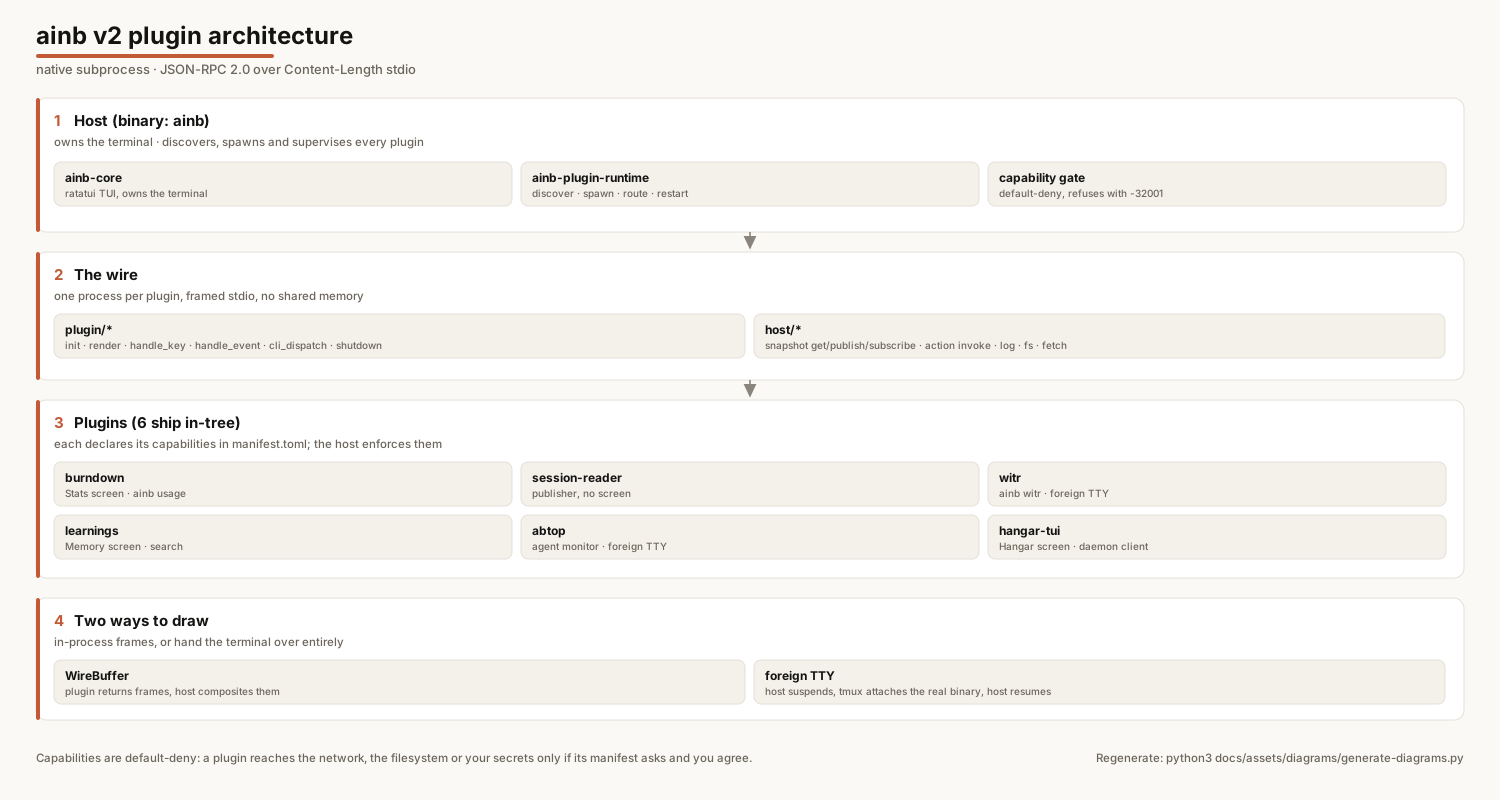
### Plugins `ainb` boots a plugin host at startup. Some screens — notably **Analytics / Usage (the burndown dashboard)** — are provided by subprocess plugins that the host discovers and loads automatically. **All plugins are enabled by default**; you only need the controls below to turn them off or scope which ones load.

ainb v2 plugin architecture: the host and its runtime, the JSON-RPC method sets on each side of the wire, the six in-tree plugins, and the two ways a plugin can draw

**How it works (in brief):** a v2 plugin is a **native subprocess** that speaks **JSON-RPC 2.0 over Content-Length-framed stdio** — no wasm, no in-process linking. The host (`ainb-core`) discovers each plugin from `dist/plugins//`, spawns it, and exchanges messages: `plugin/render` (the plugin returns a `WireBuffer` of cells the host blits), `plugin/handle_key`, `plugin/cli_dispatch` (routes `ainb …`), plus reverse `host/snapshot/publish` calls over an **event bus**. Each plugin declares its `[capabilities]` in `manifest.toml`; the runtime denies any ungranted host call with JSON-RPC `-32001`. A plugin screen can render **two ways**: in-process via a `WireBuffer` (host owns the terminal — e.g. **burndown**), or as a **host-embedded foreign TTY** where ainb suspends and hands the terminal to an external interactive program (e.g. **witr**'s `witr -i` browser). Full walkthrough: [`docs/plugins/`](docs/plugins/overview.md). There are four ways to filter plugins, with the following precedence (most specific wins): | Goal | How | Type | |------|-----|------| | All on (default) | *(nothing)* | — | | All off (kill switch) | `AINB_DISABLE_PLUGINS=1 ainb` | env | | Load only these | `AINB_ONLY_PLUGINS=burndown ainb` | env allowlist | | Load all except these | `AINB_DISABLE_PLUGIN=burndown ainb` | env denylist | | Persistent allowlist | `[plugins].enabled = ["burndown"]` in `config.toml` | config | | Persistent denylist | `[plugins].disabled = ["burndown"]` in `config.toml` | config | Resolution order: `AINB_DISABLE_PLUGINS` → `AINB_ONLY_PLUGINS` → `AINB_DISABLE_PLUGIN` → config `enabled` → config `disabled` → default all-on. **Env always beats config**, and an allowlist always beats a denylist. Config lives at `~/.agents-in-a-box/config/config.toml` under a `[plugins]` table — see [`example.config.toml`](ainb-tui/config/example.config.toml) for the annotated block. When a screen's plugin is disabled, the TUI shows a placeholder naming the exact variable that turned it off, rather than hanging. ### Keyboard Shortcuts | Key | Action | |-----|--------| | `j/k` or `↑/↓` | Navigate sessions | | `Enter` | Attach to session | | `n` | New session | | `d` | Delete session | | `r` | Restart Claude in session | | `l` | View logs | | `q` | Quit | ### Platform Support | Platform | Status | Method | |----------|--------|--------| | macOS Apple Silicon | ✅ | Pre-built binary | | macOS Intel | ✅ | Build from source | | Linux x86_64 | ✅ | Pre-built binary | | Linux ARM64 | ✅ | Build from source | | Windows (WSL2) | ✅ | Install script | | Windows (Native) | ❌ | Unsupported — uses Unix-only APIs (PTY, POSIX) | ### Requirements - **tmux** — persistent session management - **git** — worktree operations - **Claude Code CLI** — the `claude` command ### Live window source matrix | Provider | 5h burn | 7d window | Cost | Reset times | Source | |---|---|---|---|---|---| | Claude Code (Pro/Max OAuth + statusline wired) | ✓ | ✓ | ✓ | ✓ | OAuth-grade via Claude Code | | Claude Code (API key) | ✓ | — | ✓ | — | local JSONL fallback | | Claude Code (statusline not wired) | ✓ | — | ✓ | — | local JSONL fallback | | Codex | ✓ | — | ✓ | — | local JSONL fallback | | Other agents | — | — | — | — | not supported | **Why the asymmetry**: only Anthropic publishes rate-limit windows over OAuth, and only the Claude Code CLI exposes them to statusline hooks. Wiring `ainb claudecode statusline` brings the OAuth-grade signal into ainb-tui's Burndown panel and session-window top bar. --- ## Toolkit A portable AI coding agent toolkit: skills, agents, workflows, and configurations that deploy to 9 different AI coding tools from a single source. **[Full toolkit documentation → stevengonsalvez/ainb-toolkit](https://github.com/stevengonsalvez/ainb-toolkit)** ### Supported AI Tools | Tool | Deploy target | Method | |------|--------------|--------| | **Claude Code** | `~/.claude/` | Home directory | | **Codex** | `~/.codex/` | Home directory | | **GitHub Copilot** | `~/.copilot/` | Home directory | | **Gemini CLI** | `.gemini/` | Project directory | | **Amazon Q** | `.amazonq/rules/` | Project directory | | **Cursor** | Project root | Project directory | | **Cline** | Project root | Project directory | | **Roo** | Project root | Project directory | | **Claude Desktop** | `~/Library/Application Support/Claude/` | Home directory — MCP servers only | ### Skills (94) Skills are reusable capabilities that any supported AI tool can invoke.
Workflow & Planning (14) `plan` · `plan-tdd` · `plan-gh` · `implement` · `validate` · `workflow` · `brainstorm` · `critique` · `discuss` · `expose` · `interview` · `make-a-goal` · `show-me` · `enhance-prompt`
Code Quality & Testing (11) `commit` · `find-missing-tests` · `webapp-testing` · `security-audit` · `security-scan` · `test-driven-development` · `expect-test` · `browser-verify` · `mobile-e2e-mcp` · `test-ainb` · `agentmail`
DevOps & Infrastructure (9) `start-local` · `start-ios` · `start-android` · `spawn-agent` · `tmux-monitor` · `tmux-status` · `tmux-message` · `debug-bridge` · `coding-agent`
Knowledge & Learning (6) `research` · `research-cache` · `instincts` · `prime` · `notebooklm` · `explain-to-me`
Session Management (9) `health-check` · `session-info` · `session-metrics` · `session-summary` · `handover` · `recover-sessions` · `plugins` · `standup` · `token-usage`
Swarm Orchestration (8) `swarm-create` · `swarm-join` · `swarm-inbox` · `swarm-status` · `swarm-shutdown` · `swarm-orchestration` · `swarm-agent-troubleshooting` · `swarm-attach-watchdog` > Sizing guidance: [Progressive subagents](https://stevengonsalvez.com/tools-tips/progressive-subagents) — score the work before you spawn eight agents.
GitHub & Issues (8) `gh-issue` · `make-github-issues` · `do-issues` · `merge-agent-work` · `list-agent-worktrees` · `attach-agent-worktree` · `cleanup-agent-worktree` · `git-history-surgery`
Design & Frontend (12) `ui-ux-pro-max` · `frontend-design` · `frontend-slides` · `tui-style-guide` · `liquid-glass` · `remotion` · `remotion-best-practices` · `design-md` · `react-components` · `shadcn-ui` · `stitch-design` · `stitch-loop`
Research & Analysis (8) `crypto-research` · `oracle` · `sentry-cli` · `ats-resume-matcher` · `resume-formatter` · `retro-pdf` · `scrapling-official` · `posthog-replay-analysis`
Agent Architecture (9) `skill-creator` · `agent-ops` · `autonomous-loops` · `cost-aware-pipeline` · `media-processing` · `nano-banana-pro` · `sync-learnings` · `claude-langfuse` · `langfuse-setup`
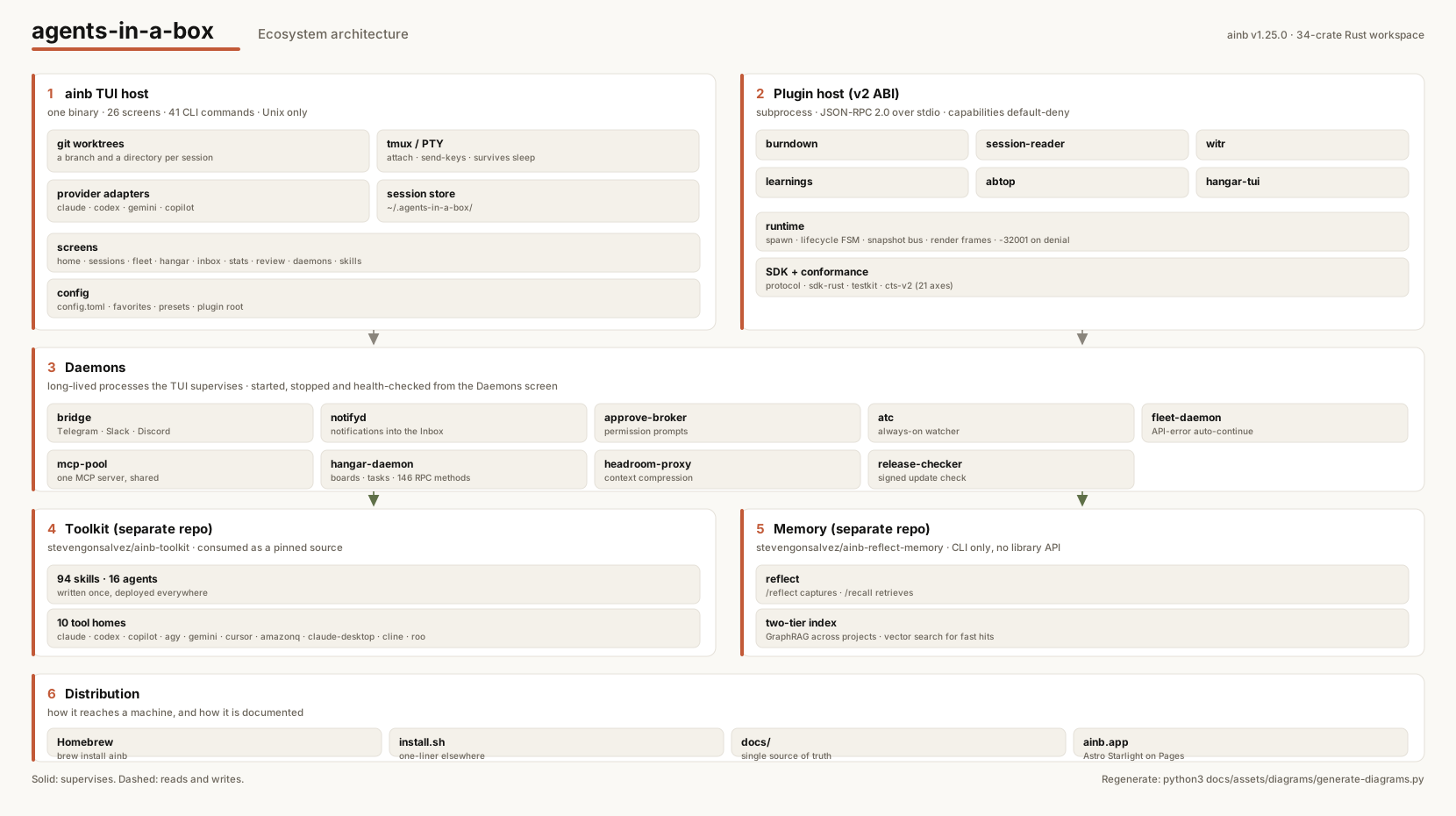
### Agents (16) Specialized AI agents organized by domain. Each agent has a defined persona, tool access, and area of expertise. | Category | Agents | |----------|--------| | **Universal** (5) | `backend-developer` · `deep-reasoner` · `fast-worker` · `frontend-developer` · `superstar-engineer` | | **Engineering** (6) | `code-archaeologist` · `code-reviewer` · `documentation-specialist` · `performance-optimizer` · `security-agent` · `test-engineer` | | **Swarm** (2) | `leader` · `worker` | | **Meta** (1) | `agentmaker` | | **Root** (2) | `distinguished-engineer` · `web-search-researcher` | --- ## Knowledge System A two-tier learning system that captures insights during development and retrieves them across sessions and projects. | Layer | Technology | Purpose | |-------|-----------|---------| | **Fast local** | QMD (Quick Markdown Documents) | Semantic search over structured learning notes | | **Deep graph** | GraphRAG (nano-graphrag) | Entity-relationship graph with community detection for cross-project knowledge retrieval | The `/reflect` skill captures learnings. The `/research` and `/prime` skills retrieve them. The [`reflect`](https://github.com/stevengonsalvez/ainb-reflect-memory) Python library (installed as the `reflect` CLI) manages the knowledge base directly — it lives in its own repo, [stevengonsalvez/ainb-reflect-memory](https://github.com/stevengonsalvez/ainb-reflect-memory), and installs via `uv tool install --upgrade 'git+https://github.com/stevengonsalvez/ainb-reflect-memory.git[graph]'`. **[How the knowledge system works →](docs/knowledge/overview.md)** --- ## Architecture

agents-in-a-box ecosystem architecture: the ainb TUI host, the v2 plugin host and its six in-tree plugins, the nine daemons the TUI supervises, the separate toolkit and reflect-memory repos, and how it is distributed

``` agents-in-a-box/ │ ├── ainb-tui/ # Rust Cargo workspace │ ├── crates/ │ │ ├── ainb-core/ # TUI application (app, components, tmux, git, claude, config) │ │ ├── ainb-plugin-runtime/ # Plugin host runtime │ │ ├── ainb-plugin-protocol/ # Plugin JSON-RPC protocol │ │ ├── ainb-plugin-sdk-rust/ # Rust plugin SDK │ │ ├── ainb-plugin-types-sessions/ # Shared session types │ │ ├── ainb-plugin-burndown/ # v2 analytics plugin │ │ ├── ainb-plugin-notifyd/ # v2 notifications plugin │ │ ├── ainb-plugin-session-reader/ # v2 data-backend plugin │ │ ├── ainb-plugin-cts-v2/ # Conformance test suite (21 axes) │ │ └── ainb-plugin-testkit/ # Plugin author test harness │ ├── config/ # Homebrew formula & packaging │ └── install.sh # One-liner installer │ # reflect (the `reflect` CLI + GraphRAG/QMD engine and its Claude Code plugin) # now lives in a SEPARATE repo: github.com/stevengonsalvez/ainb-reflect-memory # — flattened, with the engine at its repo root and the plugin under plugin/. # ├── plugins/ # Claude Code plugins (root-level) │ ├── ainb-fleet/ # Backs the `ainb fleet` CLI (standup/broadcast/sequence/needs/daemon) │ └── ainb-hooks/ # ainb lifecycle hooks │ # The portable toolkit (94 skills, 16 agents, workflows, utilities, # bootstrap.js, external-dependencies.yaml, catalog.yaml) lives in a # SEPARATE repo: github.com/stevengonsalvez/ainb-toolkit — flattened at # its repo root. `ainb` consumes it as a pinned external source. # ├── ainb-tui/ # `ainb` binary (Rust) — TUI + skill-manager CLI │ ├── crates/ │ │ ├── ainb-cli/ # ainb source/skill/doctor subcommands │ │ ├── ainb-core/ # ratatui app + manifest/lockfile/URI types │ │ ├── ainb-fetch/ # git2 / http / local fetchers │ │ ├── ainb-adapters-source/ # marketplace / manifest / raw / single │ │ ├── ainb-adapters-tool/ # 9 tool adapters (claude/codex/copilot/…) │ │ ├── ainb-diff/ # Diff render + pager driver │ │ ├── ainb-skill-core/ # Manifest/lockfile/URI/paths/error │ │ └── ainb-usage/ # JSONL invocation parser + cache │ └── plans/skill-manager/spec.md # v1 design + acceptance criteria │ ├── docs/ # Documentation hub (Markdown source of truth) │ ├── README.md # Docs TOC │ ├── product/ # What ainb is, value, architecture │ ├── tui/ # ainb CLI reference, FAQ, keyboard shortcuts │ ├── toolkit/ # ainb-toolkit reference (skills/agents/bootstrap) │ ├── plugins/ # v2 plugin overview, user guide, authoring, spec │ ├── knowledge/ # reflect/recall (GraphRAG + QMD) │ ├── contributing/ # Build, CI/CD, release │ └── reference/ # Architecture deep-dive, glossary │ ├── website/ # Website source (Astro + Starlight) │ └── BRIEF.md # Original design brief (historical) │ └── .github/workflows/ ├── ci.yml # Rust CI (fmt, clippy, test, deny, machete) ├── toolkit-validation.yml # Skill Manager & Catalog CI (ainb + ainb-toolkit) ├── release.yml # Cross-platform binary releases └── deploy-pages.yml # Build & deploy the website to GitHub Pages ``` --- ## CI/CD & Quality | Check | Tool | What it catches | |-------|------|-----------------| | Format | `rustfmt` | Style inconsistencies | | Lint | `clippy` (pedantic + nursery) | Logic errors, anti-patterns, code smells | | Test | `cargo-nextest` (Ubuntu + macOS) | Regressions across platforms | | Security | `cargo-deny` (RustSec) | Known vulnerabilities in dependencies | | Licenses | `cargo-deny` | Non-compliant dependency licenses | | Dead deps | `cargo-machete` | Unused crate declarations | | Toolkit structure | Custom validation | Package counts, template substitution, install verification | The Rust codebase enforces `unsafe_code = "forbid"` and runs clippy with `pedantic`, `nursery`, and `cargo` lint groups enabled. --- ## Development ### Building from source ```bash cd ainb-tui cargo build --release ./target/release/ainb ``` ### Running tests ```bash cd ainb-tui cargo test # Unit tests cargo test --features visual-debug # With terminal output cargo test --features vt100-tests # VT100 screen verification cargo nextest run # With nextest (parallel) ``` ### Linting & checks ```bash cd ainb-tui cargo fmt --check # Format check cargo clippy --all-targets # Lint cargo deny check # Security + licenses ``` ### Installing the toolkit Install is **additive** — units are deployed alongside whatever is already in your tool homes; nothing is wiped. Writes to the real tool dirs are opt-in via `AINB_USE_REAL_HOMES=1` (without it, ainb writes to a managed sandbox). ```bash # Register the toolkit as a source (fetches it and reports its unit count). ainb source add gh:stevengonsalvez/ainb-toolkit # Install the units you want into the real tool home dirs. AINB_USE_REAL_HOMES=1 ainb skill install gh:stevengonsalvez/ainb-toolkit/skills/commit # Scope an install to specific tools (passed to every mutating verb): ainb skill install gh:stevengonsalvez/ainb-toolkit/skills/commit --targets claude,codex ainb skill sync # reconcile installed units with the manifest ainb skill update --check # report drift across sources ainb skill update --all --yes # re-fetch + apply ainb skill remove gh:stevengonsalvez/ainb-toolkit/skills/commit # per-file uninstall, never touches config ainb doctor # health-check the deployment ``` > Prefer the TUI? Press `m` for the Skill Manager to browse + install units > with `[i]` and remove them with `[r]` — no manual URIs. See `ainb-tui/plans/skill-manager/spec.md` for the full §8 CLI surface (`source`, `skill`, `doctor`, `usage`). #### v1.1 — Discovery + adoption + promote If you already have skills under `~/./skills/` (Claude, Codex, Gemini, …) or plugins installed via Claude Code's `/plugin install`, you don't have to migrate by hand any more. v1.1 layers a read-only discovery walker + a one-keystroke adoption banner on top of v1. Open SkillManager (`m` on Home) with an empty manifest and `ainb` offers to import what's already on disk — marketplace plugins, orphan skills, the lot — including a conflict matrix when the same name shows up in two places. A new `ainb skill promote --to gh:user/repo` command turns a hand-edited orphan into a git-backed source in one shot: clones the target repo, copies the unit, commits + pushes, and rewrites the manifest URI from `local:` to `gh:`. - [Discovery flow reference →](docs/skill-manager/discovery.md) — walker classes, reconciler conflict matrix, banner UX - [`ainb skill promote` reference →](docs/skill-manager/promote.md) — command surface, locked design, failure modes - [`ainb skill usage` reference →](docs/skill-manager/usage.md) — per-unit invocation counts + last-used in the Detail pane (v1.2) - [`ainb skill sync` reference →](docs/skill-manager/sync.md) — bidirectional home ↔ repo reconciliation with `[s]` keybind (v1.2) - [`ainb skill check` reference →](docs/skill-manager/check.md) — drift detection + Units-panel status column (v1.2) Full spec at `.agents/goals/ainb-skill-manager-v1.1-discovery-spec.md` and `.agents/goals/ainb-skill-manager-v1.2-rollup-plan.md`. ### Contributing 1. Fork the repository 2. Create a feature branch (`git checkout -b feature/amazing-feature`) 3. Commit your changes (`git commit -m 'feat: add amazing feature'`) 4. Push to the branch (`git push origin feature/amazing-feature`) 5. Open a Pull Request --- ## Links - [Website](https://ainb.app/) - [Releases](https://github.com/stevengonsalvez/agents-in-a-box/releases) - [Homebrew Tap](https://github.com/stevengonsalvez/homebrew-agents-in-a-box) - [Issues](https://github.com/stevengonsalvez/agents-in-a-box/issues) - [Knowledge System Architecture](docs/knowledge/overview.md) - [Toolkit Repository (ainb-toolkit)](https://github.com/stevengonsalvez/ainb-toolkit) --- ## License MIT — see [LICENSE](LICENSE) for details.