OpenHuman

The fastest, cheapest, most efficient open-source agent harness. Run more than 500 agents on a $10 VPS.
A desktop app for people. A Rust library for developers.

Early Beta Latest Release GitHub Stars License Public benchmarks

Docs · Rust quickstart · Benchmarks · Discussions · Discord · Reddit · X · @senamakel (creator)
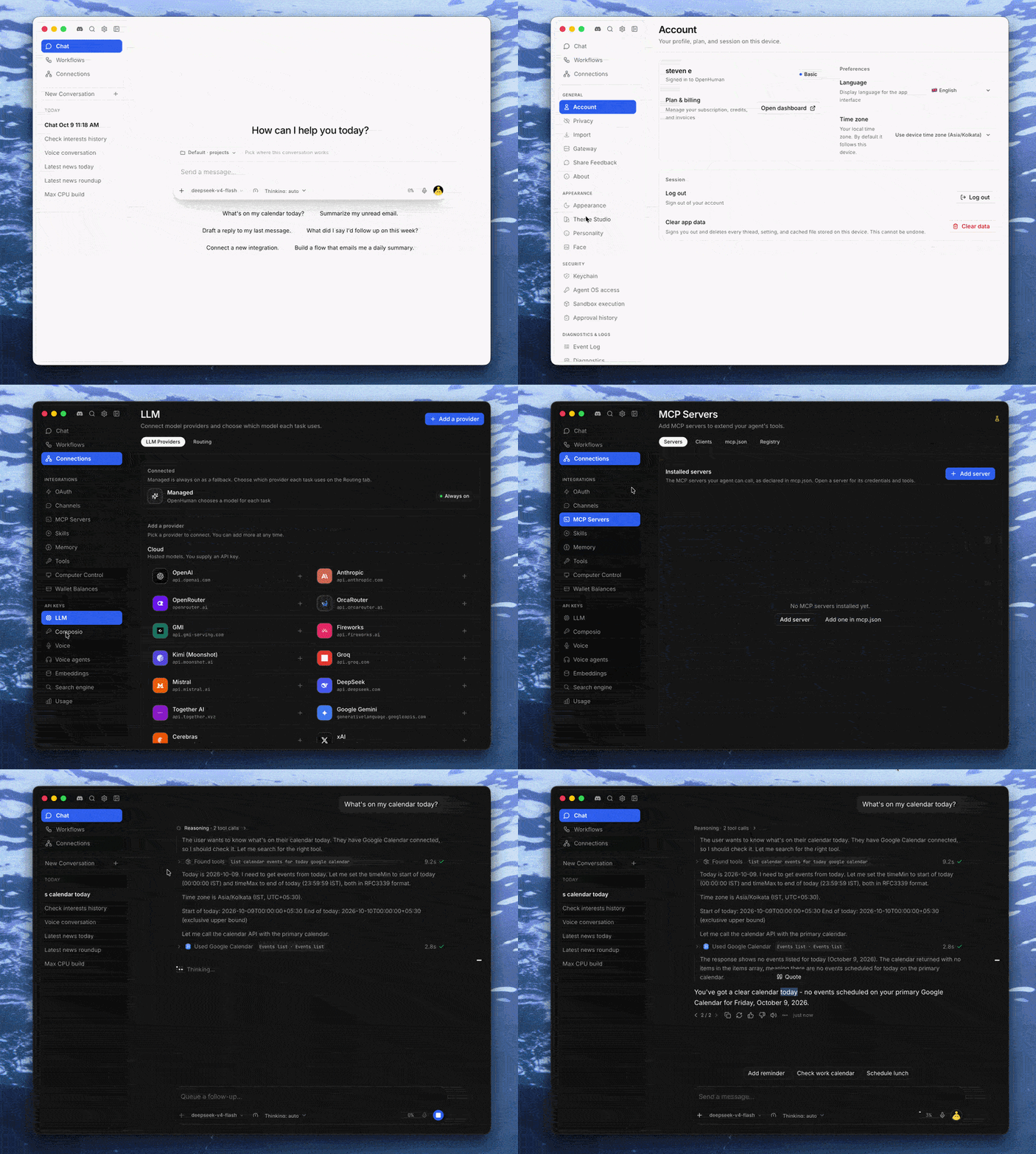
A walkthrough of the OpenHuman desktop app

tinyhumansai%2Fopenhuman | Trendshift OpenHuman on Product Hunt OpenHuman on Product Hunt

English | العربية | 简体中文 | 日本語 | 한국어 | Deutsch | Türkçe | اردو

> [!NOTE] > 🎉 Within one week of launch, OpenHuman became the **number one trending repository on GitHub** for nine days in a row. > **Early beta.** OpenHuman is under active development, so expect rough edges. --- ## Install The easiest way is to download the desktop app from [tinyhumans.ai/openhuman](https://tinyhumans.ai/openhuman?utm_source=github&utm_medium=readme) or the [latest release](https://github.com/tinyhumansai/openhuman/releases/latest). There is a `.dmg` for macOS, an `.msi` or `.exe` for Windows, and a `.deb` or `.AppImage` for Linux. Prefer the terminal? The install script picks the right package for your system, checks its checksum and installs it: ```bash # macOS and Linux curl -fsSL https://raw.githubusercontent.com/tinyhumansai/openhuman/main/scripts/install.sh | bash ``` ```powershell # Windows (PowerShell) irm https://raw.githubusercontent.com/tinyhumansai/openhuman/main/scripts/install.ps1 | iex ``` To preview what the macOS and Linux script would do, end the command with `bash -s -- --dry-run`. Other options and troubleshooting are in [INSTALL.md](./INSTALL.md). --- ## Why OpenHuman? Most agent harnesses run one heavy process per agent and resend a big prompt on every call. OpenHuman does the same work with far less. It is the only feature-rich open-source harness built for large fleets of agents: 500 of them fit on a $10 server.

Fast

Benchmark results · Cold-start numbers

Finishes coding tasks in about 20 seconds, the fastest of seven AI agent tools we tested. Starts up in a tenth of a second.

Cheap

Cost and token data · How compression works

Uses 2.6x fewer tokens than the typical agent tool, and had the lowest total bill in our test.

Efficient at scale

Fleet measurements · Methodology

Uses about 8x less memory and CPU than the typical agent tool. Run more than 500 agents on a $10 server.

Built for developers

Rust quickstart · Embedding guide · Examples

Use it as a Rust library: call an agent like any other function, or run a whole fleet from one small server.

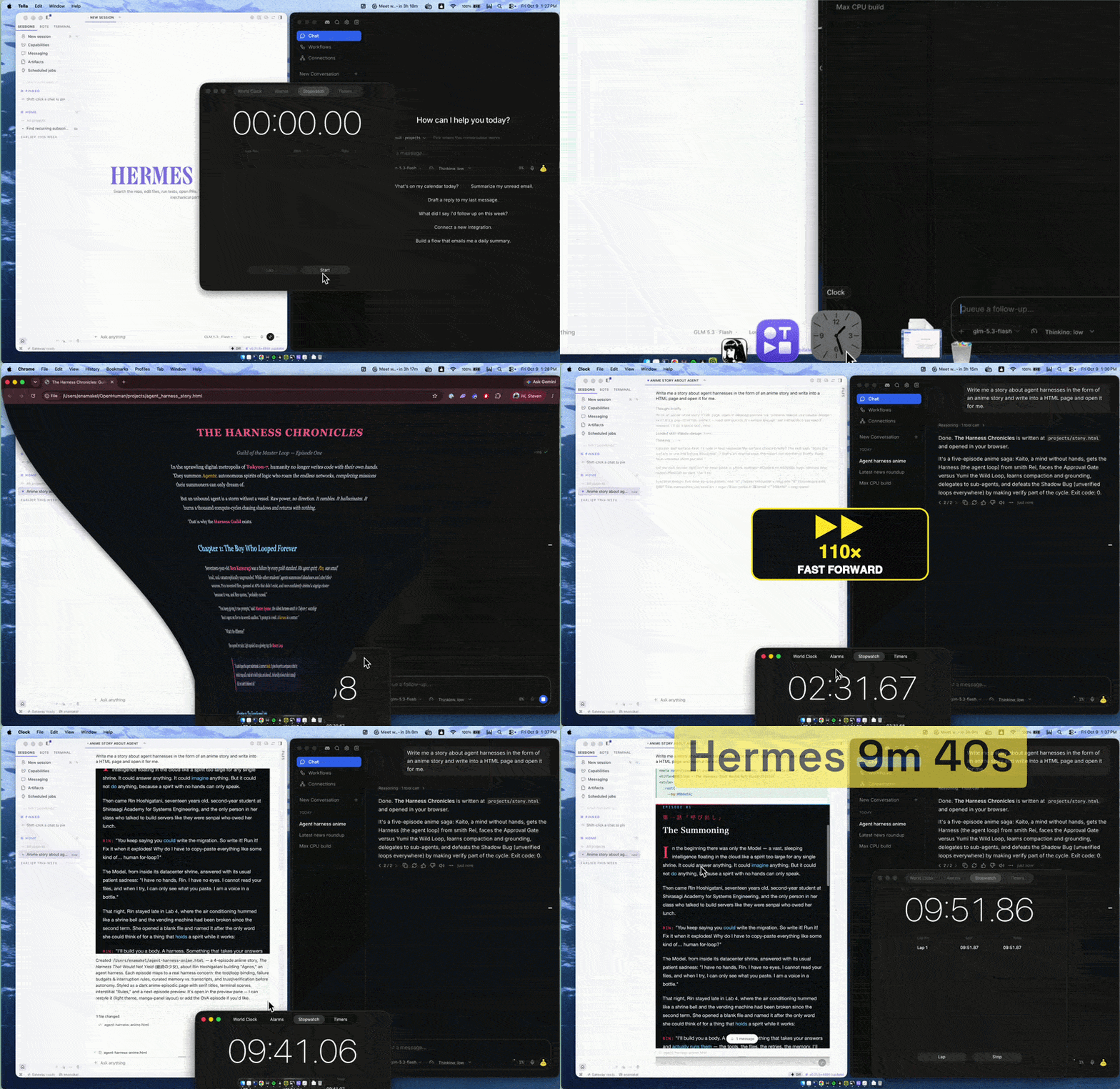
Hermes vs OpenHuman

Same prompt, Same model, Same reasoning side by side: "Write me a story about agent harnesses in the form of an anime story, write it into an HTML page and open it for me." OpenHuman finished in 20s, using 15k tokens for $0.0054. Hermes took 9min 40s, using 37k tokens for $0.0082.

--- ## Major innovations Most agent harnesses are a simple loop: send everything to the model, wait, repeat. That works for one agent, but it gets slow and expensive quickly, and it falls apart when you run hundreds. OpenHuman rethinks the parts that cost the most: how much text the AI has to read, how it finds the right tool, how features load, and how much machine the whole thing needs. The six ideas below are where the speed and savings above come from. Each card links to the docs if you want the details.

RLM token compression

RLM paper · How it works

Built on Recursive Language Models. Large tool results get compressed before the AI reads them. For very large ones, the AI gets a handle it can search instead of reading it all. Nothing is thrown away.

Jev: instant, accurate tool search

Jev · The measurements

Jev is a tiny model that finds the right tool out of 1,215. The right one is in its top picks 86.8% of the time, against 70.5% for keyword search.

Unified Rust bus

How plug-ins work

Every feature, like search, documents or voice, plugs into one Rust bus, an idea borrowed from the Linux system bus. A feature loads only when needed, and if one gets stuck, the rest keep working.

Deeply integrated memory

How memory works · Memory engines

Memory comes built in. Before every turn, OpenHuman picks out only what matters, within a token budget, and hands it to the AI with citations. It works out of the box, and you can swap in a different memory engine with a setting.

Instant browser and desktop control

Browser and computer control · Jev

The agent uses a real browser and your desktop apps. Jev picks each click from the buttons on screen, with no screenshots. It stops before any payment.

A programmable Rust core

Rust quickstart · Performance

The whole harness is compiled Rust in one process, so it starts in a tenth of a second and stays light: 68 MB at peak on our coding tasks. The same core is a library. Call an agent from your own Rust code, or run hundreds of them side by side on one small server.

--- ## Benchmarks

SWE-bench Verified run swe-x86-1: OpenHuman against six other harnesses on ten panels

We ran seven harnesses on the same SWE-bench tasks, with the same model, API key and container, and metered every call. The setup and results are public in [openhuman-benchmarks](https://github.com/tinyhumansai/openhuman-benchmarks), so anyone can rerun them. The latest run is [`swe-x86-1`](https://github.com/tinyhumansai/openhuman-benchmarks/blob/main/results/swe-x86-1/summary.md), with ten tasks. OpenHuman finished its tasks in less than half the median time, using 2.6x fewer tokens and an eighth of the memory and CPU. It made 114 model calls where the others made 134 to 212, and its whole run cost $0.05 where the others cost $0.08 to $0.35. It wins by doing less work per step. The core is compiled Rust in a single process, not Node or Python, so it uses little memory and almost no CPU between model calls. It sends the smallest prompt of the seven, 4.6k tokens with its 20 tools included, so each call is cheaper and comes back faster (1.65 s median, also the fastest). It also needs fewer calls to reach an answer, which is where most of the savings come from. | Per solved task | OpenHuman (vs. median) | Median of the other six | Best of the other six | | --- | --- | --- | --- | | Wall time (p50) | **19.8 s** (2.3x faster) | 46.5 s | 28.4 s (OpenCode) | | Tokens | **167k** (2.6x fewer) | 435k | 370k (Codex) | | Cost | **$0.0077** (-36%) | $0.012 | $0.0077 (OpenCode, a tie) | | Peak memory | **68 MB** (7.7x less) | 523 MB | 123 MB (Codex) | | CPU time | **1.3 s** (8x less) | 10.4 s | 2.9 s (DeepSeek Harness) | | System prompt | **4.6k tokens** (-40%) | 7.7k | 6.2k (DeepSeek Harness) | --- ## For users If you use Claude Code, Codex, OpenClaw or Hermes, you already know the ideas: an agent loop with tools, MCP, skills, BYOK models and memory. OpenHuman has all of them, in a desktop app, a terminal app or a headless server. | Capability | What OpenHuman ships | | --- | --- | | Configurable memory | [Built-in memory over your files, repos, feeds and apps](https://tinyhumans.gitbook.io/openhuman/features/memory), recalled before every turn with citations, on the memory engine you choose | | Voice agents | A [live voice agent](https://tinyhumans.gitbook.io/openhuman/features/native-tools/voice) you can interrupt mid-sentence, plus dictation and spoken replies | | Computer and browser control | [Drives a real Chrome browser and your desktop apps](https://tinyhumans.gitbook.io/openhuman/features/native-tools/browser-and-computer), asking before anything it cannot undo | | Search | [Search engines and search agents](https://tinyhumans.gitbook.io/openhuman/features/native-tools/web-search): Exa and Gemini included, Brave, Tavily, Parallel and more with your own key, grounded answers with citations and Deep Research | | Tools | [Native tools](https://tinyhumans.gitbook.io/openhuman/features/native-tools): shell and coder, scraper, documents, image and video generation, cron | | MCP and skills | [MCP servers and skill bundles](https://tinyhumans.gitbook.io/openhuman/features/integrations/mcp-and-skills) | | OAuth integrations | [119 apps through Composio](https://tinyhumans.gitbook.io/openhuman/features/integrations), with [triggers](https://tinyhumans.gitbook.io/openhuman/features/integrations/triggers) that start the agent when something happens | | Models | [Local models (Ollama, LM Studio, MLX) and BYOK for 26 providers](https://tinyhumans.gitbook.io/openhuman/features/model-routing/local-and-byok-models), with [automatic model routing](https://tinyhumans.gitbook.io/openhuman/features/model-routing) | | Channels | [14 messaging channels](https://tinyhumans.gitbook.io/openhuman/features/channels) as agent front ends: Telegram, Discord, iMessage, email and more | | Workflows | [Durable workflow graphs](https://tinyhumans.gitbook.io/openhuman/features/workflows): cron, event or manual triggers, approval steps, resume after a pause | | Safety | [Approval gate](https://tinyhumans.gitbook.io/openhuman/features/approval-gate), [sandboxed execution](https://tinyhumans.gitbook.io/openhuman/features/privacy-and-security) (OS jail or Docker), [Privacy Mode](https://tinyhumans.gitbook.io/openhuman/features/privacy-mode) for local-only runs, secrets in the [OS keyring](https://tinyhumans.gitbook.io/openhuman/features/os-keyring-and-secret-storage) | | Usage tracking | [Per-call cost and token usage](https://tinyhumans.gitbook.io/openhuman/features/billing-and-usage), plus replayable run journals | Start with [Getting started](https://tinyhumans.gitbook.io/openhuman/overview/getting-started) or the [guides](https://tinyhumans.gitbook.io/openhuman/guides). --- ## For developers OpenHuman is a library-first harness. Add it to your Rust project and call an agent like any other function, with no sidecar or daemon to run. One runtime can hold hundreds of agents, each with its own model, tools, memory and sandbox. 500 of them fit on a $10 VPS, so a product with one agent per customer can start without a cluster. ```rust use openhuman_embed::{Access, Harness, Provider, Workspace}; let agent = Harness::builder() .provider(Provider::openai_compatible("https://api.openai.com/v1", "sk-...").model("gpt-5")) .workspace(Workspace::Ephemeral) .access(Access::readonly()) .build() .await?; let reply = agent.run("Summarize what you can see in this directory.").await?; println!("{}", reply.reply); ``` Next: the [Rust quickstart](https://tinyhumans.gitbook.io/openhuman/developing/quickstart), the [embedding guide](./gitbooks/developing/embed/README.md) and the [developer docs](https://tinyhumans.gitbook.io/openhuman/developing). --- ## How it compares? Here is OpenHuman next to the harnesses most people already use. The top four rows come from our [public benchmark](https://github.com/tinyhumansai/openhuman-benchmarks/blob/main/results/swe-x86-1/summary.md): ten SWE-bench coding tasks, with the same model and container for every harness. Each number is per solved task. The rest compare features. In short, the others are great for one person working with one agent. OpenHuman does that too, and it is also the open-source option you can embed as a library and scale to a fleet. Products change quickly, so check each project before you decide. | | Claude Code | Codex | OpenClaw | Hermes Agent | OpenHuman | | ----------------------- | -------------------- | -------------------- | -------------------- | -------------------- | ---------------------------------------- | | **Median task time** | 37.8 s | 36.1 s | 62 s | 58.5 s | 🚀 19.8 s | | **Avg tokens per task** | 428k | 370k | 442k | 482k | 🚀 167k | | **Peak memory per task** | 231 MB | 123 MB | 1.57 GB | 816 MB | 🚀 68 MB | | **Avg cost per task** | $0.04 | $0.02 | $0.01 | $0.0082 | 🚀 $0.0077 | | **Open source** | 🚫 Proprietary | ✅ Apache-2.0 | ✅ MIT | ✅ MIT | ✅ GPL-3.0 | | **Agent fleets** | ⚠️ Process per agent | ⚠️ Process per agent | ⚠️ Process per agent | ⚠️ Process per agent | 🚀 500 agents on a $10 VPS | | **Embeddable library** | ⚠️ SDK over a CLI | ⚠️ SDK over a CLI | 🚫 None | ⚠️ Python package | 🚀 Typed Rust API | | **Memory** | ⚠️ Memory files | ⚠️ Memory files | ⚠️ Plugin-reliant | ✅ Self-learning | 🚀 Recalled every turn, with citations | | **Integrations** | ✅ MCP | ✅ MCP | ⚠️ BYO | ⚠️ BYO | 🚀 119 OAuth apps, MCP, skills | | **Messaging channels** | 🚫 None | 🚫 None | ✅ Many | ✅ Several | ✅ 14, including email | | **Browser and desktop** | ⚠️ Browser via MCP | ⚠️ Browser via MCP | ✅ Browser | ✅ Browser | ✅ Browser and desktop apps | | **Workflows** | 🚫 None | 🚫 None | ⚠️ Scripts | ⚠️ Scripts | 🚀 Visual, agent-drafted | | **Model choice** | ⚠️ Anthropic models | ⚠️ OpenAI-first | ✅ Any | ✅ Any | ✅ Any, with built-in routing | --- ## Contributing Read [`CONTRIBUTING.md`](./CONTRIBUTING.md), or let an AI coding agent guide you with [this prompt](./docs/CONTRIBUTING-BEGINNERS.md#optional--let-an-ai-coding-agent-guide-you). 1. Install Git, Node.js 24+, pnpm 10.10.0, Rust 1.96.1 (with `rustfmt` and `clippy`), CMake, Ninja, ripgrep, and your platform's desktop build prerequisites. 2. Fork and clone the repo. Run `git submodule update --init --recursive`, then `pnpm install`. 3. Run `pnpm dev` for UI work or `pnpm dev:app` for the desktop app. Before you open a PR, run `pnpm typecheck`, `pnpm format:check` and `cargo check --manifest-path Cargo.toml`. More in [Getting set up](https://tinyhumans.gitbook.io/openhuman/developing/getting-set-up), [`AGENTS.md`](./AGENTS.md) and the [crates overview](./crates/README.md). Many parts of OpenHuman live in their own repos under [`vendor/`](./vendor), and they welcome contributions too. Contributors get free merch and special access on [Discord](https://guild.tinyhumans.ai/). ## Star history

Star History Chart

## Contributors OpenHuman contributors