unitree_lerobot
Unitree Robotics
English | 中文

| Unitree Robotics repositories | link |
| ----------------------------- | ------------------------------------------------------------------------------- |
| Unitree Datasets | [unitree datasets](https://huggingface.co/unitreerobotics) |
| AVP Teleoperate | [avp_teleoperate](https://github.com/unitreerobotics/avp_teleoperate) |
| Unitree Sim IsaacLab | [unitree_sim_isaaclab](https://github.com/unitreerobotics/unitree_sim_isaaclab) |
# 0. 📖 介绍
此存储库是使用`lerobot训练验证`(支持 lerobot 数据集 v2.0 以上版本)和`unitree数据转换`
`❗Tips:如果您有任何疑问,想法或建议,请随时随时提出它们。我们将尽最大努力解决和实现。`
| 目录 | 说明 |
| ---------- | ------------------------------------------------------ |
| lerobot | `lerobot` 仓库代码,其对应的 commit 版本号为 `0878c68` |
| utils | `unitree 数据处理工具` |
| eval_robot | `unitree 模型真机推理验证` |
# 1. 📦 环境安装
## 1.1 🦾 LeRobot 环境安装
本项的目的是使用[LeRobot](https://github.com/huggingface/lerobot)开源框架训练并测试基于 Unitree 机器人采集的数据。所以首先需要安装 LeRobot 相关依赖。安装步骤如下,也可以参考[LeRobot](https://github.com/huggingface/lerobot)官方进行安装:
```bash
# 下载源码
git clone --recurse-submodules https://github.com/unitreerobotics/unitree_lerobot.git
# 已经下载:
git submodule update --init --recursive
# 创建 conda 环境
conda create -y -n unitree_lerobot python=3.10
conda activate unitree_lerobot
conda install ffmpeg=7.1.1 -c conda-forge
# 安装 LeRobot
cd lerobot && pip install -e .
# 安装 unitree_lerobot
cd .. && pip install -e .
```
## 1.2 🕹️ unitree_sdk2_python
针对 Unitree 机器人`dds通讯`需要安装一些依赖,安装步骤如下:
```
git clone https://github.com/unitreerobotics/unitree_sdk2_python.git
cd unitree_sdk2_python && pip install -e .
```
# 2. ⚙️ 数据采集与转换
## 2.1 🖼️ 数据加载测试
如果你想加载我们已经录制好的数据集, 你可以从 huggingface 上加载 [`unitreerobotics/G1_Dex3_ToastedBread_Dataset`](https://huggingface.co/datasets/unitreerobotics/G1_Dex3_ToastedBread_Dataset) 数据集, 默认下载到`~/.cache/huggingface/lerobot/unitreerobotics`. 如果想从加载本地数据请更改 `root` 参数
```python
from lerobot.datasets.lerobot_dataset import LeRobotDataset
import tqdm
episode_index = 1
dataset = LeRobotDataset(repo_id="unitreerobotics/G1_Dex3_ToastedBread_Dataset")
from_idx = dataset.meta.episodes["dataset_from_index"][episode_index]
to_idx = dataset.meta.episodes["dataset_to_index"][episode_index]
for step_idx in tqdm.tqdm(range(from_idx, to_idx)):
step = dataset[step_idx]
```
`可视化`
```bash
cd unitree_lerobot/lerobot
python src/lerobot/scripts/lerobot_dataset_viz.py \
--repo-id unitreerobotics/G1_Dex3_ToastedBread_Dataset \
--episode-index 0
```
## 2.2 🔨 数据采集
如果你想录制自己的数据集, 可以使用开源的遥操作项目[avp_teleoperate](https://github.com/unitreerobotics/avp_teleoperate) 对 Unitree G1 人形机器人进行数据采集,具体可参考[avp_teleoperate](https://github.com/unitreerobotics/avp_teleoperate)项目。
## 2.3 ✂️数据处理
当你完成了数据采集任务,通常需要对采集的数据进行一些处理,例如切掉某个Episode中多余的动作片段、删除某个不合格的Episode等。对此,我们开发了一个数据集编辑器,用于处理这样的任务。
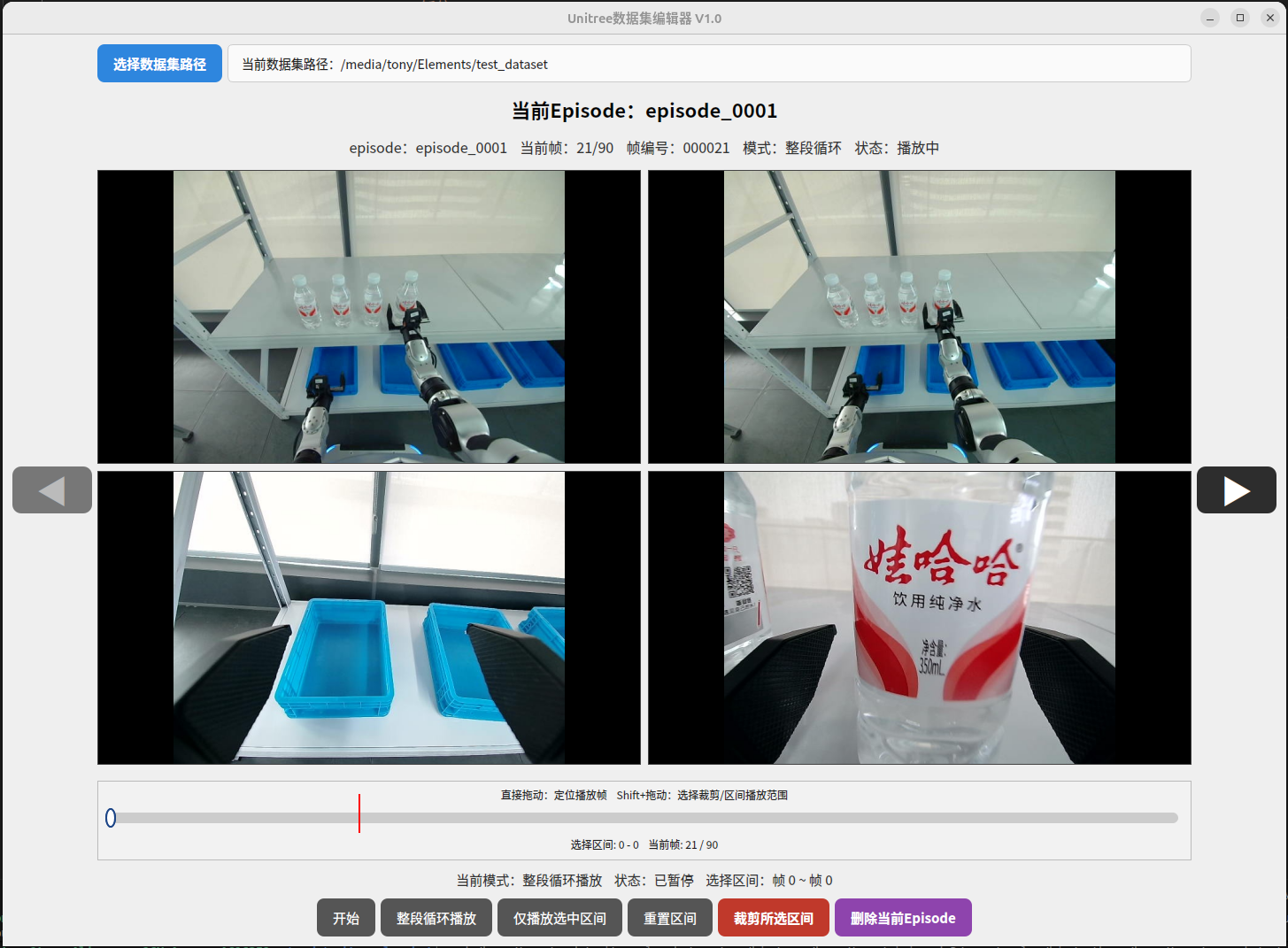
该数据集编辑器需要先安装pyqt5才可以启动。
```bash
conda activate unitree_lerobot
pip install PyQt5
```
按照如下方式启动数据集编辑器。
```bash
cd data_editor
python data_editor_CN.py
```
首先,点击`选择数据集路径`按钮,选择需要编辑的数据集路径。如下所示,在下面的目录树中,我们需要选择的路径为`test_dataset/`。
```bash
test_dataset/
├── episode_0001
├── episode_0003
├── episode_0004
├── ...
```
你可以通过拖动播放进度条上的红线来调整播放位置,也可以按住键盘上的Shift按键再去拖动,来选择片段。对于选中的片段,点击`删除所选区间`,即可将其裁减掉。如果当前Episode需要删除,点击`删除当前Episode`即可。
## 2.4 🛠️ 数据转换
使用[avp_teleoperate](https://github.com/unitreerobotics/avp_teleoperate)采集的数据是采用 JSON 格式进行存储。假如采集的数据存放在`$HOME/datasets/task_name` 目录中,格式如下:
```
datasets/ # 数据集文件夹
└── task_name / # 任务名称
├── episode_0001 # 第一条轨迹
│ ├──audios/ # 声音信息
│ ├──colors/ # 图像信息
│ ├──depths/ # 深度图像信息
│ └──data.json # 状态以及动作信息
├── episode_0002
├── episode_...
├── episode_xxx
```
### 2.4.1 🔀 排序和重命名
生成 lerobot 的数据集时,最好保证数据的`episode_0`命名是从 0 开始且是连续的,使用下面脚本对数据进行排序处理
```bash
python unitree_lerobot/utils/sort_and_rename_folders.py \
--data_dir $HOME/datasets/task_name
```
### 2.4.2 🔄 转换
转换`json`格式到`lerobot`格式,你可以根据 [ROBOT_CONFIGS](https://github.com/unitreerobotics/unitree_lerobot/blob/main/unitree_lerobot/utils/convert_unitree_json_to_lerobot.py#L154) 去定义自己的 `robot_type`
```bash
# --raw-dir 对应json的数据集目录
# --repo-id 对应自己的repo-id
# --push_to_hub 是否上传到云端
# --robot_type 对应的机器人类型
python unitree_lerobot/utils/convert_unitree_json_to_lerobot.py
--raw-dir $HOME/datasets
--repo-id your_name/repo_task_name
--robot_type Unitree_G1_Dex3 # e.g., Unitree_Z1_Single, Unitree_Z1_Dual, Unitree_G1_Dex1, Unitree_G1_Dex3, Unitree_G1_Brainco,Unitree_G1_Dex1_Sim, Unitree_G1_Inspire
--push_to_hub
```
**注意:** `Unitree_G1_Dex1_Sim` 是在[unitree_sim_isaaclab](https://github.com/unitreerobotics/unitree_sim_isaaclab)采集数据的机器人类型,头部只有一个视角的图像。
# 3. 🚀 训练
[请详细阅读官方 lerobot 训练实例与相关参数](https://github.com/huggingface/lerobot/tree/main/docs/source)
- `训练 act` [Please refer to it in detail](https://github.com/huggingface/lerobot/blob/main/docs/source/act.mdx)
```
cd unitree_lerobot/lerobot
python src/lerobot/scripts/train.py \
--dataset.repo_id=unitreerobotics/G1_Dex3_ToastedBread_Dataset \
--policy.push_to_hub=false \
--policy.type=act
```
- `训练 Diffusion Policy` [Please refer to it in detail](https://github.com/huggingface/lerobot/blob/main/docs/source/policy_diffusion_README.md)
```
cd unitree_lerobot/lerobot
python src/lerobot/scripts/train.py \
--dataset.repo_id=unitreerobotics/G1_Dex3_ToastedBread_Dataset \
--policy.push_to_hub=false \
--policy.type=diffusion
```
- `训练 pi0` [Please refer to it in detail](https://github.com/huggingface/lerobot/blob/main/docs/source/pi0.mdx)
```
cd unitree_lerobot/lerobot
python src/lerobot/scripts/train.py \
--dataset.repo_id=unitreerobotics/G1_Dex3_ToastedBread_Dataset \
--policy.push_to_hub=false \
--policy.type=pi0
```
- `训练 Pi05 Policy` [Please refer to it in detail](https://github.com/huggingface/lerobot/blob/main/docs/source/pi05.mdx)
```bash
cd unitree_lerobot/lerobot
python src/lerobot/scripts/lerobot_train.py \
--dataset.repo_id=unitreerobotics/G1_Dex3_ToastedBread_Dataset \
--policy.type=pi05 \
--output_dir=./outputs/pi05_training \
--job_name=pi05_training \
--policy.pretrained_path=lerobot/pi05_base \
--policy.compile_model=true \
--policy.gradient_checkpointing=true \
--policy.dtype=bfloat16 \
--policy.device=cuda \
--policy.push_to_hub=false
```
- `训练 Gr00t Policy` [Please refer to it in detail](https://github.com/huggingface/lerobot/blob/main/docs/source/groot.mdx)
```bash
cd unitree_lerobot/lerobot
python src/lerobot/scripts/lerobot_train.py \
--dataset.repo_id=unitreerobotics/G1_Dex3_ToastedBread_Dataset \
--output_dir=./outputs/groot_training \
--policy.push_to_hub=false \
--policy.type=groot \
--policy.tune_diffusion_model=false \
--job_name=groot_training
```
如果你想使用多 GPU 训练,请参考 [here](https://github.com/huggingface/lerobot/blob/main/docs/source/multi_gpu_training.mdx)
# 4. 🤖 真机测试
[如何打开 image_server](https://github.com/unitreerobotics/avp_teleoperate?tab=readme-ov-file#31-%EF%B8%8F-image-server)
```bash
# --policy.path: 指定预训练模型的路径,用于评估策略。
# --repo_id: 数据集的仓库ID,用于加载评估所需的数据集。
# --root: 数据集的根目录路径,默认为空字符串。
# --episodes: 评估的回合数;设为0表示使用默认值。
# --frequency: 评估频率(单位:Hz),用于控制评估的时间步长。
# --arm: 机器人手臂的型号,例如 G1_29、G1_23。
# --ee: 末端执行器的类型,例如 dex3、dex1、inspire1、brainco。
# --visualization: 是否启用可视化;设置为 true 表示启用。
# --send_real_robot: 是否将指令发送到真实机器人
python unitree_lerobot/eval_robot/eval_g1.py \
--policy.path=unitree_lerobot/lerobot/outputs/train/2025-03-25/22-11-16_diffusion/checkpoints/100000/pretrained_model \
--repo_id=unitreerobotics/G1_Dex3_ToastedBread_Dataset \
--root="" \
--episodes=0 \
--frequency=30 \
--arm="G1_29" \
--ee="dex3" \
--visualization=true
如果你想在 unitree_sim_isaaclab 仿真环境下进行推理测试,请执行:
# --save_data 用于在模型推理过程中进行数据录制,目前只能在sim环境中使用
# --task_dir: 数据存放的目录
# --max_episodes: 每一次最多推理的次数,超过次次数默认任务执行失败
python unitree_lerobot/eval_robot/eval_g1_sim.py \
--policy.path=unitree_lerobot/lerobot/outputs/train/2025-03-25/22-11-16_diffusion/checkpoints/100000/pretrained_model \
--repo_id=unitreerobotics/G1_Dex3_ToastedBread_Dataset \
--root="" \
--episodes=0 \
--frequency=30 \
--arm="G1_29" \
--ee="dex3" \
--visualization=true \
--save_data=false \
--task_dir="./data" \
--max_episodes=1200
# If you want to evaluate the model's performance on the dataset, use the command below for testing
python unitree_lerobot/eval_robot/eval_g1_dataset.py \
--policy.path=unitree_lerobot/lerobot/outputs/train/2025-03-25/22-11-16_diffusion/checkpoints/100000/pretrained_model \
--repo_id=unitreerobotics/G1_Dex3_ToastedBread_Dataset \
--root="" \
--episodes=0 \
--frequency=30 \
--arm="G1_29" \
--ee="dex3" \
--visualization=true \
--send_real_robot=false
```
**注意:** 如果使用 unitree_sim_isaaclab 仿真环境,请参考[unitree_sim_isaaclab](https://github.com/unitreerobotics/unitree_sim_isaaclab)进行环境的搭建与运行.
# 5. 🎬 在机器人上 replay 数据集
这一部分提供了在机器人上重放数据集的说明。它对于使用预先录制的数据来测试和验证机器人的行为非常有用。
```bash
# --repo_id Hugging Face Hub 上的数据集仓库 ID(例如:unitreerobotics/G1_Dex3_ToastedBread_Dataset)
# --root 数据集根目录路径(留空则使用默认的缓存路径)
# --episodes 要重放的轨迹索引(例如:0 表示第一个轨迹)
# --frequency 重放频率,单位 Hz(例如:30 表示每秒 30 帧)
# --arm 使用的机械臂类型(例如:G1_29,G1_23)
# --ee 使用的末端执行器类型(例如:dex3,dex1,inspire1,brainco)
# --visualization 是否在重放时启用可视化(true 表示启用,false 表示禁用)
python unitree_lerobot/eval_robot/replay_robot.py \
--repo_id=unitreerobotics/G1_Dex3_ToastedBread_Dataset \
--root="" \
--episodes=0 \
--frequency=30 \
--arm="G1_29" \
--ee="dex3" \
--visualization=true
```
# 6. 🤔 Troubleshooting
| Problem | Solution |
| ------------------------------------------------------------------------------------------------------------------------------------------------------------------------------------------------------------------------------------------- | -------------------------------------------------------------- |
| **Why use `LeRobot v2.0`?** | [Explanation](https://github.com/huggingface/lerobot/pull/461) |
| **401 Client Error: Unauthorized** (`huggingface_hub.errors.HfHubHTTPError`) | Run `huggingface-cli login` to authenticate. |
| **FFmpeg-related errors:**
Q1: `Unknown encoder 'libsvtav1'`
Q2: `FileNotFoundError: No such file or directory: 'ffmpeg'`
Q3: `RuntimeError: Could not load libtorchcodec. Likely causes: FFmpeg is not properly installed.` | Install FFmpeg:
`conda install -c conda-forge ffmpeg` |
| **Access to model `google/paligemma-3b-pt-224` is restricted.** | Run `huggingface-cli login` and request access if needed. |
# 7. 🙏 致谢
此代码基于以下开源代码库进行构建。请访问以下链接查看相关的许可证:
1. https://github.com/huggingface/lerobot
2. https://github.com/unitreerobotics/unitree_sdk2_python
3. https://github.com/unitreerobotics/xr_teleoperate
4. https://github.com/unitreerobotics/unitree_sim_isaaclab