
Table of Contents
Entities in BigWorld are contained in the game universe. A universe is composed of spaces, which are composed of cells.
Each space can contain:
-
Space Data for information that must be available to the entire space.
-
Geometry to define where entities can move.
-
Time of day, which is used by clients to determine day/night cycles.
BigWorld supports having multiple separate geometric spaces in a universe. Each space can have a different set of geometry mapped into it, and a different set of entities existing within it. Each CellApp can handle multiple cells in different spaces.
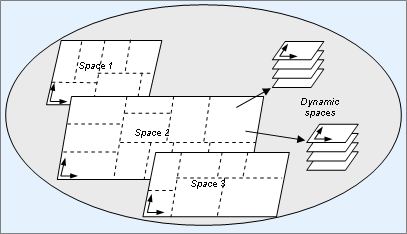
Visualisation of spaces and division in cells (cell boundaries marked in dotted lines)
Spaces are usually created by creating an entity in a new space. For this reason, every space needs at least one entity and as such once a space has no entities, it will cease to exist.
A common design technique to make this management easier is to
create an entity Space (usually named after the
space's purpose, e.g.,
Mission, or Quest). Such an
entity will be created in a new space, and then be responsible for
configuring that space for game play to begin. Players can then teleport
into the new space to explore it, play their mission, etc.
The general structure of this kind of entity is the illustrated in the code fragments below:
-
Base script:
class Space( BigWorld.Base ):

  def __init__( self ):
    # create our cell entity in a new space. self.onGetCell() will be
    # called when the cell entity is created.
    self.createInNewSpace()

  def onGetCell( self ):
    # create any predefined entities in the space
    # may want to use ResMgr to load details from an XML file

    # we want to make sure that each entity's createCellEntity()
    # method is passed the appropriate cell mailbox (this entity's
    # cell mailbox) so that it is created in the correct space
    # for example:
    BigWorld.createBase( "Monster", arguments, createOnCell=self.cell )
Example file
<res>/scripts/base/Space.py
-
Cell script:
class Space( BigWorld.Entity ):

  def __init__( self ):
    # Register our mailbox for getting the callback when the space
    # geometry finishes loading. You can choose any arbitrary string
    # as the key so long you can find this entry again.
    BigWorld.cellAppData[ 'SpaceLoader:' + str(self.spaceID) ] = self

    # Add the geometry mapping. This maps the set of .chunk files we
    # want into the space. BWPersonality.onAllSpaceGeometryLoaded will
    # be called when BigWorld finished loading the geometry.
    BigWorld.addSpaceGeometryMapping( self.spaceID, None,
      "geometry/path" )

  def onGeometryLoaded( self ):
    # we can now also teleport in any additional entities that already
    # existed in the world (we'd probably store a mailbox somewhere in
    # the construction sequence to make this possible)
    # see the cell entity teleport() method for details
    playerMB.teleport( self, position, direction )
Example file
<res>/scripts/cell/Space.py
-
Cell personality script:
def onAllSpaceGeometryLoaded( spaceID, isBootstrap, lastPath ):
  if (isBootstrap):
    # Find the registered loader and tell it to load the entities into
    # the space.
    loaderKey = 'SpaceLoader:' + str(spaceID)
    if BigWorld.cellAppData.has_key( loaderKey ):
      BigWorld.cellAppData[ loaderKey ].onGeometryLoaded();
Example file
<res>/scripts/cell/BWPersonality.py
To create this entity, the code below would be written[12]:
newSpace = BigWorld.createBaseAnywhere( "Space", ... )
Notice that there are four key steps in this piece of code:
-
Create the cell entity in a new space (in the
__init__method). -
When the cell entity is created, map in any geometry that the space contains.
-
Create any entities that are required to be in the world.
-
When the space geometry is loaded, bring any required players into the space.
It is likely that there will be management code specific to the style of space that is required (this code will be heavily dependant on your game's requirements). It is also possible to perform various steps between the cell and the base, depending on entity instantiation requirements.
When all entities in a space are removed, the space will be
destroyed. Alternatively, any entity in the space can call the method
Entity.destroySpace to
destroy the current space the entity exists in. Each entity in the space
will have its method onSpaceGone called before it
is actually destroyed.
When your game requires multiple instances of a space (e.g., a mission space), it is advantageous to create a pool of reusable space instance during game startup.
This mechanism removes the need of later having to load chunks on demand, as when players request to enter a space, an instance will be chosen from the pool. After players leave the space, you can move the space back to the pool for later usage. This mechanism can greatly speed up the game loading for players on the server.
The sub-sections below describe the features of the Navigation System.
The key features of the system are:
-
Navigation of both indoor and outdoor chunks.
-
Seamless transition between indoor and outdoor regions.
-
Dynamic loading of navpoly graphs.
-
Paths caching, for efficiency.
The world is broken up into chunks. Each chunk is a convex hull, and is uniquely identified by a chunk ID string, e.g., 0000ffffo.
For navigation purposes, each chunk is broken up into a set of convex polygonal prisms. Such a prism is known as navpoly, and is identified by an integer navpoly ID unique to a single chunk.
Each edge on a navpoly can be shared with the edge of an adjacent region. This means that movement between these two regions is allowed. Alternatively, an edge may be marked as being adjacent to a different chunk.
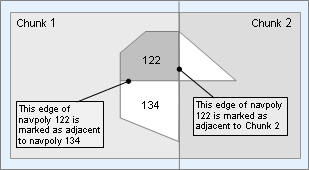
Navpoly edge demarcation
A navpoly also has a height associated with it. This is the maximum height of the navpoly region, such that the client can do a drop test from this Y value, and always end up on the bottom of the navpoly.
Vertices in the navpoly are defined in clockwise order, and have its XZ coordinates stored in the XY fields.
The third coordinate is used to store adjacency information for the edge formed between this vertex and the next. The value of this third coordinate is either the navpoly ID of the adjacent navpoly, or an encoding of an obstacle type. Edges on chunk boundaries are indicated by the presence of a separate tag for the adjacent chunk ID. In this case, the third vertex coordinate is not used.
The example file below illustrates this concept:
<navpoly> 230 <minHeight> 11.662999 </minHeight> <height> 14.362000 </height> <vertex> 3.100000 88.099998 239.000000 </vertex><vertex> -0.900000 88.099998 0.000000 <adjacentChunk> FFFF0000o </adjacentChunk>
</vertex> <vertex> -0.900000 94.599998 228.000000 </vertex> <vertex> 8.100000 94.599998 229.000000 </vertex> <vertex> 9.600000 94.599998 -2231.000000 </vertex>
</navpoly>
Example
<res>/spaces/<space>/<chunk_ID>.chunk
When an entity wants to navigate to a position, it uses the Python
Entity.navigate script
method, like the example below:
self.controllerId = self.navigate( position, velocity, userTag, girth )
The parameters for the navigate script
method are described below:
-
position‐ The destination position. -
velocity‐ Movement velocity in metres per second. -
userTag‐ Integer value passed to the navigation callback. -
girth‐ Minimum width of the gap that the entity can squeeze through.
If there is no valid path to the destination, then navigate will fail, and throw a script exception. Otherwise, it will return a controller ID. This is a unique ID that can be used to cancel the movement request, like so:
self.cancel( self.controllerID )
When the movement is complete, the entity's
onNavigate method will be called, with the
controllerId and userId as
arguments. At this stage, all resources related to the controller have
been released, and there is no need to free them by calling
Entity.cancel.
self.onNavigate( controllerId, userId )
When the
Entity.navigate script
method is called, the server performs the following steps:
-
Resolve the ChunkID and WaypointID from the source location.
-
Resolve the ChunkID and WaypointID from the destination location.
-
If the ChunkIDs are different, then perform a graph search on the chunk level. Otherwise, if the WaypointIDs are different, then perform a graph search on the navpoly level. If both these tests fail, move in a straight line to the specified position.
An A* search is used for both the chunk graph search and the
navpoly graph search. The ChunkState and
WaypointState classes both implement the
interface required for an A* search, and are used to search the chunk
and navpoly graphs respectively.
The chunk graph is searched by using the centre of each chunk for calculating distances.
Distances on the navpoly graph are calculated based on the actual path that would be taken through the navpolys.
Given a source location inside the navpoly, and a destination location outside the navpoly, the algorithm is as follows:
-
Find the point where the direct line from source to destination would intersect the polygon border.
-
If this point is on an edge that has an adjacency, move directly to the point of intersection.
-
Otherwise, move to a vertex that has an adjacency, such that the angle between this path and the desired path is minimised.
This is a simple approach, and not always optimal, but works properly in most cases.
The PathCache class is used as a wrapper
for performing both chunk and navpoly graph searches. It caches one path
per entity, and also stores the current hop index within that path. Each
time a graph search would take place, the
PathCache checks if the goal is the same as the
cached goal. If so, then the next state in the path is returned, and the
hop index is incremented, if appropriate.
Based on terrain and other geometric information in the chunk
files (named
<res>/spaces/<space>/<chunk_ID>.chunk
-
It flood fills each chunk, using client physics rules.
-
It uses a BSP to recursively subdivide the space and form convex polygonal prisms.
It writes the results in the binary .cdata files[14].
The NavGen utility handles multiple vertical levels within a chunk (bridges, tunnels, etc...). It uses a multi-pass algorithm to analyse and describe the connectedness of such scenes.
NavGen's XML configuration file
<bwclient_source_folder>/../tools/misc/navgen_settings.xml
For more details, see the document ????'s chapter ????.
We have seen how entities define how different pieces of a game can behave. Game play involves changing entities' states over time, and so it is important to have a good understanding of how time is managed in the BigWorld environment.
It helps to think about different types of time when discussing time in BigWorld. These types are discussed in the following sub-sections.
Real Time is simply the time on a clock in the real world. Real time is used as the basis for defining the other types of time in BigWorld.
On the server, game time is incremented in discrete units, based
on the <gameUpdateHertz> configuration option
in
<res>/server/bw.xml
The server keeps an integer counter that is incremented at this rate and whose initial value at server startup is 0.
To calculate the server time in seconds, the following formula is used:
serverTime = serverTimestamp / gameUpdateHertz
This is approximately:
serverTime ~= currentRealTime - serverStartRealTime
Each client machine calculates a synchronised version of this
time, available via the
BigWorld.serverTime
script method.
Game Time is the time sensed by the players in the game world.
A massively online persistent game usually has virtual days and months in its virtual world. You might want to run one game world hour for every hour of Real Time, for example. In order to support this, BigWorld has a standard piece of space data used to calculate the time of day[16].
This space data records the following numbers:
-
initialTimeOfDay ‐ Game Time when server started.
-
gameSecondsPerSecond ‐ Conversion factor, from Server Time update rate to Real Time.
They are used together to define Game Time as:
gameTimeOfDay = ( serverTime - initialTimeOfDay ) * gameSecondsPerSecond
To modify game time for an entire space a CellApp Python method
called
BigWorld.setSpaceTimeOfDay
can be used. This method takes three parameters as follows:
-
spaceID‐ The ID of the space which should be effected. -
initialTimeOfDay‐ The time of day at server startup. -
gameSecondsPerSecond‐ The number of game seconds that pass for each real time second.
To modify only client side visualisation based on time, refer to
the Client Python method
BigWorld.spaceTimeOfDay.
By default, when the server is started, a single default space is created, containing no entities and no geometry. In order to make a game interesting, scripts must populate this space, and possibly create other spaces to also populate. While the server is running, you might wish to run specialist scripts to change properties of elements within the world. These tasks can be completed using the personality script, and two server side tools: eload and runscript.
The personality script can contain a Python function to be executed on every BaseApp right after there is an available CellApp running. In this way, it is guaranteed that you can create both cell and base entities from the script.
The script to be executed is specified in the file
<res>/server/bw.xml
<root>
  ...
  <personality> personalityscript </personality>
  ...
</root>
Example file
<res>/server/bw.xml
The corresponding file (following the example above would be
personalityscript.py) is placed in the directory
<res>/scripts/base
If a personality script is not defined, then the default filename
BWPersonality.py is used.
The method onBaseAppReady in the
personality script is called by the BaseApp. The method receives one
Boolean argument, whose values are defined below:
-
True ‐ If the BaseApp is the first one ready in the server clusters.
-
False ‐ If the BaseApp is not the first ready in the cluster.
The personality script can call any BigWorld module method, and it is the recommended point to perform the following:
-
Add geometry to the space by calling
addSpaceGeometryMappingfrom a cell entity. -
Initialise the game time by calling method
setSpaceTimeOfDayfrom a cell entity. For more details, see Game Time. -
Initialise any custom space data. For more details, see Space Data.
-
Populate the world by creating entities.
During the execution of the personality script functions, the BaseApp cannot respond to messages received from other server components. A time-consuming personality script is likely to timeout the BaseApp from the server clusters. It is recommended to spread the entity creation in a timely manner for a smooth and robust startup.
The example is illustrated below, with code on the personality, base, and client scripts.
-
In the personality script:
...
def onBaseAppReady( bool isBootStrap ):
  if isBootStrap:
    BigWorld.createBase( "SpaceManager", {}, {} )
    BigWorld.createBase( "EntityLoaderManager", {}, {} )
  # every BaseApp needs an EntityLoader
  BigWorld.createBase( "EntityLoader", {}, {} )
...
Example personality script
<res>/scripts/base/<personality_script_name>.py -
On the BaseApp:
class SpaceManager( BigWorld.Base ):
  def __init__( self ):
    # create the cell entity in a new space
    self.createInNewSpace( (0,0,0), (0,0,0), None )

class EntityLoaderManager( BigWorld.Base ):
  def __init__( self ):
    # register globally under a well-known name (ELM for example)
    # so the EntityLoaders can register with me
    self.registerGlobally( "ELM", onRegister )
    # add a timer that calls back every 1 second.
    # User data is 999 (only for identification purpose)
    self.addTimer( 1, 1, 999 )

  def onRegister( self, succeeded ):
    # callback from registerGlobally(). Argument succeeded should always
    # be True there is only one EntityLoaderManager in whole system
    if not succeeded:
      # should not be possible, try re-register
      self.registerGlobally( "ELM", onRegister )

  def registerLoader( self, entityLoader ):
    # append the mailbox of an entityLoader into our list
    # might have to verify it is not re-registered though
    self.entityLoaderList.append( entityLoader )

  def onTimer( self, timerId, userData ):
    if userData == 999:
      # distribute entity creation tasks to every registered
      # EntityLoader in a load spreading manner
      for i in range( len( self.entityLoaderList ) ):
        # prepare the argument for entity creation
        args = ...
        self.entityLoaderList[i].createEntities( args )
      if allJobFinished:
        # remove the timer if not required any more
        delTimer( timerId )

class EntityLoader( BigWorld.Base ):
  def __init__( self ):
    self.registerWithELM()

  def registerWithELM():
    if BigWorld.globalBases.has_key( "ELM" ):
      # if EntityLoaderManager is available register with it now
      elm = BigWorld.globalBases["ELM"]
      elm.registerLoader( self )
    else:
      # otherwise wait a bit
      self.addTimer( 1 )

  def onTimer( self, timerId, userData ):
    # retry registering
    self.registerWithELM()

  def createEntities( self, args ):
    # create the entities according to the arguments
Example file
<res>/scripts/base/SpaceManager.py
-
On the CellApp:
class SpaceManager( BigWorld.Entity ):
  def __init__( self ):
    # add the geometry mapping
    # this maps the set of .chunk files we want into the space
    BigWorld.addSpaceGeometryMapping( self.spaceID, None, "geometry/path" )
Example file
<res>/scripts/cell/SpaceManager.py
For details on eload and runscript, see the document Server Operations Guide's section Admin Tools → Miscellaneous Command-line Tools.
BigWorld offers several mechanisms for distributing global data to its components. Most of these mechanisms also offer callbacks when a particular piece of global data is modified, effectively turning them into global event distribution mechanisms as well.
As with most programming environments, global data should be treated with care, due to the challenges they pose to code maintenance. In a distributed system like BigWorld, globals should be used even more sparingly, because of the performance impact of data distribution, as well as the risk of race conditions.
BigWorld offers three Python dictionaries that are replicated across BigWorld components. They differ in their scope of replication:
-
BigWorld.globalData‐ Replicated on all BaseApps and CellApps. -
BigWorld.baseAppData‐ Replicated on all BaseApps. -
BigWorld.cellAppData‐ Replicated on all CellApps.
The keys and values must be pickle-able Python objects. The value type can be any pickle-able Python object. If the value is a BigWorld entity, then it is converted to a mailbox on components where the entity does not currently reside.
The following callbacks are invoked when items in the dictionary are modified:
| Global Data | Added or modified | Deleted |
|---|---|---|
baseAppData
|
BWPersonality.onBaseAppData |
BWPersonality.onDelBaseAppData |
cellAppData
|
BWPersonality.onCellAppData |
BWPersonality.onDelCellAppData |
globalData
|
BWPersonality
onGlobalData
|
BWPersonality
onDelGlobalData
|
BigWorld only detects an item change if it is assigned to a different object, not when part of the object is changed. For example:
BigWorld.globalData[ "list" ] = [1, 2, 3]   # addition is detected
BigWorld.globalData[ "list" ][1] = 7        # modification not detected
BigWorld.globalData[ "list" ] = [3, 4, 5]   # modification is detected
If the modification is not detected, then the change will not replicated to other components, resulting in inconsistency between the local and remote copies.
Each value object is pickled individually. This results in the value being a copy of the original. For example:
drinks = [ "juice", "wine" ]
# BigWorld.globalData[ "fridge" ] will have its own copy of [ "juice","wine" ]
BigWorld.globalData[ "fridge" ] = drinks
# BigWorld.globalData[ "cupboard" ] will have its own copy of [ "juice","wine" ]
BigWorld.globalData[ "cupboard" ] = drinks
If multiple components concurrently modify the same item in the
dictionary, then a central authority will determine the order of
modifications. For globalData and
cellAppData, the authority is CellAppMgr; for
baseAppData, the authority is BaseAppMgr.
Callbacks for the modifications will be called in the order determined by the authority. In the components where the modifications took place, the dictionary item will temporarily have the value of the local modification before it is overridden by the value determined by the authority. Therefore, it is recommended that any actions that should take place after a change to global data be placed in the callback functions instead of inline with the code that changes the value of global data. For example:
def someFunction( ):
  BigWorld.globalData[ "mode" ] = 3
  # Should not put actions for mode 3 here. Otherwise there is a risk
  # that it will be performed in a different order on different
  # components

# In BWPersonality.py
def onGlobalData( key, value ):
  if ((key == "mode") and (value == 3)):
    # Do actions for mode 3
In addition to the components where globalData,
baseAppData and cellAppData are
replicated, the dictionaries are also backed up to the following
locations:
| Global Data | BaseAppMgr | CellAppMgr | Database |
|---|---|---|---|
baseAppData
|
✓ | ✗ | ✗ |
cellAppData
|
✗ | ✓ | ✗ |
globalData
|
✓ | ✓ | ✗ |
The backup copies are used in the case of a component failure. However, since the dictionaries are never backed up to the database, in the event of entire server failure, these dictionaries will be empty after disaster recovery has completed.
Space data is a means to distribute global data across the cell and client. It can be used for data that should be transmitted to the client, but does not fit in the entity structure. Such examples, which are built into BigWorld itself, include:
-
Time of day ‐ Two floats containing data that allows BigWorld to translate Server Time to Game Time.
-
Space geometry ‐ String describing which geometries are mapped into a space.
Space data consists of a 16-bit integer index, and a string. By packing various types into a string, it can represent any application-defined data type.
A piece of space data can be set by calling the method
BigWorld.setSpaceData on
the cell.
The function takes the parameters described below:
BigWorld.setSpaceData
parameters.</title>| Parameter | Description |
|---|---|
spaceID
|
The space in which to set the space data. Each space has its own unique set of space data, which is never shared between spaces. |
key
|
A 16-bit integer index identifying which piece of space data to set. All indices less than 256 are reserved for internal
BigWorld usage, so games developers must choose values greater
than or equal to 256
( For keys less than 16,384
( |
value
|
A string to set as the current space data value for this key. |
When space data is set, a space data entry ID is returned. The entry
ID and the key can be used to retrieve the space data
using the
BigWorld.getSpaceData
method. Entry ID is required because BigWorld supports having multiple
space data entries with the same key using the method
BigWorld.addSpaceData. All
entries for a particular key can be retrieved using
BigWorld.getSpaceDataForKey.
For keys that should never have more than one entry, the method
BigWorld.getSpaceDataFirstForKey
can be used to retrieve a space data entry with only the key. The method
returns the first entry with the specified key. The ordering of entries is
guaranteed to be the same across all CellApps.
When multiple CellApps simultaneously call
BigWorld.setSpaceData with
the same key, there is a small possibility that both entries are kept by
BigWorld. In this case,
BigWorld.getSpaceDataForKey
would return many entries. But since
>BigWorld.getSpaceDataFirstForKey
is more commonly used for keys that should have only one entry, the
situation is usually resolved automatically.
Whenever a new space data value is added,
onSpaceData is called on the personality script.
For more details, see the CellApp Python API
documentation's entry Main Page → Cell →
BW Personality → Functions →
onSpaceData.
Space data is backed up to the CellAppMgr as well as the database. Space data is preserved in all failure scenarios handled by the BigWorld server.
BigWorld provides a registry of base entity mailboxes that is replicated on all BaseApps. Base entities represented in this registry are referred to as global bases, and their mailbox can be retrieved by name on all BaseApps.
In order to give a name in the global registry to a base entity, you can call its method registerGlobally[17]. This method takes the following parameters:
-
A name for the base entity to register as.
-
A callback function to be called when the registration is complete or has failed. The callback function is called with a single Boolean parameter indicating if the registration was successful.
The method registerGlobally can be called
multiple times on a single entity with different names. It is not allowed
to register two different entities (or the same entity twice) with the
same name.
The BaseApp contains the object
BigWorld.globalBases, which
emulates a read-only Python dictionary that provides information on global
bases.
The object
BigWorld.globalBases can be used
as illustrated below:
print "The main mission entity is", BigWorld.globalBases["MainMission"]
print "There are", len( BigWorld.globalBases ), "global bases."
Using the BaseApp's object
BigWorld.globalBases to retrieve
information on global bases
Things to consider when using global bases include:
-
Remember that global bases are not actually distributed themselves, only their mailboxes are. You may not want these entities to be accessed frequently by many different entities, as it could affect the scalability as more players log in.
-
Often the game design will require an interaction to locate many entities that might otherwise be considered global. For example, perhaps a conversation with a faction leader is required to join that faction, and as such might remove the need to declare that an entity is global.
[12] This entity creation would normally be initiated from a client side action such as a "Create Mission" user interface option, or from a player entering a dungeon portal.
[13] For details on this file's grammar, see the document ????'s section ????.
[14] For details on the information held by this and other chunk
files, see the document ????'s section ???? → ????. For details on
.cdata files' grammar, see
the document ????'s
section ????.
[15] For details, see the document ????'s section ???? → ????.
[16] For more details on space data, see Space Data.
[17] You can remove an entity from the global bases registry with its
method deregisterGlobally.