





SearXNG HTTP MCP

License Docker Image Build Status Python 3.14+ Transport MCP Compatible PyPI MCP Registry OpenSSF Scorecard OpenSSF Best Practices Mentioned in Awesome MCP Servers Glama score

searxng-http-mcp MCP server

中文 · Quick Start · Features · Architecture · Comparison · Usage · MCP Tools · Client Config · Plugin · Contributing

A self-contained MCP server that wraps [SearXNG](https://github.com/searxng/searxng) — a free, privacy-respecting metasearch engine that aggregates results from 200+ search engines. --- ## 🚀 Quick Start **Server mode** — deploy once, connect from any client: ```bash docker run -d --name searxng-mcp --restart unless-stopped \ -p YOUR_PORT:8888 --memory=512m --cpus=1 \ ghcr.io/whw23/searxng-http-mcp:latest ``` Then [connect your client](#-client-configuration) to `http://YOUR_HOST:YOUR_PORT/mcp/`. To enable API key auth, see [Authentication](#-authentication). **Local mode** — no server needed, run directly in your client: ```bash docker run --rm -i --memory=512m --cpus=1 ghcr.io/whw23/searxng-http-mcp:latest --stdio ``` Add this as a stdio MCP server in your client — see [Client Configuration](#-client-configuration) for details. **uvx mode** — if you already have SearXNG running ([install guide](https://docs.searxng.org/admin/installation.html)): ```bash uvx searxng-http-mcp ``` Set `SEARXNG_URL` to point to your SearXNG instance (default: `http://127.0.0.1:8080`). ## ✨ Features ### Search - 🔍 200+ search engines — Google, Bing, DuckDuckGo, Brave, and more via SearXNG - 📂 30+ categories — news, images, videos, science, IT, and more - 📄 Multi-page fanout — up to 5 pages per call - 💡 Autocomplete suggestions — discover relevant search terms - 🗂 Engine discovery — query available engines grouped by category - 🎯 Token-efficient — results trimmed to essentials ### Infrastructure - 📦 Self-contained — SearXNG built into Docker image - 🔄 Triple transport — HTTP server, Docker stdio, and uvx standalone - 🔐 Authentication — `x-api-key` + HTTP Basic Auth - 🌐 Reverse proxy — SearXNG Web UI on the same port - ⚡ Dynamic tool descriptions — live category lists injected at startup - 📐 Rich JSON Schema — enum constraints, range limits, and descriptions on every parameter ## 🏛 Architecture ```mermaid graph LR Client(["client:YOUR_PORT"]) --> Expose(":8888") subgraph Container["🐳 Docker Container"] direction LR Expose --> Auth{Auth} Auth -->|/mcp| MCP[FastMCP Server] Auth -->|/*| Proxy[Reverse Proxy] MCP --> SearXNG[SearXNG :8080] Proxy --> SearXNG end style Expose fill:none,stroke:#2496ed,stroke-dasharray:5 5,color:#2496ed style Client fill:#4a90d9,color:#fff,stroke:#3a7bc8 style Container fill:#f0f4f8,stroke:#2496ed,stroke-width:2px,color:#2496ed style Auth fill:#f5a623,color:#fff,stroke:#d4900e style MCP fill:#50c878,color:#fff,stroke:#3da85e style Proxy fill:#9b59b6,color:#fff,stroke:#8344a5 style SearXNG fill:#e74c3c,color:#fff,stroke:#c0392b ``` ## 📊 Comparison with Alternatives
Why these five? There are [20+ SearXNG MCP servers](https://glama.ai/mcp/servers?query=searxng) and many more general-purpose search MCPs. Most SearXNG wrappers only expose a basic search tool, leaving SearXNG's categories, autocomplete, and engine metadata unused. We picked five alternatives that each represent a distinct category: - **88plug/searxng-mcp** — richest tool surface among SearXNG MCPs (7 tools: rendered fetch, research mode, parallel queries) - **ihor/mcp-searxng** — most GitHub stars among SearXNG MCPs - **open-webSearch** — top free multi-engine alternative outside the SearXNG ecosystem (Bing, Baidu, DuckDuckGo, Brave, etc.) - **exa-mcp-server** — most popular commercial search API MCP - **Perplexity MCP** — commercial AI-powered search, highest star count in the search MCP space
Feature ✨ This project 88plug/searxng-mcp ihor/mcp-searxng open-webSearch exa-mcp-server Perplexity MCP
Search
200+ engines via SearXNG✅✅✅❌❌❌
30+ search categories✅❌❌❌❌❌
Multi-page fanout✅❌❌❌❌❌
Autocomplete suggestions✅❌❌❌❌❌
Engine discovery tool✅❌❌❌❌❌
Dynamic tool descriptions✅❌❌❌❌❌
Infrastructure
Self-contained (built-in search)✅❌❌✅N/AN/A
Zero-install Docker deploy✅❌❌✅❌❌
HTTP + stdio transport✅✅✅✅✅✅
Authentication✅❌❌❌✅✅
Web UI reverse proxy✅❌❌❌❌❌
AI Coding Agent Plugin✅❌❌❌❌✅
General
Free & open source✅✅✅✅❌ (paid API)❌ (paid API)
Privacy (self-hosted)✅✅✅✅❌❌
LanguagePythonPythonNode.jsTypeScriptTypeScriptTypeScript
GitHub Starsstarsstarsstarsstarsstarsstars
Why fewer tools? MCP is designed for composition — clients connect multiple specialized servers, each doing one thing well. Some alternatives bundle URL fetching, rendered page extraction, multi-query fan-out, or research modes into the search server. We keep the tool surface to three (search, autocomplete, engine discovery) by design: - **URL fetching is a separate concern.** MCP clients already ship dedicated tools (WebFetch, Playwright MCP, Jina Reader). Bundling fetch into a search server mixes responsibilities and duplicates the client ecosystem. - **Multi-query parallel search is client-side orchestration.** LLM clients can fire multiple `search` calls in parallel — a `search_many` tool only adds token overhead for tool selection with no real benefit. - **Research / synthesis belongs in the LLM layer.** The model is the best synthesizer. Pushing multi-step research logic into the MCP server couples application concerns to infrastructure. Instead we invest in what the alternatives above lack: **complete SearXNG API coverage** (categories, autocomplete, engine metadata — capabilities most wrappers leave on the table), **self-contained deployment, authentication, Web UI reverse proxy, and AI coding agent plugin integration (Claude Code / Copilot CLI / Codex CLI).**
## 📖 Usage ### 🌐 HTTP Mode (default) ```bash # Without authentication docker run -d --name searxng-mcp --restart unless-stopped \ -p YOUR_PORT:8888 --memory=512m --cpus=1 \ ghcr.io/whw23/searxng-http-mcp:latest # With authentication docker run -d --name searxng-mcp --restart unless-stopped \ -p YOUR_PORT:8888 --memory=512m --cpus=1 \ -e API_KEY=your-secret-key \ ghcr.io/whw23/searxng-http-mcp:latest ```
🔗 MCP Endpointhttp://YOUR_HOST:YOUR_PORT/mcp/
🖥 SearXNG Web UIhttp://YOUR_HOST:YOUR_PORT/
### 📡 stdio Mode ```bash docker run --rm -i --memory=512m --cpus=1 \ ghcr.io/whw23/searxng-http-mcp:latest --stdio ``` No ports exposed. Communication via stdin/stdout. SearXNG runs internally for the MCP tools. ### 🐍 uvx Mode ```bash # Connect to a local SearXNG instance (default: http://127.0.0.1:8080) uvx searxng-http-mcp # Connect to a remote SearXNG instance SEARXNG_URL=http://YOUR_SEARXNG_HOST:YOUR_SEARXNG_PORT uvx searxng-http-mcp ``` Requires Python 3.14+ and an existing SearXNG instance. No Docker needed. ### ⚙️ Environment Variables
VariableDefaultDescription
API_KEY(empty, no auth)API key for authentication
SEARXNG_URLhttp://127.0.0.1:8080SearXNG instance URL (for uvx/standalone mode)
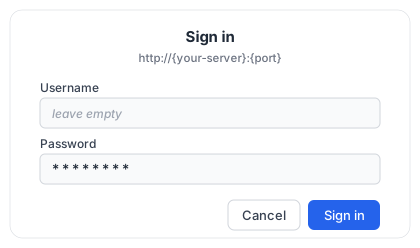
### 🔐 Authentication When `API_KEY` is set, all requests require one of: - **`x-api-key` header** — for MCP clients: `x-api-key: your-key` - **HTTP Basic Auth** — for browsers > [!TIP] > **Browser Login:** When accessing the Web UI with `API_KEY` enabled, the browser will show a login dialog. **Leave the username empty** and enter your API key as the **password**. > > Browser Login Dialog When `API_KEY` is not set, all requests are open. --- ## 🔧 MCP Tools Reference
🔍 search — Search the web using SearXNG
Aggregates results from 200+ search engines with privacy.
ParameterTypeRequiredDefaultDescription
querystringyes—The search query to use
categoriesstringno""Comma-separated category names (e.g., general,news,science)
enginesstringno""Comma-separated engine names (e.g., google,arxiv,wikipedia)
languagestringno""Search language code (e.g., en, zh, ja)
time_rangeenumnonullday, week, month, year
safesearchenumno00=off, 1=moderate, 2=strict
pagenoint ≥1no1Starting page number
pagesint 1–5no1Number of pages to fetch in parallel
max_resultsint 1–100no10Maximum number of results to return
formatenumnocompactcompact (title/url/content) or full (+ engines/score/category/date)
**Returns:** results, answers, suggestions, corrections, infoboxes.
💡 autocomplete — Get search query suggestions
ParameterTypeRequiredDescription
querystringyesPartial query string to get suggestions for
🗂 engine_info — Discover available engines and categories
No parameters. Returns the list of enabled engines grouped by category. **Returns:** ```json { "categories": ["general", "images", "videos", "news", ...], "engines": ["google", "bing", "duckduckgo", ...], "category_engines": { "general": ["google", "bing", "duckduckgo", "brave", ...], "science": ["arxiv", "google scholar", "pubmed", ...], ... } } ``` Use this to discover what engines are available before calling `search` with specific `engines` or `categories` filters.
--- ## 🔌 Client Configuration The following is a **baseline** server-mode (remote HTTP) example using the standard `mcpServers` JSON structure. Many clients accept this structure, but field names and required `type` values differ — see the NOTE below and adjust for your client: ```json { "mcpServers": { "searxng": { "type": "http", "url": "http://YOUR_HOST:YOUR_PORT/mcp/", "headers": { "x-api-key": "your-secret-key" } } } } ``` > [!NOTE] > Field-name differences: **ZCode** uses `mcp.servers`; **Kilo Code** uses a top-level `mcp` key with `"type": "remote"`; **Windsurf** uses `serverUrl` instead of `url`; **VS Code Copilot** uses a top-level `servers` key; **OpenCode** nests under `mcp` with `"type": "remote"`; **Codex** and **Hermes** use `mcp_servers` (TOML/YAML). For **Claude Code**, `"type": "http"` is **required** — without it the entry is read as a stdio server and skipped. For **Cline**, set `"type": "streamableHttp"` on remote HTTP servers.
Claude Claude Desktop **Server mode** — edit `~/Library/Application Support/Claude/claude_desktop_config.json`: ```json { "mcpServers": { "searxng": { "url": "http://YOUR_HOST:YOUR_PORT/mcp/", "headers": { "x-api-key": "your-secret-key" } } } } ``` **Local mode**: ```json { "mcpServers": { "searxng": { "command": "docker", "args": ["run", "--rm", "-i", "--memory=512m", "--cpus=1", "ghcr.io/whw23/searxng-http-mcp:latest", "--stdio"] } } } ``` **uvx mode**: ```json { "mcpServers": { "searxng": { "command": "uvx", "args": ["searxng-http-mcp"], "env": { "SEARXNG_URL": "http://YOUR_SEARXNG_HOST:YOUR_SEARXNG_PORT" } } } } ```
Claude Claude Code **Server mode (CLI)**: ```bash claude mcp add --transport http searxng http://YOUR_HOST:YOUR_PORT/mcp/ \ --header "x-api-key: your-secret-key" ``` **Server mode (JSON)** — the same `mcpServers` structure works in a **team-shared** project `.mcp.json` or a **user-wide** global `~/.claude.json`: ```json { "mcpServers": { "searxng": { "type": "http", "url": "http://YOUR_HOST:YOUR_PORT/mcp/", "headers": { "x-api-key": "your-secret-key" } } } } ``` **Local mode**: ```bash claude mcp add --transport stdio searxng -- docker run --rm -i --memory=512m --cpus=1 ghcr.io/whw23/searxng-http-mcp:latest --stdio ``` **uvx mode**: ```bash claude mcp add --transport stdio searxng -- uvx searxng-http-mcp ```
Codex Codex **Server mode** — add to `~/.codex/config.toml`: ```toml [mcp_servers.searxng] url = "http://YOUR_HOST:YOUR_PORT/mcp/" http_headers = { "x-api-key" = "your-secret-key" } ``` **Local mode**: ```toml [mcp_servers.searxng] command = "docker" args = ["run", "--rm", "-i", "--memory=512m", "--cpus=1", "ghcr.io/whw23/searxng-http-mcp:latest", "--stdio"] ``` **uvx mode**: ```toml [mcp_servers.searxng] command = "uvx" args = ["searxng-http-mcp"] ```
Cursor Cursor **Server mode** — edit `.cursor/mcp.json`: ```json { "mcpServers": { "searxng": { "url": "http://YOUR_HOST:YOUR_PORT/mcp/", "headers": { "x-api-key": "your-secret-key" } } } } ``` **Local mode**: ```json { "mcpServers": { "searxng": { "command": "docker", "args": ["run", "--rm", "-i", "--memory=512m", "--cpus=1", "ghcr.io/whw23/searxng-http-mcp:latest", "--stdio"] } } } ``` **uvx mode**: ```json { "mcpServers": { "searxng": { "command": "uvx", "args": ["searxng-http-mcp"], "env": { "SEARXNG_URL": "http://YOUR_SEARXNG_HOST:YOUR_SEARXNG_PORT" } } } } ```
Copilot VS Code Copilot **Server mode** — add to `.vscode/mcp.json`: ```json { "servers": { "searxng": { "type": "http", "url": "http://YOUR_HOST:YOUR_PORT/mcp/", "headers": { "x-api-key": "your-secret-key" } } } } ``` **Local mode**: ```json { "servers": { "searxng": { "type": "stdio", "command": "docker", "args": ["run", "--rm", "-i", "--memory=512m", "--cpus=1", "ghcr.io/whw23/searxng-http-mcp:latest", "--stdio"] } } } ``` **uvx mode**: ```json { "servers": { "searxng": { "type": "stdio", "command": "uvx", "args": ["searxng-http-mcp"], "env": { "SEARXNG_URL": "http://YOUR_SEARXNG_HOST:YOUR_SEARXNG_PORT" } } } } ```
Windsurf Windsurf **Server mode** — add to `~/.codeium/windsurf/mcp_config.json`: ```json { "mcpServers": { "searxng": { "serverUrl": "http://YOUR_HOST:YOUR_PORT/mcp/", "headers": { "x-api-key": "your-secret-key" } } } } ``` **Local mode**: ```json { "mcpServers": { "searxng": { "command": "docker", "args": ["run", "--rm", "-i", "--memory=512m", "--cpus=1", "ghcr.io/whw23/searxng-http-mcp:latest", "--stdio"] } } } ``` **uvx mode**: ```json { "mcpServers": { "searxng": { "command": "uvx", "args": ["searxng-http-mcp"], "env": { "SEARXNG_URL": "http://YOUR_SEARXNG_HOST:YOUR_SEARXNG_PORT" } } } } ```
Cline Cline Configure via Cline's MCP settings panel in VS Code (`Cline > MCP Servers > Add`). **Server mode**: ```json { "mcpServers": { "searxng": { "type": "streamableHttp", "url": "http://YOUR_HOST:YOUR_PORT/mcp/", "headers": { "x-api-key": "your-secret-key" } } } } ``` **Local mode**: ```json { "mcpServers": { "searxng": { "command": "docker", "args": ["run", "--rm", "-i", "--memory=512m", "--cpus=1", "ghcr.io/whw23/searxng-http-mcp:latest", "--stdio"] } } } ``` **uvx mode**: ```json { "mcpServers": { "searxng": { "command": "uvx", "args": ["searxng-http-mcp"], "env": { "SEARXNG_URL": "http://YOUR_SEARXNG_HOST:YOUR_SEARXNG_PORT" } } } } ```
OpenCode OpenCode **Server mode** — edit `opencode.json`: ```json { "mcp": { "searxng": { "type": "remote", "url": "http://YOUR_HOST:YOUR_PORT/mcp/", "headers": { "x-api-key": "your-secret-key" } } } } ``` **Local mode**: ```json { "mcp": { "searxng": { "type": "local", "command": ["docker", "run", "--rm", "-i", "--memory=512m", "--cpus=1", "ghcr.io/whw23/searxng-http-mcp:latest", "--stdio"] } } } ``` **uvx mode**: ```json { "mcp": { "searxng": { "type": "local", "command": ["uvx", "searxng-http-mcp"] } } } ```
Hermes Hermes Agent **Server mode** — edit `~/.hermes/config.yaml`: ```yaml mcp_servers: searxng: url: "http://YOUR_HOST:YOUR_PORT/mcp/" headers: x-api-key: "your-secret-key" ``` **Local mode**: ```yaml mcp_servers: searxng: command: "docker" args: ["run", "--rm", "-i", "--memory=512m", "--cpus=1", "ghcr.io/whw23/searxng-http-mcp:latest", "--stdio"] ``` **uvx mode**: ```yaml mcp_servers: searxng: command: "uvx" args: ["searxng-http-mcp"] ```
🟦 ZCode (Zhipu AI · GLM) **Server mode** — edit `~/.zcode/cli/config.json` (user-wide) or `.zcode/config.json` (project): ```json { "mcp": { "servers": { "searxng": { "type": "http", "url": "http://YOUR_HOST:YOUR_PORT/mcp/", "headers": { "x-api-key": "your-secret-key" } } } } } ``` **Local mode**: ```json { "mcp": { "servers": { "searxng": { "command": "docker", "args": ["run", "--rm", "-i", "--memory=512m", "--cpus=1", "ghcr.io/whw23/searxng-http-mcp:latest", "--stdio"] } } } } ``` **uvx mode**: ```json { "mcp": { "servers": { "searxng": { "command": "uvx", "args": ["searxng-http-mcp"], "env": { "SEARXNG_URL": "http://YOUR_SEARXNG_HOST:YOUR_SEARXNG_PORT" } } } } } ``` ZCode also accepts the standard `mcpServers` structure (e.g. in `.agents/mcp.json`). Alternatively, add servers via `Settings → MCP Servers → New MCP Server`.
⚡ Kilo Code **Server mode** — edit `~/.config/kilo/kilo.jsonc` (global) or `.kilo/kilo.jsonc` (project): ```json { "mcp": { "searxng": { "type": "remote", "url": "http://YOUR_HOST:YOUR_PORT/mcp/", "headers": { "x-api-key": "your-secret-key" }, "enabled": true } } } ``` **Local mode**: ```json { "mcp": { "searxng": { "type": "local", "command": ["docker", "run", "--rm", "-i", "--memory=512m", "--cpus=1", "ghcr.io/whw23/searxng-http-mcp:latest", "--stdio"], "enabled": true } } } ``` **uvx mode**: ```json { "mcp": { "searxng": { "type": "local", "command": ["uvx", "searxng-http-mcp"], "environment": { "SEARXNG_URL": "http://YOUR_SEARXNG_HOST:YOUR_SEARXNG_PORT" }, "enabled": true } } } ```
🥧 Pi Install the MCP adapter once, then add a standard `mcpServers` block — e.g. in `~/.pi/agent/mcp.json` (all projects) or `.pi/mcp.json` (project): ```bash pi install npm:pi-mcp-adapter ``` Restart Pi after installing. **Server mode**: ```json { "mcpServers": { "searxng": { "url": "http://YOUR_HOST:YOUR_PORT/mcp/", "headers": { "x-api-key": "your-secret-key" } } } } ``` **Local mode**: ```json { "mcpServers": { "searxng": { "command": "docker", "args": ["run", "--rm", "-i", "--memory=512m", "--cpus=1", "ghcr.io/whw23/searxng-http-mcp:latest", "--stdio"] } } } ``` **uvx mode**: ```json { "mcpServers": { "searxng": { "command": "uvx", "args": ["searxng-http-mcp"], "env": { "SEARXNG_URL": "http://YOUR_SEARXNG_HOST:YOUR_SEARXNG_PORT" } } } } ```
--- ## 🧩 AI Coding Agent Plugin Compatible with **Claude Code**, **GitHub Copilot CLI**, and **OpenAI Codex CLI**. Add the marketplace, then install the plugin that fits your setup: ```bash /plugin marketplace add whw23/searxng_http_mcp ``` All plugins include: - 🔍 **`/web-search-via-searxng` skill** — search the web with category selection guide and usage rules - 🤖 **`web-searcher` agent** — research subagent with: - 🌐 Multi-language parallel search — auto-detects query language, searches in multiple languages for broader coverage - 🛡 Source credibility tiers — Tier 1/2/3 classification with AI poisoning defense - ✅ Cross-validation — key facts require 2+ independent sources - 🔍 WebFetch deep reading — reads full pages from credible sources, not just snippets - 🔄 Multi-round iterative search — up to 3 rounds with automatic deepening on gaps - ⏱ Timeliness evaluation — flags outdated content, states source date ranges - 📝 Footnote-style references — structured output with inline source citations
🐍 Standalone mode — uvx, no Docker, bring your own SearXNG
```bash /plugin install searxng-http-mcp-standalone@searxng-http-mcp ``` Runs via `uvx`. Requires Python 3.14+ and an existing SearXNG instance. Set `SEARXNG_URL` in `~/.claude/settings.json`: ```json { "env": { "SEARXNG_URL": "http://YOUR_SEARXNG_HOST:YOUR_SEARXNG_PORT" } } ```
🐳 Local mode — Docker stdio, zero config
```bash /plugin install searxng-http-mcp@searxng-http-mcp ``` Runs SearXNG in a local Docker container via stdio. Requires Docker installed.
🌐 Remote mode — connect to a deployed server via HTTP
```bash /plugin install searxng-http-mcp-remote@searxng-http-mcp ``` Connects to a deployed SearXNG MCP server. Requires env vars `SEARXNG_MCP_URL` and `SEARXNG_API_KEY`. Add to `~/.claude/settings.json` under the `env` field: ```json { "env": { "SEARXNG_MCP_URL": "http://YOUR_HOST:YOUR_PORT/mcp/", "SEARXNG_API_KEY": "your-api-key" } } ``` Then restart Claude Code.
--- ## 🛠 SearXNG Configuration
🖥 Via Web UI
Access the SearXNG Web UI at `http://YOUR_HOST:YOUR_PORT/` to configure search engines, languages, and other settings. Changes persist during the container's lifetime.
💾 Via Volume Mount — persistent configuration
Mount the SearXNG config directory for persistent configuration: ```bash docker run -d --name searxng-mcp --restart unless-stopped \ -p YOUR_PORT:8888 --memory=512m --cpus=1 \ -v /path/to/searxng-config:/etc/searxng \ ghcr.io/whw23/searxng-http-mcp:latest ``` SearXNG generates `settings.yml` on first startup. The container automatically enables JSON format output required by MCP tools.
--- ## 🏗 Build from Source ```bash git clone https://github.com/whw23/searxng_http_mcp.git cd searxng_http_mcp docker build -t searxng-http-mcp:local . docker run -d --name searxng-mcp --restart unless-stopped \ -p YOUR_PORT:8888 --memory=512m --cpus=1 \ searxng-http-mcp:local ``` ## 🤝 Contributing See **[CONTRIBUTING.md](CONTRIBUTING.md)** for the full workflow, CI requirements, and development setup. 1. 🍴 Fork the repository and enable GitHub Actions in your fork 2. 🌿 Create a feature branch from `dev` 3. ✍️ Make your changes 4. ✅ Run tests: `pytest tests/ -v` — CI must pass in your fork before opening a PR 5. 📬 Submit a PR to `dev` Development happens on the `dev` branch. Merges to `main` trigger image builds. ## 📄 License [MIT](LICENSE) — MCP server code. [SearXNG](https://github.com/searxng/searxng) itself is licensed under [AGPL-3.0-or-later](https://github.com/searxng/searxng/blob/master/LICENSE).