一个自包含的 MCP 服务器,封装了 [SearXNG](https://github.com/searxng/searxng) —— 一个免费、尊重隐私的元搜索引擎,聚合了 200+ 搜索引擎的结果。
---
## 🚀 快速开始
**服务器模式** —— 部署一次,从任何客户端连接:
```bash
docker run -d --name searxng-mcp --restart unless-stopped \
-p YOUR_PORT:8888 --memory=512m --cpus=1 \
ghcr.io/whw23/searxng-http-mcp:latest
```
然后[配置客户端](#-客户端配置)连接到 `http://YOUR_HOST:YOUR_PORT/mcp/`。要启用 API Key 认证,请参阅[认证](#-认证)。
**本地模式** —— 无需服务器,直接在客户端中运行:
```bash
docker run --rm -i --memory=512m --cpus=1 ghcr.io/whw23/searxng-http-mcp:latest --stdio
```
将此作为 stdio MCP 服务器添加到客户端中 —— 详见[客户端配置](#-客户端配置)。
**uvx 模式** —— 如果你已有运行中的 SearXNG([安装指南](https://docs.searxng.org/admin/installation.html)):
```bash
uvx searxng-http-mcp
```
设置 `SEARXNG_URL` 指向你的 SearXNG 实例(默认:`http://127.0.0.1:8080`)。
## ✨ 功能特性
### 搜索
- 🔍 200+ 搜索引擎 —— 通过 SearXNG 聚合 Google、Bing、DuckDuckGo、Brave 等
- 📂 30+ 分类 —— 新闻、图片、视频、科学、IT 等
- 📄 多页并行获取 —— 每次调用最多 5 页
- 💡 自动补全建议 —— 发现相关搜索词
- 🗂 引擎发现 —— 按分类查询可用引擎
- 🎯 Token 高效 —— 结果精简至核心内容
### 基础设施
- 📦 自包含 —— SearXNG 内置于 Docker 镜像
- 🔄 三种传输模式 —— HTTP 服务器、Docker stdio 和 uvx 独立运行
- 🔐 认证 —— `x-api-key` + HTTP Basic Auth
- 🌐 反向代理 —— SearXNG Web UI 共用同一端口
- ⚡ 动态工具描述 —— 启动时注入实时分类列表
- 📐 丰富的 JSON Schema —— 每个参数都有枚举约束、范围限制和描述
## 🏛 架构
```mermaid
graph LR
Client(["客户端:YOUR_PORT"]) --> Expose(":8888")
subgraph Container["🐳 Docker 容器"]
direction LR
Expose --> Auth{认证}
Auth -->|/mcp| MCP[FastMCP 服务器]
Auth -->|/*| Proxy[反向代理]
MCP --> SearXNG[SearXNG :8080]
Proxy --> SearXNG
end
style Expose fill:none,stroke:#2496ed,stroke-dasharray:5 5,color:#2496ed
style Client fill:#4a90d9,color:#fff,stroke:#3a7bc8
style Container fill:#f0f4f8,stroke:#2496ed,stroke-width:2px,color:#2496ed
style Auth fill:#f5a623,color:#fff,stroke:#d4900e
style MCP fill:#50c878,color:#fff,stroke:#3da85e
style Proxy fill:#9b59b6,color:#fff,stroke:#8344a5
style SearXNG fill:#e74c3c,color:#fff,stroke:#c0392b
```
## 📊 与其他方案对比
为什么选这五个?
[Glama 上有 20+ 个 SearXNG MCP server](https://glama.ai/mcp/servers?query=searxng),通用搜索 MCP 更多。大多数 SearXNG 封装只暴露了一个基础搜索工具,没有用上 SearXNG 的分类、自动补全和引擎元数据。我们选了五个分别代表不同类别的竞品:
- **88plug/searxng-mcp** — SearXNG 阵营中工具最丰富(7 个工具:渲染抓取、研究模式、并行查询)
- **ihor/mcp-searxng** — SearXNG 阵营中 GitHub 星数最高
- **open-webSearch** — 非 SearXNG 生态中最佳的免费多引擎方案(Bing、Baidu、DuckDuckGo、Brave 等)
- **exa-mcp-server** — 最热门的商业搜索 API MCP
- **Perplexity MCP** — 商业 AI 搜索,搜索类 MCP 中星数最高
| 功能 |
✨ 本项目 |
88plug/searxng-mcp |
ihor/mcp-searxng |
open-webSearch |
exa-mcp-server |
Perplexity MCP |
| 搜索 |
| 200+ 引擎(SearXNG) | ✅ | ✅ | ✅ | ❌ | ❌ | ❌ |
| 30+ 搜索分类 | ✅ | ❌ | ❌ | ❌ | ❌ | ❌ |
| 多页并行获取 | ✅ | ❌ | ❌ | ❌ | ❌ | ❌ |
| 自动补全建议 | ✅ | ❌ | ❌ | ❌ | ❌ | ❌ |
| 引擎发现工具 | ✅ | ❌ | ❌ | ❌ | ❌ | ❌ |
| 动态工具描述 | ✅ | ❌ | ❌ | ❌ | ❌ | ❌ |
| 基础设施 |
| 自包含(内置搜索引擎) | ✅ | ❌ | ❌ | ✅ | N/A | N/A |
| 零安装 Docker 部署 | ✅ | ❌ | ❌ | ✅ | ❌ | ❌ |
| HTTP + stdio 传输 | ✅ | ✅ | ✅ | ✅ | ✅ | ✅ |
| 认证 | ✅ | ❌ | ❌ | ❌ | ✅ | ✅ |
| Web UI 反向代理 | ✅ | ❌ | ❌ | ❌ | ❌ | ❌ |
| AI 编程代理插件 | ✅ | ❌ | ❌ | ❌ | ✅ | ✅ |
| 通用 |
| 免费开源 | ✅ | ✅ | ✅ | ✅ | ❌(付费 API) | ❌(付费 API) |
| 隐私保护(自托管) | ✅ | ✅ | ✅ | ✅ | ❌ | ❌ |
| 语言 | Python | Python | Node.js | TypeScript | TypeScript | TypeScript |
| GitHub Stars |  |  |  |  |  |  |
为什么工具更少?
MCP 的设计哲学是组合 — 客户端连接多个专用 server,每个做好一件事。一些竞品把 URL 抓取、渲染提取、多查询并行或研究模式塞进搜索 server。我们有意将工具面控制在三个(搜索、自动补全、引擎发现):
- **URL 抓取是独立关注点。** MCP 客户端已有专用工具(WebFetch、Playwright MCP、Jina Reader 等)。将 fetch 塞进搜索 server 混淆了职责,与客户端生态重复。
- **多查询并行是客户端编排。** LLM 客户端本身就能并行发起多个 `search` 调用 — 增加 `search_many` 工具只会增加工具选择时的 token 开销,没有实际收益。
- **研究/合成属于 LLM 层。** 模型本身就是最好的合成器。将多步研究逻辑推入 MCP server 会把应用层关注点耦合到基础设施。
我们选择把精力投入到竞品缺失的方向:**完整的 SearXNG API 覆盖**(分类、自动补全、引擎元数据 — 大多数封装都没有暴露这些能力),以及**自包含部署、认证、Web UI 反向代理和 AI 编程代理插件集成(Claude Code / Copilot CLI / Codex CLI)**。
## 📖 使用方法
### 🌐 HTTP 模式(默认)
```bash
# 不启用认证
docker run -d --name searxng-mcp --restart unless-stopped \
-p YOUR_PORT:8888 --memory=512m --cpus=1 \
ghcr.io/whw23/searxng-http-mcp:latest
# 启用认证
docker run -d --name searxng-mcp --restart unless-stopped \
-p YOUR_PORT:8888 --memory=512m --cpus=1 \
-e API_KEY=your-secret-key \
ghcr.io/whw23/searxng-http-mcp:latest
```
| 🔗 MCP 端点 | http://YOUR_HOST:YOUR_PORT/mcp/ |
| 🖥 SearXNG Web UI | http://YOUR_HOST:YOUR_PORT/ |
### 📡 stdio 模式
```bash
docker run --rm -i --memory=512m --cpus=1 \
ghcr.io/whw23/searxng-http-mcp:latest --stdio
```
不暴露端口。通过 stdin/stdout 通信。SearXNG 在容器内部运行,供 MCP 工具使用。
### 🐍 uvx 模式
```bash
# 连接本地 SearXNG 实例(默认:http://127.0.0.1:8080)
uvx searxng-http-mcp
# 连接远程 SearXNG 实例
SEARXNG_URL=http://YOUR_SEARXNG_HOST:YOUR_SEARXNG_PORT uvx searxng-http-mcp
```
需要 Python 3.14+ 和已有的 SearXNG 实例。无需 Docker。
### ⚙️ 环境变量
| 变量 | 默认值 | 描述 |
|---|
API_KEY | (空,不启用认证) | 用于认证的 API Key |
SEARXNG_URL | http://127.0.0.1:8080 | SearXNG 实例地址(用于 uvx/独立运行模式) |
### 🔐 认证
当设置了 `API_KEY` 时,所有请求需要以下认证方式之一:
- **`x-api-key` 请求头** —— 用于 MCP 客户端:`x-api-key: your-key`
- **HTTP Basic Auth** —— 用于浏览器
> [!TIP]
> **浏览器登录:** 启用 `API_KEY` 后访问 Web UI 时,浏览器会弹出登录对话框。**用户名留空**,将 API Key 作为**密码**输入。
>
> 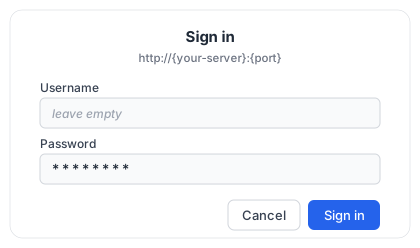 未设置 `API_KEY` 时,所有请求均开放访问。
---
## 🔧 MCP 工具参考
未设置 `API_KEY` 时,所有请求均开放访问。
---
## 🔧 MCP 工具参考
🔍 search —— 使用 SearXNG 搜索网络
聚合 200+ 搜索引擎的结果,保护隐私。
| 参数 | 类型 | 必填 | 默认值 | 描述 |
|---|
query | string | 是 | —— | 搜索查询语句 |
categories | string | 否 | "" | 逗号分隔的分类名称(如 general,news,science) |
engines | string | 否 | "" | 逗号分隔的引擎名称(如 google,arxiv,wikipedia) |
language | string | 否 | "" | 搜索语言代码(如 en、zh、ja) |
time_range | enum | 否 | null | day、week、month、year |
safesearch | enum | 否 | 0 | 0=关闭,1=适度,2=严格 |
pageno | int ≥1 | 否 | 1 | 起始页码 |
pages | int 1–5 | 否 | 1 | 并行获取的页数 |
max_results | int 1–100 | 否 | 10 | 最大返回结果数 |
format | enum | 否 | compact | compact(标题/链接/内容)或 full(+ 引擎/评分/分类/日期) |
**返回:** 搜索结果、直接答案、建议、纠正、信息框。
💡 autocomplete —— 获取搜索建议
| 参数 | 类型 | 必填 | 描述 |
|---|
query | string | 是 | 用于获取建议的部分查询字符串 |
🗂 engine_info —— 发现可用引擎和分类
无参数。返回按分类分组的已启用引擎列表。
**返回:**
```json
{
"categories": ["general", "images", "videos", "news", ...],
"engines": ["google", "bing", "duckduckgo", ...],
"category_engines": {
"general": ["google", "bing", "duckduckgo", "brave", ...],
"science": ["arxiv", "google scholar", "pubmed", ...],
...
}
}
```
使用此工具在调用 `search` 时指定特定的 `engines` 或 `categories` 过滤器之前,先发现有哪些引擎可用。
---
## 🔌 客户端配置
以下是一个**基准**服务器模式(远程 HTTP)示例,使用标准的 `mcpServers` JSON 结构。多个客户端接受该结构,但字段名和必需的 `type` 值因客户端而异 —— 请根据下方 NOTE 针对你的客户端调整:
```json
{
"mcpServers": {
"searxng": {
"type": "http",
"url": "http://YOUR_HOST:YOUR_PORT/mcp/",
"headers": {
"x-api-key": "your-secret-key"
}
}
}
}
```
> [!NOTE]
> 字段名差异:**ZCode** 用 `mcp.servers` 键;**Kilo Code** 用顶层 `mcp` 键且 `"type": "remote"`;**Windsurf** 用 `serverUrl` 而非 `url`;**VS Code Copilot** 用顶层 `servers` 键;**OpenCode** 嵌套在 `mcp` 下且用 `"type": "remote"`;**Codex** 和 **Hermes** 使用 `mcp_servers`(TOML/YAML)。对 **Claude Code** 而言,`"type": "http"` 是**必需的** —— 缺少该字段会被当作 stdio 服务器并跳过。对 **Cline** 而言,远程 HTTP 服务器需设置 `"type": "streamableHttp"`。
 Claude Desktop
**服务器模式** —— 编辑 `~/Library/Application Support/Claude/claude_desktop_config.json`:
```json
{
"mcpServers": {
"searxng": {
"url": "http://YOUR_HOST:YOUR_PORT/mcp/",
"headers": {
"x-api-key": "your-secret-key"
}
}
}
}
```
**本地模式**:
```json
{
"mcpServers": {
"searxng": {
"command": "docker",
"args": ["run", "--rm", "-i", "--memory=512m", "--cpus=1", "ghcr.io/whw23/searxng-http-mcp:latest", "--stdio"]
}
}
}
```
**uvx 模式**:
```json
{
"mcpServers": {
"searxng": {
"command": "uvx",
"args": ["searxng-http-mcp"],
"env": {
"SEARXNG_URL": "http://YOUR_SEARXNG_HOST:YOUR_SEARXNG_PORT"
}
}
}
}
```
Claude Code
**服务器模式(命令行)**:
```bash
claude mcp add --transport http searxng http://YOUR_HOST:YOUR_PORT/mcp/ \
--header "x-api-key: your-secret-key"
```
**服务器模式(JSON)** —— 同样的 `mcpServers` 结构既可用于**团队共享**的项目级 `.mcp.json`,也可用于**全局生效**的用户级 `~/.claude.json`:
```json
{
"mcpServers": {
"searxng": {
"type": "http",
"url": "http://YOUR_HOST:YOUR_PORT/mcp/",
"headers": {
"x-api-key": "your-secret-key"
}
}
}
}
```
**本地模式**:
```bash
claude mcp add --transport stdio searxng -- docker run --rm -i --memory=512m --cpus=1 ghcr.io/whw23/searxng-http-mcp:latest --stdio
```
**uvx 模式**:
```bash
claude mcp add --transport stdio searxng -- uvx searxng-http-mcp
```
 Codex
Codex
**服务器模式** —— 添加到 `~/.codex/config.toml`:
```toml
[mcp_servers.searxng]
url = "http://YOUR_HOST:YOUR_PORT/mcp/"
http_headers = { "x-api-key" = "your-secret-key" }
```
**本地模式**:
```toml
[mcp_servers.searxng]
command = "docker"
args = ["run", "--rm", "-i", "--memory=512m", "--cpus=1", "ghcr.io/whw23/searxng-http-mcp:latest", "--stdio"]
```
**uvx 模式**:
```toml
[mcp_servers.searxng]
command = "uvx"
args = ["searxng-http-mcp"]
```
 Cursor
**服务器模式** —— 编辑 `.cursor/mcp.json`:
```json
{
"mcpServers": {
"searxng": {
"url": "http://YOUR_HOST:YOUR_PORT/mcp/",
"headers": {
"x-api-key": "your-secret-key"
}
}
}
}
```
**本地模式**:
```json
{
"mcpServers": {
"searxng": {
"command": "docker",
"args": ["run", "--rm", "-i", "--memory=512m", "--cpus=1", "ghcr.io/whw23/searxng-http-mcp:latest", "--stdio"]
}
}
}
```
**uvx 模式**:
```json
{
"mcpServers": {
"searxng": {
"command": "uvx",
"args": ["searxng-http-mcp"],
"env": {
"SEARXNG_URL": "http://YOUR_SEARXNG_HOST:YOUR_SEARXNG_PORT"
}
}
}
}
```
 VS Code Copilot
**服务器模式** —— 添加到 `.vscode/mcp.json`:
```json
{
"servers": {
"searxng": {
"type": "http",
"url": "http://YOUR_HOST:YOUR_PORT/mcp/",
"headers": {
"x-api-key": "your-secret-key"
}
}
}
}
```
**本地模式**:
```json
{
"servers": {
"searxng": {
"type": "stdio",
"command": "docker",
"args": ["run", "--rm", "-i", "--memory=512m", "--cpus=1", "ghcr.io/whw23/searxng-http-mcp:latest", "--stdio"]
}
}
}
```
**uvx 模式**:
```json
{
"servers": {
"searxng": {
"type": "stdio",
"command": "uvx",
"args": ["searxng-http-mcp"]
}
}
}
```
 Windsurf
**服务器模式** —— 添加到 `~/.codeium/windsurf/mcp_config.json`:
```json
{
"mcpServers": {
"searxng": {
"serverUrl": "http://YOUR_HOST:YOUR_PORT/mcp/",
"headers": {
"x-api-key": "your-secret-key"
}
}
}
}
```
**本地模式**:
```json
{
"mcpServers": {
"searxng": {
"command": "docker",
"args": ["run", "--rm", "-i", "--memory=512m", "--cpus=1", "ghcr.io/whw23/searxng-http-mcp:latest", "--stdio"]
}
}
}
```
**uvx 模式**:
```json
{
"mcpServers": {
"searxng": {
"command": "uvx",
"args": ["searxng-http-mcp"],
"env": {
"SEARXNG_URL": "http://YOUR_SEARXNG_HOST:YOUR_SEARXNG_PORT"
}
}
}
}
```
 Cline
Cline
通过 VS Code 中 Cline 的 MCP 设置面板配置(`Cline > MCP Servers > Add`)。
**服务器模式**:
```json
{
"mcpServers": {
"searxng": {
"type": "streamableHttp",
"url": "http://YOUR_HOST:YOUR_PORT/mcp/",
"headers": {
"x-api-key": "your-secret-key"
}
}
}
}
```
**本地模式**:
```json
{
"mcpServers": {
"searxng": {
"command": "docker",
"args": ["run", "--rm", "-i", "--memory=512m", "--cpus=1", "ghcr.io/whw23/searxng-http-mcp:latest", "--stdio"]
}
}
}
```
**uvx 模式**:
```json
{
"mcpServers": {
"searxng": {
"command": "uvx",
"args": ["searxng-http-mcp"],
"env": {
"SEARXNG_URL": "http://YOUR_SEARXNG_HOST:YOUR_SEARXNG_PORT"
}
}
}
}
```
 OpenCode
**服务器模式** —— 编辑 `opencode.json`:
```json
{
"mcp": {
"searxng": {
"type": "remote",
"url": "http://YOUR_HOST:YOUR_PORT/mcp/",
"headers": {
"x-api-key": "your-secret-key"
}
}
}
}
```
**本地模式**:
```json
{
"mcp": {
"searxng": {
"type": "local",
"command": ["docker", "run", "--rm", "-i", "--memory=512m", "--cpus=1", "ghcr.io/whw23/searxng-http-mcp:latest", "--stdio"]
}
}
}
```
**uvx 模式**:
```json
{
"mcp": {
"searxng": {
"type": "local",
"command": ["uvx", "searxng-http-mcp"]
}
}
}
```
 Hermes Agent
**服务器模式** —— 编辑 `~/.hermes/config.yaml`:
```yaml
mcp_servers:
searxng:
url: "http://YOUR_HOST:YOUR_PORT/mcp/"
headers:
x-api-key: "your-secret-key"
```
**本地模式**:
```yaml
mcp_servers:
searxng:
command: "docker"
args: ["run", "--rm", "-i", "--memory=512m", "--cpus=1", "ghcr.io/whw23/searxng-http-mcp:latest", "--stdio"]
```
**uvx 模式**:
```yaml
mcp_servers:
searxng:
command: "uvx"
args: ["searxng-http-mcp"]
```
🟦 ZCode(智谱 AI · GLM)
**服务器模式** —— 编辑 `~/.zcode/cli/config.json`(全局)或 `.zcode/config.json`(项目):
```json
{
"mcp": {
"servers": {
"searxng": {
"type": "http",
"url": "http://YOUR_HOST:YOUR_PORT/mcp/",
"headers": {
"x-api-key": "your-secret-key"
}
}
}
}
}
```
**本地模式**:
```json
{
"mcp": {
"servers": {
"searxng": {
"command": "docker",
"args": ["run", "--rm", "-i", "--memory=512m", "--cpus=1", "ghcr.io/whw23/searxng-http-mcp:latest", "--stdio"]
}
}
}
}
```
**uvx 模式**:
```json
{
"mcp": {
"servers": {
"searxng": {
"command": "uvx",
"args": ["searxng-http-mcp"],
"env": {
"SEARXNG_URL": "http://YOUR_SEARXNG_HOST:YOUR_SEARXNG_PORT"
}
}
}
}
}
```
ZCode 也接受标准 `mcpServers` 结构(如放在 `.agents/mcp.json`)。也可以通过 `设置 → MCP 服务器 → 新建 MCP 服务器` 添加。
⚡ Kilo Code
**服务器模式** —— 编辑 `~/.config/kilo/kilo.jsonc`(全局)或 `.kilo/kilo.jsonc`(项目):
```json
{
"mcp": {
"searxng": {
"type": "remote",
"url": "http://YOUR_HOST:YOUR_PORT/mcp/",
"headers": {
"x-api-key": "your-secret-key"
},
"enabled": true
}
}
}
```
**本地模式**:
```json
{
"mcp": {
"searxng": {
"type": "local",
"command": ["docker", "run", "--rm", "-i", "--memory=512m", "--cpus=1", "ghcr.io/whw23/searxng-http-mcp:latest", "--stdio"],
"enabled": true
}
}
}
```
**uvx 模式**:
```json
{
"mcp": {
"searxng": {
"type": "local",
"command": ["uvx", "searxng-http-mcp"],
"environment": {
"SEARXNG_URL": "http://YOUR_SEARXNG_HOST:YOUR_SEARXNG_PORT"
},
"enabled": true
}
}
}
```
🥧 Pi
安装 MCP 适配器一次,然后添加标准 `mcpServers` 配置块 —— 例如 `~/.pi/agent/mcp.json`(所有项目)或 `.pi/mcp.json`(项目):
```bash
pi install npm:pi-mcp-adapter
```
安装后重启 Pi。
**服务器模式**:
```json
{
"mcpServers": {
"searxng": {
"url": "http://YOUR_HOST:YOUR_PORT/mcp/",
"headers": {
"x-api-key": "your-secret-key"
}
}
}
}
```
**本地模式**:
```json
{
"mcpServers": {
"searxng": {
"command": "docker",
"args": ["run", "--rm", "-i", "--memory=512m", "--cpus=1", "ghcr.io/whw23/searxng-http-mcp:latest", "--stdio"]
}
}
}
```
**uvx 模式**:
```json
{
"mcpServers": {
"searxng": {
"command": "uvx",
"args": ["searxng-http-mcp"],
"env": {
"SEARXNG_URL": "http://YOUR_SEARXNG_HOST:YOUR_SEARXNG_PORT"
}
}
}
}
```
---
## 🧩 AI 编程代理插件
兼容 **Claude Code**、**GitHub Copilot CLI** 和 **OpenAI Codex CLI**。添加市场,然后安装适合你环境的插件:
```bash
/plugin marketplace add whw23/searxng_http_mcp
```
所有插件都包含:
- 🔍 **`/web-search-via-searxng` 技能** —— 网络搜索,含分类选择指南和使用规则
- 🤖 **`web-searcher` 子代理** —— 研究代理,具备:
- 🌐 多语言并行搜索 —— 自动检测查询语言,跨语言搜索以获得更广覆盖
- 🛡 来源可信度分级 —— Tier 1/2/3 分类,含 AI 投毒防御
- ✅ 交叉验证 —— 关键事实需 2+ 个独立来源确认
- 🔍 WebFetch 深度阅读 —— 从可信来源读取完整页面,而非仅依赖搜索摘要
- 🔄 多轮迭代搜索 —— 最多 3 轮,自动在信息缺口处深入
- ⏱ 时效性评估 —— 标注过时内容,声明来源时间范围
- 📝 脚注式引用 —— 结构化输出,行内来源引用标注
🐍 独立模式 —— uvx 启动,无需 Docker,自备 SearXNG
```bash
/plugin install searxng-http-mcp-standalone@searxng-http-mcp
```
通过 `uvx` 运行。需要 Python 3.14+ 和已有的 SearXNG 实例。在 `~/.claude/settings.json` 中设置 `SEARXNG_URL`:
```json
{
"env": {
"SEARXNG_URL": "http://YOUR_SEARXNG_HOST:YOUR_SEARXNG_PORT"
}
}
```
🐳 本地模式 —— Docker stdio,零配置
```bash
/plugin install searxng-http-mcp@searxng-http-mcp
```
通过 stdio 在本地 Docker 容器中运行 SearXNG。需要已安装 Docker。
🌐 远程模式 —— 通过 HTTP 连接已部署的服务器
```bash
/plugin install searxng-http-mcp-remote@searxng-http-mcp
```
连接到已部署的 SearXNG MCP 服务器。需要设置环境变量 `SEARXNG_MCP_URL` 和 `SEARXNG_API_KEY`。
添加到 `~/.claude/settings.json` 的 `env` 字段:
```json
{
"env": {
"SEARXNG_MCP_URL": "http://YOUR_HOST:YOUR_PORT/mcp/",
"SEARXNG_API_KEY": "your-api-key"
}
}
```
然后重启 Claude Code。
---
## 🛠 SearXNG 配置
🖥 通过 Web UI
访问 `http://YOUR_HOST:YOUR_PORT/` 的 SearXNG Web UI 来配置搜索引擎、语言和其他设置。更改在容器生命周期内持续有效。
💾 通过卷挂载 —— 持久化配置
挂载 SearXNG 配置目录以实现持久化配置:
```bash
docker run -d --name searxng-mcp --restart unless-stopped \
-p YOUR_PORT:8888 --memory=512m --cpus=1 \
-v /path/to/searxng-config:/etc/searxng \
ghcr.io/whw23/searxng-http-mcp:latest
```
SearXNG 在首次启动时生成 `settings.yml`。容器会自动启用 MCP 工具所需的 JSON 格式输出。
---
## 🏗 从源码构建
```bash
git clone https://github.com/whw23/searxng_http_mcp.git
cd searxng_http_mcp
docker build -t searxng-http-mcp:local .
docker run -d --name searxng-mcp --restart unless-stopped \
-p YOUR_PORT:8888 --memory=512m --cpus=1 \
searxng-http-mcp:local
```
## 🤝 贡献
请参阅 **[CONTRIBUTING.md](CONTRIBUTING.md)** 获取完整的工作流、CI 要求和开发环境搭建说明。
1. 🍴 Fork 仓库并在你的 Fork 中启用 GitHub Actions
2. 🌿 从 `dev` 分支创建功能分支
3. ✍️ 进行修改
4. ✅ 运行测试:`pytest tests/ -v` —— 在提交 PR 之前,CI 必须在你的 Fork 中通过
5. 📬 向 `dev` 提交 PR
开发工作在 `dev` 分支进行。合并到 `main` 会触发镜像构建。
## 📄 许可证
[MIT](LICENSE) —— MCP 服务器代码。
[SearXNG](https://github.com/searxng/searxng) 本身基于 [AGPL-3.0-or-later](https://github.com/searxng/searxng/blob/master/LICENSE) 许可。