# dsh-spring-widget
> DSH (DeepSeek Harness) plugin: IDEA-style **Spring Boot backend service manager** in the top bar.
Manage your Spring Boot backend right from the DSH top bar: source-mode launch / packaged-jar launch / stop / restart, with a live 3-tab log console (Service Logs · Request Logs · Build Output). No need to leave the conversation to watch or control your backend process.



---
## 📷 Screenshots
| Service Logs | Request Logs |
|---|---|
| 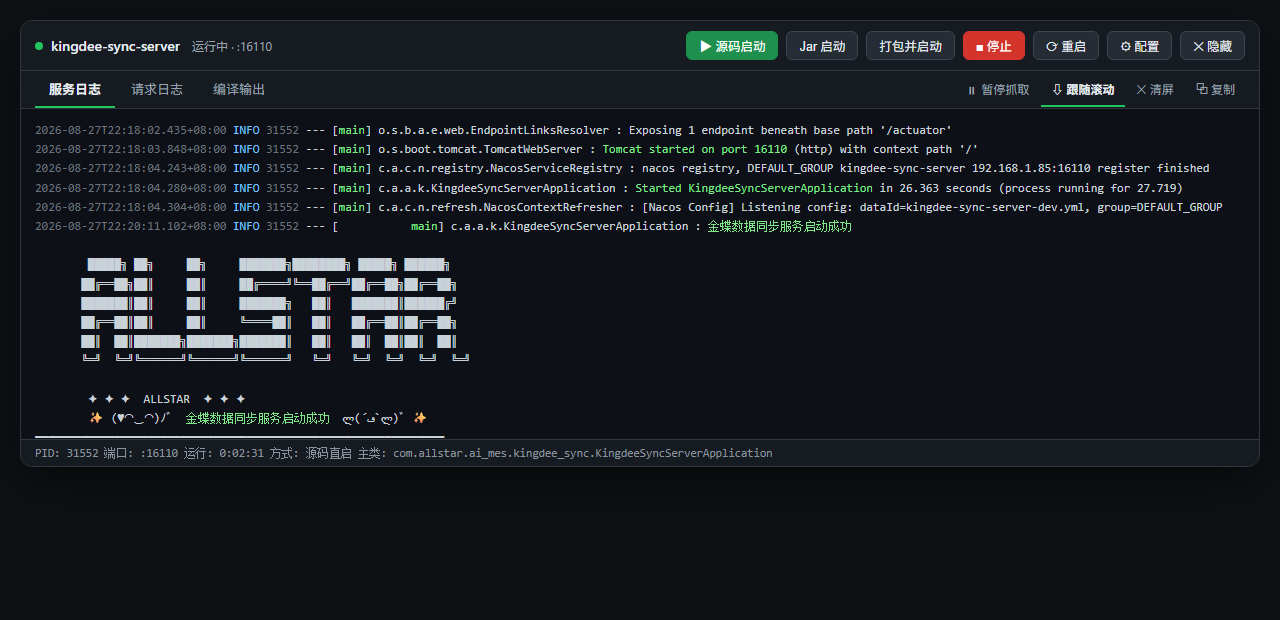 | 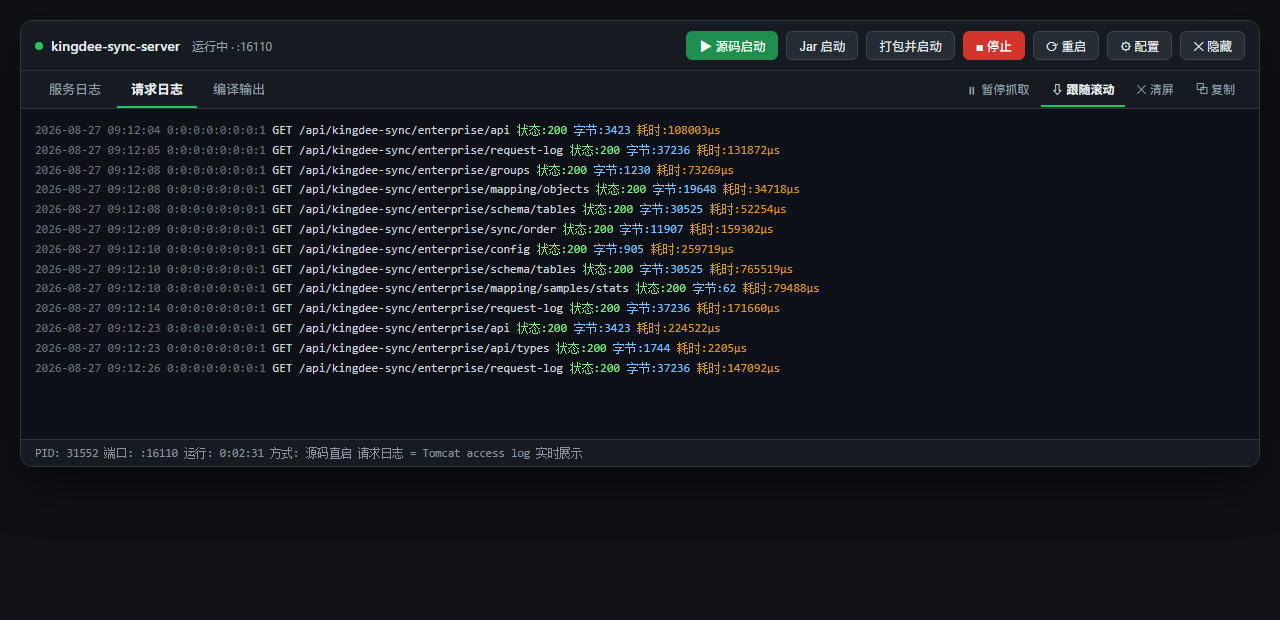 |
| Config Panel |
|---|
| 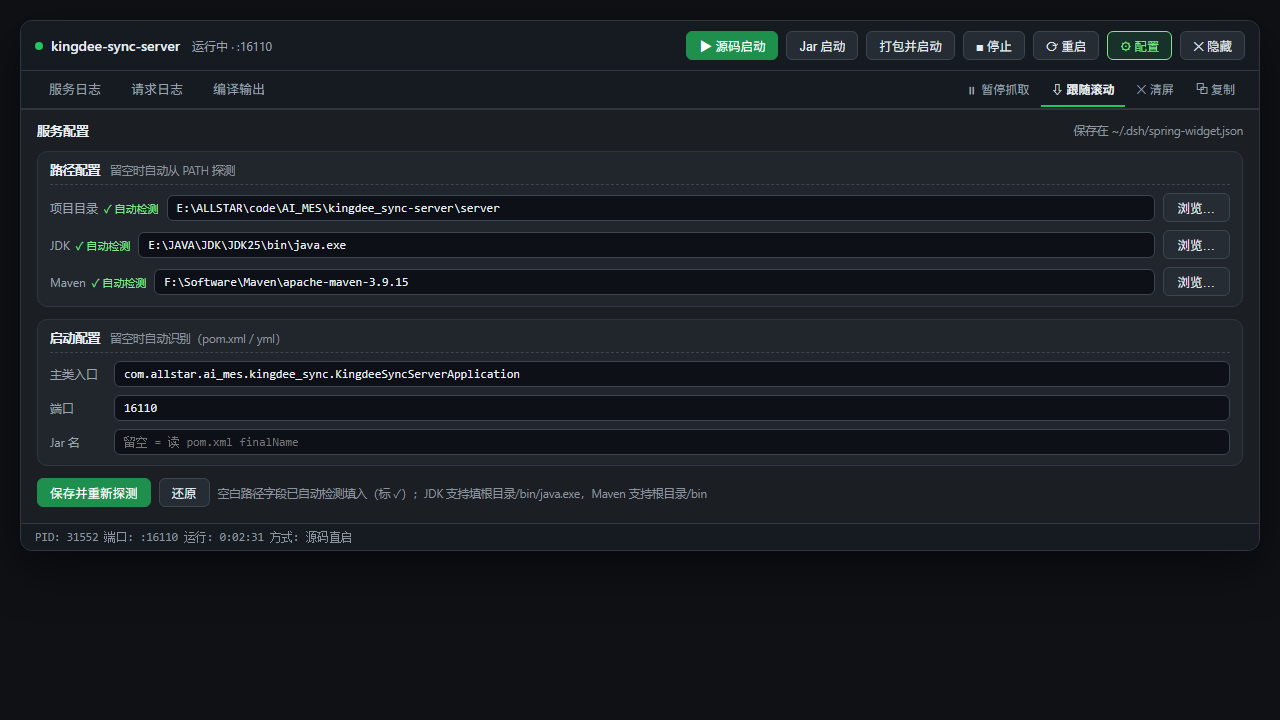 |
---
## ✨ Features
### 🚀 Launch Modes
| Mode | Description |
|---|---|
| **▶ Source Launch** | `mvn compile` incremental build + `java @argfile` direct launch of the main class — **no packaging needed** for iterate-and-run (generates `target/sbsv-args.txt` to bypass Windows command-line length limits) |
| **📦 Package & Launch** | `mvn clean package -DskipTests` (**cleans previous build residue first**), then `java -jar` |
| **Jar Launch** | Launch the existing packaged jar directly (skip rebuild) |
### 📺 3-Tab Live Log Console
| Tab | Content |
|---|---|
| **Service Logs** | App stdout/stderr (UTF-8 enforced, no garbled Chinese text) |
| **Request Logs** | Tomcat access log — one line per HTTP request: `time IP method path status:xxx bytes:xxx cost:xxxµs` |
| **Build Output** | Maven compile/package output (stdout + stderr merged) |
- **Incremental polling**: pulls only new content every second, logs scroll in real time
- **Follow-scroll**: auto-scrolls to bottom; scrolling up pauses follow automatically
- **Clear**: clears only the **currently active tab** (service / request / build), keeps read offsets so history never flashes back
- **Copy**: one-click copy of the active tab's full log
### 🗂 Grouped Config Panel
- **Path settings**: project dir / JDK / Maven (auto-detected from PATH when blank)
- **Launch settings**: main class / port / jar name (auto-detected when blank)
- **Custom directory picker**: breadcrumb navigation + subdirectory list + manual path input; JDK root → auto-appends `bin\java.exe`
- Config persisted to `~/.dsh/spring-widget.json`, survives restarts
### 🌙 Dark/Light Theme Ready
Fully adapts to DSH light/dark themes — tabs, buttons and titles stay readable in dark mode.
---
## 📦 Install
### From GitHub Release
```bash
dsh plugin add dsh-spring-widget --source github:wrw-dev/dsh-spring-widget
```
### Local Development (link mode, hot-reload)
```bash
# In your profile package.json dependencies add:
# "dsh-spring-widget": "link:C://.dsh/plugins/dsh-spring-widget"
# And add "dsh-spring-widget" to the dsh.profile.bundles array
```
**Host changes** (`index.js`) require a DSH restart; **client changes** (`client/client.js`) take effect on page refresh (the webserver serves the bundle live).
---
## 🎮 Usage
1. **Backend Service** widget appears on the right of the top bar (⚙ button + status dot + log entry)
2. Click the widget to open the console
3. Click **▶ Source Launch** or **📦 Package & Launch**
4. Watch real-time output in the **Service Logs / Request Logs / Build Output** tabs
5. Stop or restart via **■ Stop** / **⟳ Restart**
> 💡 First launch auto-detects project structure (JDK, Maven, main class, port); you can also set them manually in **⚙ Config**.
---
## ⚙️ Configuration
| Field | Description | Auto-detect |
|---|---|---|
| `cwd` | Project dir (server dir) | ✅ Locate pom.xml / yml |
| `javaPath` | java.exe path | ✅ java on PATH |
| `mavenHome` | Maven root | ✅ mvn on PATH |
| `mainClass` | Main class | ✅ Scan @SpringBootApplication |
| `port` | Service port | ✅ bootstrap.yml / application.yml |
| `jarName` | Jar file name | ✅ pom.xml finalName / artifactId |
Stored in `~/.dsh/spring-widget.json`:
```json
{
"cwd": "E:/path/to/project/server",
"javaPath": "E:/JAVA/JDK/JDK25/bin/java.exe",
"mavenHome": "F:/Software/Maven/apache-maven-3.9.15",
"mainClass": "com.example.AppApplication",
"port": "16110",
"jarName": ""
}
```
---
## 📁 Project Structure
```
dsh-spring-widget/
├── index.js # Host half: service management, subprocess, RPC, springboot_service tool
├── client/
│ └── client.js # Browser half: top-bar widget, console UI, config panel
├── docs/ # README screenshots
│ ├── shot-console.png
│ ├── shot-access.png
│ └── shot-config.png
├── README.md # README (Simplified Chinese) / 简体中文说明
├── README_EN.md # README (English) / English docs
├── cordis.patch.yml # Plugin assembly declaration
└── package.json # Plugin metadata
```
---
## 🔌 Model Tool
Installs tool **`springboot_service`** automatically — control the backend via chat:
```
springboot_service action=start mode=src # Source launch
springboot_service action=start mode=jar rebuild=true # Package & launch
springboot_service action=stop # Stop
springboot_service action=status # Status + log tail
```
---
## 🧱 Technical Notes
- **RPC channel**: host `ctx.connection.rpc.handle('/spring-widget', ...)` ↔ client `connection.rpc.call('/spring-widget', ...)` (dedicated channel, never conflicts with the official `/api`)
- **Subprocess capture**: `SubprocessCollect` memory tail window + spill to disk (lost head recoverable)
- **Encoding fix**: JDK18+ defaults to native encoding → JVM flags `-Dstdout.encoding=UTF-8` / `-Dstderr.encoding=UTF-8` / `-Dlogging.charset.console=UTF-8`
- **Request logs**: Tomcat access log enabled via JVM flags (`-Dserver.tomcat.accesslog.enabled=true`), written to `~/.dsh/spring-widget-access/`, read incrementally by the host and shown in the UI
- **Maven execution**: `cmd.exe /c ` (Node 24 forbids direct `.cmd` spawn)
---
## © License
UNLICENSED — internal use.
---
## 🔗 Related
- [DeepSeek Harness](https://github.com/deepseek-ai/dsh)
- [DSH plugin ecosystem · dsh-plugin topic](https://github.com/topics/dsh-plugin)