MCP Document Converter
MCP (Model Context Protocol) Document Converter - A powerful MCP tool for converting documents between multiple formats, enabling AI agents to easily transform documents.
🌐 Language: English | 中文




## Features
- **Multi-format Support**: Supports 5 mainstream document formats: Markdown, HTML, DOCX, PDF, and Text
- **Bidirectional Conversion**: Any format can be converted to any other format (5×5=25 conversion combinations)
- **MCP Protocol**: Compliant with MCP standards, can be used as a tool for AI assistants like Trae IDE
- **Plugin Architecture**: Easy to extend with new parsers and renderers
- **Syntax Highlighting**: HTML and PDF outputs support code syntax highlighting
- **Style Customization**: Support for custom CSS styles
- **Metadata Preservation**: Preserves document title, author, creation time, and other metadata during conversion
---
## 📚 Documentation
[User Guide](docs/en/USER_GUIDE.md) · [API Reference](docs/en/API.md) · [Contributing](docs/en/CONTRIBUTING.md) · [Changelog](docs/en/CHANGELOG.md) · [License](LICENSE)
---
## Architecture
```mermaid
flowchart TB
subgraph Parsers["Parsers"]
MD[Markdown]
DOCX1[DOCX]
HTML1[HTML]
PDF1[PDF]
TXT1[Text]
end
subgraph IR["Intermediate Representation (IR)"]
DT[Document Tree]
META[Metadata]
ASSETS[Assets]
end
subgraph Renderers["Renderers"]
HTML2[HTML]
PDF2[PDF]
MD2[Markdown]
DOCX2[DOCX]
TXT2[Text]
end
MD --> IR
DOCX1 --> IR
HTML1 --> IR
PDF1 --> IR
TXT1 --> IR
IR --> HTML2
IR --> PDF2
IR --> MD2
IR --> DOCX2
IR --> TXT2
```
### Core Components
1. **DocumentIR (Intermediate Representation)**: Unified abstraction for all documents, containing document tree, metadata, assets, etc.
2. **BaseParser (Parser Base Class)**: Defines the parser interface, parses various formats into DocumentIR
3. **BaseRenderer (Renderer Base Class)**: Defines the renderer interface, renders DocumentIR into various formats
4. **ConverterRegistry (Registry)**: Manages all parsers and renderers, provides format lookup and auto-matching
5. **DocumentConverter (Conversion Engine)**: Coordinates parsers and renderers to complete document conversion
## Supported Formats
### Input Formats (Parsers)
| Format | Extensions | MIME Type | Features |
|--------|------------|-----------|----------|
| Markdown | .md, .markdown, .mdown, .mkd | text/markdown | YAML Front Matter, GFM extensions |
| HTML | .html, .htm | text/html | Semantic tag parsing |
| DOCX | .docx | application/vnd.openxmlformats-officedocument.wordprocessingml.document | Styles, tables, images |
| PDF | .pdf | application/pdf | Text extraction and structure recognition |
| Text | .txt, .text | text/plain | Auto encoding detection and structure recognition |
### Output Formats (Renderers)
| Format | Extension | MIME Type | Features |
|--------|-----------|-----------|----------|
| HTML | .html | text/html | Beautiful styling, code highlighting, responsive design |
| Markdown | .md | text/markdown | Standard Markdown format, YAML Front Matter |
| DOCX | .docx | application/vnd.openxmlformats-officedocument.wordprocessingml.document | Word document format, style preservation |
| PDF | .pdf | application/pdf | Generated with WeasyPrint, pagination support |
| Text | .txt | text/plain | Plain text, basic formatting preserved |
## Conversion Matrix
```mermaid
flowchart LR
subgraph Sources["Source Formats"]
MD_S[Markdown]
HTML_S[HTML]
DOCX_S[DOCX]
PDF_S[PDF]
TXT_S[Text]
end
subgraph Targets["Target Formats"]
MD_T[Markdown]
HTML_T[HTML]
DOCX_T[DOCX]
PDF_T[PDF]
TXT_T[Text]
end
MD_S --> Targets
HTML_S --> Targets
DOCX_S --> Targets
PDF_S --> Targets
TXT_S --> Targets
```
## Installation
### Using pip (Recommended)
```bash
pip install mcp-document-converter
```
### From Source
```bash
git clone https://github.com/xt765/mcp-document-converter.git
cd mcp-document-converter
pip install -e .
```
## MCP Tools
This server provides the following tools:
### `convert_document`
Convert a document from one format to another.
**Arguments:**
- `source_path` (string, required): Path to the source document.
- `target_format` (string, required): Target format (`html`, `pdf`, `markdown`, `docx`, `text`).
- `output_path` (string, optional): Path for the output file.
- `source_format` (string, optional): Format of the source file (auto-detected if not provided).
- `options` (object, optional): Additional options like `template`, `css`, and `preserve_metadata`.
## Configuration
### Using in Trae IDE / Claude Desktop
Add the following to your MCP configuration file:
**Option 1: Using PyPI (Recommended)**
```json
{
"mcpServers": {
"mcp-document-converter": {
"command": "uvx",
"args": [
"mcp-document-converter"
]
}
}
}
```
**Option 2: Using GitHub repository**
```json
{
"mcpServers": {
"mcp-document-converter": {
"command": "uvx",
"args": [
"--from",
"git+https://github.com/xt765/mcp-document-converter",
"mcp-document-converter"
]
}
}
}
```
**Option 3: Using Gitee repository (Faster access in China)**
```json
{
"mcpServers": {
"mcp-document-converter": {
"command": "uvx",
"args": [
"--from",
"git+https://gitee.com/xt765/mcp-document-converter",
"mcp-document-converter"
]
}
}
}
```
**Option 4: Using pip (Manual installation)**
First install the package:
```bash
pip install mcp-document-converter
```
Then add to configuration:
```json
{
"mcpServers": {
"mcp-document-converter": {
"command": "mcp-document-converter",
"args": []
}
}
}
```
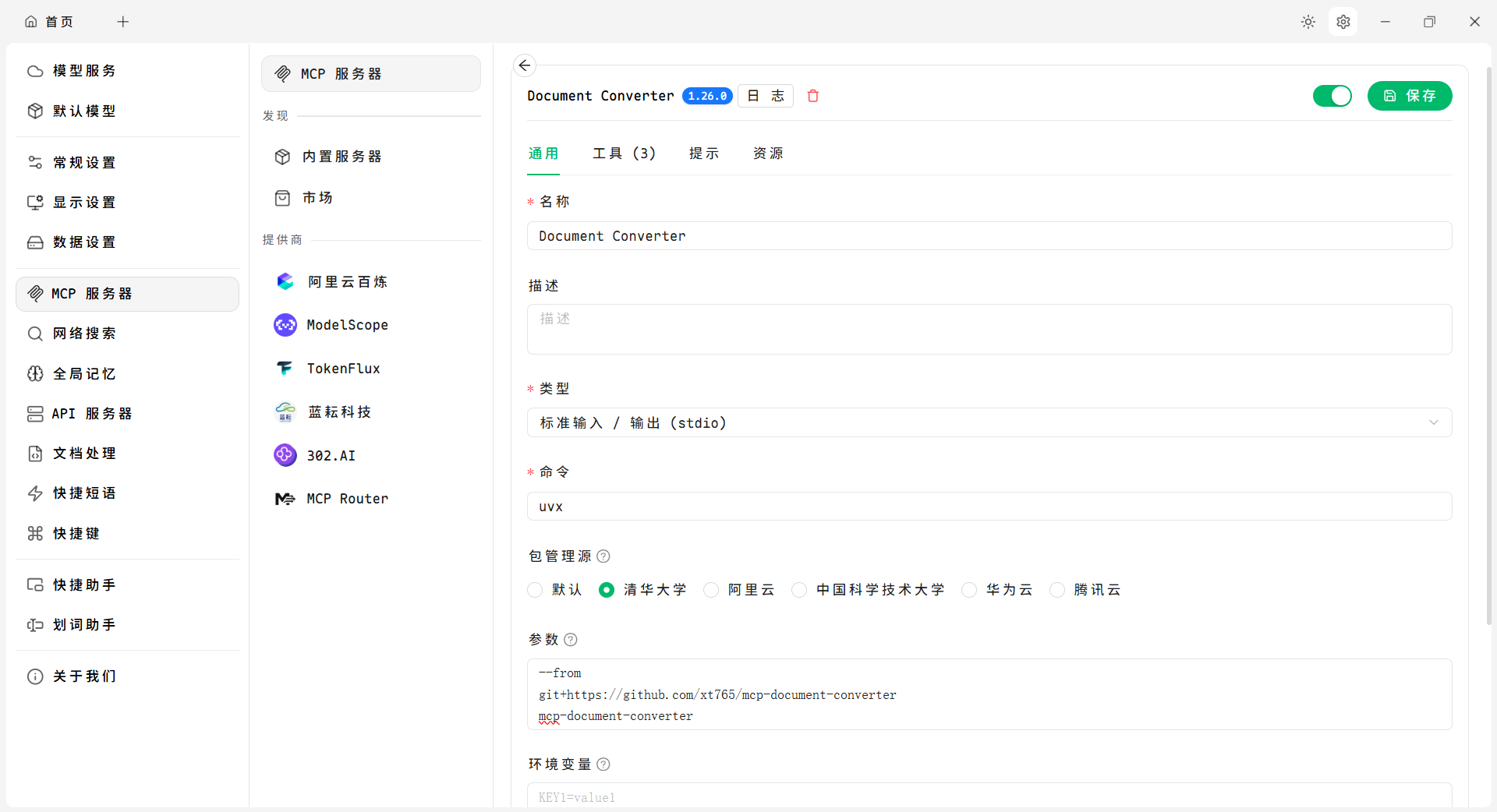
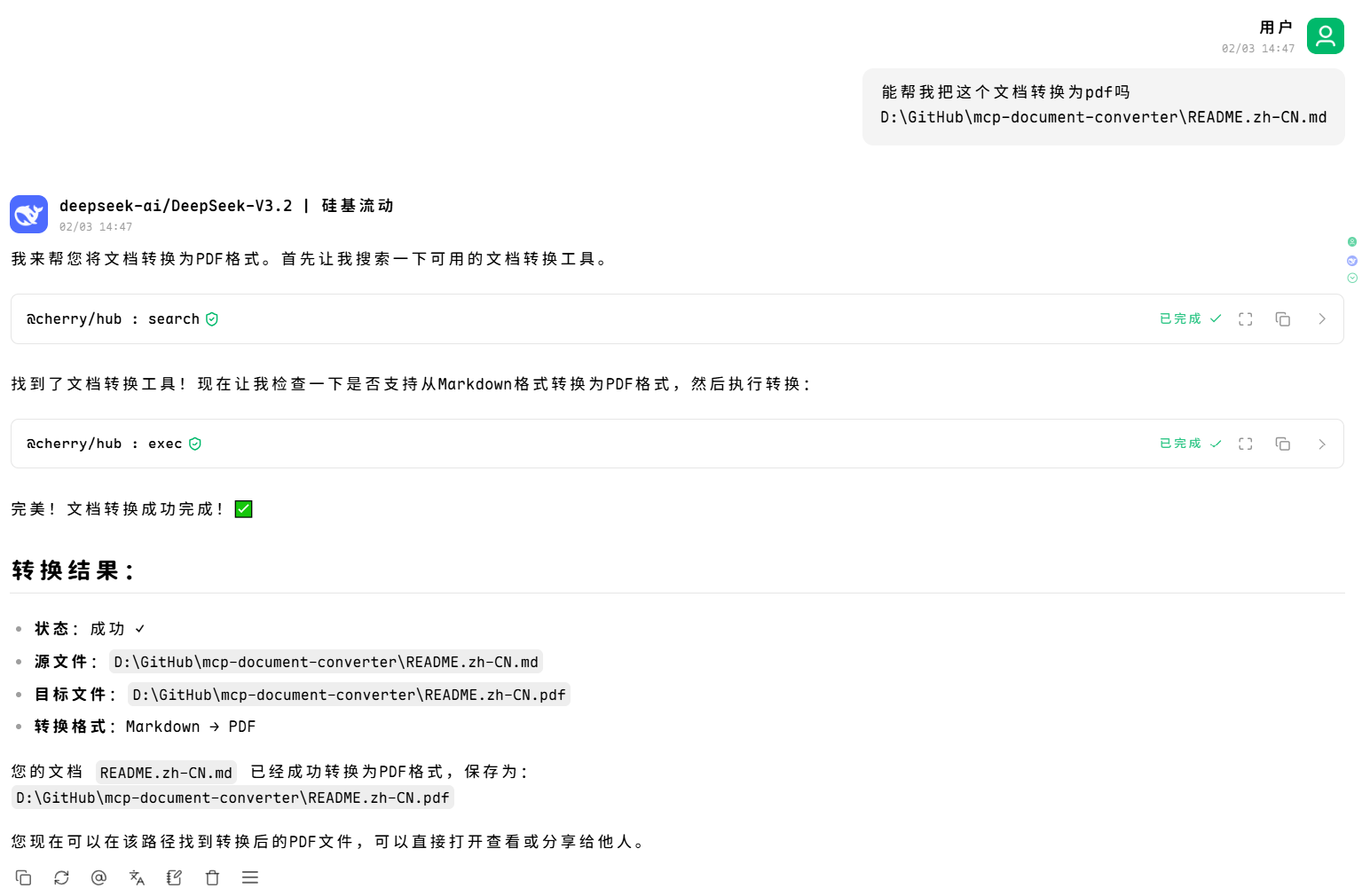
### Using in Cherry Studio
*Cherry Studio is a powerful open-source desktop AI client assistant that supports integrating various tools through the MCP protocol*
**Configuration Example:**
**Usage Example:**
## Usage
### As an MCP Tool
After configuration, AI assistants can directly call the following tools:
#### 1. convert_document (Recommended)
Use a unified interface to convert any supported document type.
```python
# Markdown to HTML
convert_document(
source_path="document.md",
target_format="html"
)
# HTML to PDF
convert_document(
source_path="document.html",
target_format="pdf"
)
# DOCX to Markdown
convert_document(
source_path="document.docx",
target_format="markdown"
)
# Conversion with options
convert_document(
source_path="document.md",
target_format="html",
output_path="output.html",
options={
"css": "custom.css",
"preserve_metadata": True
}
)
```
#### 2. list_supported_formats
List all supported document formats.
```python
list_supported_formats()
```
#### 3. get_conversion_matrix
Get the complete format conversion matrix.
```python
get_conversion_matrix()
```
#### 4. can_convert
Check if conversion from source format to target format is supported.
```python
can_convert(source_format="markdown", target_format="pdf")
```
#### 5. get_format_info
Get detailed information about a specific format.
```python
get_format_info(format="markdown")
```
### As a Python Library
```python
from mcp_document_converter import DocumentConverter
from mcp_document_converter.registry import get_registry
from mcp_document_converter.parsers import MarkdownParser, HTMLParser
from mcp_document_converter.renderers import HTMLRenderer, PDFRenderer
# Register parsers and renderers
registry = get_registry()
registry.register_parser(MarkdownParser())
registry.register_parser(HTMLParser())
registry.register_renderer(HTMLRenderer())
registry.register_renderer(PDFRenderer())
# Create converter
converter = DocumentConverter(registry)
# Convert document
result = converter.convert(
source="input.md",
target_format="html",
output_path="output.html"
)
if result.success:
print(f"✅ Conversion successful: {result.output_path}")
else:
print(f"❌ Conversion failed: {result.error_message}")
```
## Tool Interface Details
### convert_document
Convert a document from one format to another.
**Parameters:**
| Parameter | Type | Required | Description |
|-----------|------|----------|-------------|
| `source_path` | string | ✅ | Source file path, supports absolute or relative paths |
| `target_format` | string | ✅ | Target format: `html`, `pdf`, `markdown`, `docx`, `text` |
| `output_path` | string | ❌ | Output file path (optional, defaults to source filename) |
| `source_format` | string | ❌ | Source format (optional, auto-detected from file extension) |
| `options` | object | ❌ | Conversion options |
**Options:**
| Option | Type | Default | Description |
|--------|------|---------|-------------|
| `template` | string | - | Template name |
| `css` | string | - | Custom CSS styles |
| `preserve_metadata` | boolean | true | Whether to preserve metadata |
| `extract_images` | boolean | true | Whether to extract images |
**Example:**
```json
{
"source_path": "/path/to/document.md",
"target_format": "html",
"output_path": "/path/to/output.html",
"options": {
"css": "body { font-family: Arial; }",
"preserve_metadata": true
}
}
```
## Extension Development
### Adding a New Parser
```python
from typing import List, Union
from pathlib import Path
from mcp_document_converter.core.parser import BaseParser
from mcp_document_converter.core.ir import DocumentIR, Node, NodeType
class MyParser(BaseParser):
@property
def supported_extensions(self) -> List[str]:
return [".myext"]
@property
def format_name(self) -> str:
return "myformat"
@property
def mime_types(self) -> List[str]:
return ["application/x-myformat"]
def parse(self, source: Union[str, Path, bytes], **options) -> DocumentIR:
# Read source file
content = self._read_source(source)
# Parse into DocumentIR
document = DocumentIR()
document.title = "My Document"
# Add content nodes
document.add_node(Node(
type=NodeType.PARAGRAPH,
content=[Node(type=NodeType.TEXT, content="Hello World")]
))
return document
```
### Adding a New Renderer
```python
from typing import Any
from mcp_document_converter.core.renderer import BaseRenderer
from mcp_document_converter.core.ir import DocumentIR
class MyRenderer(BaseRenderer):
@property
def output_extension(self) -> str:
return ".myext"
@property
def format_name(self) -> str:
return "myformat"
@property
def mime_type(self) -> str:
return "application/x-myformat"
def render(self, document: DocumentIR, **options: Any) -> str:
# Render DocumentIR to target format
parts = []
if document.title:
parts.append(f"# {document.title}")
for node in document.content:
# Render each node
pass
return "\n".join(parts)
```
### Registering Extensions
```python
from mcp_document_converter.registry import get_registry
# Register new parser and renderer
registry = get_registry()
registry.register_parser(MyParser())
registry.register_renderer(MyRenderer())
```
## Testing
```bash
# Run all tests
python tests/test_conversion.py
# Run specific test
python tests/test_conversion.py::test_markdown_to_html
```
## Environment Variables
| Variable | Description | Default |
|----------|-------------|---------|
| `MCP_CONVERTER_LOG_LEVEL` | Log level | `INFO` |
| `MCP_CONVERTER_TEMP_DIR` | Temporary files directory | System temp directory |
## Dependencies
### Core Dependencies
- `mcp` >= 1.26.0 - MCP protocol implementation
- `pydantic` >= 2.12.5 - Data validation
### Parser Dependencies
- `markdown` >= 3.5.0 - Markdown parsing
- `beautifulsoup4` >= 4.12.0 - HTML parsing
- `python-docx` >= 1.1.0 - DOCX parsing
- `pypdf` >= 6.7.4 - PDF parsing
- `chardet` >= 5.0.0 - Encoding detection
- `pyyaml` >= 6.0.0 - YAML parsing
### Renderer Dependencies
- `weasyprint` >= 60.0 - PDF rendering
- `pygments` >= 2.17.0 - Code highlighting
- `jinja2` >= 3.1.6 - Template engine
- `reportlab` >= 4.0.0 - PDF generation
### Development Dependencies
- `pytest` >= 7.0.0 - Testing framework
- `pytest-asyncio` >= 0.21.0 - Async testing support
- `pytest-cov` >= 4.0.0 - Coverage reporting
- `basedpyright` >= 1.0.0 - Type checking
- `ruff` >= 0.1.0 - Linting and formatting
## License
MIT License
## Contributing
Issues and Pull Requests are welcome!
## Related Projects
- [MCP Document Reader](https://github.com/xt765/mcp_documents_reader) - MCP document reader supporting multiple document formats
- [Model Context Protocol](https://modelcontextprotocol.io/) - Official Model Context Protocol documentation