A typed and named value in a hierarchy of controls. More...
Detailed Description
A typed and named value in a hierarchy of controls.
Controls do not actually store values. Instead, every control receives an InputStateBlock which, after the control's device has been added to the system, is used to read out values from the device's backing store.
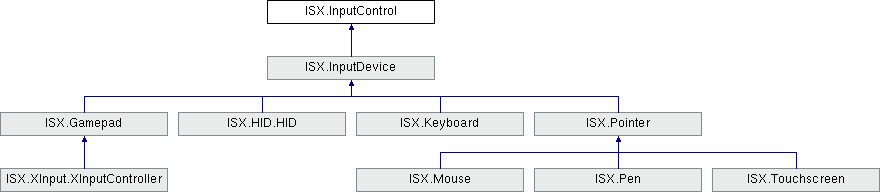
Controls can have children which in turn may have children. At the root of the child hierarchy is always an InputDevice (which themselves are InputControls).
Controls can be looked up by their path (see InputControlSetup.GetControl and InputControlPath.TryFindControl).
Each control must have a unique name within its parent (see name). Multiple names can be assigned to controls using aliases (see aliases). Name lookup is case-insensitive.
In addition to names, a control may have usages associated with it (see usages). A usage indicates how a control is meant to be used. For example, a button can be assigned the "PrimaryAction" usage to indicate it is the primary action button the device. Within a device, usages have to be unique. See CommonUsages for a list of standardized usages.
- See also
- InputDevice
- Todo:
Add ability to get and to set configuration on a control (probably just key/value pairs)
Remove the distinction between input and output controls; allow every InputControl to write values