Base class for pointer-style devices moving on a 2D screen. More...
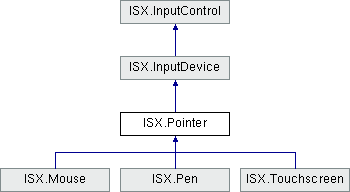
Properties | |
| Vector2Control | position [get] |
| The current pointer coordinates in window space. More... | |
| static Pointer | current [get, set] |
| The pointer that was added or updated last or null if there is no pointer connected to the system. More... | |
 Properties inherited from ISX.InputDevice Properties inherited from ISX.InputDevice | |
| bool | remote [get] |
| Whether the device is mirrored from a remote input system and not actually present as a "real" device in the local system. More... | |
| bool | native [get] |
| Whether the device comes from the native Unity runtime. More... | |
| double | lastUpdateTime [get] |
| Timestamp of last state event used to update the device. More... | |
Additional Inherited Members | |
| Public Member Functions inherited from ISX.InputDevice | |
| virtual void | OnConfigurationChanged () |
| Called by the system when the configuration of the device has changed. More... | |
Detailed Description
Base class for pointer-style devices moving on a 2D screen.
Note that a pointer may have "multi-point" ability as is the case with multi-touch where multiple touches represent multiple concurrent "pointers". However, for any pointer device with multiple pointers, only one pointer is considered "primary" and drives the pointer controls present on the base class.
Property Documentation
◆ current
|
staticgetset |
The pointer that was added or updated last or null if there is no pointer connected to the system.
◆ position
|
get |
The current pointer coordinates in window space.
REVIEW: shouldn't this be done for every touch position, too?
Within player code, the coordinates are in the coordinate space of the Display space that is current according to displayIndex. When running with a single display, that means the coordinates will always be in window space of the first display.
Within editor code, the coordinates are in the coordinate space of the current UnityEditor.EditorWindow. This means that if you query Mouse.current.position in UnityEditor.EditorWindow.OnGUI, for example, the returned 2D vector will be in the coordinate space of your local GUI (same as UnityEditor.Event.mousePosition).