
dsh-zhihu-search

Empowering DeepSeek Harness with Zhihu Insights
赋予 DeepSeek Harness 检索知乎社区的能力




简体中文 · English
---
> [!NOTE]
> **Built on the official Zhihu Open Platform API**, not web scraping. All search results include citable original links, and Zhihu's own results also carry their upvote counts, ensuring every model response is verifiable. Search results are text summaries only and do not include article images.
Grounded search. Cited answers. Three Zhihu tools for DSH: in-site search, global web search, and Zhida direct answers — returning a list of citable sources instead of an unverifiable summary.
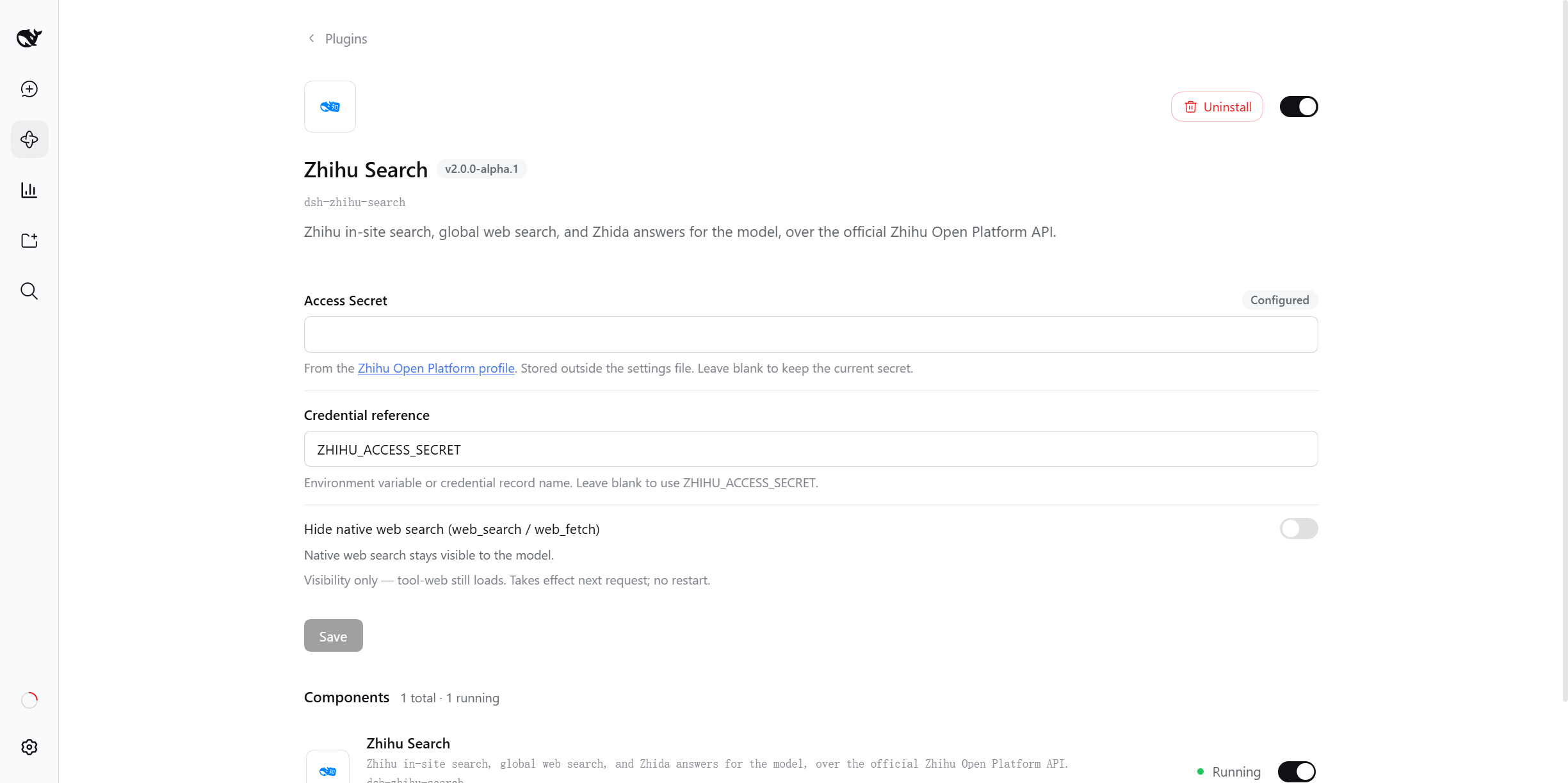
Lives on the Plugins panel: under Installed, click Zhihu Search to open its details page
(the technical name dsh-zhihu-search sits right below the title). Enter your Access Secret and it takes effect immediately.
## Tools
Installing adds three tools to the model:
| Tool | One line | Use it for |
|---|---|---|
| `zhihu_search` | Searches Zhihu's own questions and articles; sortable by votes / comments / time | Chinese experience, product reviews, industry discussion, engineering practice |
| `zhihu_global_search` | Searches Zhihu's global web index; the results mix in some Zhihu content | Finding material on a specific site |
| `zhihu_zhida` | Zhihu Zhida: a synthesized answer that pulls a topic together | Complex Chinese questions that need "retrieve, then summarize" |
The three sections below are each tool's full parameter set and limits. The model only ever sees the semantic parameters in these tables — Zhihu's native string query syntax is compiled inside the plugin, so the model cannot get it wrong.
### `zhihu_search` — in-site search
| Parameter | Type | Default | Notes |
|---|---|---|---|
| `query` | string | **required** | Search keywords; works best in Chinese. |
| `count` | integer | `5` | Number of results, 1–10. |
| `sortField` | enum | `default` | `default` keeps relevance order; `voteUpCount` upvotes · `commentCount` comments · `editTime` time (published or last edited). |
| `order` | enum | `desc` | `desc` or `asc`. Only applies when `sortField` is set. |
| `minValue` | number | — | Inclusive lower bound on the sort field, **requires `sortField`**, non-negative integer. **It screens the candidates retrieved by this call only**: when few qualify you get fewer than `count` — that does not mean Zhihu has no highly upvoted content. |
| `publishedAfter` | string | — | Only content published after this date, `YYYY-MM-DD`. |
| `publishedBefore` | string | — | Only content published before this date, `YYYY-MM-DD`. |
**Limits**: no domain filter — in-site results all come from Zhihu anyway; use `zhihu_global_search` to search a specific site. `minValue` and a non-default `order` require `sortField`, otherwise the call is rejected with a hint. **No pagination**: for more results change the keywords or the sort. **The lower bound screens candidates**: when it winnows the list the results say so, and an empty result does not mean Zhihu has no highly upvoted content.
### `zhihu_global_search` — global web index search
| Parameter | Type | Default | Notes |
|---|---|---|---|
| `query` | string | **required** | Search keywords. |
| `count` | integer | `8` | Number of results, 1–20 — wider than in-site. |
| `site` | string | — | Only this domain, e.g. `github.com`. A full URL is reduced to its host, and a leading `www.` is dropped. |
| `publishedAfter` | string | — | Only content published after this date, `YYYY-MM-DD`. |
| `publishedBefore` | string | — | Only content published before this date, `YYYY-MM-DD`. |
| `searchDb` | enum | `all` | `all` · `realtime` newest · `static` long-term index. |
**Limits**: the domain is matched **exactly**, so subdomains must be listed separately (`qq.com` does not reach pages on `news.qq.com`), and Zhihu domains are rejected. **There is no sorting parameter** (the endpoint ignores sorting), **and no pagination parameter**. The results mix in some Zhihu content; to search Zhihu's own questions and articles specifically, use `zhihu_search`.
### `zhihu_zhida` — Zhida
| Parameter | Type | Default | Notes |
|---|---|---|---|
| `question` | string | **required** | The question; the more specific you are, the better. |
| `mode` | enum | `thinking` | `fast` quick answer · `thinking` deep reasoning · `agent` multi-step retrieval. |
| `includeReasoning` | boolean | `false` | Also return the reasoning trace. Off by default to save context; turn it on when checking an answer. |
**Limits**: this is **not a search** — it returns a generated answer, not a list of sources. The answer is generated by Zhihu and may be wrong; verify anything that matters. The reasoning trace is omitted by default.
## Capabilities
- The three tools do not overlap: in-site for experience, global index for material, Zhida for synthesis — the model picks by question type.
- Search returns structured source entries (title / URL / snippet / author / upvotes / comments / date), every one carrying a URL, so results can be cited and checked.
- The result text states its own boundaries: hitting the per-call cap, mixing in external pages, or a filter winnowing the candidates are all spelled out, so the tool's limits are not mistaken for the world's.
- Results render both as source cards and as plain Markdown, so they stay readable anywhere.
## Install
### Requirements
- **DSH `0.1.7-rc.2` or newer, below `0.2.0`** — the single range that [package.json](package.json) declares in both `engines.dsh` and every `@deepseek-ai/dsh-*` entry (the two must stay the same shape: a missing host seam makes the configuration UI disappear silently).
- Node `>= 20`
Install the Host from an **explicit dist-tag**: `latest` is not trustworthy across this family (on most `@deepseek-ai/dsh-*` packages it points at a much older version), so a default install can land outside the declared range — check it live with `npm view @deepseek-ai/dsh dist-tags`.
```bash
npm install -g @deepseek-ai/dsh@next # the line this plugin commits to
```
Compatibility is measured, not inferred: [compat.yml](.github/workflows/compat.yml) swaps the DSH packages onto the `next` line (the committed one) and the `alpha` line (now **below our declared floor**, kept as a record only) every week, and runs the existing suite. Current results and what to do when a line breaks: [docs/PUBLISHING.md](docs/PUBLISHING.md).
### From source
```bash
git clone https://github.com/zlZayn/dsh-zhihu-search.git
cd dsh-zhihu-search
npm install && npm run build
dsh plugin --profile web add "$PWD"
```
`dsh plugin` installs the package into the profile and lists it in `dsh.profile.bundles`. Restart `dsh --profile web` to pick it up.
### From npm
```bash
dsh plugin --profile web add dsh-zhihu-search
```
### Discovery and install
- **npm**: [`dsh-zhihu-search`](https://www.npmjs.com/package/dsh-zhihu-search)
- **GitHub**: [`zlZayn/dsh-zhihu-search`](https://github.com/zlZayn/dsh-zhihu-search)
The repository carries the GitHub topic [`dsh-plugin`](https://github.com/topics/dsh-plugin), which is how plugin marketplaces discover plugins.
## Version compatibility
The configuration UI registers into the Host's `plugins.bundle.config` slot, and its dispatch `key` is this plugin's **package name** (the `name` in [package.json](package.json)). That slot does **not** hand the page a form, so the card fetches it itself from `ctx.configForms.get()` — `configForms` is a client service that arrived in 0.1.7, which is why the seam requires a Host at or above the **lower bound** declared by `engines.dsh`; that declaration is the single source of truth, and this document does not copy version numbers.
- **Host is new enough**: **Plugins → Installed → click "Zhihu Search"** to open its details page (that title comes from [locale/en.json](locale/en.json), the name shown on an English UI; the technical name `dsh-zhihu-search` stays right below it) — the configuration section sits inline between the description and the components list, with **no extra Configure step**. Both the key and the switch are edited there.
- **Earlier Host (no `configForms`)**: the three tools keep working, and the Plugins page simply **shows no configuration entry** — silently, with no error. That is the watershed; the browser console keeps one WARN-level English note about it.
- **Want in-place configuration**: upgrade the Host to the version declared by `engines.dsh` or newer — that version currently lives on the `alpha` line only, so install it with `npm install -g @deepseek-ai/dsh@alpha`; which line points at which version is one command away: `npm view @deepseek-ai/dsh dist-tags`.
How to install the Host from the right line: [Install → Requirements](#requirements). Weekly measurements and what to do when a line breaks: [docs/PUBLISHING.md](docs/PUBLISHING.md).
## Configuration
The configuration UI lives in the Host Plugins page's **bundle configuration** slot (`plugins.bundle.config`, keyed by package name); when it does not show up, and what happens then, is covered in [Version compatibility](#version-compatibility).
### On the Plugins page
Open **Plugins → Installed**, then **click "Zhihu Search"** to open its details page — the configuration section sits between the description and the components list. Enter the Access Secret and save. It takes effect immediately, with no DSH restart.
The name and the one-line description shown on the Plugins page and in Settings come from this package's language files (the `meta` in [locale/en.json](locale/en.json) and [locale/zh.json](locale/zh.json)). That is **display metadata only**: it takes no part in loading and changes no configuration or tool, and a Host that cannot read it merely falls back to the technical name (without an error). This document therefore does not copy those two sentences — edit the language files instead.
The key goes into DSH's credential store (`~/.dsh/.credentials.yaml`), **never into a configuration file** — the active profile's Cordis patch holds only the reference name and the switch, so it is safe to screenshot or share.
Get the Access Secret from the [Zhihu Open Platform profile](https://developer.zhihu.com/profile); the config card links to the same place.
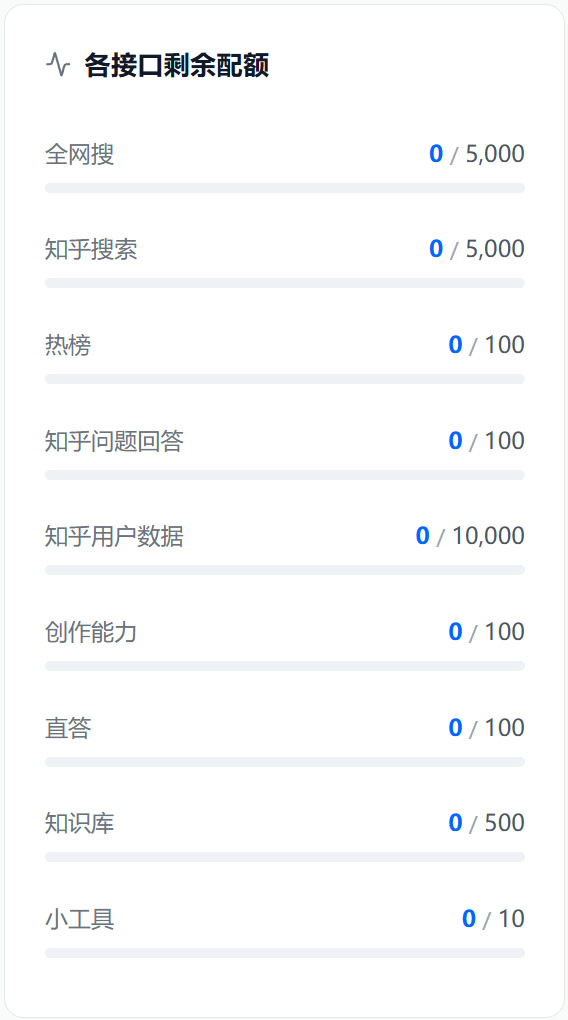
### Daily quota
Quotas settle per calendar day, and the per-endpoint readings live in the [Zhihu Open Platform profile](https://developer.zhihu.com/profile) — the same place you get the Access Secret. This is what that panel looks like:
### Point at another credential source
The card's "Credential reference" defaults to `ZHIHU_ACCESS_SECRET`. Put a different name there to point elsewhere.
The key resolves through DSH's layers, highest first:
- Process environment variable (`export ZHIHU_ACCESS_SECRET=…`)
- Credential store (`~/.dsh/.credentials.yaml`)
- `.env` in the project directory
- `~/.dsh/.env`
When a read-only source (an environment variable) supplies the reference, the card disables its input and says so — a value there cannot be overridden.
### Advanced: timeouts and limits
Plugin options live in the `Config` of [src/index.ts](src/index.ts) (edit the plugin config in `cordis.patch.yml`). Two timeouts are worth knowing:
- `timeoutMs` (default 15s): per-request budget for searches.
- `streamTimeoutMs` (default 55s): budget for reading a whole Zhida stream; the Zhida tool's timeout follows it automatically. Raising the request timeout never shrinks it (the larger of the two wins), so this is the one to raise.
### Zhihu results only
The card's "Hide native web search (web_search / web_fetch)" switch is off by default — the plugin does not quietly remove host capabilities. Turn it on and save, and the model no longer sees DSH's native `web_search` and `web_fetch`, leaving only the three Zhihu tools.
- Applies from the **next model request**: no restart, no new window.
- Agents derived from that one follow the same rule.
- Visibility only: the tool-web plugin still loads, and switching it back off restores the tools.
## Security and boundaries
- The Access Secret only travels between the config card, the credential scope and the environment: never logged, never in a cache key in clear text, never committed.
- Returned content is treated as untrusted external data: snippets are stripped of HTML tags, URLs of tracking parameters.
- Only `developer.zhihu.com` is contacted; nothing is proxied or forwarded.
## License
[MIT](LICENSE).
## Contributing
External entry point (what a bug report needs, what to read before proposing a feature, what to do before opening a PR) → [CONTRIBUTING_en.md](CONTRIBUTING_en.md).
Design stance: tool parameters and result text are an **API for the model** first and documentation for humans second — the writing rules live in [docs/ARCHITECTURE.md](docs/ARCHITECTURE.md) under "Tool description conventions" and "Honesty of model-visible text".
Maintainer doc map in [AGENTS.md](AGENTS.md); the design constraints that do not change in [docs/ARCHITECTURE.md](docs/ARCHITECTURE.md); the release process in [docs/PUBLISHING.md](docs/PUBLISHING.md).