# CodexHost **Use 15+ Agents like Claude Code, Pi and Grok inside Codex Desktop, without switching apps** They get the same Diff review, Fork and approvals as Codex, and can hand work to each other. There is also a **Web app**: the same Codex interface with lower memory use, so you can use every Agent on this computer remotely from your phone or any other computer. ⭐ If CodexHost is useful to you, please give it a star! ⭐

Pi Codex Claude Code OpenCode Grok Oh My Pi
DSH Qwen Code Devin AGY Kiro CLI CodeBuddy
WorkBuddy Cursor Hermes Qoder Kimi Code ZCode GitHub Copilot

Download · Quick Start · Desktop · Cross-Agent Collaboration · 微信交流群 · 简体中文 · 한국어
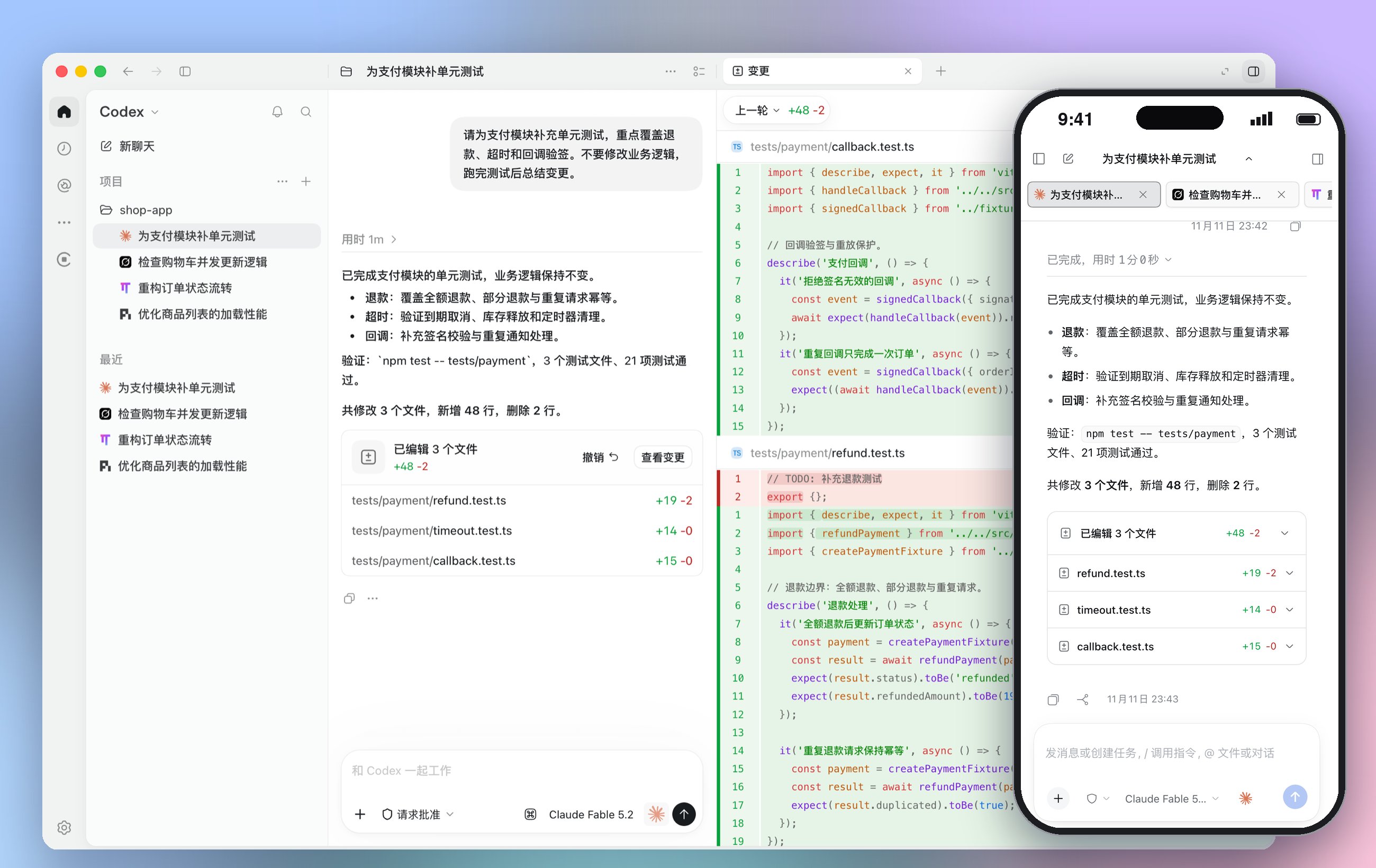
Several Agent sessions and the Diff review panel in Codex Desktop, with the same session open on a phone at the bottom right
## Sponsors
Click to collapse
VibeAPI Thanks to VibeAPI for sponsoring this project! Built for power developers and teams, VibeAPI provides unified access to mainstream AI models, focusing on the Codex and Claude series with a self-managed, traceable account pool. It offers ultra-fast time to first token, 99.9% SLA availability, and cache hit rates of 95%+. Human technical support is available 24/7, with corporate invoicing and enterprise partnerships fully supported. Grab some cyber goodies →
## Quick Start **Option 1: npm** (macOS / Windows / Linux) ```bash npm install -g @codexhost/cli codexhost # start Codex Desktop codexhost web # start Web and open it in your browser codexhost stop # stop all CodexHost background services ``` **Option 2: Installer** (macOS / Windows) Grab the installer for your platform from [Releases](https://github.com/BytePioneer-AI/codex-host/releases). For Web: open codexhost after installing, then visit http://127.0.0.1:4400 locally. **Option 3: WinGet** (Windows x64 / ARM64) Install or upgrade with the same command: ```powershell winget install --id BytePioneer-AI.CodexHost --exact ``` > Linux is supported on x64 and ARM64. See the [Linux guide](docs/platforms/linux/linux.md). **Upgrade and stop:** run `codexhost update` to upgrade, and `codexhost stop` to stop all background services. Before installing over an existing npm installation, run `codexhost stop` first.
Installation troubleshooting **codexhost does not start, or Codex opens without codexhost features** Run `codexhost console` (Windows: Start Menu → "codexhost console") to open the local console at `http://127.0.0.1:4399/`. It shows why the last start failed, the Codex Desktop version and Host Runtime logs, and can update codexhost while Codex is not running. **macOS: "App can't be verified" on first launch** ```bash xattr -dr com.apple.quarantine /Applications/codexhost.app ``` **Windows: using a portable Codex Desktop** 1. Point `CODEXHOST_INSTALL_ROOT` at the folder where you extracted Codex Desktop: ```powershell [Environment]::SetEnvironmentVariable("CODEXHOST_INSTALL_ROOT", "D:\CodexPortable", "User") ``` 2. Quit Codex Desktop completely, open a new terminal, and run `codexhost`.
## Use every Agent in Codex Desktop No more switching apps: **Pi, Claude Code, Grok Build and 15+ other Agents** all run in the same Codex Desktop window. Every session is in the sidebar, and you can switch Agents from the bottom-right of the composer. https://github.com/user-attachments/assets/c48192d7-23ff-4f6e-b61a-6345a655bb76

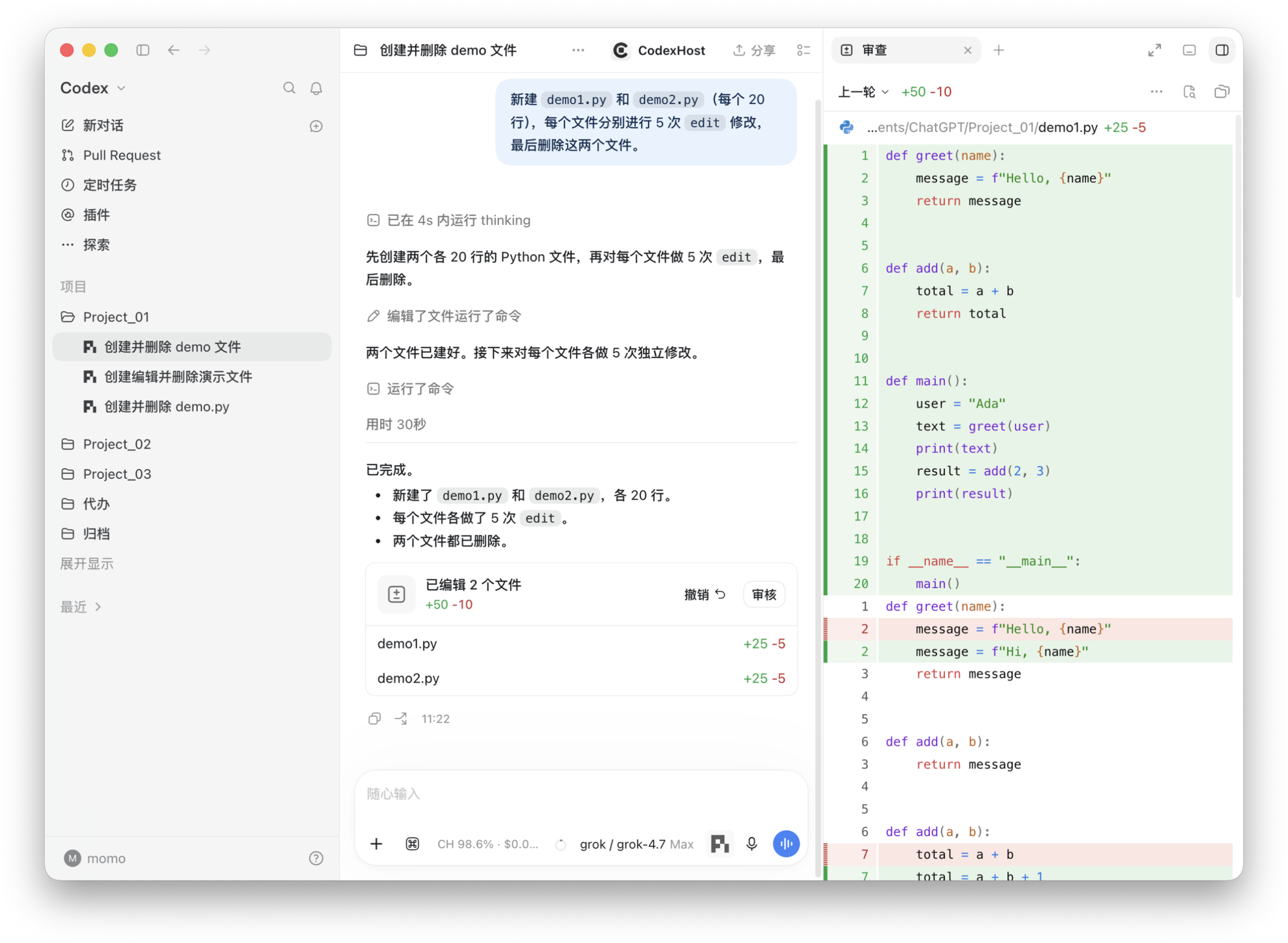
Diff review panel
Every turn summarizes its changes; click Review to open the full Diff

Change summary card in the conversation and the full Diff in the review panel

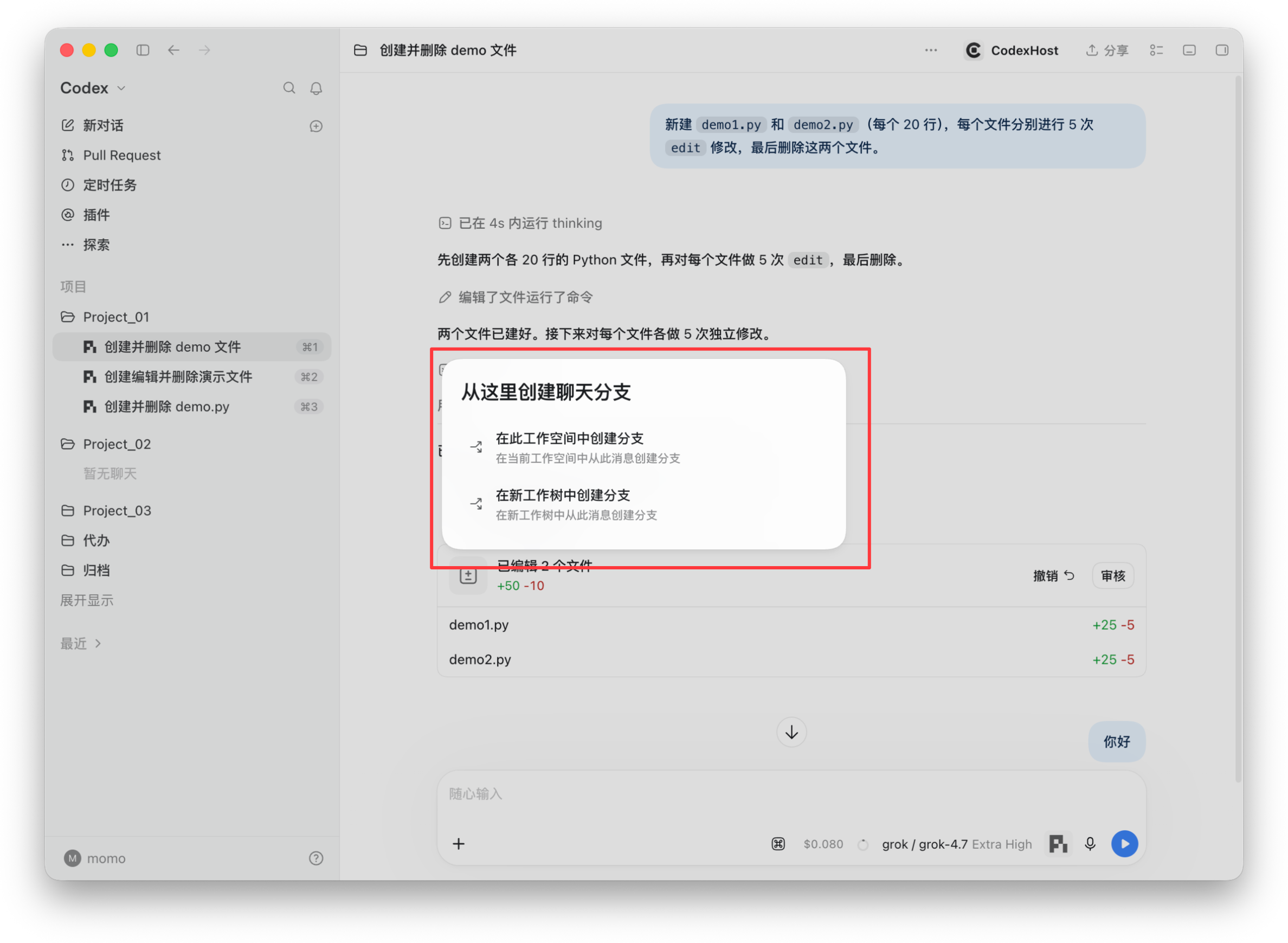
Fork from any message
Branch in the current workspace, or in a new Worktree for parallel work

Menu for creating a branch from a message, in this workspace or a new worktree

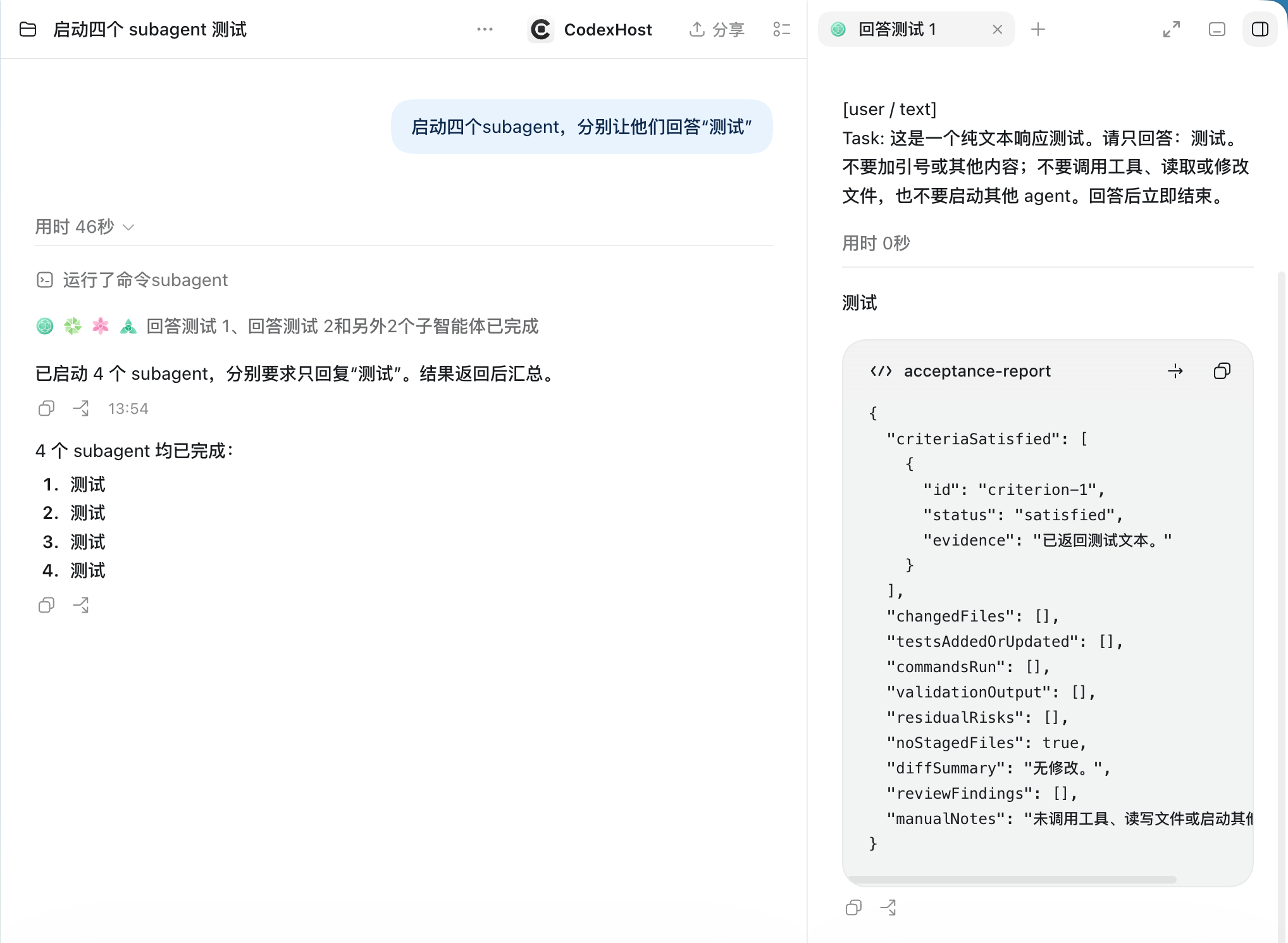
Visible Subagents
Each Subagent has its own icon; open its full conversation on the right

Status of 4 Subagents in the main conversation, with one opened on the right
More: tool details, usage, account import, diagram rendering

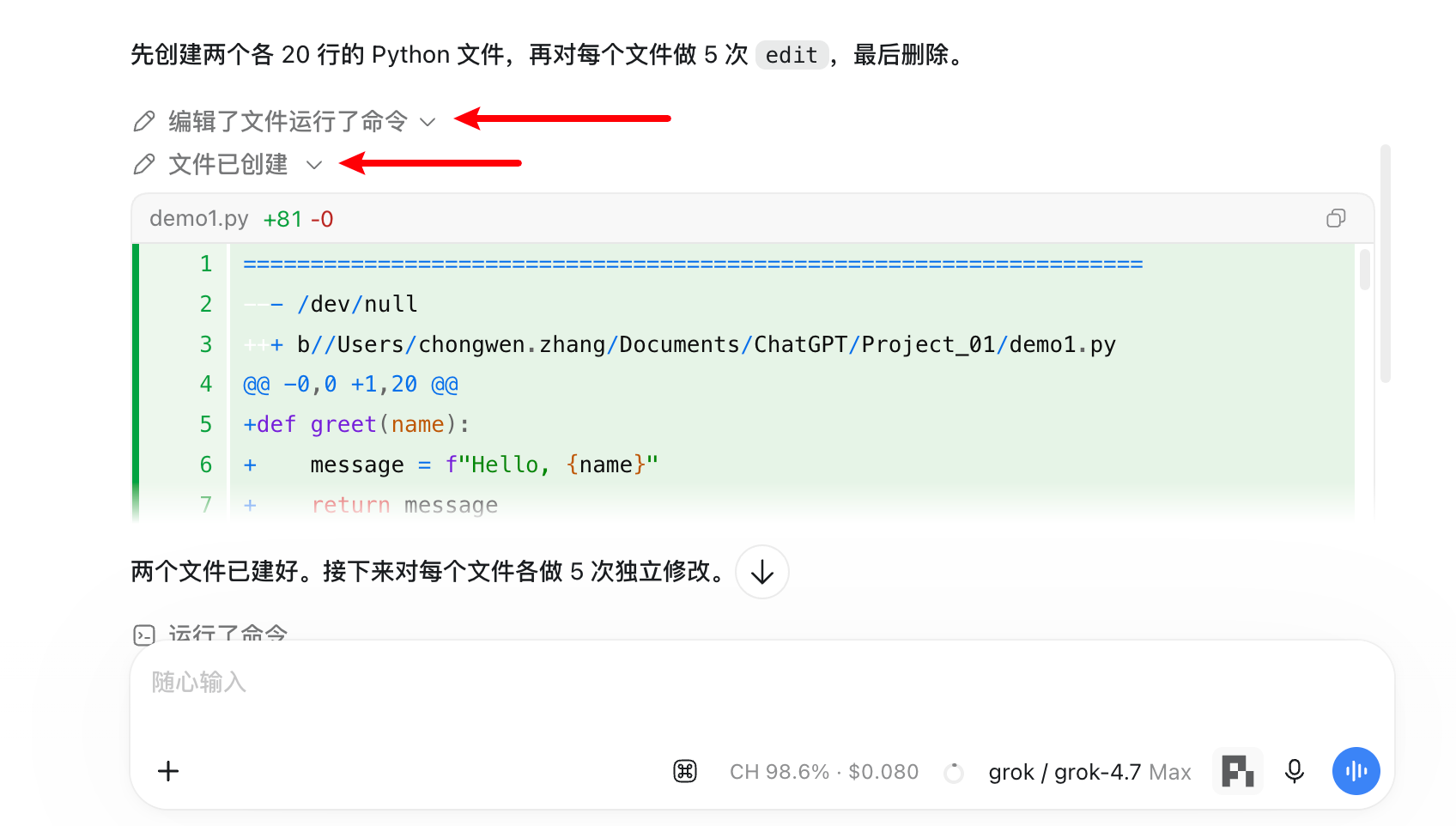
Tool calls and thinking
Expand any edit, command or thinking step to see the details

An expanded edit entry showing the Diff of a newly created file

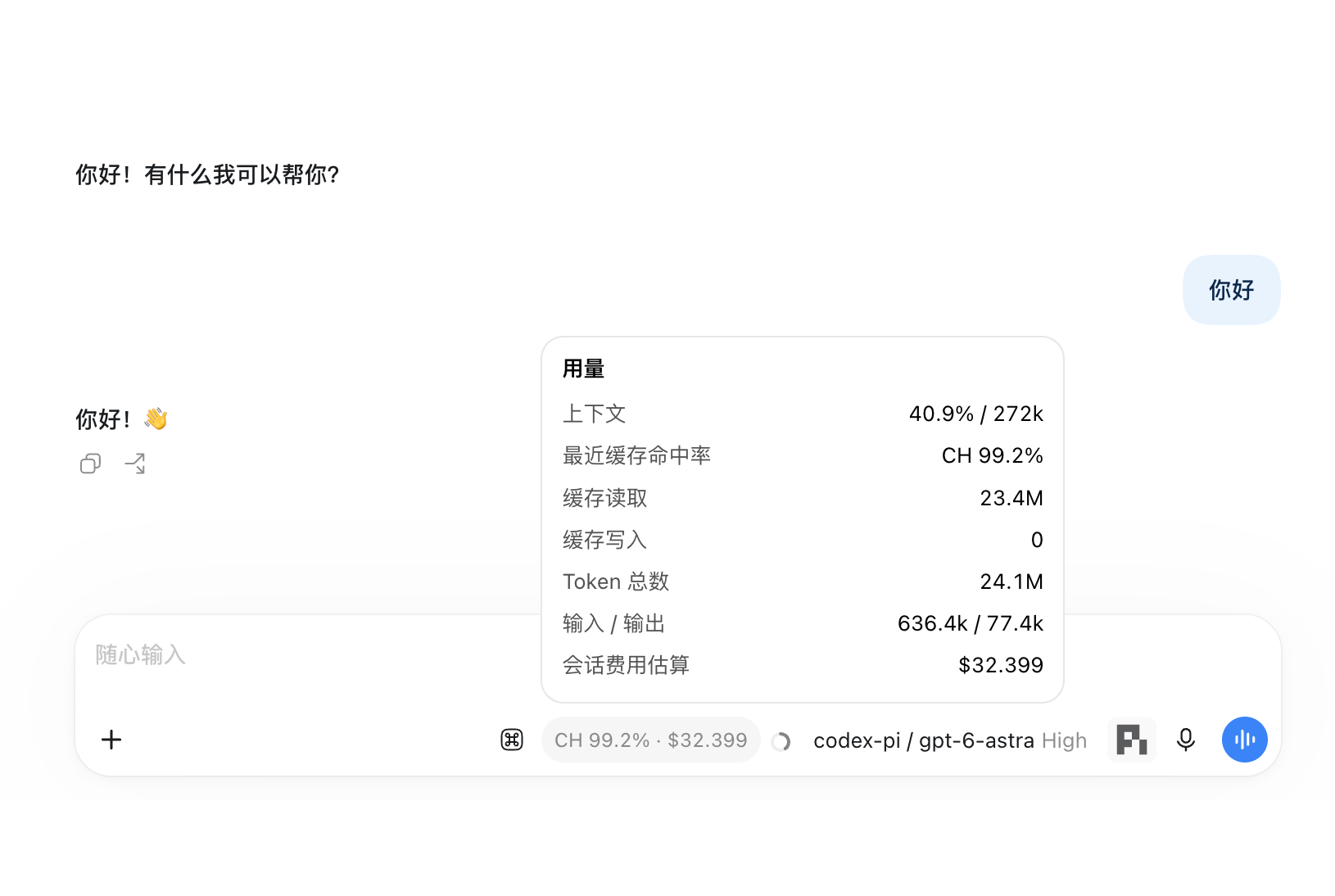
Usage at a glance
Cache hit rate, cost estimate and context usage, live

Usage popover: context, cache hit rate, cache reads and writes, total tokens, cost estimate

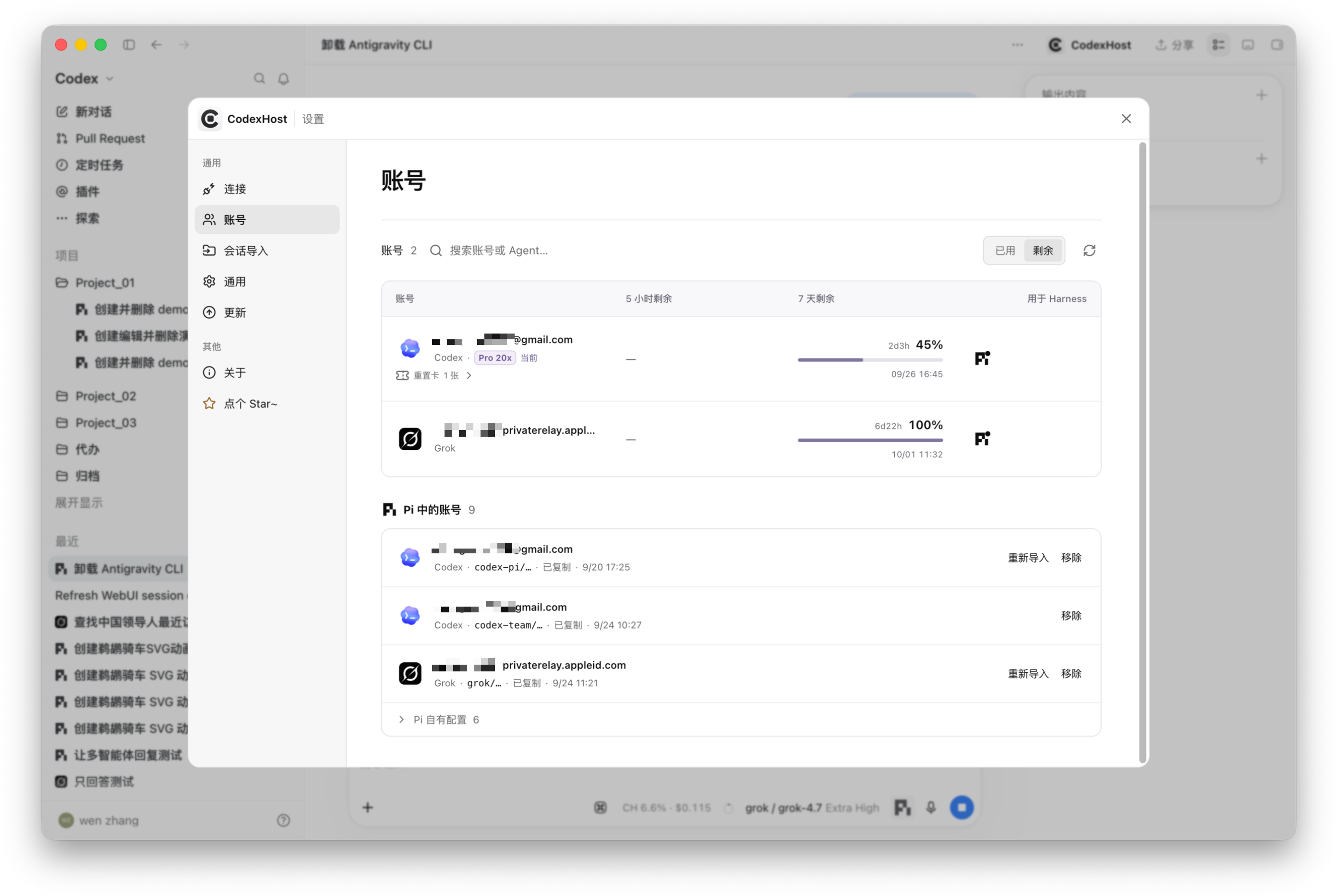
One-click account import
Copy your locally signed-in Codex and Grok credentials to Pi, with live quota

Account settings: 5-hour and 7-day remaining quota, and accounts imported into Pi

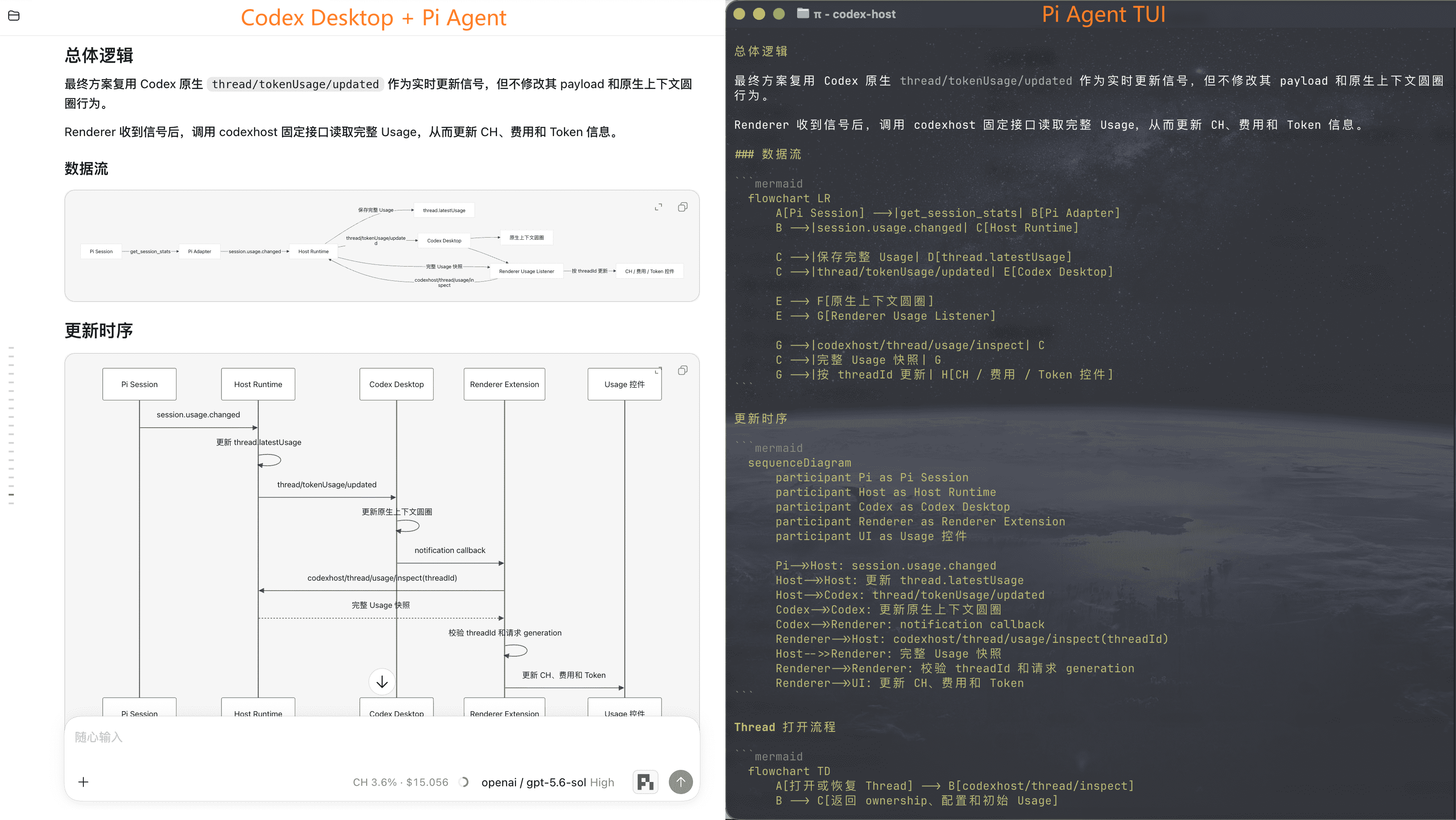
Better than a terminal
Left: Codex Desktop + Pi renders the Mermaid diagram; right: the Pi TUI only shows the source

Comparison of Mermaid diagram rendering between Pi with Codex Desktop and the Pi Agent TUI
Feature support by Agent | Capability | Pi | Oh My Pi | Claude Code | OpenCode | Grok | DSH | AGY | CodeBuddy | WorkBuddy | Cursor | Hermes | Qoder | Kimi Code | Copilot | Qwen Code | Devin | | :--- | :---: | :---: | :---: | :---: | :---: | :---: | :---: | :---: | :---: | :---: | :---: | :---: | :---: | :---: | :---: | :---: | | Streaming responses | ✅ | ✅ | ✅ | ✅ | ✅ | ✅ | ✅ | ✅ | ✅ | ✅ | ✅ | ✅ | ✅ | ✅ | ✅ | ✅ | | Tool status | ✅ | ✅ | ✅ | ✅ | ✅ | ✅ | ✅ | ✅ | ✅ | ✅ | ✅ | ✅ | ✅ | ✅ | ✅ | ✅ | | Edit Diff | ✅ | ✅ | ✅ | ✅ | ✅ | ✅ | ✅ | ✅ | ✅ | ✅ | ✅ | ✅ | ✅ | ✅ | — | ✅ | | Questions / cancellation | ✅ | ✅ | ✅ | ✅ | ✅ | ✅ | ✅ | ✅ | ✅ | ✅ | ✅ | ✅ | ✅ | ✅ | ✅ | — / ✅ | | Model / Thinking selection | ✅ | ✅ | ✅ | ✅ | ✅ | ✅ | ✅ | ✅ | ✅ | ✅ | ✅ | ✅ | ✅ | ✅ | ✅ / — | ✅ / ◐ | | Tool approvals | ✅ | ✅ | ✅ | ✅ | ✅ | ✅ | — | ✅ | ✅ | ✅ | ✅ | ✅ | ✅ | ✅ | ✅ | ✅ | | Permission modes | — | ✅ | ✅ | ✅ | ✅ | ✅ | ✅ | ✅ | ✅ | ✅ | ✅ | ✅ | ✅ | ✅ | ✅ | ✅ | | Cross-Agent task collaboration | ✅ | ✅ | ✅ | ✅ | ✅ | ✅ | ✅ | ✅ | — | ✅ | ✅ | ✅ | ✅ | ✅ | ✅ | ◐ | | Usage | ✅ | ✅ | ✅ | ✅ | ✅ | ✅ | ✅ | ✅ | ✅ | — | ✅ | ✅ | ✅ | ✅ | ✅ | — | | Fork | ✅ | ✅ | ✅ | ✅ | ✅ | ✅ | ✅ | ✅ | ✅ | ✅ | ✅ | ✅ | ◐ | ✅ | — | ◐ | | Context compaction | ✅ | ✅ | ✅ | ✅ | ✅ | ✅ | — | ✅ | ✅ | — | ✅ | ✅ | ✅ | ✅ | — | — | | Slash commands | ✅ | ✅ | ✅ | ✅ | ✅ | ✅ | ✅ | ✅ | ✅ | ✅ | ✅ | ✅ | ✅ | — | — | — | | Edit previous message | ✅ | ✅ | ✅ | ✅ | ✅ | ✅ | ✅ | ✅ | ✅ | ✅ | ✅ | ✅ | ✅ | ✅ | — | ◐ |
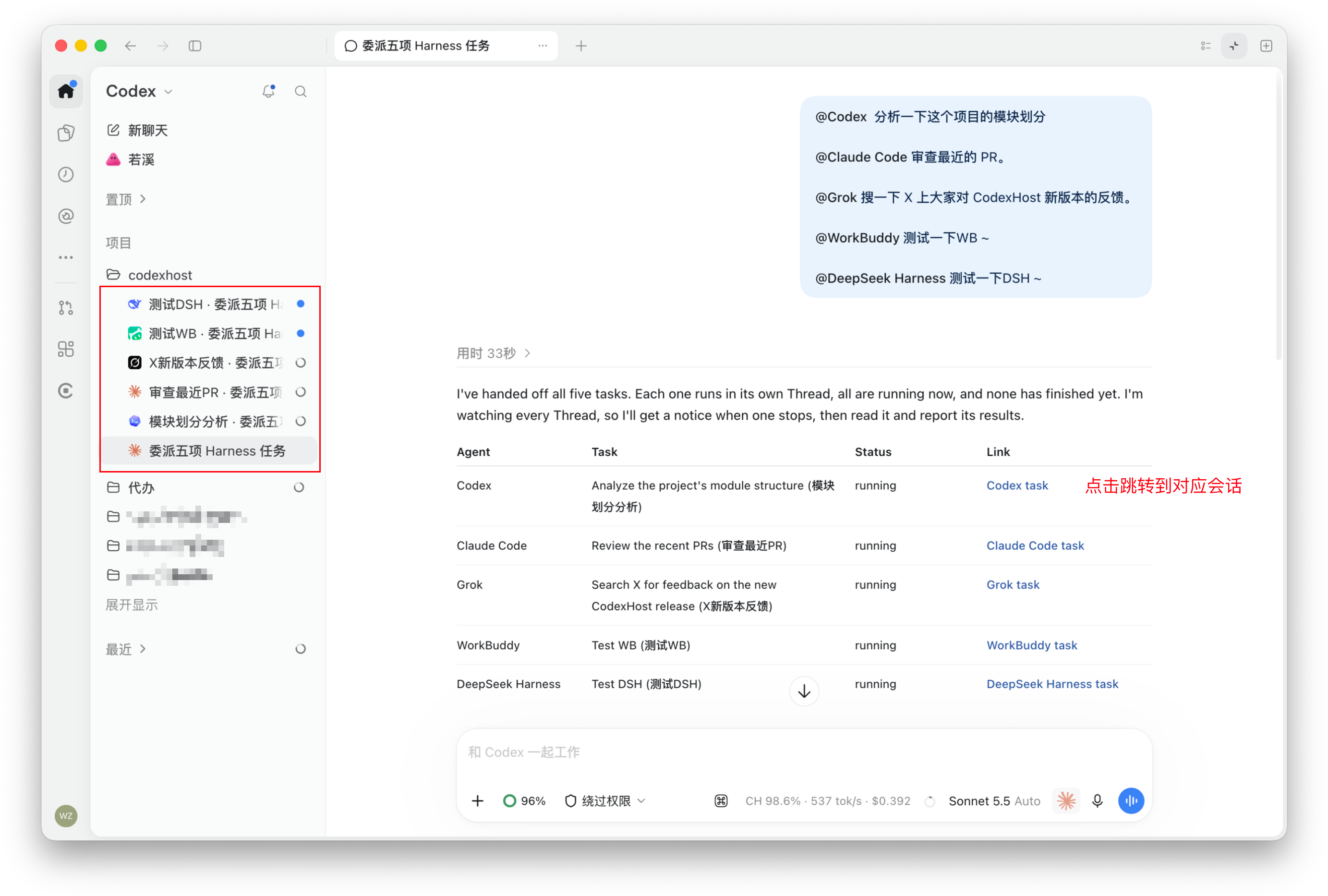
## Agents hand work to each other Type `#` in the chat input, pick an Agent, and hand it a self-contained task: > Have `#claude-code` review this change on its own and flag any compatibility risks. > > Have `#pi` figure out why this test is flaky. > > Have `#omp` implement this feature while I keep working on the docs. Every delegated task runs as a separate native session in the target Agent. It shows up in the conversation list, so you can open it anytime to check progress or continue the conversation. When it finishes, the result returns to the session that started it.

Agents work in parallel
Each in its own session, without interfering

Delegated sessions of several Agents running in parallel in the sidebar

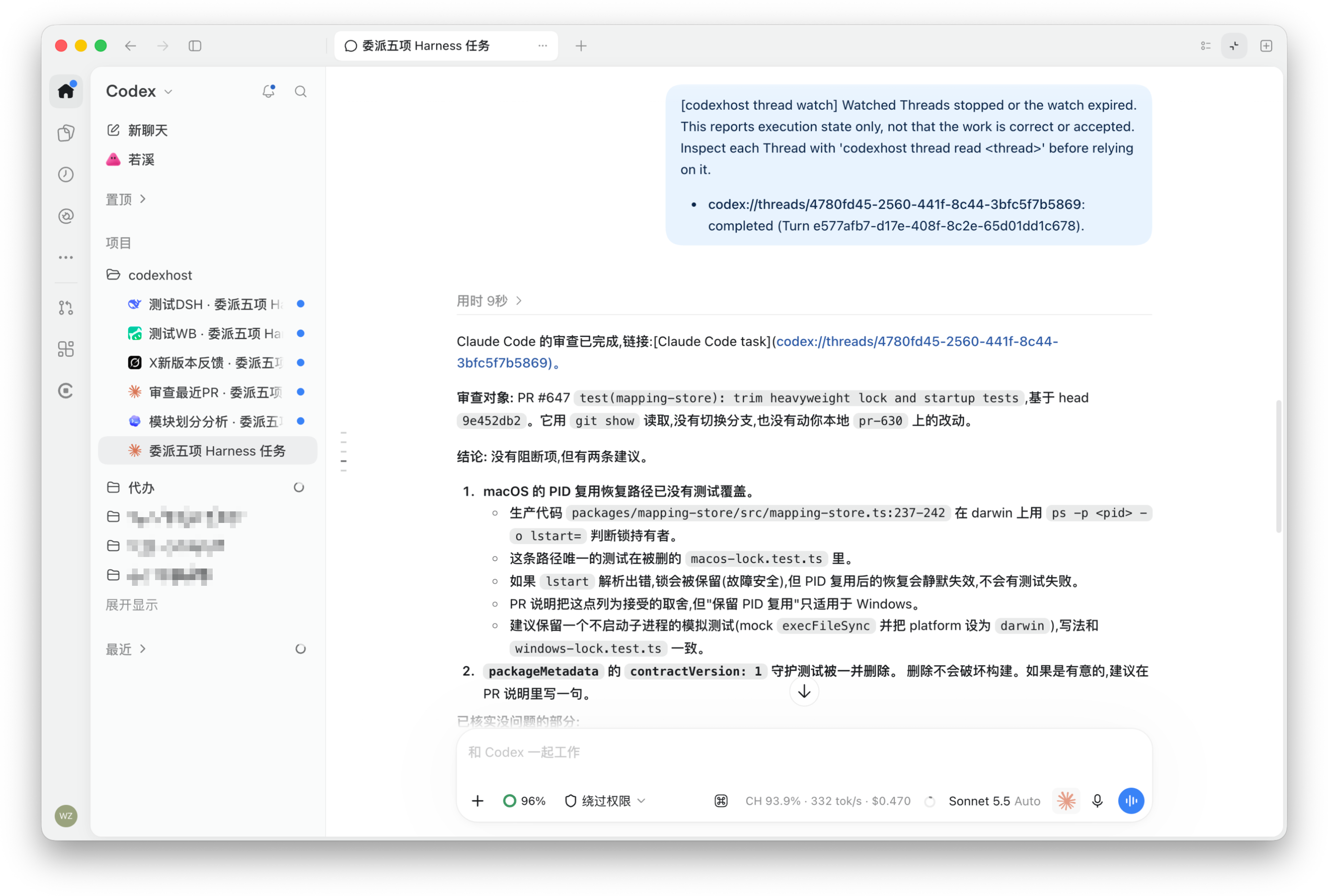
Reports back when done
The originating session is notified when a delegated task ends

Notice shown in the originating session after a delegated task completes
**For developers:** local programs such as terminal scripts, Claude Desktop and always-on bots can also hand tasks to these Agents and wait for results through the `codexhost delegate` / `codexhost thread` commands or MCP. See [external clients](docs/architecture/external-clients.md).

Advanced: use Agents on another machine from your local UI

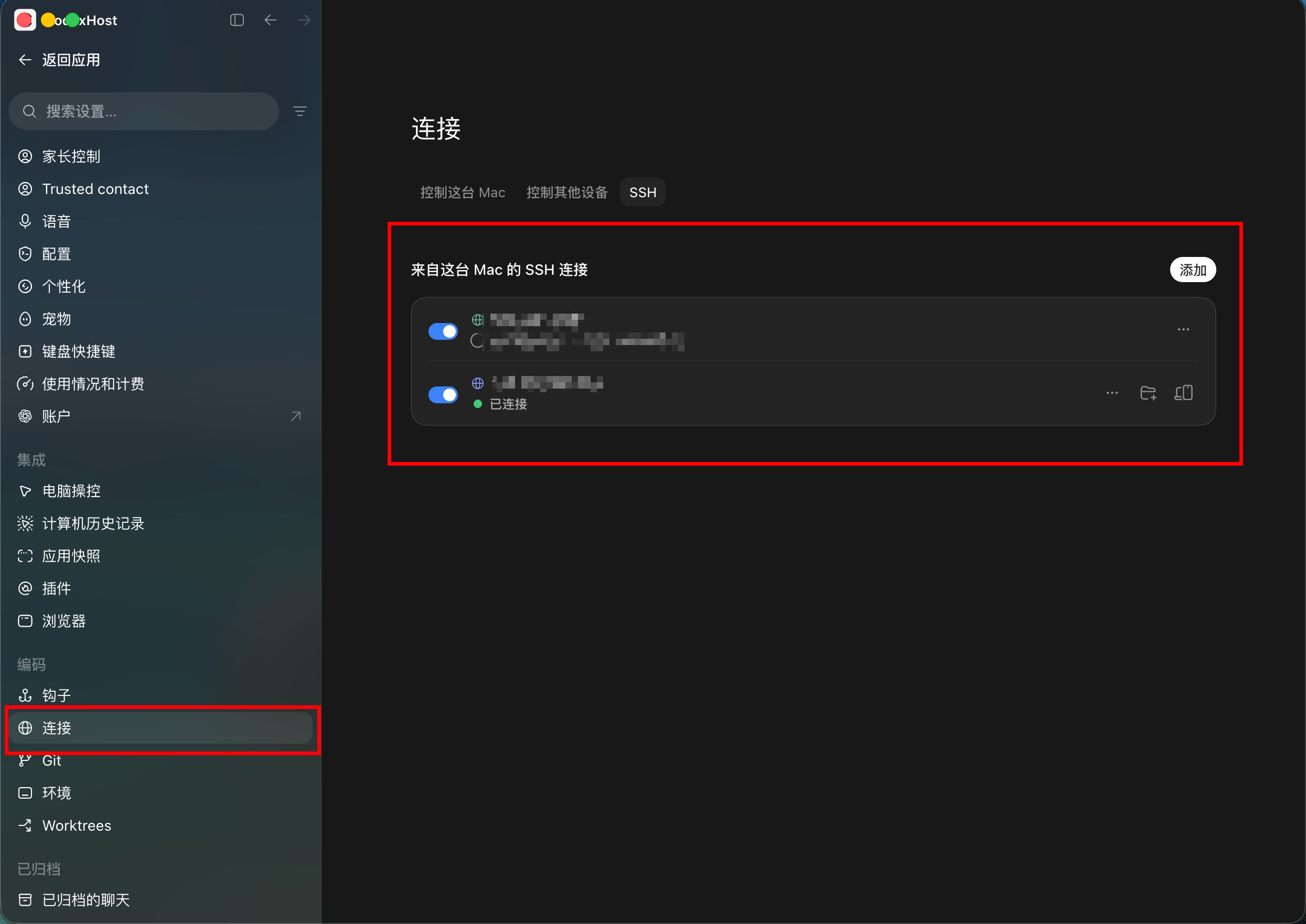
Tasks run on the other machine while the UI stays in your local Codex Desktop. Both machines need the same CodexHost version. | Remote machine | How to connect | | --- | --- | | macOS / Linux | [SSH](#ssh) | | Windows | [Remote Control](#remote-control-experimental) (experimental) | #### SSH Before you start, add the remote machine in Codex Desktop under **Settings → Connections → SSH**. Your local machine can run macOS, Linux or Windows.
SSH connections added under Settings → Connections → SSH in Codex Desktop
1. Install and start codexhost on the remote machine: ```bash npm install -g @codexhost/cli codexhost remote install codexhost remote start codexhost remote status ``` 2. On your local machine, launch Codex Desktop through codexhost and open the SSH workspace. 3. Pick an Agent from the composer's Agent / Model selector. [SSH setup, diagnostics and uninstall →](docs/platforms/remote/remote-ssh-host.md) #### Remote Control (Experimental) Use Agents on a Windows machine from another computer, built on the pairing and sign-in of Codex Desktop's official Remote Control. Before you start, make sure official Remote Control can already run Codex tasks. No public services or ports are opened, and Agent credentials never leave the Windows machine. [Remote Control setup, transport boundary and diagnostics →](docs/platforms/remote/remote-control-host.md)
## 微信交流群
微信交流群
Scan the QR code to add me on WeChat (note “CodexHost”) and I will invite you to our WeChat group.
  • Get help with installation
  • Share feature ideas and feedback
  • Talk about development
  • For bugs, please open an issue
Contributions are welcome.
WeChat contact QR code

Architecture and development

#### How it works Most multi-agent clients build their own chat UI and plug Agents in through a common protocol. CodexHost does it differently: - **Desktop:** extends the official Codex Desktop via CDP / Electron Inspector, with no rebuilt chat UI and no patched installer - **Protocol:** a CLI Shim sits in front of the official app-server and passes native Codex requests through untouched - **Agents:** each Agent is integrated through its own native interface where one exists (Pi over RPC, Claude Code via the Agent SDK), falling back to [ACP](https://agentclientprotocol.com/) otherwise. Streaming, tool status, diffs, approvals and questions all render in Codex Desktop's native UI - **Orchestration:** delegated tasks run as independent native sessions in the target Agent; the caller can wait for the result or let it run in the background - **Web:** Desktop and Web connect to the same background Host, so there is one copy of each session, approval and question, and both sides see the same state #### Development Please read the [contributing guide](CONTRIBUTING.md) before opening an issue or PR. See [repository maintenance automation](docs/operations/repository-maintenance.md) for PR title labels, CI summaries and pre-release checks. Requirements: the official Codex Desktop, Node.js 22.19+ or 24, and Rust. ```bash git clone https://github.com/BytePioneer-AI/codex-host cd codex-host npm ci npm start ``` | Command | Purpose | | --- | --- | | `npm start` | Build and start Desktop. | | `npm start web` | Build and start Web with Web UI hot reload (default). | | `npm start web -- --no-watch` | Build and start Web without hot reload. | | `npm stop` | Stop the current user's local codexhost services across worktrees. | #### Runtime architecture Using Pi as an example, here is how a single request flows from left to right: Desktop → shared layer → Pi plugin → native process.
Runtime architecture using Pi: Desktop to the shared layer, then the Pi plugin and native process
#### Adding a Harness Most of the work is implementing the plugin's Manifest, factory, Adapter and Session, plus the native communication and translation logic. The Renderer still has some hard-coded wiring, so full Desktop integration takes extra work. Tip: point your coding Agent at the in-repo [codexhost-add-harness Skill](.agents/skills/codexhost-add-harness/SKILL.md). It covers plugin structure, the shared Adapter interface, capability implementation and testing requirements.
## Acknowledgements - Thanks to the [LINUX DO](https://linux.do/) community for their ongoing support. - Thanks to [Paseo](https://github.com/getpaseo/paseo), whose approach to multi-Harness integration and architecture inspired ours. - Thanks to [DSH (DeepSeek Harness)](https://github.com/deepseek-ai/deepseek-harness); CodexHost's Web client is built on DSH Web. ## Contributors Thanks to everyone who has contributed to CodexHost. CodexHost contributors ## Star History Star History Chart